
ComfyUI Realtime
Build realtime services like low latency s2s for your apps with OpenAI Realtime API-compatible pipelines built on top of the ComfyUI Websocket.
ComfyUI-Realtime
ComfyUI-Realtime is a fully modular speech-to-speech engine that piggybacks on ComfyUI's websocket to service realtime s2s to any client conforming to the OpenAI Realtime API.
Quickly wire up your own local realtime s2s service using the LLM, STT, and TTS models you want to use.
Status: Core feature set is complete:
- Full speech-to-speech with barge-in
- Pipeline modularity with multiple provider node options
- REST API for s2s pipeline management
- Built-in reference client for testing realtime pipelines
Next:
- Concurrency optimizations
- Continue provider nodes buildout and optimizations for LLM, STT, and TTS models
- Explore realtime s2v
- Vision support
Requirements
- ComfyUI installed and runnable locally (validated on v0.22)
- Python 3.13 (3.10+ may work but only 3.13 has been validated).
Note: This custom node has been validated only on MacOS and Linux.
Installation
Via ComfyUI-Manager: Install through the manager. Default s2s node dependencies installed automatically.
Manual:
cd /path/to/ComfyUI/custom_nodes
git clone https://github.com/uttermyth/ComfyUI-Realtime ComfyUI-Realtime
cd ComfyUI-Realtime
pip install requirements.txt
Note: requirements.txt installs the [default] dependencies for the provider nodes needed for full s2s. Skip if you prefer picking your own providers.
Provider Nodes
Provider nodes are this project's core building block: each one wraps a specific backend/model format for one pipeline role (LLM, STT, TTS, or VAD) behind a common interface, so you can wire whichever ones you want into a RealtimePipelineNode and swap implementations without touching the rest of the pipeline. Install only the dependencies for the providers you plan to use, alongside or instead of the [default] set.
Download the models or assets that each provider you want to use needs into the appropritate directories noted below.
| Provider Node | Type | Default | Dependency | Model/Asset Directory | Notes |
|---|---|:---:|---|---|---|
| Silero VAD Provider | VAD | ✅ | silero | (bundled) | Bundles its own model, no download needed. |
| WhisperCpp STT Provider | STT | ✅ | whisper-cpp | models/stt/whisper_cpp/ | A whisper.cpp ggml-*.bin model. |
| LlamaCpp LLM Provider | LLM | ✅ | llama-cpp | models/llm/gguf/ | Supports GGUF-format llm models compatible with llama-cpp-python. |
| PocketTTSProviderNode | TTS | ✅ | pocket-tts | models/tts/pocket_tts/<language>/ (model); ComfyUI-Realtime/assets/pocket_tts_voices/ or models/tts/pocket_tts_voices/ (voices) | Download safetensors and tokenizer.model. Voices are a local reference audio clip or a pre-exported .safetensors voice embedding (works with the default, non-gated weights). |
| Faster Whisper STT Provider | STT | | faster-whisper | models/stt/faster_whisper/ | Alternative STT — lighter on some platforms. A CTranslate2 model directory. |
| Piper TTS Provider | TTS | | piper | ComfyUI-Realtime/assets/piper_voices/ or models/tts/piper_voices/ | GPL-3.0 licensed. A Piper voice (.onnx + matching .onnx.json config). |
| Transformers LLM Provider | LLM | | transformers | models/llm/transformers/<model-dir>/ | Loads a local HuggingFace transformers-format chat model directory (config.json + .safetensors weights + tokenizer files) with a tokenizer chat template.|
| vLLM LLM Provider (Beta) | LLM | | vllm | models/llm/transformers/<model-dir>/ | Bugs and limited features in current state. Loads HuggingFace transformers-format directory via vLLM's synchronous, in-process LLMEngine. Supports quantized-format coverage (NVFP4/modelopt, FP8, AWQ, GPTQ — auto-detected from the checkpoint's config.json). Requires a CUDA GPU, single-GPU only. vLLM's FlashInfer sampling kernels JIT-compile with nvcc at first use. If your environment has the CUDA driver/runtime but not the full CUDA Toolkit, you'll hit RuntimeError: Could not find nvcc. Either install the CUDA Toolkit, or set VLLM_USE_FLASHINFER_SAMPLER=0 in your environment to use vLLM's non-FlashInfer sampler instead. NVFP4 support not successfully validated. |
| (engine-internal) | — | ✅ | resample | — | resample isn't associated with a provider node but it is required for sample-rate conversion in the pipeline. |
Install individual dependencies instead of or alongside the default providers for full s2s.
To install individual dependencies:
pip install ".[faster-whisper]"   # drop-in STT alternative to whisper-cpp
pip install ".[piper]"            # TTS (GPL-3.0)
pip install ".[transformers]"     # LLM alternative to llama.cpp -- HF safetensors models
pip install ".[vllm]"             # LLM alternative via vLLM -- same HF safetensors models, GPU-only, quantized-format support
Restart ComfyUI after installing or changing anything in this package.
Configuration: building a pipeline
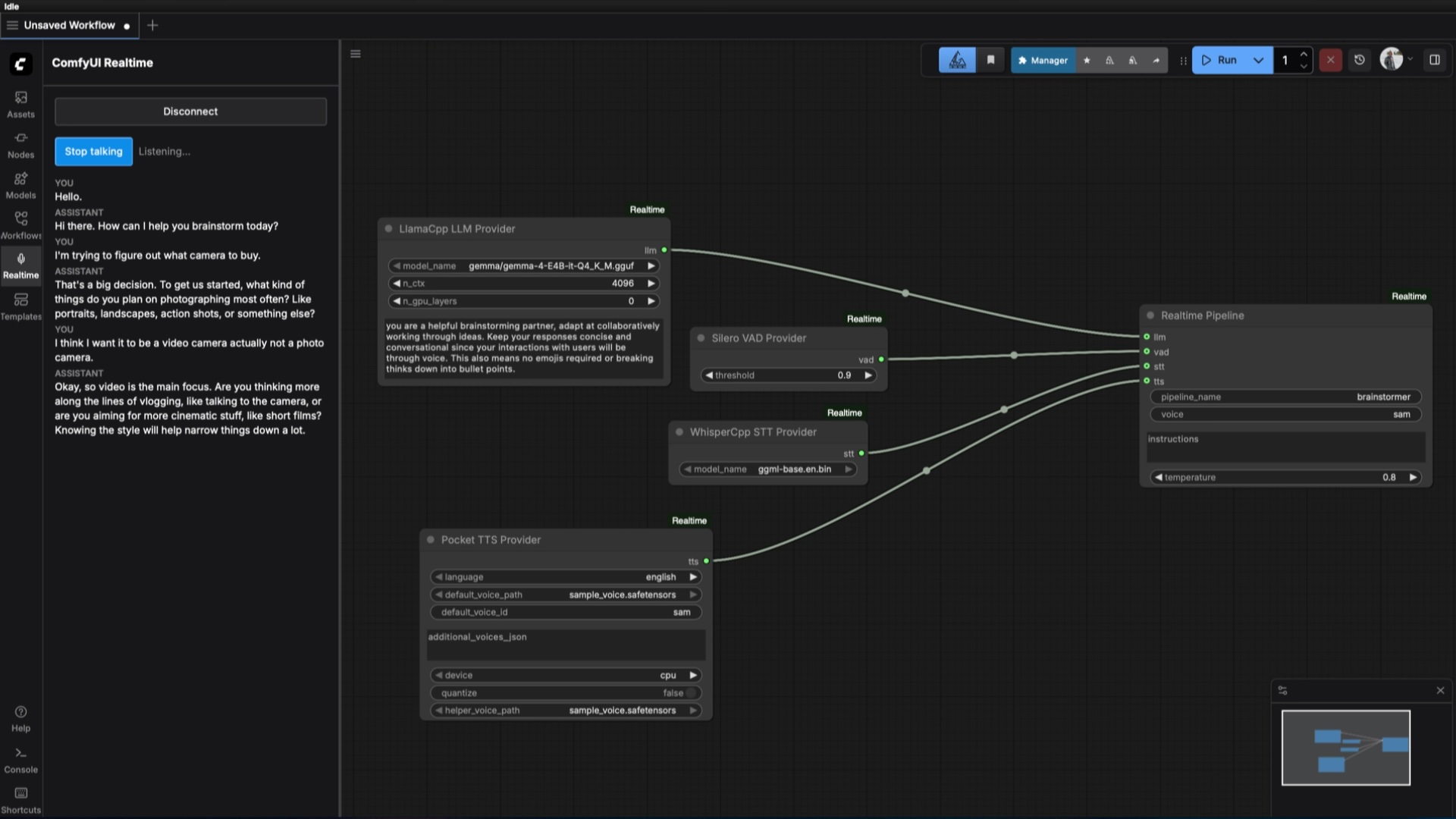
In ComfyUI's graph editor, wire provider nodes into a RealtimePipelineNode:
LlamaCppLLMProviderNode->llminputSileroVADProviderNode->vadinputWhisperCppSTTProviderNode->sttinputPocketTTSProviderNode->ttsinput
The pipeline shape you get depends on which ones you connect (see "Example workflows" below). RealtimePipelineNode itself takes a pipeline_name (what clients connect with via ?model=<name> on the WebSocket URL), plus voice, instructions, and temperature.
Queue the workflow once to register the pipeline. Re-queuing the same pipeline_name replaces the registration; deleting it (via DELETE /realtime/pipelines/{name}, see "REST API" below) or queuing a different pipeline_name makes a different pipeline.
Connect a client to ws://<comfyui-host>:<port>/v1/realtime?model=<pipeline_name>.
Example workflows
workflows/ has one example for each pipeline shape this project supports. workflows/api/ contains prompt-API payloads for use with curl; workflows/ui/ contains graph format for loading directly in the ComfyUI UI. Each uses placeholder model names (your-llm.gguf, your-whisper-model.bin) -- replace these with the actual filenames of models you've placed in the appropriate models/ subdirectory.
| File | Shape | Providers |
|---|---|---|
| full-speech-to-speech.json | Full speech-to-speech | VAD + STT + LLM + TTS |
| text-to-speech.json | Text-to-speech | LLM + TTS |
| speech-to-text.json | Speech-to-text | VAD + STT + LLM |
| text-to-text.json | Text-to-text | LLM only |
| continuous-transcription.json | Continuous transcription (live captioning, no response generation) | VAD + STT only |
| shared-multi-voice.json | One shared pipeline with multiple TTS voices, demonstrating per-session voice selection via session.update | LLM + TTS (3 voices) |
Queue one with ComfyUI's /prompt API, e.g.:
curl -X POST http://127.0.0.1:8188/prompt -H "Content-Type: application/json" -d @workflows/api/full-speech-to-speech.json
Alternatively, you can import the ui compatible workflows via the ComfyUI web interface.
Realtime Extension
A "Realtime" sidebar tab reference client inside ComfyUI. Use this to test realtime workflows for CumfyUI-Realtime. Open it in ComfyUI's UI to converse with any registered pipeline without installing anything separately.
Using the Realtime extension
Open the tab, pick a registered pipeline from the dropdown, and connect. The UI adapts to whatever the pipeline actually supports -- a microphone control and live transcript for pipelines with audio input, a text box for text-only ones, and a response area that only appears once the pipeline actually generates a response (some shapes, like continuous transcription, never will by design). When a connected pipeline has more than one TTS voice loaded, the client displays a voice selector dropdown.
For Developers
Provider Nodes
Each provider has two layers: a backend class under comfyui_realtime/providers/ implementing one of the Protocol interfaces in providers/base.py (ILLMProvider, ITTSProvider, IVADProvider, ISTTProvider), and a thin ComfyUI node wrapper under comfyui_realtime/nodes/provider_nodes/ that exposes an io.ComfyNode schema (category Realtime/Providers) and outputs a typed provider instance for wiring into RealtimePipelineNode. The engine only ever talks to the Protocol interface, never a specific library, so swapping implementations doesn't touch pipeline code.
To add a new provider:
- Implement the relevant
Protocolinproviders/. - Wrap it in a node class in
nodes/provider_nodes/, following an existing node (e.g.silero_vad.py) as a template. - Add
("your_module", "YourProviderNode")to_PROVIDER_MODULESinnodes/provider_nodes/__init__.py.
That module import list is defensive by design: if a provider's dependency isn't installed, only that node is skipped (with a warning) instead of crashing the whole package -- so an optional dependency doesn't need a hand-written try/except.
Realtime Extension
Source for the realtime extension lives in ui/ (React + TypeScript + Vite); the built bundle in dist/ is committed, so cloning this repo and restarting ComfyUI is enough to use it -- no Node.js toolchain required unless you're modifying the client itself. If you are:
cd ui
npm install
npm run build    # one-shot build into ../dist
npm run watch     # rebuild on change while developing
npm test          # run the client's own test suite
REST API
GET /realtime/health-- status, registered pipeline count, active session count.GET /realtime/pipelines-- list all registered pipelines (name, modalities, providers, registration time, voices).GET /realtime/pipelines/{name}-- details for one pipeline.DELETE /realtime/pipelines/{name}-- unregister a pipeline.GET /realtime/sessions-- list active WebSocket sessions (id, pipeline, uptime, state).GET /v1/models-- OpenAI-compatible model list; each registered pipeline appears as a model entry.
The GET /realtime/pipelines response includes a voices field for each pipeline: a list of voice IDs the pipeline's TTS provider has loaded (empty if the pipeline has no TTS provider).
/v1/models can be disabled (e.g. to avoid colliding with another custom node's route) by setting COMFYUI_REALTIME_DISABLE_MODELS_ROUTE=1 before starting ComfyUI.
Testing
Python backend:
pip install -e ".[dev]"
pytest tests/ -m "not integration"
Tests marked integration require a live ComfyUI server with real models loaded -- see tests/conftest.py for the environment variables they read (COMFYUI_ROOT, COMFYUI_URL).
Reference client (ui/):
cd ui
npm install
npm test
License
MIT -- see LICENSE.