
Google Flow (Veo 3.1, Omni 1.2 Flash, Nano Banana) via useapi.net
Google Flow nodes: Veo 3.1 Lite and Omni 1.2 Flash video, Nano Banana images and 1080p/4K video upscale on your own Google AI plan, through the third-party useapi.net API.
Google Flow nodes for ComfyUI (Veo 3.1, Omni 1.2 Flash, Nano Banana)
Make Veo 3.1 Lite and Omni 1.2 Flash videos, Nano Banana images and 1080p / 4K video upscales from ComfyUI, on your own Google AI plan. The nodes call Google Flow through the useapi.net Google Flow API. Generations use your Google account's Flow credits, not per-second Comfy credits.
useapi.net is a third-party API service. It is not affiliated with Google.
Step-by-step tutorial: Veo 3.1 and Nano Banana in ComfyUI. Video: the workflow's real outputs as a YouTube Short.
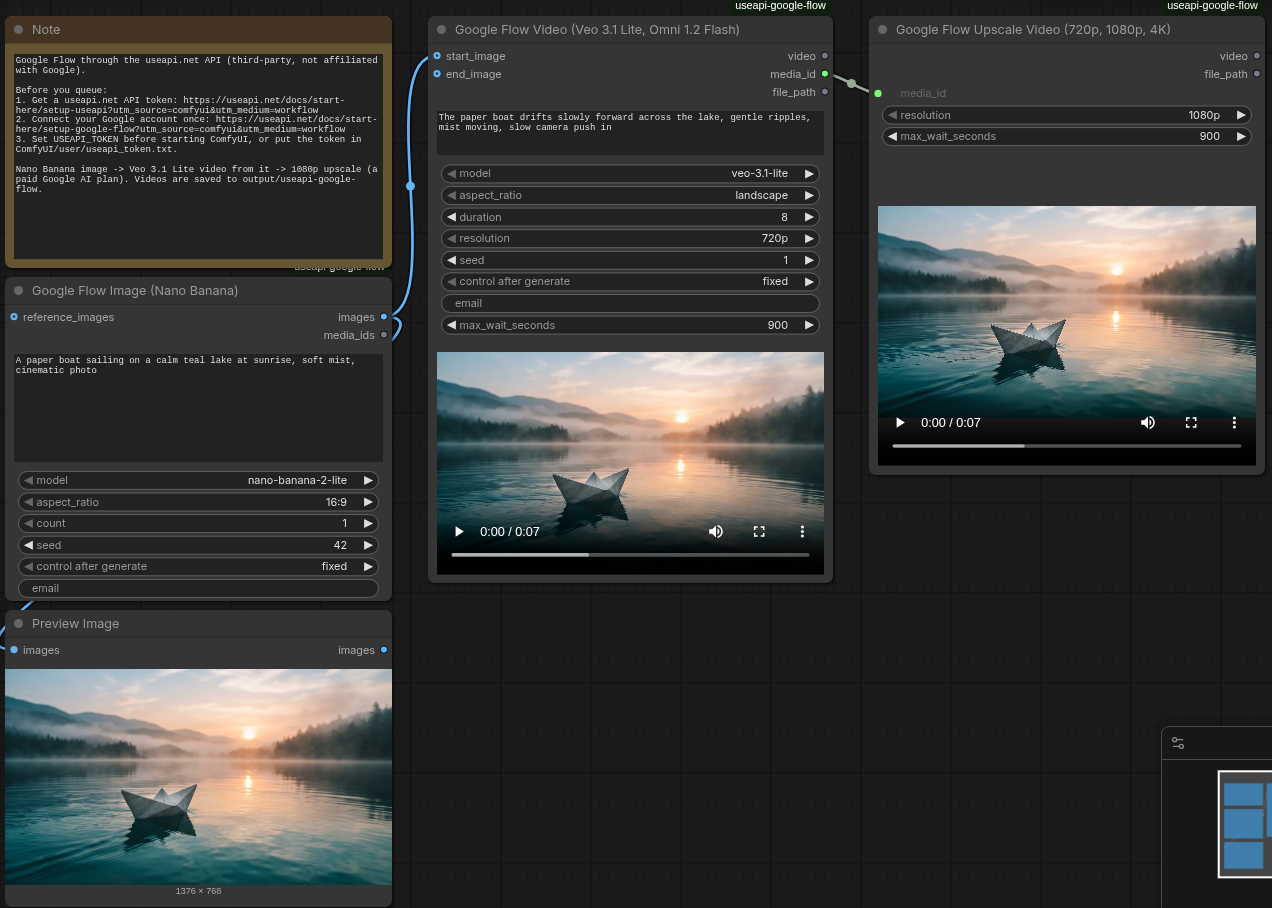
Nodes
| Node | What it does |
|---|---|
| Google Flow Image (Nano Banana) | Text to image, or edit with up to 10 reference images. Models: Nano Banana 2 Lite, Nano Banana 2.1 (nano-banana-2), Nano Banana Pro. 1 to 4 images per run, 5 aspect ratios or auto (the first reference's shape), seed. Outputs an IMAGE batch and the Google Flow media ids. |
| Google Flow Video (Veo 3.1 Lite, Omni 1.2 Flash) | Text to video, or start from an image and optionally end on one. Landscape or portrait. Veo 3.1 Lite: 720p, 8 s (4 and 6 s on Google AI Ultra). Omni 1.2 Flash: 360p or 720p, 3 to 15 s (above 10 s on a paid plan). Outputs a VIDEO, the media id and the saved MP4 path. |
| Google Flow Upscale Video (720p, 1080p, 4K) | Upscales a Google Flow video of up to 15 s (720p is for 360p clips). 720p and 1080p need a paid Google AI plan (Plus, Pro or Ultra); 4K needs Google AI Ultra. Connect media_id from the video node. |
Videos are saved to ComfyUI/output/useapi-google-flow/ and previewed on the node. The VIDEO output also works with
ComfyUI's own Save Video and video nodes.
What you need
- A Google account with Google Flow. Images and videos work on the free tier; a Google AI Plus, Pro or Ultra plan gives more Flow credits and Omni clips longer than 10 s, and upscaling needs one (4K needs Ultra).
- A useapi.net subscription and API token.
- The Google account connected once at useapi.net: Setup Google Flow. You get 300 free captcha credits with your first account; after that, add your own captcha provider key.
Install
- ComfyUI-Manager: search for
useapi-google-flow(or "Google Flow") and install. - Comfy CLI:
comfy node install useapi-google-flow - By hand:
cd ComfyUI/custom_nodes && git clone https://github.com/useapi/comfyui-google-flow, then restart ComfyUI. The only dependency isrequests, which ComfyUI installs already.
Your API token
Set it once, outside ComfyUI, in either place:
- environment variable:
USEAPI_TOKEN=...before you start ComfyUI, or - a file:
ComfyUI/user/useapi_token.txtholding just the token (restart not needed).
The nodes have no token field on purpose: ComfyUI copies node inputs into saved workflows, into the metadata of every image and video it saves, and into its history, so a token typed into a node would travel with everything you share.
Example workflows
In ComfyUI open Templates and search google-flow, load them from example_workflows/, or download all three from Civitai:
google-flow-image-to-video-upscale.json: Nano Banana image → Veo 3.1 Lite video from it → 1080p upscale.google-flow-text-to-video.json: Omni 1.2 Flash text to video.google-flow-nano-banana-edit.json: edit a loaded image with Nano Banana.
Good to know
- Each
emailfield is optional. Leave it empty and useapi.net picks one of your connected Google accounts. Images you pass in are uploaded to that account first, because a generation can only use media from its own account. - The video
seedis not sent to Google. Change it (or set it to randomize) to queue a new take with the same settings. - Cancel in ComfyUI stops a video or upscale node while it waits for the result (not during the upload or the submit request). A job already started at Google keeps running there.
- Errors come back as plain sentences: plan limits, captcha, an expired session, Google's moderation reasons.
Links
- Tutorial: Veo 3.1 and Nano Banana in ComfyUI
- Google Flow API docs
- More Google Flow examples (n8n, Python, Node.js, Dify)
- useapi.net
License
MIT