
ComfyUI-MOSS-Shift-Scheduler
Three general-purpose sigma schedulers for ComfyUI, developed for MOSS-Image workflows: MOSS Shift Scheduler, MOSS Curve Scheduler, and MOSS Sigma Scheduler.
MOSS Shift Scheduler v0.9
Three general-purpose sigma schedulers for ComfyUI, developed for MOSS-Image workflows: MOSS Shift Scheduler, MOSS Curve Scheduler, and MOSS Sigma Scheduler.
This is a personal, experimental tool primarily used with MOSS-Image SFT + lora_latest.safetensors DMD acceleration LoRA.
Normal generation without the acceleration LoRA has had very limited practical testing. Other models are unverified.
The calculations are not restricted to MOSS, but this is not a claim of broad model compatibility or optimal settings.
The linked LoRA is published as DMD (a distillation-based acceleration LoRA). This README uses its published name; no separate “Turbo” model is required.
Installation
Open a terminal in your ComfyUI installation, then run:
cd custom_nodes
git clone https://github.com/ukr8b3g-cmyk/ComfyUI-MOSS-Shift-Scheduler.git
Restart ComfyUI and reload the browser. No extra Python dependencies or model downloads are required by this package; it uses the NumPy and PyTorch already supplied with ComfyUI.
Install only one copy. If you have the earlier development folder ComfyUI-MOSS-Scheduler,
disable that copy before installing this repository alongside it. Saved node ID MOSS_Scheduler is retained.
This repository is not yet registered in ComfyUI Manager/Comfy Registry; Git clone is the available installation route.
ComfyUI compatibility
- CPU integration checked against ComfyUI 0.42.1, commit
63be2f9b82ad0dac88a7ceaa28a9cf3154125a18. - The Core selector integration requires
comfy.samplers.SCHEDULER_HANDLERS,SchedulerHandler, andSCHEDULER_NAMES. A minimum older ComfyUI version has not been established. - Use a ComfyUI build that supports MOSS-Image when following the MOSS workflow below.
- Verification environment: Python 3.12.12, PyTorch 2.14.1+cu130, NumPy 2.5.2. These describe the checked environment, not exact required dependency pins.
Three choices
The dedicated node and Core KSampler selectors use exactly the same full names.
| Choice | power | midpoint_shift | Grid before curve shaping (N = steps) | End handling |
|---|---:|---:|---|---|
| MOSS Shift Scheduler — default | 2.4 | 0.98 | j / (N + 1); generate N+1 candidates | Append zero, then remove the penultimate sigma; original Radiance-compatible calculation |
| MOSS Curve Scheduler | 2.0 | 1.00 | j / N; generate N candidates | Keep the last nonzero value and append zero; original Power Shift defaults |
| MOSS Sigma Scheduler | 2.4 | 0.98 | j / (N + 0.75); generate N candidates | Keep the last nonzero value and append zero; fractional-grid variant |
power and midpoint_shift shape the curve; the grid determines where each step samples it.
These are fixed settings of each choice, not CFG or the model's flow shift.
Thus Shift and Sigma share the curve settings but choose slightly different points.
Curve changes both the curve settings and the placement. All three finish at zero.
Numerical comparison at 10 steps
CPU-calculated example: 10 steps, denoise 1.0, a 1,000-point flow table with shift 5, rounded to 4 decimals.
The table uses the same shift transform as the MOSS default; no model weights or images were generated.
Values are scheduled noise levels (sigma), not image-quality scores.
| Choice | Start | After step 1 | After step 5 | Before final step | End | |---|---:|---:|---:|---:|---:| | MOSS Shift Scheduler | 1.0000 | 0.9984 | 0.9085 | 0.3494 | 0.0000 | | MOSS Curve Scheduler | 1.0000 | 0.9959 | 0.8656 | 0.1611 | 0.0000 | | MOSS Sigma Scheduler | 1.0000 | 0.9982 | 0.9024 | 0.2943 | 0.0000 |
In this example, Shift keeps higher noise levels at the displayed intermediate points; Curve reaches lower levels sooner and has a smaller final jump to zero. Sigma stays close to Shift while making that final jump slightly smaller. This may change composition and finishing detail, but which looks better needs image comparison. The numbers change with the model's sigma table, flow shift and step count.
MOSS Shift Scheduler is the baseline choice. The names do not rank image quality. Switching a choice does not load a LoRA or change steps, CFG, sampler, SLG, or model shift.
MOSS-Image SFT + DMD LoRA example
| Setting | Project recommendation / starting point |
|---|---|
| Model | MOSS-Image SFT |
| Acceleration LoRA | lodestones/MOSS-Image-SFT-8-steps-dmd, specifically lora_latest.safetensors |
| LoRA strength | 0.8 as this project's recommended starting point, adjustable rather than mandatory |
| Sampler | dpmpp_sde or dpmpp_2m_sde |
| Scheduler | MOSS Shift Scheduler; compare the other two choices if useful |
| Steps | 8–10; start at 8 and adjust |
| CFG | 3 as the recommended starting point; adjust to taste |
| Model shift | 5; the native ComfyUI MOSS loader already uses this default without a separate shift node |
| Denoise | 1.0 for this text-to-image example |
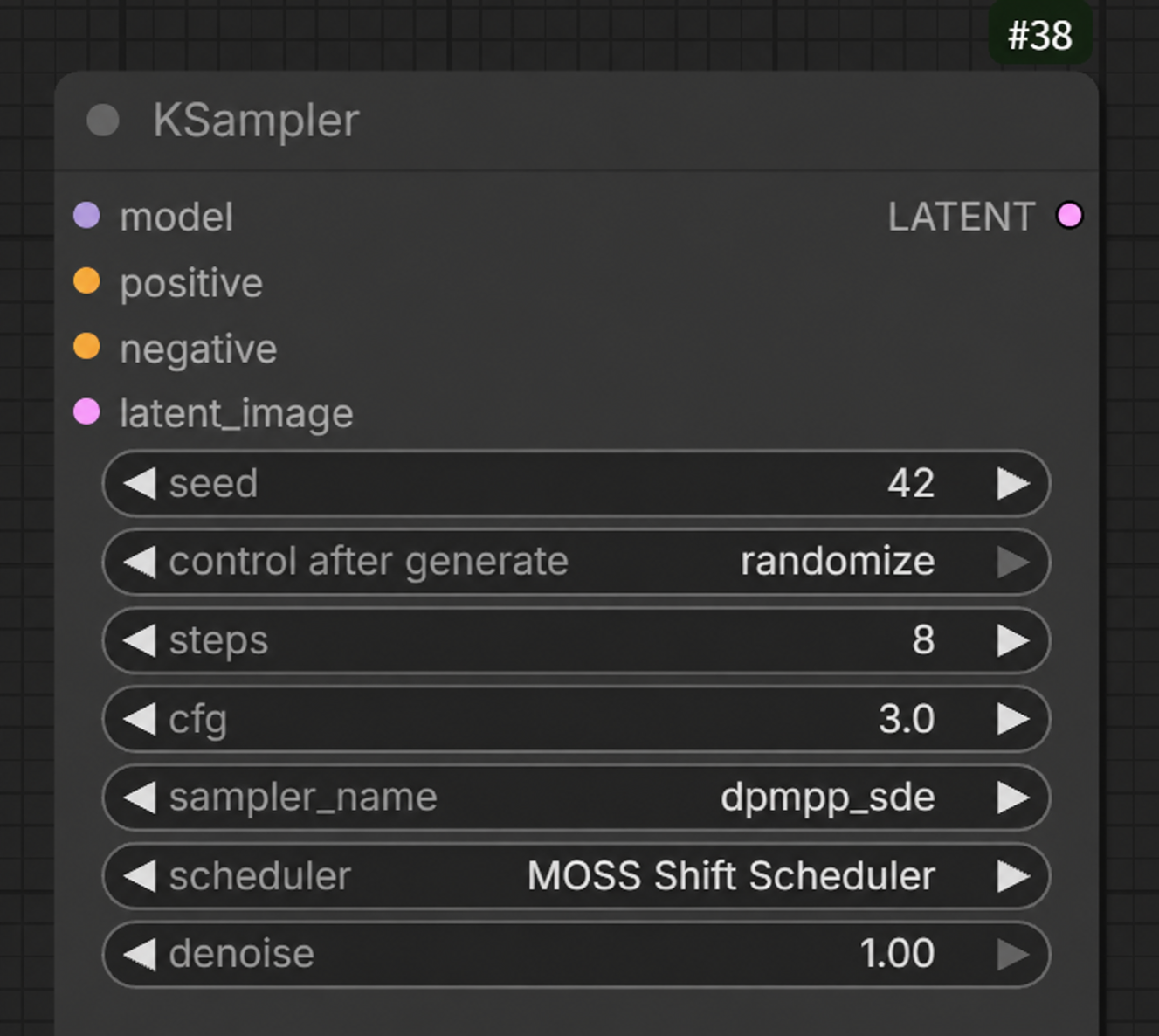
The KSampler reference image shows 8 steps, CFG 3, dpmpp_sde, MOSS Shift Scheduler and denoise 1.0.
The CFG value in this reference image was edited to show the recommended starting point of 3.
Model shift and LoRA strength are not shown; use the recommendations in the table above.
The current personal starting point is 8 steps, CFG 3, model shift 5 and LoRA strength 0.8.
The owner reports faster generation and slightly more detail at 8 steps than at 10 in their use case.
This is a personal observation, not a controlled speed or quality benchmark; the values remain adjustable.
The LoRA author recommends strength 0.7 for lora_latest.safetensors; that is the upstream reference,
not the project's current 0.8 recommendation. Adjust the strength to suit the output.
Do not confuse it with the separate lora.safetensors file and its different strength recommendation.
This follows the combinations in this sampler comparison report:
dpmpp_sde / radiance_shift and dpmpp_2m_sde / radiance_shift.
The report evaluates prompt adherence but does not state the actual generation step count.
The 8-step starting point above follows the owner's latest recommendation.
Good prompt adherence has also been reported in that use case; this is an observation, not a controlled benchmark.
Both named SDE samplers are recommended candidates; no independent GPU comparison between them was performed here.
Usage and changes from upstream
- In KSampler, choose one of the three full names under scheduler. KSampler's own default selection is unchanged.
- With the dedicated MOSS Shift Scheduler node, connect the same MODEL used by the sampler, and connect SIGMAS to SamplerCustom / SamplerCustomAdvanced. The node defaults to MOSS Shift Scheduler, 25 steps and denoise 1.0; the recommended 8-step starting point is set manually.
- Denoise below 1.0 uses the tail of a longer schedule; zero returns an empty schedule.
- Some samplers (
dpm_2,dpm_2_ancestral,uni_pc,uni_pc_bh2) add Core penultimate-sigma handling. Their Core KSampler path can differ from passing dedicated SIGMAS directly. - Repeated timestep indices are removed, so very long schedules or short model tables can yield fewer points.
The baseline retains the original MIT radiance_shift_scheduler calculation.
The Curve choice uses the original power_shift_scheduler defaults.
The Sigma choice changes timestep placement from j / steps to j / (steps + 0.75),
toward Radiance's j / (steps + 1) grid. It is not a 75% blend of SIGMAS.
Compared with the first unshifted prototype, it moves toward higher noise and increases the final jump to zero.
A quality improvement has not been established.
The original MIT repository's old dedicated Radiance node calls the Power Shift function;
numerical compatibility here targets the original Radiance function / registered scheduler.
This package does not replace the UtilsCollection node or alter its radiance_shift registration.
Earlier development names
| Earlier labels / selector values | Current full name | |---|---| | Radiance Shift (Compatible), Balanced, moss_radiance_shift, moss_shift_balanced | MOSS Shift Scheduler | | MOSS Standard, Power, moss_standard, moss_shift_power | MOSS Curve Scheduler | | MOSS DMD, Offset, moss_dmd, moss_shift_offset | MOSS Sigma Scheduler |
Normal workflow loading migrates the dedicated node and KSampler / KSamplerAdvanced / BasicScheduler values in the browser. The saved file changes only when you save it again. Dedicated-node API mode aliases remain accepted. Old Core API prompts and other custom sampler nodes should be updated to the new full names.
Verification and license
CPU verification covers numerical output, Core integration, and registration. Offline JavaScript verification covers old-name migration. These are separate from user-provided practical MOSS use. No comparative GPU image-quality benchmark was performed here. See CPU_VALIDATION.md.
MIT. The upstream copyright and license are retained in LICENSE; source, pinned revision, and changes are listed in THIRD_PARTY_NOTICES.md. This is an unofficial extension and is not endorsed by OpenMOSS or the upstream author.
<a id="日本語"></a>
日本語
概要・主な使用対象
MOSS Shift Scheduler v0.9 は、MOSS-Imageでの利用を目的に作成した、非公式の汎用スケジューラーです。
主に MOSS-Image SFT+lora_latest.safetensorsのDMD高速化LoRA を使うための個人的な実験用ツールです。
高速化LoRAを使わない通常生成は、実使用でほとんどテストしていません。他モデルでの生成も未確認です。 モデル固有の計算や、MOSS以外を拒否する処理はありませんが、汎用性・画質の最適化を実証したという意味ではありません。 リンク先は配布元がDMDと呼んでいる蒸留型の高速化LoRAです。別の「Turbo」モデルを必須とするものではありません。
導入方法
ComfyUIフォルダーでターミナルを開き、次を実行してください。
cd custom_nodes
git clone https://github.com/ukr8b3g-cmyk/ComfyUI-MOSS-Shift-Scheduler.git
ComfyUIを再起動し、ブラウザーを再読み込みします。 ComfyUIに含まれるNumPy・PyTorchを使うため、本パッケージ独自の追加依存やモデルのダウンロードは不要です。
導入は1コピーだけにしてください。 旧開発フォルダー ComfyUI-MOSS-Scheduler がある環境では、
旧コピーを無効化してから導入してください。既存ノードの内部ID MOSS_Scheduler は維持しています。
ComfyUI Manager / Comfy Registryには未登録です。現時点の導入方法はGit cloneです。
ComfyUIの対応・確認環境
- ComfyUI 0.42.1、コミット
63be2f9b82ad0dac88a7ceaa28a9cf3154125a18でCPU統合確認済みです。 - Coreへの登録は
SCHEDULER_HANDLERS、SchedulerHandler、SCHEDULER_NAMESのAPIを使います。 それ以前の最低対応バージョンは確定していません。 - 下記の使用例では、MOSS-Imageを読み込めるComfyUIが必要です。
- 確認環境はPython 3.12.12、PyTorch 2.14.1+cu130、NumPy 2.5.2です。これらの厳密な版固定を要求するものではありません。
3種類の選択肢
KSamplerと専用ノードで、名前を省略せず同じ表記で使います。
| 選択名 | power | midpoint_shift | 曲線を変形する前の点の配置(N=steps) | 末尾の処理 |
|---|---:|---:|---|---|
| MOSS Shift Scheduler(初期選択) | 2.4 | 0.98 | j / (N + 1)。N+1点の候補を計算 | ゼロを追加し、その直前の点を削除。元のRadiance互換 |
| MOSS Curve Scheduler | 2.0 | 1.00 | j / N。N点の候補を計算 | 最後の非ゼロ値を残してゼロを追加。元のPower Shift既定値 |
| MOSS Sigma Scheduler | 2.4 | 0.98 | j / (N + 0.75)。N点の候補を計算 | 最後の非ゼロ値を残してゼロを追加。配置を調整した派生方式 |
powerとmidpoint_shiftは曲線の形、点の配置はその曲線のどこを各ステップで使うかを決めます。 現在は方式ごとに固定している内部設定で、CFGやモデル側のflow shiftとは別です。 ShiftとSigmaは曲線の設定値が同じで、使う点の位置が少し違います。 Curveは曲線の設定値と配置の両方が異なります。最後は3方式ともゼロになります。
10ステップでの数値比較
10 steps、denoise 1.0、shift 5の1,000点flowテーブルでCPU計算した例です。小数第4位まで表示しています。 MOSS既定と同じshift変換を使った例で、モデルの重みを読み込んだ生成テストではありません。 数値はスケジュール上のノイズ量(sigma)で、画質の点数ではありません。
| 選択名 | 開始 | 1ステップ後 | 5ステップ後 | 最終ステップ直前 | 終了 | |---|---:|---:|---:|---:|---:| | MOSS Shift Scheduler | 1.0000 | 0.9984 | 0.9085 | 0.3494 | 0.0000 | | MOSS Curve Scheduler | 1.0000 | 0.9959 | 0.8656 | 0.1611 | 0.0000 | | MOSS Sigma Scheduler | 1.0000 | 0.9982 | 0.9024 | 0.2943 | 0.0000 |
この例では、Shiftは表の途中時点で高めのノイズ量を保ちます。 Curveはより早く低いノイズ量へ進み、最後のゼロまでの飛び幅も小さめです。 SigmaはShiftに近い配分で、最後の飛び幅を少し小さくしています。 構図や仕上がりが変わる可能性がありますが、どれが高画質かは実画像での比較が必要です。 モデルのsigmaテーブル、flow shift、ステップ数を変えると、この数値も変わります。
MOSS Shift Schedulerを基準に選びます。名前は画質の順位ではありません。 選択を変えてもLoRA、steps、CFG、サンプラー、SLG、モデルのshiftは自動変更しません。
MOSS-Image SFT+DMD高速化LoRAの使用例
| 項目 | 本プロジェクト推奨の開始値 |
|---|---|
| モデル | MOSS-Image SFT |
| 高速化LoRA | lodestones/MOSS-Image-SFT-8-steps-dmd の lora_latest.safetensors |
| LoRA強度 | 0.8を本プロジェクトの推奨開始値に。固定・必須ではなく調整可能です |
| サンプラー | dpmpp_sde または dpmpp_2m_sde |
| スケジューラー | MOSS Shift Schedulerを基準に、ほかの2方式とも比較可能 |
| ステップ | 8〜10。まず8を起点に調整 |
| CFG | 3を推奨開始値に。出力に合わせて調整可能 |
| モデルShift | 5。ComfyUI標準のMOSSローダーは、別の変更ノードがなくても既定値5を使います |
| denoise | 1.0(txt2imgの例) |
KSamplerの参考画像は 8 steps・CFG 3・dpmpp_sde・MOSS Shift Scheduler・denoise 1.0 です。
推奨開始値に合わせて、参考画像のCFG欄を3に編集しています。
モデルShiftとLoRA強度は画像には表示されていないため、上の推奨表を参照してください。
現在の個人の開始例は 8 steps・CFG 3・モデルShift 5・LoRA強度0.8 です。
作者の実使用では「10ステップより8ステップの方が速く、細部もややよかった」との所感があります。
速度や画質の比較ベンチマークではなく、各値は調整可能です。
配布元のlora_latest.safetensors推奨強度は0.7で、こちらは配布元の参考値として区別します。
本プロジェクトの推奨は0.8ですが、出力に合わせて調整してください。
別ファイルlora.safetensorsの推奨強度とは区別してください。
この使用例はサンプラー比較投稿の
dpmpp_sde / radiance_shift、dpmpp_2m_sde / radiance_shiftに準拠しています。
元投稿ではプロンプト追従性が評価されていますが、実際の生成ステップ数は不明です。
上記の8ステップという開始値は、作者の最新の推奨に基づきます。
その実使用でも「プロンプトへの追従性がよい」との評価がありましたが、比較ベンチマークではありません。
両SDEサンプラーを推奨候補としますが、こちらで両者の独立したGPU比較を行ったものではありません。
使用方法・元実装との差
- KSamplerではschedulerから上記のフルネームを選びます。KSampler自身の初期選択は変更しません。
- 専用ノードでは同じMODELをサンプラーにも接続し、SIGMASをSamplerCustom / SamplerCustomAdvancedへ渡します。 ノード初期値はMOSS Shift Scheduler、25 steps、denoise=1.0です。推奨開始値の8 stepsは手動設定します。
- denoiseを小さくすると長いスケジュールの末尾を使います。0は空のSIGMASです。
dpm_2、dpm_2_ancestral、uni_pc、uni_pc_bh2ではCoreの追加末尾処理があるため、 専用SIGMASを渡す経路との差があります。時刻の重複除去で出力段数が減る場合もあります。
MOSS Shift Schedulerは元MIT版のRadiance関数を再現し、MOSS Curve Schedulerは元のPower Shift既定値を使います。
MOSS Sigma Schedulerは元の時刻配置 j / steps を j / (steps + 0.75) に変更した派生方式です。
Radianceの配置は重複除去前では j / (steps + 1) です。SIGMASを75%混ぜる処理ではありません。
初期の補正なし試作より高ノイズ側へ寄り、最後のゼロまでの飛び幅も大きくなります。画質改善は未検証です。
元MIT版の旧専用RadianceノードはPower Shift関数を呼ぶため、互換対象は元のRadiance関数 / 登録です。
既存UtilsCollectionのノードやradiance_shift登録には触れません。
旧名・検証・ライセンス
旧Balanced / Radiance Shift (Compatible) / moss_radiance_shift / moss_shift_balancedはMOSS Shift Scheduler、 旧Power / MOSS Standard / moss_standard / moss_shift_powerはMOSS Curve Scheduler、 旧Offset / MOSS DMD / moss_dmd / moss_shift_offsetはMOSS Sigma Schedulerに対応します。
通常ワークフロー読込時は専用ノードとKSampler / KSamplerAdvanced / BasicSchedulerの旧値をブラウザーで変換します。 再保存するまで保存ファイルは変わりません。専用ノードAPIは旧モード値も受け付けます。 旧Core API promptや他のカスタムサンプラーは新しいフルネームへ更新してください。
CPU数値一致・Core統合・登録、旧名移行のオフラインJavaScript確認を実施しています。 ユーザー側のMOSS実使用とは区別し、こちらでGPU画質の比較ベンチマークは行っていません。 詳細はCPU_VALIDATION.mdを参照してください。
MIT。原作者の著作権表示と全文はLICENSE、出典・固定コミット・改変内容は THIRD_PARTY_NOTICES.mdに記載しています。 OpenMOSSや元スケジューラー作者の公認拡張ではありません。