
ComfyUI-MOSS-Emphasis
Experimental beta: settings-controlled MOSS-Image prompt weights for ordinary ComfyUI text inputs. Actual ComfyUI browser UI and MOSS GPU generation remain unverified.
Nodes (3)
ComfyUI-MOSS-Emphasis v0.11.0
日本語 · How the methods differ · GPU comparison guide · Validation · Attribution
New in v0.11.0 (Beta): Settings now offer NegPiP implementation → Forge compatible for native MOSS. Enable prompt weighting and Use NegPiP, then select it; saved workflows keep their existing method unless explicitly switched. Use V-Scaling defaults OFF; its strength defaults to 1 (0..2). OFF or strength 0 is basic Forge NegPiP, not bypass. At 1 the image-query Values receive signed prompt magnitudes; text queries read sign-only Values. Old Strength / PPM effect values are retained and ignored in this mode. Release notes.
Forge mode processes both Positive and Negative independently, using separate ordinary CLIP Text Encode inputs. Negative remains the negative CFG branch; (word:-1) there is not equivalent to using it in Positive. Native CFG branch skipping is unchanged. Non-MOSS models automatically bypass Forge weighting with original text and retain these settings; returning to MOSS resumes them. Existing normal/PPM model support and Negative behavior are unchanged. Layout JSON, custom chat templates, image references and processed/region/scheduled conditioning are outside the new mode's scope. Structural graph errors are still rejected before execution.
The new Forge-derived module is AGPLv3, combined with the existing GPLv3 code under section 13; see NOTICE. The Settings status offers the corresponding source of the actual installed version at /moss_emphasis/source. Restart ComfyUI and reload the browser after installation; CPU tests do not establish GPU quality, Kitchen performance or live UI behavior.
Prompt weighting and NegPiP from Settings → MOSS Emphasis, using ordinary CLIP Text Encode. No prompt-weight node needs to be placed on the canvas.
Existing normal/PPM modes support three model families: native MOSS-Image, SDXL / Illustrious, and native Anima. In auto model mode, every other architecture automatically bypasses this extension, including Qwen-Image, FLUX, SD1.5, SD3, Krea2 and SDXL Refiner; ordinary generation continues. Forge mode supports native MOSS only. These are CPU-tested experimental features; GPU quality, speed and VRAM remain unverified.
Compatibility: the numerical protections introduced in 0.10.1 remain in place. Old backends rejecting supported settings, including Forge schema 4 or version 0.11.0, give a localized restart instruction without queueing or changing saved settings. Settings from 0.9.0, 0.9.1, 0.10.0 and 0.10.1 remain loadable with their method, strengths and model scope preserved, including the prior local Forge settings.
Install / update
Run in ComfyUI's custom_nodes directory:
git clone https://github.com/ukr8b3g-cmyk/ComfyUI-MOSS-Emphasis.git
For an existing installation, update the repository, restart ComfyUI itself, then reload the browser. A browser refresh alone cannot load new Python code. No additional pip dependencies, PPM/KJNodes installation or model downloads are required. Use a recent ComfyUI with native support for the selected model and the V3 node API; see the tested version in Validation.
Choose a method
Keep your normal model, positive and negative wiring. Open Settings → MOSS Emphasis:
| Setting | Meaning |
|---|---|
| Enable prompt weighting | Master switch, saved per workflow. New workflows start OFF. |
| Strength | Normal emphasis only, 0–4; start at 1. |
| Use NegPiP | OFF = normal emphasis; ON = the selected NegPiP implementation. The methods are exclusive. |
| NegPiP implementation | PPM reference keeps the existing method; Forge compatible selects the new MOSS-only method. Default: PPM. |
| NegPiP effect | PPM only, 0–1; start at 1. Ignored in Forge mode. |
| Use V-Scaling | Forge only. Default OFF; basic Forge NegPiP remains active when OFF. |
| V-Scaling Strength | Forge with V-Scaling ON, 0–2; default 1. Zero means basic Forge NegPiP, not bypass. |
| Current method | Shows the selected method and effective strength. Forge status notes automatic bypass outside MOSS. |
In auto mode, actual MODEL and CLIP types select the adapter; checkpoint filenames do not. There is no model selection menu. Use NegPiP does not activate anything while the master switch is OFF. The inactive strength is retained but ignored.
Zero has different meanings for different controls, as explained below. Master OFF bypasses this extension in every mode. Native SDXL/Anima weighting still applies to the original text. Extension OFF does not disable a model's built-in weighting.
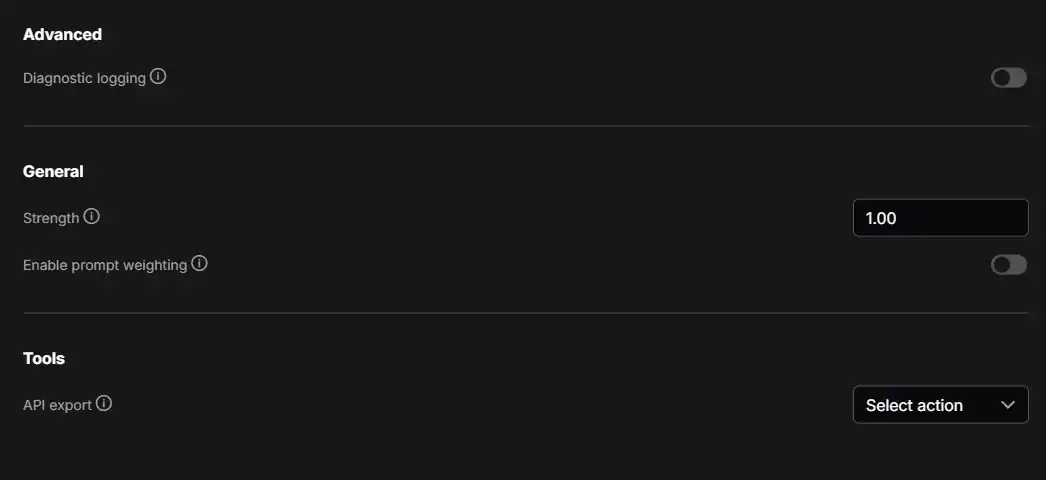
This image predates NegPiP controls. Current order: Enable → Strength → Use NegPiP → implementation → PPM effect → Use V-Scaling → V-Scaling Strength → Current method. Inactive controls retain their values but are disabled. ComfyUI's Japanese locale translates labels and hover help; persisted IDs stay unchanged.
How the methods differ
All methods let you ask for more or less influence from a phrase. They adjust that influence at different points, so the same number can produce a different image. The following is a simple analogy for MOSS, not a promise about the visual result:
| Method | An easy way to think about it | |---|---| | Existing normal emphasis | “Pay more attention to this phrase.” It adjusts attention and how much a token contributes. | | Existing PPM NegPiP | At its reference effect of 1, adjust attention using the weight's magnitude; a negative weight reverses the contribution read by the image side. | | Forge, V-Scaling OFF | Adjust the strength of the text information given to the image model. Negative weights still reverse contributions. | | Forge, V-Scaling ON | Shift the magnitude adjustment towards the image model's drawing process: scale the token contributions read by the image side. The text side retains sign-only contributions. |
For example, (red hair:1.5) asks for more influence from “red hair.” With Forge V-Scaling OFF, its text encoding is adjusted. With V-Scaling ON at strength 1, that magnitude adjustment is applied to the image-side contributions instead. These are alternative calculations, not extra effects stacked on top of PPM. 1.5 does not guarantee 1.5 times as much red hair, and no method is established as universally better.
There is also a syntax difference: Forge treats ordinary (red hair) as emphasis, while the existing MOSS parser leaves parentheses without an explicit numeric weight as literal text. Forge tokenizes weighted segments separately. Do not expect identical results from the same prompt across methods.
V-Scaling ON, OFF and strength 0
| Control / state | What it means | |---|---| | Master switch OFF | This extension is bypassed, regardless of the selected method or saved strengths. | | Normal emphasis: Strength 0 | The existing normal method is bypassed. | | PPM NegPiP: NegPiP effect 0 | The existing PPM method is bypassed. | | Forge: Use V-Scaling OFF | Basic Forge NegPiP remains active. Magnitudes affect text encoding; negative weights still reverse contributions. The saved V-Scaling strength is ignored. | | Forge: V-Scaling ON, strength 0 | The same basic Forge NegPiP as OFF. Zero does not disable Forge NegPiP. | | Forge: V-Scaling ON, strength 1 | Apply signed weight magnitudes to the image-side contributions; keep sign-only contributions on the text side. This is a starting point for comparison, not a proven best setting. |
The old normal Strength and PPM effect do not control Forge mode, even if their saved values are 0. A prompt weight such as (red hair:0) is a separate setting: it changes that phrase's treatment, does not switch off the extension, and does not guarantee concept deletion.
Negative is another difference: existing normal/PPM modes retain its native processing. Forge applies its selected weighting to both Positive and Negative independently. Negative is still the negative CFG branch; putting a negative weight there is not equivalent to putting it in Positive, and is not a simple guaranteed “double negative.”
To compare, keep the prompt, seed, model, LoRA, sampler, steps and CFG fixed; change only Forge V-Scaling OFF versus ON at strength 1. Choose the result you prefer. Forge is currently native MOSS only; other models bypass its weighting. Existing normal/PPM support for SDXL/Illustrious and Anima is unchanged. GPU image-quality comparisons remain unperformed.
GPU comparison guide
These are suggested comparison conditions, not verified optimal settings or GPU quality results. Use a native MOSS model and ordinary CLIP Text Encode for every condition. Forge mode bypasses other model families. Start with an empty Negative field to isolate Positive weighting from the different Negative handling.
Fixed generation settings
| Setting | Suggested starting condition | |---|---| | Steps | 8 | | CFG | 3 | | Sampler | dpmpp_sde | | Scheduler | MOSS Shift Scheduler, if installed; otherwise keep your current scheduler fixed | | Seed | 42, or another fixed seed; disable automatic seed changes | | Denoise | 1.0 | | Model / CLIP / LoRA | Same files and LoRA strengths; leave model-side Shift unchanged | | Resolution and other options | Same values throughout |
The scheduler above belongs to the separate MOSS Shift Scheduler extension; it is not required by MOSS Emphasis. CFG 3 and model-side Shift are separate settings.
Four comparison conditions
Open Settings → MOSS Emphasis and keep Enable prompt weighting ON for A–D. These are alternative methods, not stacked effects.
| Condition | Use NegPiP | Implementation | Active strength / V-Scaling | |---|---|---|---| | A: Existing normal emphasis | OFF | Not used | Strength 1 | | B: Existing NegPiP | ON | PPM reference | NegPiP effect 1 | | C: Basic Forge NegPiP | ON | Forge compatible | V-Scaling OFF | | D: Forge with V-Scaling | ON | Forge compatible | V-Scaling ON, strength 1 |
Normal Strength and PPM effect are ignored in C/D. For an optional extension-bypass baseline, turn the master switch OFF; this is different from C.
Positive-weight example
Use this identical Positive prompt for A–D, leaving Negative empty:
Anime illustration of one adult woman, waist-up portrait, facing the viewer.
She has short black hair and wears a (red jacket:1.5) over a white shirt.
Plain light gray background, soft lighting, clean line art.
Check whether the jacket follows the requested color, whether red spreads to the hair/skin/background, and whether the face, clothing shape, composition or fine lines change undesirably. If useful, repeat with only 1.5 replaced by 1.0 or 2.0. Look for changes to the intended attribute versus changes to the whole image; the number does not guarantee a proportional visual effect.
Negative-weight example
Keep Negative empty and use:
Anime illustration of one adult woman, waist-up portrait, facing the viewer.
She has short black hair, (glasses:-1), and wears a blue jacket over a white shirt.
Plain light gray background, soft lighting, clean line art.
First try (glasses:1) with each tested method to check whether glasses appear at that seed. Then change only the weight to -1 and compare B/C/D: do glasses decrease, and do the eyes and face remain intact? If glasses are absent in the positive-weight baseline, use another seed for both runs. A negative number in A does not automatically enable NegPiP. Greater negative magnitude does not guarantee stronger suppression or concept removal.
What to look for with V-Scaling
Compare C versus D with everything else fixed:
| Forge setting | Calculation | What to inspect in the image | |---|---|---| | V OFF | Magnitudes affect text encoding; basic NegPiP remains active | Prompt adherence and changes spreading to the face, composition or unrelated attributes | | V ON, strength 1 | Apply signed magnitudes to image-side Values; text-side Values retain sign only | Intended attribute strength, color spill, shape stability and unwanted artifacts | | V ON, strength 0 | Same basic Forge NegPiP as V OFF; not complete bypass | Optional consistency check against C, under the same generation conditions |
ON does not inherently mean more detail, and OFF does not inherently mean more natural results. If ON at 1 feels too strong, compare 0.5 next. Start with one fixed seed, then repeat the preferred settings with two or three more seeds before judging consistency.
Test the Negative field separately afterward: first add ordinary glasses there and compare with the empty-Negative result. Existing normal/PPM modes keep native Negative processing; Forge processes both fields. Treat negative numeric weights in Negative as a separate experiment: (glasses:-1) there is not equivalent to the same expression in Positive and does not guarantee a simple double-negative effect. No GPU generation or image-quality outcome is claimed by these examples.
Model support
This table describes the existing normal/PPM modes. Forge is currently native MOSS only and automatically bypasses every other model.
| Model | Normal emphasis | NegPiP at effect 1 | Status | |---|---|---|---| | Native MOSS-Image Base / SFT | Existing KJ-style Value scaling / attention bias | PPM-reference log-absolute-weight bias and Value sign | Existing arithmetic preserved; CPU regressions | | Native SDXL Base / Illustrious | Native CLIP-L/G weighting | Absolute CLIP weights, separate Key/Value; negative weights reverse Value | CPU tokenization, encoding, batching and real attention-module tests | | Native Anima | Native T5 token weights after the Qwen adapter | Absolute T5 weights and negative-token Value sign | CPU preprocessing, deferred forward, padding, batching and real attention-module tests | | Qwen-Image, FLUX, SD1.5, SD3, Krea2, SDXL Refiner, all other architectures | Automatically bypassed | Automatically bypassed | Ordinary model processing continues |
In auto model mode, unsupported architectures skip this extension's weighting and attention patches, preserving the original text, MODEL and Negative. The saved ON/OFF and method settings stay intact; switching back to a supported model activates the selected method again. The server log records the bypass. A supported MODEL with the wrong CLIP still produces a mismatch error. Graph/conditioning compatibility checks still apply; automatic model bypass does not add support for integrated custom samplers or unsupported graph layouts.
Qwen-Image here means the image-generation architecture. MOSS and Anima may use a Qwen text encoder; the encoder name alone does not make them unsupported.
Illustrious uses the native SDXL architecture route, not a filename allowlist. No Illustrious/Anima checkpoint was loaded for these tests. Anima uses existing T5 tokenizer metadata; this extension does not load a T5 encoder model. MODEL and CLIP must be a matching native pair.
Existing normal/PPM modes weight Positive. Negative retains its native numerical meaning, including native weights it already contains. SDXL PPM NegPiP internally transports identical K/V copies of Negative to compensate for the attention split; it does not reinterpret Negative with NegPiP. Forge's processing of both fields is explained above.
Prompt weights and zero
1girl, (red hair:1.2), (realistic:-5)
A negative number is interpreted within the selected method; it does not automatically switch to NegPiP. Prompt weights have no fixed min/max. Non-finite values, overflowing coefficients and unrepresentable conditioning are rejected. The actual MOSS Value product, combined attention mask and Anima post-adapter product are also checked where weighting can overflow: an invalid result raises INVALID_WEIGHT, without clamping the weight or changing methods. Larger magnitudes do not guarantee stronger visual suppression.
| Existing normal/PPM modes, strength/effect = 1 | Weight 0 | Weight 1 | |---|---|---| | MOSS normal | Value multiplier 0; Key remains | Ordinary weight | | MOSS PPM NegPiP | Absolute weight floored to 1e-4 for bias; positive Value sign | Relative weight 1; normalized with other tokens | | SDXL normal / NegPiP | Empty-prompt-reference embedding; positive NegPiP sign | Native embedding | | Anima normal / NegPiP | Corresponding adapted context multiplied by 0; positive NegPiP sign | Native weight |
None guarantees concept deletion. (realistic:1) is ordinary weighting, not a special realism boost.
For existing normal/PPM modes, syntax differs by model: MOSS preserves explicit decimal syntax, literal unweighted parentheses, nested products, 128-group/16-level limits and character-position mapping. Its Layout JSON protection applies only to summary.caption / items[].caption. SDXL/Anima use their native tokenizer's parentheses, escaping, nesting and token weights. MOSS JSON protection does not apply to them; this is not an A1111/Compel normalization mode. Forge uses its separate Original-style syntax and does not yet support Layout JSON.
For SDXL/Anima normal emphasis, Strength s maps token weight w to 1+s*(w-1). NegPiP effect t uses 1+t*(abs(w)-1) and negative Value multiplier 1-2*t. Effect 1 is the pinned PPM equation comparison point; intermediate effects are extension-specific. At 0.5, negative-token Value becomes zero but the token remains. MOSS retains its log-bias interpolation.
Workflows and compatibility
Supported: ordinary CLIPTextEncode → KSampler / KSamplerAdvanced, or CLIPTextEncode → CFGGuider → SamplerCustomAdvanced. Text Multiline/CSV/concatenation can feed CLIPTextEncode.text. Standard LoRA and CLIP skip stay on the native encoder path.
Initial scope excludes CLIPTextEncodeSDXL, Advanced CLIP, regional/scheduled/combined conditioning, ControlNet/IPAdapter, Refiner, standalone HF loaders and integrated custom samplers. Upstream weighting/attn2 replacement patches are rejected. Use OFF for unsupported workflows.
MOSS retains its existing backend boundary: PyTorch/basic, native global Comfy Kitchen INT8 (--use-ck-attention) integration and official SLG callbacks; no Sage/Flash/SOL override or configured per-layer INT8. Real Kitchen/SLG GPU operation remains unverified. SDXL/Anima use native hooks and retain the selected kernel; CPU tests do not certify every GPU backend.
Saved schema 1/2 workflows retain their old MOSS-only behavior. Loading them does not silently activate weighting on other models. To enable auto model mode, explicitly change a weighting setting (e.g. master OFF then ON), then save. Status changes from legacy MOSS to auto model. Diagnostic logging alone does not migrate the workflow. Both strengths survive method changes and tab switches.
Private runtime nodes are inserted only into a copy of the execution graph; editor wiring stays intact. Each job captures its settings, which participate in caching. No global tokenizer/attention replacement, model-file changes or ComfyUI source modifications. CFG, sampler and scheduler stay unchanged.
API and tests
Use Settings → MOSS Emphasis → API export → Export execution API JSON, or prepare an actual API graph with:
POST /moss_emphasis/prepare
{"schema_version":1,"prompt":{},"settings":{"schema_version":3,"enabled":true,"engine":"negpip_auto_v1","strength":1,"negpip_strength":1}}
Replace prompt with the actual graph, then send the returned prompt to /prompt. Preparation failures never queue an unweighted fallback. The prepare envelope stays version 1; existing auto-mode settings use schema 3, and Forge uses schema 4. Prepared graphs require this extension. Ordinary ComfyUI API export may omit the transformation.
python -m unittest discover -s tests -v
node --test tests/frontend.test.mjs tests/locales.test.mjs
python -B tests/native_contract.py --comfy-root /path/to/ComfyUI
Validation separates unit tests, real CPU module contracts and unperformed GPU/UI checks. Existing files are GPL-3.0-only; the new Forge-derived module is AGPL-3.0-only. NOTICE lists the applicable licenses and references. No promise of identical generated images.