
Anima Regional Canvas
ANIMA-focused regional canvas node for Anima-LLLite Regional ControlNet workflows in ComfyUI.
Nodes (2)
Anima Regional Canvas
Current version: 2.0.1
<img width="1712" height="745" alt="Clip_7" src="https://github.com/user-attachments/assets/73c40c9b-d6b1-4eab-a3e7-0baf36a4f8af" />Version 2.0.1 Maintenance
- Canvas Undo history now uses a 128 MiB memory budget and restores the previous canvas dimensions after a resize.
- Painting no longer PNG-encodes the entire canvas every 250 ms; the serialized mask is updated when an edit is committed.
- Canvas PNG data is stored once in
canvas_data; the legacy duplicateproperties.arcCanvasDatais migrated on load and removed on save. - Browser backup keys are scoped by workflow graph and node ID, with migration from the old unscoped key.
- The interactive canvas is capped at 4096×4096 for browser memory safety. Python/API validation keeps the existing backend limit.
- Size polling was removed. Connected-image refresh now runs only for the Inpaint node and pauses while the document is hidden.
- Added lightweight regression checks for Python syntax, JavaScript syntax/contracts, and bundled workflow JSON.
Version 2.0 Update
- Updated both bundled workflows for ComfyUI core
Load Model PatchandApply Anima LLLite. - Reorganized the canvas toolbar, enlarged the canvas-size controls, and added a draggable canvas/prompt divider.
- Prompt fields now use local text by default. Click
← INonly when an externalSTRINGinput is needed. - Fixed canvas persistence so painted regions are restored safely after tab changes or canvas rebuilds.
An ANIMA-focused custom node for Anima-LLLite regional-control workflows.
It is designed for ANIMA workflows using the Anima base model and the Anima-LLLite Regional ControlNet model. The node lets you paint color-coded regions directly inside ComfyUI, outputs the color mask image for ComfyUI core Apply Anima LLLite, and generates masked conditioning from matching region prompts.
Requirements
- A current ComfyUI build containing core
Load Model PatchandApply Anima LLLite - Anima base model: circlestone-labs/Anima Other Anima fork models
- Model: anima-lllite-regional-exp-v3.safetensors
- Model repository: Sen-sou/Anima-LLLite-Regional-Controlnet
Place the regional model where ComfyUI's Load Model Patch can find it (normally ComfyUI/models/model_patches). This repository does not include model files.
Install
Search for "anima regional" from ComfyUI Manager. <img width="1033" height="250" alt="1782109442-qZH5iIbnRBG4mx23WP7yMvTz" src="https://github.com/user-attachments/assets/64d29b98-74a1-4c47-90fe-010ed2f4ad29" />
Clone this repository into ComfyUI's custom_nodes folder:
cd ComfyUI\custom_nodes
git clone https://github.com/ukr8b3g-cmyk/Anima_Regional_Canvas.git
Restart ComfyUI after installation.
Example workflows are included in workflows/:
Usage
- Add one of the canvas nodes:
Anima Regional Canvas: normal regional generation.Anima Regional Inpaint Canvas: regional inpaint generation from an optional input image.
- Check the canvas size shown in the
Canvas width x heightinfo badge.- The default size is
1024 x 1024. - Enter a width and height in the number boxes, then press
Enteror move focus away to apply the resize. Load Canvasand a connected image update the canvas size. Sizes are normalized down to multiples of 8 to match the latent output.- For ANIMA workflows, a larger size is recommended. Smaller sizes work, but they may be too low-resolution for detailed ANIMA output.
- Drag the divider between the canvas and prompt panel to change their widths. The canvas has a protected minimum width.
- The default size is
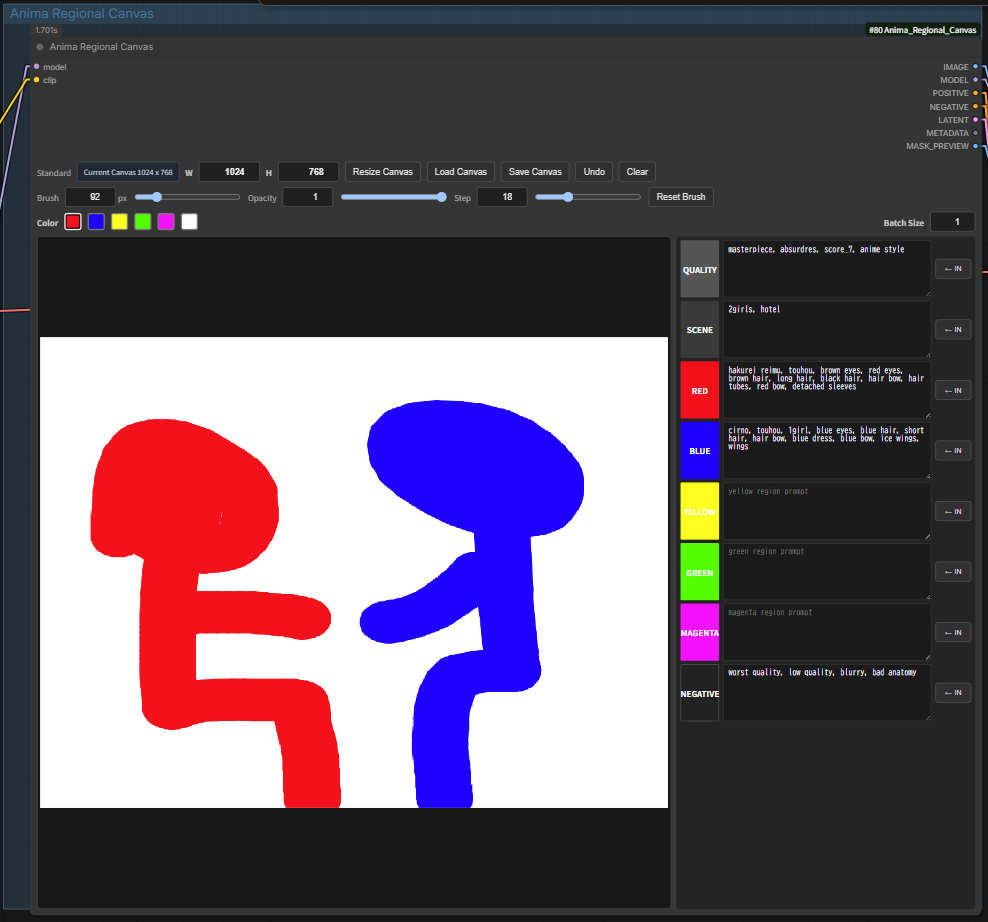
- Enter prompts:
QUALITY: quality/style tags, for examplemasterpiece, absurdres, score_7, anime styleSCENE: count, character names, background, and situation, for example2girls, cirno, reimu, cafeRED/BLUE/YELLOW/GREEN/MAGENTA: prompt for each painted regionNEGATIVE: negative prompt- Local text entry is enabled by default.
- Click
← INbeside a field to add its externalSTRINGsocket. The button changes toIN ONand disables the local text box. - Connect
Text (Multiline)or anotherSTRINGoutput to the newly added socket. Disconnect the cable, then clickIN ONto return to local text.
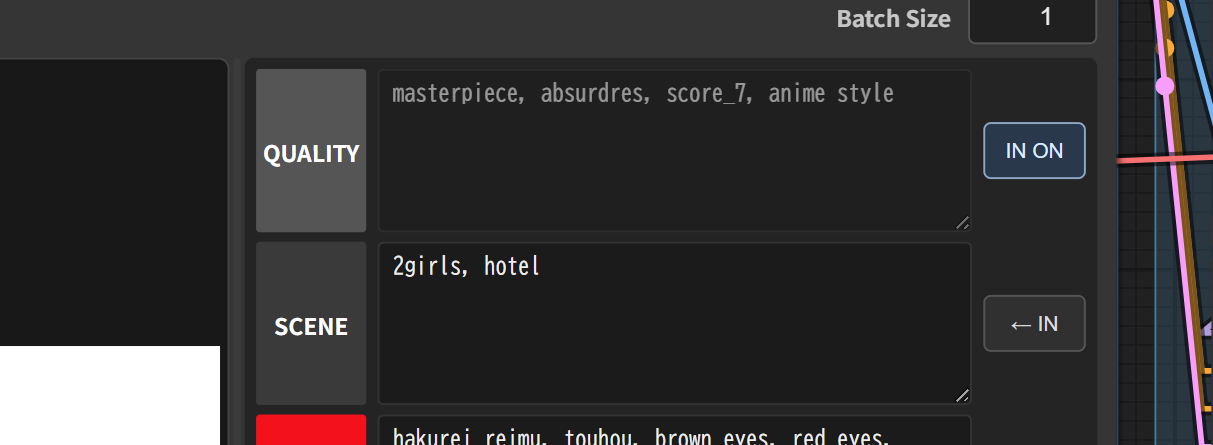
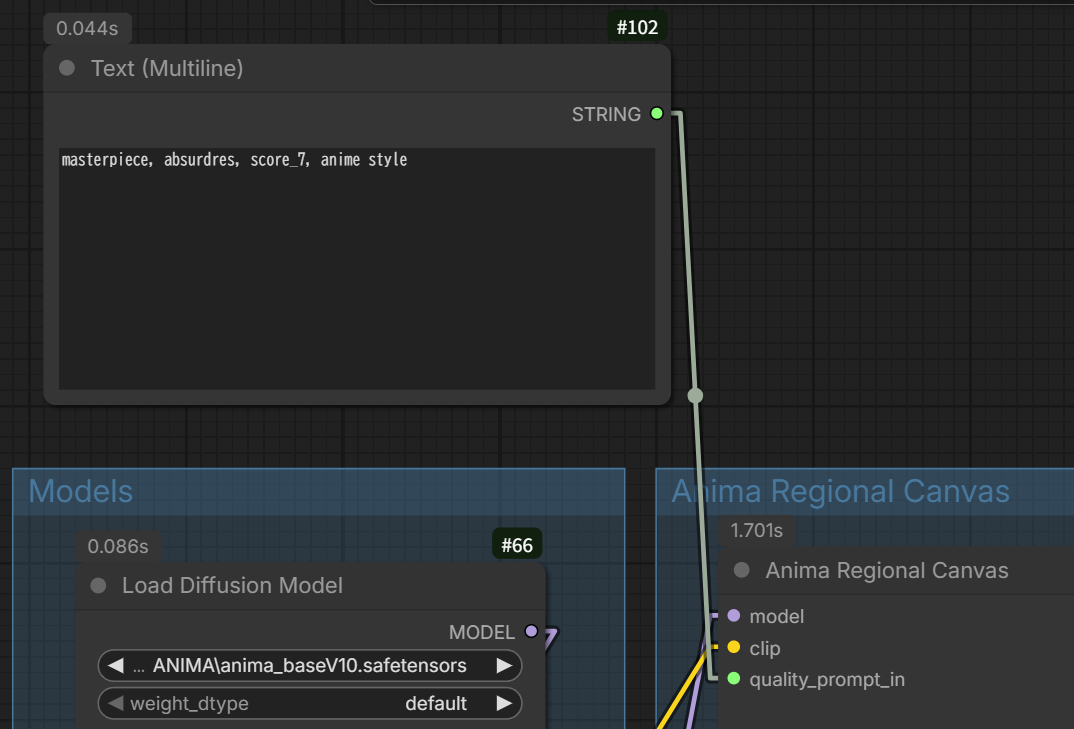
- Paint regions on the canvas with the color buttons.
Save Canvas: save the painted canvas as PNG.Load Canvas: load a saved canvas PNG or image back into the canvas.- Brush size can be changed with the
Brushnumber box or slider. - Windows shortcut:
Alt + right-dragon the canvas. Move left/right to change brush size. - Mac shortcut:
Control + Option + left-dragon the canvas. Move left/right to change brush size. - Moving up/down during the shortcut adjusts brush opacity.
- The brush circle preview shows the current brush size on the canvas.
- Load
anima-lllite-regional-exp-v3.safetensorswithLoad Model Patch, then connect it toApply Anima LLLite model_patch. - Connect the canvas
IMAGEoutput toApply Anima LLLite image. - Connect
POSITIVE,NEGATIVE, andLATENTtoKSampler. - For a mask overlay preview, use ComfyUI core
Blend Images:- generated image ->
Blend Images image1 MASK_PREVIEW->Blend Images image2Blend Images->Preview Image
- generated image ->
- Save the final image with
Save WEBP Metaif metadata output is needed.
Node Variants
Anima Regional Canvas
Use this for normal generation.
IMAGEoutputs the painted color mask forApply Anima LLLite image.LATENToutputs an empty latent using the canvas size.- Paint red, blue, yellow, green, or magenta regions and enter matching region prompts.
Anima Regional Inpaint Canvas
Use this for inpaint generation.
- Connect an input image to
imagewhen you want to inpaint over an existing image. - Connect
vaewhen using the node'sINPAINT_LATENToutput. - The connected image is shown on the canvas automatically when available.
- Paint only the areas that should be controlled or repainted.
- White/unpainted areas are treated as the keep/base area.
grow_mask_byexpands the inpaint mask slightly to reduce hard edges.- If no
imageandvaeare connected, the node falls back to an empty latent, similar to the normal node.
Design
- ComfyUI core
Load Model PatchandApply Anima LLLitestay separate. KSampler,VAE Decode, andSave WEBP Metastay separate.- External custom nodes are not imported or called.
- This implementation is independently designed, inspired by regional conditioning workflows, and optimized for this canvas-based node. It does not reuse external custom-node code.
- Regional control uses ComfyUI's standard masked conditioning: only painted colors with non-empty prompts are encoded.
QUALITYis for quality/style tags.SCENEis for count, subject names, background, and situation, for example2girls, cirno, reimu, cafe.RED,BLUE,YELLOW,GREEN, andMAGENTAare region prompts.
Outputs
Anima Regional Canvas
IMAGE: color mask image forApply Anima LLLite imageMODEL: passthrough modelPOSITIVE: masked conditioning forKSampler positiveNEGATIVE: conditioning forKSampler negativeLATENT: empty latent using the canvas sizeMETADATA: prompt metadata stringMASK_PREVIEW: preview-only image
Anima Regional Inpaint Canvas
IMAGE: color mask image forApply Anima LLLite imageMODEL: passthrough modelPOSITIVE: masked conditioning forKSampler positiveNEGATIVE: conditioning forKSampler negativeINPAINT_LATENT: inpaint latent whenimageandvaeare connected; otherwise empty latentINPAINT_MASK: inpaint mask generated from painted regionsMETADATA: prompt metadata string
Compatibility
Verified in this workspace:
- Python
3.13.11 - PyTorch
2.12.1+cu130 - CUDA build
13.0 - Pillow
12.2.0 - NumPy
2.4.4
Inferred minimum:
- Python: ComfyUI-supported Python, practically
3.10+. - PyTorch: ComfyUI-supported PyTorch. This node uses only basic tensor ops and should not require a specific CUDA build.
- CUDA: no direct dependency. CPU or any CUDA build that your ComfyUI/PyTorch already supports is acceptable.
- Pillow/NumPy: no special version pin; ComfyUI's installed versions are sufficient.
The node avoids hard version pins and only lazily uses ComfyUI core helpers when available.
The bundled workflows require a ComfyUI build that includes ModelPatchLoader and the model-patch input on AnimaLLLiteApply.
Standard Connection
Load Model Patch MODEL_PATCH -> Apply Anima LLLite model_patch
Anima Regional Canvas IMAGE -> Apply Anima LLLite image
Anima Regional Canvas MODEL -> Apply Anima LLLite model
Apply Anima LLLite MODEL -> KSampler model
Anima Regional Canvas POSITIVE -> KSampler positive
Anima Regional Canvas NEGATIVE -> KSampler negative
Anima Regional Canvas LATENT -> KSampler latent_image
KSampler LATENT -> VAE Decode -> Save Image
Inpaint Connection
Load Image IMAGE -> Anima Regional Inpaint Canvas image
Load VAE VAE -> Anima Regional Inpaint Canvas vae
Load Model Patch MODEL_PATCH -> Apply Anima LLLite model_patch
Anima Regional Inpaint Canvas IMAGE -> Apply Anima LLLite image
Anima Regional Inpaint Canvas MODEL -> Apply Anima LLLite model
Apply Anima LLLite MODEL -> KSampler model
Anima Regional Inpaint Canvas POSITIVE -> KSampler positive
Anima Regional Inpaint Canvas NEGATIVE -> KSampler negative
Anima Regional Inpaint Canvas INPAINT_LATENT -> KSampler latent_image
KSampler LATENT -> VAE Decode -> Save Image
Standard Connection Chart
flowchart LR
  Model["Load Diffusion Model"] --> Canvas["Anima Regional Canvas"]
  Clip["Load CLIP"] --> Canvas
  VAE["Load VAE"] --> Decode["VAE Decode"]
  Patch["Load Model Patch"] -- MODEL_PATCH --> LLLite["Apply Anima LLLite"]
  Canvas -- IMAGE --> LLLite
  Canvas -- MODEL --> LLLite
  LLLite -- MODEL --> KSampler
  Canvas -- POSITIVE --> KSampler
  Canvas -- NEGATIVE --> KSampler
  Canvas -- LATENT --> KSampler
  KSampler -- LATENT --> Decode
  Decode -- IMAGE --> Save["Save Image"]
  Canvas -- MASK_PREVIEW --> Preview["Preview Image optional"]
  classDef canvasNode fill:#0f4f3a,stroke:#69d89b,color:#ffffff
  classDef llliteNode fill:#50321a,stroke:#ffb45c,color:#ffffff
  class Canvas canvasNode
  class LLLite llliteNode
Inpaint Connection Chart
flowchart LR
  Model["Load Diffusion Model"] --> Canvas["Anima Regional Inpaint Canvas"]
  Clip["Load CLIP"] --> Canvas
  Image["Load Image"] --> Canvas
  VAE["Load VAE"] --> Canvas
  VAE --> Decode["VAE Decode"]
  Patch["Load Model Patch"] -- MODEL_PATCH --> LLLite["Apply Anima LLLite"]
  Canvas -- IMAGE --> LLLite
  Canvas -- MODEL --> LLLite
  LLLite -- MODEL --> KSampler
  Canvas -- POSITIVE --> KSampler
  Canvas -- NEGATIVE --> KSampler
  Canvas -- INPAINT_LATENT --> KSampler
  KSampler -- LATENT --> Decode
  Decode -- IMAGE --> Save["Save Image"]
  Canvas -- INPAINT_MASK --> MaskToImage["Convert Mask to Image optional"]
  MaskToImage --> MaskPreview["Preview Image optional"]
  classDef canvasNode fill:#0f4f3a,stroke:#69d89b,color:#ffffff
  classDef llliteNode fill:#50321a,stroke:#ffb45c,color:#ffffff
  class Canvas canvasNode
  class LLLite llliteNode
UI Prompt Fields
QUALITY: quality and style tags, for examplemasterpiece, absurdres, score_7, anime style.SCENE: global composition, count, subject names, pose, background, and situation, for example1girl, full body, standing with arms out, outdoor, blue sky, green field.RED/BLUE/YELLOW/GREEN/MAGENTA: prompt for each painted region.NEGATIVE: negative prompt.
Common prompt rule:
- Put the overall scene in
SCENE. - Put region-specific details in the matching color prompt.
- Leave unused color prompts empty.
- White/unpainted areas use the default
QUALITY+SCENEconditioning.
Example:
SCENE:
1girl, full body, standing with arms out, outdoor, blue sky, green field

YELLOW:
long blonde twin tails, large fluffy hair

MAGENTA:
pink one-piece dress

BLUE:
blue eyes

GREEN:
green grass field
Colors
REDBLUEYELLOWGREENMAGENTA- white background uses the default
QUALITY+SCENEconditioning
Acknowledgements
- kohya-ss/ComfyUI-Anima-LLLite for the original Anima-LLLite ComfyUI implementation that preceded the core nodes.
- Sen-sou/Anima-LLLite-Regional-Controlnet for the regional ControlNet model.
- This project was inspired by Sen-sou's Anima-LLLite-Regional-Controlnet, but the code in this repository is original, independently developed, and not copied or plagiarized.
- ComfyUI and its community.
License
MIT License. See LICENSE.
日本語
現在のバージョン:2.0.1
ANIMA向けの色分けリージョナルキャンバスノードです。ComfyUI上で領域を色分けして描画し、各色に対応するプロンプトのマスク付きConditioningと、Apply Anima LLLite用のカラー画像を出力します。
バージョン2.0.1 メンテナンス
- Undo履歴を128 MiBのメモリ予算制に変更し、Resize前のCanvasサイズもUndoで復元します。
- 描画中250msごとに行っていたCanvas全体のPNG/Base64化を廃止し、編集確定時に保存します。
- Canvas PNGは
canvas_dataへ1回だけ保存し、旧properties.arcCanvasDataは読込時に移行して保存時に削除します。 - ブラウザバックアップをWorkflow Graph ID+Node IDで分離し、旧キーからの移行も行います。
- ブラウザのメモリ保護のため、対話Canvasの最大サイズを4096×4096に制限します。Python/API側の既存上限は維持します。
- Canvasサイズの常時ポーリングを削除し、接続画像の監視はInpaintノードだけで、非表示時は停止します。
- Python/JavaScript/同梱Workflow向けの軽量回帰チェックを追加しました。
バージョン2.0 更新内容
- 同梱の通常生成・Inpaintワークフローを、ComfyUIコアの
Load Model PatchとApply Anima LLLiteへ更新しました。 - ツールバーを3段に整理し、キャンバスサイズ入力を拡大しました。
- キャンバスとプロンプト欄の境界をドラッグして、左右の幅を変更できます。
- プロンプトはローカル入力が初期状態です。外部テキストが必要な項目だけ
← INで入力ソケットを追加できます。
必要環境
Load Model PatchとApply Anima LLLiteを含む現在のComfyUI- Animaベースモデル、または対応する派生モデル
- anima-lllite-regional-exp-v3.safetensors
リージョナルモデルは通常、ComfyUI/models/model_patchesへ配置します。本リポジトリにモデルファイルは含まれません。
インストール
ComfyUI Managerでanima regionalを検索するか、ComfyUIのcustom_nodesへクローンしてください。
cd ComfyUI\custom_nodes
git clone https://github.com/ukr8b3g-cmyk/Anima_Regional_Canvas.git
インストール後はComfyUIを再起動します。サンプルはworkflows/にあります。
基本的な使い方
Anima Regional CanvasまたはAnima Regional Inpaint Canvasを追加します。- W/Hへキャンバスサイズを入力し、
Resize Canvasを押します。 QUALITY、SCENE、各色、NEGATIVEへプロンプトを入力します。- 色ボタンを選択してキャンバスへ領域を描きます。
Load Model Patchでリージョナルモデルを読み込み、Apply Anima LLLiteのmodel_patchへ接続します。- Canvasの
MODELとIMAGEをApply Anima LLLiteへ接続します。 - Canvasの
POSITIVE、NEGATIVE、LATENTをKSamplerへ接続します。InpaintではINPAINT_LATENTを使用します。
プロンプト入力
QUALITY:品質・スタイルタグSCENE:人数、キャラクター名、背景、状況など全体の指定RED/BLUE/YELLOW/GREEN/MAGENTA:各色の領域に対応する指定NEGATIVE:ネガティブプロンプト
通常はノード内のテキスト欄へ直接入力します。外部のText (Multiline)を使う場合だけ、対象行の← INを押してください。ボタンがIN ONになり、対応する*_prompt_inソケットがノード左側へ追加されます。
ローカル入力へ戻す場合は、先にSTRINGケーブルを外してからIN ONを押します。どのプロンプトを外部入力にするかは項目ごとに選択できます。
キャンバス操作
Resize Canvas:W/Hの値でキャンバスを変更Load Canvas/Save Canvas:キャンバス画像の読込・保存Undo/Clear:直前の操作を戻す/描画を消去Brush/Opacity/Step:ブラシサイズ、不透明度、間隔- 中央の境界をドラッグ:キャンバスとプロンプト欄の幅を変更
- Windows:
Alt + 右ドラッグでブラシサイズ、上下移動で不透明度を調整 - macOS:
Control + Option + 左ドラッグ
Inpaint
Anima Regional Inpaint Canvasのimageへ入力画像、vaeへVAEを接続します。描き直したい領域を色で塗り、INPAINT_LATENTをKSamplerへ接続してください。未塗装の白い領域は基本的に保持領域として扱われます。
ライセンス
MIT License。詳細はLICENSEを参照してください。