
ComfyUI RTX Video Suite
RTX Video Super Resolution (VSR) batch upscaler with native drag & drop picker, zero-temp-file FFmpeg pipeline, audio copy, auto subfolder and FPS/VFR preservation for ComfyUI
Nodes (6)
A video loader that hands you a path, not a RAM bomb
Put audio on a video without re-encoding it — in milliseconds
The video upscaler that won't OOM your session or burn out your SSD
The same RTX engine, with every lever exposed
Watch a render the moment it exists — without stopping the queue
A Go / Cancel gate before you waste an hour of GPU on a dud
🎬 ComfyUI RTX Video Suite (Bulletproof Edition)
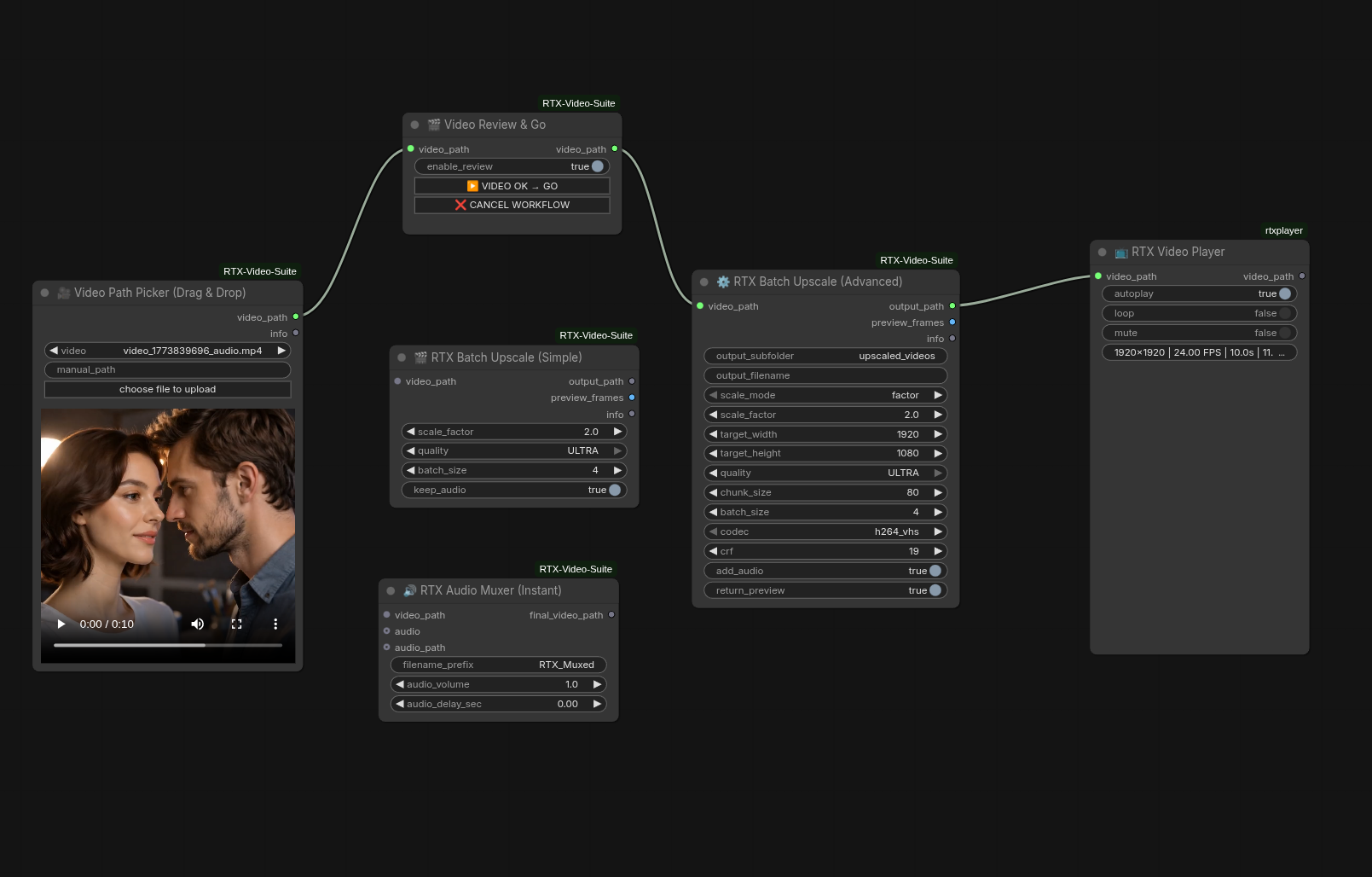
Upscaling long videos in ComfyUI finally works exactly as it should. No out-of-memory (OOM) crashes, no killing your SSD with thousands of temporary PNG files, and no silent freezes after 4 hours of rendering.
This suite wraps NVIDIA Video Effects (VFX) SDK (part of NVIDIA AI for Media, formerly known as Maxine) into a bulletproof, production-ready pipeline. It features true streaming, real non-blocking I/O, and an architecture designed to survive extreme workloads.
🌟 Why does this exist?
Most video nodes in ComfyUI do one of two things:
- They load the entire video into RAM at once (Instant OOM).
- They save every single processed frame to your hard drive before using FFmpeg to stitch them together (Terrible for SSD lifespan and painfully slow).
This suite does neither. It uses a highly optimized Producer-Consumer architecture. Frames are read in chunks, processed on your RTX GPU, and the raw RGB bytes are streamed directly into FFmpeg's memory pipe. Zero temporary files. Pure speed.
✨ Features
- 🛡️ Bulletproof Pipeline: Hardware-level I/O handling (
os.write), EINTR resistance, and watchdog threads. If FFmpeg chokes, the GPU waits (True Backpressure). It simply does not crash. - 💾 Zero Disk I/O: Frames go from GPU memory straight to the encoder.
- 🖱️ Native Drag & Drop: A custom Video Path Picker node that supports ComfyUI's native drag-and-drop, but outputs a clean
STRINGpath to save your RAM. - 🎵 Audio Muxing: Automatically preserves and muxes all original audio and subtitle streams without lossy re-encoding.
- 🖥️ Standalone CLI: Don't want to open ComfyUI? Run the script directly from your terminal with a beautiful progress bar.
🛠️ Prerequisites
You must have an NVIDIA RTX GPU and the NVIDIA Video Effects (VFX) SDK installed.
- Windows: Download and install the NVIDIA Video Effects (VFX) SDK from the NVIDIA NGC Catalog (part of NVIDIA AI for Media, formerly Maxine).
- Ensure you have the
nvvfxPython module available in your ComfyUI environment. - FFmpeg must be installed and available in your system's PATH.
Note: The old GitHub repository
NVIDIA/MAXINE-VFX-SDKwas archived after NVIDIA rebranded Maxine to AI for Media. The SDK itself is still fully supported and actively maintained.
📦 Installation
Navigate to your ComfyUI custom_nodes folder and clone this repository:
cd ComfyUI/custom_nodes
git clone [https://github.com/uczensokratesa/ComfyUI-RTX-Video-Suite.git](https://github.com/uczensokratesa/ComfyUI-RTX-Video-Suite.git)
(Restart ComfyUI after installation).
🧩 The Nodes
1. 🎥 Video Path Picker (Drag & Drop)
Standard Load Video nodes output heavy IMAGE tensors. This node looks identical, allows you to drag & drop videos into it, but smartly outputs the video_path string. This keeps your RAM completely empty before processing starts.

2. 🎬 RTX Batch Upscale (Simple)
The streamlined version. Plug in your video path, choose your scale factor (e.g., 2.0x), select the quality, and hit Queue. It handles the naming, folder creation, and audio muxing automatically.

3. ⚙️ RTX Batch Upscale (Advanced)
For power users. Take full control over the FFmpeg crf quality, specific target resolutions, chunk sizes, and batch sizes to perfectly balance your VRAM usage.

4. ⏸️ VAE Review → RTX Confirm (Interactive Checkpoint)
The ultimate "Human-in-the-loop" bridge. This node acts as a smart gatekeeper between your VAE video generation and the heavy upscaling process. It ensures you never waste hours upscaling a "dud" generation.

Smart Path Sanitization: Automatically cleans messy output strings from VAE Streaming or Video Combine nodes, extracting the exact file path needed for the next step.

Integrated Video Player: Uses high-performance addDOMWidget technology to embed a native HTML5 video player directly onto the node. Watch your generation with full playback controls before committing.

Workflow Synchronization: Pauses the entire ComfyUI execution thread, waiting for your manual "Go" or "Cancel".

Automation-Friendly: Includes an enable_review toggle. Turn it OFF for unattended 24/7 batch processing (where it acts as a silent path cleaner), or ON when you want to curate the results personally.

5. 🔊 RTX Audio Muxer (Instant)
**Fastest way to combine audio with your upscaled video.** This node uses FFmpeg "stream copying" technology to inject audio into a video file in milliseconds, without re-encoding the video (preserving 100% of the RTX Upscale quality).

* **Inputs:**
    * `video_path`: Path to your upscaled MP4 file.
    * `audio`: (Optional) Connect raw AUDIO tensors (e.g., from Audio Separator or Load Audio).
    * `audio_path`: (Optional) Provide a direct path to an existing .mp3 or .wav file.
* **Features:**
    * **Instant Muxing:** No video re-rendering (uses `-c:v copy`).
    * **Audio Delay/Advance:** Precisely sync audio with video (±10 seconds).
    * **Volume Control:** Boost or lower audio levels (0x to 10x).
    * **Auto-Cleanup:** Automatically manages temporary files generated from audio tensors.
    * **Organization:** Saves final files in a dedicated `output/rtx_muxed` folder with timestamps.
> [!IMPORTANT]
> **FFmpeg is required** for the RTX Audio Muxer node.
> Ensure FFmpeg is installed and added to your system's PATH.
> You can check this by typing `ffmpeg -version` in your terminal.

6. 📺 RTX Video Player (Path-Based)
**The ultimate playback companion for your video workflows.** Unlike the Review node, this is a "passive" player—it doesn't pause the execution. It simply monitors the provided path and, as soon as the file is ready, renders an high-performance HTML5 video player directly on the node.

* **Inputs:**
    * `video_path`: Direct path to any video file (works perfectly with Upscale or Muxer outputs).
* **Features:**
    * **Instant Metadata:** Automatically displays resolution, FPS, duration, and file size beneath the player.
    * **Smart Playback:** Toggleable `autoplay`, `loop`, and `mute` (essential for browser compatibility).
    * **Pass-through Architecture:** Features a `video_path` output, allowing you to chain it anywhere in your workflow without breaking the logic.
    * **Dynamic Resizing:** The node automatically adjusts its height to match the aspect ratio of your video (from 9:16 shorts to 21:9 cinematic renders).
    * **Zero-Cache Tech:** Uses a timestamp-based buster to ensure you always see the latest render, not a cached version.


💻 CLI Usage (Standalone)
This suite doubles as a standalone Python script!

Bash
# Basic 2x Upscale
python rtx_nodes.py -i input.mp4 -o output.mp4 -s 2.0 -q ULTRA

# Advanced: Custom batch size and disable audio muxing
python rtx_nodes.py -i input.mp4 -o output.mp4 -s 2.0 -b 8 --no-audio
🤝 Credits: The "AI Ensemble"
This codebase is the result of a unique collaboration between a human architect and a choir of AI models:

Claude: UI/UX design, ComfyUI node structuring, and elegant fallback mechanics.

Gemini: Pipeline architecture, FFmpeg stdin piping, and Producer-Consumer queue integration.

Grok: Low-level OS I/O hardening, partial write resistance, and VFR/FPS preservation.

GPT: Deadlock prevention, watchdog threads, and robust audio stream mapping.
📜 Changelog
[v1.1.0] - 2026-03-21
"The UX & Workflow Update"

NEW Node: RTX Video Player – A passive UI component that allows you to watch your renders directly in ComfyUI without stopping the workflow. Includes automatic metadata detection (Resolution, FPS, File Size).

REFACTORED Node: Video Review & Go – Complete rewrite of the old "Confirm" node.

Improved naming convention for inputs (video_path instead of vae_output) for better compatibility with other suites.

Optimized file locking handling for Windows users.

Standardized Data Types – All nodes now use video_path as a universal string exchange format, making the suite 100% compatible with standard ComfyUI "Load Video" or "Save Video" paths.

Performance – Improved FFmpeg stream handling in the Audio Muxer.

[v1.0.0] - 2026-02-15
"The Foundation"

Initial Release of the RTX Video Suite.

Core Engine – Integration with NVIDIA Video Effects (VFX) SDK (AI for Media) for RTX Video Super Resolution.

RTX Batch Upscale (Simple/Advanced) – High-performance upscaling for MP4/AVI containers.

Native Video Path Picker – Drag-and-drop file path provider for local files.

RTX Audio Muxer – Instant, zero-re-encode audio injection into upscaled videos.
## 🚀 Roadmap
- [ ] **RTX Director Suite** – Sequential video generation from text scenarios.
- [ ] **Frame-Bridge Logic** – Automatic "Last Frame" to "Next Start" conditioning for seamless long-form video.