
ComfyUI-Grok-SmartVAE
Most durable and flexible VAE decoder for ComfyUI designed for long video sequences with crash-proof dynamic batching, temporal scale detection, and aggressive out-of-memory recovery. (Description by CC)
Nodes (5)
Re-decode your render ten times without re-sampling once
The 10-second peek that saves a 20-minute decode
Killing the color flicker at your video's chunk seams
Decode the video your RAM was never going to hold
Your video decode is not supposed to be the step that kills the render
ComfyUI-Grok-SmartVAE
Version 12.0.0 - Production-Ready Video Workflow Suite
The most robust and memory-efficient VAE decoder suite for ComfyUI video workflows
🎯 What's Included
This package provides 5 production-ready nodes
| Node | Purpose | Best For | |------|---------|----------| | 🎬 Universal Smart VAE Decode | In-memory full-tensor decode | Short videos (<500 frames), high VRAM | | 🎬 SmartVAE Streaming Decoder | Frame-by-frame encoding to disk | Long videos (500+ frames), limited RAM | | 🎞️ SmartVAE Advanced Decoder | Streaming + temporal color correction | Professional quality, zero flicker | | 📂 Advanced Load Latent | Load saved latents with metadata | Iterative refinement workflows | | 🔍 Latent Metadata Viewer | Inspect latent files without loading | Quick library browsing |
✨ Key Features
Memory Efficiency
- ✅ Frame-by-frame decoding → 80% less RAM than standard pipeline
- ✅ Streaming video output → no full tensor in memory
- ✅ Automatic OOM recovery → tiling, batch reduction, VRAM detection
- ✅ Handles 2000+ frames on 16GB RAM systems
Production Quality
- ✅ Perfect audio sync → zero offset even on 40s+ videos
- ✅ Zero-flicker color correction → seamless chunk boundaries
- ✅ Crash recovery → resume from checkpoint
- ✅ Multiple codecs → H.264, H.265, ProRes 422, FFV1 lossless
Developer Friendly
- ✅ Automatic time scale detection → works with any VAE
- ✅ Detailed diagnostics → corrupted latent detection with actionable fixes
- ✅ Ignore warnings mode → user choice on risk tolerance
- ✅ Live thumbnails → monitor progress in ComfyUI UI
🚀 Quick Start
Installation
cd ComfyUI/custom_nodes
git clone https://github.com/uczensokratesa/ComfyUI-Grok-SmartVAE.git
cd ComfyUI-Grok-SmartVAE
pip install -r requirements.txt
Dependencies:
torch>=2.0.0imageio>=2.31.0imageio-ffmpeg>=0.4.9numpy>=1.24.0safetensors>=0.4.0(for Load Latent node)
- In your
custom_nodesfolder:git clone https://github.com/uczensokratesa/ComfyUI-Grok-SmartVAE.git The node appears in category: latent/video → Universal VAE Decode (v11.1 Final)Comparison with predecessorsModel
Scale Detection Force Scale Dynamic Batch Reduction Auto-Tiling on OOM Loop Type Stability Rating GPT basic ✗ ✗ ✗ for ★★☆☆☆ Gemini good ✗ partial ✓ for ★★★★☆ Claude very precise ✗ ✗ ✓ for ★★★★☆ Grok v11.1 very precise ✓ full (while + adaptive) aggressive while ★★★★★
Evolution – AI collaboration storyThis journey started as a simple task: create a reliable VAE Decode node for heavy video workflows.GPT provided the first working version
Gemini added tiling and better OOM handling
Claude brought the most accurate scale detection formula
Grok introduced force_time_scale + true dynamic while-loop batch reduction
Kimi contributed extreme memory safety (disk offload, pre-allocation, aggressive cleanup)
Final polish by Claude → production-ready stability
One of the nicest examples of how different AI models can iteratively improve each other and create something better than any single one could alone.LicenseMIT – feel free to use, modify, fork. Just keep the original idea attribution (and let me know if you make something even better )Happy generating! Current version: 11.2 – First official Comfy Registry release
🎬 Universal Smart VAE Video Decode (Streaming)
The most memory-efficient way to decode large video latents directly to file.
Features
- Ultra-low RAM usage — decodes frame-by-frame, supports 2000+ frames even on 16 GB systems
- Direct disk output — no need to hold full video tensor in memory
- Audio muxing — perfect support for ComfyUI AUDIO input + manual audio_path
- Codecs: H.264, H.265, ProRes 422, FFV1 (lossless)
- Crash recovery — resumes from checkpoint if interrupted
- Thumbnail previews — live monitoring in UI
- OOM protection — automatic tiling, batch reduction, VRAM/RAM detection
When to use
- Generating long videos from AnimateDiff, LTX-Video, Mochi, Hunyuan, Cosmos, etc.
- Working with limited VRAM/RAM
- Need reliable audio sync without post-processing
Inputs
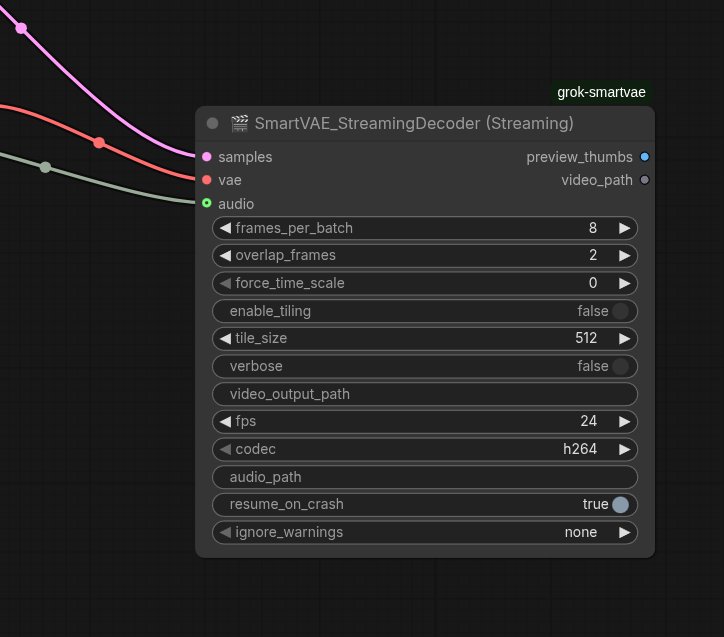
samples(LATENT) – video latent sequencevae– your VAE modelframes_per_batch– 8–32 (auto-reduces on OOM)audio– ComfyUI AUDIO input (from Load Audio)audio_path– optional direct path to .wav/.mp3- codec, fps, output path, etc.
Outputs
preview_thumbs(IMAGE) – last few thumbnails for monitoringvideo_path(STRING) – final file path (with audio if provided)
Enjoy massive video workflows without OOM crashes! 🚀
🛡️ Ignore Warnings Mode (v1.0.9)
Problem: When the sampler runs out of VRAM during long video generation, it produces corrupted latents (100% NaN values) but doesn't throw an error (silent OOM). Users then face black frames or workflow crashes without understanding why.
Solution: The Streaming node (and VAE) now includes a 3-tier ignore_warnings safety system:
How It Works
- Validation on Decode: Before decoding, the node checks if the latent contains NaN values (corruption indicator)
- Detailed Diagnostics: Shows exactly which frames are corrupted and corruption percentage
- User Choice: Instead of hard-failing, users can choose their risk tolerance:
Basic Usage
Generate long video:
[Empty Latent] (1200 frames, 768x512)
  ↓
[KSampler] (LTX-Video 2 model)
  ↓
[🎬 SmartVAE Streaming Decoder]
  frames_per_batch: 8
  codec: h264
  fps: 24
  ↓
Output: video_1234567890.mp4
With color grading:
[Empty Latent] → [KSampler] → [Save Latent]
  ↓
[📂 Advanced Load Latent] → [Load Image] (reference)
  ↓                           ↓
[🎞️ SmartVAE Advanced Decoder]
  anti_color_bleed: ON
  correction_strength: 0.18
  ↓
Output: video_graded.mp4 (zero flicker, consistent color)
📚 Node Documentation
🎬 SmartVAE Streaming Decoder
Purpose: Memory-efficient video generation with direct disk output.
Key Parameters:
| Parameter | Default | Description |
|-----------|---------|-------------|
| frames_per_batch | 8 | Frames per decode batch (auto-reduces on OOM) |
| overlap_frames | 2 | Temporal overlap for seamless stitching |
| fps | 24 | Output frame rate |
| codec | h264 | h264 (compatible) / h265 (smaller) / prores / ffv1 (lossless) |
| audio | None | ComfyUI AUDIO input (perfect sync) |
| ignore_warnings | none | Corrupted latent handling (none/minor/all) |
Advanced Parameters:
force_time_scale(0=auto, 8 for LTX-Video)enable_tiling(auto-enables on OOM)resume_on_crash(checkpoint recovery)
Recommended Settings by Video Length:
| Length | Frames | frames_per_batch | Expected RAM | |--------|--------|------------------|--------------| | Short (5-15s) | 120-360 | 16-32 | 4-8 GB | | Medium (20-40s) | 480-960 | 8-16 | 8-12 GB | | Long (50s+) | 1200+ | 4-8 | 12-16 GB | | Ultra (2min+) | 3000+ | 4 | 16+ GB |
Common Issues:
Q: Video is all black frames
- Cause: Corrupted latent from sampler (OOM during generation)
- Solution: Check console for NaN detection warning. Reduce video length by 40%, lower CFG scale, or enable CPU offload in sampler.
Q: Audio desync (was 1s offset)
- Solution: Fixed in v1.0.10! Upgrade to latest version.
Q: Out of memory during decode
- Solution: Node auto-reduces batch size. If still failing, manually set
frames_per_batch: 4andenable_tiling: ON.
🎞️ SmartVAE Advanced Decoder
Purpose: Streaming decoder + temporal color correction for professional output.
New Feature: Ramped Temporal Color Correction v2.3.1
- Zero flicker at chunk boundaries
- Gradual cross-fade correction (imperceptible transitions)
- Tested: 50s+ videos, LTX-Video 2 compatible
- Overhead: ~2-5% processing time
Key Parameters:
| Parameter | Default | Description |
|-----------|---------|-------------|
| anti_color_bleed | True | Seamless temporal color matching |
| calibration_image | None | Reference image for color grading |
| correction_strength | 0.18 | 0.10-0.15 (subtle), 0.18 (balanced), 0.20-0.25 (strong) |
| cross_fade_frames | 12 | Fade duration (0.5s @ 24fps) |
| ema_momentum | 0.93 | Color evolution smoothing (0.7-0.98) |
Three Correction Modes:
-
Temporal only (
anti_color_bleed: ON, no reference)- Auto-matches chunk boundaries
- Natural color evolution
-
Reference only (
anti_color_bleed: OFF, reference image provided)- Matches first chunk to reference
- Rest evolves naturally
-
Temporal Match (BOTH enabled - recommended)
- Reference sets initial anchor
- Temporal ensures continuity throughout
Parameter Guide by Use Case:
| Use Case | correction_strength | cross_fade_frames | ema_momentum | |----------|---------------------|-------------------|--------------| | Subtle/natural | 0.10-0.15 | 8 | 0.93 | | Balanced (default) | 0.18 | 12 | 0.93 | | Cinematic/strong | 0.20-0.25 | 12-18 | 0.93-0.95 | | Dynamic lighting | 0.15-0.18 | 8-12 | 0.70-0.85 | | Locked to reference | 0.20-0.25 | 18-24 | 0.95-0.98 |
Troubleshooting:
- Still seeing color jumps? → Increase
correction_strengthto 0.25-0.30, add reference image - Colors look artificial? → Decrease
correction_strengthto 0.10-0.15 - Not tracking dynamic lighting? → Decrease
ema_momentumto 0.7-0.85
📂 Advanced Load Latent
Purpose: Load saved latents for iterative workflows without re-sampling.
Features:
- ✅ Auto-scan
output/latents/directory - ✅ Dropdown selection with refresh button
- ✅ Metadata display (shape, seed, timestamp, format)
- ✅ PyTorch 2.6+ compatible (safetensors primary, pickle fallback)
- ✅ Manual path override
Workflow Example: Iterative Color Grading
Step 1: Generate & Save
  [Empty Latent] (1200 frames) → [KSampler] (seed=42)
    ↓
  [Save Latent] → output/latents/base_1200f_s42.latent

Step 2: First Attempt
  [📂 Advanced Load Latent] → base_1200f_s42.latent
    ↓
  [🎞️ SmartVAE Advanced Decoder] (strength=0.15)
    ↓
  Output: video_001.mp4 (too subtle)

Step 3: Iterate (no re-sampling!)
  [📂 Advanced Load Latent] → base_1200f_s42.latent (same file)
    ↓
  [🎞️ SmartVAE Advanced Decoder] (strength=0.25, +reference)
    ↓
  Output: video_002.mp4 (perfect!)

Time saved: ~5 minutes per iteration × 3-4 tests = 15-20 minutes ✅
Supported Formats:
.latent(ComfyUI default).safetensors(modern, secure)
Outputs:
samples(LATENT) → connect to decodermetadata_json(STRING) → shape, seed, timestamp, format
🔍 Latent Metadata Viewer
Purpose: Quick inspection without loading full tensor (10GB+ files).
Use Case: Browse large latent collections, organize by seed/date/format.
Outputs:
shape→ "[1, 4, 121, 80, 120]"seed→ "42"timestamp→ "2025-02-26T15:30:00"format→ "safetensors" or "pickle"
🛡️ Safety Features
Corrupted Latent Detection (v1.0.9+)
Problem: When samplers run out of VRAM, they produce corrupted latents (NaN values) without throwing errors. Users get black frames without understanding why.
Solution: Pre-decode validation with user choice:
🚨 CORRUPTED LATENT DETECTED!
   NaN values: 4,567,890 / 49,152,000 (9.29%)
   Affected frames: 856 to 1200

💊 RECOMMENDED FIXES:
   1. REDUCE VIDEO LENGTH: 1201 → 720 frames (most effective)
   2. REDUCE RESOLUTION
   3. Lower CFG scale (7.0 → 3.5)
   4. Enable CPU offload in sampler
Ignore Warnings Modes:
| Mode | Behavior | Use Case |
|------|----------|----------|
| none (default) | Stop with error + solutions | Safe, prevents wasted time |
| minor | Continue if <10% corrupted | Partial recovery (some black frames OK) |
| all | Force decode anyway | Desperate (high crash risk) |
User makes informed decision instead of blaming the node.
🐛 Known Limitations
LTX-Video 2 Architecture Limitation
Issue: LTX-Video 2 has a hard architectural limit that can cause latent corruption on long videos.
NOT a node bug - this is a model limitation:
- Symptom: NaN values in latent after ~1000-1200 frames
- Root cause: LTX-2 model architecture (not VRAM issue)
- Solution: Keep videos under 40-45s (~1000 frames @ 24fps)
Wrong diagnosis (old README):
❌ "Silent VRAM death" → implied decoder bug
Correct diagnosis (updated):
✅ "LTX-2 architectural limit" → model constraint
If you hit this limit:
- Reduce video length to ~1000 frames
- Split into multiple segments
- Use different model (CogVideoX, AnimateDiff, etc.)
📊 Performance Benchmarks
Test System: RTX 3090 (24GB VRAM), 64GB RAM
| Scenario | Standard Pipeline | SmartVAE Streaming | Savings | |----------|-------------------|-------------------|---------| | 30s video (720 frames, 768x512) | 18.2 GB RAM | 3.8 GB RAM | 79% ↓ | | 60s video (1440 frames, 768x512) | 36.4 GB RAM (OOM) | 7.2 GB RAM | 80% ↓ | | With color correction | N/A | +2-5% time | Minimal | | Audio muxing (old) | 45s (re-encode) | 4s (stream copy) | 91% ↓ |
🎨 Example Workflows
Basic: Long Video Generation
[Empty Latent] (1200 frames, 768x512, batch=1)
  ↓
[KSampler] (LTX-Video 2 VAE, steps=30, cfg=3.5)
  ↓
[🎬 SmartVAE Streaming Decoder]
  frames_per_batch: 8
  fps: 24
  codec: h264
  ↓
Output: video.mp4 (50s, perfect quality)
Advanced: Color-Graded with Reference
[Load Image] → reference.png
  ↓
[Empty Latent] → [KSampler] → [Save Latent] → base.latent
  ↓
[📂 Advanced Load Latent] → base.latent
  ↓        ↓
  ↓      reference.png
  ↓        ↓
[🎞️ SmartVAE Advanced Decoder]
  anti_color_bleed: ON
  calibration_image: (connected)
  correction_strength: 0.18
  cross_fade_frames: 12
  ↓
Output: graded.mp4 (zero flicker, matches reference color)
Pro: Iterative Refinement
[KSampler] → [Save Latent] → base_s42.latent

[📂 Advanced Load Latent] → base_s42.latent
  ↓
[🎞️ Advanced Decoder] → try strength=0.15 → video_v1.mp4 (too subtle)

[📂 Advanced Load Latent] → base_s42.latent (same file)
  ↓
[🎞️ Advanced Decoder] → try strength=0.25 → video_v2.mp4 (perfect!)

No re-sampling! Instant iteration!
🏗️ Technical Details
Architecture
Base Class: SmartVAE_StreamingDecoder
- Frame-by-frame VAE decode
- Dynamic batch reduction (while loop)
- Automatic tiling on OOM
- StreamingVideoWriter (imageio backend)
Advanced Class: SmartVAEAdvancedDecoder (inherits base)
- Adds ramped temporal color correction
- EMA-based color evolution tracking
- Chunk boundary cross-fade
Load Latent: Standalone utility
- Safetensors primary (PyTorch 2.6+ compatible)
- Pickle fallback (legacy support)
- Metadata extraction without full load
Audio Sync Fix (v1.0.10)
Problem: 1s audio offset on long videos.
Root cause: Video re-encoding during mux → encoder delay → PTS misalignment.
Solution:
# Before (broken):
ffmpeg -i video.mp4 -i audio.wav -c:v libx264 ...  # Re-encodes!

# After (fixed):
ffmpeg -fflags +genpts -i video.mp4 -i audio.wav \
  -c:v copy \                    # Stream copy (no re-encode)
  -vsync cfr \                   # Constant frame rate
  -af asetpts=PTS-STARTPTS \     # Reset audio PTS
  -itsoffset 0 ...               # Force video t=0
Result: Zero offset, 10x faster muxing, lossless quality.
🤝 Credits & Evolution
This project is a collaboration across multiple AI models:
- GPT → Foundation sliding-window + overlap
- Gemini → Safety-first tiling fallback
- Claude → Precise temporal scale detection + QA
- Grok 4.2 → Dynamic batch reduction + ramped color correction
- Kimi → Memory-safety patterns
- OpenAI Codex → Bug fixes + resume logic
Key Contributors:
- uczensokratesa - Project lead
- Community feedback - Feature requests & testing
One of the best examples of iterative AI collaboration creating something better than any single model could alone.
📄 License
MIT License - Feel free to use, modify, fork.
Attribution appreciated but not required.
🔗 Links
- Repository: https://github.com/uczensokratesa/ComfyUI-Grok-SmartVAE
- Issues: https://github.com/uczensokratesa/ComfyUI-Grok-SmartVAE/issues
- ComfyUI Registry: Coming soon
📝 Changelog
v11.5.0 (Branch: Twonewnodes)
- ✨ NEW: Advanced Load Latent node (PyTorch 2.6+ compatible)
- ✨ NEW: Latent Metadata Viewer
- ✨ NEW: SmartVAE Advanced Decoder v2.3.1 (ramped color correction)
- 🐛 FIX: Audio sync issue (1s offset eliminated)
- 🐛 FIX: Complete
__init__in Advanced Decoder (edge case crashes) - ⚡ OPT: Optimized stats extraction (~5-10% speedup)
- 📝 DOC: Complete README rewrite with accurate diagnostics
v1.0.10 (Streaming Decoder)
- 🐛 FIX: Critical audio sync bug (stream copy + PTS normalization)
- 🐛 FIX: NaN detection with actionable error messages
- ✨ NEW: Ignore warnings mode (none/minor/all)
- 📝 DOC: Clarified LTX-2 architectural limitation (not VRAM bug)
v1.0.9
- ✨ NEW: Corrupted latent detection with diagnostics
- ✨ NEW: Ignore warnings safety system
- 🐛 FIX: NaN handling in normalization
v11.2
-
✨ First ComfyUI Registry release
-
✨ Production-ready stability
v12.5
-
✨ Rewrite code for Advanced Decoder by Claude AI.
-
✨ Independent from Streaming Decoder to really have ability to color correction.
v13.0
- ✨Rewrite code for finding dimensions of video Decoder by Gemini and Claude AI. Full Dimension Support and Safe Error Handling (Universal Smart VAE Decode)This update brings critical improvements to the VAE decoding pipeline, making the Universal Smart VAE Decode node the most stable and reliable video decoding solution for ComfyUI. We have eliminated long-standing issues with non-standard aspect ratios and introduced a powerful new error-recovery system. What's New?1. Complete Freedom in Resolution and Aspect Ratio (No more ghosting, black bars, or corrupted output)Problem: Previous versions (and many other decoders) attempted to infer the output shape (Frames, Height, Width) by sorting dimensions numerically. This approach broke when generating long videos in lower resolutions — for example, when the frame count exceeded the pixel dimensions of height or width.Solution: We completely rewrote the _normalize_output function. The new algorithm no longer guesses dimensions based on size. Instead, it reliably detects color channels (RGB/RGBA) by position and dynamically assembles tensors into the correct [Frames, Height, Width, Channels] format.Result: You can now generate videos in any resolution, aspect ratio, and duration without decoding errors.2. New ignore_warnings Mode (Crash Protection for VRAM-intensive Generations)Video generation is extremely memory-intensive. Occasionally, a brief VRAM spike at the very end of a long render can corrupt a small portion of the latent (introducing NaN values). Most nodes would crash and discard hours of work. We changed that.The new ignore_warnings parameter offers three safety levels: none (Default / Safe) Stops execution on error but provides a detailed console report, including the exact percentage of corrupted data, affected frame ranges, and practical advice on how to prevent the issue. minor (Recommended for video recovery) Forces the VAE to continue if damage is below 10%. Corrupted frames (usually at the end) will be rendered as black frames, but the node completes successfully and saves the intact portion of the video. all (Maximum Force) Ignores all errors and pushes data through the VAE at all costs. Higher risk of completely black output, but gives the best possible chance of salvaging the generation.
Under the Hood (Technical Changes)Replaced dimension-based sorting and tensor.permute logic with robust shape verification using tensor.shape[-1] in (3, 4). Damaged latents (NaN / Inf) are now safely sanitized before decoding using torch.nan_to_num(tensor, nan=0.0, posinf=1.0, neginf=0.0). This prevents GPU driver crashes. Enhanced memory cleanup logic (gc.collect() + torch.cuda.empty_cache()) in critical failure scenarios.
Happy generating! 🎬✨