
4A Prompt Manager
Folder-backed prompt library and multi-track scheduler for ComfyUI, plus optional NovelAI (NAI) nodes. Browse/edit wildcards and JSON cards with LoRAs, sparse generation settings, and sparse nai fields; auto-apply models/params and embed wildcard LoRAs per queue job; NAI serial batch with resume; reuse image metadata; save with A1111-style parameters.
Nodes (8)
Flip a whole subgraph to Bypass from one boolean
Set your second sampling pass once — and let the recipe travel with the image
The save node that writes the A1111 metadata CivitAI actually wants
One node to define the whole sampling recipe — and take it with you
Drop an image on the canvas and get its whole recipe back
Read what a generation was made from
The prompt library, docked inside your canvas
The engine that turns wildcard folders into batched generations
ComfyUI-4A-Prompt-Manager
Companion NovelAI generation plugin: ComfyUI-4A-NovelAI
Chinese video guide (Bilibili): https://www.bilibili.com/video/BV1DWKv6NE6t
Update #1 (Bilibili): https://www.bilibili.com/video/BV1Ccg86nErh
Folder-backed prompt library and scheduler for ComfyUI: browse/edit wildcards and JSON cards (LoRAs + sparse generation settings), assemble multi-track prompts, auto-apply settings on Wildcard batch runs, reuse image metadata, and save generations with portable parameters.
Current release: 1.5.1
- Image metadata reading supports ComfyUI's native format: when no 4APM or A1111 metadata is present, prompts, sampler settings, models, and LoRAs are read from the executed graph ComfyUI saves by itself (PNG / WebP)
- The full-metadata view shows ComfyUI's executed graph (
prompt) while still hiding the canvas data (workflow)
1.5.0
- Adds a workflow-level receiving Scheduler: Browser, Prompt Display, and Meta Apply pick the target by
prompt_jsonwire > dropdown choice > the only Scheduler; with several Schedulers you can choose one or all, and the choice is saved with the workflow - Fixes Image Saver no longer detecting the base model when no model name is given (it again uses the only Checkpoint / UNet upstream of
images) - Supports the assets panel in newer ComfyUI versions: images dragged from it, including ones in output subfolders, load correctly
- Nested
__wildcard__references inside card negatives (including cards in the fixed negative) are now expanded recursively - Saving an unchanged card no longer rewrites the file or creates an archive copy
- Detail-view send, apply models / LoRA / parameters, and send NAI settings all use the saved card content
- When official Queue temporarily applies card settings, the canvas is restored even if applying fails midway
- Removes redundant code and polling; Browser follows workflow switches more reliably
1.4.4
- Fixes commas before line breaks in the Scheduler being stripped
1.4.3
- Caches Wildcard leaf sizes so large folder
__key__expands stay fast after the first count
1.4.2
- Image Saver writes prompt, parameter, and hash metadata only from connected or filled inputs; unconnected optional inputs no longer add default or empty structures
1.4.1
- Caches the Wildcard library snapshot so official Queue no longer rebuilds the whole library on every click; plain text skips the snapshot entirely
- Remembers Browser folder, view, and send mode per workflow instead of sharing one global UI state
1.4.0
- Adds NovelAI (NAI) Browser mode, sparse
naicard fields, NAI image metadata reading, and sending prompts/settings to external NAI nodes - Moves generation nodes into standalone ComfyUI-4A-NovelAI; Prompt Manager still works without that plugin
- Converts Comfy / NAI weights only when the active mode has no native text; detail view, copy, send, and Wildcard expansion share the same rules
- Flattens NAI characters into
charN:lines when a card is used in Comfy - Writes edits back to the current mode only, without overwriting the other mode's native text
- Persists Meta Apply / Meta Loader previews via
/viewafter upload so they survive workflow switches and restarts
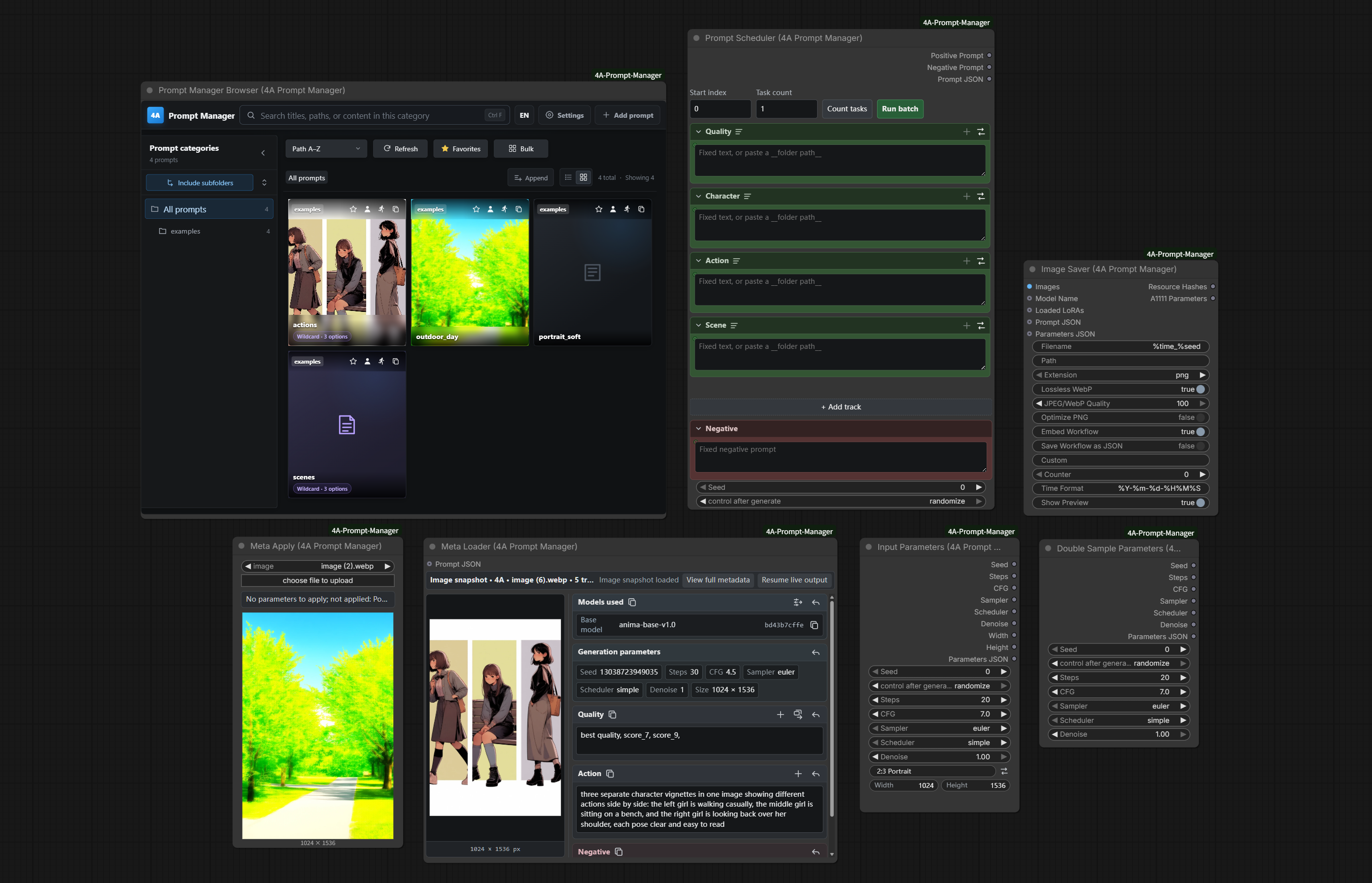
Highlights
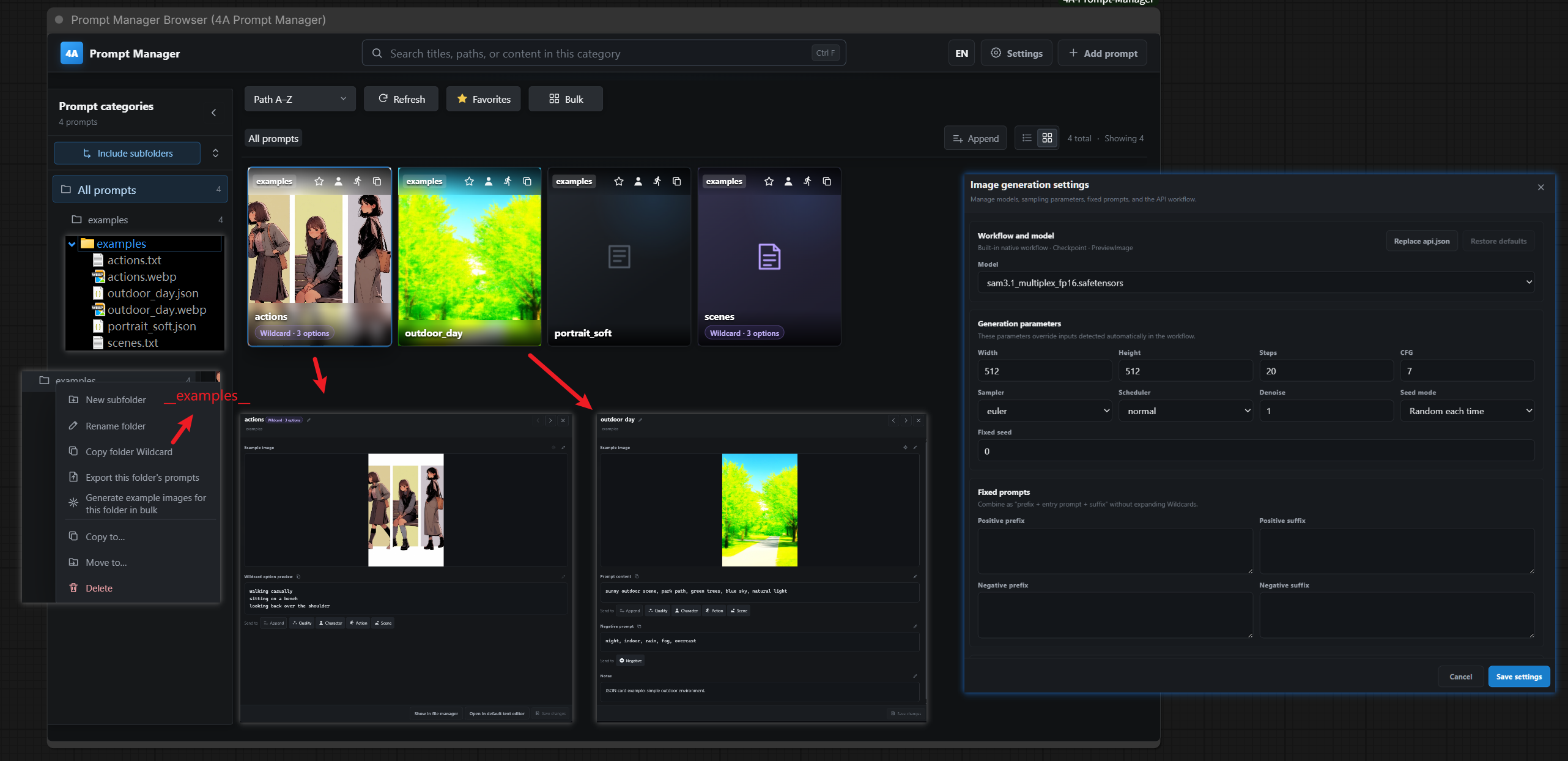
Prompt Manager frontend
A full, easy-to-use library UI. Prompts live as a normal folder tree (JSON cards + TXT wildcards), so you can back up or share by copying folders; import/export freely; generate preview images for cards (uses a built-in API workflow, or replace it with your own api.json). The last folder and sidebar expansion are remembered across reloads. After a library refresh you can align card model names to local files by hash.
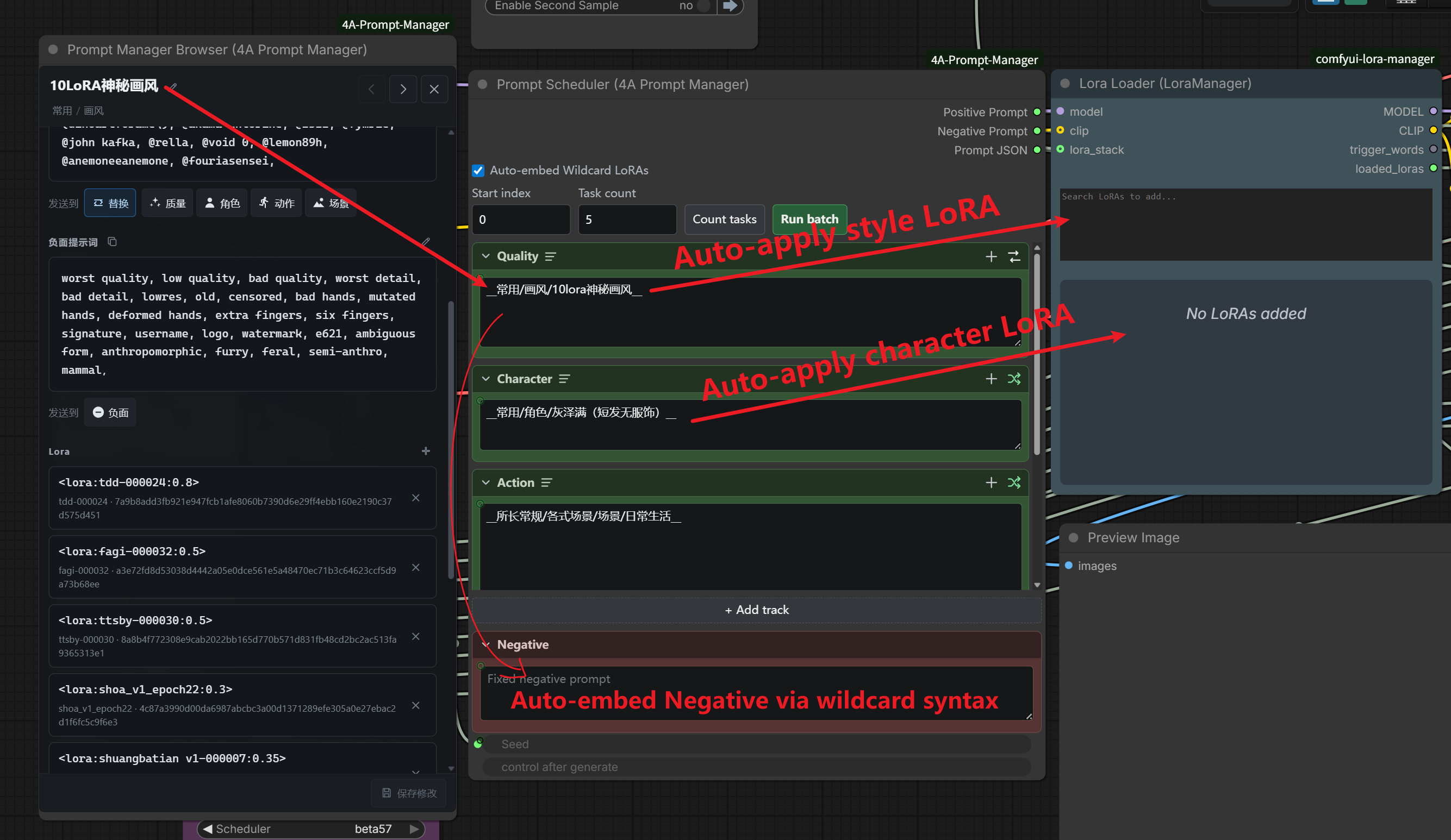
JSON card LoRAs / generation settings + wildcard auto-apply
JSON cards can sparsely store LoRAs, models, sampler settings (including seed/size), and double-sample settings. Empty fields are omitted from JSON; presence of a double-sample block means second pass ON (no separate enable flag). When Scheduler tracks resolve those cards via wildcard syntax, enable Auto-embed Wildcard LoRAs and/or Auto-apply models / inference parameters to write matching nodes before queueing, then restore the canvas baseline (seed is not restored). With auto-embed on, Group same models / LoRAs queues jobs that share the same stack together to reduce reloads. Conflict rules: LoRAs stack (skip same name); everything else is first-wins per field. Bypass Switch follows whether the card has double-sample fields—wire the second-pass subgraph/parameters into it (one switch per workflow for now). Dropping an image when creating a card still reads prompts only by default; use Load generation settings from image (with overwrite confirm) for models/params/size/LoRA. Detail view can also push the saved models / LoRA / parameters into the canvas in one click.
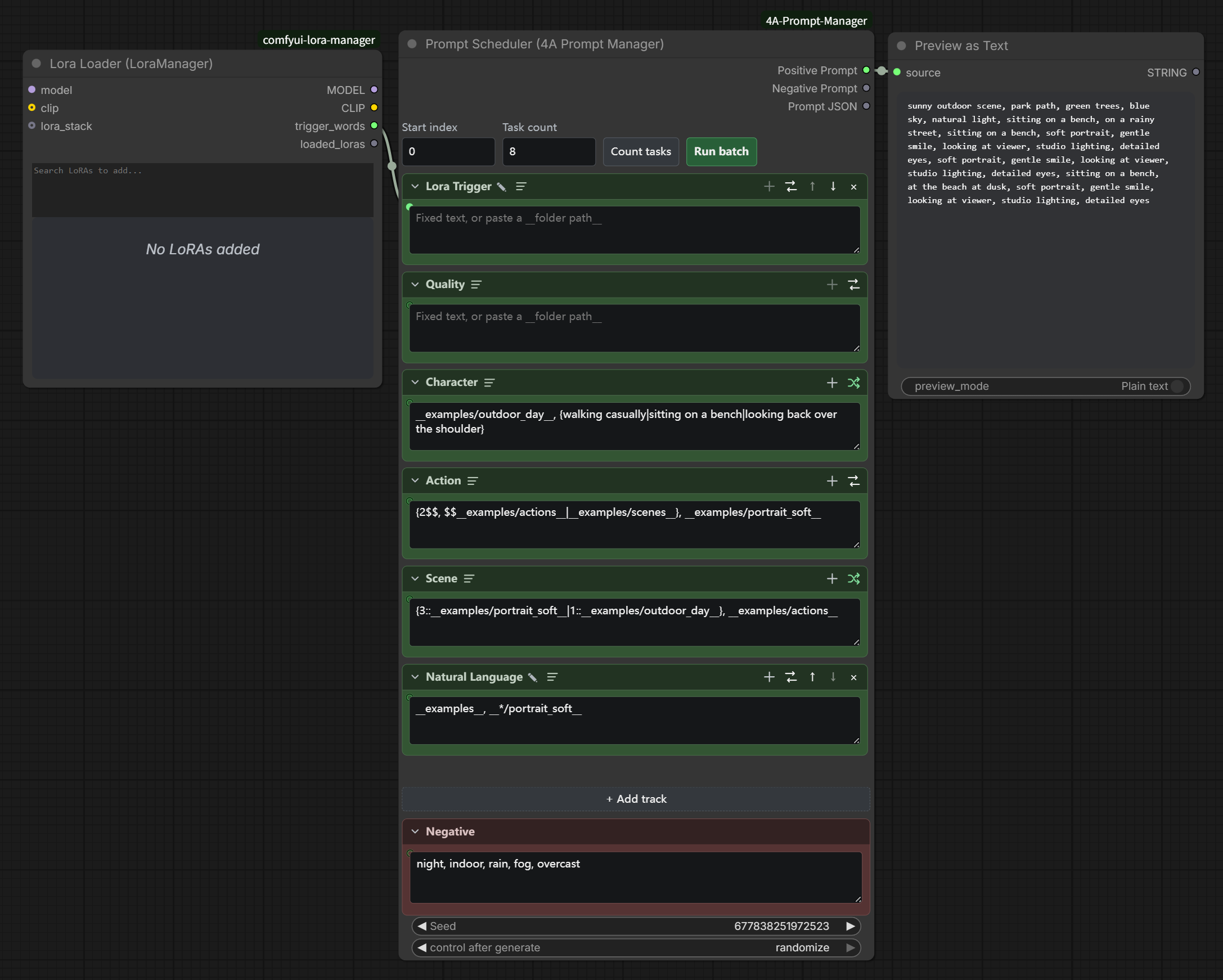
Multi-track Prompt Scheduler
Stack positives across tracks with random / sequence / shuffle, Impact-compatible wildcard parsing (__key__, {a|b}, weights, multi-select, folder and global name lookup), and optional STRING inputs wired into each track from the graph.
Nested wildcards (great for automation): JSON content / negative and TXT bodies may contain further __folder__ / __path/file__. Expansion resolves recursively and carries nested LoRAs, negatives, and sparse generation settings. Sequential batching uses a leaf space: nested branches sum, side-by-side __a__, __b__ in one track multiply, multiple tracks take the longest; {a|b} and friends stay random and do not lengthen the cycle. A common pattern is “outer cards = LoRAs/presets to compare; inner __scenes__ / suites = shared prompts”—Count tasks fills the job count from that leaf space, not just the top-level folder size.
Receiving Scheduler: when a workflow has several Schedulers, Browser, Prompt Display, and Meta Apply show a Receiving Scheduler dropdown where you pick one or All Schedulers; the choice stays in sync everywhere and is saved with the workflow. A node whose prompt_json is wired to a Scheduler always sends to that one, and with a single Scheduler no choice is needed.
Full rules and examples: docs/wildcard-nesting.md (中文).
NovelAI (NAI) prompt and metadata management
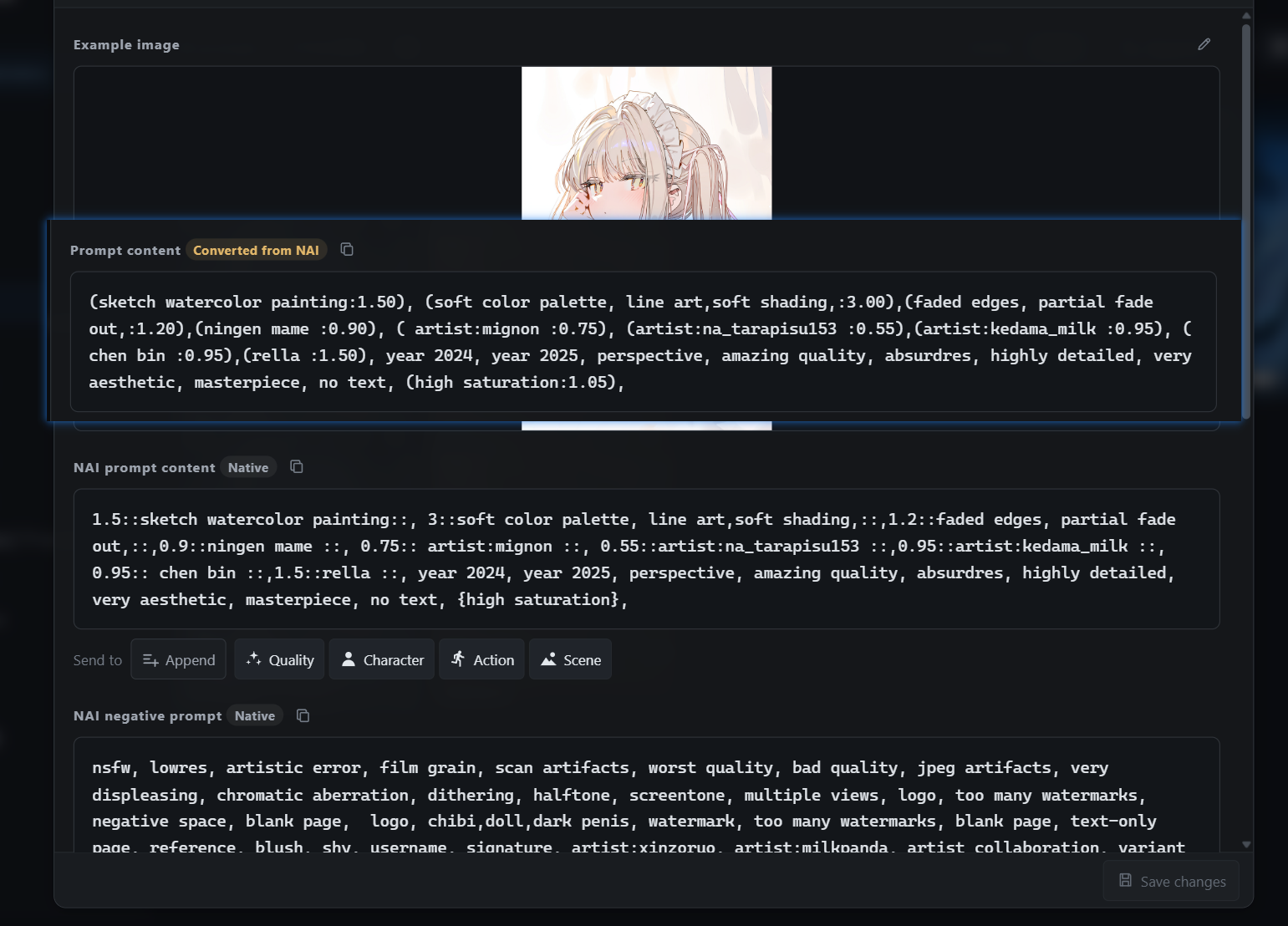
NAI generation nodes have moved to the standalone ComfyUI-4A-NovelAI plugin. This project retains prompt-card storage, the Wildcard library, weight-display conversion, image-metadata reading/apply, and the bridge that sends prompts and sparse settings to NAI nodes. PM4A still works when the generation plugin is not installed.
- JSON cards keep generic
content/negativeseparate from nativenai.content/nai.negative. Browser prefers the active mode's native text and only converts the other representation as a temporary fallback; edits are saved back to the active mode so{},[], andN::text::are not misinterpreted. The detail labels mark whether the visible text is native or a converted preview. nai.parametersstores only sparsesteps,cfg,sampler,scheduler,cfg_rescale,width, andheight. Orderednai.charactersstore each character's positive/negative text plus optional per-characterx/y; model and generation seed remain on the standalone generation nodes.- PM4A continues to read NAI positive/negative prompts, character prompts and coordinates, plus the sampler and size fields from images and can apply them to the standalone Scheduler / Sampler.
- NAI-only Wildcard expansion, multi-character scheduling, free-form positioning, serial batch, model/account usage, references, and txt2img/img2img/inpaint switching through a dedicated image-input node belong to the generation plugin.
Metadata reuse (Meta Loader & Meta Apply)
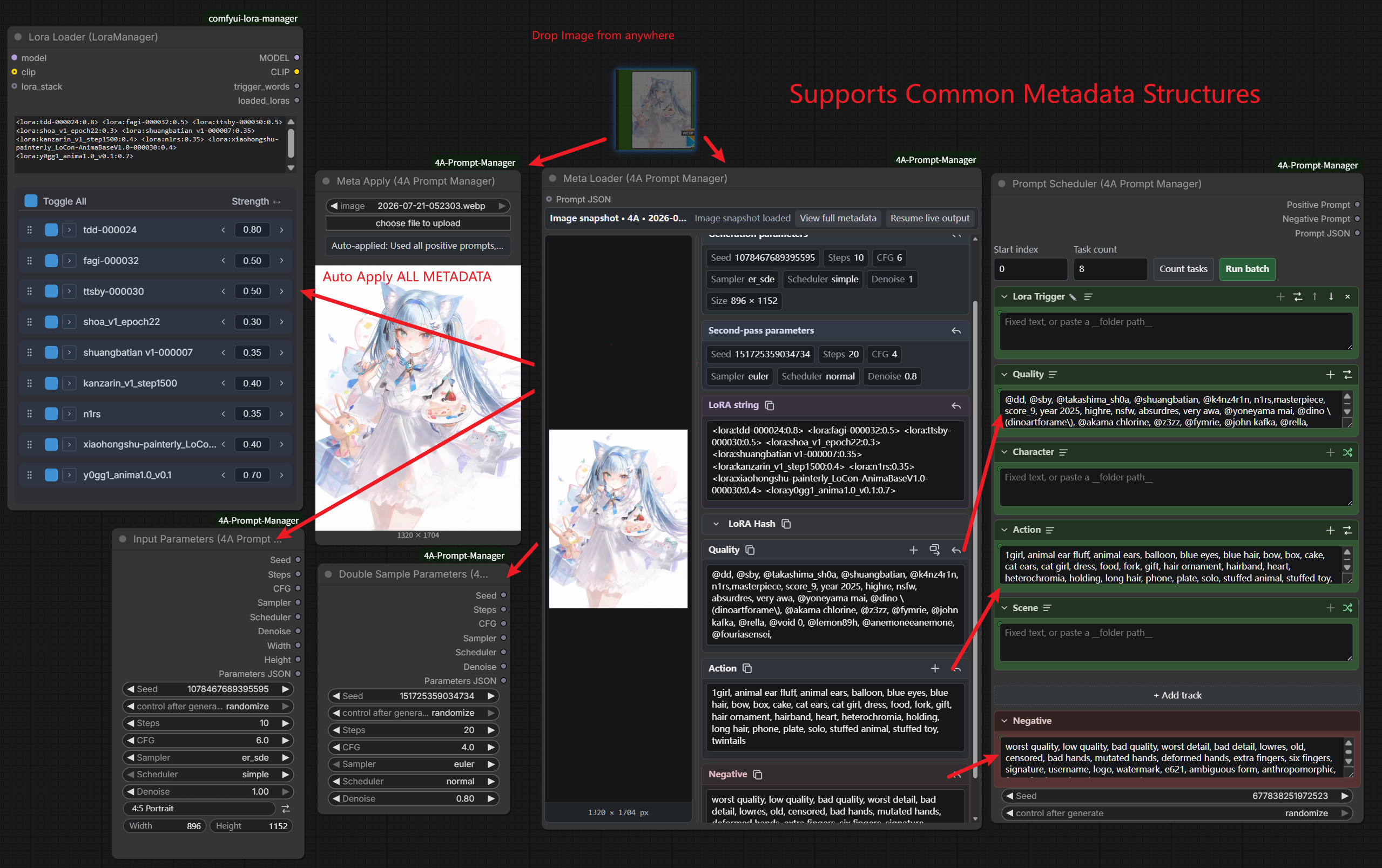
Read prompts and params from common image formats. Drop images from the Browser UI, outside the app, or ComfyUI assets; one click to reuse embedded prompts, sampler settings, and LoRA stacks (LoRA apply needs Lora Manager). Meta Apply has separate toggles for model, LoRA, inference parameters, and prompt. Applying parameters also syncs Bypass Switch from whether double-sample fields are present. Metadata is recognized in the order 4APM → NovelAI → A1111 → ComfyUI native, so images saved only by the official save nodes still yield prompts, parameters, models, and LoRAs from ComfyUI's executed graph.
Input Parameters & Image Saver
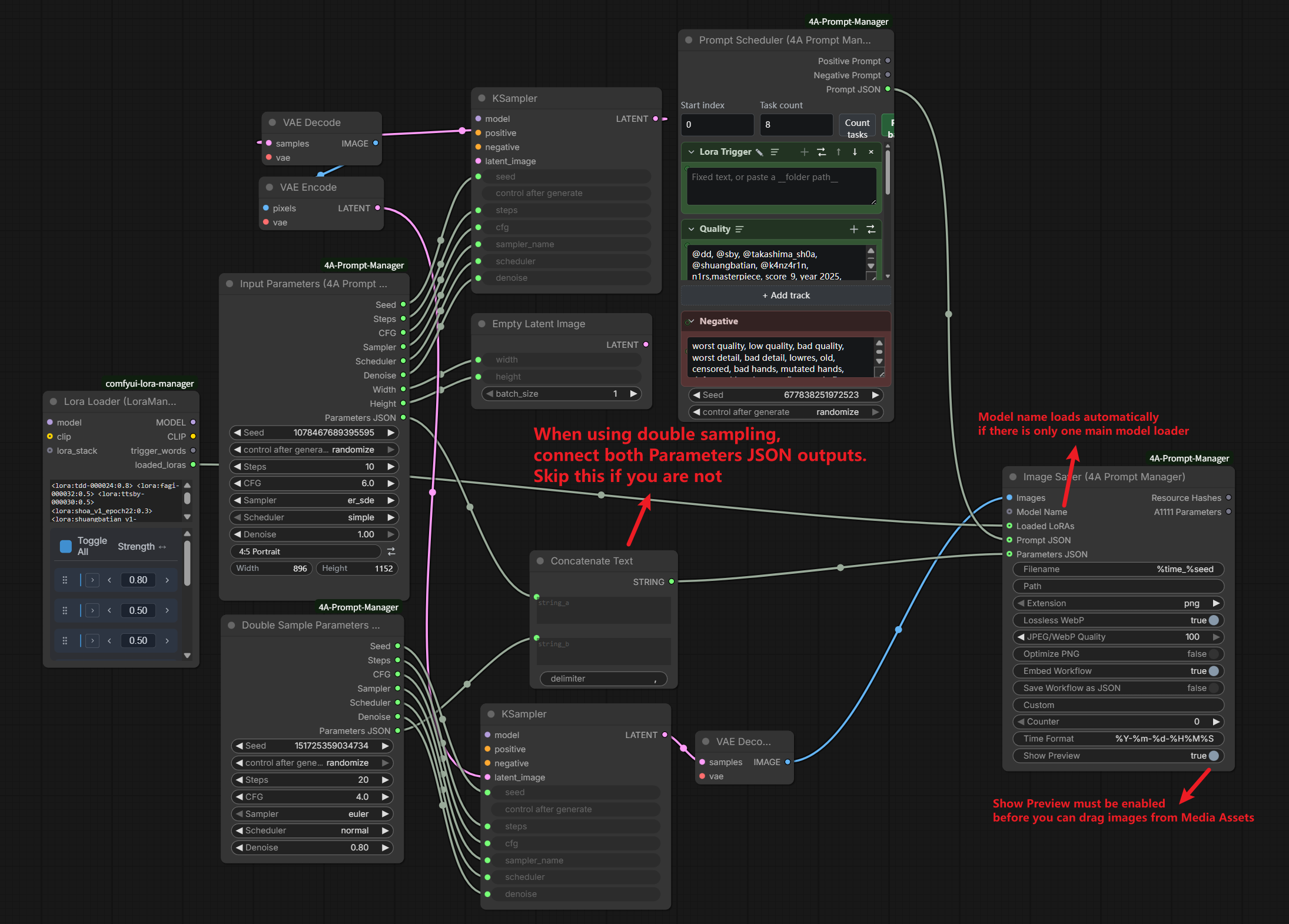
Simple wiring for sampler / resolution outputs; save PNG/JPEG/WebP with A1111-style metadata so your prompts and params stay portable and reusable (JPEG/WebP need piexif). When no model name is given, Image Saver uses the only Checkpoint / UNet upstream of images as the base model; with several upstream models it leaves the field empty instead of guessing.
Install
ComfyUI-Manager (recommended)
Search for 4A Prompt Manager / ComfyUI-4A-Prompt-Manager and install. Dependencies from requirements.txt / install.py are handled by Manager.
Manual
cd ComfyUI/custom_nodes
git clone https://github.com/tsukino4a/ComfyUI-4A-Prompt-Manager.git ComfyUI-4A-Prompt-Manager
cd ComfyUI-4A-Prompt-Manager
python install.py
# or: pip install -r requirements.txt
Restart ComfyUI after install.
Quick start
- Open Workflow → Browse Templates → ComfyUI-4A-Prompt-Manager and try:
01_single_sampler_workflow— Input Parameters → KSampler → Image Saver02_double_sampler_workflow— Double Sample Parameters + second pass
- Open a Prompt Manager Browser node (or the top-menu browser). You should see shipped samples under
wildcards/examples/(JSON cards + TXT wildcards). - To learn batch import, use
examples/pm4a_examples_bundle.json— the samepm4a-prompt-bundleshape produced by library export (mixedjson+txtentries). Import it from the Browser import dialog; do not put this file insidewildcards/(it is not a single prompt card).
Nodes
| Node | Role | |------|------| | Prompt Manager Browser | Full library UI in a node | | Prompt Scheduler | Build positive/negative strings from tracks | | Meta Loader (Prompt Display) | Inspect image metadata cards; apply LoRA text when Lora Manager is present | | Meta Apply | Auto-apply image metadata to linked targets (including LoRA via Lora Manager) | | Input Parameters | Seed / steps / cfg / sampler / size + JSON | | Double Sample Parameters | Second-pass sampler JSON | | Bypass Switch | Wire-controlled Bypass/Always for connected nodes; ON when the card has double-sample fields | | Image Saver | Save images with hashes & A1111 params |
Example workflows & library samples
| Path | Purpose |
|------|---------|
| example_workflows/ | UI templates for Browse Templates (+ .png previews) |
| wildcards/examples/ | Shipped prompt samples (loaded by the library) |
| examples/pm4a_examples_bundle.json | Export/import demo bundle |
| workflows/default_api.json | Built-in UNet API graph for in-browser preview generation (replaceable) |
| docs/wildcard-nesting.md | Nested wildcards / sequential leaf-space guide (中文) |
Select models in template workflows before running if loaders are empty or point to names you do not have locally.
Dependencies
- Required extra:
piexif(>=1.1.3) for JPEG/WebP EXIF when using Image Saver / preview EXIF - Pillow, NumPy, aiohttp are provided by ComfyUI
- Optional NAI generation plugin: ComfyUI-4A-NovelAI; PM4A no longer registers NAI generation nodes
Without piexif, PNG save still works; JPEG/WebP metadata write will error (preview WebP may skip EXIF silently).
License
This project is released under the MIT License.
Image Saver adaptations from ComfyUI-Image-Saver are documented in THIRD_PARTY_NOTICES.md.