
My Templates
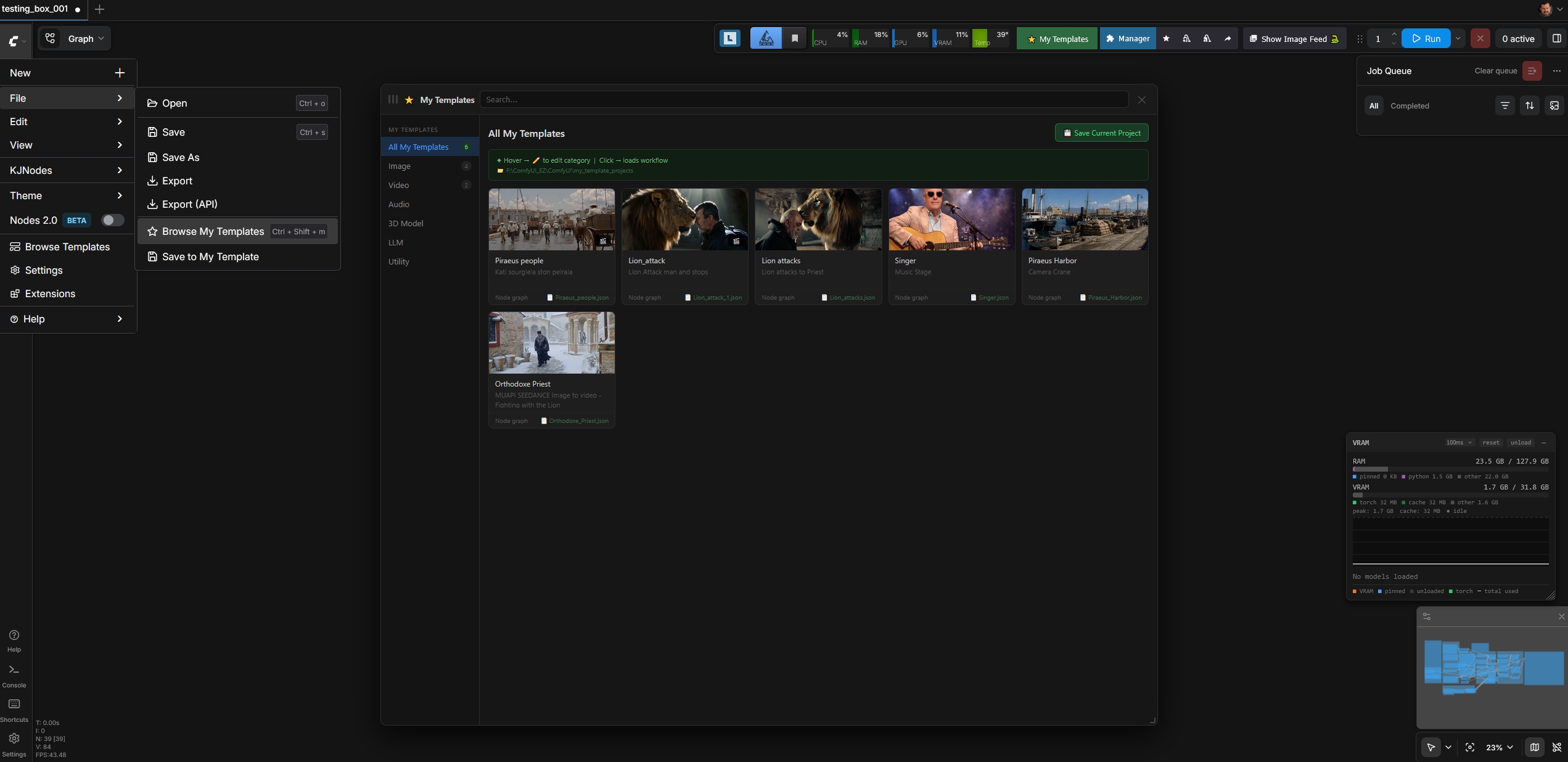
Save, categorize and reload your own ComfyUI workflows as private templates with image / 3-second video thumbnails. File menu integration + dedicated topbar button + draggable resizable window.
⭐ ComfyUI My Templates
Save, categorize and reload your own ComfyUI workflows as private templates — with image or short video thumbnails. Mirrors the look of the native Templates panel, but for your workflows.


Features
- 💾 Save current workflow as a named template directly from the File menu
- 🖼️ Image or video thumbnails — videos are auto-trimmed to 3 seconds in the browser, played on hover
- 📂 Categorize templates: Image / Video / Audio / 3D / LLM / Utility
- 🪟 Floating, draggable, resizable window — position & size persist across sessions
- ⌨️ Keyboard shortcut
Ctrl+Shift+Mto toggle the window - 📁 Workflows saved as files in
ComfyUI/my_template_projects/— portable, easy to backup - 🔍 Live search + click any card to load the workflow
Access
After installation, three ways to open My Templates:
- ⭐ My Templates button in the top-right toolbar (next to Manager)
- File → Browse My Templates menu item
- Keyboard shortcut Ctrl+Shift+M
To save the current workflow:
- File → Save to My Template, or
- The "Save Current Project" button inside the My Templates window
Installation
Option 1 — ComfyUI Manager (recommended)
Search for My Templates in ComfyUI Manager and click Install.
Option 2 — Manual
cd ComfyUI/custom_nodes
git clone https://github.com/trelohra-hash/comfyui-my-templates.git
Then restart ComfyUI and hard-refresh your browser (Ctrl+Shift+R).
The folder structure should look like:
ComfyUI/
├── custom_nodes/
│   └── comfyui-my-templates/
│       ├── __init__.py
│       ├── pyproject.toml
│       ├── LICENSE
│       ├── README.md
│       └── js/
│           └── my_templates.js
└── my_template_projects/        ← created automatically on first save
How storage works
Each saved template produces up to three files in ComfyUI/my_template_projects/:
my_template_projects/
├── My_Portrait_LoRA.json   ← workflow graph
├── My_Portrait_LoRA.jpg    ← poster thumbnail (auto-extracted from video, or your image)
└── My_Portrait_LoRA.webm   ← optional 3-second video clip (only if you chose Video thumbnail)
Template metadata (name, description, category, dates) is stored in browser localStorage.
The actual workflows + thumbnails on disk are portable — zip the folder for backup or to move to another machine.
Video thumbnails
Videos are auto-trimmed to the first 3 seconds in your browser using the native MediaRecorder API and saved as a small WebM clip (typically 300 KB – 1 MB). No FFmpeg or system dependencies required. The original video is never uploaded.
On hover over a card, the WebM clip plays on a 3-second loop.
Compatibility
- ComfyUI: any recent version (uses official
app.registerExtensionAPI:commands,menuCommands,keybindings) - Browser: Chrome, Edge, Firefox, Safari 14.1+
License
MIT — see LICENSE.