
rec-frame-ComfyUI
A ComfyUI extension with 5 custom nodes.
Nodes (5)
rec-frame-ComfyUI
English | 🇯🇵 日本語ドキュメント (README_JA.md)


A powerful, pixel-perfect camera viewfinder overlay custom node for ComfyUI.
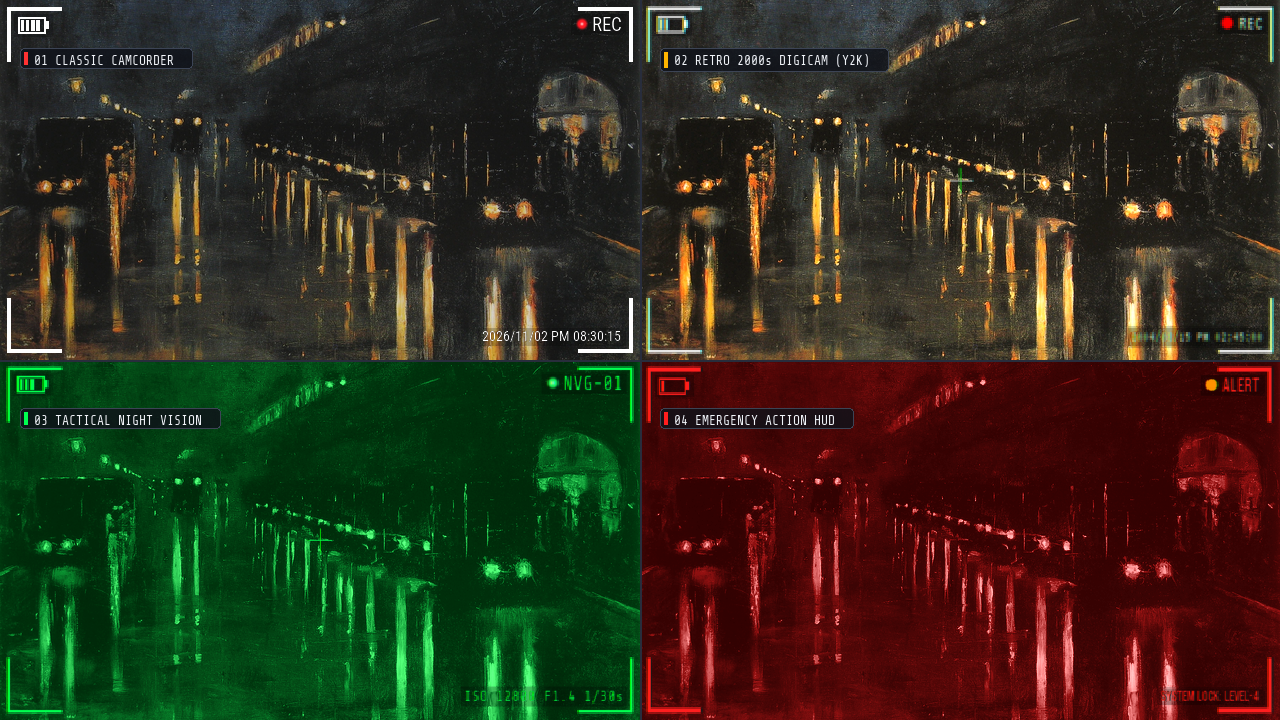
Effortlessly composite realistic camcorder and digital camera HUDs—including corner L-frames, battery indicators, blinking red REC dots, center focus crosses, date/timecodes, semi-transparent background boxes, and retro UI degradation effects (chromatic aberration, CRT bloom, downsampling)—directly onto your image and video generation pipelines.
Ported and optimized from treeturtlefall-arch/rec-frame-app with full video batch support (AnimateDiff, Wan, MiniMax, CogVideoX, etc.).
Visual Showcase
4 Representative Viewfinder Styles
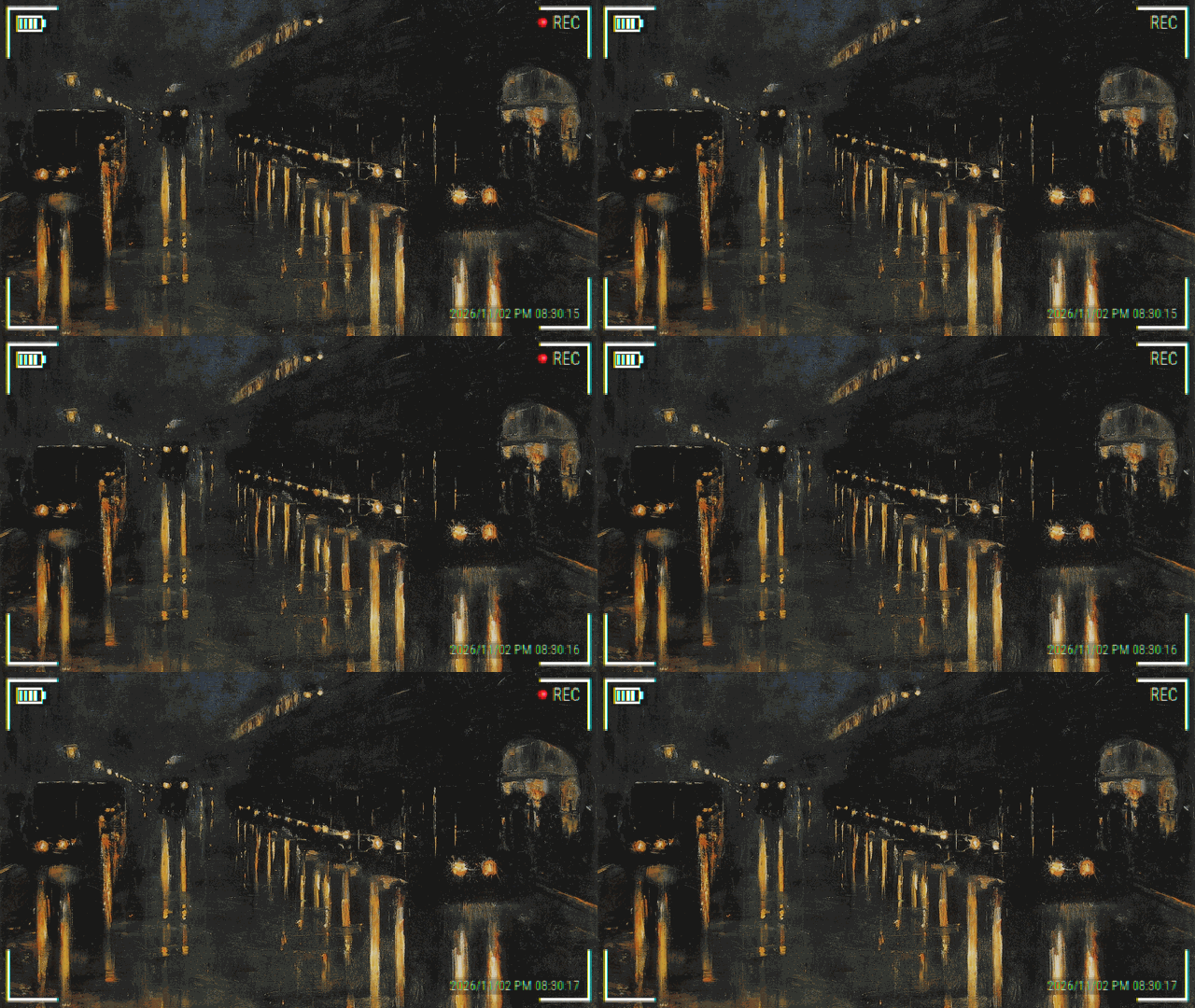
Video Pipeline Demo (Blinking Red Dot & Real-time Timecode Advance)
Key Features
- Short-Edge Relative Vector Scaling (
s = min(w, h))- All HUD dimensions scale smoothly relative to the shorter dimension. No stretched PNG assets—crisp, perfectly balanced geometry across widescreen 16:9, square 1:1, or vertical 9:16 aspect ratios.
- Pixel-Perfect Equal-Length Corner L-Frames
- Corrected for PIL's inclusive coordinate bounds with exact
-1offsets. All four corner brackets have identical horizontal and vertical pixel lengths and equal outer margins.
- Corrected for PIL's inclusive coordinate bounds with exact
- Specialized Image & Video Separation
RecFrameImageOverlayfor ultra-fast, zero-overhead single-pass image compositing.RecFrameVideoOverlaywith intelligent LRU caching for video batches, advancing timecodes and blinking red dots with minimal frame redrawing overhead.
- No-Queue Dynamic Live Preview (
RecFramePreview)- Connect the
overlay_rgbaoutput toRecFramePreviewto see slider adjustments (thickness, fonts, colors, toggles) update instantly inside ComfyUI without pressing Queue Prompt.
- Connect the
- Unified Non-Destructive Retro Degradation (
retro_effect: 0 to 6)- Seamlessly simulates authentic retro optical and digital display artifacts (RGB chromatic aberration → CRT bloom glow → pixel downsampling). Applied exclusively to the UI overlay layer, keeping your underlying image/video pristine.
- Self-Contained Fonts (No OS System Folder Access)
- Includes 6 open-source fonts (SIL OFL) in
fonts/. Never queries Windows/Linux/macOS system fonts for privacy and cross-platform determinism. Supports drop-in custom.ttf/.otf/.ttcfonts.
- Includes 6 open-source fonts (SIL OFL) in
Included Nodes (Category: image/overlay)
| Node Display Name | Class Name | Purpose |
|---|---|---|
| REC Frame (Image) [画像用] | RecFrameImageOverlay | Dedicated still image node. Streamlined UI without video-specific timing parameters. Generates standalone transparent overlays if no image is connected. |
| REC Frame (Video) [動画用] | RecFrameVideoOverlay | Dedicated video/batch node with frame-accurate red dot blinking (blink_red_dot_interval) and timecode auto-advance (advance_timecode_fps). |
| Preview REC Overlay (枠プレビュー) | RecFramePreview | Live interactive preview node for immediate visual inspection without queuing prompts. Includes 4 background options (Black, White, Gray, Checkerboard). |
| REC Frame Overlay (All-in-One / Legacy) | RecFrameOverlay | Backward-compatible consolidated node for existing workflows. |
Parameter Reference
Required Settings
| Parameter | Type / Options | Default | Description |
|---|---|---|---|
| color | white, black, green, cyan, red, yellow | white | Viewfinder theme color preset (affects frames, battery, text, center cross). |
| font_key | Dropdown (6 bundled + custom) | Roboto Condensed Bold(細長) | Bundled open-source typography or user fonts in fonts/. |
| retro_effect | INT (Slider 0 to 6) | 0 | UI degradation intensity (0: Clean vector, 2: Classic 2000s, 6: Near Break). |
| show_frame | BOOLEAN | True | Toggle corner L-shaped viewfinder brackets. |
| thickness | INT (Slider 0 to 100) | 50 | Bracket stroke thickness (0: hairline ~1px, 50: standard, 100: bold impact). |
| show_rec | BOOLEAN | True | Toggle recording indicator block (dot + text). |
| dot_style | Dropdown (Assets list) | flat_red | Dot asset style (flat_* solid circle, glow_* anime aura, classic geometric circle). |
| rec_label | STRING | "REC" | Text string next to dot (e.g. "LIVE", "PLAY", "STBY", "ALERT"). |
| show_battery | BOOLEAN | True | Toggle battery gauge. |
| battery_bars | INT (0 to 4) | 4 | Number of battery level bars (0 expresses depleted/blinking battery). |
| show_cross | BOOLEAN | False | Toggle center crosshairs focus mark. |
| show_timecode | BOOLEAN | False | Toggle timestamp/timecode display. |
| timecode_mode | manual, now, now_sec, smpte | manual | Timecode mode: manual text, current time (minutes), current time (seconds :SS), or frame-accurate SMPTE (HH:MM:SS:FF). |
| timecode_text | STRING | "" | Timestamp text (YYYY/MM/DD AM/PM HH:MM[:SS], SMPTE 00:00:00:00, or custom text). |
Optional & Advanced Video Settings
| Parameter | Type | Default | Description |
|---|---|---|---|
| images / image | IMAGE | Optional | Input image or video batch [B, H, W, C]. Generates standalone overlay if unconnected. |
| fps | FLOAT (Input Pin) | Optional | External frame rate connection (wire from GetVideoComponents or model output). Overrides advance_timecode_fps and auto-syncs timecode to video speed. |
| custom_color | STRING | "" | Direct HEX color override (e.g. #00FF50). Highest priority over color. |
| custom_font_path | STRING | "" | Direct path to external .ttf/.otf/.ttc font file (works immediately without restart). |
| custom_dot_path | STRING | "" | Direct path to custom dot/logo .png/.webp image (works immediately without restart). |
| bg_box_opacity | FLOAT (0.0 to 1.0) | 0.10 | Opacity of semi-transparent backdrop boxes (auto-inverts white/black based on luminance). |
| margin_ratio | FLOAT (0.0 to 0.2) | 0.020 | Outer margin ratio of corner brackets relative to short edge. |
| arm_len_ratio | FLOAT (0.01 to 0.5) | 0.15 | Bracket arm length ratio (increase to 0.18-0.20 for wider, cinematic brackets). |
| blink_red_dot_interval | INT (Video) | 0 | Blinking frame interval (0: always on; e.g. 12 blinks every 0.5s at 24fps). |
| advance_timecode_fps | FLOAT (Video) | 0.0 | Frame rate for auto-advancing timecode seconds (0.0: static). |
| empty_width / empty_height | INT | 1280x720 | Canvas resolution when generating standalone transparent overlays. |
| empty_frames | INT (Video) | 24 | Number of frames to generate when running standalone video node. |
Visual Comparison
Retro UI Degradation Levels (retro_effect: 0 to 6)
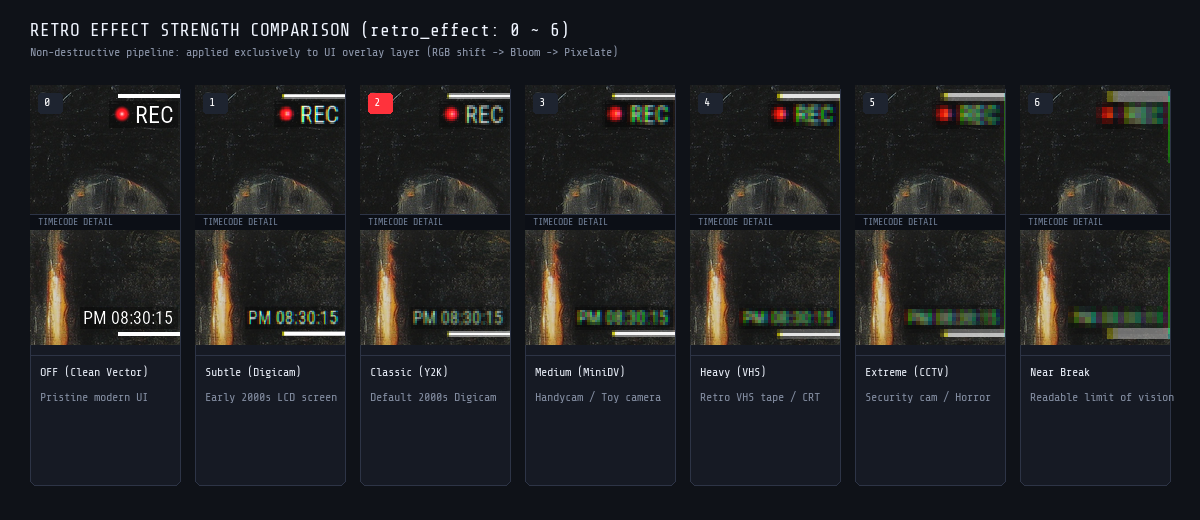
0: OFF (Clean Vector): Modern, high-resolution vector HUD. Razor-sharp edges with zero degradation.1: Subtle (Digicam): Gentle optical blur mimicking early 2000s LCD viewfinders. Blends naturally with modern AI images.2: Classic (Y2K): Standard 2000s consumer digicam aesthetic with balanced chromatic aberration and CRT bloom.3: Medium (MiniDV): Moderate analog tape and handycam screen softening.4: Heavy (VHS): Heavy phosphor bloom and CRT monitor scan degradation.5: Extreme (CCTV): Gritty surveillance camera, security footage, or horror found-footage feel.6: Near Break: Extreme glitch limit—degraded to the absolute edge of human perceptual decipherability.
Color Presets & Retro Glow Dots
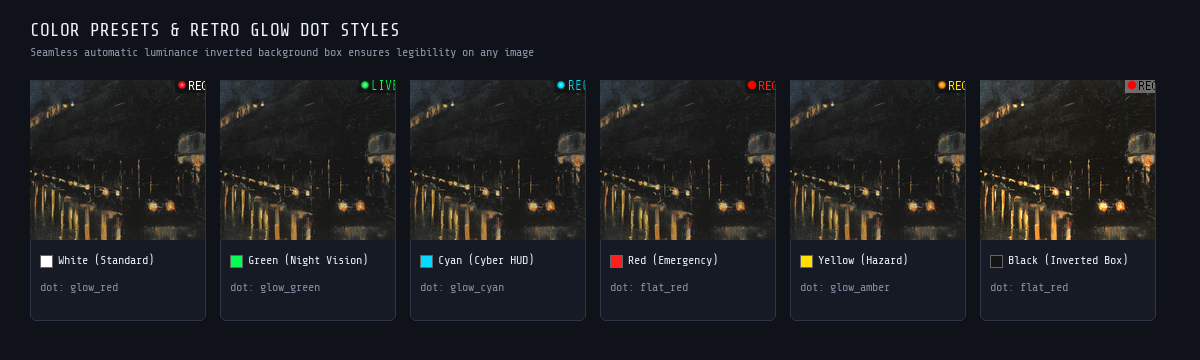
Includes 6 built-in presets (white, green, cyan, red, yellow, black) and arbitrary HEX code support.
The dynamic background box (bg_box_opacity) automatically computes perceived luminance: dark themes get a soft white backdrop, while light/neon themes get a soft black backdrop, ensuring readability over any footage.
Bundled Open-Source Typography
All fonts are self-contained in fonts/ (SIL Open Font License 1.1):
Roboto Condensed Bold(細長)— Standard modern camera viewfinder.Bebas Neue(縦長大文字)— Cinematic, bold all-caps title typography.DSEG7 Classic(7セグLED)— Digital 7-segment LCD counter & clock display.Share Tech Mono(等幅)— Night vision goggles, telemetry, and cyber HUD.VT323(レトロドット)— Authentic 90s/2000s Y2K pixel dot-matrix typography.Zen Kaku Gothic(日本語)— High-legibility Japanese Gothic typography.
Official Workflows (ComfyUI Desktop Ready)
Ready-to-use workflows in both English (_en.json) and Japanese (_ja.json) are included in workflows/ and automatically synced to ComfyUI Desktop's workflow browser under rec-frame/:
- Basic Still Image Workflow (
rec_frame_basic_workflow_en.json/ JA)Load Image→RecFrameImageOverlay&RecFramePreview→Save Image.
- 2000s Digicam Preset Workflow (
rec_frame_2000s_digicam_workflow_en.json/ JA)- Features
Share Tech Mono/VT323dot font,retro_effect: 2,STBYindicator, 3-bar battery, and backdrop boxes.
- Features
- Video Animation Batch Workflow (
rec_frame_video_batch_workflow_en.json/ JA)- Complete video pipeline with
RecFrameVideoOverlay(blink_red_dot_interval: 24,fpsauto-sync fromGetVideoComponents).
- Complete video pipeline with
[!IMPORTANT] Video Pipeline Best Practice: "Overlay Belongs Last"
If your pipeline uses Frame Interpolation (e.g. RIFE, FILM) or AI Upscaling (e.g. RealESRGAN, NNLatentUpscale), ALWAYS placeRecFrameVideoOverlayAFTER them, immediately before video combining/saving (CreateVideo/SaveVideo).
- Why? Frame interpolation morphs text edges and blinking elements, resulting in blurry smearing, and changes total frame count which can desync timecode timing. AI upscalers can also treat retro pixel artifacts as noise. Keep the overlay as the final composite step for crisp, authentic HUD elements!
Installation
Method 1: ComfyUI-Manager (Recommended)
- Open the Manager menu inside ComfyUI.
- Click Custom Nodes Manager.
- Search for
rec-frameorREC Frame. - Click Install and restart ComfyUI.
Method 2: Manual Git Clone
Run the following in your terminal:
cd ComfyUI/custom_nodes
git clone https://github.com/treeturtlefall-arch/rec-frame-ComfyUI.git
Dependencies (Pillow, PyTorch, torchvision) are standard ComfyUI requirements—no additional pip install needed!
Frequently Asked Questions (FAQ)
Q. Do the top corner L-frames look shorter than the bottom ones? Is this a bug?
A. All four corner brackets are mathematically identical in length down to the exact pixel.
Because horizontal UI elements (battery indicator on top-left, REC indicator on top-right) sit directly beside the upper brackets, the brain experiences an optical contrast illusion and the vertical-horizontal illusion (perceiving vertical lines as 10-20% longer than horizontal lines).
If you prefer wider, more expansive top brackets, simply set arm_len_ratio to 0.18 ~ 0.20 (default is 0.15).
Q. How can I use my own custom fonts or dot images/logos?
A. You can use either of the following two methods:
- Method A: Direct Path Input (Instant test, no ComfyUI restart needed)
- Paste your local file path directly into
custom_font_path(for.ttf/.otf/.ttc) orcustom_dot_path(for.png/.webp). Updates immediately!
- Paste your local file path directly into
- Method B: Folder Placement (Permanent dropdown registration)
- Put font files into
fonts/and custom dot images intoassets/dots/. Restart ComfyUI to have them automatically populate in the node dropdown menus.
- Put font files into
License & Credits
- rec-frame-ComfyUI: MIT License
- Upstream project: treeturtlefall-arch/rec-frame-app
- Bundled Fonts:
- Roboto Condensed, Bebas Neue, DSEG7 Classic, Share Tech Mono, VT323, Zen Kaku Gothic: SIL Open Font License 1.1