
ComfyUI Handy Nodes
Handy Nodes - GUI INPUTS, Video/Audio Chunking, Prompt looper, Speaker control, etc.
Nodes (33)
Mix your audio tracks without leaving ComfyUI — the Audio Merge/Fuse node
The boring little input node your diarization workflow is built on
The node that stops your video/audio sync from falling apart in V2V
How to get raw samples out of ComfyUI's AUDIO type
The math node that keeps your chunks on LTX's picky frame grid
Make your stitched-together video segments feel like one take
The two-minute fix for videos that start on a jarring hard cut
Fake speaker detection that actually works for AI dialogue
Concat a list of clips into one clean track
One clean widget for a batch of image-to-video scenes
Load twelve reference images into one looper-friendly list
Four prompts, one wire, and the node on the other end
One pair of dials so your photo workflow has a single place to set size
The debug node that tells you what's actually flowing through your wires
Dress up your prompts the way video models actually want
Alternate up to four scenes in a loop without a spaghetti graph
Loop through image+prompt lists without retyping anything
Split long audio on silence so generation never cuts a word in half
Silence-based video+audio chunking for LTX 2.3 and Wan 2.2
End the clumsy frame-count math for LTX and Wan
Pull one speaker's dialogue out of the full mix, LTX-ready
A two-way switch that swaps prompt and start image per speaker
Count the real number of talk tracks across two speakers
Finding real scene boundaries in your video
Cut on Scene Changes, Not on Frame 81
How Many Chunks Did the Detector Actually Make?
Trim the edges off audio without rebuilding the workflow
Trim an image sequence and its audio to the exact frame you asked for
Strip the crossfade padding back off your video chunks
Bolt up to three audio streams onto your video in one node
Pick a video resolution by dragging a dot, not doing math
The stripped-down resolution picker when you just need W and H
One node for video width, height, frames and fps
TKSmartVideoChunker
Silence-based video/audio chunking for LTX 2.3 / Wan 2.2. Looks for silence in audio to create chunk breaks.
This is helpful when speakers take a breath and we don't cut off speaker while talking.
Chunking is required to get around VRAM issues. For Low VRAM set chunk size lower"
Silence-based video/audio chunking for LTX 2.3 or Wan 2.2. Slices at native fps, resamples to target_fps, and snaps to a valid frame count
<img width="432" height="497" alt="Screenshot 2026-08-05 131620" src="https://github.com/user-attachments/assets/839ac1e9-1feb-44c0-9039-2de24a1dca77" />TKSmartAudioChunker
Silence based audio chunker.. used in workflow for Singing or Talking, so it never breaks middle sentence. TKSmartVideoChunker will call this node for the audio breaks.
TKPromptLooper
A node for looping multiple prompts and avoid messy code. Up to 4 prompts. Used for long workflow where you want to swap images and prompts. <img width="744" height="384" alt="Screenshot 2026-08-05 132344" src="https://github.com/user-attachments/assets/24463863-72bb-41bc-898d-ffdabc85fa5d" />
TKAudioToFPSMatcher
Mismatches between FPS can throw sync off in videos with audio.
This node fixes the FPS mismatch problem.
Use case: You have a 30fps video with audio... but you need to create a LTX 24fps video.
Use this node to fix the mismatch otherwise your audio will be out of sync.
<img width="698" height="440" alt="fps" src="https://github.com/user-attachments/assets/e80a63ea-2b6d-4820-9037-99ca235ecd71" />
TKAudioUnwrap
when working with audio segments, this is needed to consolidate back to 1 waveform.
TKVideoUserInputs -
GUI for collecting inputs for Video related workflow.
Easily select size with visual feedback.
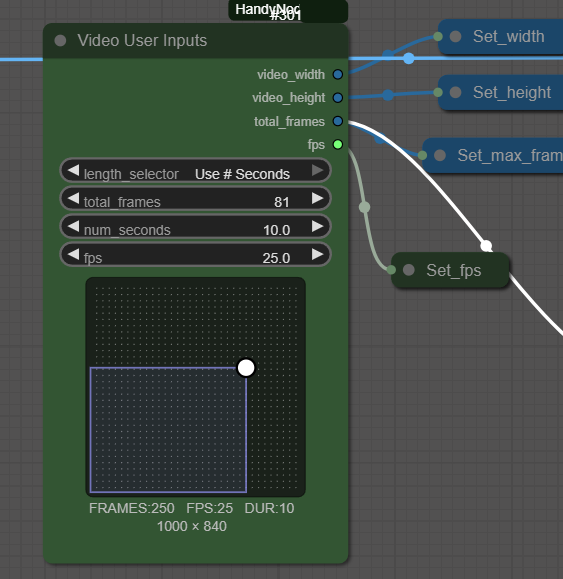
TKPrintValueToLog
Print value to log, helpful for debug or status of workflow
TKTransitionDetector
Detects scene changes in video, similar to how Davinci works.
TKSnapFrames
Snap frames for LTX or Wan boundry rules If you don't snap frames , you might get errors or bad renders. This avoid the clumsy math expressions that are normally required in the workflow
TKNodes (Handy Nodes for ComfyUI)
 "TKPromptEnhanced": "Enhanced Prompt with camera descriptives",
 "TKTrimAudioWithBooleans": "Trim Audio (Booleans)",
 "TKCalcLTXFrames":    "Calculate LTX Frames ",
 "TKVideoUserInputs": "Video User Inputs",
 "TKPhotoUserInputs": "GUI - Photo User Inputs",
 "TKVideoUserInputsBasic": "Video User Inputs Basic",
 "TKVideoAudioFuse": "Video Audio Fuse",
 "TKAudioFuse": "Audio Merge/Fuse",
 "TKSmartAudioChunker": "Smart Audio Chunker",
 "TKSmartVideoChunker": "Smart Video Chunker",
 "TKAudioUnwrap": "Audio → Waveform Tensor",
 "TKPrintValueToLog": "Print Value to log",
 "TKSpeakerAudioTrackExtractor": "Extract nTh Audio track",
 "TKMergeAudioList": "Merge audio list to master audio",
 "TKTotalTracksInAudio": "User supplied tracks",
 "TKLocateSpeakersUsingSilenceBreaks": "Identify Speakers using Silence Breaks",
 "TKTrimImageOverlap": "Trim Padding used for Smooth Transition",
 "TKSpeakerDataFromTrack" : "Get a Track details from Track",
 "TKAudioSpeakerTalkTime": "Speaker Talk Times",
 "TKFadeInVideo": "Fade in Video",
 "TKPromptLooper": "Prompt Looper",
 "TKCrossDissolve":"Cross Dissolve Effect",
 "TKTrimFrames": "Trim Frames and Audio",
 "TKTransitionDetector": "Video Transition Detector",
 "TKSnapFrames" : "Snap Frames to boundry rules",
 "TKAudioToFPSMatcher" :"Resample Audio for new FPS",
Manager install
Search for "Handy Nodes" in Comfy Manager
for manual install
https://github.com/trashkollector/TKNodes
go to the custom_nodes folder in comfy
git clone https://github.com/trashkollector/TKNodes
Workflows https://github.com/trashkollector/TKNodes/tree/main/workflow