
ComfyUI-WindowSeat
ComfyUI custom node for removing reflections from images using the WindowSeat model.
Nodes (2)
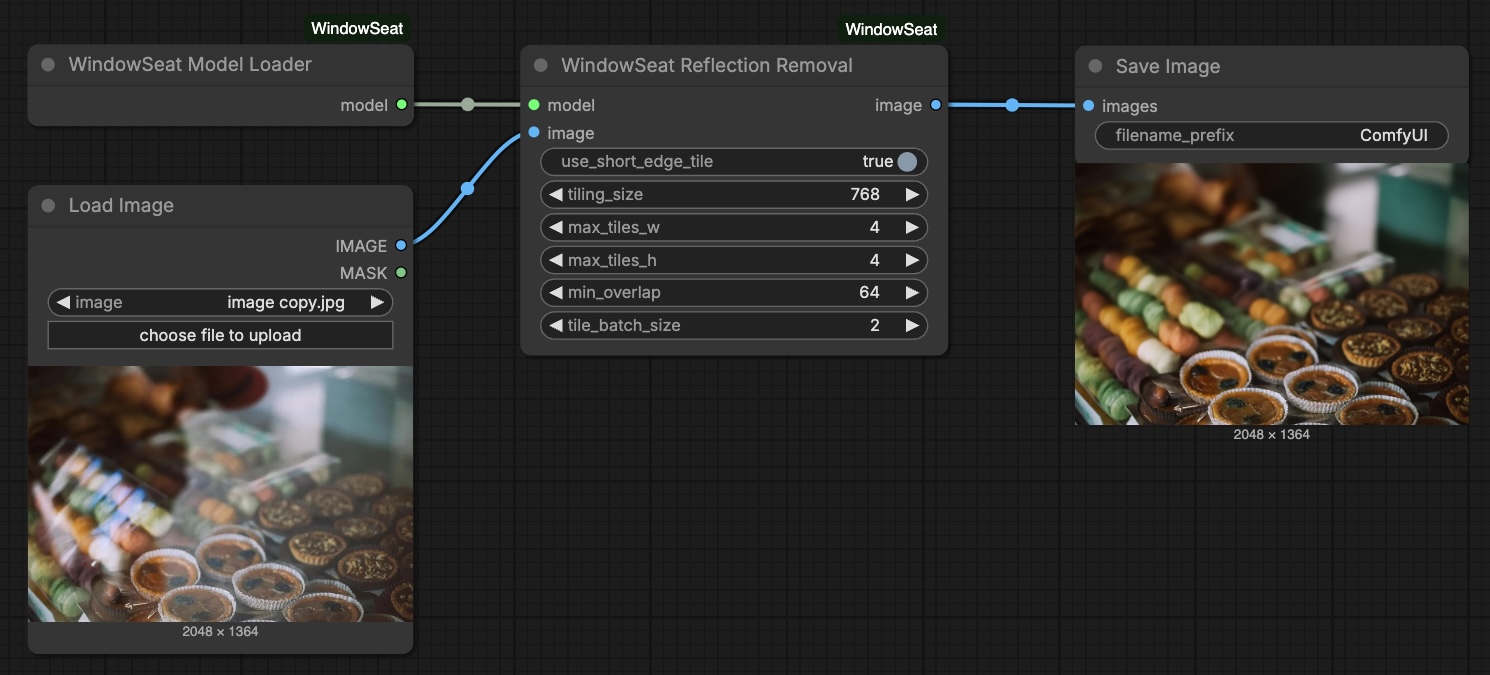
WindowSeat Reflection Removal in ComfyUI
A ComfyUI custom node plugin for removing reflections from images using the WindowSeat model.
<p align="center"> <a href="https://hf.co/spaces/huawei-bayerlab/windowseat-reflection-removal-web"><img src="assets/shields/project-website.svg"></a> <a href="https://arxiv.org/abs/2512.05000"><img src="assets/shields/arxiv-pdf.svg"></a> <a href="https://huggingface.co/huawei-bayerlab/windowseat-reflection-removal-v1-0"><img src="assets/shields/huggingface-model-yellow.svg"></a> <a href="https://huggingface.co/spaces/toshas/windowseat-reflection-removal"><img src="assets/shields/huggingface-space-yellow.svg"></a> </p>Installation
Option 1: Manual Installation
cd ComfyUI/custom_nodes
git clone https://github.com/toshas/ComfyUI-WindowSeat.git
cd ComfyUI-WindowSeat
pip install -r requirements.txt
Option 2: ComfyUI Manager
Search for "WindowSeat" in ComfyUI Manager and install.
Note: If you get a security error when installing, you can temporarily change the security policy as described here, restart ComfyUI, install this plugin, and then restore your security policy.
Usage
- Right-click on canvas → Add Node → WindowSeat
- Add WindowSeat Model Loader node
- Add WindowSeat Reflection Removal node
- Connect them: Loader → Reflection Removal
- Add an image input (Load Image node) and connect to Reflection Removal
- Add a Preview Image or Save Image node to see results
- Click "Queue Prompt" to run
Nodes
WindowSeat Model Loader
Loads the model from HuggingFace Hub (auto-downloads on first use). Caches the model for reuse.
WindowSeat Reflection Removal
Required Inputs:
model- Connect from WindowSeat Model Loaderimage- Input image (from Load Image node)
Optional Inputs:
| Parameter | Default | Description | |-----------|---------|-------------| | use_short_edge_tile | True | Use short edge for tile size | | tiling_size | 768 | Base tile size (512-1536) | | max_tiles_w | 4 | Max horizontal tiles (1-8) | | max_tiles_h | 4 | Max vertical tiles (1-8) | | min_overlap | 64 | Tile overlap pixels (16-256) | | tile_batch_size | 2 | Tiles per batch (1-4) |
Requirements
- Python 3.10+
- PyTorch 2.0+
- CUDA-capable GPU
- 24GB VRAM
Development
pip install -r requirements.txt
pre-commit install  # Required: install git hooks
Run tests:
./run_tests.sh           # Unit tests (no GPU)
./run_tests.sh --gpu     # All tests including GPU integration
Troubleshooting
Out of memory:
- Reduce
tile_batch_sizeto 1 - Use smaller
tiling_size(e.g., 512) - Process smaller images
Model not loading:
- Check HuggingFace Hub access
- Ensure you're logged in:
huggingface-cli login
Citation
Please cite our paper:
@InProceedings{Zakarin_2026_CVPR,
  author    = {Zakarin, Daniyar and Wandel, Thiemo and Obukhov, Anton and Dai, Dengxin},
  title     = {Reflection Removal through Efficient Adaptation of Diffusion Transformers},
  booktitle = {Proceedings of the IEEE/CVF Conference on Computer Vision and Pattern Recognition (CVPR) Workshops},
  year      = {2026},
  pages     = {2776--2785}
}
License
The code and models of this work are licensed under the Apache License, Version 2.0. By downloading and using the code and model you agree to the terms in LICENSE.