
Topview 3D Builder
Offline interactive 3D scene editor for ComfyUI
English · 简体中文
This project is based on our other project, Topview 3D Builder, which supports integration with any agent tool to generate animated 3D scenes.
Build 3D scenes and adjust camera angles in ComfyUI, export images or white-model animations directly to the canvas, then use a video model to render realistic videos.
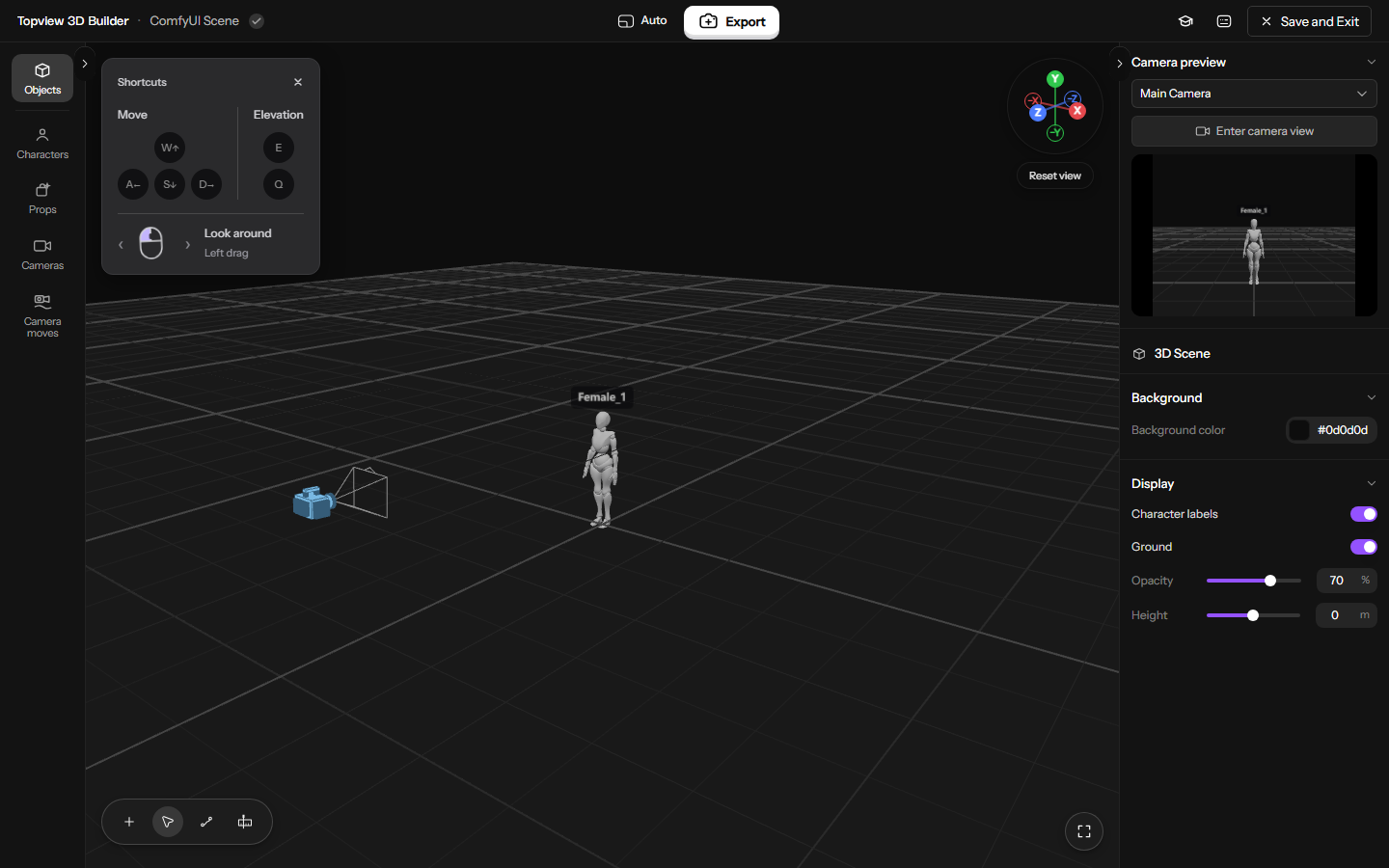
Build 3D scenes, arrange characters and objects, fine-tune poses, and choreograph camera moves with timeline-based keyframe animation.
Installation and Updates
Option 1 — Git (recommended)
Open a terminal inside your ComfyUI/custom_nodes folder and run:
git clone https://github.com/gyx85542-dot/ComfyUI-Topview-3D-Builder.git
Option 2 — Download ZIP
Use Code → Download ZIP on this repository. Extract the plugin folder into ComfyUI/custom_nodes. Make sure __init__.py is directly inside the plugin folder, with no extra nested repository folder:
ComfyUI/
└── custom_nodes/
    └── ComfyUI-Topview-3D-Builder/
        ├── __init__.py
        ├── backend.py
        ├── assets/
        ├── editor/
        └── web/
Restart ComfyUI, then refresh the browser.
Update
For a Git installation, open a terminal inside your ComfyUI/custom_nodes folder, then enter the plugin directory and pull the latest version:
cd ComfyUI-Topview-3D-Builder
git pull --ff-only origin main
Features
- 3D scene building: place characters and objects, adjust poses, and compose your shot.
- Built-in assets: 4 characters, 121 static poses, 5 primitive types, 15 camera views (including the current view), and 24 camera movement presets.
- Cameras and animation: frame shots, preview camera views, and plan animation with camera movement presets and the timeline.
- Image and video export: choose cameras, frame ranges, resolution and aspect ratio. Download locally or export directly to the ComfyUI canvas.
- Multilingual UI: follows ComfyUI settings with support for 15 languages.
Quick start
-
Add Topview → Topview 3D Builder from the node menu or search for Topview 3D Builder.
https://github.com/user-attachments/assets/0a73724f-d75e-4f62-acef-ac1c4d1b27bd
-
Click Open 3D Builder. Add characters and objects, adjust poses, set up your camera, and animate the scene on the timeline.
https://github.com/user-attachments/assets/0b66c435-75dd-4bd6-8efe-86ca57b2cd6e
-
Click the central Export button. Select Image or Video, then configure the output.
https://github.com/user-attachments/assets/724a4556-249e-46e8-bf8a-daa5b9f1234d
-
Click Export to ComfyUI canvas. After successful export and saving, the editor closes and the exported media appears as a native node.
-
To save the scene without creating a media node, click Save and Exit. This updates the Builder card's preview and closes the editor.
-
Save your ComfyUI workflow to keep the editable scene with the graph. Saving inside the editor does not save the workflow file itself.
Example Results
<table> <tr> <th width="50%" align="center">3D scene<br><sub>created by 3D Builder</sub></th> <th width="50%" align="center">Generated video<br><sub>rendered by Topview.ai</sub></th> </tr> <tr> <td align="center"><video src="https://github.com/user-attachments/assets/26108771-b47f-4e14-ac65-605329030369" width="100%" controls muted playsinline></video></td> <td align="center"><video src="https://github.com/user-attachments/assets/78aaa908-a3bf-4d4e-a0a3-172aa460c76d" width="100%" controls muted playsinline></video></td> </tr> <tr> <td align="center"><video src="https://github.com/user-attachments/assets/623c3610-0eb1-4f66-a1bf-ef1b28a2e360" width="100%" controls muted playsinline></video></td> <td align="center"><video src="https://github.com/user-attachments/assets/aca8255e-e22c-4e47-b55a-4cf614d067a2" width="100%" controls muted playsinline></video></td> </tr> <tr> <td align="center"><video src="https://github.com/user-attachments/assets/a6e689bb-d059-4eec-a06c-94db098796b9" width="100%" controls muted playsinline></video></td> <td align="center"><video src="https://github.com/user-attachments/assets/8e25b621-e1cd-47cf-ada1-a960163b0e86" width="100%" controls muted playsinline></video></td> </tr> <tr> <td align="center"><video src="https://github.com/user-attachments/assets/fd32e367-c9a6-4111-bd8f-bae8b0a7d568" width="100%" controls muted playsinline></video></td> <td align="center"><video src="https://github.com/user-attachments/assets/71559885-aea2-40f3-b824-de0cd7ec06cf" width="100%" controls muted playsinline></video></td> </tr> <tr> <td align="center"><video src="https://github.com/user-attachments/assets/bc00daca-e8e6-469b-a3a2-cf34b6395826" width="100%" controls muted playsinline></video></td> <td align="center"><video src="https://github.com/user-attachments/assets/955dae4e-dc87-4448-9f4d-219789dc441f" width="100%" controls muted playsinline></video></td> </tr> </table> <details> <summary>More examples</summary> <table> <tr> <th width="50%" align="center">3D scene<br><sub>created by 3D Builder</sub></th> <th width="50%" align="center">Generated video<br><sub>rendered by Topview.ai</sub></th> </tr> <tr> <td align="center"><video src="https://github.com/user-attachments/assets/a8d96386-3908-43c7-bf44-42256995714b" width="100%" controls muted playsinline></video></td> <td align="center"><video src="https://github.com/user-attachments/assets/53dc49f2-5e3a-4519-9af7-cd152ad3aaf4" width="100%" controls muted playsinline></video></td> </tr> <tr> <td align="center"><video src="https://github.com/user-attachments/assets/04bb3fa8-98fa-40bf-89f3-8caeb621958d" width="100%" controls muted playsinline></video></td> <td align="center"><video src="https://github.com/user-attachments/assets/6d5feedb-e532-4840-b25d-2776f934d512" width="100%" controls muted playsinline></video></td> </tr> <tr> <td align="center"><video src="https://github.com/user-attachments/assets/32e485e7-7a25-4036-bce3-afb634669c1c" width="100%" controls muted playsinline></video></td> <td align="center"><video src="https://github.com/user-attachments/assets/d6076569-dc82-44e1-97ac-df7a57cdcfd8" width="100%" controls muted playsinline></video></td> </tr> <tr> <td align="center"><video src="https://github.com/user-attachments/assets/8ad22506-637f-483f-a37c-ff6ebcc494fc" width="100%" controls muted playsinline></video></td> <td align="center"><video src="https://github.com/user-attachments/assets/23ba9945-f92f-470e-895b-2d5638ada379" width="100%" controls muted playsinline></video></td> </tr> </table> </details>Tutorial
3D Builder: Build Scenes, Stage Action, and Move the Camera
License
- Code: Apache-2.0, NOTICE.
- Bundled assets: assets/LICENSE, assets/NOTICE.
- Fonts: Darker Grotesque OFL, Instrument Sans OFL.
- Frontend dependencies: JavaScript notices, CSS notices.
Support our other project, Topview 3D Builder, for creating 3D scenes with an agent.