ComfyUI-Utility-Suite
Inpainting/outpainting, tiling and ref editing logics. Also an unofficial extension of Impact Pack.
Nodes (49)
Impact's BBOX Output Is a List in a Trench Coat
Xywh, xyxy, and the Crop That's Offset by Its Own Width
Packing a List Back Into a Collection
A Mask Blur That Doesn't Eat the Thing You Masked
Your mask blur is secretly a shrink — this node tells you by how much
Glue Two Detected Blobs Into One Region
Composite a Mask Into Every SEG Without Rebuilding the Boxes
Subtract One Detector's Masks From Another's, Inside SEGS
The Empty Latent That Doesn't Assume You're Running SD 1.5
Feathered Edges That Follow the Mask's Own Bounding Box
Stop Detailing the Same Face Twice
How Big Will This Latent Actually Decode To?
ComfyUI's Two Kinds of 'Many Images', and How to Switch
Glue Your Per-Image Results Back Into One Batch
Tiling That Remembers Where Every Tile Came From
Stitching Tiles Without the Grid Showing
SEGS Masks, But Backwards (and Still Soft)
A Bag You Can Keep Adding To Inside a Loop
Cashing Out Your Accumulator at the End of the Loop
Two Lists, One Wire, No Type Arguments
Is This One Image or Twenty? The Node That Answers It
Twenty Masks Into One, the Additive Way
See the mask sitting on top of the picture instead of guessing
Solid masks, plus two knobs that quietly do nothing
Grab items 3 through 5 out of a mask list
Crop to the pixels that are actually on, then put them back
One painted mask in, one mask per blob out
Turn a mask canvas into a grid of Impact-compatible regions
A pass-through wire that also tells you if anything is plugged in
Unpack a context wire into six values and three lists
Pull one named value back off a pipe
The list half of the pipe, and why it can't cross wires with the scalar half
Name a value, drop it in the pipe, one wire from now on
Carry a whole list down the pipe without flattening it
Write back into a pipe without destroying what's already there
See your tile grid and where the overlaps pile up
Stop guessing which mask is which
Process your tiles in reading order, or from the middle out
The wire that survives being unplugged and tells you about it
Put back the tiles your filter dropped through the floor
Keep regions 3 through 5 and stay a SEGS
Turn where your tiles collide into an actual mask
Pull the coordinates out, no pixels read
Utility Suite
Tiling and inpainting/outpainting logics.
Recommended addition:
- Impact Pack
SEGS Sampler Custom
SEGS Sampler Custom enhances Impact-compatible SEGS with ComfyUI's separate
NOISE, GUIDER, SAMPLER, and SIGMAS components. sequential processes
each crop from the progressively updated canvas. individual enhances stored
or original crops independently, then pastes them in SEG order.
Widget defaults are guide_size=512, guide_size_for=bbox,
scale_to_guide_size=upscale, max_size=1024, force_inpaint=enabled,
feather=5, noise_mask=enabled, noise_mask_feather=20,
tiled_encode=disabled, tiled_decode=disabled, and operation=sequential.
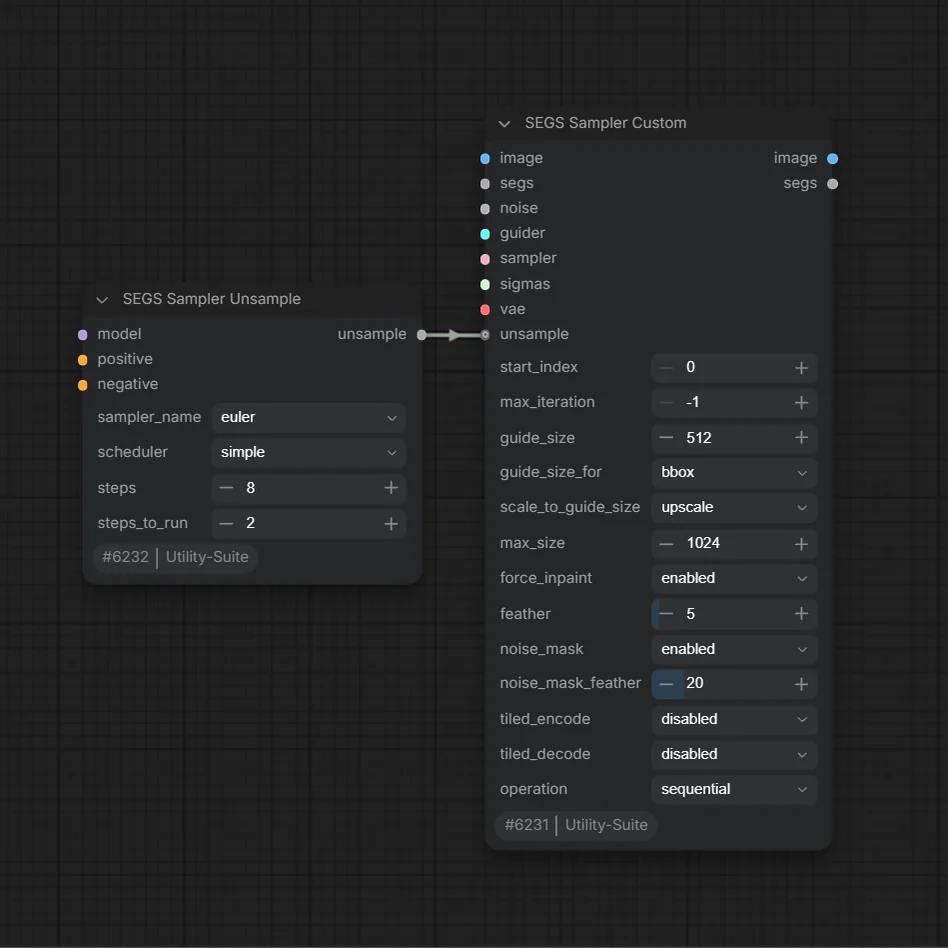
SEGS Sampler Unsample
SEGS Sampler Unsample configures an optional reverse-then-forward diffusion
pass for SEGS Loop Sample. It raises a crop from low noise to the selected
sigma level with CFG 1, then resamples it using the loop's normal controls.
steps_to_run=-1 uses the full schedule; reverse execution currently supports
the Euler sampler only.
SEGS Loop
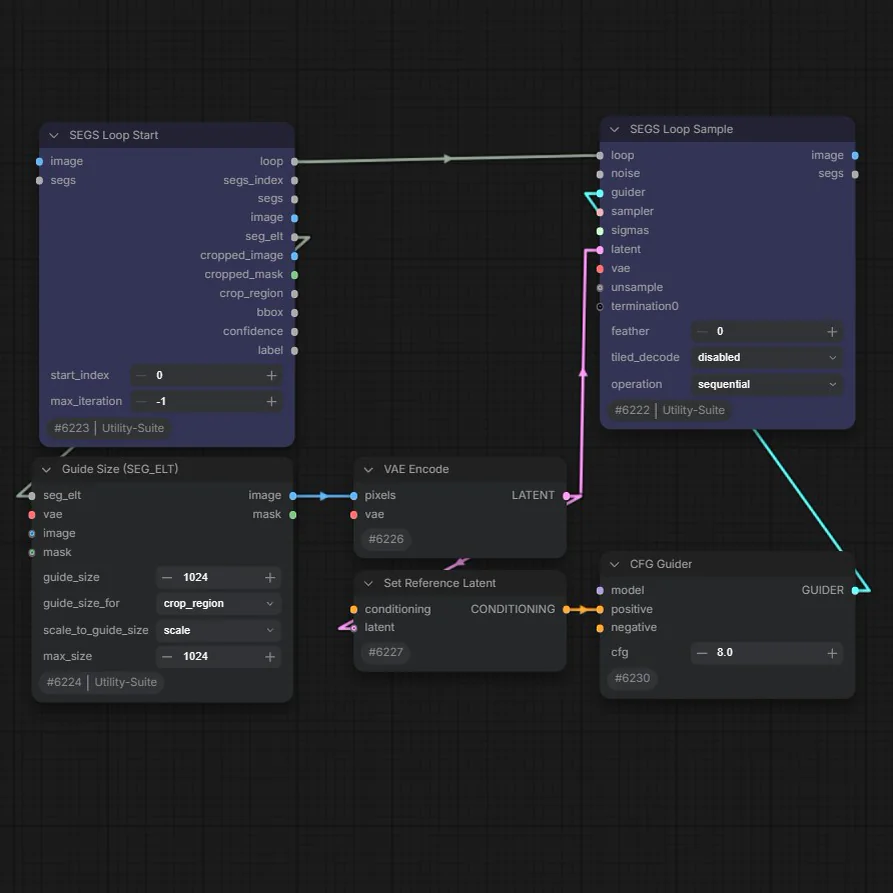
SEGS Loop (displayed as SEGS Loop Start) runs the nodes between it and a
loop-ending node once for each SEG. It exposes the current SEG, crop, mask,
index, and metadata so each region can have its own processing path.
start_index skips earlier entries; max_iteration=-1 processes all remaining
entries.
SEGS Loop Sample
SEGS Loop Sample ends a SEGS loop by sampling the current crop, decoding it,
and returning the updated image and SEGS. sequential lets later overlapping
regions see earlier edits, while individual processes stored crops separately
and pastes them all at the end. Connect a SEGS Sampler Unsample output to
optionally unsample each crop before the normal sampling pass.
Guide Size (SEG_ELT)
Guide Size (SEG_ELT) resizes one SEG crop and mask to a sampling-friendly
resolution. The guide size represents the square root of a target pixel area,
measured from either the SEG bbox or crop region; it is not a fixed width or
height. Scaling respects the connected VAE's spatial compression ratio and
max_size; none returns the original dimensions unchanged.
SEGPaste
SEGPaste replaces one SEG's stored crop with a processed image and optionally
pastes it onto a full-size image. The crop is resized to the SEG's crop region,
blended through its existing cropped mask, and softened by feather. With no
full image connected, the updated SEGS is still returned for later use.
SEGS Loop Pass
SEGS Loop Pass ends a SEGS loop without sampling. Use it when the loop body
already updates the SEGS, and optionally the full image, by other means. Any
connected termination outputs are forced to run once per iteration, which is
useful for previews or other side effects.
MASK to Tile SEGS
MASK to Tile SEGS divides one mask canvas into overlapping tile SEGS and also
returns the same crops as a mask batch. Choose fixed-size tiles, a grid bounded
by maximum rows and columns, or a uniform grid with minimum rows, columns, and
overlap. Connecting an image stores the matching image crop in every SEG.
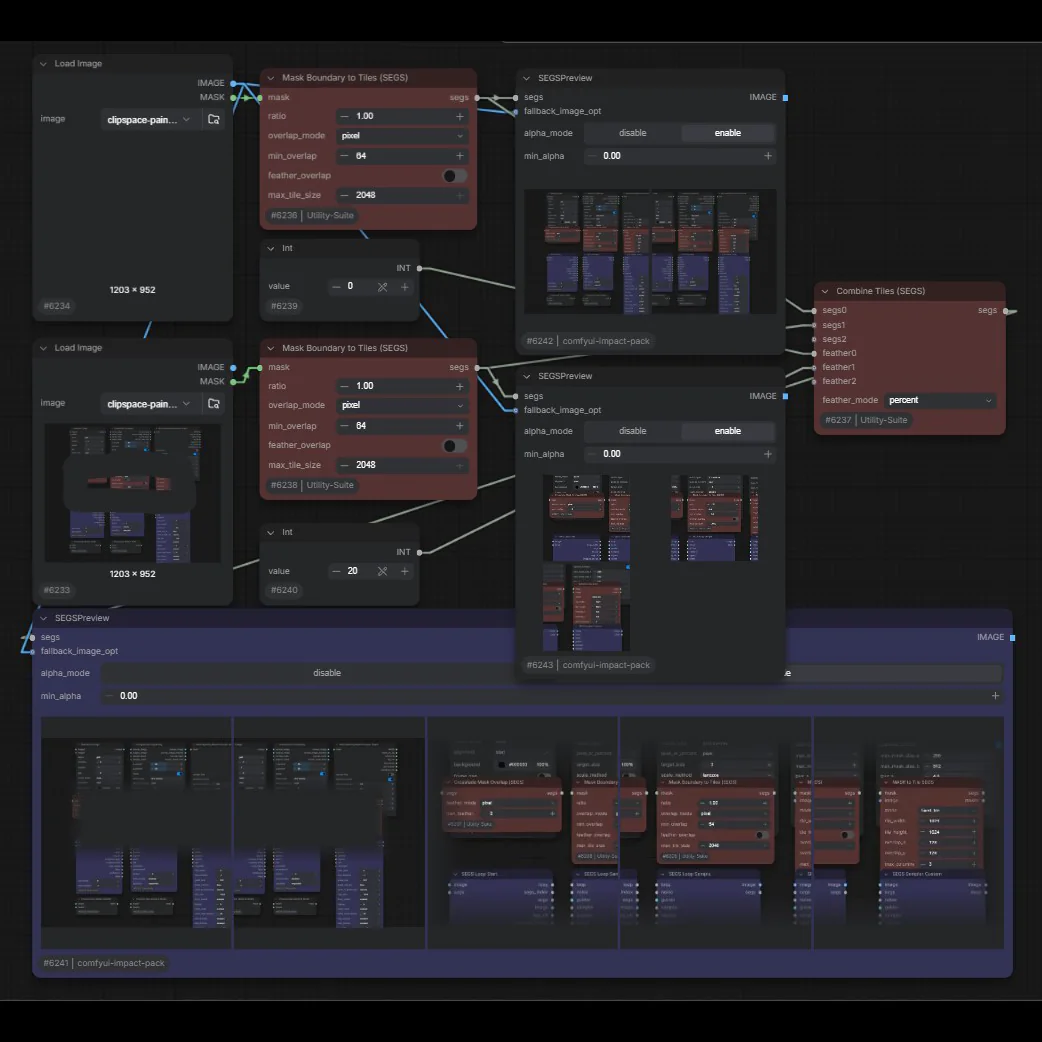
Mask Boundary to Tiles (SEGS)
Mask Boundary to Tiles (SEGS) finds each mask's union bounding box and fills
that exact boundary with width-to-height-ratio tiles. It never expands or
shrinks the detected boundary. Overlap may be specified in pixels or percent,
and feather_overlap creates complementary tile masks for smoother recombining.
SEGS Change Ratio
SEGS Change Ratio expands each SEG crop region to a requested width-to-height
ratio while keeping it within the source canvas. Enable tiling when a region
must be split to stay below max_tile_size; overlap and optional overlap
feathering then control how those tiles meet.
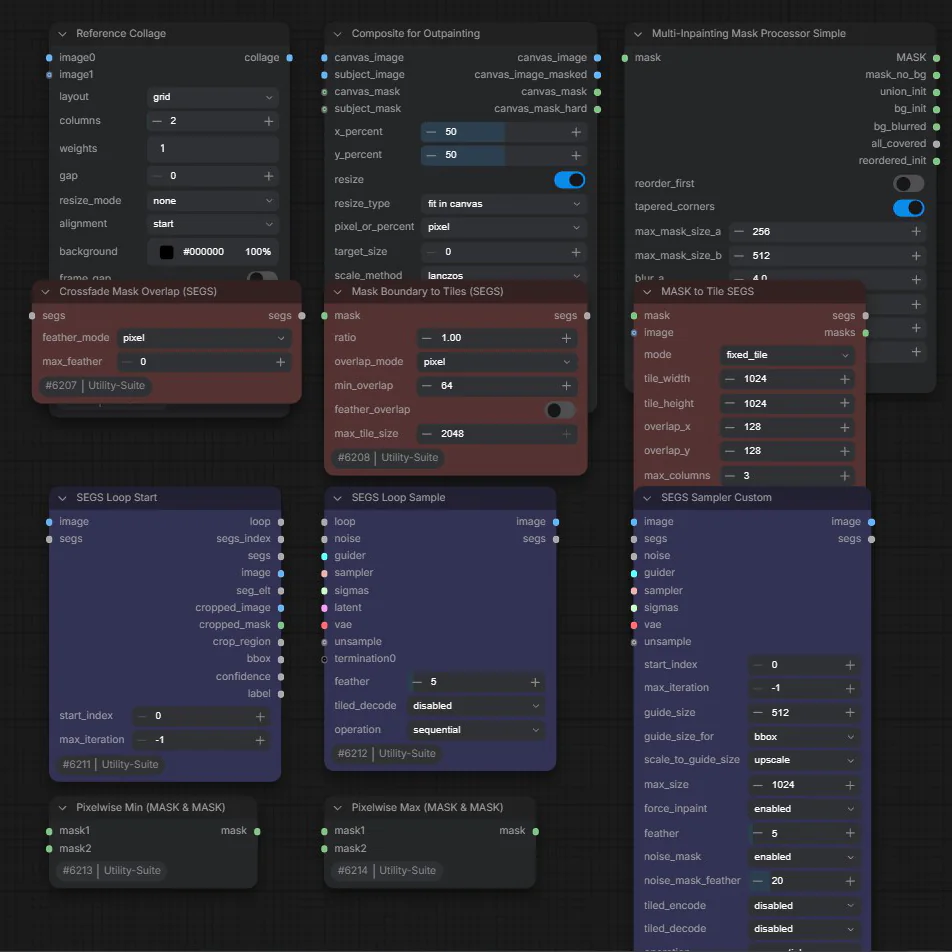
Crossfade Mask Overlap (SEGS)
Crossfade Mask Overlap (SEGS) changes SEG cropped masks so neighboring crop
regions crossfade across their shared area. Feather width may be given in
pixels or as a percentage of the overlap, with max_feather=0 using the full
overlap. Crop regions and other SEG metadata are left unchanged.
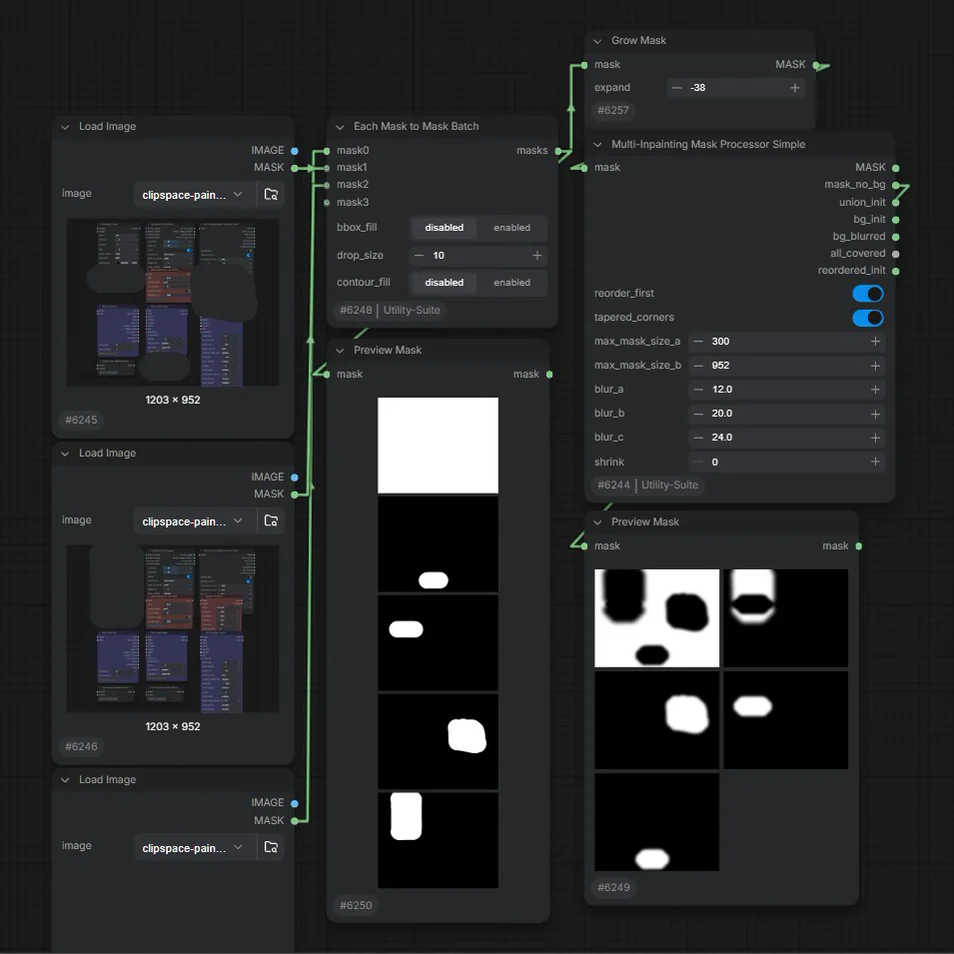
Multi-Inpainting Mask Processor Simple
Multi-Inpainting Mask Processor Simple turns a batch of nested or overlapping
masks into a non-overlapping sequence for staged inpainting. It adds the
background as the first mask, chooses blur strength from mask size, and can
shrink masks or taper blur corners. The extra outputs expose the foreground
partition, original union/background, processed background, coverage status,
and cleaned input order for inspection.
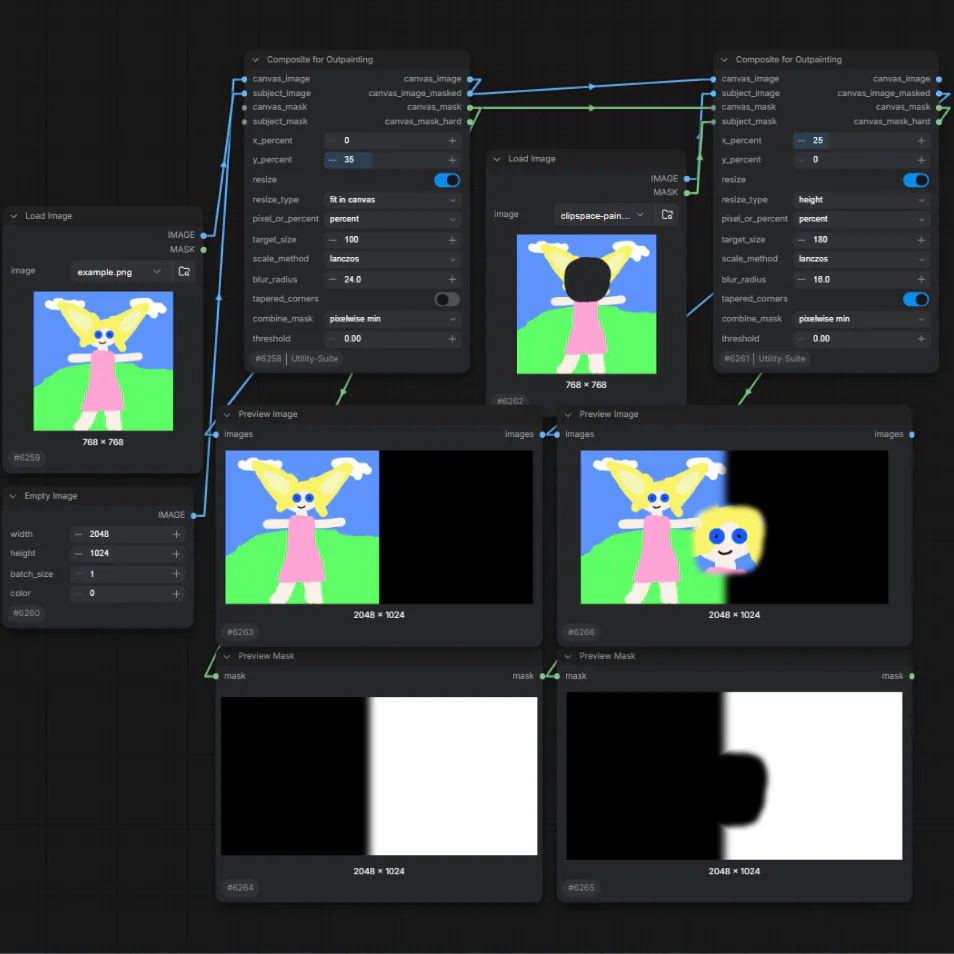
Composite for Outpainting
Composite for Outpainting places and optionally resizes a subject on a canvas
using percentage-based alignment, then builds soft and thresholded hard masks
for outpainting. Optional canvas and subject masks control the reusable area;
blur and tapered corners soften its boundary. It returns the plain composite,
a mask-applied preview, the soft mask, and the hard mask.
Batch MASK to SEGS with Comparison
Batch MASK to SEGS with Comparison creates one SEG for each mask in a batch.
Normally crop_factor expands each crop around its target bounds; with
mask_base connected, comparison masks can instead establish a larger crop at
the offset selected by start_comparison. bbox_fill fills target boxes and
contour_fill fills outer contours before the cropped masks are stored.
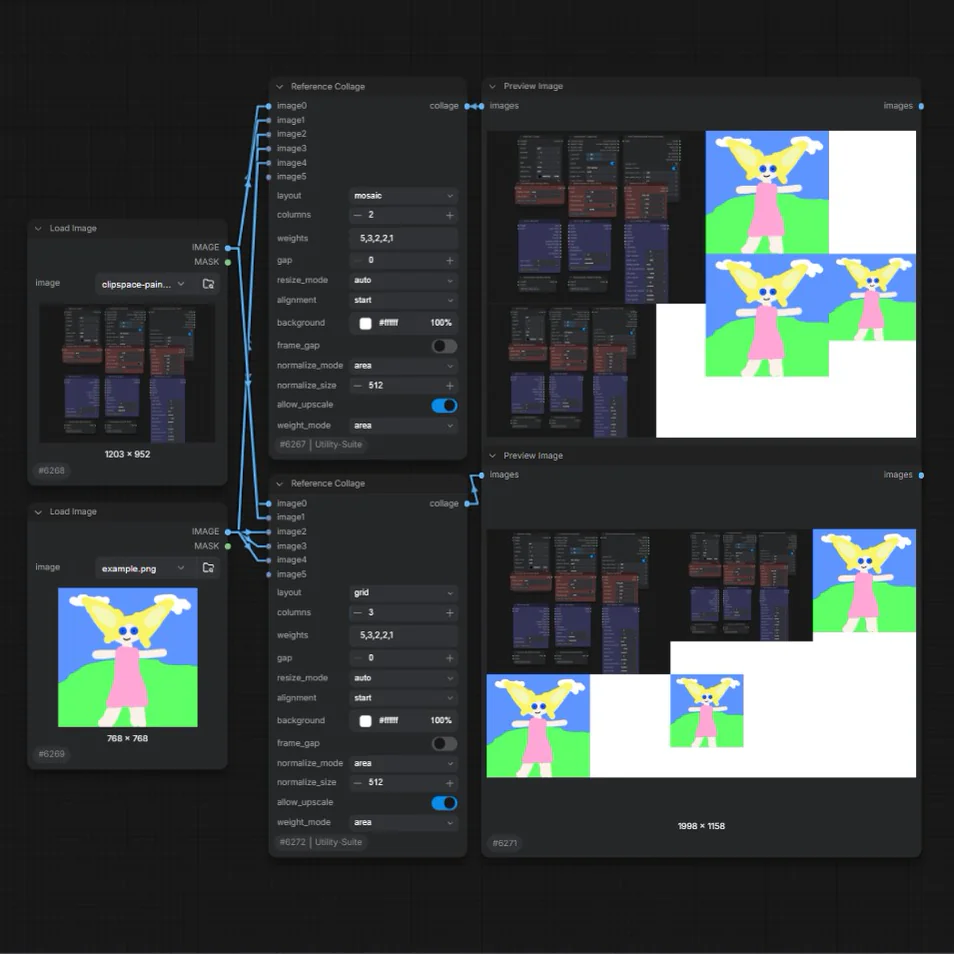
Reference Collage
Reference Collage combines its auto-growing image0, image1, ... inputs
into a content-sized grid or weighted mosaic while preserving aspect ratios and
socket order. Comma-separated weights control relative displayed area or
linear scale; normalization can first bring mixed source sizes to a common
longest side, shortest side, or approximate area. Use gap, frame_gap,
alignment, and background to control the finished canvas; columns applies to
grid mode only.