
Multimodal — LLM (Local-first: GGUF + Transformers)
Local-first multimodal LLM nodes for ComfyUI (GGUF+mmproj via llama.cpp, optional Transformers fallback).
Nodes (11)
The honest way to let an LLM decide whether to generate an image
A prompt contract so your LLM stops improvising its JSON
The `<context>` snatcher that closes the loop on model memory
Guess-free GGUF settings by reading the filename instead of your mind
Assemble your LLM's background knowledge without a monster text block
The same context assembler, but with X-ray vision into each block
Five seconds of introspection that saves an hour of wheel roulette
An LLM that lives inside your ComfyUI graph, reads up to 3 images, and never needs an API key
The node that finds the exact llama-cpp-python wheel your GPU needs
Pick a persona for your LLM node without writing a system prompt by hand
The eject button for models that ComfyUI forgot it loaded
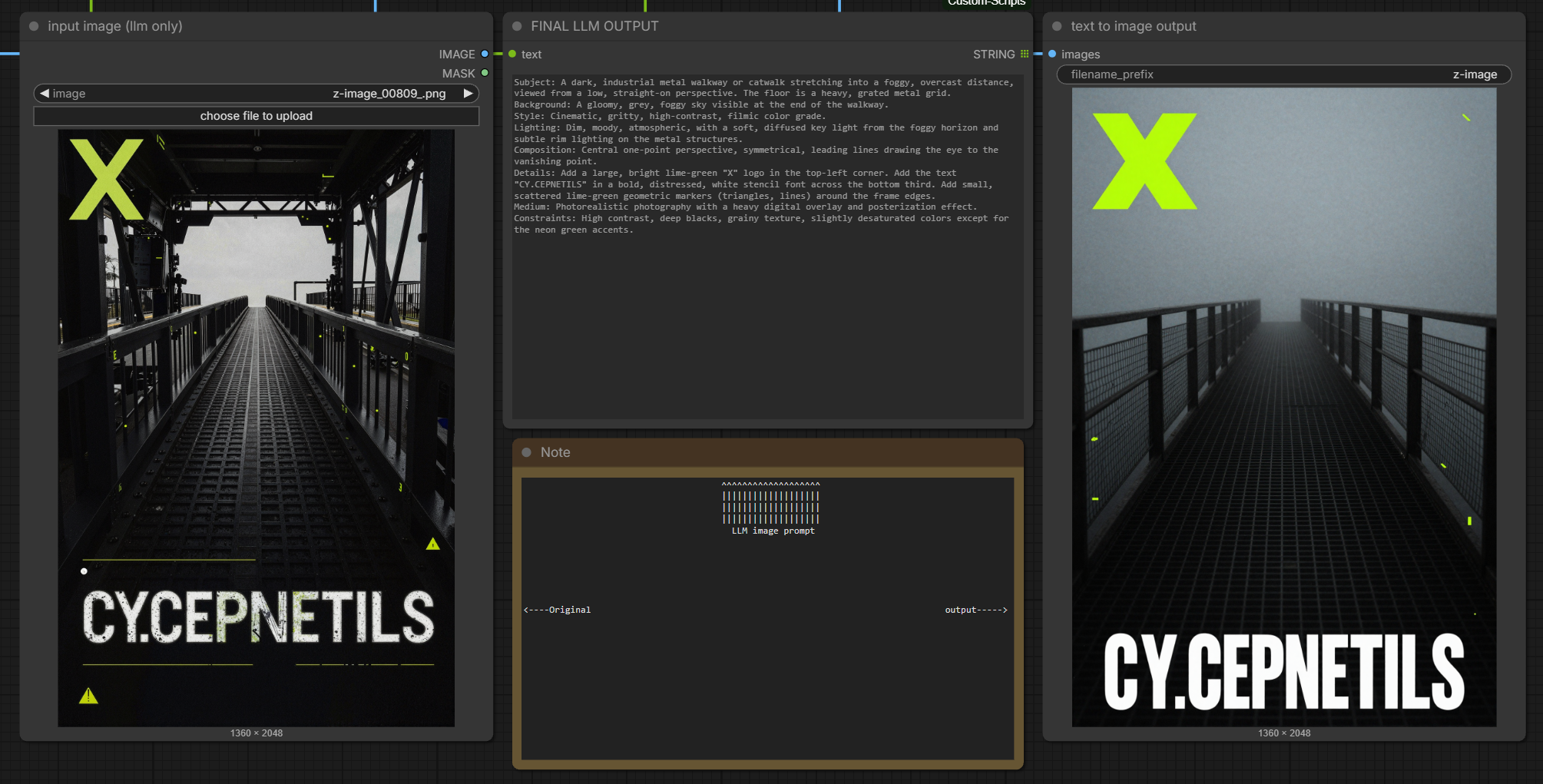
llm_comfy_multimodal
Local-first multimodal reasoning inside ComfyUI.
What makes this powerful:
- Graph-native VLM: use an LLM/VLM as a node that can read up to 3 images, write text, and drive the rest of your workflow.
- Closed-loop pipelines: describe → write prompt → generate → QC → edit (consistency-locked) without copy/paste.
- Preset prompts as files: drop a
.mdintopresets/system/orpresets/context/and it becomes selectable in the UI. - Runs on your machine: GGUF + mmproj (llama.cpp) first, with transformers as an optional fallback.
Custom nodes for ComfyUI that run text + vision models inside ComfyUI (same Python process). You can use:
- GGUF + mmproj (llama.cpp via
llama-cpp-python) for local VLMs like Qwen / Gemma3 - Transformers (HF id or local snapshot folder) for text-only or VLMs
All nodes show up under the llm/multimodal menu (search “Multimodal”).
Requirements (read this first)
- ComfyUI installed and running.
- Python deps installed into the same Python environment ComfyUI uses.
- For GGUF runs: a working
llama-cpp-pythonbuild (CUDA wheel if you want GPU speed). - Your models live in ComfyUI’s model folder:
- GGUF + mmproj:
ComfyUI/models/llm/<your_model>/ - Transformers snapshots (optional):
ComfyUI/models/llm/<your_transformers_model>/
- GGUF + mmproj:
Install
- Copy this folder to:
ComfyUI/custom_nodes/llm_comfy_multimodal/
- Install deps (from ComfyUI’s Python):
pip install -r ComfyUI/custom_nodes/llm_comfy_multimodal/requirements.txt
-
(GGUF) Install a CUDA-capable
llama-cpp-pythonwheel that matches your system.- Use node “Multimodal — CUDA / Python report” to see your
pip_wheel_cuda_tag_hint(e.g.cu124). - Use node “Multimodal — llama-cpp wheel pick (GitHub)” (internet required) or CLI:
python -m llm_comfy_multimodal.install_llama_wheel
- Use node “Multimodal — CUDA / Python report” to see your
-
Restart ComfyUI.
Where to put GGUF + mmproj
Put both files in a subfolder under ComfyUI/models/llm/:
ComfyUI/models/llm/MyModel/
  MyModel-Q8_0.gguf
  mmproj-MyModel-BF16.gguf
Rules:
- You need two different files: main weights +
mmproj*.gguf - Download main + mmproj from the same release family (don’t mix mmproj across models)
Main node (Multimodal — LLM)
Vision run
use_vision = True- connect
image(orimage2/image3) - set both GGUF fields (main + mmproj) or use
combined_modelfor transformers VLM
Text-only run
use_vision = False(linked images are ignored)- if GGUF main+mmproj are set → llama.cpp text-only chat on that stack
- otherwise → text-only transformers using
combined_model
Notes:
keep_models_loadedcontrols this extension’s cache only (HF pipelines / llama-cpp instances). It does not unload SD checkpoints.- Seed controls sampling randomness; it does not create a separate “chat session”.
GGUF handler choices
Set gguf_vlm_handler to match your GGUF family:
qwen3-vl: Qwen3-VL GGUF + mmproj (requires a wheel that exportsQwen3VLChatHandler)qwen2.5-vl: Qwen2.5-VLgemma3: Gemma 3 GGUF + mmprojllava-1.6/llava-1.5: LLaVA families
If you pick the wrong handler, you’ll usually get “can’t see the image” or empty/odd output.
Helper nodes
- Multimodal — System prompter: picks a system prompt preset (
presets/system/*.md) and outputssystem_prompt+ a preview. - Multimodal — Context handler: builds
extra_contextfrom toggle-able blocks (text/file/preset), plus a preview. - Multimodal — GGUF settings sorter: heuristic defaults from GGUF filenames (handler/n_ctx/etc.).
- Multimodal — Context schema builder / parser: prompt contracts +
<context>...</context>extraction. - Bonus: LLM text → image intent: routes an LLM reply into KSampler-style prompt fields.
Workflow example (included)
This repo includes a ready-to-import ComfyUI workflow:
workflow/multimodal - LLM.json
And two reference images:
workflow/preview(not workflow).png(this README header image)workflow/workflow.png(full graph screenshot)
How to use:
- In ComfyUI, load the workflow JSON (drag/drop it onto the canvas, or use ComfyUI’s workflow load menu).
- The graph demonstrates the typical pattern:
LoadImage→Multimodal — Context handler+Multimodal — System prompter→Multimodal — LLM- LLM output → prompt routing → CLIP encodes →
KSampler(example “text to image output”)
Presets (system + context)
You can add your own .md files:
- System presets:
presets/system/ - Context presets:
presets/context/
Restart ComfyUI to refresh the dropdowns.
Troubleshooting
GGUF is slow / OOM / thrashing VRAM
- Don’t run two ComfyUI instances on one GPU if you can avoid it (each loads its own models).
- Lower
gguf_n_ctx, lowermax_new_tokens, turn off streaming to isolate issues. - Ensure main+mmproj are a matched pair; wrong mmproj often causes failures or silent degradation.
“cannot import name Qwen3VLChatHandler” / vision doesn’t work for Qwen3
- You’re using a
llama-cpp-pythonbuild without Qwen3-VL support. - Use the wheel picker node or install a Qwen3-capable build.
Handler mismatch (Gemma/Qwen/LLaVA)
- Try the correct
gguf_vlm_handlerfor your weights. - Gemma 3 vision needs
gemma3.
Dropdown shows weird values / node inputs feel scrambled
- Delete and re-add the node (old workflows can have socket order drift).
Unsure what branch actually ran
- Keep
log_load_details = Trueand read the ComfyUI console:- branch (
combined+GGUF+VLM,combined+GGUF+text,combined+HF+VLM_pipeline,combined+causal_LM) - resolved model paths and handler tag
- branch (
Repo layout (quick)
nodes.py: ComfyUI nodesgguf_multimodal.py: GGUF + mmproj backend (llama-cpp-python)presets/system/: system prompt presetspresets/context/: context blocks / schemasrequirements.txt: python deps