
ComfyUI-StableLayers
Stable-Layers / Qwen-Image-Layered RGBA layer decomposition nodes for ComfyUI, plus a PEFT-format LoRA loader that actually applies.
Nodes (6)
Merge Layer Range — when the model hands you a figure in three pieces
Load PEFT/diffusers LoRA (Model only) — for when your LoRA is silently doing nothing
Save Layers (RGBA) — the save node that doesn't throw your alpha away
Solidify Alpha — for when your cutout looks like smoked glass
Split Layer Stack — turning the layered latent into actual layers
Stable-Layers LoRA (auto-download) — the one-input node that makes decomposition work
ComfyUI-StableLayers
Run Stable-Layers (Stability AI) inside ComfyUI, on top of Qwen-Image-Layered — decompose a flat image into stacked RGBA layers (background + objects, back-to-front) that you can move, recolour, delete or animate independently.
Stability released the adapter as a bare PEFT checkpoint plus a decompose.py that wants
~40 GB of VRAM. This repo makes it a first-class ComfyUI citizen: it loads on the fp8 / GGUF
quantisations (so a 24–32 GB card is enough), keeps the alpha channel all the way to disk, and
ships a headless API driver.
Not affiliated with Stability AI or Alibaba. Model licences are their own — see Licences.
Why a custom node is needed
LoraLoaderModelOnly silently does nothing with this adapter. Two reasons, both fixed here:
- Key prefix. PEFT saves tensors as
base_model.model.transformer_blocks.0.attn.to_q.lora_A.weight. ComfyUI's QwenImage key map (comfy/lora.py) accepts the bare form, thetransformer.prefix and the SimpleTuner lycoris form — but notbase_model.model.. All 840 tensors miss, and you get a normal-looking run with zero LoRA applied. - Missing alpha. PEFT keeps
lora_alphainadapter_config.json; ComfyUI reads the scale from a companion<key>.alphatensor and otherwise assumesalpha = rank. For Stable-Layers (r=32,lora_alpha=64) that halves the effect: scale 1.0 instead of the intended 2.0.
PeftLoraLoaderModelOnly handles both for any diffusers/PEFT adapter, not just this one.
Examples
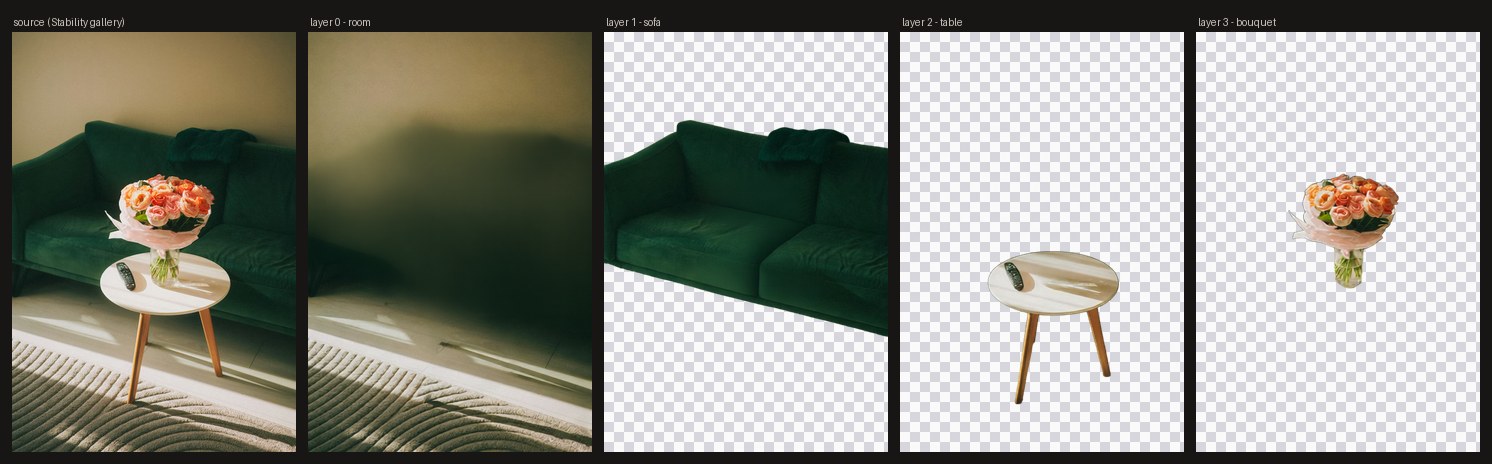
One image in, a background plate plus separated objects out — each with its own alpha, so the bouquet moves without dragging the table with it. Note layer 0: the sofa is gone, and the wall and carpet behind it were painted back in. That is the part matting cannot do.
(Source image from the Stable-Layers project gallery; the layers are this node pack's output on it, and they reproduce Stability's own published grouping — room / sofa / table / bouquet.)
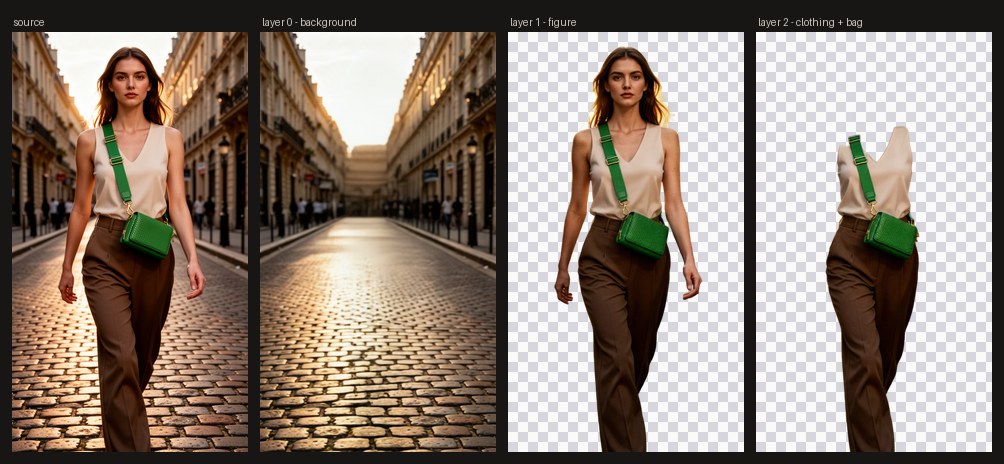
The same on a rendered photo: background, figure, then the clothing-and-bag group as its own layer.
Install
ComfyUI-Manager: search for ComfyUI-StableLayers and install.
Manually:
cd ComfyUI/custom_nodes
git clone https://github.com/tggo/ComfyUI-StableLayers
# optional, only for the auto-download node:
pip install huggingface_hub
Then grab the base model (ComfyUI ≥ 0.6.0 supports it natively — no other custom nodes needed):
| File | → | Size |
|---|---|---|
| qwen_image_layered_fp8mixed.safetensors | models/diffusion_models/ | 20.5 GB |
| qwen_image_layered_vae.safetensors | models/vae/ | 254 MB |
| qwen_2.5_vl_7b_fp8_scaled.safetensors | models/text_encoders/ | 9.4 GB |
qwen_image_layered_bf16.safetensors (40.9 GB) is the full-precision alternative; for lower VRAM
use the GGUF quants from unsloth/Qwen-Image-Layered-GGUF
with ComfyUI-GGUF — the LoRA loader here works on those too.
The adapter itself (330 MB) is downloaded on first use into models/loras/stable-layers/.
Nodes
| Node | What it does |
|---|---|
| Stable-Layers LoRA (auto-download) | Fetches StabilityLabs/Stable-Layers and applies it with the correct alpha. One input: strength. |
| Load PEFT/diffusers LoRA (Model only) | Generic: any base_model.model.* PEFT adapter from models/loras/, alpha read from the sibling adapter_config.json. |
| Merge Layer Range | Composites layers start..end back into one RGBA and keeps z-order for the rest — the adapter often splits one subject into torso/legs/arms, which is depth you may want or noise you may not. |
| Split Layer Stack | Decoded batch → composite, layers, alpha_masks, layer_count. Optionally drops blank layers (the model pads unused slots). |
| Solidify Alpha | Hardens a soft matte into a solid silhouette with a clean anti-aliased edge — the fix for limbs that come back 40–60 % transparent. |
| Save Layers (RGBA) | Writes numbered PNGs with alpha. Core SaveImage converts to RGB and throws the alpha away, which makes it useless for a layer stack. |
Wiring

Drag example_workflows/stable_layers_decompose.json
onto the ComfyUI canvas — that is the graph above, mid-run: per-node timings across the top, the
input on the left, and the four decoded layers previewed in Save Layers (RGBA) on the right
(91 s end to end at 640 px). example_workflows/*_api.json are the same graphs in API format
for /prompt.
The base pipeline is the stock ComfyUI Image to Layers template:
UNETLoader ─► [Stable-Layers LoRA] ─► ModelSamplingAuraFlow(shift 1.0) ─► KSampler ─► LatentCutToBatch(t, 1) ─► VAEDecode ─► Split Layer Stack ─► Save Layers (RGBA)
CLIPTextEncode(prompt) ─► ReferenceLatent(VAEEncode(image)) ─► positive
CLIPTextEncode("")     ─► ReferenceLatent(VAEEncode(image)) ─► negative
EmptyQwenImageLayeredLatentImage(w, h, layers) ─► latent
The layered latent holds layers + 1 temporal slices; slice 0 is the flattened composite, the
rest are the layers. The official template cuts slice 0 away with LatentCut(t, 1, …); keep it and
Split Layer Stack hands it back as a free reconstruction check.
Settings that matter
| | base Qwen-Image-Layered | + Stable-Layers | |---|---|---| | sampler | euler | heun | | steps | 20 (paper: 50) | 50 | | CFG | 2.5 (paper: 4.0) | 1.0 | | input size | 640 px (1024 for hi-res) | 640 px max | | layers | 2–20 | tuned for 4 (trained on 2–5) | | LoRA strength | — | 1.0 = Stability's own scale; 0.75 keeps a single subject in one layer |
Stability is explicit that "using a higher resolution, lower steps, or a non-Heun sampler will
garble the results" — the adapter's recipe is not the base model's recipe. The text prompt
describes the whole image (it helps with occluded content); it does not steer individual layers.
Stability's default is "a clean, well composed image", and their ablation found a basic prompt
beats a detailed one.
Strength is a real knob. At the shipped strength (1.0, i.e. alpha/r = 2.0) the adapter chases
its "distribute content across layers" reward hard enough to split a lone figure into torso, legs and
arms. That is depth you can actually drive — give each layer its own parallax factor — but if you
wanted one cutout, drop to 0.75 and the subject comes back whole with the cleaner alpha intact.
Speed
ComfyUI's own execution_start → execution_success on an RTX 5090, 640 px, 4 layers, one variable
at a time. Never time this from the client: a queue wait or the first 20.5 GB weight load dwarfs the
run (one of ours reported 645 s wall for 50 s of compute).
| recipe | text encoder | time | |---|---|---| | euler 20 · CFG 2.5 (stock template) | GPU | 44 s | | euler 20 · CFG 2.5 | CPU | 62 s | | euler 20 · CFG 1.0 | CPU | 48 s | | heun 50 · CFG 1.0 (Stable-Layers recipe) | CPU | 95 s | | heun 50 · CFG 1.0 + Stable-Layers | CPU | 97 s |
Reading: the adapter is nearly free (+2 s) — what costs is its recipe, since 50 Heun steps are 100 model evaluations against euler-20's 40. Dropping CFG to 1.0 removes the negative pass and saves ~23 %.
CLIPLoader device=cpu is not a speed trick — it cost 18 s here. Use it only if the 20.5 GB
transformer plus the 9.4 GB encoder push you into an OOM; on a 32 GB card ComfyUI juggles both
without help.
Verified
ComfyUI 6f7cd7fc (2026-08-04), torch 2.10.0.dev+cu130, adapter revision 41b2f769,
qwen_image_layered_fp8mixed. A correct load prints 420 patches attached (60 blocks × 7
modules) and no lora key not loaded warnings — check for both if you suspect a silent no-op.
Headless
python scripts/decompose_api.py --host 127.0.0.1:8188 \
    --input panel.png --outdir out/ --layers 4 --lora
Builds the graph, uploads the image, waits, and pulls layer_*.png back. Drop --lora for the
stock model; --steps/--cfg/--sampler override the recipe.
Licences
- This node pack: Apache-2.0.
Qwen/Qwen-Image-Layered(20B base): Apache-2.0.StabilityLabs/Stable-Layers(the adapter): Stability AI Community License — free for research, non-commercial, and commercial use below USD 1 M annual revenue; above that an enterprise licence is required. The restriction comes from the adapter only — the base model stays Apache-2.0 if you run without it.
Credits
Rowles, Adithyan, Pinnaparaju, Voleti, Boss — Stable-Layers: Fine-Tuning Image Layer Decomposition Models with VLM-Scored Reinforcement Learning, arXiv:2605.30257. Base model: Qwen-Image-Layered.