
ComfyUI-LiveDev
A full-featured development toolkit for ComfyUI: live-reload custom nodes without restarting, live server console, Python REPL, Wires & Connections (12 routing styles, 16 visual effects, Quick Connections), Dependencies Manager with rollback, Smart Localization Scanner, Alignment Dock, and GPU/RAM diagnostics.
🔃 ComfyUI-LiveDev
<p align="center"> <img src="https://raw.githubusercontent.com/technokeys-ai/ComfyUI-LiveDev/main/icon.svg" alt="ComfyUI-LiveDev Icon" width="76" /> </p> <p align="center"> <strong>Developed by <a href="https://github.com/technokeys-ai">TechnoKeys</a></strong> </p> <p align="center"> <a href="https://github.com/technokeys-ai/ComfyUI-LiveDev/releases"><img src="https://img.shields.io/github/v/release/technokeys-ai/ComfyUI-LiveDev?style=flat-square&color=38c0c4" alt="Release" /></a> <a href="https://registry.comfy.org"><img src="https://img.shields.io/badge/Comfy%20Registry-technokeys--ai-1f6f73?style=flat-square" alt="Comfy Registry" /></a> <a href="https://github.com/technokeys-ai/ComfyUI-LiveDev/blob/main/LICENSE"><img src="https://img.shields.io/badge/License-MIT-38c0c4?style=flat-square" alt="MIT License" /></a> <img src="https://img.shields.io/badge/Python-3.10%2B-1f6f73?style=flat-square" alt="Python 3.10+" /> </p>A comprehensive development toolkit and workflow power-suite for ComfyUI. Reload custom nodes the moment their code changes, inspect live server logs and system telemetry, resolve dependency conflicts with one-click rollback, customize wire routing and visual effects, and organize large graphs — all without restarting the server.
Quick Start
- Open the Control Hub: click the
LiveDevbutton in the top menu bar to access Console, Config, Memory, Report, Deps, Toolbar, Restart, Shutdown, Rebuild, and Reload All. - Customize Wires & Effects: open
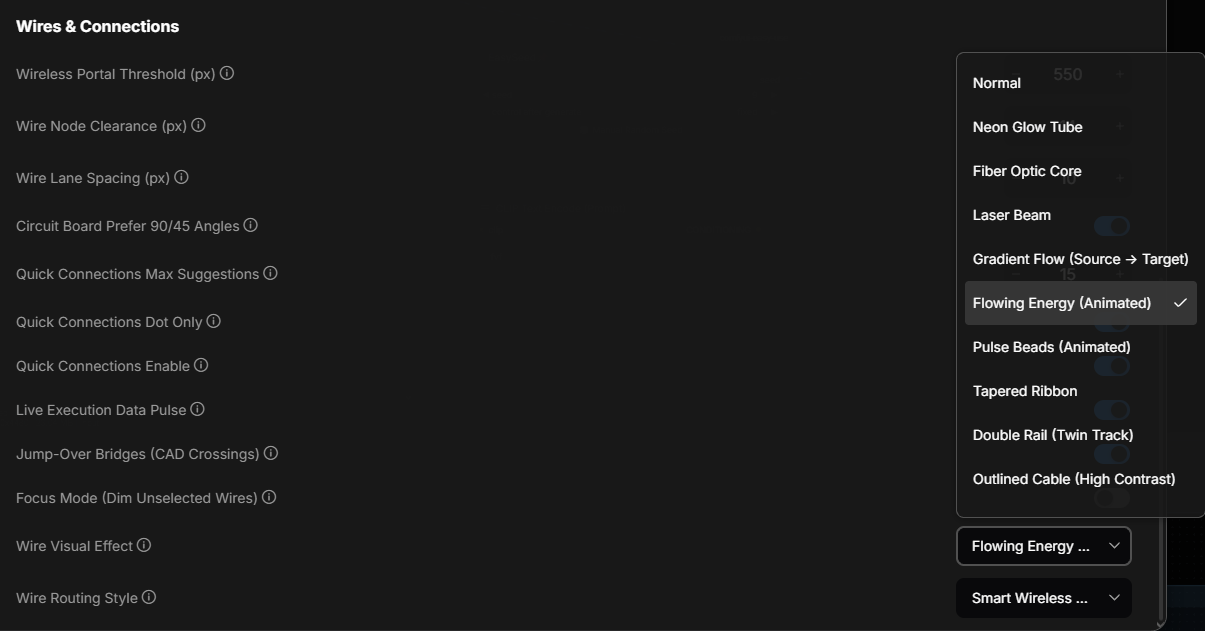
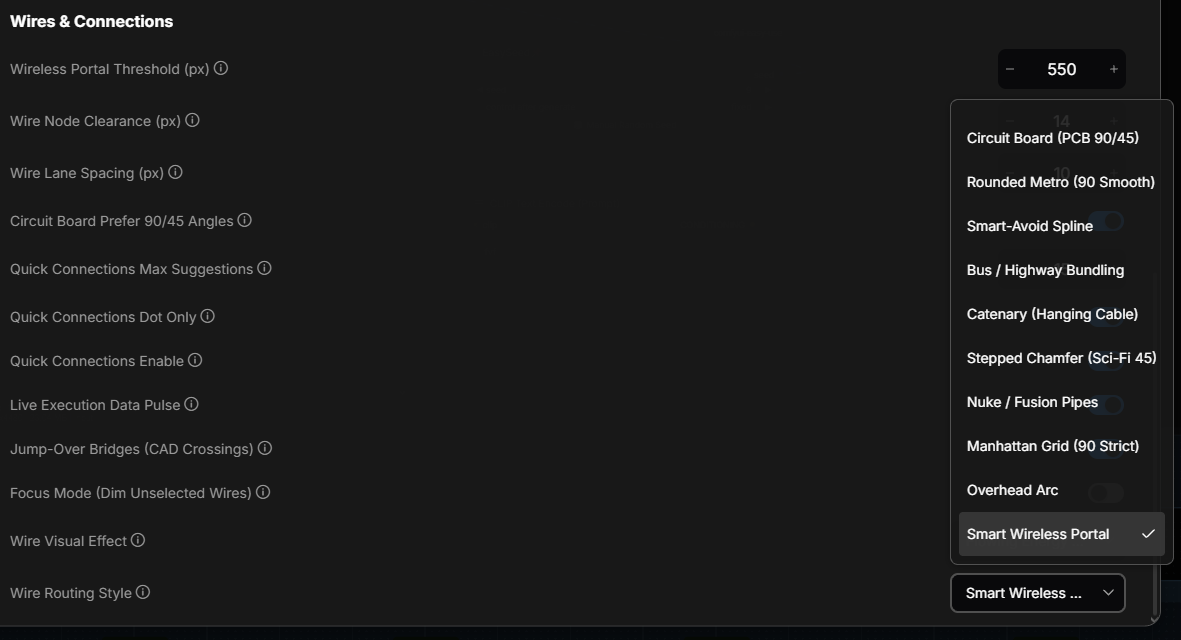
Settings → 🔃 LiveDev → Wires & Connectionsto switch live between 12 Wire Routing Styles, 16 Wire Visual Effects, Quick Connections, Focus Mode, CAD Jump-Over Bridges, and Live Execution Data Pulse. - Dock or Auto-Hide the Alignment Toolbar: click the pin toggle on the floating bottom dock (or click
Toolbarin the LiveDev menu) to keep it always visible or show it only when 2+ nodes are selected.
Visual Showcase
Control Hub & Live System Telemetry
| LiveDev Control Hub | Live Stats Bar & Detail Popup | | :---: | :---: | | <img src="https://raw.githubusercontent.com/technokeys-ai/ComfyUI-LiveDev/main/assets/LiveDevBTN.png" alt="LiveDev Control Hub" width="320" /> | <img src="https://raw.githubusercontent.com/technokeys-ai/ComfyUI-LiveDev/main/assets/Stats-Bar-1.png" alt="LiveDev Stats Bar" width="420" /><br /><br /><img src="https://raw.githubusercontent.com/technokeys-ai/ComfyUI-LiveDev/main/assets/Stats-Bar-2.png" alt="LiveDev Stats Detail Popup" width="420" /> |
Wires & Connections (16 Visual Effects + 12 Routing Styles)
| 16 Wire Visual Effects | 12 Wire Routing Styles |
| :---: | :---: |
|  |
 |
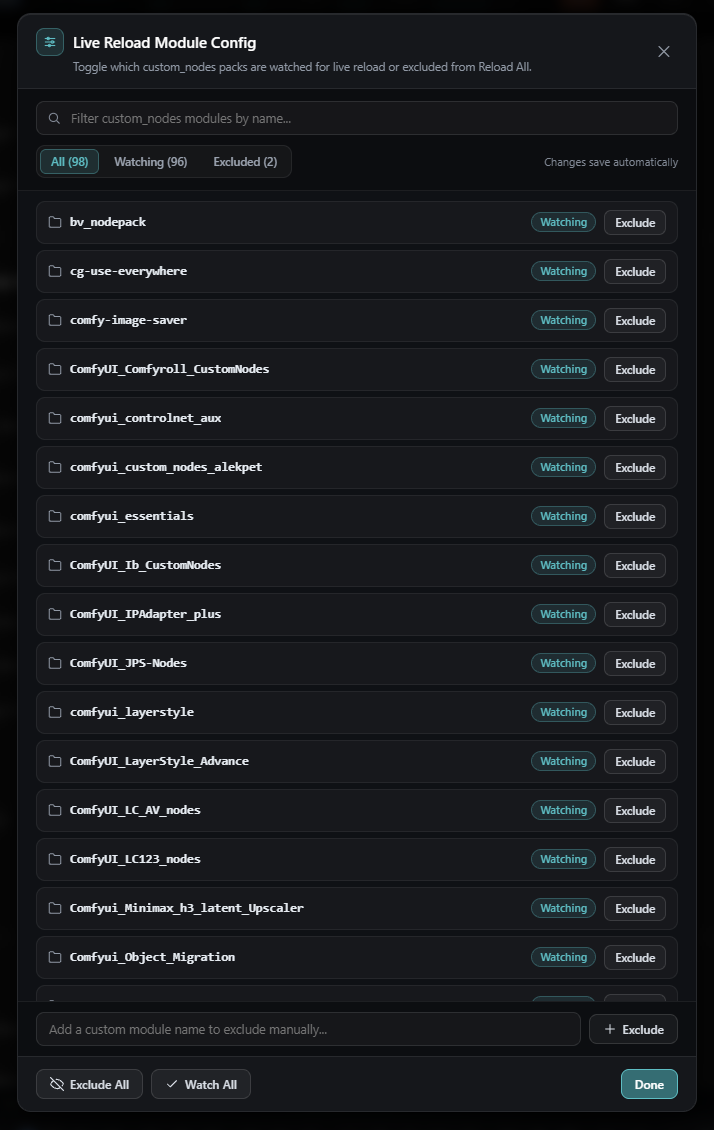
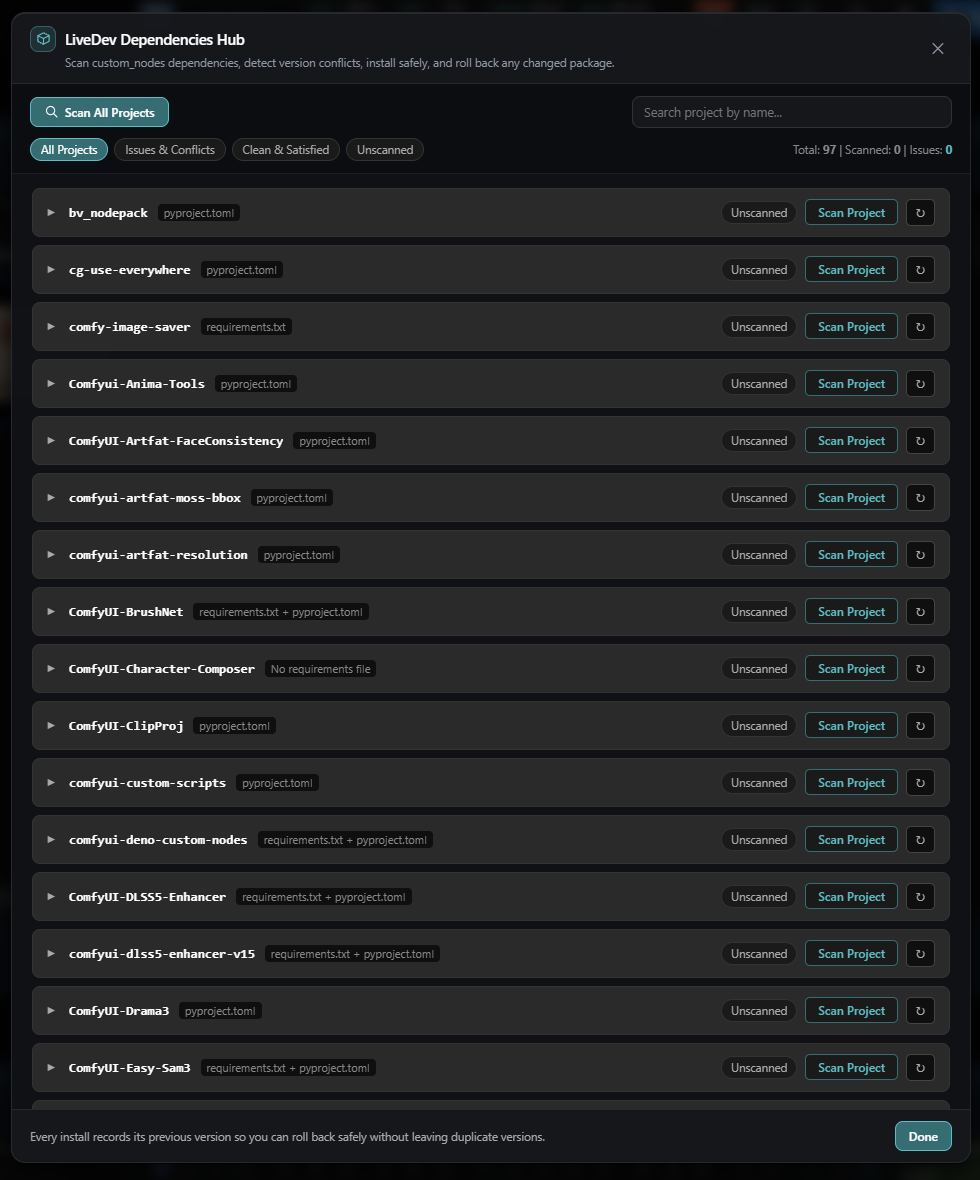
Live Reload Module Config & Dependencies Rollback Hub
| Live Reload Module Config | Dependencies Manager & Rollback Hub |
| :---: | :---: |
|  |
 |
Features
Live Reload & Watcher
- Smart content-verified watching: watches
custom_nodes/on startup (after a configurable startup grace window, default10s) and verifies real edits with SHA-256 content hashing so phantom filesystem writes and cache churn never spam the console. - Defer reload while generating: quietly defers reloads while an image or video prompt is actively executing, then applies cleanly when idle.
- Syntax safety & rollback: a module with a syntax error is refused, not loaded, keeping the server alive. The last working copy of every module is kept and can be restored from Reload History.
- Dependency-aware reloads & Reload All: reloads dependent packs in order, or reloads all watched modules at once when shared helpers change.
- Stale node detection & one-click Rebuild: draws a dashed accent border on canvas nodes whose widget schema changed after a reload and exposes Rebuild (n) in the LiveDev menu to rebuild them cleanly while preserving values and connections.
- Live Reload Module Config: interactive toggle manager (
All/Watching/Excludedtabs, instant search, bulk actions) to choose which packs are watched or excluded.
Wires & Connections
Controlled live from Settings → 🔃 LiveDev → Wires & Connections:
- Quick Connections: smart glassmorphic slot suggestions beside the cursor when dragging a link for rapid node wiring.
- 12 Wire Routing Styles:
Default (ComfyUI),Circuit Board (PCB 90/45),Rounded Metro (90 Smooth),Smart-Avoid Spline,Bus / Highway Bundling,Catenary (Hanging Cable),Stepped Chamfer (Sci-Fi 45),Nuke / Fusion Pipes,Manhattan Grid (90 Strict),Overhead Arc,Smart Wireless Portal, andOn Top (Above Nodes). - 16 Wire Visual Effects:
Normal,Neon Glow Tube,Fiber Optic Core,Laser Beam,Gradient Flow (Source -> Target),Flowing Energy (Animated),Pulse Beads (Animated),Tapered Ribbon,Double Rail (Twin Track),Outlined Cable (High Contrast),3D Glossy Pipe,Glass Tube,Circuit Trace (Solder Pads),Dashed Technical,Blueprint Dotted, andDirectional Chevrons. - Composable overlays:
Focus Mode (Dim Unselected Wires),Jump-Over Bridges (CAD Crossings), andLive Execution Data Pulse— all route-cached for smooth high-FPS rendering.
Dependencies Manager & Conflict Rollback Hub
- Scans installed custom nodes for missing packages and version mismatches.
- One-click package installation with automatic pre-install version snapshotting (
conflict_install_log.json). - Rollback / Undo: revert any installed or upgraded dependency back to its previous version (or uninstall if newly added) directly from the Deps Hub or Rollback History drawer.
Live Console, Diagnostics & Python REPL
- Live Console: mirrors server
stdoutandstderrin a browser panel, plus a canvas Terminal LiveDev node. - Stats Bar: live CPU, GPU, VRAM, RAM, and Disk telemetry with a glassmorphic detail popup showing ComfyUI process usage, reserved VRAM, loaded models, and active device.
- Module Conflict Report: identifies Python module names defined by multiple custom node packs and shows which file Python actually loaded.
- Error Report Panel: collects sanitized tracebacks, failing node widgets, console tail, and system figures into a shareable Markdown report (tokens/keys redacted and local paths shortened automatically).
- Python REPL (off by default): opt-in via
LIVEDEV_ENABLE_REPL=1.
Alignment Dock, Smart Localization & Node Tools
- Floating Glassmorphic Alignment Dock: align, distribute, match size, auto-size, smart auto-layout, bookmarks, node search, batch connect, wire bundles, auto-reroute, workflow templates, node presets, tags, bulk editor, node themes, clean orphaned nodes, fix duplicate node IDs, and Fix Node / Fix Node (Keep Values).
- Smart Localization Scanner: scans non-English titles, widgets, dropdown options, slot labels, properties, and groups; defaults From to Auto detect (
sl=auto); saves applied translations on nodes and in local translation memory so already-translated fields are never flagged again unless edited.
Optional, User-Initiated Network Features
- Localization Translate sends submitted text to
translate.googleapis.comonly when triggered by the user. - Voice Input uses the browser's Web Speech API (with optional
SpeechRecognitionfallback). - ComfyUI Update Check queries the GitHub releases API only when the LiveDev menu is opened and an updater directory exists.
Nodes
Both nodes live under 🔃 LiveDev/:
- 🖥 Terminal LiveDev (
LiveDev_Terminal) — mirrors the server console output directly onto the canvas. - 🧹 Clean Memory LiveDev (
LiveDev_ClearMemory) — unloads models and frees RAM/VRAM with anenabledtoggle and optionaltriggerinput.
Settings
All settings live under Settings → 🔃 LiveDev, organized into six sections:
- Wires & Connections — Wire Routing Style (12 modes), Wire Visual Effect (16 effects), Focus Mode, CAD Jump-Over Bridges, Live Execution Data Pulse, Quick Connections toggles, and lane/clearance/portal geometry.
- Toolbar & UI — Always Show Alignment Toolbar, Alignment Toolbar Theme (
Auto/Dark/Light), and Expand Extra Tools Row. - Live Reload & Watcher — Start Watching On Launch, Defer Reload While Generating, Reload Dependents, Confirm Before Reload All, Debounce, Watch Extensions, Observe Only Modules, Ignore Patterns, Live Reload Module Config, and live Environment summary.
- Diagnostics & Buffers — Mark Stale Nodes, Keep Last Error, Reload History Size, Console Buffer Size, and Module Conflict Cache TTL.
- Stats Bar — CPU/GPU/VRAM/RAM toggles, Refresh Rate, Process/ComfyUI detail rows, Compact Stats Bar, Top/Bottom Bar Position, and Disk Root.
- Language & Voice — Voice Language (
en/ar) and default Translate Target Language.
Environment Variables
| Variable | Meaning |
|---|---|
| LIVEDEV_EXCLUDE | Comma-separated module names to add to the exclusion list. |
| LIVEDEV_OBSERVE_ONLY | If set, watch only these comma-separated custom node folders. |
| LIVEDEV_EXTENSIONS | File extensions to watch (default .py). |
| LIVEDEV_DEBOUNCE_TIME | Seconds to wait after a file change before reloading (default 1.0). |
| LIVEDEV_STARTUP_SETTLE | Seconds to ignore file events after startup (default 10). |
| LIVEDEV_ENABLE_REPL | Set to 1 to enable the Python REPL (disabled by default). |
Installation
Option 1: ComfyUI Manager / Comfy Registry (Recommended)
Search for ComfyUI-LiveDev in ComfyUI Manager and click Install, or install via comfy-cli:
comfy node install comfyui_livedev
Option 2: Git Clone
cd ComfyUI/custom_nodes
git clone https://github.com/technokeys-ai/ComfyUI-LiveDev.git
pip install -r ComfyUI-LiveDev/requirements.txt
Option 3: Release Archive
Extract ComfyUI-LiveDev-v1.0.0.zip into ComfyUI/custom_nodes/, install requirements.txt if needed, and restart ComfyUI.
Author
Developed by TechnoKeys — https://github.com/technokeys-ai
License
MIT — Copyright (c) 2026 TechnoKeys. See LICENSE.