
Unbake
Drop an image and get the ComfyUI workflow back: a Civitai link, a PNG with metadata, or your own output. Unbake reads the PNG info — prompt, seed, sampler, steps, CFG, LoRAs — rebuilds the graph, and sorts the missing models by how you would obtain them. Then it runs a validated XY plot (parameter sweep) that throws if anything other than the axis you declared has moved, so the comparison you are looking at is actually a comparison.
ComfyUI-Unbake
"You can't unbake a cake." — this node does the thing that isn't supposed to work.
Take one image, rebuild the ComfyUI workflow behind it. Then move exactly one axis, run it many times, and put the results side by side.
If you have ever searched ComfyUI for "workflow from image", for "PNG info", or for an "XY plot" — this is those three, wired together and checked against each other.
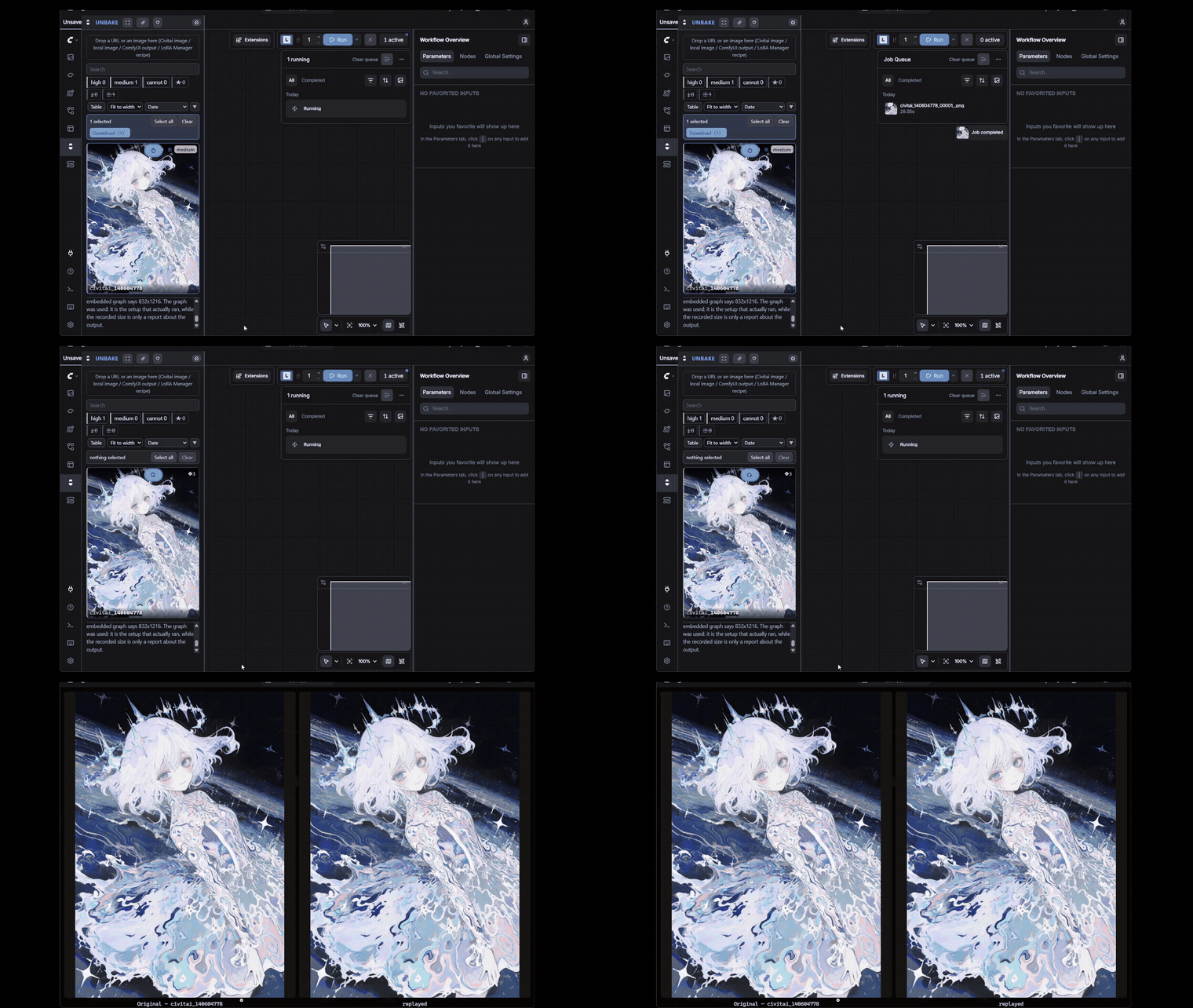
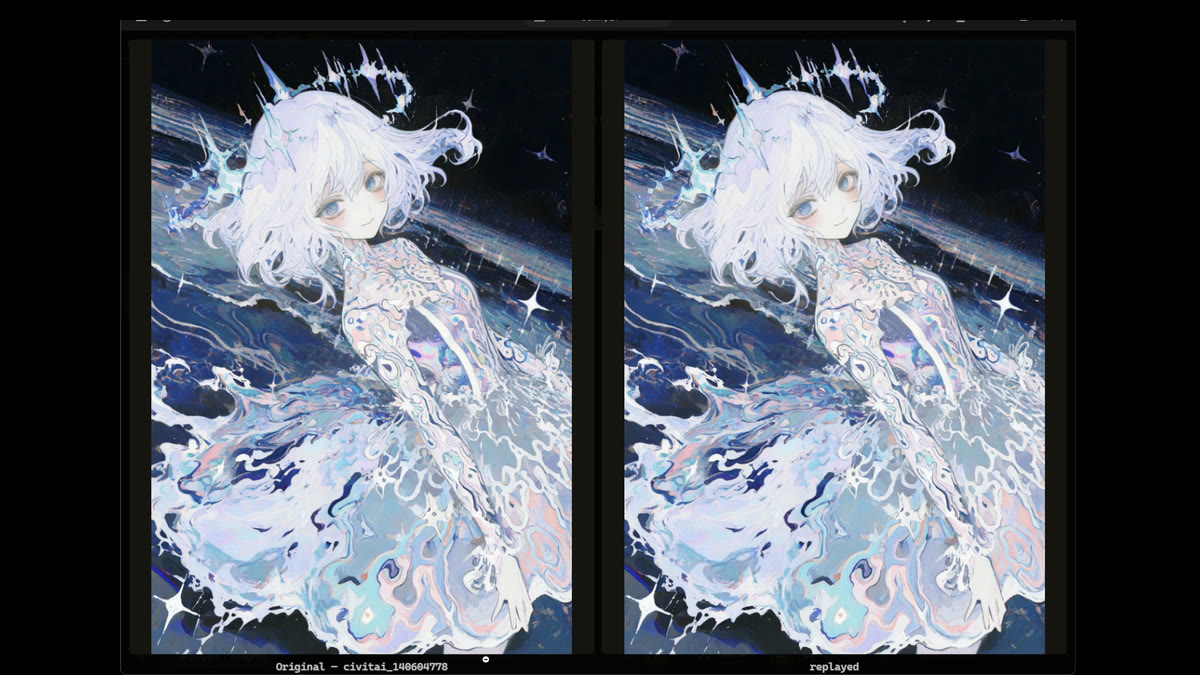
Left is the original, right is the replay. The first pair still has a model missing — the picture comes out, but it is not the same picture. The second pair is the same record after the missing pieces were installed.
A Civitai image, a PNG on your disk, or ComfyUI's own output — it all starts by dropping something onto the panel.
What it deliberately does not do
Stating the absent features up front, as a specification. These are not "not yet" — they are "never".
- Browsing, searching, organising models — not this tool's job.
- Managing preview images and model descriptions — likewise absent.
- A Civitai browsing client — it does nothing beyond being handed one image.
- Training, merging, quantising — this is about reproducing and comparing generations.
- A library that only returns a verdict — that is genrecord's job (AGPL-3.0 + commercial). That one decides whether an image can be reproduced; this one actually builds it and runs it.
Three words
| Layer | Word | What it means |
|---|---|---|
| Input | Generation Record (short: Record) | The record of the conditions that made one image. A Civitai image, an A1111 PNG, a ComfyUI output, or a LoRA Manager recipe — any of them can be the source |
| Plan | Replay Manifest | The execution plan built from that record, carrying what can be satisfied and what is missing |
| Compare | Sweep | Declare an axis, run many, lay the results out side by side |
What it can do
1. Reproduce
Drop an image and it reads the record and builds the workflow. Having built it, it returns a verdict. There are five, and they are worded on screen as high / medium / cannot / download to try / unchecked — how likely the picture is to come back the same, not whether the workflow could be assembled.
The verdict is produced by checking against what is actually installed (/object_info).
A name matching and ComfyUI being able to accept it are two different things, so it
looks through alias tables as well and confirms all the way to "this can be queued".
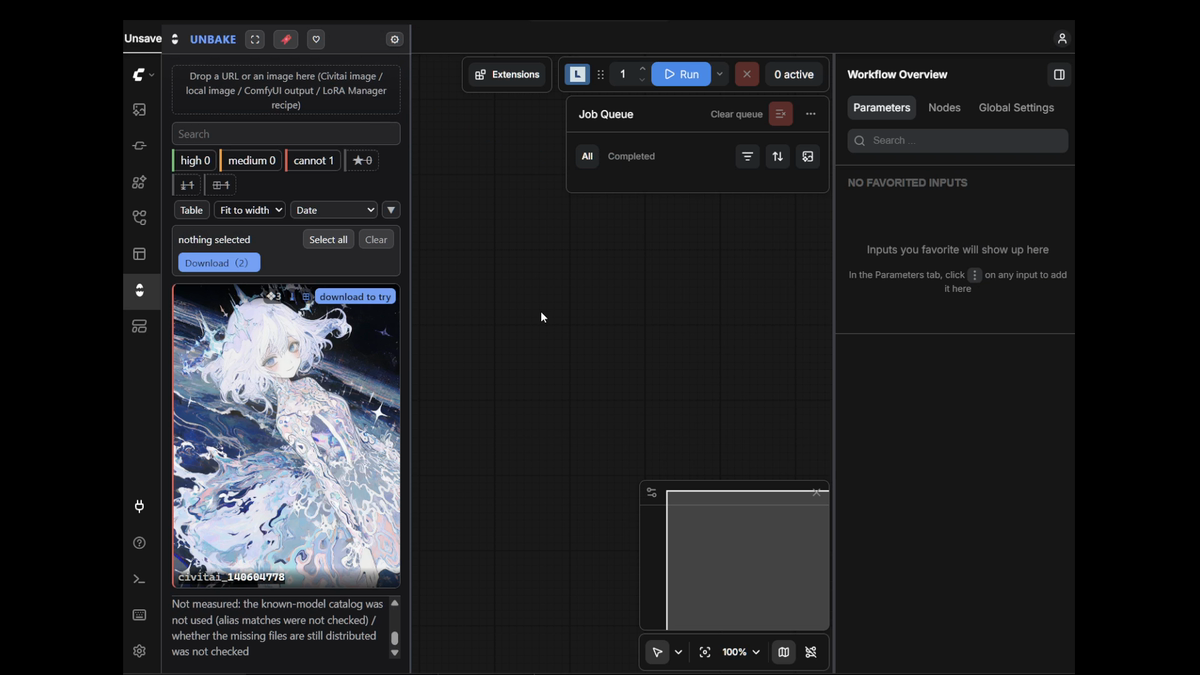
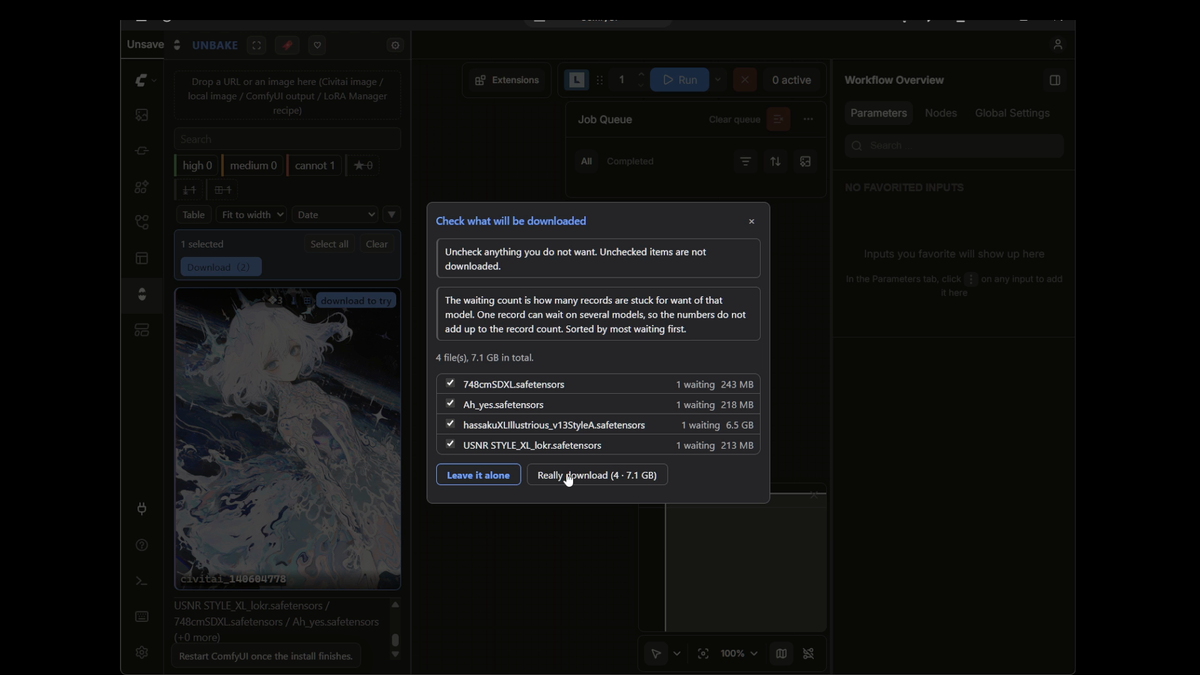
Whatever is missing is sorted by how you would obtain it (downloadable from Civitai / downloadable from a known-model ledger / manual only / no lead at all). If something is no longer distributed, it says so rather than letting you download a file that will not work.
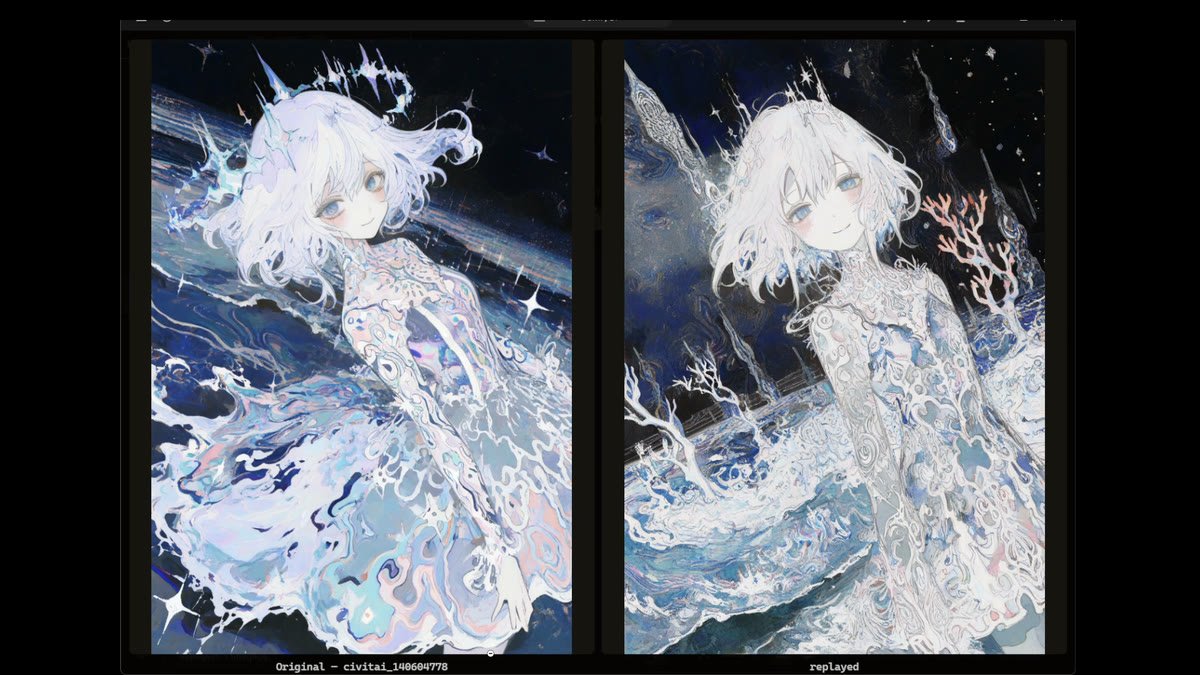
A verdict is not a promise. These two are the same record, replayed twice. The first run still had a missing piece, so Unbake substituted — the picture came out, and it is not the same picture. The second run is after the missing pieces were installed.
| still missing something | everything installed |
|---|---|
|  |
|  |
|
2. Sweep
A Sweep is not a comparison. It is a guarantee that the comparison is valid.
- Five kinds of axis (
checkpoint/ generation parameters / LoRA strength / prompt append / prompt replace) - Four run shapes (seed only / single axis × seed / cartesian product / product × seed — capped at 500 cells)
- Every axis needs two or more distinct values and exactly one baseline
- If anything outside the declared axes moved, it throws (
assertOnlySweepInputsChanged) - Interrupt it and it resumes; outputs that already exist are not remade
- Automatic scores are shown for reference only. A human picks the winner.
The order of the screen is the argument above.
pick a template → check the axes → validate (nothing queued yet) → run → look
"Validate" sits before "Run". You cannot press Run until validation passes — reversing the order would mean showing you a bad comparison first and validating it afterwards, and the impression left by an image you have already seen cannot be undone. Validation builds the whole plan without queueing anything, and reports the cell count and an estimate.
The top template is "seed only". It moves no axis at all and runs four from the record's own seed — "was that one image just lucky?" is the most common question in reproduction work, so it is placed first. There is no dedicated screen for it (it is just one more template) — adding UI per feature makes the whole Sweep surface something people stop using. If the record has no seed, the description says so (none of the outputs will match the original).
Templates are derived from the record automatically (seed only / LoRA strength /
LoRA × CFG / two-LoRA balance / CFG × Steps / prompt append). Nobody can write axes
from a blank page, so you always start from "run this" or "edit this".
Values are one label = value per line, with * marking the baseline. The baseline
is not auto-centred, because if adding one value moved the baseline, you could no
longer compare against your previous experiment.
The runner has four rules of its own.
- The same combination is never re-run. Identity is decided by a fingerprint of the assembled graph, not of the values. Skipped cells are reported as skipped — what matters for a comparison is that the images are all present, not how many times you pressed run, so nothing is silently dropped.
- State is saved per cell. Close it midway and it resumes. Anything already queued is waited for, not re-queued.
- Cells whose fate is unknown are never merged into "failed". Merging and resending produces duplicate generations, and then you cannot tell which one was the reproduction.
- If the baseline cell has no image, it says so. Laying out images with nothing to compare against turns "the one that looked good" into the winner.
Only recipe-derived records can be swept. A captured image carries the graph that actually ran, and varying that is a different mechanism. Records that cannot be swept show a reason, not a disabled button.
Cells can be taken back in as records. Note that the baking happens in two places:
the graph that ran is written by ComfyUI itself into the PNG's prompt chunk
(measured: 100% of outputs carry it). What Unbake puts into extra_pnginfo is
only the Sweep marker — the graph is not in there. Capture → Sweep → capture again
closes the loop thanks to the former.
3. Drop things in
Four things can be dropped onto the panel, and what happens inside is different for each of them.
| What you drop | What arrives | What it does |
|---|---|---|
| ComfyUI output | a /api/view URL | fetches it and captures directly (the graph is embedded, so nothing is rebuilt) |
| A local image file | bytes | reads the PNG metadata. Capture |
| A LoRA Manager recipe (.recipe.json) | bytes | uses the graph if present, builds it if not. Reproduce |
| A Civitai image or page URL | a URL only (no bytes arrive) | takes the ID, re-fetches from the API, and reconstructs |
"Capture" and "reproduce" are qualitatively different. An image ComfyUI produced has the graph that ran embedded in it, so it only needs reading. A recipe, on the other hand — most recipes do not carry an execution graph at all — mostly needs assembling, and doing that assembly is the core of this tool.
The capture route closes the loop: your own output → record → Sweep → record again.
A Civitai post URL (/posts/…) is not accepted, on purpose. A post can hold several
images, so one cannot be chosen from the URL alone — rather than silently picking the
first (and quietly reproducing the wrong picture), it tells you to open the post, click
the image you want, and drop that page URL (/images/…).
0. Your own records are there from the start
Point the settings at a folder and it scans the *.recipe.json files there, along with
their paired reference images, and lists them. "Empty until you drop something" would
mean dropping every file again on every launch, which is not usable in practice.
- The source folder is read-only. Point it at LoRA Manager's recipes folder and it never writes there. Anything Unbake creates goes to a separate folder (configurable).
- The list appears without verdicts (
not built yet). A verdict only exists once that record's graph has been built, and building every one of them on open would freeze the screen. Building happens when you open a Sweep, where one record is enough. - A running LoRA Manager is only a supplement. The records on disk always win, and the
API may only add ids that are not in the folder. Every record carries its origin
(
folder/lora-manager) — if you cannot read where something came from, a discrepancy becomes "something that never happened". - A folder that could not be read is never merged into "0 results". The reason goes on screen.
Keys can be written but never read back. The Civitai API key and the Raindrop token can be entered but are never displayed again — all you get is whether one is set, and its length. Building a path that displays it turns that path into a leak route through devtools, screen sharing and screen recording. The length is shown so that a truncated paste (the real cause of "I set it but auth fails") is visible. They are stored in ComfyUI's user directory, outside this extension's folder, so they never enter version control.
Reference images cannot be fetched by path. The screen is only handed a record id;
path resolution happens server-side. No endpoint accepts ?path=, so there is
structurally no way to make it read outside the scanned area.
4. Actually run it and check (trial) — core, but not yet on screen
A verdict only says whether it can be built. Being buildable and producing the same thing when run are different claims. A trial queues the assembled workflow with four seeds — the first is the seed written in the record (the candidate for exact reproduction), the other three are random (a control for whether everything besides the seed is right).
It carries four safety rules. Every one of them fails quietly rather than throwing.
- If the queue is not empty, nothing is submitted. Mixing into someone else's generation means the only way to trace which submission produced an image is the history.
- A candidate whose fate is unknown is never auto-resubmitted. Merging "unknown" into "failed" and resending produces a duplicate, and then you cannot tell which one is the reproduction.
- For a record that cannot be built, the queue is never touched at all. Noticing after submitting leaves one half-finished item behind.
- Outputs carry the trial marker. ComfyUI only writes the contents of
extra_pnginfointo the PNG, so the marker goes there. Without it, dropping the output back into Unbake loses "which trial, which of the four".
5. Override, batch, and know the sharing — likewise not yet on screen
- LoRA strength overrides live in a layer separate from the record and are applied only at assembly time. The record itself is never rewritten — rewriting it would move the baseline of the comparison with every pass. "Revert" is just deleting the layer.
- Run lists are named containers for records you want to run in order. You can have several. Ones saved in the old shape (a bare array) still load — what is lost is not the array but the order you rearranged them into.
- Model sharing answers "how many other records ask for this model". It is needed to sort missing models by how many records get unblocked if you download it. Records whose models could not be counted are not treated as zero — dropping them silently understates the sharing count and quietly smuggles in an unmeasured claim that "nobody else wants this one".
"Core" does not mean "usable". The things in these two sections live in
web/core/and their tests pass (including against real data), but the panel cannot call them. They get wired up when the Sweep surface is built.
It does not collapse as the count grows
The sidebar is narrow. Listed naively, the scroll grows with every record. Three things combine to prevent that.
- Per-verdict counts always sit at the top. You see the shape of the whole set without scrolling.
- Filter before drawing. Search (model name, prompt, filename) plus verdict filters. Verdicts you filtered out still show their counts — so that "zero" and "hidden" are never confused.
- When narrow, cap the number of rows. The rest appears as "N more — open fullscreen". The effect of this third one is that scroll length is not proportional to data volume.
The switch is decided by the container's width, not by which screen you are on. Make the fullscreen view narrow and it behaves like the sidebar; widen the sidebar and everything appears.
Languages
English is the default. It follows ComfyUI's own locale setting (Comfy.Locale), so
if ComfyUI is in Japanese, so is the panel. There is no separate switch — having one
would let you reach a state where the app is in one language and this panel is in another.
All twelve languages ComfyUI offers are supported — en / zh / zh-TW / ru / ja / ko / fr / es / ar / tr / pt-BR / fa. Users of any other language fall back to English, matching the host's own choice. Arabic and Persian lay out right-to-left (the CSS is written in logical directions).
Letter-spacing is switched off in right-to-left mode. Space between glyphs visually
breaks Arabic joining, so a ligature reads as two separate characters
(tile.commercial.no in ar is "لا"). Only elements that render translated text are
affected; family badges and digits in output filenames are Latin, so they stay as they are.
Adding a new letter-spacing turns the tests red until you declare it in or out of scope
(tests/rtl_letter_spacing_test.mjs).
Adding a language is one file in web/i18n/locales/ plus one line in index.js, and
missing or surplus keys turn the tests red (a missing translation is not an exception —
it shows up as one line in a different language, which the human eye does not catch).
Everything except English and Japanese has not been reviewed by a native speaker. Each catalogue carries this in
meta.reviewed. If you find a mistake, please fix it — and setreviewedtotruewhen you do. Technical terms (checkpoint / LoRA / denoise / sampler / VAE) are borrowed as-is in every language, so what needs fixing is the prose.
Generation Record / Replay Manifest / Sweep are never translated, in any language.
They are the product's vocabulary, not prose; translating them stops users of the same tool
from understanding each other.
Even the sentences explaining why something cannot be reproduced are translated into all twelve. "Why can't this be reproduced" and "what was used instead" are the most-read text in this tool, and having that in only one language makes the tool run on one lung.
That the port changed no wording is checked against real data rather than asserted;
tests/carries the comparison.
Installing
Install ComfyUI-Unbake from ComfyUI Manager, or place it under custom_nodes.
ComfyUI/custom_nodes/ComfyUI-Unbake/
It adds exactly one canvas node. The rest is a sidebar tab, and the same screen can
be opened fullscreen (command Unbake: Open fullscreen, Esc to close).
The node is Unbake — Recipe from Image. Give it a picture — or paste an image URL — press the button, and it reads how that picture was made and builds the graph from it. The node stays at the head of the graph and feeds prompt, seed, steps and cfg downstream — swap the image and the whole graph follows it.
The URL field takes exactly what the sidebar takes: a Civitai image page, or a ComfyUI output URL. It goes through the same routing, so anything the panel accepts the node accepts, and anything it refuses the node refuses too — with the reason on the console.
The trade is worth stating plainly: a graph built that way needs Unbake installed to run. A graph that works without Unbake and a graph that follows the image cannot be the same graph. If you want the plain one, open the sidebar and build from there instead.
License
GPL-3.0-or-later. Free to distribute. Not for sale.
Almost every file is Copyright (C) 2026 syugoji. Exactly one file comes from upstream,
unmodified:
web/core/genParamsMapper.js ComfyUI-Lora-Manager (GPL-3.0), unmodified
It maps A1111 sampler display names onto ComfyUI's internal values, and keeping it is why this node is GPL-3.0 as a whole. That is the intended outcome — it works against anyone absorbing this into a closed paid product.
Read NOTICE for the details. It contains the procedure for verifying this
separation yourself: it is written to be run, not merely asserted.
Support
If this tool was useful, either of these works. Neither requires the payer to have an account, and both take a card, one-off. Nothing is removed from the tool if you don't.
Payment and receipt have both been verified on both routes (2026-08-24, US$1 once each). Only withdrawal is unverified — the balance is small enough that the transfer fee would exceed it, so testing now would prove nothing. There are two entrances but the same account behind them — two doors, one pipe. If you try to send something and it fails, that is a plumbing problem rather than a demand problem, so please tell me. Measured fees and the full history are in
.github/FUNDING.yml.