
comfyui-klein-edit-composite
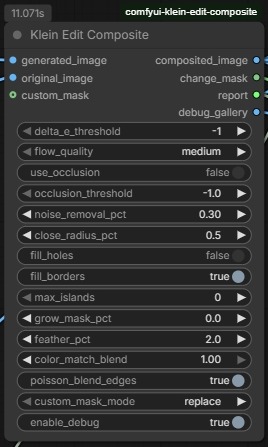
A ComfyUI node that intelligently composites a generated (AI-edited) image back onto an original image by detecting only what actually changed between the two images and blending the generated content in cleanly.
Nodes (1)
Klein Edit Composite — ComfyUI Custom Node
What it does
This is a ComfyUI node that intelligently composites a generated (AI-edited) image back onto an original image. Its core job is to detect only what actually changed between the two images and blend the generated content in cleanly — preserving the original background wherever it wasn't meaningfully altered.
Series of edits without the node:
Series of edits with the node:
How it works
The pipeline runs roughly in this order:
-
Alignment (Two-Pass SIFT + Homography): Uses SIFT feature matching with CLAHE preprocessing and MAGSAC outlier rejection to correct any camera/perspective shift between the original and generated image. A second pass refines alignment using only background pixels.
-
Optical Flow (DIS): After homography correction, dense optical flow catches any remaining sub-pixel or local motion between the two images.
-
Difference Detection: Computes a hybrid diff map combining perceptual color difference (Delta E in LAB color space) and structural difference (Sobel gradient magnitude). This makes it robust to minor lighting shifts while still catching real content changes.
-
Mask Refinement: The raw change mask is cleaned up via noise removal (opening-by-reconstruction), hole filling, island pruning, border bleed, and optional grow/shrink. An optional occlusion mask (forward-backward flow consistency check) can also be incorporated.
-
Color Matching: Optionally applies Reinhard color transfer (in LAB space) to match the generated image's lighting/color to the original, using only background pixels for statistics.
-
Compositing: The final mask is feathered using a guided filter (edge-aware smoothing) and used to alpha-blend the generated image over the original.
Outputs
composited_image— the final blended resultchange_mask— the detected change regionreport— a text summary of all parameters and statisticsdebug_gallery— optional visual breakdown of intermediate steps (SIFT matches, flow, diff maps, etc.)