
Seedance 2.0 (Sjinn.ai)
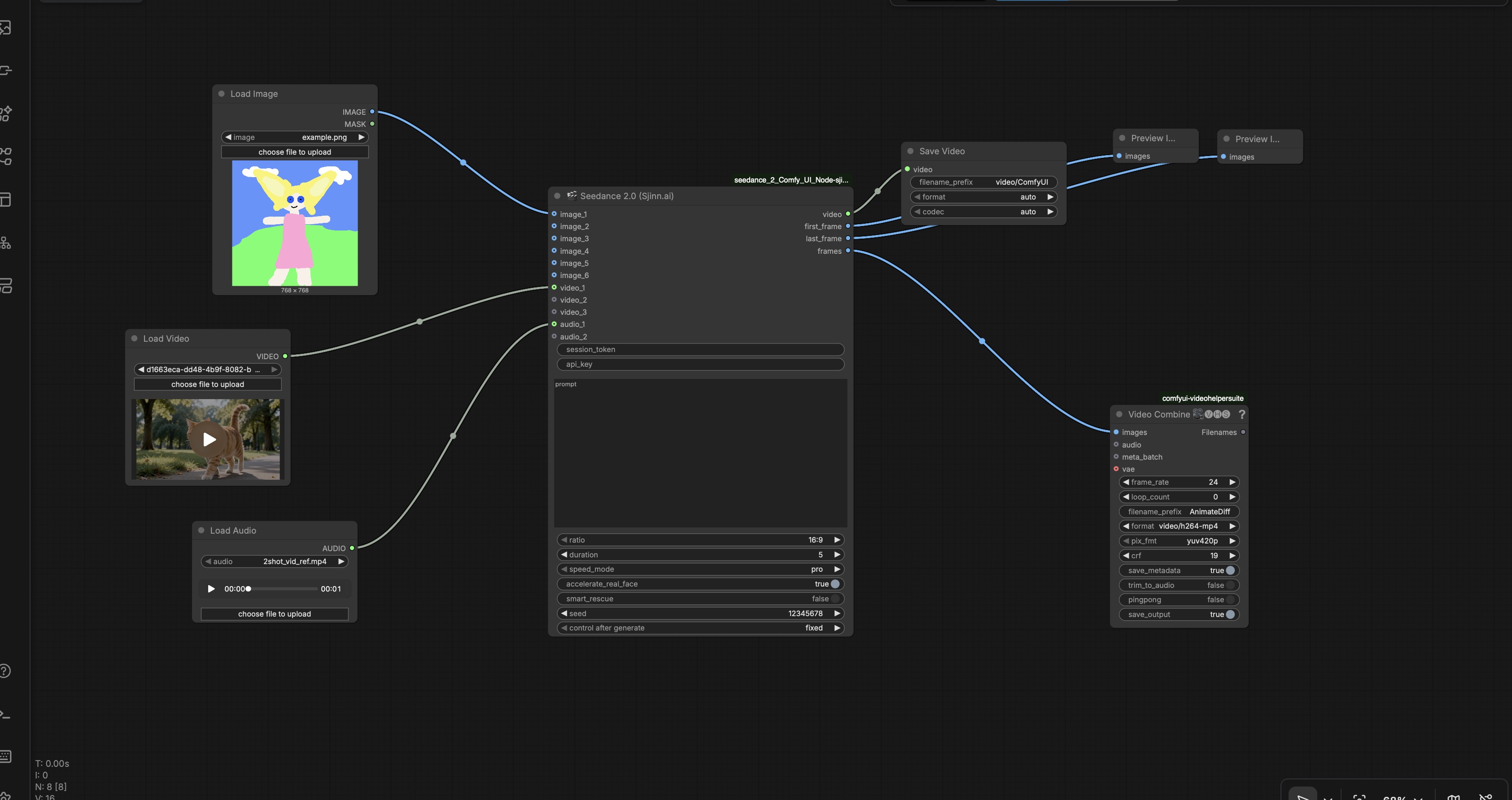
Run ByteDance Seedance 2.0 video generation in ComfyUI via Sjinn.ai API. Supports up to 6 image, 3 video and 2 audio references. Outputs native VIDEO plus first frame, last frame and frame batch.


🎬 Seedance 2.0 ComfyUI Node — Sjinn.ai API
Run ByteDance Seedance 2.0 video generation directly in ComfyUI via the Sjinn.ai API.
Connect reference images, videos and audio clips, write a prompt, click Run. The node handles uploads, task creation and polling — you get back a native VIDEO output plus frame previews.
✨ Features
| | |
|--|--|
| 🖼️ Reference images | Up to 6 — connect any Load Image node |
| 🎥 Reference videos | Up to 3 — connect vanilla Load Video node (≤720P, ≥2s) |
| 🎵 Reference audio | Up to 2 — connect Load Audio node |
| 📐 Aspect ratios | 16:9 · 9:16 · 1:1 · 4:3 · 3:4 |
| ⏱️ Duration | 4–15 seconds |
| ⚡ Speed mode | pro = quality · fast = speed |
| 🎲 Seed | Fixed or random |
| 🛡️ Smart rescue | Auto-rewrites prompt if content policy blocks it |
| 📊 Progress bar | Real ComfyUI progress during uploads + generation |
| 🎞️ Frame outputs | first_frame, last_frame, frames (IMAGE batch for VHS nodes) |
📦 Requirements
- ComfyUI v0.14+ (native VIDEO and AUDIO types)
- Sjinn.ai Pro+ account — https://sjinn.ai
opencv-python— auto-installed via requirements.txt
🚀 Installation
Via ComfyUI Manager (recommended):
- Manager → Install via Git URL
- Paste:
https://github.com/steptonite/seedance2-sjinn-comfyui - Install → restart ComfyUI
Manual:
cd ComfyUI/custom_nodes/
git clone https://github.com/steptonite/seedance2-sjinn-comfyui

# Mac / Linux
../../python/bin/python -m pip install -r seedance2-sjinn-comfyui/requirements.txt

# Windows portable
..\..\python_embeded\python.exe -m pip install -r seedance2-sjinn-comfyui/requirements.txt
Restart ComfyUI.
🔑 Credentials
Two credentials from sjinn.ai are required.
API Key
Profile → API Keys → Create → copy the key → paste into api_key field.
Session Token
- Open https://sjinn.ai/tools/seedance20-video (must be logged in, Pro+)
- F12 → Application → Cookies →
https://sjinn.ai - Find cookie:
__Secure-next-auth.session-token - Click the row → copy the full value from the bottom panel (starts with
eyJ, ~500 chars) - Paste into
session_tokenfield
⚠️ Token expires when your browser session ends. On 401 errors — grab a fresh one.
🕹️ How to Use
Find 🎬 Seedance 2.0 (Sjinn.ai) in the Sjinn.ai category (or search "Seedance").
- Connect images →
image_1…image_6 - Connect videos →
video_1…video_3(must be ≤720P and ≥2 seconds) - Connect audio →
audio_1/audio_2 - Write prompt — reference inputs with
@Image1,@Image2,@Video1:@Image1 is the character. @Video1 is the camera motion reference. Cinematic slow motion, natural lighting. - Set
ratio,duration,speed_mode,seed - Enter
session_tokenandapi_key - Queue Prompt — progress bar shows upload → generation → done
Outputs: video (VIDEO) · first_frame · last_frame · frames (IMAGE batch)
📋 Parameters
| Parameter | Default | Description |
|-----------|---------|-------------|
| session_token | — | Browser cookie from sjinn.ai |
| api_key | — | Sjinn.ai API key (for polling) |
| prompt | — | Generation prompt |
| image_1..6 | — | Reference images |
| video_1..3 | — | Reference videos (≤720P, ≥2s) |
| audio_1..2 | — | Reference audio clips |
| ratio | 16:9 | Aspect ratio |
| duration | 5 | Output length in seconds (4–15) |
| speed_mode | pro | pro quality / fast speed |
| accelerate_real_face | True | Preserve face consistency across frames |
| smart_rescue | True | Auto-fix prompt on content policy block |
| seed | -1 | -1 = random · fixed int = reproducible |
💰 Cost
100 credits per second of output. A 5-second video = 500 credits. Credits are refunded if the task fails content policy.
💡 Tips
- Videos must be ≤720P — resize upstream if needed
- Videos must be ≥2 seconds
speed_mode: fastfor iteration,profor finalssmart_rescue: offif you want the prompt used verbatim- Use
@Image1,@Video1etc. to explicitly assign roles in the prompt
🔐 Local Credentials File (optional)
Create sjinn_config.py in the node folder to pre-fill fields:
SJINN_API_KEY = "your-key"
SJINN_SESSION_TOKEN = "your-token"
Already in .gitignore — never commit this file.
🛠️ Troubleshooting
| Issue | Fix |
|-------|-----|
| 401 on upload/task | Session token expired — grab fresh cookie |
| "Service temporarily unavailable" | Sjinn.ai server load — retry |
| Task failed (status=2) | Enable smart_rescue or soften prompt |
| Video too short error | Reference video must be ≥2 seconds |
| video_1 / audio_1 socket missing | Update ComfyUI to v0.14+ |
| first_frame is black | pip install opencv-python |
🇺🇦 Community
Ukrainian ComfyUI community — questions, workflows, tips: t.me/comfyui_ua
📄 License
MIT — see LICENSE