
GenAsset
ComfyUI nodes for saving, loading, and versioning GenAsset generations.
Nodes (20)
Asset Summary In GenAsset — the tl;dr for one asset
Compare Two GenAsset Versions — settle the 'which one was better?' argument
Create Asset In GenAsset — the explicit, all-manual first save
Create Branch Version In GenAsset — explore without breaking the mainline
Delete Version In GenAsset — removing with your seatbelt on
Display Any From GenAsset — the debug viewer you didn't know the pack shipped
Find Assets In GenAsset — searching your own library
Fork Asset From Version In GenAsset — a new asset, born from an old version
List Asset Versions In GenAsset — see the whole family tree
Load Current Version For Asset — the approved one, not the latest experiment
Load Version From GenAsset — time travel, one UUID at a time
Load Recipe To Widgets — the author's favorite node, and it's easy to see why
Load Asset From GenAsset — one load node to rule them all
Save Metadata Patch To GenAsset — fix the record without re-rendering
Promote Version In GenAsset — making a version the official one
Rename Asset In GenAsset — fix a name without a migration
Save To GenAsset — the node that makes this pack worth installing
The GenAsset node you run first (it makes no images)
Upsert Asset Tags Fields — keeping your asset cards tidy
GenAsset Workflow Assistant — an AI that fills out your paperwork
ComfyUI-GenAsset



ComfyUI nodes for saving, loading, and versioning image generations in GenAsset.
GenAsset keeps the output image together with the recipe (prompt, model, seed, sampler/scheduler, workflow JSON, metadata), so teams and agents can reproduce and reuse results reliably.
Current package version: v1.0.21.
Start Free
Create your GenAsset workspace and token at:
- https://www.genasset.xyz/
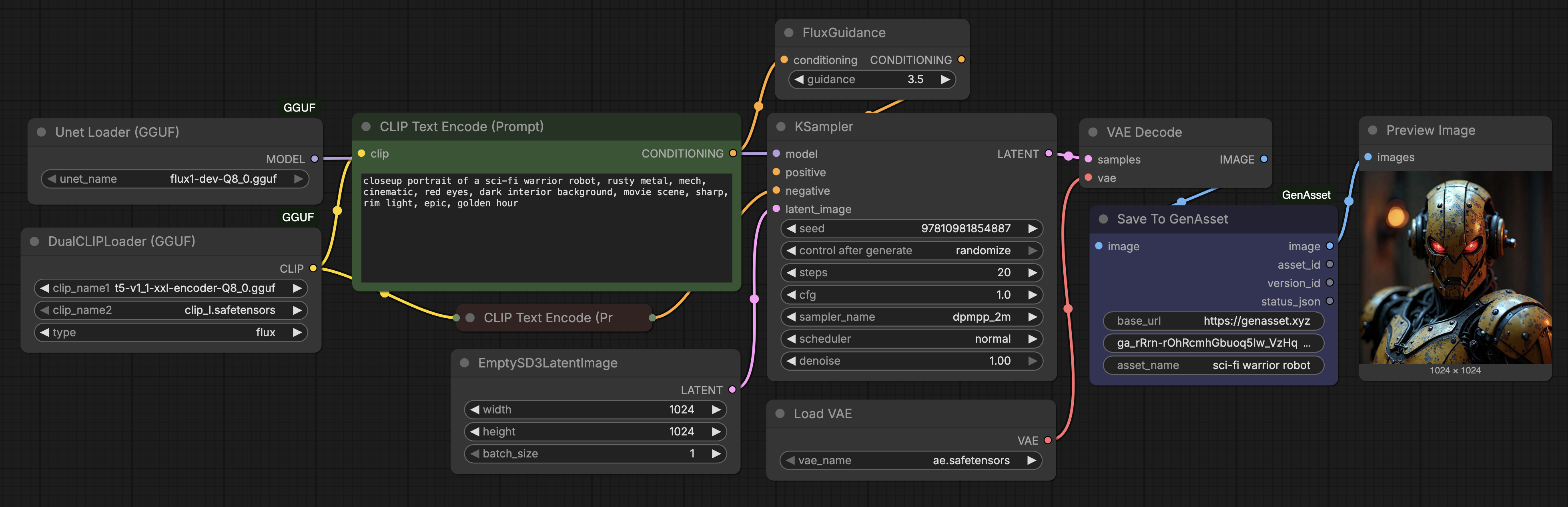
Example: Save From ComfyUI To GenAsset
A Flux GGUF txt2img workflow using Save To GenAsset.
Why Use This Node Pack
- Save generation outputs as reusable, versioned assets.
- Load exact versions later for edits or replay.
- Compare versions and capture metadata changes.
- Branch/fork creative directions without losing lineage.
- Upload upstream
LoadImageinputs as GenAsset input artifacts when available. - Add automatic Repro Lock metadata to every saved generation.
- Check workflow health with the GenAsset Manager Health tab before queueing.
- Enable safer handoff between humans and AI agents.
Included Nodes
Category in ComfyUI:
genasset
Node Reference
| Node | What it does | Inputs | Outputs |
| --- | --- | --- | --- |
| Test GenAsset Connection | Checks that ComfyUI can reach GenAsset and that the workspace token is valid. Use this first when setting up a workflow. | base_url, token | workspace_name, status_json, summary, state, normalized_status_json |
| GenAsset Workflow Assistant | Validates a workflow and suggests optional prefill fields such as asset name, tags, intent, notes, version label, and metadata. Wire its outputs into Save To GenAsset. | base_url, token; optional image, asset_name_hint, asset_id_hint | asset_name, asset_id, tags_csv, intent, notes_md, version_label, metadata_json, warnings_json, status_json, summary |
| Save To GenAsset | Saves a generated image as a GenAsset version with prompt, model, seed, workflow JSON, metadata, and optional assistant-prefilled fields. | image, base_url, token, asset_name; optional asset_id, tags_csv, intent, notes_md, version_label, metadata_json, source | image passthrough, asset_id, version_id, status_json |
| Load Asset From GenAsset | Loads a preview image and recipe metadata. Can load an exact version, an asset's current/latest version, or the latest updated asset in the workspace. | base_url, token, optional asset_id, optional version_id | image, asset_id, version_id, workflow_json, metadata_json, status_json |
| Load Version From GenAsset | Loads one exact historical version by version id. | base_url, token, version_id | image, asset_id, version_id, workflow_json, metadata_json, status_json |
| Save Metadata Patch To GenAsset | Merges a JSON metadata patch into an existing version without uploading a new image. | base_url, token, version_id, metadata_patch_json | version_id, metadata_json, status_json |
| Compare Two GenAsset Versions | Loads two versions and returns both previews plus a JSON diff of key recipe fields. | base_url, token, left_version_id, right_version_id | left_image, right_image, diff_json, status_json |
| Create Branch Version In GenAsset | Creates a new version connected to a parent version, useful for branching experiments. | image, base_url, token, asset_id, parent_version_id, asset_name, prompt_text, negative_prompt_text, model_name, seed, tags_csv, intent, extra_metadata_json | image passthrough, asset_id, version_id, status_json |
| Load Recipe To Widgets | Extracts replay-friendly widget values from stored workflow_json and metadata_json. | workflow_json, metadata_json | prompt_text, negative_prompt_text, model_name, seed, steps, cfg, sampler_name, scheduler, denoise, width, height, status_json |
| Find Assets In GenAsset | Searches assets in the current workspace. | base_url, token, search_query, page, page_size | assets_json, asset_ids_csv, status_json |
| List Asset Versions In GenAsset | Lists versions for a specific asset. | base_url, token, asset_id, max_versions | versions_json, version_ids_csv, status_json |
| Load Current Version For Asset | Loads the current/latest version for one asset id. | base_url, token, asset_id | image, asset_id, version_id, workflow_json, metadata_json, status_json |
| Promote Version In GenAsset | Promotes a selected version to be the current version for an asset. | base_url, token, asset_id, version_id | asset_id, version_id, status_json |
| Delete Version In GenAsset | Deletes a GenAsset version. | base_url, token, version_id, confirm_delete | version_id, status_json |
| Fork Asset From Version In GenAsset | Creates a new asset from an existing source version. | base_url, token, source_version_id, new_asset_name, prompt_suffix, negative_prompt_override, tags_csv, intent, extra_metadata_json | image, asset_id, version_id, status_json |
| Create Asset In GenAsset | Creates a new GenAsset asset and initial version from a supplied image. | image, base_url, token, asset_name, prompt_text, negative_prompt_text, model_name, seed, tags_csv, intent, extra_metadata_json | image passthrough, asset_id, version_id, status_json |
| Rename Asset In GenAsset | Renames an existing asset. | base_url, token, asset_id, new_name | asset_id, asset_name, status_json |
| Upsert Asset Tags Fields | Updates asset-level fields such as tags and notes. | base_url, token, asset_id, tags_csv, notes_md | asset_id, asset_json, status_json |
| Asset Summary In GenAsset | Fetches compact summary information for one asset. | base_url, token, asset_id | summary, asset_json, status_json |
Manager Health Tools
The GenAsset toolbar panel also includes a Health tab. These are manager tools rather than standalone canvas nodes:
| Tool | What it does | Uses GenAsset AI? |
| --- | --- | --- |
| Refresh Current Workflow | Reads the current ComfyUI graph/API prompt and summarizes node/link counts. | No |
| Resolve Models | Finds required checkpoints, UNets/GGUFs, LoRAs, VAEs, ControlNets, CLIP files, embeddings, upscale models, and related files. It reports found/missing files and expected ComfyUI folders. | No |
| Preview Repro Lock | Shows the Repro Lock metadata that Save To GenAsset will attach automatically. | No |
| Run Doctor | Sends a redacted deterministic health payload to GenAsset AI and returns plain-language issues and fix steps. | Yes, through the configured GenAsset workspace token/API |
Model Resolver v1 is suggestion-only. It gives expected folders and Hugging Face/Civitai search links, but it does not auto-download or install files.
Save Capture
Save To GenAsset captures the following automatically when the graph exposes it:
- prompt and negative prompt
- Qwen/Kontext edit prompts from prompt-bearing nodes
- zeroed negative conditioning as blank negative prompt
- checkpoint/model name
- seed, steps, cfg, sampler, scheduler, denoise
- image size and batch size
- upstream node ids
- input images from upstream
LoadImagenodes, uploaded as GenAsset input artifacts when the files are available in the ComfyUI input folder - ComfyUI API prompt and workflow JSON, with token-like fields redacted
metadata.repro_lockwith environment and reproducibility details:- ComfyUI path/branch/commit when available
- GenAsset node version
- Python, Torch, CUDA, and MPS information
- installed custom-node names, versions, and git commits when available
- referenced model metadata with hashes when files are small enough, or size/mtime fallback for large files
- stable workflow hash
- basic tags derived from the prompt/model
- image quality metrics
It refuses to save blank or near-black frames. In that case it returns a status JSON explaining the rejection instead of creating a bad version.
Load Behavior
- If
version_idis set: loads that exact version. - Else if
asset_idis set: loads the current/latest version of the matched asset. - Else (both empty): loads the latest updated asset in the workspace.
asset_id should be the exact asset id (UUID). Leave it empty to load the latest asset in the workspace.
Installation
Option 1: ComfyUI Manager
After publication in the registry, open ComfyUI Manager and search:
GenAsset
Install and restart ComfyUI.
If you are loading a workflow that contains GenAsset nodes, ComfyUI-Manager's missing-node installer should resolve those node types to the genasset package from the default channel.
Option 2: Manual Install
From your ComfyUI folder:
cd custom_nodes
git clone https://github.com/steliosot/ComfyUI-GenAsset.git
Restart ComfyUI.
Quick Start (2 minutes)
- In GenAsset, create a workspace token (
Settings -> Tokens). - In ComfyUI, add
Test GenAsset Connectionand confirm status is successful. - Add
Save To GenAssetto any image workflow and set:
base_url = https://genasset.xyz
token = PASTE_TOKEN
asset_name = your asset name
- Queue prompt. You should get
asset_id,version_id, and a valid status JSON.
GenAsset Manager
After installing or updating this node pack, restart ComfyUI and click GenAsset in the top toolbar, next to Manager.
The panel can test your GenAsset connection, show recent assets, import public or workspace workflows, update the node pack, and run workflow health checks. Choose a workflow and click Import. The workflow is loaded onto the canvas, but it is not queued automatically.
Health Tab
Open GenAsset -> Health to inspect the currently loaded graph.
Recommended flow before sharing or queueing a new workflow:
- Click
Refresh Current Workflow. - Click
Resolve Modelsand install any missing files in the suggested ComfyUI folders. - Click
Preview Repro Lockif you want to inspect the metadata that saves will attach. - Click
Run Doctorfor plain-language issue explanations and fix suggestions.
Run Doctor requires the GenAsset API and configured workspace token because the AI guidance runs through GenAsset.
Token File
Instead of pasting a token into every node, keep the default ComfyUI/user/genasset.json and create that file in your ComfyUI user folder:
{
  "base_url": "https://genasset.xyz",
  "workspace_token": "PASTE_TOKEN"
}
For local development, replace base_url with your local app URL, for example http://127.0.0.1:3010.
Example Workflows
Workflows are in workflows/.
Recommended starters:
genasset_sdxl_save_generation.json- generate and save a new version.genasset_load_version.json- load latest or exact version by id.genasset_img2img_load_edit_save_woman_cafe.json- load, edit, save next version.genasset_compare_two_versions.json- compare settings between two versions.genasset_create_branch_version.json- create branch lineage from a parent version.
Security Notes
- Never commit real tokens inside workflow JSON files.
- Use workspace-scoped tokens and rotate them periodically.
- Workflow JSON redacts token-like fields before save.
Development
Smoke test:
python scripts/smoke_import.py
Health and onboarding workflow regression tests:
python scripts/test_health.py
python scripts/test_onboarding_workflows.py
node --check js/genasset_manager.js
Expected result:
Loaded GenAsset nodes: GenAssetAssetSummary, ..., GenAssetWorkflowAssistant
See also:
License
MIT. See LICENSE.