
ComfyBlockout
3D editor node — build a blockout scene (primitives, GLB, FBX with animation, gaussian splats), record a keyframed camera path, and feed the rendered mp4 + image + prompt into Seedance / Nano Banana / Flux / any downstream model.
ComfyBlockout
3D editor node for ComfyUI — build a blockout scene (primitives, GLB, FBX with animation, gaussian splats, particle emitters), key-frame both the camera path and per-object motion, and feed the rendered mp4 + start image + scene prompt straight into Seedance / Nano Banana / Flux / any downstream model.
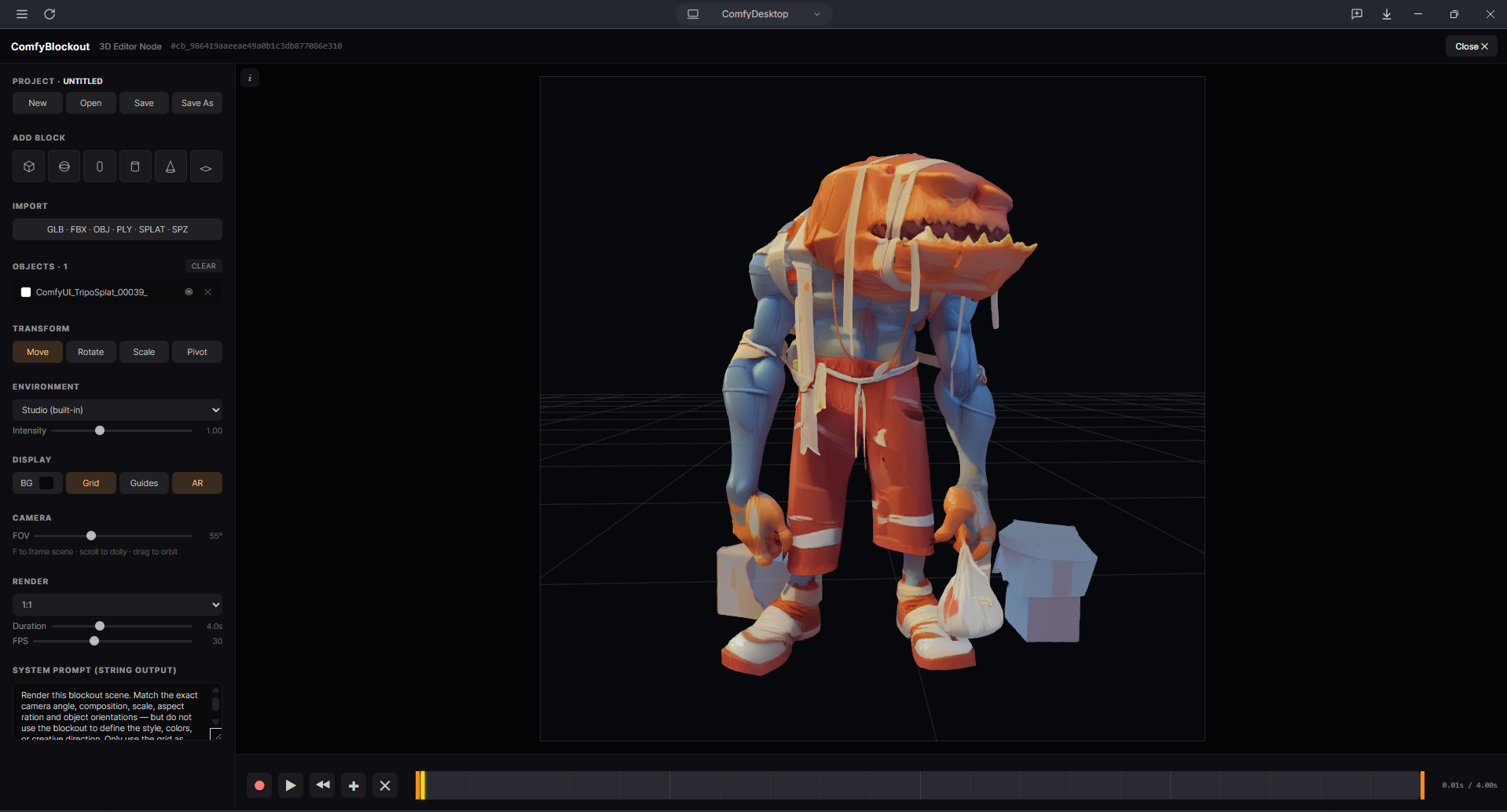
What it does
- Drop the ComfyBlockout node onto your canvas — it ships with a live in-node 3D viewport.
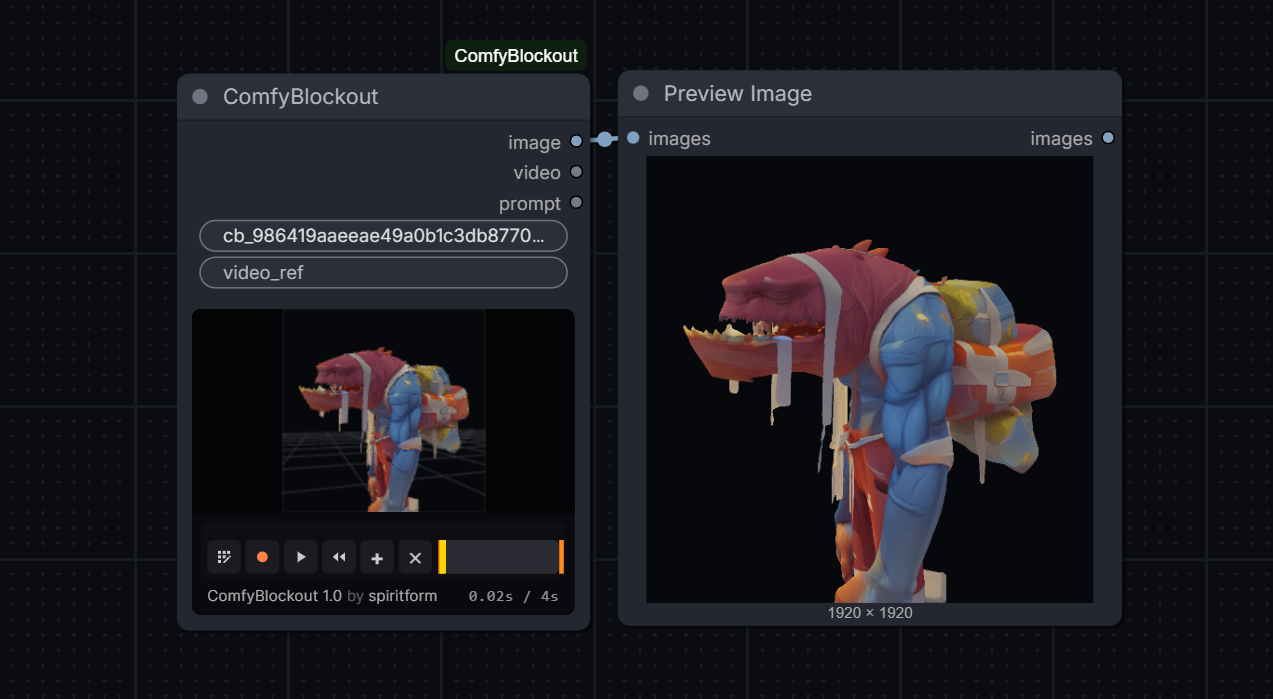
- The node body shows a real-time three.js preview with a mini transport (record / play / rewind / add-key / clear) and a scrub timeline. Edit the scene without ever leaving the canvas.
- Click Edit in the in-node bar → fullscreen 3D editor opens with the full toolset: add primitives, import meshes, spawn particle emitters, animate individual objects, sculpt a camera path, save as a named project.
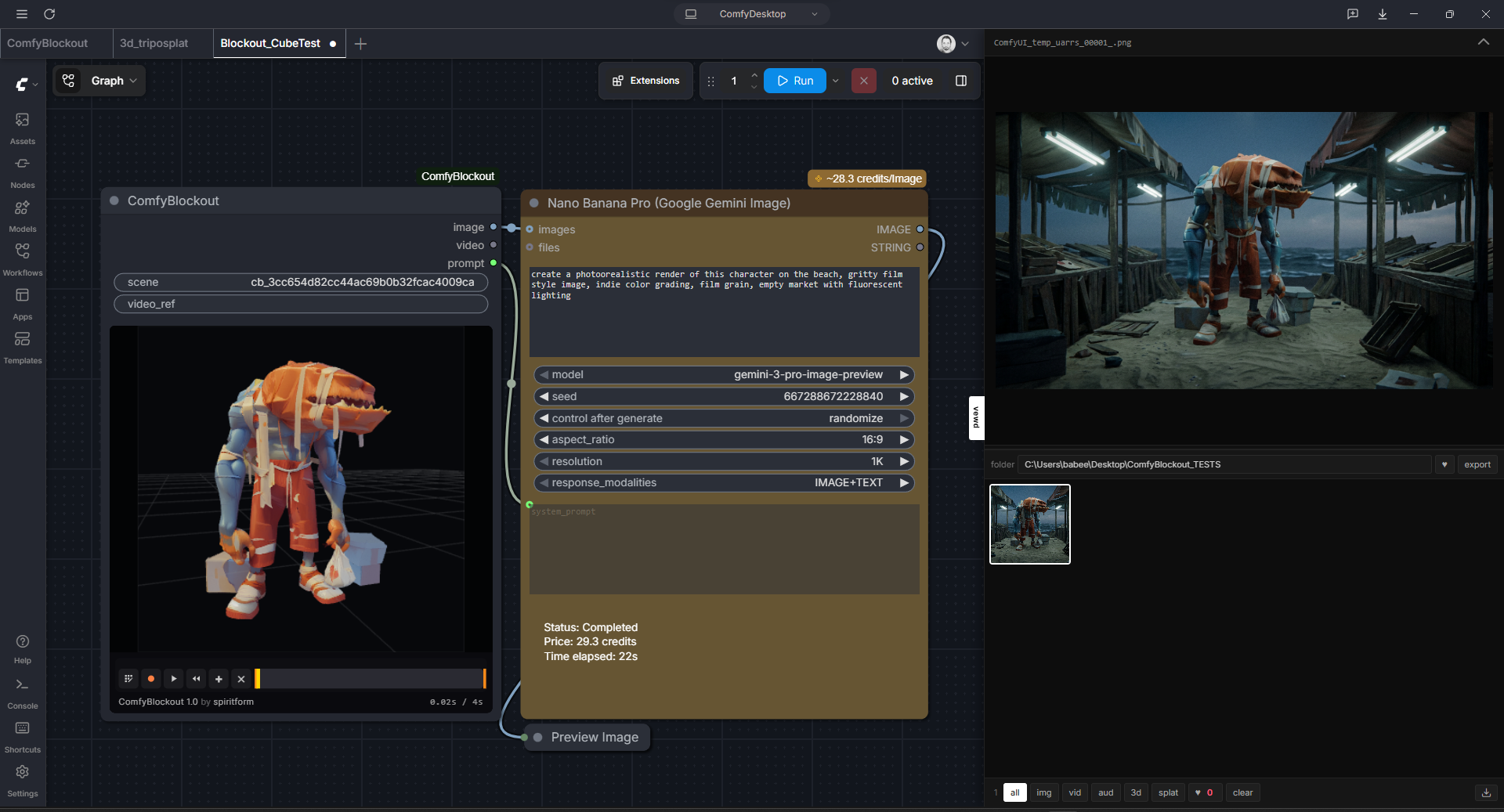
- Three outputs ready to wire downstream:
image(IMAGE) — first frame / snapshot, wires into Seedanceimage_Nslots, Nano Bananaimages, Flux text-to-image start imagevideo(VIDEO) — recorded mp4, wires into Seedancevideo_1, Wan motion ref, LTXprompt(STRING) — editable system prompt, wires into Nano Banana / Flux / any text-to-image prompt input
Features
Scene building
- 7 primitive kinds (cube, sphere, capsule, cylinder, cone, plane, custom-import) auto-colored from a curated 12-color named palette so each block reads as "the red cube is the car driving down the street" when prompting
- Drag-and-drop or Import button: GLB / GLTF / FBX (with AnimationMixer) / OBJ / PLY mesh / PLY+SPLAT+KSPLAT+SPZ gaussian splats
- Particle emitters — GPU shader-driven Points cloud, one-click add. Configurable style (soft dot / solid dot / square), emitter shape (point / box / sphere — use object Scale to resize), size + random variance, count, lifetime, initial speed, spread cone, gravity, wind, turbulence, additive/normal blending, and an optional sprite texture upload.
- Outliner with per-row color swatch, visibility toggle, delete, and double-click to rename
- Studio HDRI environments (built-in + Polyhaven presets)
Animation
- Camera keyframes — pos + target + up (roll preserved) + fov, per-key easing (linear / ease-in / ease-out / ease-in/out / through)
- Per-object keyframes — position + rotation + scale animated on any primitive, import, or particle emitter. Cyan diamond track sits above the green camera track on the timeline.
- "Through" waypoints — hollow diamonds. Positional-only Catmull-Rom controls that bend a smooth curve through them without adding a time anchor. Auto-defaulted when you insert a key between existing keys.
- In-scene motion path — subtle helper geometry shows every animated object's path with clickable dots at each keyframe. Click a dot → playhead jumps to that key and the object snaps to it (works for through keys too).
- Delete a boundary keyframe → the next through key promotes to
easeInOutso the object always has a defined start/end pose.
Timeline & transport
- Diamond keyframe handles above the timeline + grey position lines inside it (so the playhead never collides)
- Click to select + snap object to the key, drag to retime, right-click for the ease menu (bulk-applies to every selected key)
- Shift+click to multi-select keys; the ease menu batch-applies
- Shift + ←/→ jumps to the previous/next keyframe on any track
- Plain ←/→ still frame-steps
- Playhead snaps to camera and object keys within 6px while scrubbing (Shift bypasses)
Right-side properties panel
- Auto-switches context:
PROPERTIES : Scene(nothing selected),PROPERTIES : Camera(camera icon), orPROPERTIES : <Object Name>(double-click to rename) - Object — Appearance (color + a texture eye-toggle that hides/restores diffuse maps), Transform drag-fields, and full Particle inspector when a particle emitter is selected
- Camera — FOV slider, pos + yaw/pitch/roll drag-fields, Reset, Render section (aspect / duration / fps)
- Scene — Background (Color OR Image — pick either), Environment (preset + intensity), Display (Guides / AR)
Recording
canvas.captureStream()→ MediaRecorder → ffmpeg → h264 mp4 with+faststartand yuv420p (so it actually plays everywhere)- Aspect-ratio framing overlay (16:9, 9:16, 1:1, 4:5, 4:3, 21:9, free) with letterbox/pillarbox crop applied during conversion
- Duration + FPS controls — recordings auto-tween through your keyframes if you have ≥2
Projects + persistence
- Named server-side projects: New / Open / Save / Save As via the top bar (Ctrl+S saves), list/delete via the Open modal
- Projects live at
<comfy_temp>/comfyblockout/projects/<name>/{scene.json, assets/}and are shared across every ComfyBlockout node on the install - Scene + imported asset bytes both auto-save per node, so reopening a workflow restores everything
- Particle emitter config, per-object keyframes, background image, viewport state all round-trip
- Live sync between the editor and the in-node preview — edit blending / gravity / color in the editor and the preview updates without a reload
- Stable UUID per node so freshly-dropped nodes don't collide on backend storage
Controls
Viewport navigation
| Action | Mouse / Key |
| --- | --- |
| Orbit around target | Left-drag |
| Pan (screen-space) | Middle-drag |
| Dolly | Scroll wheel |
| Free-look (look around in place) | Alt + left-drag |
| Roll / dutch angle | Alt + right-drag |
| Frame the selected object (or all objects) | F |
| Reset camera to default | Home (or the Reset button in the Camera panel) |
The Camera panel has six drag-fields — Pos X / Y / Z and Yaw / Pitch / Roll. Drag horizontally to scrub the value (small default sensitivity for micro-adjustments), hold Shift for ×0.1 fine mode, or click without dragging to type a value directly.
Fly mode (Unreal-style)
Hold right-mouse-button anywhere in the viewport to enter fly mode. While RMB is held:
| Action | Key |
| --- | --- |
| Look around | Move the mouse |
| Forward / Back / Strafe Left / Right | W / S / A / D |
| Down / Up (world Y) | Q / E |
| Boost ×3 | Shift |
| Adjust fly speed | Scroll wheel |
Release RMB to exit. The transform-tool shortcuts (W / E / R) are suppressed while flying.
Transform
Click an object in the viewport or the outliner to select. The gizmo follows the current mode:
| Action | Key / Button |
| --- | --- |
| Move (translate) | W / Move button |
| Rotate | E / Rotate button |
| Scale | R / Scale button |
| Pivot mode (move origin without moving geometry) | Pivot icon in the viewport toolbar |
| Snap (0.25u translate / 15° rotate / 0.25 scale) | Snap icon in the viewport toolbar |
| Frame selection | F |
| Delete selected | Delete / Backspace |
| Duplicate selected | Ctrl + D |
| Copy / Cut / Paste (paste is in-place) | Ctrl + C / X / V |
| Rename object | Double-click name in the outliner (or the properties title) |
Keyframes
| Action | Key / Mouse |
| --- | --- |
| Play / pause preview | Space |
| Set keyframe at playhead (object or camera) | S — keys the selected object; camera if none selected |
| Step one frame | ← / → |
| Jump to previous / next keyframe | Shift + ← / → |
| Select keyframe + snap object to it | Click a diamond |
| Add / remove keyframe from selection | Shift + click a diamond |
| Retime keyframe | Drag a diamond |
| Ease menu (bulk-applies to every selected key) | Right-click a diamond |
| Delete selected keyframes | Delete / Backspace (or via the ease menu) |
| Jump to a keyframe from 3D | Click one of the small dots on the motion path |
Edit
| Action | Key |
| --- | --- |
| Undo | Ctrl + Z |
| Redo | Ctrl + Shift + Z (or Ctrl + Y) |
| Save project | Ctrl + S |
Install
Drop or symlink this folder into your ComfyUI custom_nodes:
ComfyUI/custom_nodes/ComfyBlockout/
Or via ComfyUI-Manager: search "ComfyBlockout" and install.
Restart ComfyUI. The node appears under the video category.
Requirements
Python deps (pinned in pyproject.toml, installed automatically by ComfyUI-Manager):
imageio-ffmpeg— bundles a static ffmpeg binary used as a fallback for mp4 conversion when one isn't on PATHopencv-python— first-frame extraction for the IMAGE output when no snapshot existsPillow,numpy— image loading + tensor conversion
ComfyUI itself provides torch, aiohttp, and (on a recent frontend) comfy_api.input.video_types.VideoFromFile. If VideoFromFile isn't available the VIDEO slot falls back to a path string.
Optional but recommended:
- A system
ffmpegon PATH — faster than the imageio-ffmpeg fallback and produces marginally smaller files. ComfyBlockout uses whichever it finds first (PATH → imageio-ffmpeg → no conversion). If neither is available, the VIDEO output stays as.webmwhich Seedance won't accept.
Browser: any modern Chromium / Firefox with WebGL 2 + ES modules + import maps (basically anything from the last three years). The editor + node body are both iframed three.js scenes.
Quick start
- Drop a ComfyBlockout node onto the canvas — it spawns with a single random-colored cube on a grid.
- Click the edit icon in the in-node bar to open the full editor.
- Add primitives, drop a GLB/FBX, or click the particle icon to spawn an emitter.
- Move objects with the gizmo.
Sdrops a keyframe at the current time (object if one is selected, camera otherwise). - Scrub the playhead to a new time, move the object / camera, hit
Sagain. Repeat. - Right-click a keyframe → set ease. Or click a dot on the in-scene motion path to jump to that key.
- Hit Record (red dot) — recording length matches the Duration slider. mp4 lands on the node's
videooutput and is saved as a project asset. - Wire the three outputs into Seedance / Nano Banana / Flux / Wan.
Roadmap
- [x] Primitives, GLB, OBJ, FBX (+ animation)
- [x] PLY / SPLAT / KSPLAT / SPZ gaussian splat loading via sparkjs
- [x] Particle emitter (GPU-driven, per-emitter config)
- [x] Aspect-ratio framing overlay + cropped mp4 output
- [x] Scene + asset autosave / restore (full round-trip, including particle config + per-object keyframes + bg image)
- [x] Editable prompt output with a model-tuned default
- [x] Keyframed camera path with per-key easing
- [x] Per-object keyframes (pos/rot/scale) with in-scene motion-path viz
- [x] "Through" waypoints for smooth Catmull-Rom bends
- [x] Right-click ease menu (linear / in / out / in-out / through) + bulk apply
- [x] Named projects (Save / Open / Save As / Ctrl+S)
- [x] In-node mini timeline + transport (record without opening the editor)
- [x] Right-side properties inspector (Object / Camera / Scene)
- [ ] Visual-only "drop here" affordance when dragging files onto the in-node preview
- [ ] In-Worker splat parsing so the main thread doesn't pause on huge worldlabs / postshot captures
License
See LICENSE.