
YouTube Downloader
A custom ComfyUI node for downloading YouTube videos and audio with precise resolution control
ComfyUI YouTube Downloader Node


A custom ComfyUI node for downloading YouTube videos and audio with precise resolution control.

Preview
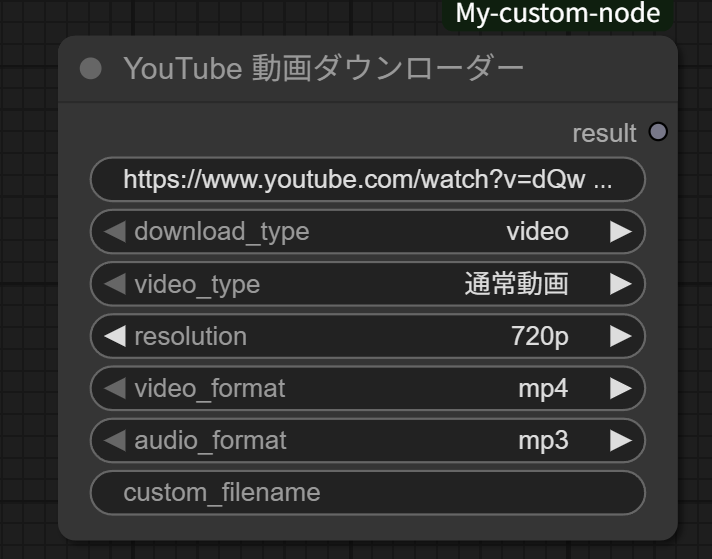
The YouTube Downloader node interface in ComfyUI
Features
- Video Download: Download YouTube videos in MP4, WebM, or MKV format
- Audio Extraction: Extract audio in MP3, M4A, OPUS, or WAV format
- Resolution Control: Choose from 1080p, 720p, 480p, or 360p
- Video Type Support: Normal videos (landscape) or Short videos (portrait)
- Auto Size Conversion: Automatically handles portrait/landscape orientation
- Standalone Operation: Works independently without connecting to other nodes
Installation
Method 1: Git Clone (Recommended)
cd ComfyUI/custom_nodes/
git clone https://github.com/YOUR_USERNAME/comfyui-youtube-downloader.git
Method 2: Manual Download
-
Download this repository as ZIP
-
Extract to your ComfyUI custom nodes directory:
ComfyUI/custom_nodes/comfyui-youtube-downloader/ -
Install dependencies:
pip install yt-dlp -
Install FFmpeg (required for video/audio conversion):
- Windows: Download from FFmpeg Builds
- macOS:
brew install ffmpeg - Linux:
sudo apt install ffmpeg(Ubuntu/Debian) orsudo yum install ffmpeg(CentOS/RHEL)
-
Restart ComfyUI
Usage
-
Add the node: Right-click →
Add Node→YouTube Downloader→YouTube 動画ダウンローダー -
Configure parameters:
- video_url: YouTube video URL
- download_type:
videooraudio - video_type:
通常動画(Normal) orショート動画(Short) - resolution:
1080p,720p,480p, or360p - video_format:
mp4,webm, ormkv - audio_format:
mp3,m4a,opus, orwav - custom_filename: Optional custom filename
-
Click "Queue Prompt" to start download
Resolution Mapping
Normal Videos
- 1080p → 1920x1080
- 720p → 1280x720
- 480p → 854x480
- 360p → 640x360
Short Videos (Auto-rotated)
- 1080p → 1080x1920
- 720p → 720x1280
- 480p → 480x854
- 360p → 360x640
Output
Downloaded files are saved to ComfyUI's output directory with sanitized filenames based on video titles.
Requirements
- Python 3.7+
- yt-dlp >= 2023.12.30
- FFmpeg (for video/audio conversion)
- ComfyUI
License
This project is released under the MIT License.
Notes
- Respect YouTube's Terms of Service and copyright laws
- Use for personal and educational purposes
- Some videos may not be available for download due to restrictions
- Network connection required for downloading
Contributing
Contributions are welcome! Please feel free to submit a Pull Request.
Issues
If you encounter any problems or have feature requests, please open an issue.
Support
- ⭐ Star this repository if you find it useful
- 🐛 Report bugs via GitHub Issues
- 💡 Request features via GitHub Issues
Changelog
v1.0.0
- Initial release
- Video and audio download support
- Resolution control (1080p, 720p, 480p, 360p)
- Normal and Short video type support
- Multiple format support (MP4, WebM, MKV, MP3, M4A, OPUS, WAV)