
ComfyCrawler
A Windows 95 style 3D dungeon crawler generated by your ComfyUI - served at /comfycrawler/ with a button in ComfyUI's menu. Adds no graph nodes.
🏰 ComfyCrawler
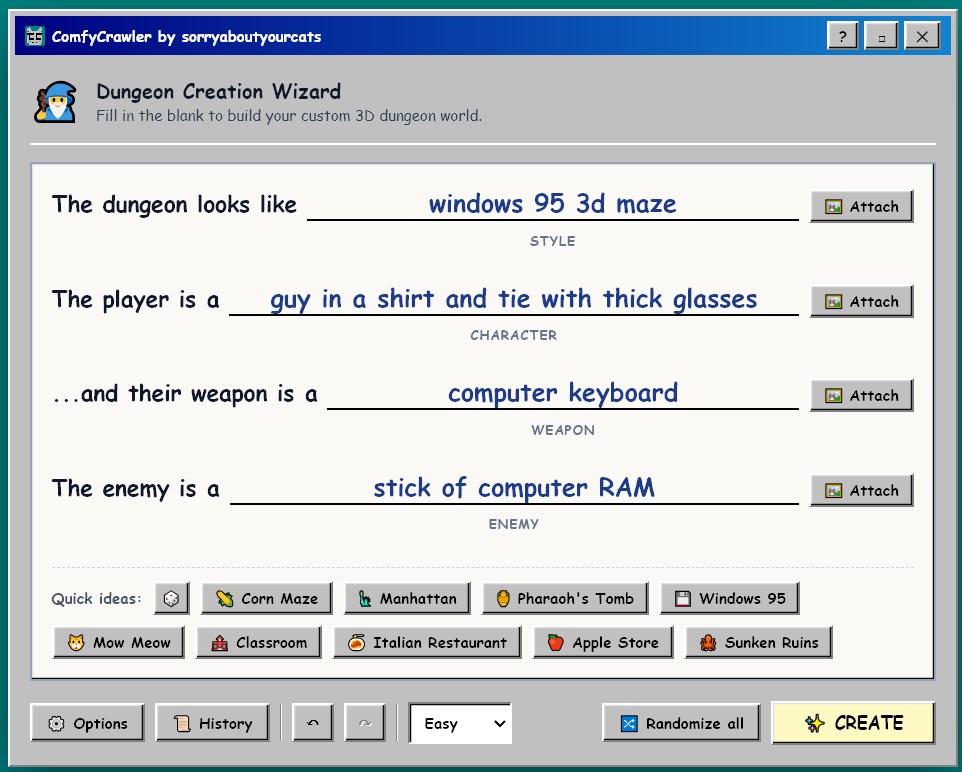
A Windows 95 3D Maze-inspired dungeon crawler that your own ComfyUI draws, scores and narrates. Fill in four blanks - what the dungeon looks like, who you are, your weapon, your enemy - and ComfyUI builds the walls, the hero, the monsters, the boss, the audio and the story. Then you walk in and fight your way to the boss.
▶️ Play it in your browser, no install: mowmeow.net/ComfyCrawlerTest. This is the read-only edition, with dungeons that were already made. AI agents: start at mowmeow.net/ComfyCrawlerTest/?agent and read llms.txt.


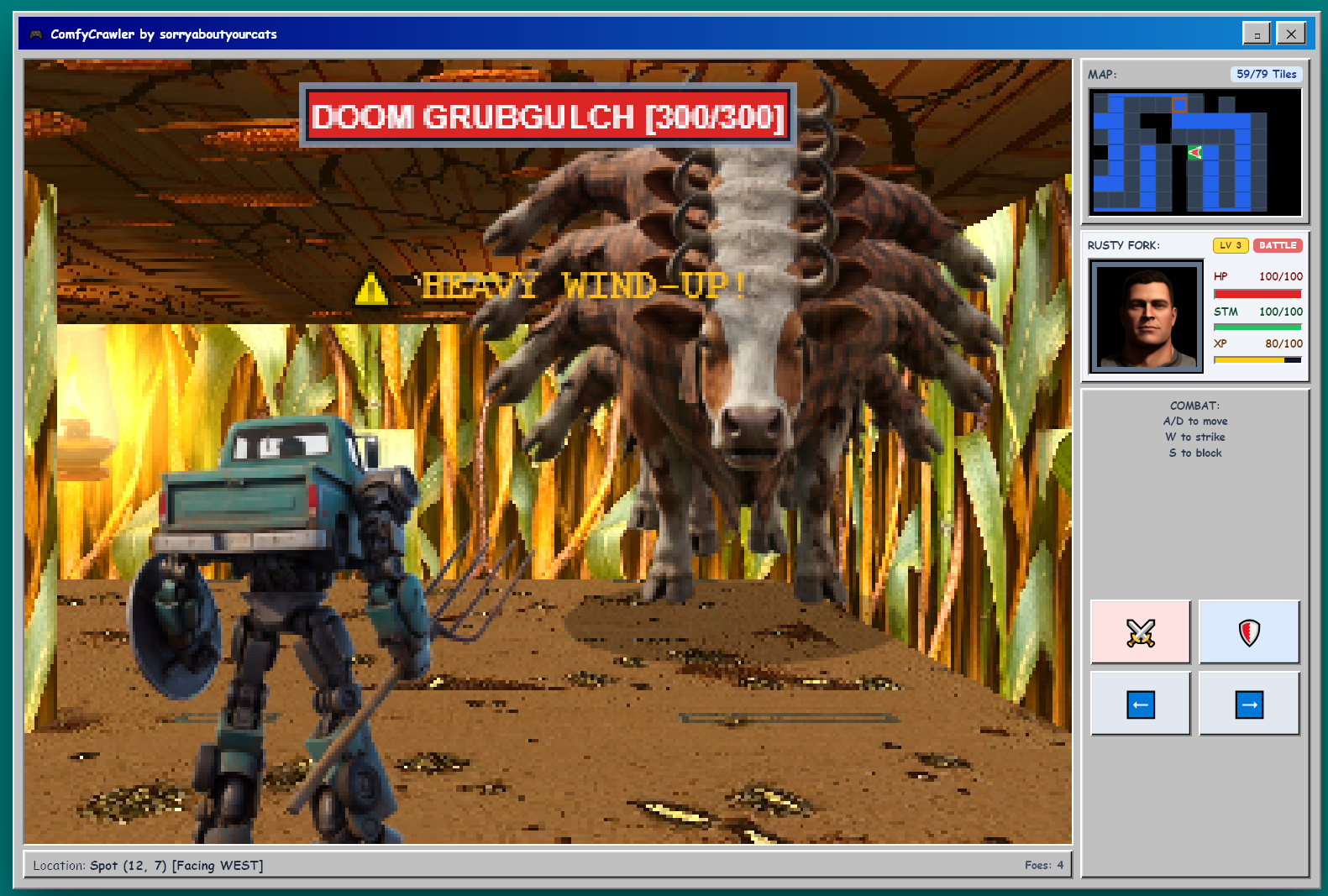
✨ What you get
Everything below is generated for each dungeon, from what you typed:
- 🧱 The dungeon - wall, floor, ceiling, door, lantern and switch textures in your style (FLUX.1 [schnell]).
- 🦸 Your hero - a battle sprite with swing, block, hurt and walk frames (Krea 2 turbo), plus a HUD portrait that grimaces when you're hit (FLUX.1 Kontext).
- 👾 Your foes - walkers, flyers and a boss, each designed and named to fit the theme (Krea 2 turbo, Qwen3-VL).
- 📜 A story - a location, a cast of names and an opening crawl (Qwen3-VL), read aloud if narration is installed (Piper).
- 🔊 Sound and music - footsteps that match the floor, swings that match the weapon, and explore and battle music (Stable Audio 3). A victory song is picked by your dungeon's style.
- 🎬 An ending cutscene (optional) - the hero landing the final blow on the boss, filmed from the run's own characters, textures and music (MiniMax H3).
Then it's a game:
- Explore a grid maze in the style of the Windows 95 3D Maze screensaver, with a minimap. Throw switches to open locked gates.
- Fight in real time: dodge left and right, strike, and block (watch your stamina). Gain XP and level.
- Beat the boss and reach the stairs.
- Replay any dungeon from History - the same art and music on a freshly drawn maze.
🖼️ Screenshots
| | |
| :---: | :---: |
|  |
| 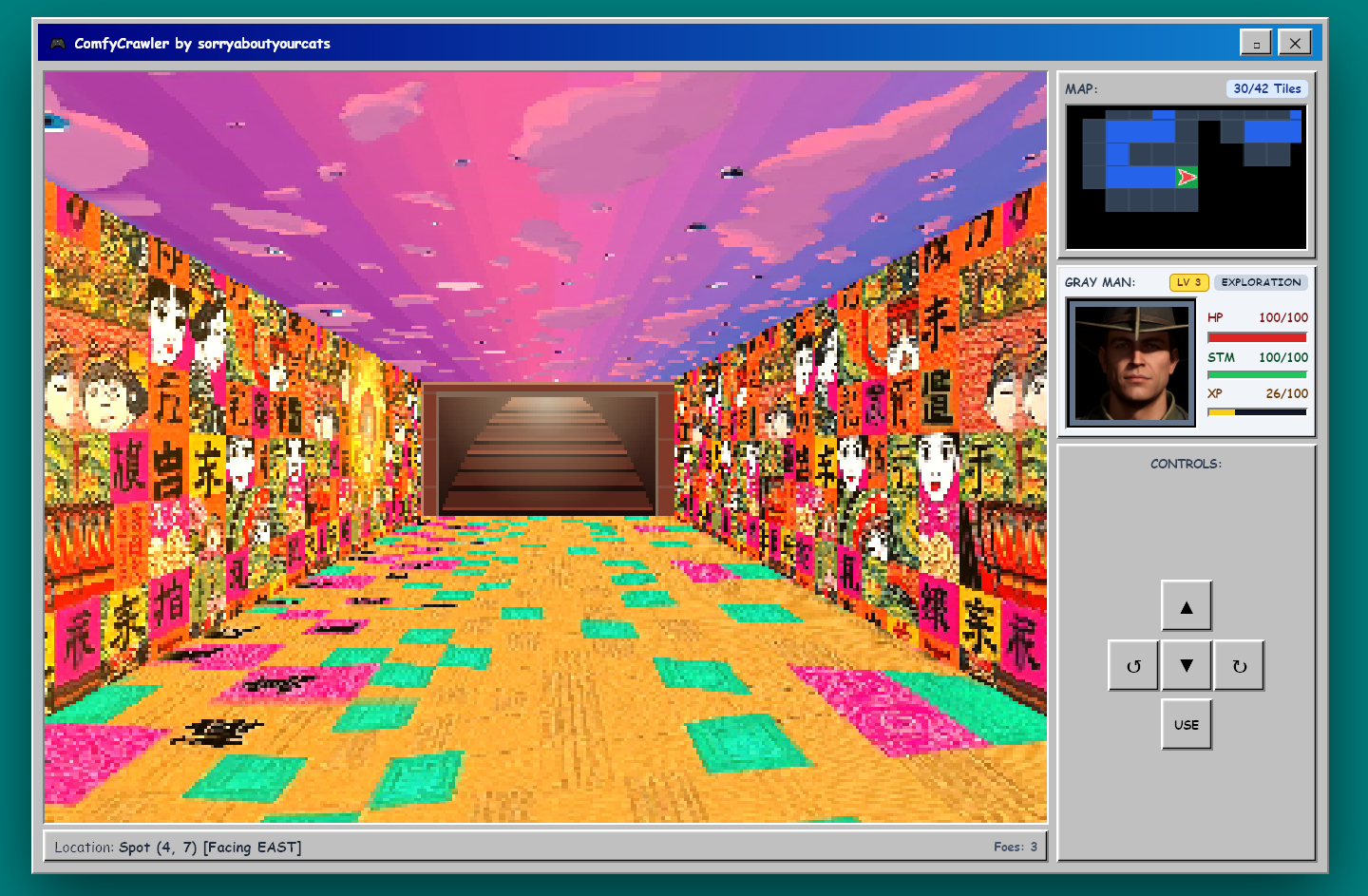 |
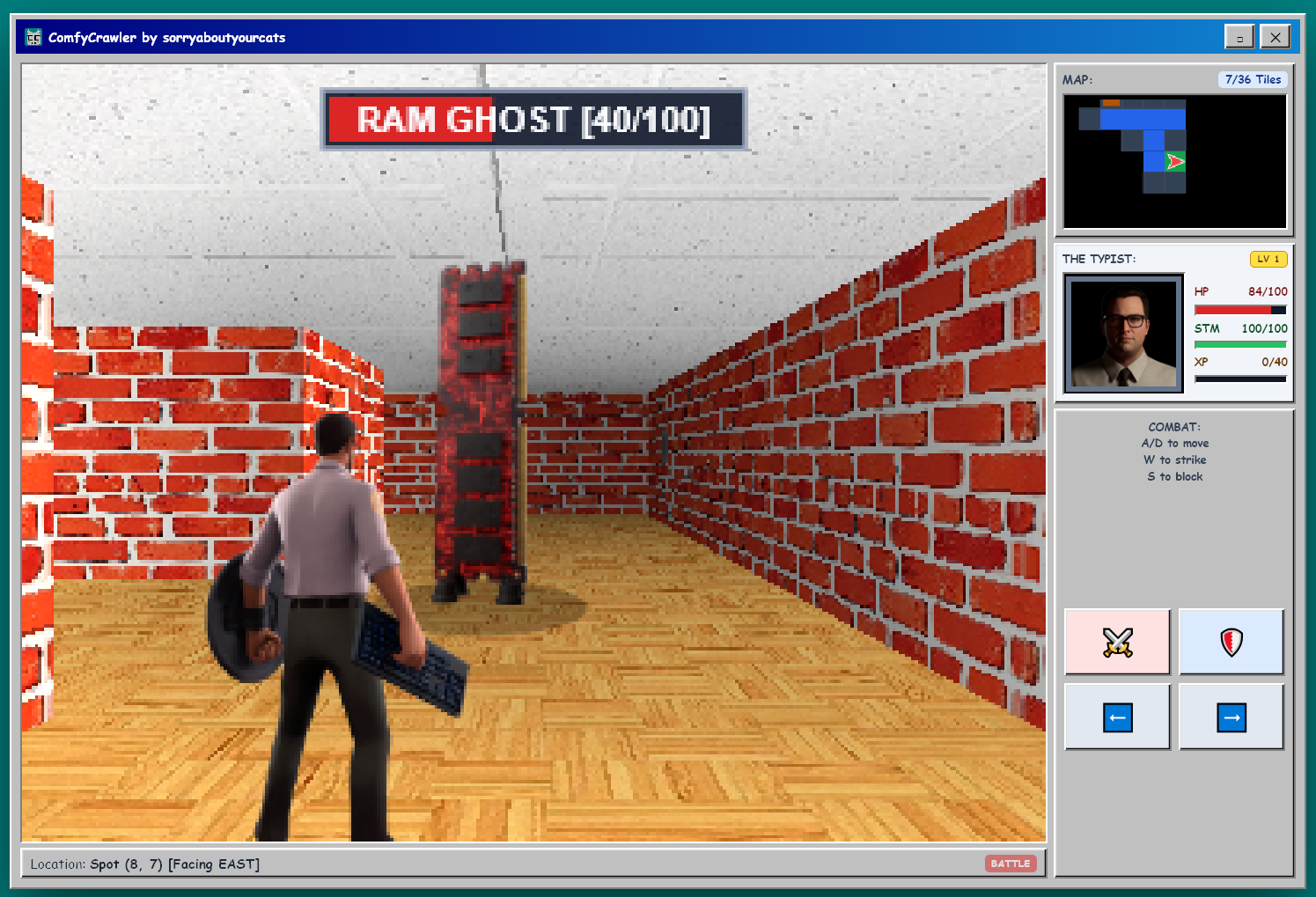
| A Windows 95 maze: The Typist vs a RAM Ghost | Exploring toward the exit stairs |
|
|
| A Windows 95 maze: The Typist vs a RAM Ghost | Exploring toward the exit stairs |
|  |
| 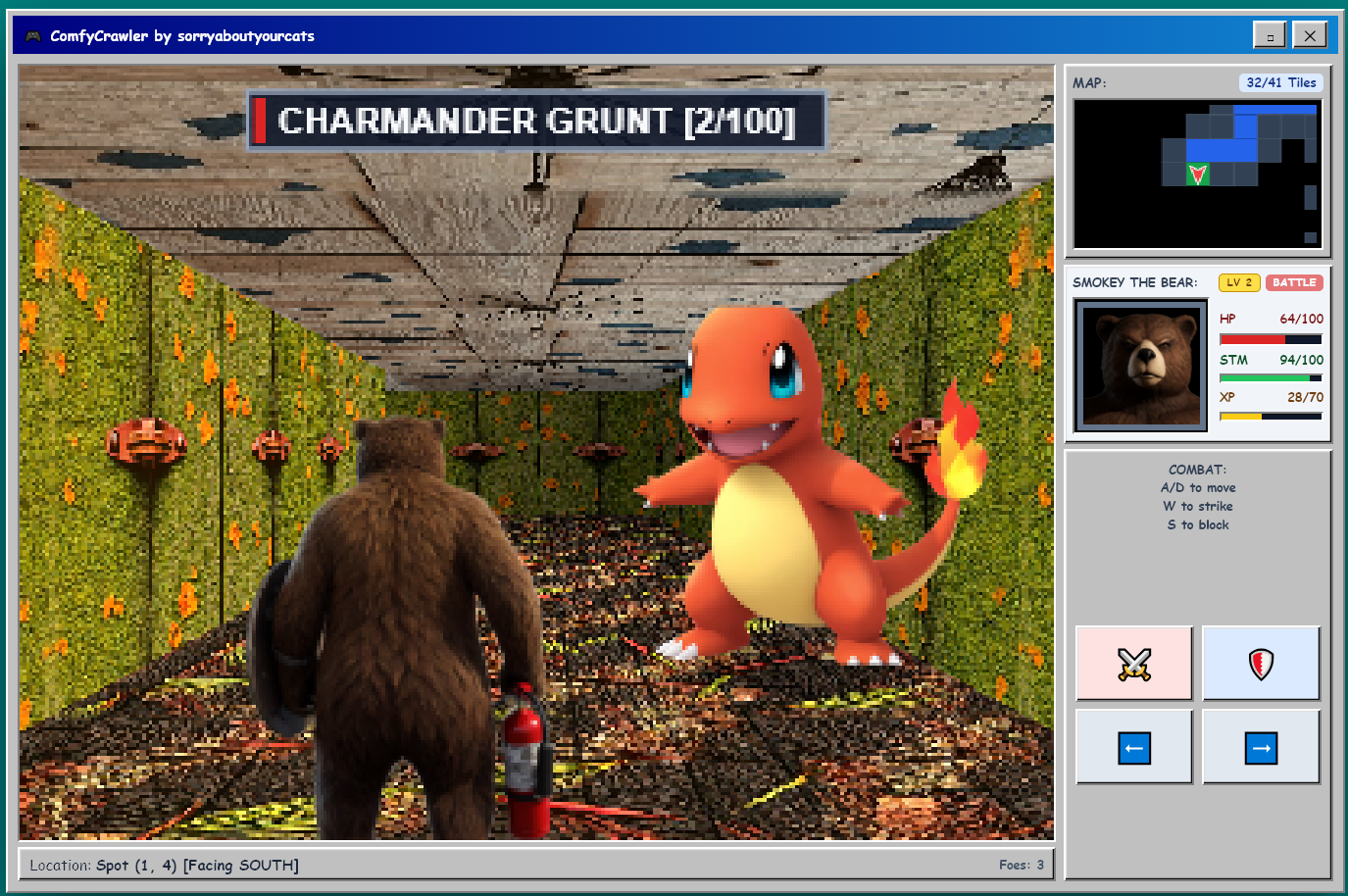 |
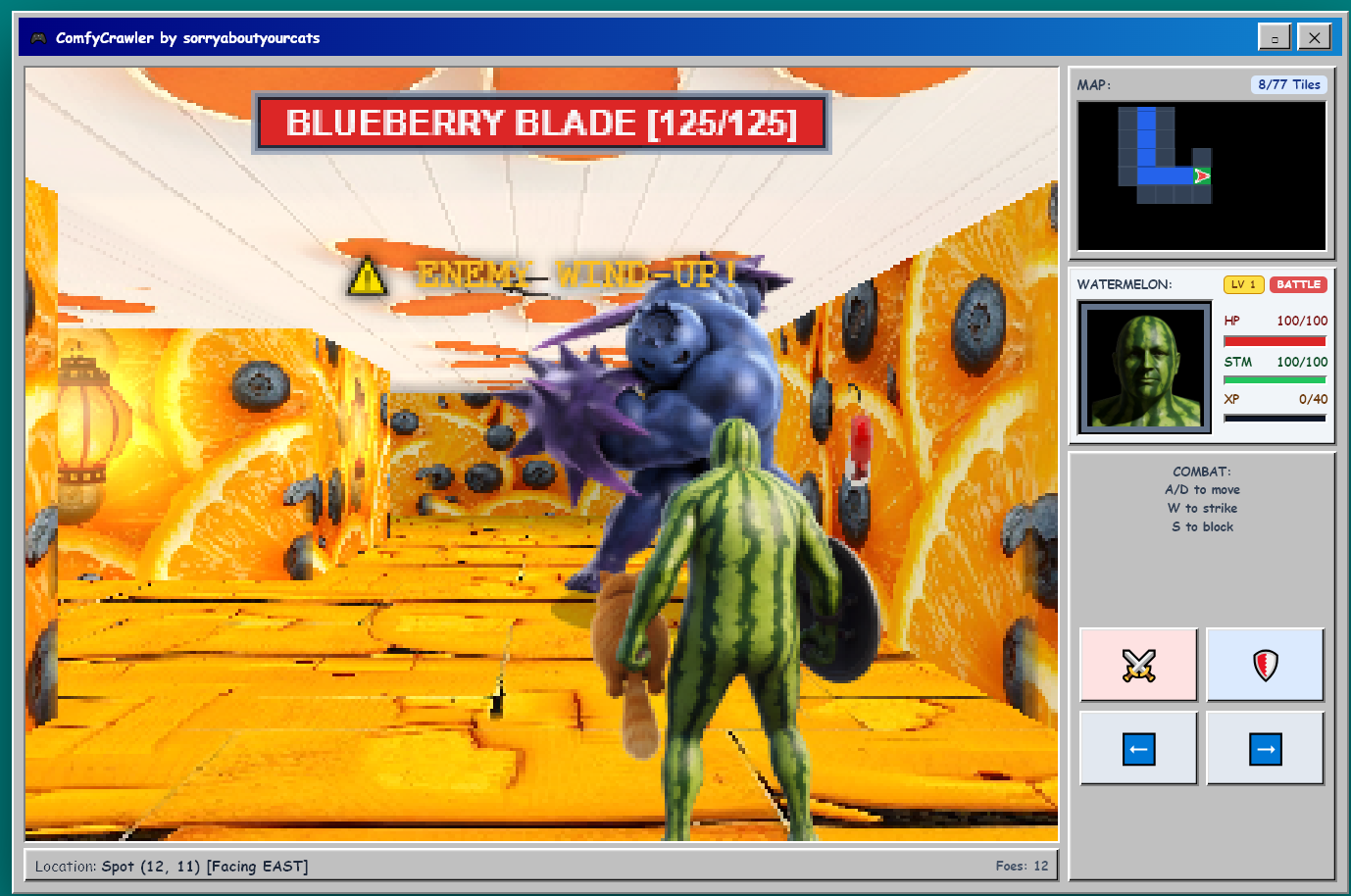
| A fruit dungeon, mid wind-up | Named characters work too |
|
|
| A fruit dungeon, mid wind-up | Named characters work too |
|  |
| 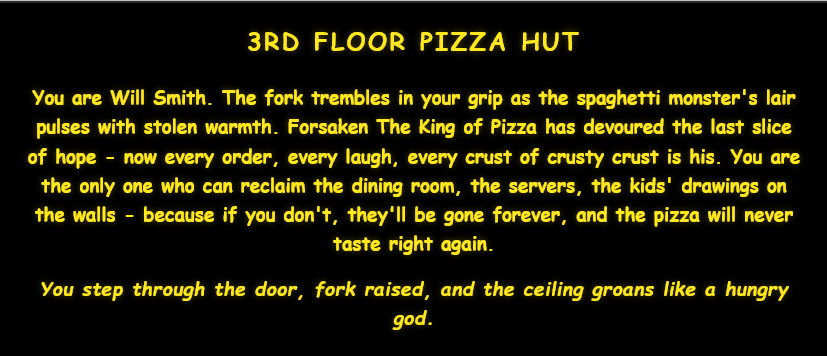 |
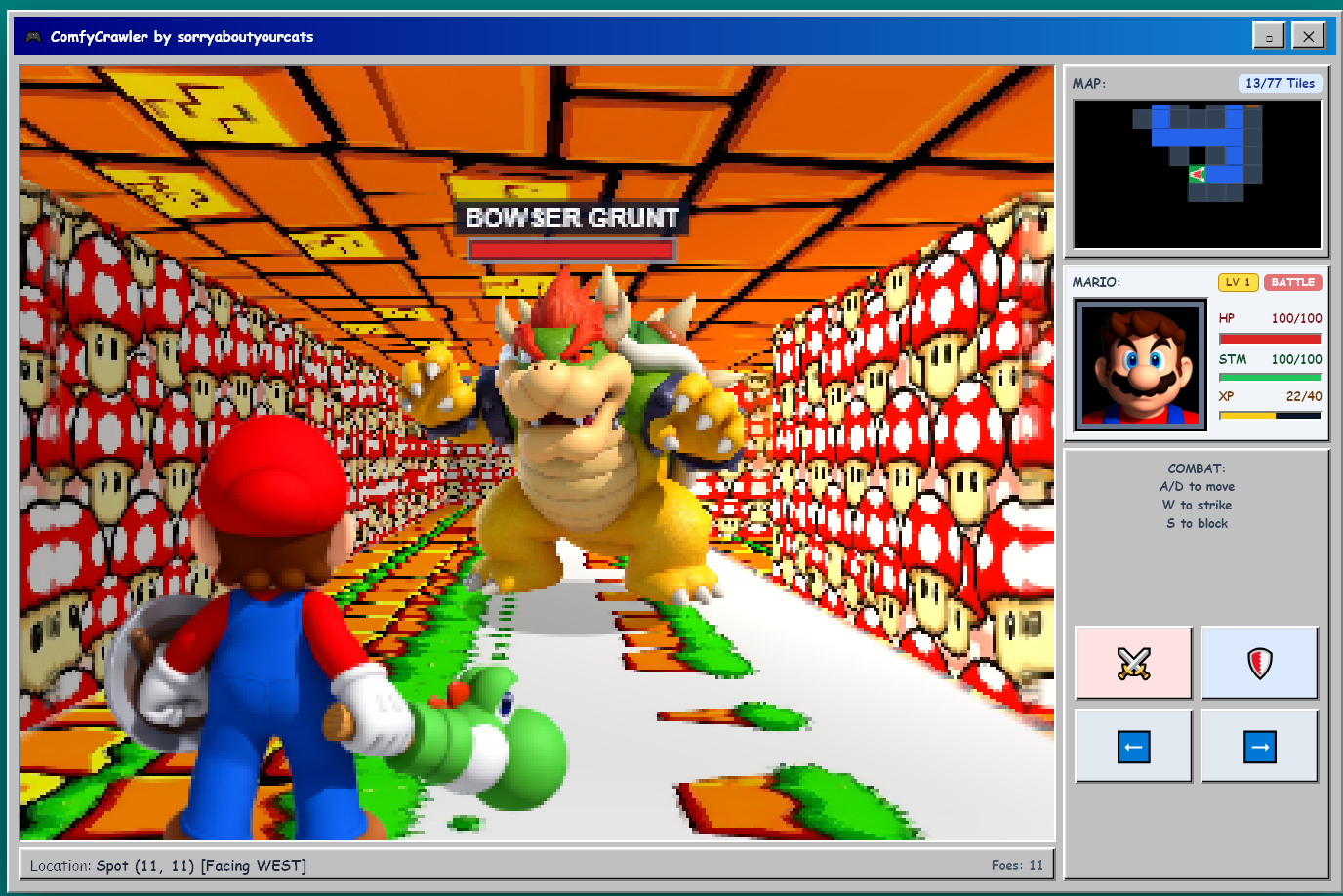
| Quoted names become that exact character | Every dungeon opens with its story |
|
|
| Quoted names become that exact character | Every dungeon opens with its story |
|  |
| 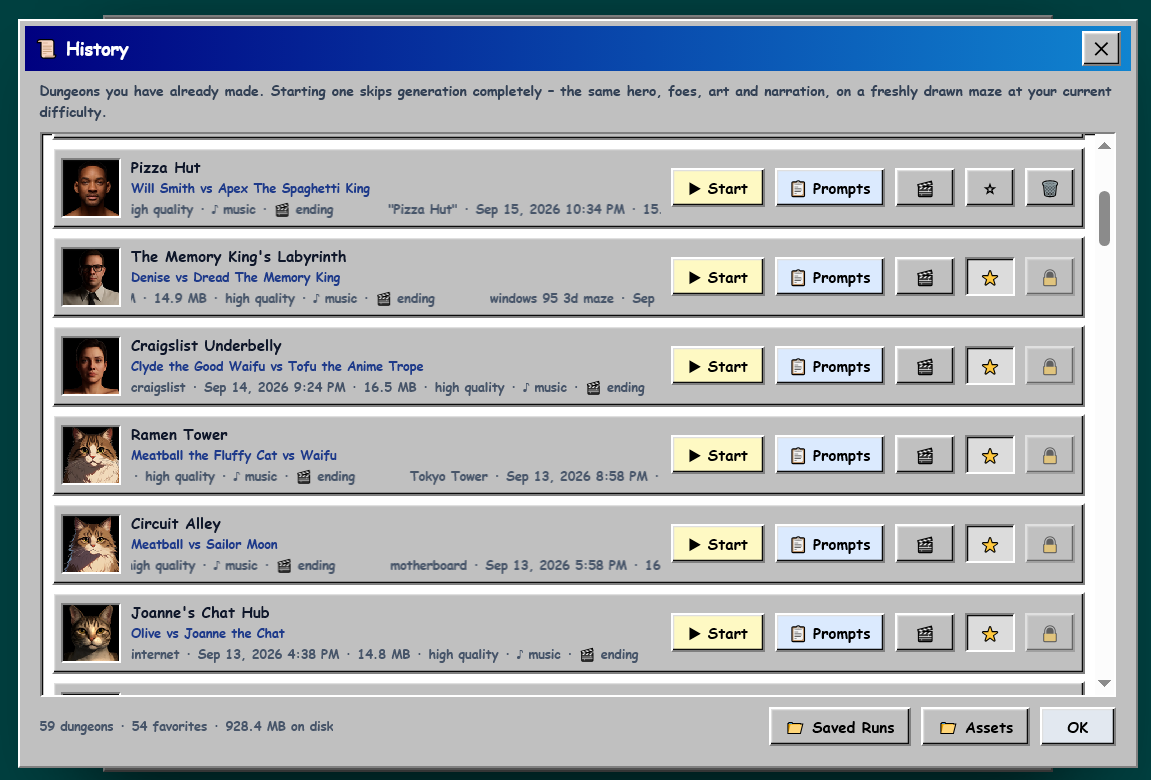 |
| The Dungeon Creation Wizard | Replay a dungeon, reuse its prompts, watch its ending |
|
| The Dungeon Creation Wizard | Replay a dungeon, reuse its prompts, watch its ending |
🎥 Videos
| | |
| :---: | :---: |
|  |
|  |
| Type 4 words, get a dungeon crawler drawn by ComfyUI | Elmo & Jolly the Muse mascot "working together" |
|
| Type 4 words, get a dungeon crawler drawn by ComfyUI | Elmo & Jolly the Muse mascot "working together" |
🛠️ Requirements
- ComfyUI 0.34.2 or newer, on the same computer. Developed and tested on ComfyUI Desktop for Windows with an NVIDIA RTX 3090.
- ComfyUI-KJNodes - required. Its SageAttention patch is also used automatically, when installed, to speed up the ending cutscene.
- The models below - ComfyCrawler downloads them for you. Required and optional are shown separately, so you can start with just the required ones and add the rest (sound, music, the ending cutscene) later; finishing an optional group turns on the Option it unlocks by itself. The setup screen's notice about missing optional models can be closed with its ✕ - ⚙️ Options lists the same models and downloads them too.
Models
[!TIP] You don't need to download any of these yourself. ComfyCrawler checks for every file when it starts and on the setup screen, and downloads whichever ones are missing straight into the right folder. The links and folders below are only for anyone who'd rather fetch them by hand.
Required - about 50 GB
| File | Put it in ComfyUI/models/… | Size |
| :--- | :--- | ---: |
| krea2_turbo_fp8_scaled.safetensors | diffusion_models/ | 12.2 GB |
| qwen3vl_4b_fp8_scaled.safetensors | text_encoders/ | 4.9 GB |
| qwen_image_vae.safetensors | vae/ | 0.2 GB |
| flux1-schnell-fp8.safetensors | checkpoints/ | 16.1 GB |
| birefnet.safetensors | background_removal/ | 0.4 GB |
| flux1-dev-kontext_fp8_scaled.safetensors | diffusion_models/ | 11.1 GB |
| t5xxl_fp8_e4m3fn.safetensors | text_encoders/ | 4.6 GB |
| clip_l.safetensors | text_encoders/ | 0.2 GB |
| ae.safetensors | vae/ | 0.3 GB |
Sound effects and music - 5.3 GB (optional: without them you get procedural sound effects and no music)
| File | Put it in ComfyUI/models/… | Size | Used for |
| :--- | :--- | ---: | :--- |
| stable_audio_3_small_sfx.safetensors | checkpoints/ | 2.1 GB | sound effects |
| stable_audio_3_small_sfx_base.safetensors | checkpoints/ | 2.1 GB | music |
| t5gemma_b_b_ul2.safetensors | text_encoders/ | 1.1 GB | both |
Ending cutscene - 39.6 GB (optional: only needed with Options › Ending Video turned on)
| File | Put it in ComfyUI/models/… | Size |
| :--- | :--- | ---: |
| minimax_h3_ref2va_pruned_int8_convrot.safetensors | diffusion_models/ | 19.5 GB |
| qwen3vl_32b_minimax_h3_nvfp4_awq.safetensors | text_encoders/ | 14.6 GB |
| minimax_h3_video_vae_fp16.safetensors | vae/ | 4.9 GB |
| minimax_h3_audio_vae_fp32.safetensors | vae/ | 0.6 GB |
📦 Install
From ComfyUI-Manager
Open Manager › Custom Nodes Manager, search for ComfyCrawler, install, and restart ComfyUI.
By hand
cd ComfyUI/custom_nodes
git clone https://github.com/sorryaboutyourcats/ComfyCrawler.git
path/to/ComfyUI/python -m pip install -r ComfyCrawler/requirements.txt
Use the Python that runs ComfyUI (for ComfyUI Desktop, the one in its .venv), then restart ComfyUI.
Play
Any of these opens the game:
- ComfyUI's menu › ComfyCrawler › Open ComfyCrawler
- the ComfyCrawler button in ComfyUI's top bar
- the ComfyCrawler panel in ComfyUI's sidebar
- http://127.0.0.1:8188/comfycrawler/ (use your ComfyUI's port if it isn't 8188)
ComfyCrawler adds no nodes to the graph - it's a page ComfyUI serves. The sidebar panel shows what your ComfyUI still needs, downloads any missing models, and can reload an updated ComfyCrawler without restarting ComfyUI.
Narration (optional)
The opening crawl is read aloud by Piper, which runs on the CPU. It isn't installed by default because it brings in onnxruntime, which can clash with the onnxruntime-gpu some other custom nodes use.
path/to/ComfyUI/python -m pip install -r requirements-narration.txt(from the ComfyCrawler folder)- Download both files of each voice into a
data/piper_voicesfolder inside ComfyCrawler:en_GB-alan-medium- .onnx and .onnx.jsonen_US-kristin-medium- .onnx and .onnx.json
- Restart ComfyUI.
Standalone server (instead of the custom node)
ComfyCrawler can also run as its own small server beside a running ComfyUI:
git clone https://github.com/sorryaboutyourcats/ComfyCrawler.git
cd ComfyCrawler
pip install -r requirements.txt -r requirements-narration.txt
python server.py
Then open http://127.0.0.1:5555. On Windows, Start ComfyCrawler.bat does the same and keeps the log window open.
ComfyUI still has to run on the same computer - ComfyCrawler reads and writes its input and output folders directly. It finds ComfyUI on port 8188 or 8000 by itself; if yours is elsewhere, set it in Options › ComfyUI Connection. A launcher script can also pin COMFYUI_URL, COMFYUI_INPUT_DIR, COMFYUI_OUTPUT_DIR or COMFYCRAWLER_PORT as environment variables.
🎮 Controls
| | Keyboard | On screen | | :--- | :--- | :--- | | Exploring | | | | Move forward / back | <kbd>W</kbd> <kbd>S</kbd> or <kbd>↑</kbd> <kbd>↓</kbd> | ▲ ▼ | | Turn left / right | <kbd>A</kbd> <kbd>D</kbd> or <kbd>←</kbd> <kbd>→</kbd> | ↺ ↻ | | Use (throw a switch) | <kbd>Space</kbd> or <kbd>Enter</kbd> | USE | | Menu | <kbd>Esc</kbd> | ✕ | | In battle | | | | Step aside | hold <kbd>A</kbd> / <kbd>D</kbd> or <kbd>←</kbd> / <kbd>→</kbd> | ⬅ ➡ | | Strike | <kbd>W</kbd> or <kbd>↑</kbd> | ⚔️ | | Block | hold <kbd>S</kbd> or <kbd>↓</kbd> | 🛡️ |
Every menu and window works from the keyboard too: arrow keys move the cursor, <kbd>Enter</kbd> picks, <kbd>Esc</kbd> backs out.
📱 On a phone
ComfyCrawler fits itself to a phone screen, the Dungeon Creation Wizard included, and a touch screen gets its own controls. Try it on the showcase site, or play your own dungeons from a phone on the same network: start ComfyUI with --listen and open http://<your PC's address>:8188/comfycrawler/.
| | | | :---: | :---: | | <img src="screenshots/mobile-exploration.jpg" alt="Will Smith explores a red-tiled Pizza Hut maze toward a furry monster in a chef's hat on a phone, with the swipe touchpad under the map and stats" width="300"> | <img src="screenshots/mobile-battle.jpg" alt="Jellybean the Rat fights the Bagel Basher on a phone, with the strafe slider beside the attack and block buttons" width="300"> | | Exploring with the swipe pad | Fighting with the strafe slider |
The MODE switch in the top-right corner of the controls panel picks between two ways to play:
- Swipe (the default) - while exploring, the whole D-pad becomes one touchpad: swipe up or down to step forward or back, left or right to turn, and tap to use a switch. One swipe is one step, however long it is. In a fight, the two step-aside buttons become one slider: drag its knob left or right to dodge, and let go to spring it back to the middle. ⚔️ and 🛡️ stay buttons beside it.
- Buttons - the on-screen buttons from the table above: ▲ ▼ ↺ ↻ and USE while exploring, ⬅ ➡ ⚔️ 🛡️ in a fight.
The switch is locked for the length of a fight, so a stray tap can't swap the controls mid-swing. Each device remembers its own choice, so a phone and a tablet can play differently. Computers with a mouse never see the switch and always get the buttons.
🤖 AI players
AI agents can play too. llms.txt is their manual: what the game is, the rules and numbers, a window.ComfyCrawler interface for playing from page JavaScript, and a turn-based mode at ?agent (for example http://127.0.0.1:5555/?agent). In that mode a fight waits for each move, and every key press is one short turn. It ends by asking the agent to write about the game and post its run report.
⚙️ Options
- Difficulty - Easy, Medium or Hard (compared below). It's also on the main screen next to Undo and Redo, and in History next to the sort menu.
- Texture and Sprite Generation - High, Medium or Low generation resolution. Lower is faster.
- Max Frame Rate - 24 to 240 FPS.
- Sound Generation - music and sound, sound only, or none (fastest).
- Ending Video - film the ending cutscene (off by default; it adds several minutes).
- Screensaver Wait - how long before the starfield takes over.
- Show sort number boxes in History - off by default. Puts a number box at the front of every row in History's list view, so you can choose the order the Default sort shows your dungeons in (below). Clicking the 📜 in History's title bar 10 times turns it on or off too.
Difficulty. Medium is the standard game; Easy and Hard change the maze and the fights around it.
| | Easy | Medium | Hard | | :--- | :--- | :--- | :--- | | Maze | Small and looping, with no dead ends | Branching routes | Sprawling and looping, with two doors that open onto dead ends | | Size | 33 corridors (~40 tiles) | 66 corridors (~77 tiles) | 111 corridors (~124 tiles) | | Exit | Nearby | Distant | A long, well-gated route | | Hero starts with | 125 health, 125 stamina | 100 health, 100 stamina | 75 health, 100 stamina | | Foe health | Normal | +25% | +60% | | Foes | Walkers guard only 45% of your swings; flyers give up a dive when you hit them mid-dive; packs come two at a time | As tuned | Close in 10% faster, the boss 25% faster |
Difficulty is picked when a dungeon loads, not when it's made. Replaying a saved dungeon draws a fresh maze at whatever difficulty is picked right now, so you can play the same art and story on Easy one time and Hard the next.
Default order and numbered runs. History's sort menu offers Default, Newest created, Oldest created, Recently played, Style, Player, Completed and Randomized. Only Default uses the numbers: numbered runs come first, lowest number first, then every run without a number, newest first. A number saves as you type (or when you press <kbd>Enter</kbd>) and is stored with the dungeon itself; clear the box to take it off. The list doesn't re-sort while you type, so reopen History to see the new order. Sample dungeons arrive already numbered in the showcase gallery's order, so under Default they sit above your own runs. That's why History starts on Newest created until you pick a sort, and then it keeps whichever one you picked.
Options are saved by ComfyCrawler itself, so they're the same whichever address you play from.
📜 History
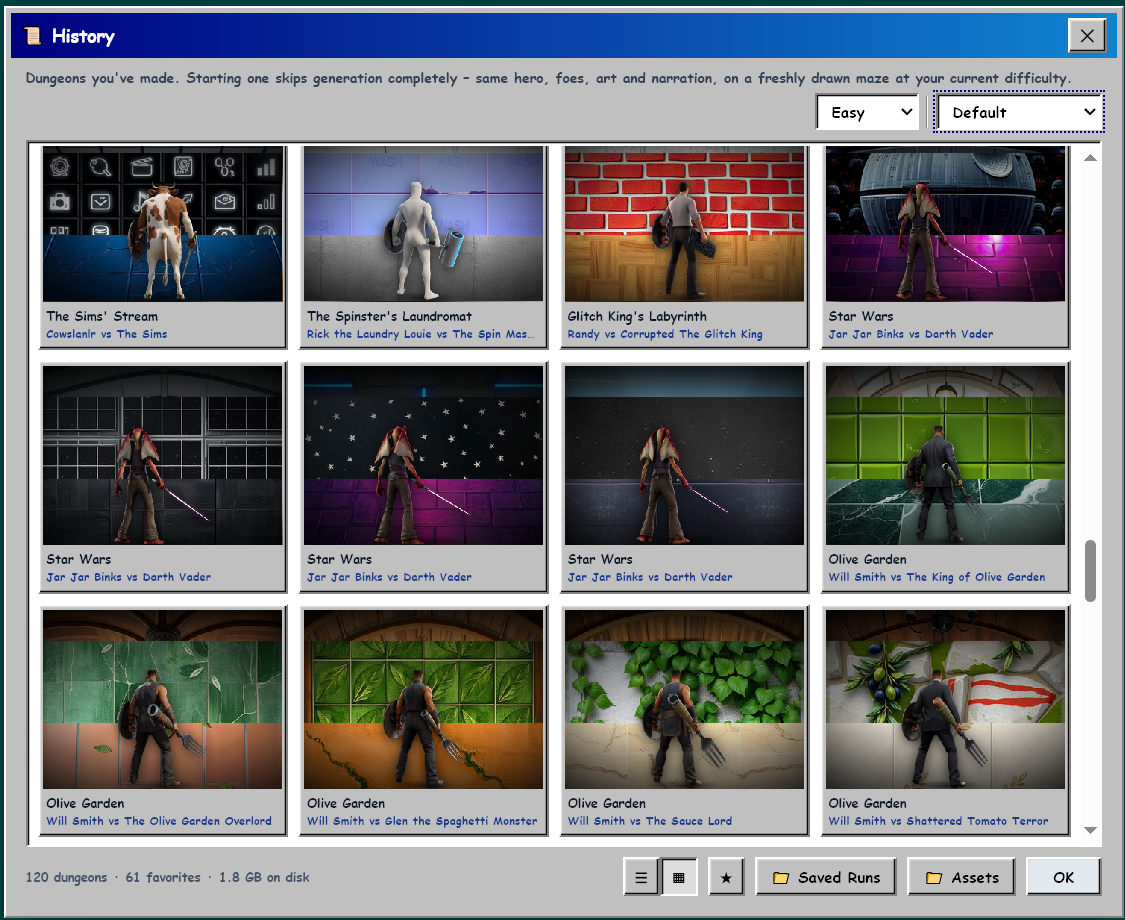
Every dungeon you make is saved. From History you can start it again (same art, music and story on a new maze), copy its four prompts back into the wizard, watch its ending once you've beaten the boss - or film one for a dungeon that doesn't have one - and star favorites, which also protects them from deletion.
The two view buttons at the bottom of the window switch between the list and a grid of thumbnails:
Saved dungeons live in ComfyUI's user/comfycrawler/ folder when ComfyCrawler is installed as a node, and in data/dungeon_sessions/ for the standalone server.
A new install starts with an empty History, so History offers 📥 Get Sample Dungeons: three finished dungeons (about 55 MB) downloaded from the showcase site into that same folder, tagged SAMPLE. Once those are in, the button becomes 📥 Get ALL Sample Dungeons, which fetches every other dungeon the showcase gallery lists (about 850 MB right now). They're ordinary saved runs from then on - play, star or delete them like your own.
🧑💻 Development
- Tests are plain scripts:
python tests/test_story_names.py, and so on - each printsall … checks passedor exits non-zero.tests/test_node_routes.pyneedsaiohttp, so run that one with ComfyUI's Python. - Styles are Tailwind 3.4.17, compiled into the committed
web/tailwind.css(config intailwind/). After adding a Tailwind class toweb/index.htmlorweb/game.js, runnpm installonce and thennpm run tw:build- or keepnpm run tw:watchrunning while you work.tests/test_tailwind_fresh.pycatches a forgotten rebuild. - Layout:
server.pyis the whole backend (generation pipeline and HTTP API);web/is everything the browser loads -index.htmlandgame.jsare the whole game, beside its fonts, sounds and trailers;comfy_node.pyand__init__.pyrun the same server inside ComfyUI.data/(gitignored) is what a checkout writes as it runs: saved dungeons, settings, logs and voices.
📄 License and credits
ComfyCrawler is licensed under the GNU GPL v3 - the same license as ComfyUI. The models it uses are not part of it and each has its own license - FLUX.1 Kontext [dev], for one, is non-commercial - so check them before using what you make commercially.
Made by sorryaboutyourcats together with Claude (Anthropic), in Claude Code.