
ComfyUI Extension
ComfyUI-InfiniDepth
ComfyUI custom nodes for InfiniDepth — arbitrary-resolution monocular depth estimation.
snomiao/ComfyUI-InfiniDepth
Nodes2
On cloudLocal install
Categorydepth/InfiniDepth
Stars0
Updated7 months ago
Nodes (2)
Readme
ComfyUI-InfiniDepth
ComfyUI custom nodes for InfiniDepth — arbitrary-resolution monocular depth estimation (CVPR 2026).
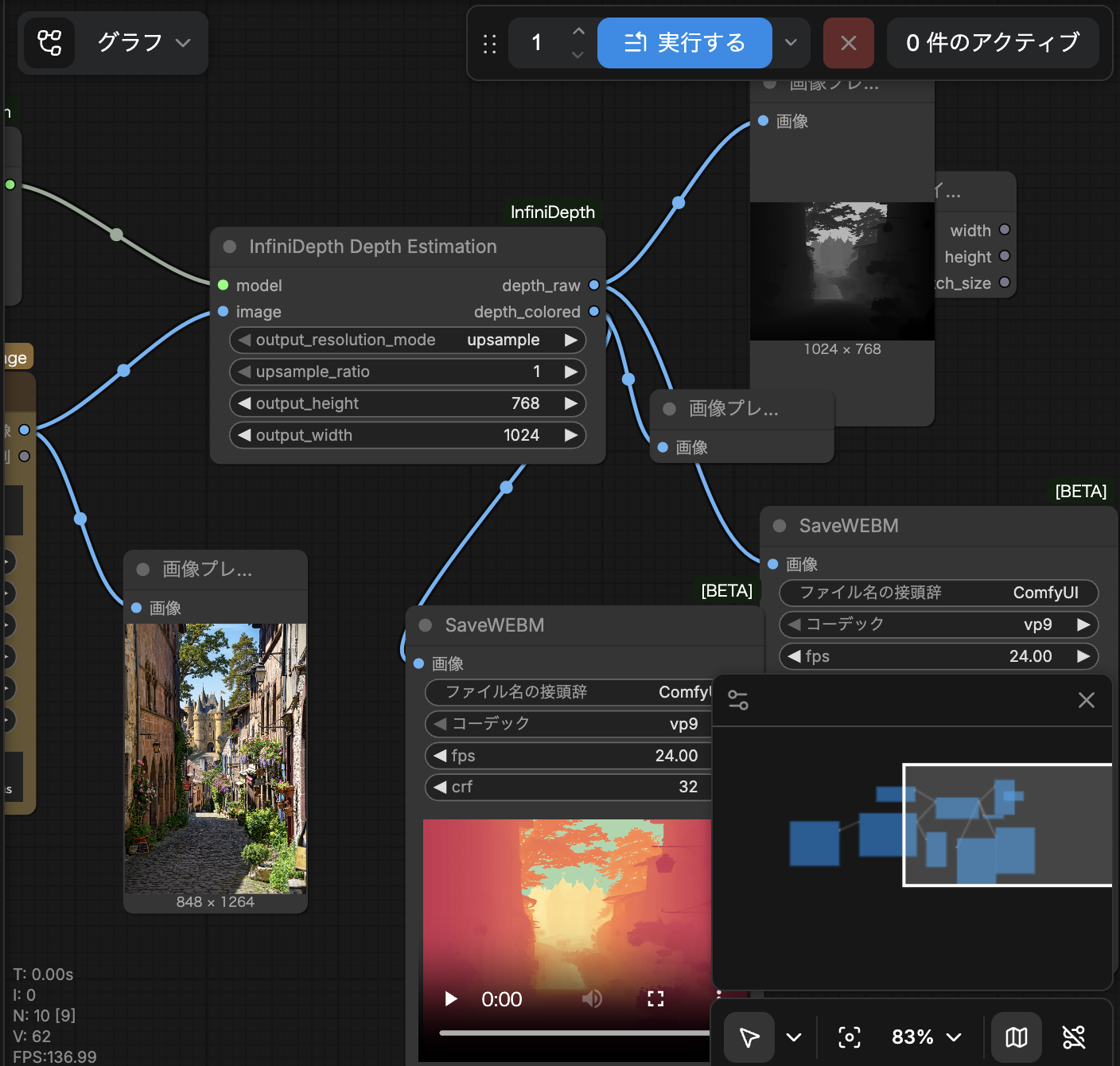
Nodes
| Node | Description | |------|-------------| | Load InfiniDepth Model | Load depth estimation model from checkpoint | | InfiniDepth Depth Estimation | Run depth estimation on images, outputs raw + colorized depth maps |
Installation
- Clone this repo into ComfyUI's custom nodes directory:
cd ComfyUI/custom_nodes
git clone https://github.com/snomiao/ComfyUI-InfiniDepth.git
- Clone the InfiniDepth repo and set the environment variable:
git clone https://github.com/YvanYin/InfiniDepth.git
export INFINIDEPTH_ROOT=/path/to/InfiniDepth
Or symlink this node folder into the InfiniDepth repo (auto-detects InfiniDepth/ as sibling directory).
- Install dependencies:
pip install -r requirements.txt
python install.py  # installs MoGe and gsplat from git
- Download checkpoints from HuggingFace and place them as:
checkpoints/
  depth/infinidepth.ckpt
  depth/infinidepth_depthsensor.ckpt
  moge-2-vitl-normal/model.pt
  gs/infinidepth_gs.ckpt
  gs/infinidepth_depthsensor_gs.ckpt
  sky/skyseg.onnx
Usage
- Add Load InfiniDepth Model node — select model type and checkpoint paths
- Add InfiniDepth Depth Estimation node — connect model + image
- Connect outputs to Preview Image nodes
Outputs:
depth_raw: Grayscale depth map (normalized 0-1)depth_colored: Spectral colormap visualization
Supported Platforms
- CUDA (recommended)
- MPS (Apple Silicon)
- CPU (slow but works)
Credits
- InfiniDepth by Tianyu Li et al.
- MoGe-2 by Microsoft for metric scale recovery