
ComfyUI Extension
ComfyUI Frontend Vue Basic
ComfyUI Frontend Vue Basic is custom node that demonstrate how to use vue as frontend framework along with primevue and vue-i18n, cooperating with ComfyUI API. Needs ComfyUI Frontend 1.25.0 or later.
smk-h/ComfyUI_sm_utils
Nodes—
On cloudLocal install
Stars1
Updated4 months ago
Readme
ComfyUI SM Utils
一个示例自定义节点,演示如何在 ComfyUI 中集成 Vue 作为前端框架,包含 PrimeVue 组件和 vue-i18n 支持。
注意:自 ComfyUI Frontend 1.33.9 起,前端不再暴露 Vue。本项目现在使用与扩展一起打包的独立 Vue 实例,而不再依赖前端的 Vue。
概览
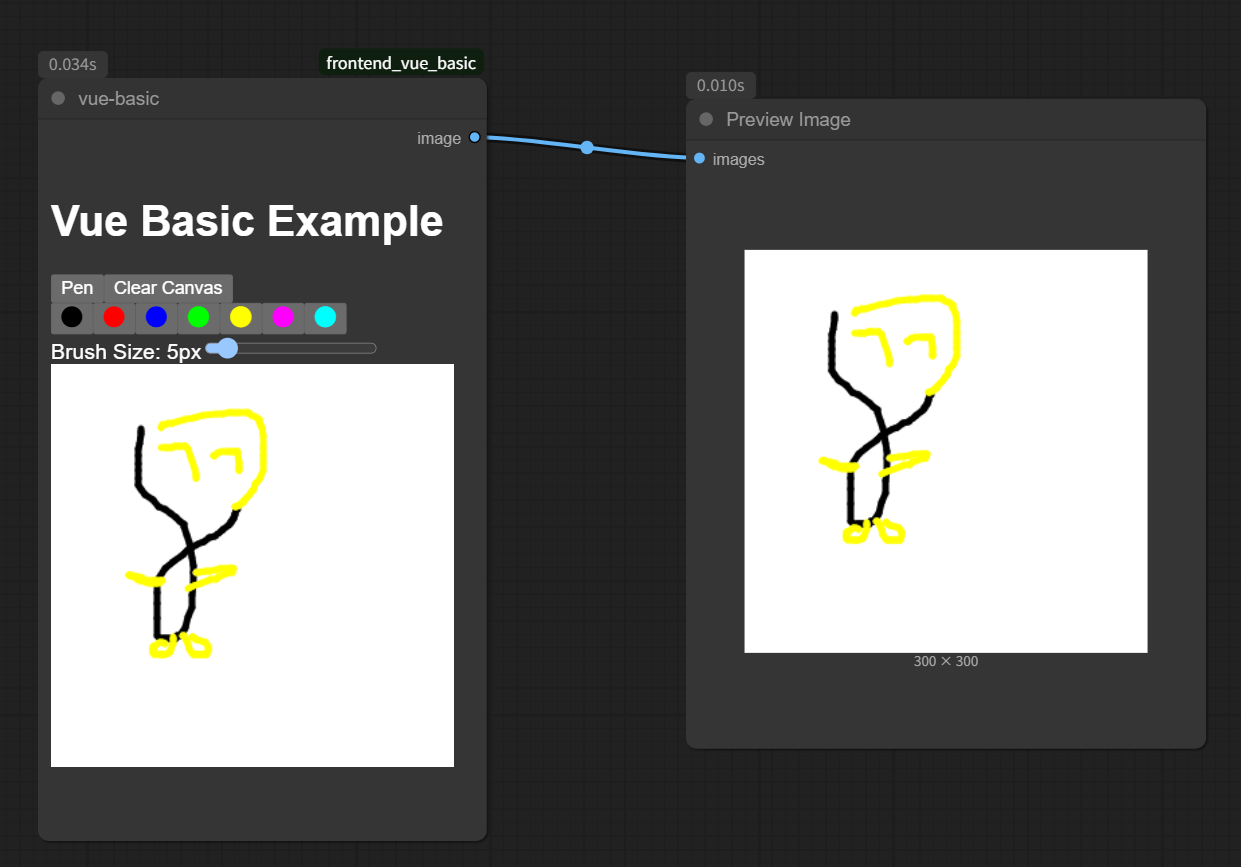
ComfyUI SM Utils 提供了一个可运行的示例,展示如何使用现代 Web 技术为 ComfyUI 自定义节点构建交互式 UI 组件。它在自定义节点内提供了一个基础画板,并将绘制的图像作为结果输出。
技术栈
功能特性
- 自定义节点内的交互式画板
- 基于 PrimeVue 的现代 UI 组件
- 通过 vue-i18n 实现的多语言支持
- 与 ComfyUI API 系统的集成
项目结构
ComfyUI_sm_utils/
├── __init__.py                      # 自定义节点入口,注册节点映射并暴露前端资源目录
├── ComfyUIFEExampleVueBasic.py      # 节点定义,定义 vue-basic 节点的输入/输出与执行逻辑
├── pyproject.toml                   # Python 项目配置(Comfy Registry 元数据)
├── package.json                     # 前端依赖与构建脚本(Vue / PrimeVue / vue-i18n)
├── vite.config.mts                  # Vite 构建配置,输出到 js/ 目录
├── tsconfig.json                    # TypeScript 配置
├── tsconfig.node.json               # Node 环境下的 TypeScript 配置
├── src/                             # 前端源码
│   ├── main.ts                      # 扩展入口,注册 ComfyUI 扩展并挂载 Vue 组件到节点
│   └── components/                  # Vue 组件
│       ├── VueExampleComponent.vue  # 顶层组件,负责画布数据序列化与图片上传到 ComfyUI
│       ├── DrawingApp.vue           # 画板应用,组合工具栏与画布并管理绘图状态
│       ├── DrawingBoard.vue         # 画布组件,处理鼠标/触摸绘图与画布状态保存
│       └── ToolBar.vue              # 工具栏组件,提供画笔、颜色选择与画笔尺寸调节
├── locales/                         # vue-i18n 多语言文案
│   ├── en/main.json                # 英文文案
│   └── zh/main.json                # 中文文案
├── doc/                             # 文档资源
│   └── img.png                      # README 示例图片
└── LICENSE                          # MIT 许可证
构建产物会输出到
js/目录(已加入.gitignore),由__init__.py中的nodes.EXTENSION_WEB_DIRS暴露给 ComfyUI 前端加载。
安装
⚠️ 重要 ⚠️
此演示节点不设计为通过 git clone 直接安装。为确保正常功能,请通过以下方式安装:
开发环境搭建
如果你想学习如何开发此自定义节点或对其进行修改,可以搭建本地开发环境。请按以下步骤操作:
- 在你的 ComfyUI custom nodes 目录下克隆仓库:
git clone https://github.com/smk-h/ComfyUI_sm_utils - 进入项目目录:
cd ComfyUI_sm_utils - 安装依赖:
npm install - 构建项目:
npm run build - 刷新 ComfyUI 以加载。
使用方法
安装完成后:
- 在 examples 分类下将 "vue-basic" 节点添加到你的工作流
- 使用绘图界面创建你的图像
- 将输出连接到接受图像输入的兼容节点(例如 Preview Image)
- 运行你的工作流以处理绘制的图像
开发说明
对于希望了解如何将 Vue 集成到 ComfyUI 自定义节点的开发者:
- 查看代码结构,了解 Vue 组件是如何挂载的
- 研究 ComfyUI API 集成模式
- 注意 PrimeVue 组件和 i18n 是如何初始化和使用的
贡献
欢迎贡献!如果你有改进建议或发现了 bug,可以:
- 提交 issue
- 提交包含建议更改的 pull request