
MOSS Base+SFT Merge Presets
ComfyUI preset and per-layer Base+SFT merge node for MOSS-Image
ComfyUI MOSS Base+SFT Merge Presets
English | 简体中文



The goal is to retain Base's composition and natural realism while selectively inheriting SFT's typography, material, and fine-detail strengths.
Unofficial community project. Not affiliated with OpenMOSS, MOSI, or the ComfyUI project.
Preview
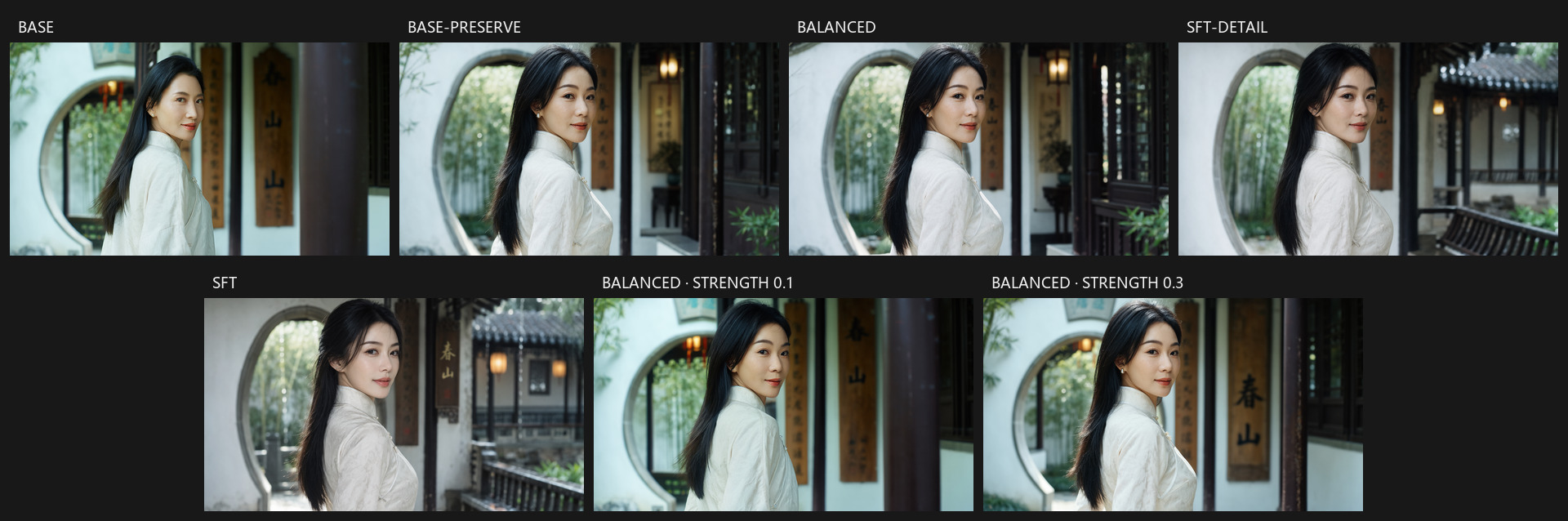
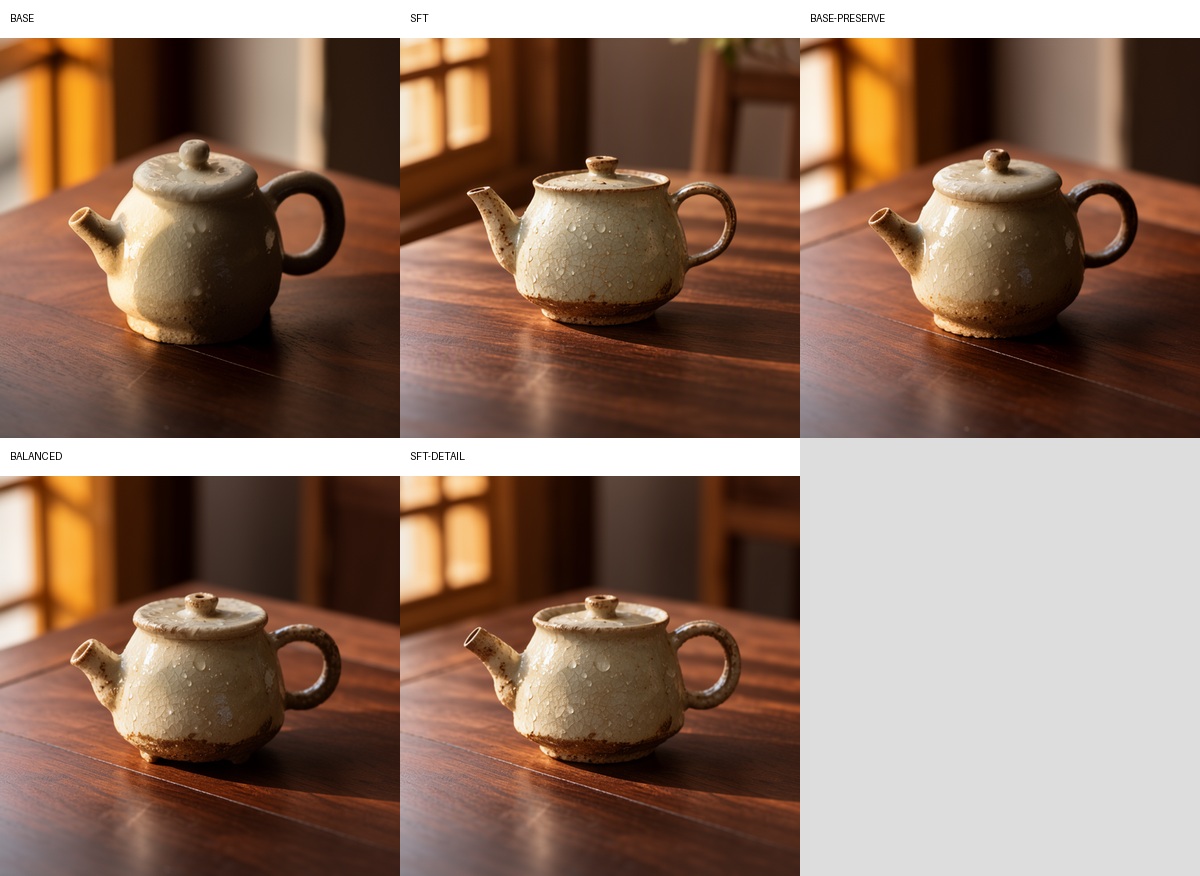
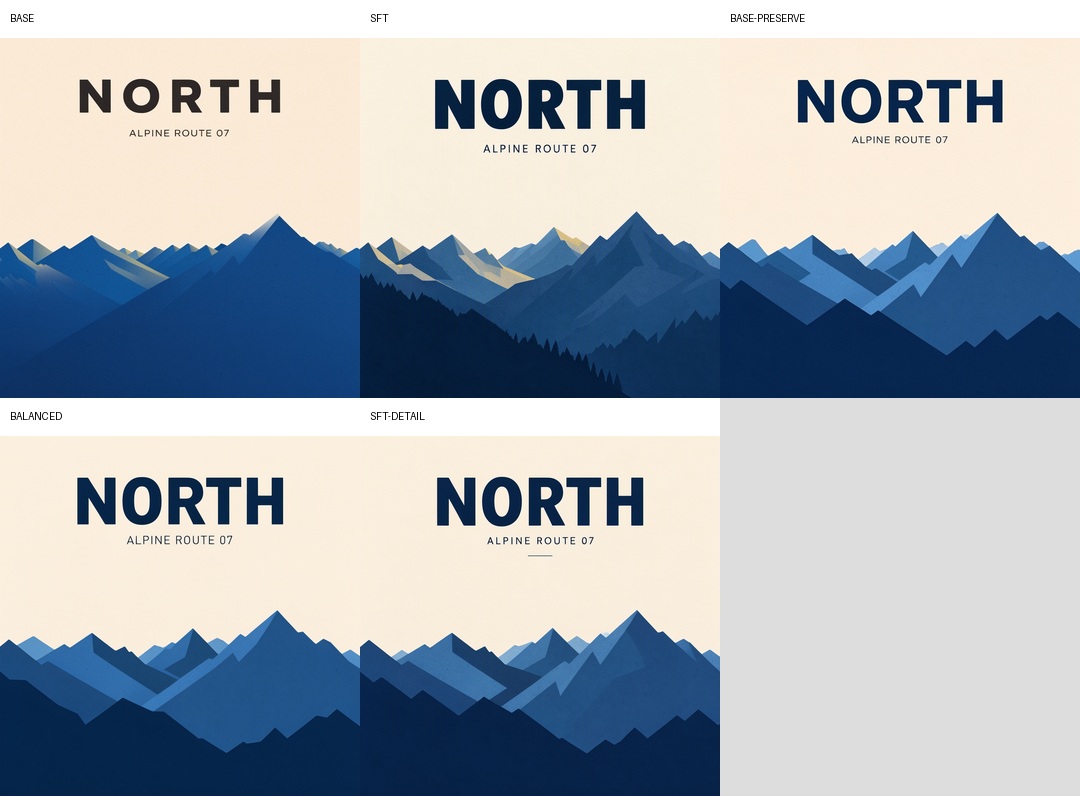
The material and typography sheets show, from left to right: Base, SFT, Base-preserve, Balanced, and SFT-detail. The portrait sheet also includes Balanced at strengths 0.1 and 0.3.
Portrait
Material and realism
Typography and graphic detail
Features
- One-click
Base-preserve,Balanced, andSFT-detailpresets. - A
Custommode exposing all 51 merge components. - Per-layer control over all 42 MOSS-Image DiT blocks.
- A live
merge_inforeadout showing effective weights afterstrengthscaling. - No extra Python dependencies beyond ComfyUI itself.
- Native int8c / convrot Base + SFT merging support.
- Compatible with the native ComfyUI MOSS-Image loader and sampling chain.
- Pairs with ComfyUI's built-in ModelSave and model-only LoRA loader nodes.
Requirements
- ComfyUI
0.42.0or newer is recommended. - Official MOSS-Image Base and SFT weights:
- int8c / convrot quantized Base and SFT diffusion models are supported.
- A ComfyUI-compatible MOSS-Image text encoder and Flux.2 VAE.
- Tested with ComfyUI 0.42.0 on Windows and an RTX 5090.
int8c / convrot compatibility
The node supports int8c Base + int8c SFT merging:
- Both
base_modelandsft_modelmay be int8c / convrot models. - ComfyUI's native quantized patch path dequantizes SFT weights, performs the component-wise interpolation, and requantizes using the Base model's layout.
- The output keeps
base_model's int8c quantization layout instead of falling back to BF16. - Quantization metadata such as
weight_scaleandcomfy_quantis not treated as ordinary mergeable weights; scales are regenerated during requantization. - The first patch application can be slower than a BF16 merge because quantized weights are dequantized on demand.
Installation
ComfyUI Manager
Search for MOSS Base+SFT Merge Presets in ComfyUI Manager, or install Registry ID comfyui-moss-merge-presets.
Clone this repository into your ComfyUI custom nodes directory:
cd ComfyUI/custom_nodes
git clone https://github.com/slmonker/ComfyUI-MOSS-Merge-Presets.git
Restart ComfyUI after installation.
Example Workflow
Download moss-merge-model.json
Drag the downloaded JSON file onto the ComfyUI canvas to import it. The example demonstrates:
- loading MOSS-Image Base and SFT diffusion models;
- merging them with MOSS Base+SFT Merge Preset using
Balancedandstrength = 1.0; - optional local prompt expansion through MOSS Prompt Enhancer;
- sampling the merged model and saving the generated image.
[!IMPORTANT] The example workflow uses the MOSS Prompt Enhancer node (
MOSSPromptEnhancerLocal) from ComfyUI-MOSS-PromptEnhancer. Install that companion project before importing the workflow. If you do not need prompt expansion, remove or bypass the node and connect your positive prompt directly to the sampler.
Reselect the Base, SFT, text encoder, and VAE files in their loader nodes if your local filenames differ from the example.
Usage
- Add two diffusion model loaders:
- one for MOSS-Image Base;
- one for MOSS-Image SFT.
- Add MOSS Base+SFT Merge Preset from
model/merging/moss.- Double-click the search result in the node library to add it. A single click only previews the node in current ComfyUI versions.
- Connect:
- Base loader →
base_model - SFT loader →
sft_model
- Base loader →
- Connect the merged
MODELoutput into your sampling chain:
Base MODEL ─┐
            ├─ MOSS Base+SFT Merge Preset ─ ModelSamplingSD3 ─ SkipLayerGuidanceDiTSimple ─ KSampler
SFT MODEL ──┘
- Start with
Balancedandstrength = 1.0.
Saving the merged model
This package does not need a separate save node. Add ComfyUI's built-in ModelSave node (shown as Save Model in some locales, category model/merging) after the merge node, then connect the merged MODEL to its model input:
Base MODEL ─┐
            ├─ MOSS Base+SFT Merge Preset ─┬─ ModelSave
SFT MODEL ──┘                              └─ ModelSamplingSD3 → SkipLayerGuidanceDiTSimple → KSampler
Set filename_prefix without an extension, for example diffusion_models/moss_balanced_s100. ComfyUI saves the file under ComfyUI/output/diffusion_models/ using its normal counter-based naming. To load it later with Load Diffusion Model, move the finished .safetensors file into ComfyUI/models/diffusion_models/ (or the equivalent configured model directory).
ModelSave is an output node, so it has no MODEL output. Branch it from the merge output while the sampling chain continues separately. The saved file contains the diffusion model produced by the merge node; it does not include the text encoder or VAE.
Using LoRA after the merge
Add ComfyUI's Load LoRA node (LoraLoaderModelOnly, category model/loaders) after MOSS Base+SFT Merge Preset:
Base MODEL ─┐
            ├─ MOSS Base+SFT Merge Preset ─ Load LoRA ─ ModelSamplingSD3 → SkipLayerGuidanceDiTSimple → KSampler
SFT MODEL ──┘
Connect the merged MODEL to the LoRA node's model input, select the LoRA file, and set strength_model. The LoRA is applied to the merged model at inference time; multiple Load LoRA nodes can be chained. If you also want to save the Base+SFT merge, branch ModelSave directly from the merge output as shown above so later LoRA changes stay independent.
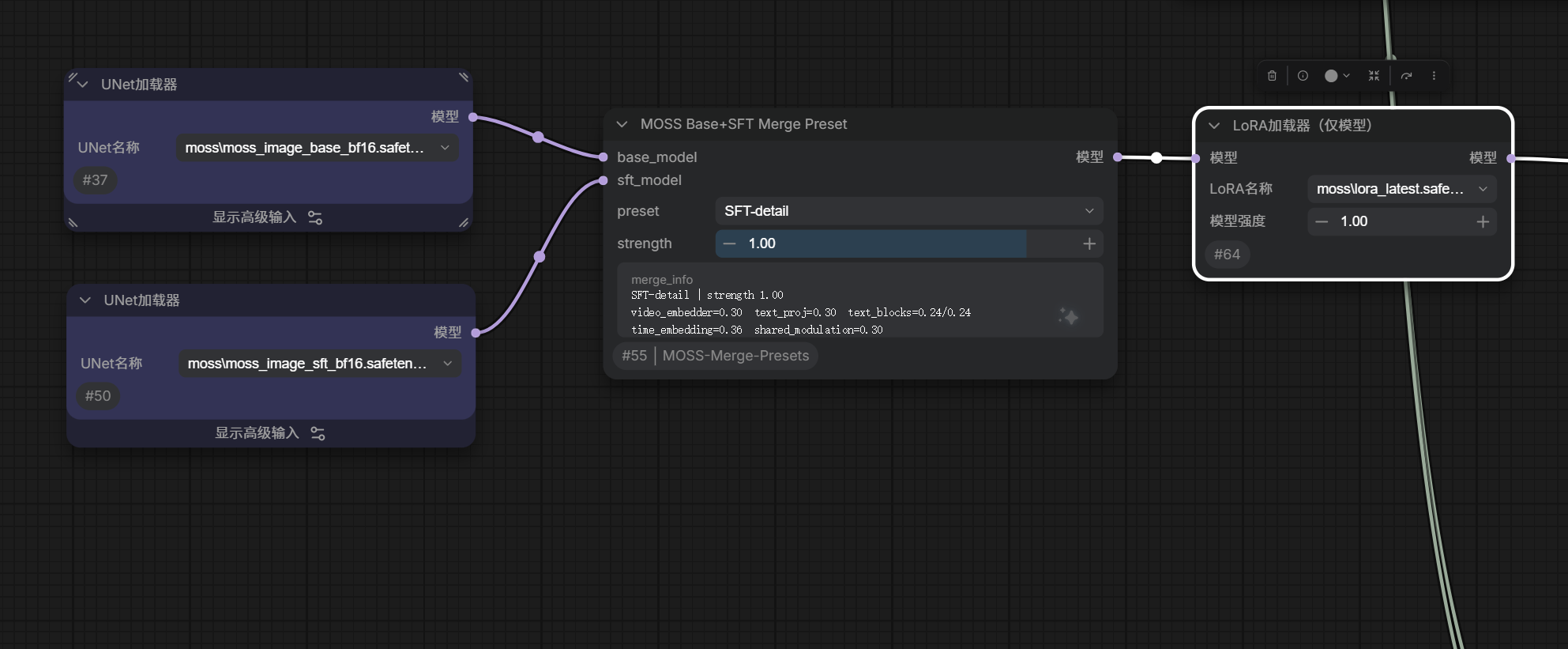
Presets
Merge weights use 0 = Base and 1 = SFT.
| Component | Base-preserve | Balanced | SFT-detail |
|---|---:|---:|---:|
| video_embedder | 0.12 | 0.20 | 0.30 |
| text_embedder.proj | 0.12 | 0.20 | 0.30 |
| text_embedder.blocks.0 | 0.10 | 0.16 | 0.24 |
| text_embedder.blocks.1 | 0.10 | 0.16 | 0.24 |
| time_embedding | 0.14 | 0.24 | 0.36 |
| shared_block_modulation | 0.12 | 0.20 | 0.30 |
| layers.0-7 | 0.08 | 0.15 | 0.25 |
| layers.8-13 | 0.12 | 0.20 | 0.32 |
| layers.14-21 | 0.18 | 0.30 | 0.50 |
| layers.22-29 | 0.28 | 0.45 | 0.65 |
| layers.30-35 | 0.42 | 0.60 | 0.80 |
| layers.36-41 | 0.52 | 0.72 | 0.90 |
| final_norm_video | 0.12 | 0.20 | 0.30 |
| final_linear_video | 0.25 | 0.35 | 0.50 |
| video_head_modulation | 0.12 | 0.20 | 0.30 |
strength
strength scales every component uniformly:
0.0= pure Base1.0= selected preset- values above
1.0amplify the preset until each component reaches1.0n Note: because each component is clamped at1.0,1.25is not a uniform 25% increase.SFT-detailat1.25is still a blend, not pure SFT.
Custom Mode
Select Custom to reveal all 51 editable components:
m_video_embedderm_text_projm_text_block0m_text_block1m_timem_sharedm_L00throughm_L41m_final_normm_linearm_head
Custom mode starts from the Balanced values. The merge_info field updates with the effective per-layer values.
Layer guidance
The following is based on controlled Base/SFT merge experiments, not an official MOSS training claim:
| Range | Main influence |
|---|---|
| text_embedder.* | Prompt semantics and text-conditioning projection |
| time_embedding | Global contrast, lighting, and timestep response |
| layers.0-13 | Subject placement, overall composition, and broad layout |
| layers.14-27 | Typography hierarchy, structured layout, and mid-level detail |
| layers.28-41 | Material texture, fine detail, and finish |
| final_* / video_head_modulation | Output mapping, color, sharpness, and final look |
To preserve Base composition, keep the early layers low. To add more SFT detail, increase the late layers first, then the middle layers.
Recommended Sampling
The presets were tested with the native ComfyUI MOSS-Image pipeline:
ModelSamplingSD3 shift:5.0CFG:3.5- Sampler:
er_sde - Scheduler:
simple - Steps:
24for drafts,40-50for final images SkipLayerGuidanceDiTSimple:single_layers:22start_percent:0.0end_percent:0.5
The official Python/Diffusers pipeline can also be used with its defaults: 50 steps, Euler, CFG 3.0, shift 5, and negative-branch layer skip 22.
Test Prompts
A set of portrait, product, typography, interior, anime, and material tests is available in TEST_PROMPTS.md.
Recommended comparison workflow:
- Keep the same seed, prompt, dimensions, and sampler settings.
- Generate
Base-preserve,Balanced, andSFT-detail. - Compare composition, skin/material texture, text accuracy, and fine detail.
- Test at least two or three seeds because composition can shift with merged weights.
Common negative prompt:
nsfw, worst quality, bad anatomy, watermark, jpeg artifact
Troubleshooting
The node shows a preview but is not added
Double-click the node in the ComfyUI node library. Single-click currently previews the node in some ComfyUI frontend versions.
Preset values are hidden after switching modes
This is expected. Presets hide the 51 custom sliders and show all effective values in merge_info. Select Custom to edit them.
Merged images drift too far toward SFT
- Lower
strength. - Switch to
Base-preserve. - Reduce
layers.0-13andtime_embeddingfirst. - Test another seed.
Text or fine detail is still weak
- Raise
layers.14-29. - Then raise
layers.30-41. - Use
SFT-detailas the starting point.
Limitations
- Linear weight merging is not equivalent to orthogonal layer or activation control.
- Composition can remain seed-sensitive.
- SFT training details are not fully public, so the layer guidance is empirical.
- The project does not include model weights.
License
MIT. See LICENSE.
Acknowledgements
- OpenMOSS / MOSS-Image
- ComfyUI
- ComfyUI-MOSS-PromptEnhancer
- The ComfyUI model-merging API and MOSS-Image community integrations
Changelog
See CHANGELOG.md.