
ComfyUI-SA-Nodes-QQ
A collection of custom nodes for ComfyUI providing video manipulation, LoRA loading, path animation, and visual drawing tools for WanVideo workflows.
Nodes (58)
Match your three-clip video merge with audio that fades in sync
Copy one video's crop to every shot in your Wan workflow
The checkpoint loader with a PowerLoraLoader-style UI
Batch multiple images into one tensor — and color-match them to a reference
Animate a real image along your spline path — the upgrade from test shapes
Animate a rectangle along a path — the deprecated shape-drawing node
Preview your motion path with a bouncing circle before you spend GPU hours
Write MiniMax H3 prompts with @media mentions instead of hand-typed tags
Plan multi-shot video cuts with a mathematically clean frame schedule
Composite layers with nine blend modes, no PIL round-trips
Blend a logo across 81 frames, or stitch two references onto one canvas
A storyboard your video model can actually read
Radial, directional, and gaussian blur with a cutout — the fake depth-of-field node
A flat-color image is more useful than it sounds (Image RGB QQ)
The checkpoint loader that remembers where the model came from
Bake an LTX LoRA straight into the checkpoint and ship one file
Turn a fine-tuned checkpoint back into a LoRA, with a VRAM dial
Turn five LTX LoRAs into one file without retraining
Shrink an over-ranked LoRA without throwing away the effect
Fix LoRAs that force you to type 0.15 every single time
Blend up to four LoRAs into one file, with rank control and no sampler
Load LTX LoRAs with per-block strengths — yes, even the audio ones
One mask in, a whole video's alpha out
Pin a face, a clip or a soundtrack to any frame of an H3 video — and make it stick
A/B your video generations in the graph, no mp4 file juggling
Crop a reference image by dragging on the canvas (Power Image Crop QQ)
Load videos in ComfyUI with a built-in timeline player
The Wan LoRA loader that actually knows about high and low noise
The canvas node that lets you draw the motion Wan should follow
Cut out reference subjects with lasso masks, right on the canvas
Type `wordx` in your prompt, roll one line out of forty
Keep every step, then pick one for free
Stop your Wan videos from flickering with Temporal Smoothing
Join a dozen text wires into one string, without a dozen concat nodes
A multiline text box that secretly calls macOS Shortcuts to translate
Crossfade two clips into one video — with audio that follows
The fast, boring way to erase stuff from video — and that's a feature
Shift a video loop's start point without re-rendering anything
Stitch three Wan clips into one video with two eased crossfades
Build the exact A-to-B transition template your Wan I2V needs
Plot your video's color over time — the flicker and grading QA tool
Slow the First or Last Frames Without Re-Rendering
Decode long videos with less VRAM and no hard seams between tiles
Pin the middle frame — first/middle/last reference for Wan 2.2 I2V
The one-widget frame counter Wan's VAE demands
Pin a new first frame onto your video and stop re-rendering
Wan won't run your 1283×513 image — get two images on the same grid
Stop re-running the expensive sampler while you tune the prompt
Cache your frames as an MP4 so you stop re-running the same 81 frames
The empty envelope for Wan's image conditioning
Grab one frame from a clip without hunting through the timeline
Give your video camera shake, water, and heat shimmer with a flowmap
I2V conditioning from start, middle, AND end images — the experimental bit
Stitch two or three Wan clips together with actual transitions
Turn motion in a clip into a flowmap, no external preprocessor needed
Stack Wan LoRAs without turning your graph into spaghetti
Resample any clip to an exact frame count — the boring node you'll keep using
The frame-replacement grammar that sets up VACE inpainting
ComfyUI-SA-Nodes-QQ
Version 1.3.8 - 2026-04-04
- Video Prep AB: mid_frame_RGB changed to color and use of RGB value
Older workflow .json files may still reference the previous wanwrapper_qq node pack, which could cause unintended installations instead of pulling this updated package.
<strong>Solution:</strong> Delete the old wanwrapper_qq folder from your custom_nodes directory and install the new ComfyUI-SA-Nodes-QQ package.
<strong>Note:</strong> The recent addition of Power Load Video overwrites ComfyUI's default drag-and-drop behavior to enable the node creation on drag and drop. Otherwise, it should act normally with other drag-and-drop functionality. If you notice anything not working, please create an issue.
Drag and drop override to create Load video node is optional now. False by default
</td> <td width="50%"> <img width="561" height="208" alt="image" src="https://github.com/user-attachments/assets/578a15e7-52f4-4f2d-a62c-4cbc6539edea" /> </td> </tr> </table>Version 1.3.4 - 2026-04-01
- ComfyUI-SA-Nodes-QQ: Name change of node/repo to ComfyUI-SA-Nodes-QQ as Comfyui had warning print on import with kj wanwraper node pack. (Originally this was an addition node pack to build on top but now there's more nodes so it doesn't make sence as well)
- Power Load Video Node: New node for loading and previewing videos directly in the canvas with integrated timeline playback.
- Hotkeys:
Shift+Spacebarto play/pause,Shift+Dragon[/]markers to adjust loop boundaries
- Hotkeys:
Version 1.3.0 - 2026-03-16
- Scaling Animation Update: Enhanced box path scaling with independent h_scale (horizontal) and v_scale (vertical) controls, plus improved rotation handling that maintains visual direction during flips.
Version 1.2.8 - 2026-03-14
- Added SAM (Segment Anything Model) preparation support. Based on MatAnyone2 Workflow Example
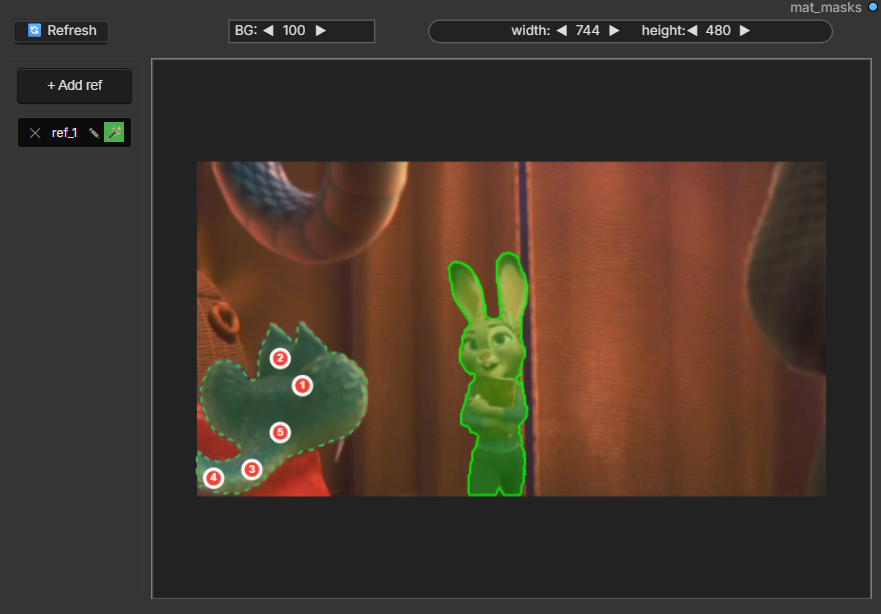
https://github.com/user-attachments/assets/17440bfb-37ea-4052-9d1b-0d62d8e8b96c
</td> </tr> </table>Version 1.2.1 - 2025-12-11
- Some changes to spline editor + added wan move example. Look like mix of ati and control 2.1 (update kj ComfyUI-WanVideoWrapper) Example
https://github.com/user-attachments/assets/119824e7-e309-4f00-9cc8-1404f10d91c9
</td> <td width="50%">https://github.com/user-attachments/assets/881f887d-d930-43d2-b197-ac44668a36e5
</td> </tr> </table>Version 1.2.0 - 2025-12-01
- Added ability to connect video to bg_image and animate over it Example
- timeline hotkey/usage
https://github.com/user-attachments/assets/dffe5da8-7626-45cf-ad22-777b5a14879f
Version 1.1.0 - 2025-11-26
- Added
Prepare Refs(needs cv2) to cut out parts forPower Spline EditorExample Power Spline Editorcan trigger ref preparation with Canvas button in backend without starting comfyui run
https://github.com/user-attachments/assets/7c3d1c3a-4777-432b-997e-eafa678f7e64
</td> <td width="60%">https://github.com/user-attachments/assets/72f46a94-a3f3-4f66-9962-c87c5c02c987
</td> </tr> </table>Version 1.0.92 - 2025-11-25
- Optional color match added to
Create Image Listbatch node (if no ref_image connected it's not used) - Bugfixes , Canvas refresh now can read ImageResizeKJv2 resize and match its parameters to be able to draw on same aspect ratio/crop etc.
https://github.com/user-attachments/assets/e1b70e5a-71af-4d01-9034-f80c9172811f
Version 1.0.9 - 2025-11-24
- Proper keyframes control in editor + TTM sample: Cleaned up keyframe layer , added ref pull and animation to later be used with ttm WF Example
- From https://github.com/time-to-move/TTM , ty https://github.com/kijai/ComfyUI-WanVideoWrapper for wrapper implementation.
- Power Spline Editor - keyframe hotkey usage
https://github.com/user-attachments/assets/41974029-4935-4952-92b6-d2d69a8873d9
Version 1.0.8 - 2025-11-17
- Refactor + better ATI driver control: Slight messy refactor + proper ati point output with pause Example
https://github.com/user-attachments/assets/c945432c-fe58-4783-a1c3-565e61868245
Version 1.0.6 - 2025-11-13
- New Wan22FMLF: A better way to add midframe control from https://github.com/wallen0322/ComfyUI-Wan22FMLF + amplitude test in one node
- Lora high.low filter: Clicking the circle icon cycles through: ◎ → ◐ → ◑ → ◎ + right icon right click options (low/high only / both)
- Mp4 muulti cache: save/load steps between samplers
Version 1.0.3 - 2025-11-07
- New Hand-Drawn Spline Layer: Added freeform path drawing with full animation controls. Special thanks to filliptm for the implementation example
- Enhanced Spline Editor Fixes: Improved coordinate parsing, multi-spline handling, and UI fixes across canvas, context menus, and layer rendering
- Independent Layer Point Control: Layer points now drive independently for better animation path control
A collection of custom nodes for ComfyUI providing video manipulation, LoRA loading, path animation, and visual drawing tools for WanVideo workflows.
<table> <tr> <td width="50%">https://github.com/user-attachments/assets/16f0da4c-38f1-4789-97dc-c331ad8a6d92
</td> <td width="50%">https://github.com/user-attachments/assets/5689c666-924a-4362-9788-d8f662c0d925
</td> </tr> </table>Power Spline Editor
<table> <tr> <td width="50%">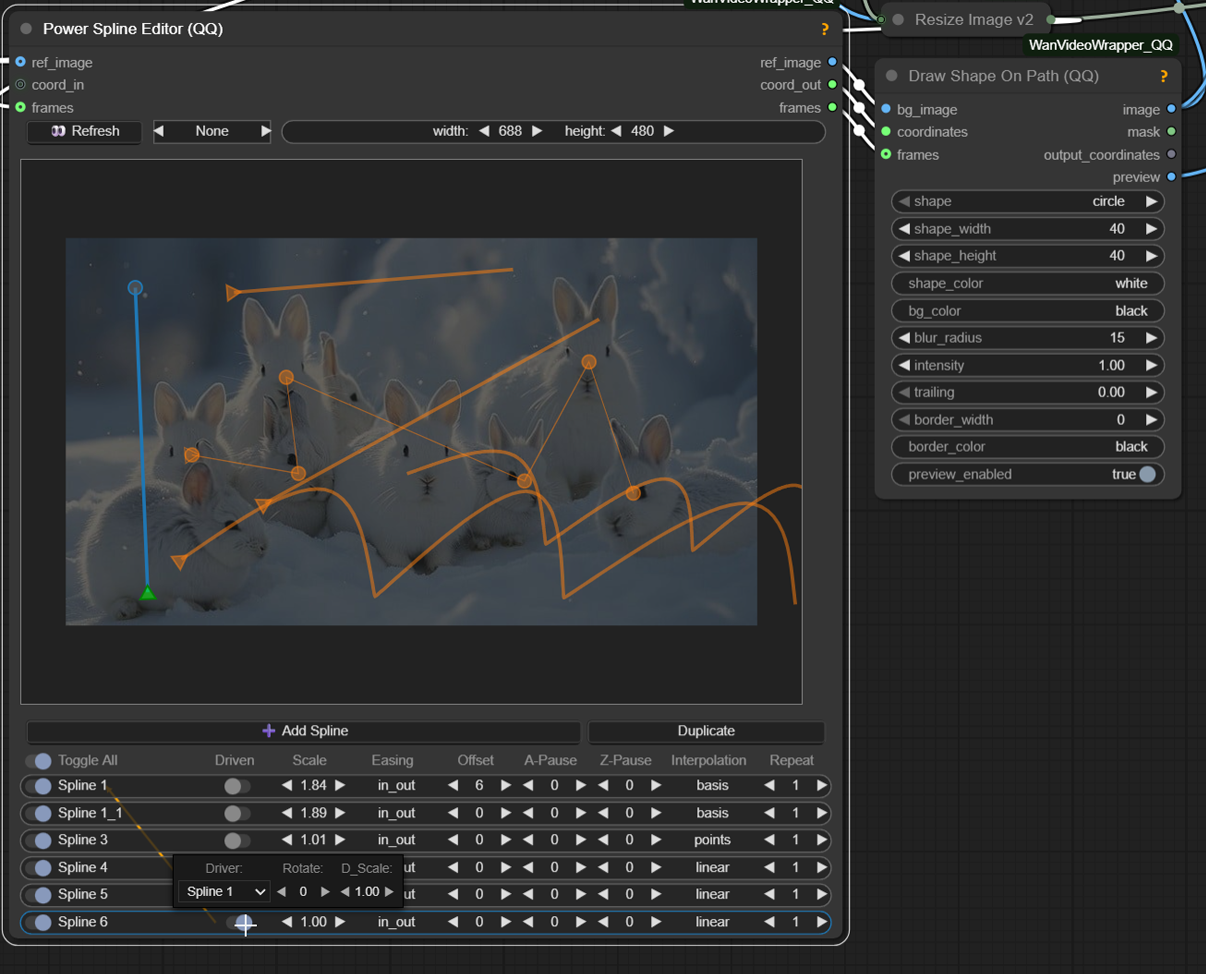
- Multi-layer canvas: Draw unlimited paths with per-layer controls
- Interpolation modes:
linear,cardinal(Catmull-Rom),basis(B-spline),points(static) - Repeat system: Loop animations with automatic closed-path handling
- Driver/driven: One path controls another with rotation, scaling, and smoothing
- Easing functions: Smooth transitions with various easing curves for path animation
- Right-click controls: Context menu for driver path with additional options
- Offset timing: Positive/negative timing shifts with pause frame control
- Pause frames: Start/end pause per layer for precise animation timing
Power Lora Loader
<table> <tr> <td width="50%">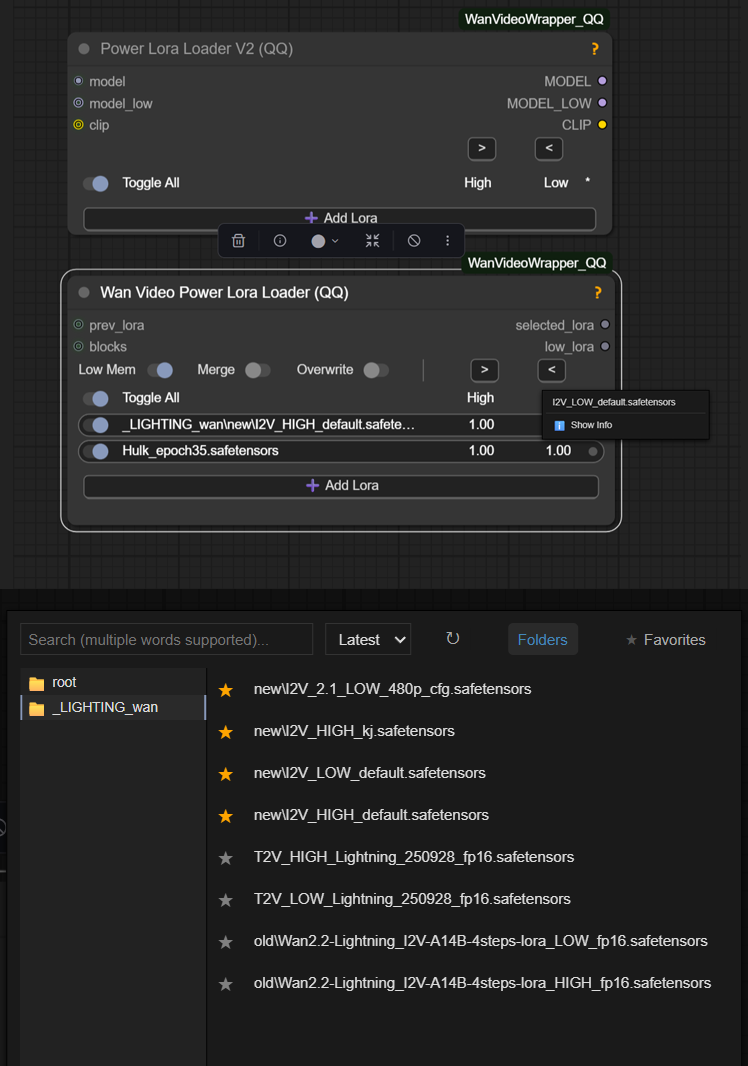
- LoRAs: Dynamic UI with rgthree-style interface
- Auto-detection: Finds Low variant pairs from High LoRAs automatically
- Smart patterns:
-,_, - Case variations:
High/high/HIGH/H/h→Low/low/LOW/L/l - Dual strength: Separate High (H) and Low (L) sliders with copy buttons
- Block selection: Per-LoRA layer control with merge and memory options
Wan Video VACE Frame Replace
<table> <tr> <td width="50%">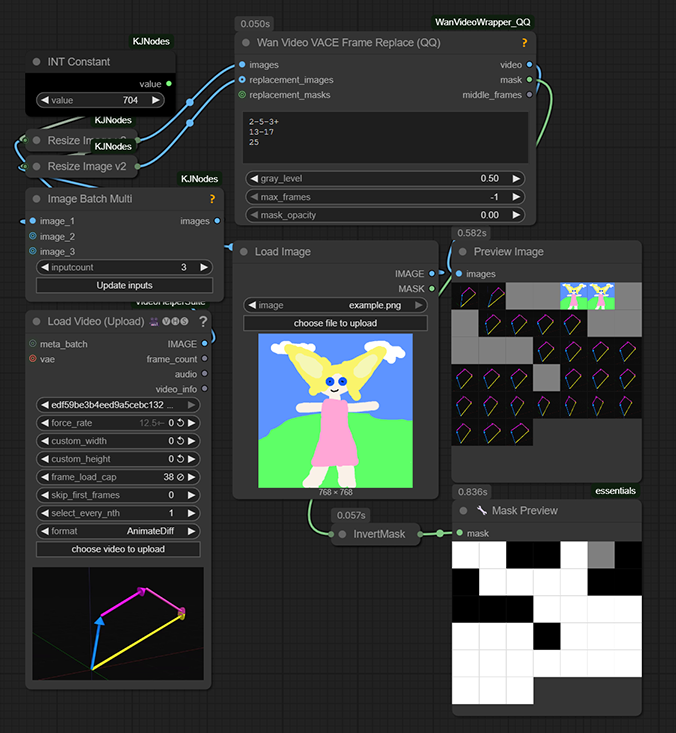
Wan Video VACE Frame Replace - example
- Single frames:
5(gray),5+(replacement image) - Ranges:
22-26(gray),*1-5(keep start),1-5*(keep end) - a-b-c patterns: Middle frame
bwithaleft/cright context - Multiple +:
++a-b-c++creates gradual duplicates on both sides - Custom opacity:
++a-b-c++ 0.8for blend strength control - Custom masks: Auto-scaled replacement masks with opacity blending
Wan Video Cache Samples
<table> <tr> <td width="35%">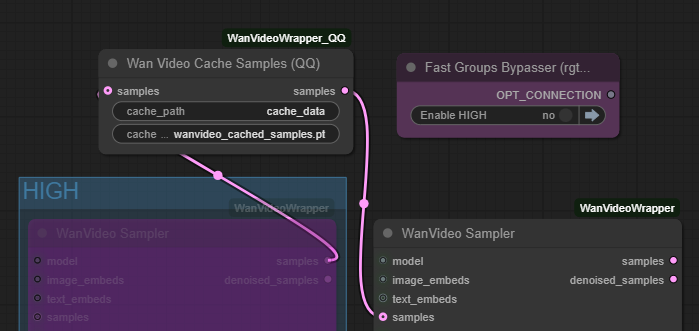
- Cache/Load workflow: Save latent samples to disk for faster workflow iteration
- Dual mode: With input → cache and passthrough; Without input → load from cache
- Auto-path handling: Saves to node directory with customizable cache names
- Workflow speedup: Skip HIGH sampling steps during prompt/parameter testing to resample LOW
Wan Video Image To Video Encode_v2
<table> <tr> <td width="35%">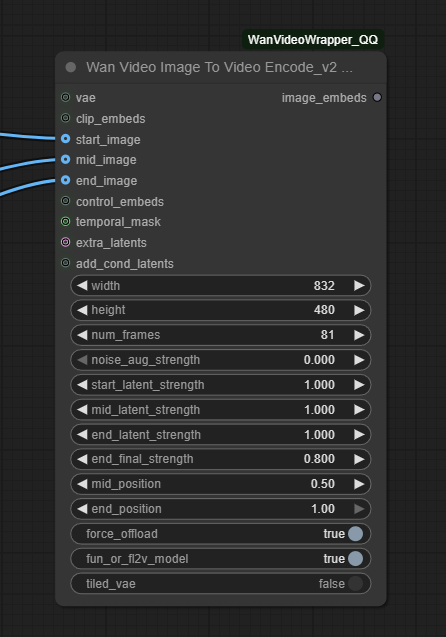
- (EXPERIMENTAL) Maybe there's native ways to do this , but it seems to work
- Multi-frame I2V: Start/mid/end image conditioning with position control
- Temporal feathering: Cosine interpolation for smooth frame transitions
- Latent strength: Per-frame multipliers (start/mid/end) for motion control (default setting work but can be adjusted)
Control only vs Control + I2V
<table> <tr> <td width="50%">https://github.com/user-attachments/assets/d65bb9d7-962a-4e1f-bc5d-be90adc9e311
</td> <td width="50%">https://github.com/user-attachments/assets/c4b70388-54a8-4b08-8f37-6028e1f2f471
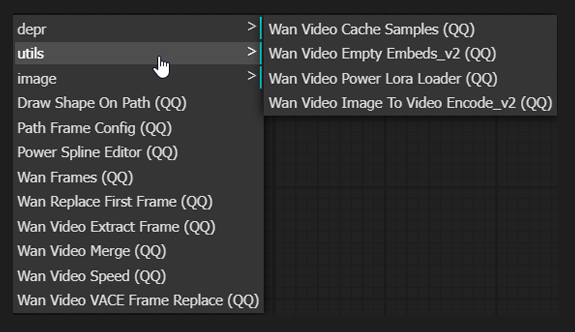
</td> </tr> </table>Other Experimental Node List
Features
- Power LoRA Loader: Advanced LoRA loading with High/Low pair detection, block selection, and custom UI
- Power Spline Editors: Multi-layer canvas-based path drawing with interpolation modes (linear, cardinal, basis, points)
- Video Manipulation: Speed adjustment, frame extraction, video merging, and frame replacement
- Path Animation: Draw shapes (circle/square/triangle) along animated paths with easing functions
- Image-to-Video Encoding: TAEHV (Tiny AutoEncoder for Hunyuan Video) with temporal feathering and memory-efficient modes
- Cache Management: Sample caching for faster workflow iteration
- VAE Frame Replacement: Replace specific frames in VAE-encoded video latents
Installation
- Navigate to your ComfyUI custom nodes directory:
cd ComfyUI/custom_nodes/
- Clone this repository:
git clone https://github.com/siraxe/ComfyUI-WanVideoWrapper_QQ.git
- Restart ComfyUI
Requirements
- ComfyUI (latest version recommended)
- PyTorch with CUDA support (for GPU acceleration)
- Standard ComfyUI dependencies
Credits
Experimental node package for WanVideo workflows in ComfyUI.
Special Thanks
- KJ - ComfyUI-WanVideoWrapper
- rgthree - rgthree-comfy