
BizyAirPlus
a/BizyAirPlus Run your workflow on cloud.
Nodes (154)
A node whose own schema won't tell you what it does
The BizyAirPlus NodeWrapper is the pack's plumbing — you'll rarely touch it, but it's why cloud execution works
Turn a rough idea into a real prompt, via an LLM call
BizyAir SiliconCloud VLM API — ComfyUI Node Guide
ACE-Step text to audio — paste lyrics, get a song, without the 20 GB local download
Cloud BiRefNet in one node — but for a single image, local is free and just as good
BizyAir OpenAPI Settings — the per-request override most BizyAir workflows never actually need
The hosted 'cartoon drawing' model — a fun niche channel, and the oddest part of the name tells you why it exists
DreamActor V2 reference-to-video — a still and a driving clip, and the cloud does the acting
The Flux Klein watermark remover — one image in, clean image out, nothing to download
Flux Kontext Max image-to-image — the sentence-driven editor that made watermark removal famous, hosted
Flux Kontext Max text-to-image — BFL's 12B editing family, hosted, zero install
Flux Kontext Pro image-to-image — the flagship instruction editor, one image in, edited image out
Flux Kontext Pro text-to-image — the top tier of the editing family, hosted, no BFL API account needed
Gemini 3.1 Flash-Lite LLM — the cheap, fast text node for churning out prompts
Gemini 3.1 Flash-Lite VLM — a cheap vision node that looks at your output and tells you what's wrong
Gemini 3.1 Pro LLM — the preview-tier text node for when your prompt pipeline deserves the flagship
Gemini 3.1 Pro VLM — the preview-tier vision node for judging your own output like a harsh reviewer
Gemini 3.5 Flash LLM — the mid-tier text node with real sampling controls
Gemini 3.5 Flash VLM — the vision node that looks at images and answers with real sampling control
Gemini 3.6 Flash LLM — the text node with a million-token window and real JSON output
Gemini 3.6 Flash VLM — the vision node that can swallow 3,000 images and return structured JSON
Gemini 3 Flash in your ComfyUI graph — a hosted LLM node for prompt work that never touches local VRAM
Gemini 3.1 Flash reads images, no GPU needed
Gemini Omni Flash I2V from inside ComfyUI
Gemini Omni Flash text-to-video, no GPU involved
Veo 3.1 Fast FLF, Channel Edition
Animate a still with Veo 3.1 Fast — image-to-video, Channel Edition
Google Veo 3.1 Fast, text-to-video, as a no-fuss cloud node
Veo 3.1 Fast first-last-frame video, Official Edition — full control, fast tier
The one with duration, audio, and a seed
Cheap FLF iteration
The budget tier with the full control set
Veo 3.1 first-last-frame video, the standard Official Edition — the one I'd use
The standard text-to-video Official Edition
First-last-frame video, portrait by default
1080p animation of a still you already have
Text-to-video at 1080p via BizyAir
GPT Image 2 image-to-image, Channel Edition
GPT Image 2 edit with real dimension control — the Official Edition
Actual width/height control for text-to-image
Prompt to image with zero local setup
XAI's Grok 2 image generation as a single ComfyUI node
Edit an image with Grok Imagine, right inside ComfyUI
Grok Imagine from your node graph — no xAI account needed
Grok image edits at 1k or 2k, without loading a checkpoint
Grok Imagine quality text-to-image, defaults to 2k
Grok Imagine video from a starting image, via the BizyAir channel
Grok Imagine text-to-video, hosted, no video stack to maintain
Grok Imagine video, official edition, up to seven input frames
Grok Imagine text-to-video through xAI's own API
Edit a video with a prompt — Grok Imagine, official edition
Hailuo 2.3 Fast, image-to-video, without a MiniMax account
Hailuo 2.3 Fast text-to-video, prompt-only, hosted
Hailuo 2.3 standard I2V with prompt optimization built in
Hailuo 2.3 standard text-to-video with optimizer and watermark controls
HappyHorse 1.0 I2V, the official API way (skip the sketchy HF repos)
Point at images, refer to them by number
HappyHorse 1.0 text-to-video with real seed control
HappyHorse video edit that can keep the original audio
Ideogram V4 text-to-image without the 24GB VRAM tax
JoyCaption 3 in the cloud when your GPU can't fit the VLM
Kling 3.0 Pro first-and-last-frame video, channel edition
Kling V3.0 Pro text-to-video, without ever opening the Kling app
Kling V3 Std first-and-last-frame video
Kling's budget text-to-video tier, wired straight into your workflow
4K video grown from a single reference shot — Kling O3's R2V
Two images, one considered transition
Kling O3 Pro
Cheap first-and-last-frame video on Kling O3, with a quiet catch
The sensible default on the O3 line
Flux Kontext Dev editing in ComfyUI, LoRAs included
Animate a still with LTX 2.3's image-to-video, minus the 22B
LTX 2.3 text-to-video without needing an 80GB GPU
Split any song into stems without touching a DAW
A lyrics-writing LLM that plugs straight into your music workflow
Turn any song into a text description, mid-workflow
Give Mureka half a song, get back a full one
The Mureka node that acts like Shazam inside ComfyUI
Extend a song past its ending, on Mureka V8
Mureka V9's BGM generator
Full songs from lyrics on Mureka V9 — the node at the end of the music pipeline
Nano Banana 2 editing from your ComfyUI graph — the no-Google-account route
The Channel Edition T2I node
Nano Banana 2's superpower is editing — here's the official I2I node
Seed and web search included
Upload images, describe the change
Nano Banana Pro text-to-image, the channel edition that just works
The official I2I node
Temperature and top_p for the picky
Turn a photo into a 3D asset from inside ComfyUI
Give your videos a voice without a TTS stack
Qwen-Image 2.0, the API-only 7B that unified gen and edit
The pricier, sharper official T2I node
The original 20B with diffusion-style dials
Seedance 2.0 first-last-frame video, the channel edition
Steer a clip with images, video, and audio
Quicker drafts for the same first-last-frame trick
Iterate fast, render once
Prompt a clip, get a clip
Vendor defaults, cleaner API surface
15-second default drafts
The simplest clip node in the pack
Seedance 2.0 Mini first/last-frame video in ComfyUI
Feed Seedance Mini images, videos, even audio
Seedance 2.0 Mini through BizyAirPlus
Animate between two images with Seedance Mini (Official Edition)
Seedance Mini with image and video refs
Seedance 2.0 Mini T2V, straight from the source (Official Edition)
First/last-frame video at full Seedance 2.0 quality, in the cloud
Images, clips and audio as refs
Full Seedance 2.0, official route, zero local compute
The Channel Edition node
Image-to-image through the official API
Seedream V4 in ComfyUI, via the official API route
Image-to-image with better instruction-following
The mid-generation sweet spot, via the official API
The modern default for image edits
The new default text-to-image, via BizyAirPlus
Top-tier T2I, fewer knobs
Seedream V5.0 Pro, official route, with image reference support
The cloud version of the default upscaler
The Cutshot node in ComfyUI
Extend a clip you already like instead of looping it — Skyreels V3 via BizyAirPlus
Skyreels V3 Reference To Video via BizyAirPlus
Skyreels V4 First-Last-Frame video via BizyAirPlus
Character consistency, now with @image1 tags and audio
The simplest on-ramp to Skywork's V4 via BizyAirPlus
Tripo3D H3.1 via BizyAirPlus
Vidu Q3 Pro first-last-frame, the cheap channel edition — bookend your shots
Vidu Q3 Pro image-to-video, Channel edition — the workhorse, minus the extras
Vidu Q3 Pro text-to-video, Channel edition — the cheapest way into Q3
Vidu Q3 Pro start-end-to-video, Official edition — seed control and the 320-coin upsell
Vidu Q3 Pro image-to-video, Official edition — seed-locked takes and the optional end frame
Vidu Q3 Pro text-to-video, Official edition — and the off-peak mode that saves you money
Vidu Q3 Turbo start-end-to-video, Channel edition — the fast tier's bookend shot
Vidu Q3 Turbo image-to-video, Channel edition — the iteration machine
Vidu Q3 Turbo text-to-video, Channel edition — fastest and cheapest way into Q3
Vidu Q3 Turbo start-end-to-video, Official edition — a prompt-optional FLF, which is rare
Vidu Q3 Turbo image-to-video, Official edition — seed control on the fast tier
Vidu Q3 Turbo text-to-video, Official edition — the full-speed text route with off-peak savings
The only way to reach it, since the weights never shipped
Alibaba's newer closed model, reachable only through the cloud
Wan 2.7 image-to-video, cloud-side
Wan 2.7 image edit
The cloud T2I node
The same surgery with a better scalpel
When 2K isn't enough
Wan 2.7 reference-to-video
The honest cloud API node
Wan 2.7 video editing
Wan 2.7 video extend
The open model without the open-GPU requirement
Distilled speed, no local weights
<img src="public/BizyAir.svg" alt="BizyAir" width="40" height="40"> BizyAirPlus
English | 简体中文
BizyAirPlus brings BizyAir cloud execution to ComfyUI while preserving the familiar local workflow editing experience. Build and edit workflows locally, submit them to BizyAir for execution, and receive progress updates and results directly in ComfyUI.
Features
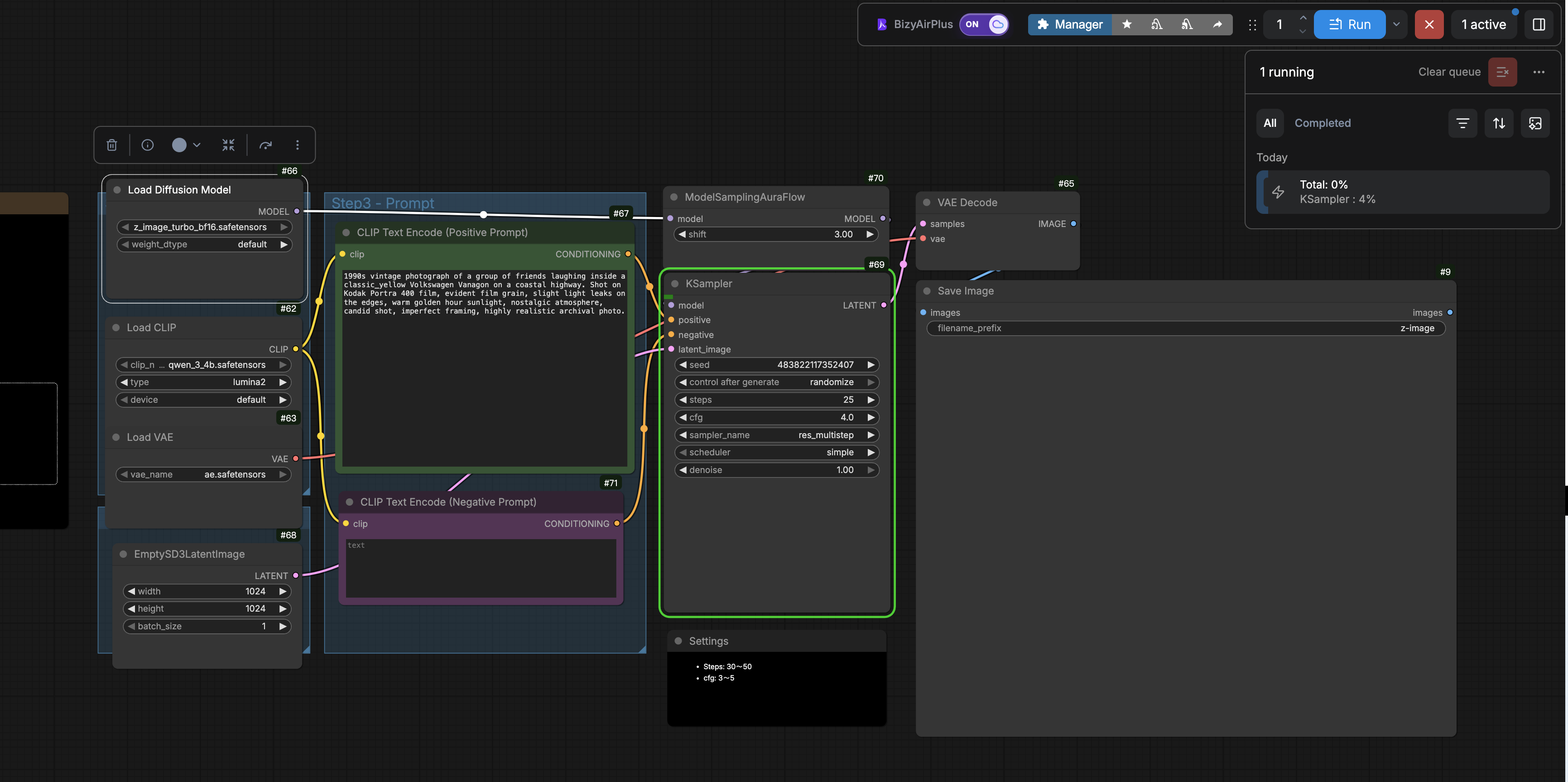
- Switch between cloud and local execution from a dedicated BizyAirPlus ON/OFF button in the ComfyUI action bar.
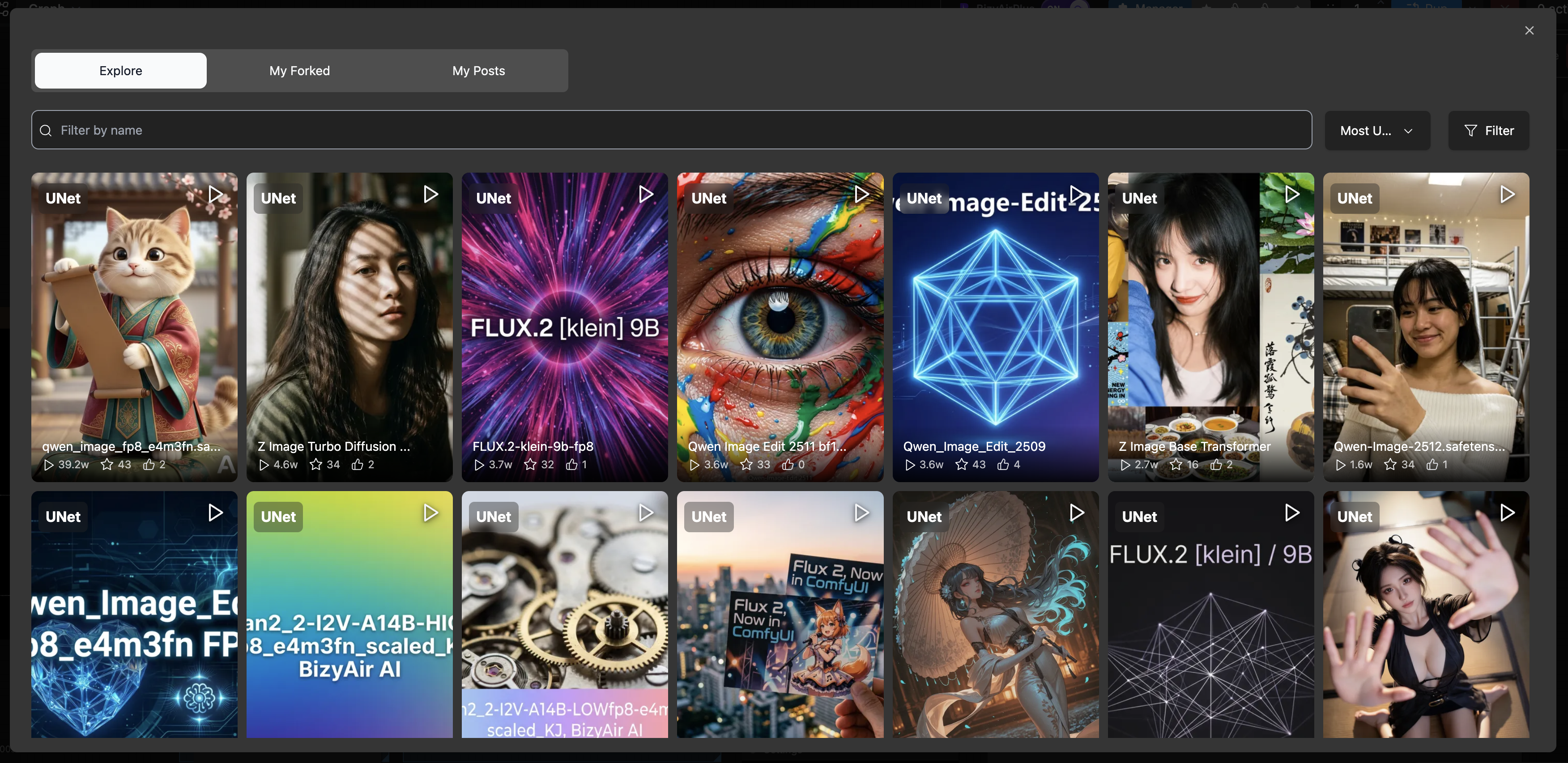
- Select cloud models directly from supported model widgets, including LoRA, Checkpoint, ControlNet, and VAE models.
- Filter models by type, base model, and keyword, and browse community or personal models.
- Use promoted model widgets, nested subgraphs, and multiple instances of the same subgraph.
- Use model selection with both LiteGraph nodes and Vue Nodes (Node 2.0).
- View live progress, previews, and results, with support for interrupting or cancelling a cloud task.
- Automatically upload workflow inputs and return generated outputs to the local ComfyUI session.
- Follow the language selected in ComfyUI.

Installation
Clone this repository into the ComfyUI custom_nodes directory, then install its dependencies with the same Python environment used to run ComfyUI:
cd /path/to/ComfyUI/custom_nodes
git clone https://github.com/siliconflow/BizyAirPlus.git
cd BizyAirPlus
python -m pip install -r requirements.txt
Restart ComfyUI after installation.
On startup, BizyAirPlus ensures that its required packages are installed and checks PyPI for a newer bizyair-cloudberry release.
- Set
BIZYAIRPLUS_SKIP_UPDATE=1to skip the latest-version check. - Set
BIZYAIRPLUS_CHECK_ONLY=1to report an available update without installing that update.
Required dependency versions may still be installed even when either option is enabled.
Getting Started
- Start ComfyUI and find the BizyAirPlus button in the action bar.
- Click the button to turn BizyAirPlus ON.
- If this is your first time using BizyAir, visit bizyair.ai, create an account, and obtain an API Key. Enter the key when prompted.
- Click a supported model widget and choose a model from the BizyAir model selector.
- Queue the workflow as usual.
- Follow its progress in ComfyUI and retrieve the result when execution finishes.
Turn the BizyAirPlus button OFF whenever you want to return to local execution.
Example workflows are available in example_workflows/.
Configuration
API Key
First-time users should visit bizyair.ai, create an account, and obtain an API Key. The easiest way to configure the key is to turn BizyAirPlus on and use the prompt that appears. You can also set it from:
Settings > BizyAirPlus > API Key
The saved key is stored at:
~/.BizyAirPlus/apikey.ini
Alternatively, set the BIZYAIR_API_KEY environment variable. An environment variable takes precedence over the saved key.
Linux and macOS:
export BIZYAIR_API_KEY=sk-xxxxxx
Windows PowerShell:
$env:BIZYAIR_API_KEY="sk-xxxxxx"
Language
Change the interface language from:
Settings > Comfy > Locale
BizyAirPlus settings are translated into English, Simplified Chinese, and Traditional Chinese. Runtime controls, prompts, and the model selector currently use English or Simplified Chinese.
Troubleshooting
The BizyAirPlus button is missing
Make sure the dependencies were installed with the Python environment used by ComfyUI, then restart ComfyUI. You can check the installed runtime package with:
python -m pip show bizyair-cloudberry
BizyAirPlus reports that the API Key is missing
Enter the key through the BizyAirPlus prompt or Settings > BizyAirPlus > API Key, or set BIZYAIR_API_KEY before starting ComfyUI.
Cloud execution fails
Check that the API Key is valid and the network is available. The ComfyUI console usually contains the detailed error.
How do I switch back to local execution?
Click the BizyAirPlus action-bar button so that it displays OFF.
Support
Report problems or request features through GitHub Issues.