
Compare Frames
Interactive Image A/B comparison node with slider wipe, side-by-side, overlay transparency, and synced video playback for image sequences. Easily compare or just view one frame or a sequence of frames.
🖼️ Compare Frames – ComfyUI Node
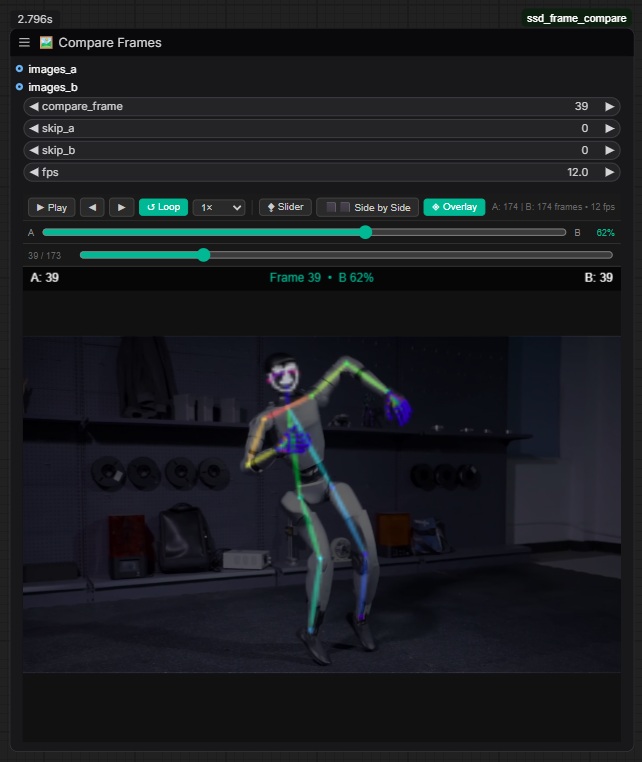
Compare Frames is a custom ComfyUI node for precise, interactive A/B comparison of two image sequences or videos — directly inside the node, no extra tools needed.
🚀 Features
- ⧪ Slider — drag a wipe handle to reveal A or B at full canvas size (true reveal, not shrink)
- ⬛⬛ Side by Side — A and B displayed simultaneously, split 50/50
- ◈ Overlay — B blended on top of A with a draggable transparency slider
- ▶ Video Playback — play both sequences in sync with loop and speed controls (0.25× – 4×)
- Scrubber bar — drag to any frame instantly, shows current / total
- ◀ / ▶ Step — step one frame at a time
- Offset sync —
skip_a/skip_blet you align two sequences that start at different times - Optional inputs — connect one or both sequences; works as a single-sequence player too
- Frontend caching — image batches are cached after first run; changing frame/offset/mode is instant
🎛️ Inputs
| Input | Type | Description |
|---|---|---|
| compare_frame | INT | Base frame number (shared playhead) |
| skip_a | INT | Frame offset for sequence A |
| skip_b | INT | Frame offset for sequence B |
| fps | FLOAT | Playback speed (default 12) |
| images_a | IMAGE (optional) | First image sequence |
| images_b | IMAGE (optional) | Second image sequence |
📦 Installation
Via ComfyUI Manager
Search for Compare Frames in the Install Custom Nodes menu.
Manual
cd ComfyUI/custom_nodes
git clone https://github.com/sidmehraajm/ssd_frame_compare
Restart ComfyUI. The node appears under the preview category as 🖼️ Compare Frames.
📁 File Structure
ComfyUI/
└── custom_nodes/
    └── ComfyUI-Compare-Frames/
        ├── __init__.py           ← node registration
        ├── compare_frames.py     ← backend
        ├── node.jpg              ← preview image
        ├── README.md
        └── web/
            └── compare_frames.js ← frontend UI