
Krea Reason
Reason-then-encode for Krea 2. The encoder's own Qwen3-VL rewrites your prompt into a richer one — or reads a reference image (describe → filter → combine) — before conditioning: a built-in prompt enhancer and language-level image reference, running on the exact model that conditions.
ComfyUI-KreaReason
<a href="https://buymeacoffee.com/lorasandlenses"><img src="https://img.shields.io/badge/Buy%20me%20a%20coffee-FFDD00?style=for-the-badge&logo=buy-me-a-coffee&logoColor=black" alt="Buy Me A Coffee"></a>
A single node that turns Krea 2's text encoder (Qwen3-VL-4B) into a built-in prompt enhancer and image-reference tool. Krea 2's "CLIP" is a full vision-language model with a working LM head, so it can rewrite a short prompt into a rich one, or read a reference image and write the prompt from it, before conditioning — all on the exact model that conditions, no second LLM.
Why this gives you more control than the standard image-reference flow. The usual path — Krea's own describe-and-encode, or embedding-based adapters — hands you whatever the model decides is important (usually the person or main subject) as a black box you can't steer, and you take it whole. Krea Reason breaks the reference into three visible, editable steps: it describes the image, lets you surgically remove exactly what you don't want (people, the main subject, everything except the background/style/colors/composition…), then combines what's left with your prompt — with your prompt leading. You see the exact text that becomes your conditioning and can keep, drop, or rewrite any part of it. So instead of "here's the whole image, roughly," you get "my subject, in that reference's lighting and setting, and nothing else." Pair it with an abliterated encoder (below) and nothing refuses or quietly softens your intent — total control end to end.
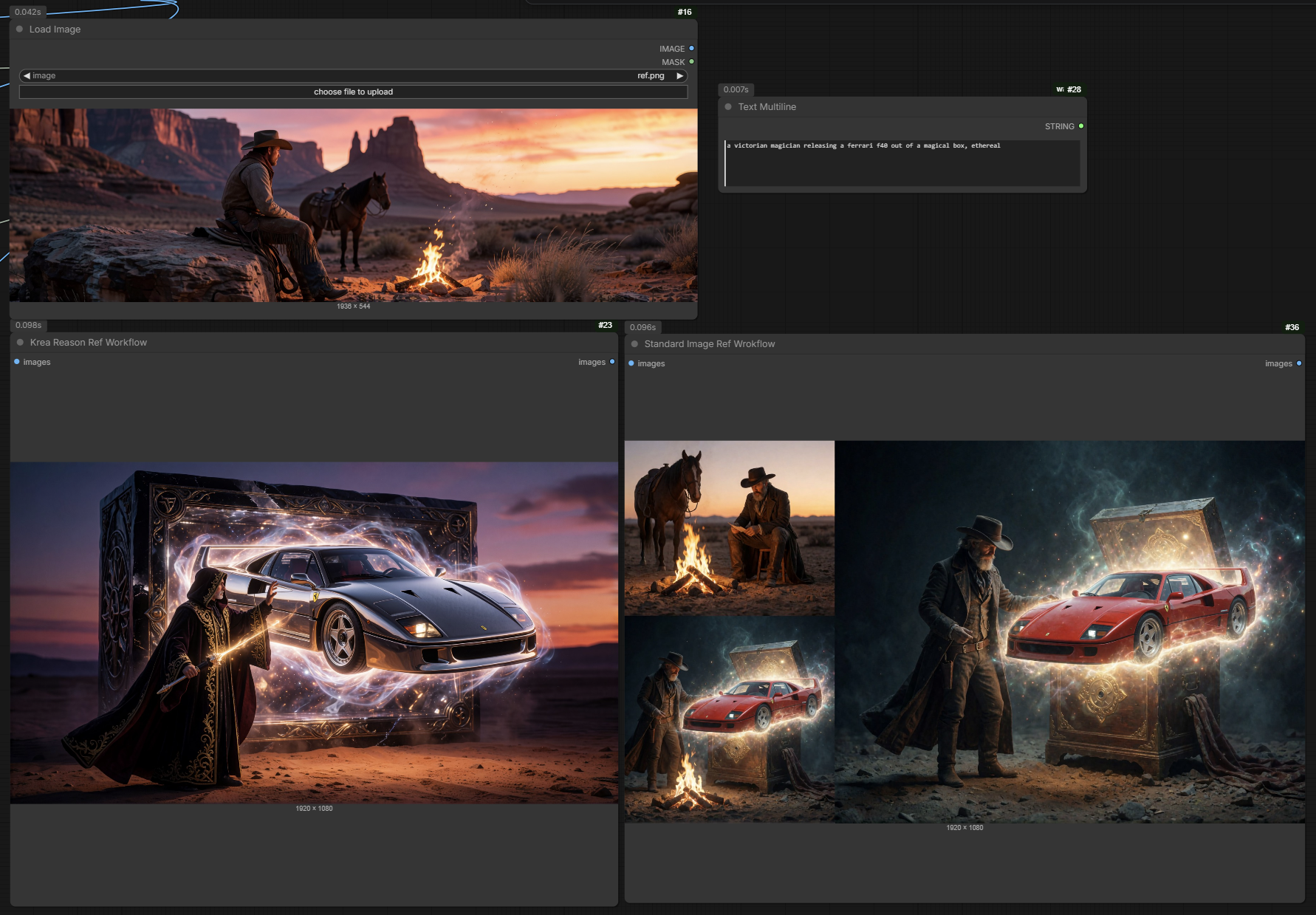
Same reference image (a cowboy by a campfire at desert sunset) and the same prompt — "a victorian
magician releasing a Ferrari F40 out of a magical box, ethereal." Left (Krea Reason,
people + main subject (keep the scene)): the magician and the Ferrari, dropped into the reference's
desert-sunset setting — the cowboy is gone, exactly as asked. Right (standard image reference): the
reference's cowboy is dragged into the output and fights the prompt, so you get a gunslinger instead of
a magician.
Install
ComfyUI-Manager (once it appears in the registry index): open Manager → Custom Nodes Manager, search "Krea Reason", click Install, then restart ComfyUI.
Manual (git clone): drop it into your custom_nodes folder and restart —
cd ComfyUI/custom_nodes
git clone https://github.com/shootthesound/ComfyUI-KreaReason
There are no extra Python dependencies — it rides on ComfyUI's built-in Krea 2 support. Restart
ComfyUI (a full restart, not just a browser refresh) after installing, and the node appears under
ShootTheSound/KreaReason. Drag workflows/Krea Reason vs Standard Image Ref.json onto the canvas
to get going.
Models (Krea 2)
Load the encoder with a CLIPLoader set to type krea2. Everything below goes in the usual
ComfyUI model folders:
| Slot | File | Folder |
|---|---|---|
| Text encoder | abliterated Qwen3-VL-4B (recommended — see below) or stock qwen3vl_4b_bf16 / qwen3vl_4b_fp8_scaled | models/text_encoders/ |
| Diffusion model | krea2_turbo_fp8_scaled.safetensors | models/diffusion_models/ |
| VAE | a Wan 2.1 VAE, e.g. wan_2.1_vae.safetensors (see Notes) | models/vae/ |
The Krea 2 model files are on Comfy-Org/Krea-2; the recommended abliterated encoder is linked in the section below.
Node: Krea Reason (expand prompt + encode) (category ShootTheSound/KreaReason)
Text mode — type a prompt and it expands it into a detailed one, then encodes:
mode = expand(default): the rewritten prompt is what gets encoded (impactful).mode = think: keeps your prompt and appends the generated text as<think>context (subtler).instruction: system instruction for the expansion (blank = built-in prompt-engineer instruction).
Reference image (optional) — a 3-pass pipeline. Connect an image and it runs:
- describe — the Qwen3-VL vision tower describes the image in full;
- filter — a text pass removes the elements you pick in
image_remove(far more reliable than asking the vision model to "describe but ignore"); - combine — a text pass merges the filtered reference with your prompt (your prompt leads).
image_remove is a dropdown of what to strip: nothing · people (and all they wear/hold) ·
the main subject · people + main subject (keep the scene) · the background (keep the subject) ·
everything except clothing / style / colors / composition · custom. The flagship use —
"people + main subject (keep the scene)" + your own subject in the prompt — drops your subject
into the reference's background. custom reads the custom_image_instruction box (say what to
remove or keep). image_megapixels (default 1.0) caps the reference resolution.
Output — CONDITIONING and the generated_text (wire it to a text preview to see what it wrote).
cond_boost — multiplies the output conditioning. Krea 2 Turbo is CFG-free, so scaling the
positive conditioning is a guidance/strength knob and often sharpens quality; ~1.5–4× is the usual
sweet spot, saturates past ~6–8× (sweep by eye). 1.0 = off.
Sampling — temperature (0 = deterministic), seed, top_p (nucleus sampling; leave ~0.95).
Recommended encoder — use an abliterated one for full control
Krea Reason drives the encoder's LLM to describe images and rewrite prompts, so the encoder's safety training gets in your way here in a way it never does for plain conditioning. The stock Qwen3-VL will sometimes refuse or hedge ("I can't describe this image…"), quietly soften or redirect what it writes, or misread content — and because its output becomes your prompt, that hijacks or degrades the result. You end up fighting the model instead of directing it.
An abliterated (uncensored) encoder has those refusal directions removed, so it just does what you ask and you keep total control of the output. This pack's workflow ships wired to Huihui-Qwen3-VL-4B-Instruct-abliterated:
- ComfyUI single-file (what the workflow uses) — ahmed22xa/Huihui-Qwen3-VL-4B-Instruct-abliterated-comfy:
Huihui-Qwen3-VL-4B-Instruct-abliterated.safetensors(bf16) and…-fp8_scaled.safetensors. - Original abliteration (source) — huihui-ai/Huihui-Qwen3-VL-4B-Instruct-abliterated (Apache-2.0).
It stops the model refusing or softening when it describes an image or expands your
prompt, without changing how it sees. Drop it in models/text_encoders/ and load it with a
CLIPLoader set to type krea2, same as the standard encoder.
Notes
- Encoder: any Krea 2 Qwen3-VL-4B encoder loads with a CLIPLoader set to type
krea2. The stock bf16 (qwen3vl_4b_bf16),fp8_scaled, and the abliterated builds above all work — including the vision/image path — on ComfyUI. If some build can't run the vision tower, the node raises a clear error suggesting bf16. - VAE: use a Wan 2.1 VAE, not the Qwen-Image VAE — Krea 2's latent format is Wan 2.1, and it
decodes noticeably better here. Any Wan 2.1 variant works:
wan_2.1_vae.safetensors(default), the fp32 build (Wan2_1_VAE_fp32.safetensors) or bf16 build for a cleaner decode, or the 2× upscaling decode (Wan2.1_VAE_upscale2x_imageonly_real_v1.safetensors) for a higher-res image straight out of the VAE. The workflow ships wired towan_2.1_vae.safetensors. - Cost: text mode is one generation + one encode; the image path is three generations, so it's a quality node, not a live dial.
- Krea 2's DiT has no reference-latent slot, so this describe→filter→combine route is the practical, language-level way to use an image reference (great for scene/style/background transfer; for exact-identity transfer an embedding-based adapter would complement it).
Workflow
workflows/Krea Reason vs Standard Image Ref.json — a ready pipeline comparing Krea Reason's
describe→filter→combine image reference against a standard image-ref path, into an 8-step Krea 2 Turbo
sampler, with the generated text shown in a preview. Wired to the abliterated encoder
(Huihui-Qwen3-VL-4B-Instruct-abliterated.safetensors) / krea2_turbo_fp8_scaled /
wan_2.1_vae.safetensors.
Support
If this node saves you time or fits into your workflow, consider buying me a coffee.
<a href="https://buymeacoffee.com/lorasandlenses"><img src="https://img.shields.io/badge/Buy%20me%20a%20coffee-FFDD00?style=for-the-badge&logo=buy-me-a-coffee&logoColor=black" alt="Buy Me A Coffee"></a>