
KSampler Multi-Choice
See what your seeds have in mind before you spend the steps: quick previews right on the node - click your favourite and only that image gets rendered. Exact continuation, no wasted steps, works with any model.
Nodes (2)
KSampler Multi-Choice


See what your seeds have in mind before you spend the steps. Quick previews appear right on the node — click your favourite and only that image gets rendered.
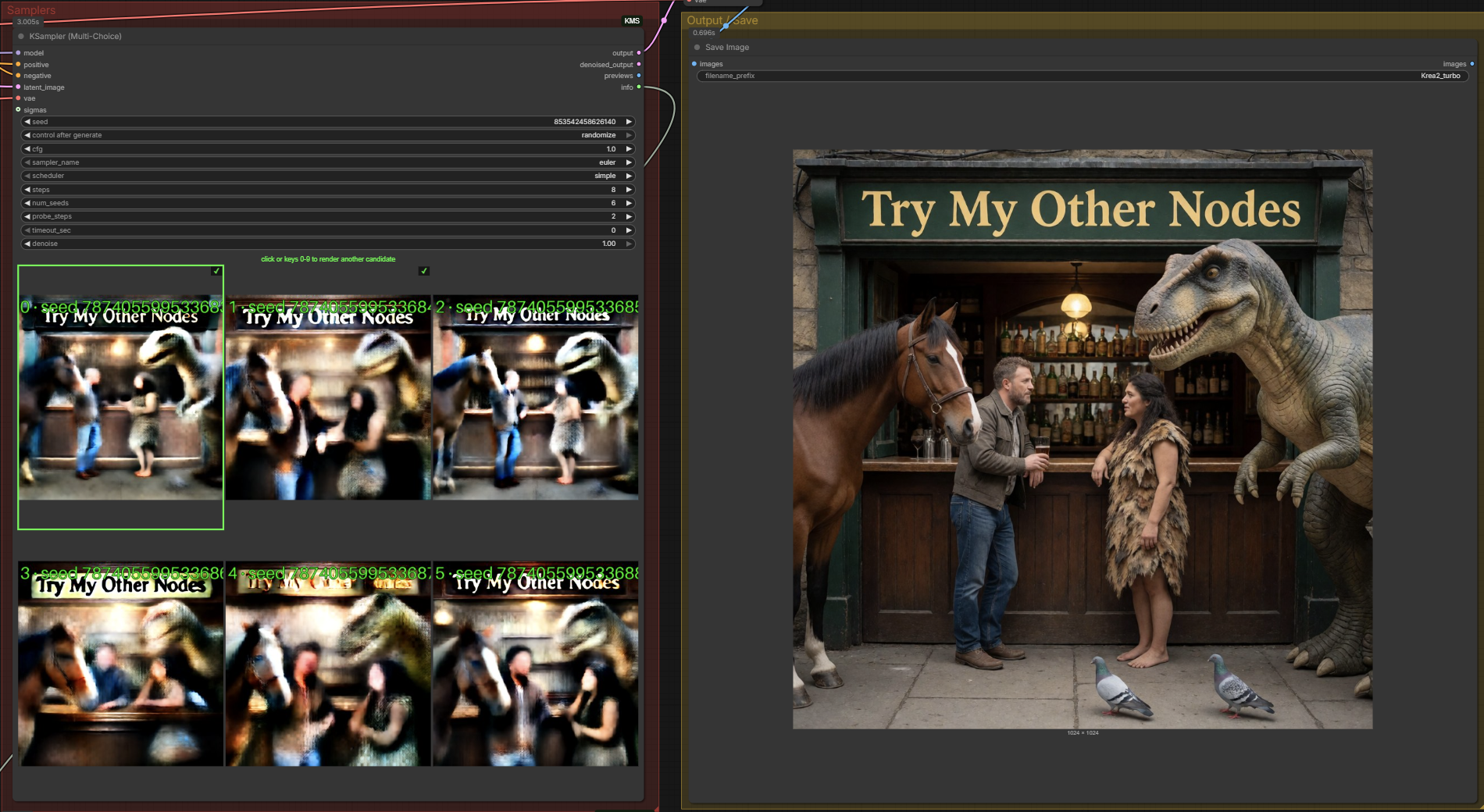
What it does
- Probe pass — runs just the first
probe_stepssteps for each ofnum_seedsconsecutive seeds. Enough to see the scene each seed will produce. - Pause — the node stops and shows the candidates as clickable thumbnails drawn right on the node. No popup, no extra window.
- Click one (or press its number key) — it finishes only that seed's image, continuing the trajectory from the probe endpoint. No probe work is wasted, and with deterministic samplers the result is bit-identical to a normal full render of that seed.
- Changed your mind? After the run, the thumbnails stay clickable. Click any other candidate and it renders too — the workflow re-queues and continues that seed straight from its cached probe endpoint (no re-probe, no waiting). Rendered candidates get a ✓ mark.
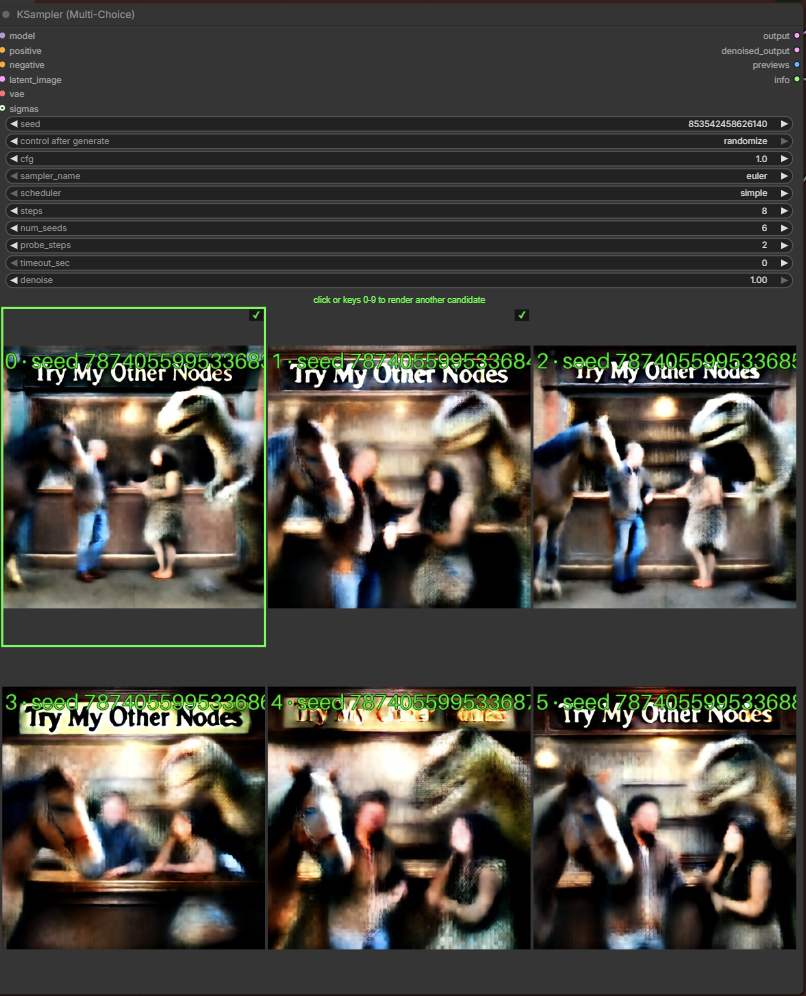
Why you'd want it
Seed roulette is expensive. Rendering 8 full images to find one keeper on an 8-step model costs 64 model steps. With Multi-Choice, browsing 8 seeds and finishing your pick costs ~22 steps — and every extra candidate you click afterwards costs only the remaining steps (~6 in that example).
The killer detail: the probe isn't a throwaway preview pass. The picked seed continues from where its probe stopped, so what you clicked is exactly what you get.
The cached candidates invalidate automatically when anything that affects them
changes (model, prompts, latent, cfg, sampler, schedule…) — but not when the
seed widget ticks over from control_after_generate, so clicking a thumbnail
always renders exactly the candidate you see.
Model support
Model agnostic. The continuation uses ComfyUI's split-sigma convention (zero-noise resume), which is exact for classic EPS models and flow/CONST models alike.
| Model type | probe_steps | cfg | Notes | |---|---|---|---| | Distilled (turbo / TDM / Lightning…) | 1–2 | 1.0 | Composition commits in the first step or two — browsing is nearly free. This is the sweet spot. | | Classic multi-step (SDXL, etc.) | ~20–30% of steps | your usual | More probe steps so the previews are readable. |
Install
cd ComfyUI/custom_nodes
git clone https://github.com/shootthesound/ComfyUI-KMS
Restart ComfyUI and hard-refresh your browser. No additional Python dependencies.
Example workflow
A ready-to-go Krea 2 example is included in
example_workflows — load it from ComfyUI's workflow
Templates browser (it appears under this pack's name), or just drag the JSON
onto the canvas.
Quick start
- Add KSampler (Multi-Choice) (category:
sampling) in place of your normal KSampler. - Wire model / positive / negative / latent as usual, plus a vae — it's used to decode the candidate previews (a fast preview VAE like taesd/taew works too).
- Set
stepsto your model's normal count,probe_stepsper the table above. - Queue. When the thumbnails appear, click the one you want. Done.
Inputs
Standard KSampler-style widgets — guider, noise, sampler and schedule are all built internally. No RandomNoise / CFGGuider / KSamplerSelect / BasicScheduler wiring needed.
| Input | What it does |
|---|---|
| seed | Base seed — seeds seed, seed+1, … seed+num_seeds-1 are probed |
| cfg | 1.0 for distilled / CFG-free models (negative pass skipped); otherwise your model's usual value |
| sampler_name | Deterministic samplers (euler, etc.) make the finished image exactly match a normal run of that seed |
| scheduler / steps | The full schedule, derived from the model (same as BasicScheduler) |
| num_seeds | How many consecutive seeds to browse — one thumbnail each |
| probe_steps | Steps run per seed before its preview is captured |
| timeout_sec | Auto-pick candidate 0 after this many seconds. 0 = wait forever |
| denoise | 1.0 = txt2img. Lower it to browse seeds for an img2img / refine pass on your input latent, exactly like a standard KSampler |
| sigmas (optional) | Custom schedule override — replaces scheduler/steps/denoise |
Outputs the same output / denoised_output pair as SamplerCustomAdvanced,
plus the labelled preview sheet as an IMAGE, an info string, and picked_seed
(the seed of the candidate you clicked — handy for wiring into other samplers).
Prove it to yourself
Don't take the "bit-identical" claim on faith — the pack includes a
Multi-Choice Verify (A/B Exact) node and a ready-made workflow
(example_workflows/…VERIFY-EXACT.json) that puts it to the test:
- The Multi-Choice node's
picked_seedoutput drives a vanilla KSampler, which re-renders the same seed from scratch — no probe, no continuation. - Both latents feed the Verify node, which reports the result right on itself: BIT-IDENTICAL (every value matches exactly), numerically equivalent (float rounding only), or different — with the actual max difference, no hand-waving.
- Both images are saved side by side so your eyes can confirm what the numbers say.
Click any candidate you like — whichever you pick, the vanilla render follows the same seed. With a deterministic sampler (euler etc.) the checker reports bit-identical: the image you clicked is that seed's normal render.
This includes fp8-quantized models. The continuation doesn't reconstruct its starting point from the cached preview — it restarts from the exact bits the probe left off at. That matters more than it sounds: fp8 models chaotically amplify even a single float rounding error into visible micro-detail changes (we measured a 1e-8 difference growing to 0.1 in six steps during development). Skipping the round trip entirely is the only thing fp8 can't amplify, and the verify workflow will show you BIT-IDENTICAL on an fp8 checkpoint to prove it.
Controls while choosing
| Action | What it does | |---|---| | Click a thumbnail | Finish that candidate | | Keys 0–9 | Same as clicking — pick by the number stamped on the thumbnail | | Shift-hover | Enlarge a thumbnail for a closer look before committing |
Both click and number keys keep working after the run — each one queues that candidate for an immediate re-render from its cached probe endpoint. Want several? Pick your favourite, then click (or key) the others as each run finishes — all from the same probe pass, each through your normal Preview/Save nodes.
Waiting behaviour
While the node waits for your click the queue is paused. Cancel aborts the
run cleanly. For unattended or headless runs, set timeout_sec and it
auto-picks candidate 0 after that long.
Tips
- Make the node bigger. The thumbnails scale with the node — drag it out to a comfortable size and the candidate grid becomes a proper contact sheet. Judging composition at a glance is much easier on large previews.
- Try 2 or even 1 step probes. If you're hunting for a particular composition — subject placement, pose, framing — a 1–2 step probe is often more than enough to tell the seeds apart, especially on distilled models where the composition is locked in from the first step. You're not judging fine detail at this stage, just picking the scene; the finished render fills in the rest. Lower probes = more seeds browsed for the same cost.
- Bump
num_seedsup when probes are that cheap — browsing 16 seeds at 1 probe step costs the same as 8 seeds at 2.
Honest limits
- Stochastic samplers (ancestral / SDE) won't give bit-identical continuation — the picked image is still that seed's composition, just not byte-for-byte the same as a standalone run. Stick to euler and friends for exactness.
- Probe previews on classic models at very low
probe_stepsare blurry — that's the model, not the node. Raiseprobe_steps. - The post-run re-pick cache lives in server memory — restarting ComfyUI clears it (the thumbnails will re-probe on the next run instead).
Support
If this tool saves you time or fits into your workflow, consider buying me a coffee.
Your support helps me keep developing and maintaining these nodes. Members get early access to new builds before public release.
Author
Peter Neill — ShootTheSound.com / UltrawideWallpapers.net
Background in music industry photography and video. Built this node because seed hunting shouldn't cost a full render per seed.
Feedback is welcome — open an issue or reach out.
License
MIT