
RandomLoRALoader
A ComfyUI custom node for randomly selecting and applying LoRAs from multiple folders with support for trigger words, sample prompts, and strength randomization.
Nodes (3)
Random LoRA Loader for ComfyUI
English | 日本語版 README
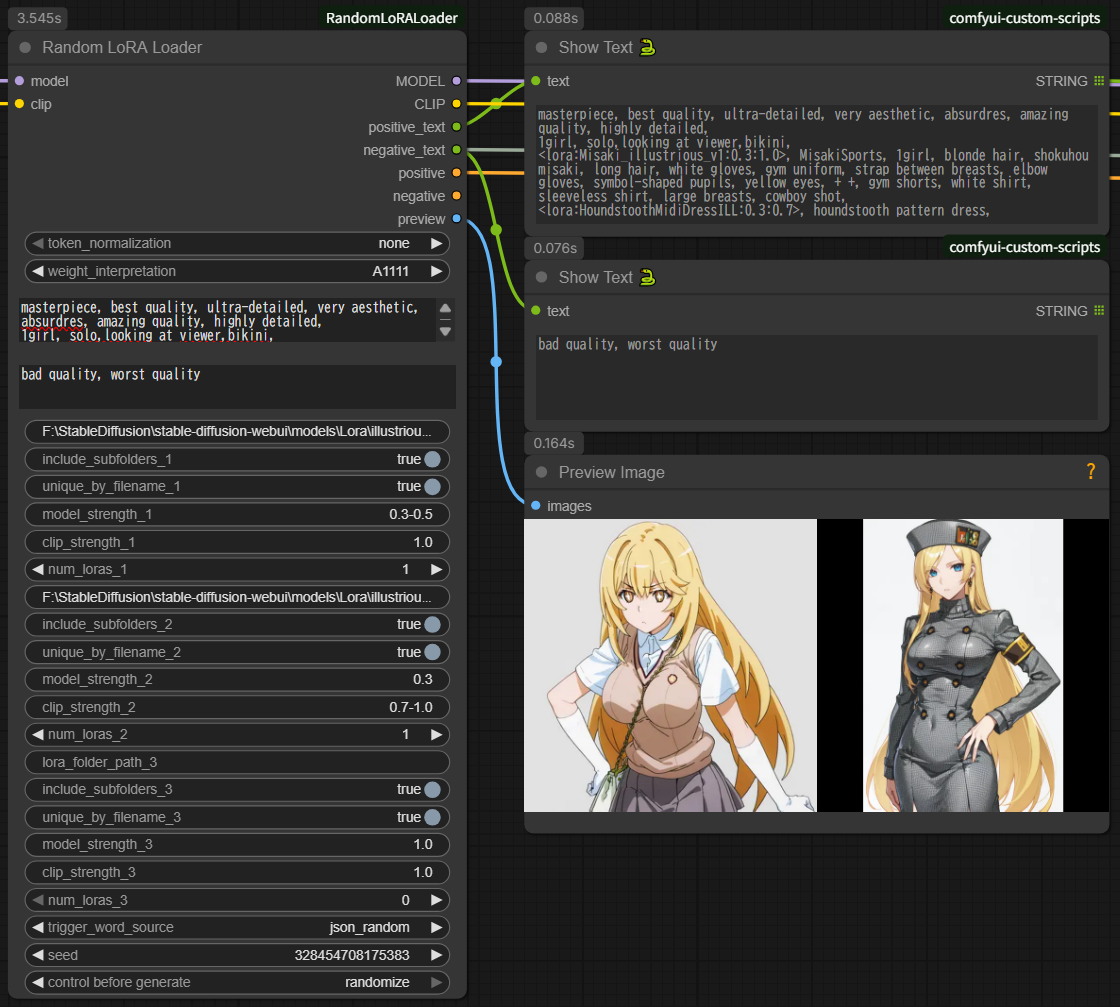
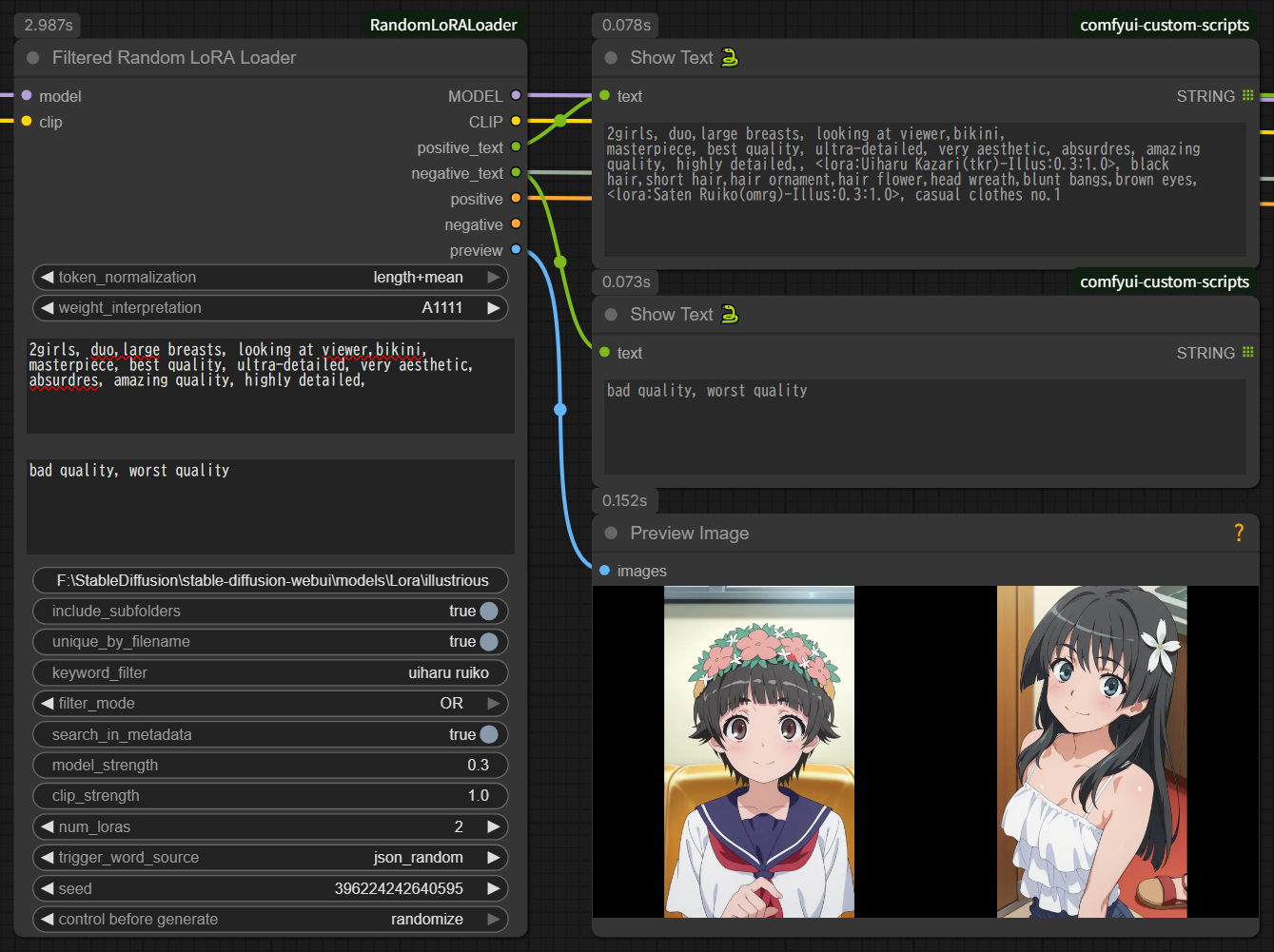
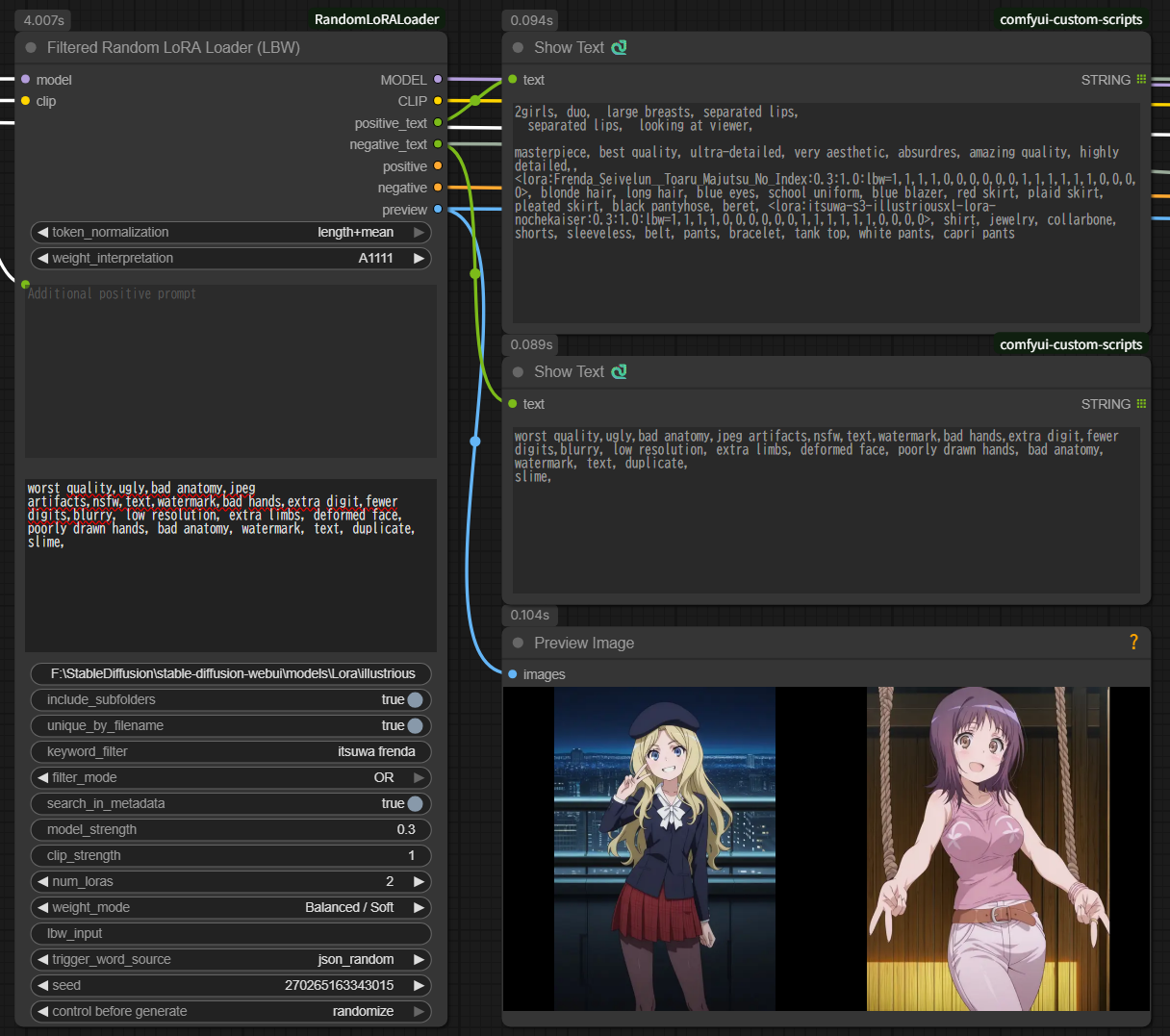
A ComfyUI custom node package for randomly selecting and applying LoRAs. Includes three nodes:
- Random LoRA Loader - Select from 3 folders simultaneously
- Filtered Random LoRA Loader - Single folder with keyword filtering
- Filtered Random LoRA Loader (LBW) - 🆕 LBW support with automatic SD1.5/SDXL detection (NEW v1.2.0)
⚠️ Important: Supported Models
These nodes are designed for SD1.5 and SDXL models ONLY.
- ✅ Supported: Stable Diffusion 1.5, Stable Diffusion XL (SDXL)
- ❌ NOT Supported: Flux, SD3, SDXL Turbo, Pony, or other architectures
The LBW node's block weight feature specifically targets SD1.5/SDXL U-Net architecture. Other model types will not work correctly with LBW.
Nodes Overview
Random LoRA Loader (Original)
Select LoRAs from up to 3 different folders. Ideal for folder-based organization.
Use case:
- Different folders for styles, characters, concepts
- Fixed LoRA categories
- Simple folder-based workflow
Filtered Random LoRA Loader
Select LoRAs from a single folder using keyword filtering. Ideal for dynamic selection and large collections.
Use case:
- All LoRAs in one folder, filter by keywords
- Dynamic filtering with AND/OR conditions
- Metadata search capability
- Recommended for chaining multiple instances
Filtered Random LoRA Loader (LBW) 🆕 NEW v1.2.0
Advanced node with LoRA Block Weight (LBW) support for precise effect control.
Use case:
- Separate control of style vs. structure
- Fine-tuned LoRA application
- Professional workflows requiring precision
- 4 preset modes + custom input
See README_LBW.md for detailed LBW documentation.
Key Features
Common Features (All Nodes)
- Multi-Source Metadata Reading: Automatically retrieve trigger words and sample prompts with priority order:
.metadata.jsonformat (ComfyUI Lora Manager) - Priority 1.infoformat (Civitai Helper) - Priority 2- Embedded metadata in LoRA file - Priority 3
- Strength Randomization:
- Range specification with negative support:
0.4-0.8,-0.8--0.3(v1.2.0) - 0.1 increments for ranges: Easier to observe effect differences
- Fixed values rounded to 2 decimals:
0.847→0.85
- Range specification with negative support:
- Flexible Trigger Word Retrieval:
json_combined: Combine all trigger word patterns (with deduplication)json_random: Randomly select one patternjson_sample_prompt: Randomly retrieve sample promptsmetadata: Read directly from embedded metadata
- Sample Prompt Optimization: Automatically remove LoRA syntax from samples and apply node-configured strength
- Text Outputs:
positive_text/negative_text, pluslora_textcarrying the LoRA syntax (v1.4.0) - ComfyUI Standard Seed Control: Supports fixed/randomize/increment/decrement
- Wildcard Encode Integration: Works seamlessly with Wildcard Encode (Inspire)
- LoRA Syntax Auto-Removal: Cleans up LoRA syntax in additional_prompt to prevent noise
- Preview Image Support: Display preview images/videos for selected LoRAs (v1.1.0)
- Duplicate Filename Handling: Exclude duplicate filenames across subfolders (v1.1.0)
Filtered Nodes (Filtered & LBW)
- Keyword Filtering: Space-separated keywords with phrase support
- AND/OR/OFF Modes: Flexible filtering logic (OFF: v1.5.0)
- Metadata Search: Search in filenames or embedded metadata
- Fast Caching: Instant metadata access after first load
- Keyword Output: Outputs the keywords the selected LoRA actually matched (v1.5.0)
LBW Node Only 🆕
- LoRA Block Weight Support: Control which U-Net blocks are affected
- Automatic SD1.5/SDXL Detection: No manual model type selection needed
- 4 Preset Modes:
- Style Focused - OUTPUT blocks only
- Character Focused - Balanced IN+MID+OUT
- Structure/Composition Only - INPUT+MID blocks only
- Balanced / Soft - Gentle application
- Preset: Random Mode: Randomly select one of the 4 presets
- Direct Input Mode: Custom weight specification
- Automatic Weight Adjustment: Handles mismatched element counts
Installation
⚠️ Optional: Video Preview Support
For video file preview (.mp4, .webm, .avi, .mov), opencv-python is REQUIRED:
pip install opencv-python
Without opencv-python:
- ✅ Static images (.png, .jpg, .jpeg) work
- ✅ Animated images (.gif, .webp) work
- ❌ Video files will show BLACK SCREEN (with warning message in console)
LoRA functionality works normally regardless of opencv-python installation. Only preview display is affected.
Requirements
- ComfyUI (works with standard installation)
- Python 3.9+
- Core dependencies included with ComfyUI ✅
Steps
cd ComfyUI/custom_nodes
git clone https://github.com/YOUR_USERNAME/RandomLoRALoader.git
# Or manually create RandomLoRALoader folder and copy files
Restart ComfyUI.
Note: Uses only Python standard library and ComfyUI bundled libraries for core functionality. opencv-python is optional for video preview only.
Uninstallation
# Navigate to custom_nodes folder
cd ComfyUI/custom_nodes

# Remove RandomLoRALoader folder
rm -rf RandomLoRALoader

# On Windows
rmdir /s RandomLoRALoader
Or manually delete the RandomLoRALoader folder and restart ComfyUI.
Usage
Basic Usage (Random LoRA Loader)
- Add Node: Search for "Random LoRA Loader" in the node browser
- Connect MODEL/CLIP: Connect base model and CLIP to inputs
- Set Folder Paths:
- Group 1: Style LoRA folder path
- Group 2: Character LoRA folder path (optional)
- Group 3: Concept LoRA folder path (optional)
- Configure Each Group:
num_loras: Number of LoRAs to select from each groupmodel_strength/clip_strength: Application strength (fixed value or random range)
- Connect Outputs:
MODEL/CLIP: Connect to KSamplerpositive/negative: Connect to Set Conditioning or KSamplerpositive_text/negative_text: Connect to Show Text for verification (recommended)lora_text: Connect to Show Text or a prompt/metadata saving node to record which LoRAs were picked
Wildcard Encode Integration (Recommended)
This node works seamlessly with Wildcard Encode (Inspire) for dynamic prompt generation combined with random LoRA selection.
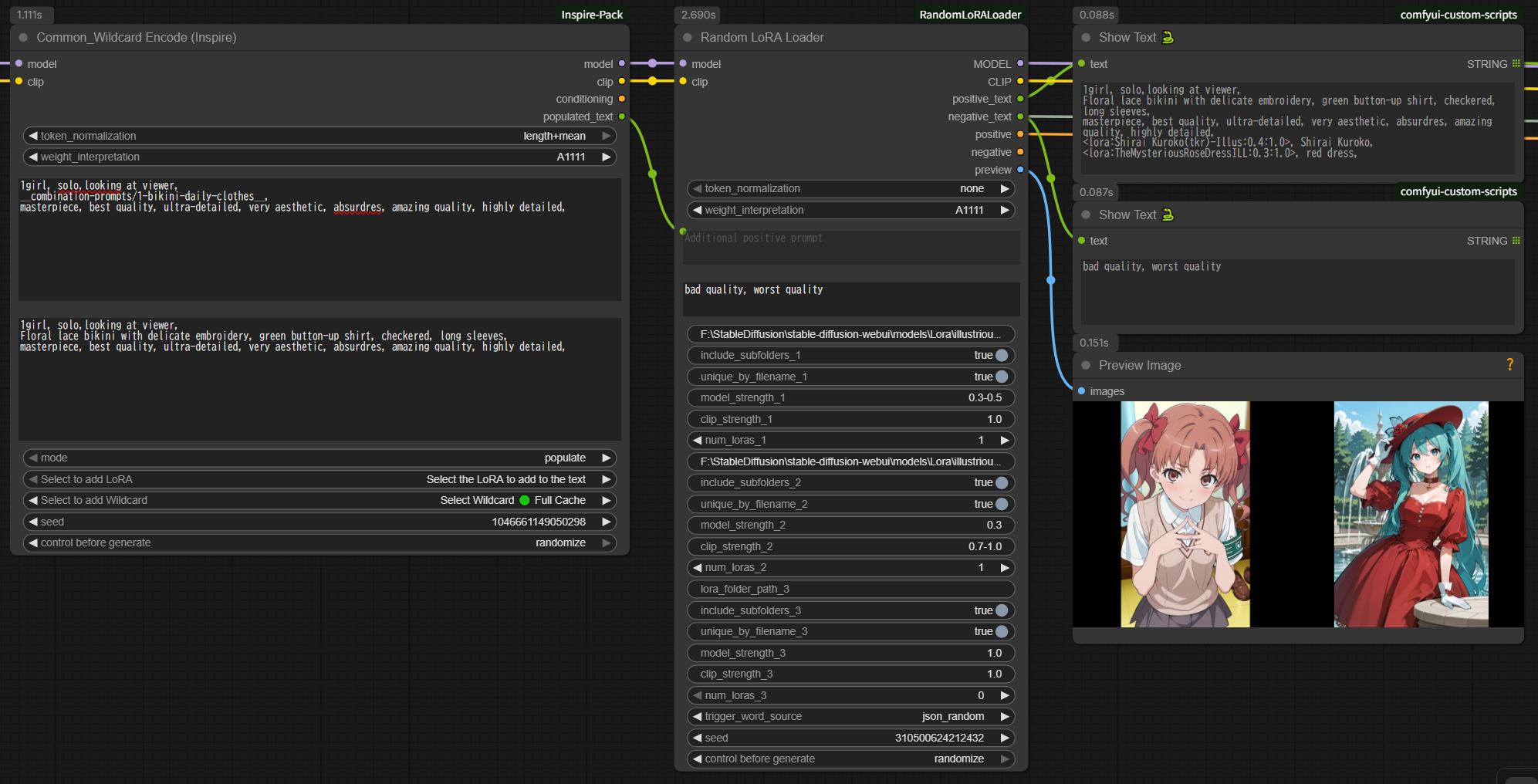
Recommended Connection
[Wildcard Encode (Inspire)]
  text: "__style__, {red|blue|green}, <lora:base_effect:0.5>"
  ↓
  ├─ populated_text ──→ [Random LoRA Loader]
  │                     additional_prompt_positive
  └─ MODEL/CLIP ──────→ model/clip input

[Random LoRA Loader]
  Folder 1: character LoRAs
  Folder 2: concept LoRAs
  ↓
  MODEL/CLIP/CONDITIONING → [KSampler]
How It Works
-
Wildcard Encode Processing:
- Wildcard expansion:
__style__→ "anime style" - Choice expansion:
{red|blue|green}→ "blue" - LoRA syntax processing:
<lora:base_effect:0.5>→ applied to MODEL - Result:
populated_text= "anime style, blue, lora:base_effect:0.5"
- Wildcard expansion:
-
Random LoRA Loader Processing:
- Auto-removes LoRA syntax from
populated_text: "anime style, blue" - Random LoRA selection: character_alice, concept_magic
- Final prompt: "anime style, blue, alice, blonde hair, magic circle"
- MODEL/CLIP: base_effect + character_alice + concept_magic (all applied)
- Auto-removes LoRA syntax from
Benefits
- ✅ Delegate wildcard functionality to Wildcard Encode (specialized tool)
- ✅ Delegate random LoRA selection to this node (simple configuration)
- ✅ Prompt information fully inherited
- ✅ LoRA syntax automatically cleaned (no noise)
3-Group Example
Group 1: style LoRAs
  - num_loras_1: 2
  - model_strength_1: "0.6-0.9"  ← Random (0.1 increments)
  - clip_strength_1: "0.6-0.9"   ← Random (0.1 increments)

Group 2: character LoRAs
  - num_loras_2: 1
  - model_strength_2: "1.0"      ← Fixed
  - clip_strength_2: "1.0"       ← Fixed

Group 3: Unused
  - lora_folder_path_3: (empty)
  - num_loras_3: 0

→ Result: 2 style LoRAs (variable strength) + 1 character LoRA (fixed strength) = 3 LoRAs total
Settings
Folder Scanning
All three nodes scan the folders you point them at the same way.
Supported extensions: .safetensors, .pt, .ckpt (case-insensitive).
Note:
.ptand.ckptfiles have no readable embedded metadata, so trigger words for them come only from.metadata.json/.infosidecar files.
Symbolic links are followed. A subfolder that is a symlink is descended into, matching ComfyUI's own folder scan — so LoRAs that only exist behind a link are included as candidates, just as they appear in ComfyUI's native LoRA dropdown. Link loops are detected and skipped rather than hanging the scan, and a folder reachable through two different links is only scanned once.
The candidate list is sorted before selection. This makes a given seed reproduce the same selection on any machine. Prior to v1.3.0 the order came straight from the filesystem, so the same seed could pick different LoRAs on a different PC.
⚠️ Because the ordering changed, an existing workflow may select a different set of LoRAs after upgrading to v1.3.0, even with a fixed seed. If a result you were relying on changes, re-roll or re-pick the seed.
Common Settings
| Setting | Description | Default |
|---------|-------------|---------|
| token_normalization | Token normalization method | none |
| weight_interpretation | Prompt emphasis notation interpretation | A1111 |
| additional_prompt_positive | Additional positive prompt (combined with trigger words) | (empty) |
| additional_prompt_negative | Additional negative prompt | (empty) |
| trigger_word_source | Trigger word source | json_combined |
| seed | Random selection seed | 0 |
Important Notes on additional_prompt
Supported:
- Regular prompt text
- Text input from other nodes (e.g., Wildcard Encode's
populated_text)
Not Supported (automatically removed):
<lora:xxx:0.8>format LoRA syntax{a|b|c}format wildcard syntax__filename__format wildcard syntax
Why:
- This node applies LoRAs via folder specification
- Wildcard functionality should be handled by dedicated nodes (Wildcard Encode, etc.)
- Writing LoRA syntax causes filename to become meaningful tokens as noise
Example (problematic case):
Input: "1girl, <lora:anime_style:0.8>, beautiful"
↓
CLIP tokenization: [1girl, lora, anime, style, 0, 8, beautiful]
                            ^^^^^ ^^^^^
                            Unintended words added to prompt ❌
Correct usage:
additional_prompt_positive: "1girl, beautiful"  ← No LoRA syntax ✅
LoRA application: Use folder specification feature ✅
Or, when connecting from Wildcard Encode, LoRA syntax is automatically removed:
[Wildcard Encode] populated_text: "1girl, <lora:style:0.8>, beautiful"
       ↓
[This Node] additional_prompt_positive received → LoRA syntax auto-removed
       ↓
Final prompt: "1girl, beautiful" ✅
Group Settings (1-3)
Each group can be configured individually:
| Setting | Description | Default |
|---------|-------------|---------|
| lora_folder_path_X | LoRA folder absolute path | (empty) |
| include_subfolders_X | Include subfolders (symbolic links are followed) | true |
| unique_by_filename_X | Exclude duplicate filenames | true |
| model_strength_X | MODEL application strength | "1.0" |
| clip_strength_X | CLIP application strength | "1.0" |
| num_loras_X | Number of LoRAs to select | Group 1: 1, Groups 2/3: 0 |
Strength Specification (Important)
Strength fields accept fixed values or random ranges, including negative values.
Fixed Value
Input: "1.0"
→ Always applied at 1.0

Input: "0.55"
→ Rounded to 0.55 (2 decimals)

Input: "-0.5"
→ Negative LoRA at -0.5 ✅ (v1.2.0)
Random Range
Format: min-max
Input: "0.6-0.9"
→ Random from [0.6, 0.7, 0.8, 0.9] (0.1 increments)

Input: "-0.8--0.3"
→ Random from [-0.8, -0.7, -0.6, -0.5, -0.4, -0.3] ✅ (v1.2.0)

Input: "-0.5-0.5"
→ Random from [-0.5, -0.4, ..., 0.4, 0.5] ✅
v1.2.0 Improvements:
- ✅ Negative range support:
-0.8--0.3now works correctly - ✅ 0.1 increments for all ranges: Easier to observe effect differences
- ✅ Fixed values rounded to 2 decimals:
0.847→0.85
Behavior
All Nodes:
- Range: 0.1 increments list → random selection
- Fixed: Rounded to 2 decimals
Example:
model_strength_1: "0.6-0.9"
→ Each execution randomly selects from [0.6, 0.7, 0.8, 0.9]
→ Console: "[RandomLoRALoader] Selected strength: 0.7"
MODEL Strength vs CLIP Strength
MODEL Strength
- Affects: Image itself (art style, composition, colors, shapes)
- Effect: Visual characteristics of generated image
- Example:
- High value: Strong art style transfer
- Low value: Subtle style hints
CLIP Strength
- Affects: Prompt interpretation (concept understanding, language-image association)
- Effect: How strongly the model follows prompt instructions
- Example:
- High value: Strong semantic guidance from trigger words
- Low value: Weak semantic influence
Recommended Settings
For most use cases:
model_strength: 0.8
clip_strength: 0.8
→ Balanced application
For subtle style application:
model_strength: 0.4-0.6
clip_strength: 0.8-1.0
→ Light visual effect, strong semantic guidance
For strong style override:
model_strength: 1.0-1.2
clip_strength: 0.6-0.8
→ Strong visual effect, moderate semantic guidance
Trigger Word Retrieval Methods
json_combined (Default)
Combines all trigger word patterns from JSON metadata.
Source:
activation textfieldss_tag_frequencykeys (first 3 highest frequency)modelspec.descriptionkeywordsss_output_namekeywords
Example:
{
  "activation text": "anime style, detailed eyes",
  "ss_tag_frequency": {
    "1girl": 500,
    "blue eyes": 300,
    "long hair": 250
  }
}
Result: "anime style, detailed eyes, 1girl, blue eyes, long hair"
json_random
Randomly selects one trigger word pattern.
Example:
Candidates:
- "anime style, detailed eyes"
- "1girl, blue eyes, long hair"
- "anime, girl, portrait"

Random selection: "1girl, blue eyes, long hair"
json_sample_prompt
Retrieves sample prompts from JSON metadata.
Source fields (priority order):
sample_promptscivitai.images[0].meta.prompt
Processing:
- Automatically removes LoRA syntax (
<lora:xxx:0.8>) - Replaces with node-configured strength
- Extracts negative prompt if available
Example:
{
  "sample_prompts": "1girl, <lora:style:0.9>, beautiful, detailed eyes"
}
Result: "1girl, beautiful, detailed eyes" (LoRA syntax removed)
metadata
Reads trigger words directly from embedded LoRA file metadata.
Source:
- Safetensors metadata keys
- Similar to json_combined but reads from LoRA file directly
Use when:
- No external JSON files available
- Want to use original training metadata
Outputs
All nodes provide the following outputs:
| Output | Type | Description |
|--------|------|-------------|
| MODEL | MODEL | Model with LoRAs applied |
| CLIP | CLIP | CLIP with LoRAs applied |
| positive | CONDITIONING | Positive conditioning (LoRA syntax removed) |
| negative | CONDITIONING | Negative conditioning |
| positive_text | STRING | Positive prompt text without LoRA syntax — exactly what is encoded into positive (v1.4.0) |
| negative_text | STRING | Full negative prompt text |
| preview | IMAGE | Batch of preview images for selected LoRAs (v1.1.0) |
| lora_text | STRING | Positive prompt text with LoRA syntax (the former positive_text content, v1.4.0) |
| keyword | STRING | Filtered nodes only. The keywords the selected LoRA actually matched (v1.5.0). See Keyword Output |
⚠️ Output changes in v1.4.0
positive_textno longer contains<lora:...>tags; the previous content now comes from the newlora_textoutput (added at the end). All other outputs keep their positions and types, so existing connections stay valid.
positive_textfed a text encoder: no rewiring needed. The tags are no longer read as textpositive_textwas used to record the LoRA syntax (saved prompts, metadata): reconnect that tolora_textThe Filtered nodes also now tidy the stray
, ,left behind after removing tags (and leading/trailing commas) before encoding, as the 3-folder node already did. Because the encoded text changes, results with the same seed may differ from earlier versions. If you need identical results to an earlier version, keep using that version.
Text Output Format
lora_text example:
<lora:style_anime:0.8:0.8>, <lora:character_alice:1.0:1.0>, anime style, alice, blonde hair, 1girl, beautiful
LBW node lora_text example:
<lora:style_anime:0.8:0.8:lbw=1,0,0,0,0,0,0,0,0,0,0,1,1,1,1,1,1,1,1,1>, anime style, 1girl, beautiful
positive_text / positive (CONDITIONING) content:
anime style, alice, blonde hair, 1girl, beautiful
(LoRA syntax removed for clean prompt)
Preview Images (v1.1.0)
Supported formats (priority order):
- Static images (.png, .jpg, .jpeg) - Always works
- Animated images (.gif, .webp) - First frame, always works
- Video files (.mp4, .webm, .avi, .mov) - First frame, requires opencv-python
File matching:
- Files starting with the LoRA filename (case-insensitive)
- Example:
style_anime.safetensorsmatches:style_anime.png✅style_anime_preview.jpg✅STYLE_ANIME.PNG✅
Filtered Random LoRA Loader
Single folder with keyword filtering.
Key Features
- Keyword Filtering: Filter LoRAs by space-separated keywords
- AND/OR/OFF Modes: Flexible filtering logic (OFF: v1.5.0)
- Phrase Matching: Use quotes for exact phrases
- Metadata Search: Search in filenames or embedded metadata
- Fast Caching: Instant metadata access after first load
- Serial Connection Ready: Chain multiple instances for complex workflows
Parameters
| Parameter | Description | Default |
|-----------|-------------|---------|
| lora_folder_path | LoRA folder path | (empty) |
| keyword_filter | Space-separated keywords or quoted phrases | (empty) |
| filter_mode | AND / OR / OFF | AND |
| search_in_metadata | Search in JSON/embedded metadata | false |
| num_loras | Number of LoRAs to select | 1 |
| model_strength | MODEL strength (fixed or range) | "1.0" |
| clip_strength | CLIP strength (fixed or range) | "1.0" |
| include_subfolders | Include subfolders (symbolic links are followed) | true |
| unique_by_filename | Exclude duplicate filenames | true |
Keyword Filter Syntax
Basic keywords (AND mode):
keyword_filter: "anime girl"
→ Matches files containing BOTH "anime" AND "girl"
OR mode:
filter_mode: OR
keyword_filter: "anime realistic"
→ Matches files containing "anime" OR "realistic"
OFF mode (v1.5.0):
filter_mode: OFF
keyword_filter: "anime realistic"
→ No filtering; picks from every LoRA in the folder
→ The keywords you typed stay, so you can switch the filter off for a while without deleting them
Phrase matching:
keyword_filter: '"anime style" detailed'
→ Must contain exact phrase "anime style" AND word "detailed"
Multiple phrases:
keyword_filter: '"anime style" "detailed eyes" red'
→ Must contain "anime style" AND "detailed eyes" AND "red"
Keyword Output (v1.5.0)
Outputs the keywords the selected LoRA actually matched, joined with _. The LBW node works the same way.
| keyword_filter | filter_mode | Selected LoRA (filename) | keyword output |
|---|---|---|---|
| aaa bbb | AND | aaa_bbb_xxx | aaa_bbb |
| aaa bbb | OR | aaa_xxx | aaa |
| aaa bbb | OR | bbb_xxx | bbb |
| "aaa bbb" | AND / OR | aaa bbb xxx | aaa_bbb |
| "aaa bbb" ccc | AND | aaa bbb ccc | aaa_bbb_ccc |
| (empty) | AND / OR | any | (empty) |
| (anything) | OFF | any | (empty) |
- Spaces inside a phrase also become
_ - In OR mode, if the selected LoRA contains several of the keywords, or
num_lorasis 2 or more, every matched keyword is joined in input order (e.g.aaa_bbb) - Keywords are output with the case you typed (matching itself ignores case)
- With
search_in_metadataON, keywords matched in the metadata are included too - Empty when
filter_modeis OFF, whenkeyword_filteris empty, when no LoRA matched, or whennum_lorasis 0
keyword was added as the last (ninth) output, so existing workflow connections keep working.
Metadata Search
Filename search (default):
search_in_metadata: false
→ Fast, searches only filenames
Metadata search:
search_in_metadata: true
→ Slower, searches JSON/embedded metadata
→ Cached after first search (instant on 2nd+)
Performance:
- Initial load (SSD):
- 1,000 files: ~2 seconds
- 5,000 files: ~10 seconds
- 10,000 files: ~20 seconds
- 2nd+ time: Instant (<100ms)
- Memory: ~150MB per 10,000 files
Use Cases
Example 1: Character Selection
lora_folder_path: "/path/to/all_loras"
keyword_filter: "character girl"
filter_mode: AND
num_loras: 1
Result: Select 1 character LoRA containing both "character" and "girl"
Example 2: Multiple Instances (Recommended)
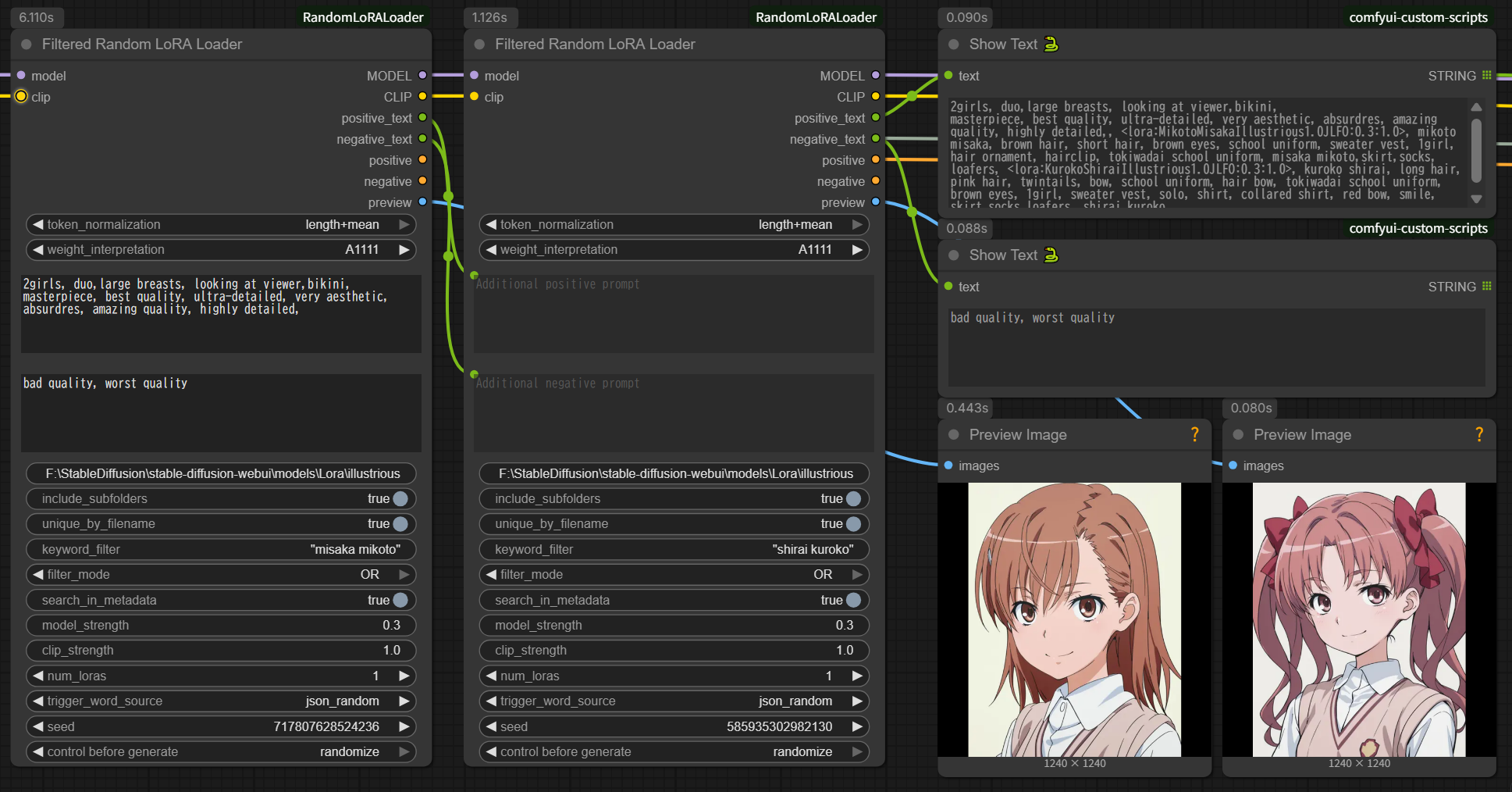
[Load Checkpoint]
  ↓
[Filtered Random LoRA Loader #1]
  keyword_filter: "style anime"
  num_loras: 1
  ↓
[Filtered Random LoRA Loader #2]
  keyword_filter: "character"
  num_loras: 1
  ↓
[KSampler]
Benefits:
- Different filtering per category
- Independent strength settings
- More flexibility
Example 3: Metadata Search
search_in_metadata: true
keyword_filter: "detailed eyes"
Searches in:
- Filenames
- JSON
activation text - JSON
ss_tag_frequency - JSON
modelspec.description - Embedded LoRA metadata
Filtered Random LoRA Loader (LBW) 🆕 NEW v1.2.0
Advanced node with LoRA Block Weight support.
What is LBW?
LoRA Block Weight allows you to control which parts of the U-Net are affected by the LoRA:
INPUT blocks  → Structure, composition, layout
   ↓
MIDDLE block  → Overall features
   ↓
OUTPUT blocks → Style, details, fine-tuning
Key Features
- 4 Preset Modes:
- Style Focused: OUTPUT blocks only (style without changing structure)
- Character Focused: Balanced IN+MID+OUT (character features)
- Structure/Composition Only: INPUT+MID blocks (layout without style)
- Balanced / Soft: Gentle application (natural results)
- Preset: Random: Randomly select one of the 4 presets
- Direct Input: Custom weight specification
- Automatic SD1.5/SDXL Detection: No manual model type selection
- Automatic Weight Adjustment: Handles mismatched element counts
Parameters
Same as Filtered Random LoRA Loader, plus:
| Parameter | Description | Default |
|-----------|-------------|---------|
| weight_mode | LBW preset or Direct Input | Normal (All 1.0) |
| lbw_input | Custom weights (for Direct Input) | (empty) |
Weight Modes
Normal (All 1.0)
Standard LoRA application without block weighting.
Style Focused
SDXL: 1,0,0,0,0,0,0,0,0,0,0,1,1,1,1,1,1,1,1,1
SD1.5: 1,0,0,0,0,0,0,1,1,1,1,1,1,1,1,1,1
- OUTPUT blocks only
- Style without changing structure
- Use for: Art style LoRAs, effect LoRAs
Character Focused
SDXL: 1,1,1,1,0,0,0,0,0,0,1,1,1,1,1,1,1,1,1,1
SD1.5: 1,0,0,0,0,0,0,0,1,1,1,1,1,1,1,1,1
- Balanced IN+MID+OUT
- Character features preserved
- Use for: Character LoRAs, person LoRAs
Structure/Composition Only
SDXL: 1,1,1,1,1,1,1,1,1,1,1,0,0,0,0,0,0,0,0,0
SD1.5: 1,1,1,1,1,1,1,1,0,0,0,0,0,0,0,0,0
- INPUT+MID blocks only
- Structure without changing style
- Use for: Pose LoRAs, composition LoRAs
Balanced / Soft
SDXL: 1,1,1,1,0,0,0,0,0,0,1,1,1,1,1,1,0,0,0,0
SD1.5: 1,1,1,1,0,0,0,1,1,1,1,1,0,0,0,0,0
- Gentle application
- Natural results
- Use for: General LoRAs, multi-LoRA workflows
Preset: Random
Randomly selects one of the 4 presets above each execution.
Direct Input
weight_mode: Direct Input
lbw_input: "1,0.5,0.5,0,0,0,0,0,0,0,1,0.8,0.8,0.8,0.8,0.8,0.5,0.5,0.5,0.5"
- Custom weight specification
- SDXL: 20 elements, SD1.5: 17 elements
- Auto-adjusted if count doesn't match
Use Cases
Example 1: Style Only
[Filtered Random LoRA Loader (LBW)]
  keyword_filter: "anime watercolor"
  weight_mode: Style Focused
  ↓
[KSampler]
Result: Applies anime watercolor style without changing composition
Example 2: Structure then Style
[Load Checkpoint]
  ↓
[Filtered Random LoRA Loader (LBW)]
  keyword_filter: "pose"
  weight_mode: Structure/Composition Only
  ↓
[Filtered Random LoRA Loader (LBW)]
  keyword_filter: "oil painting"
  weight_mode: Style Focused
  ↓
[KSampler]
Result: Pose adjustment → Oil painting style applied
Example 3: Custom Weights
weight_mode: Direct Input
lbw_input: "1,0.5,0.5,0.5,0,0,0,0,0,0,1,1,1,1,1,1,0.5,0.5,0.5,0.5"
Result: Custom block weight distribution
Advanced: Custom Presets
You can edit presets directly in the source file:
File: filtered_random_lora_loader_lbw.py (lines 29-41)
See README_LBW.md for detailed customization guide.
Tips & Tricks
Serial Connection for Multiple Effects
Connect nodes in series to apply different LoRA categories:
[Load Checkpoint]
  ↓
[Filtered Random LoRA Loader (LBW)] (Structure/Composition Only)
  keyword_filter: "pose"
  ↓
[Filtered Random LoRA Loader (LBW)] (Style Focused)
  keyword_filter: "watercolor"
  ↓
[KSampler]
Benefits:
- Different settings per category
- Cumulative LoRA effects
- More control over final result
Strength Randomization for Variety
Use ranges instead of fixed values:
model_strength_1: "0.6-0.9"
clip_strength_1: "0.6-0.9"
Effect:
- Each generation uses different strength
- More variety in results
- Easier to find optimal strength
Keyword Filtering Best Practices
Use specific keywords:
✅ Good: "anime girl"
❌ Too broad: "anime"
Combine with metadata search:
search_in_metadata: true
keyword_filter: "detailed eyes"
Use phrases for precision:
keyword_filter: '"anime style" detailed'
→ Must contain exact phrase "anime style" AND word "detailed"
Wildcard Encode + Random LoRA Loader
Ultimate dynamic workflow:
[Wildcard Encode (Inspire)]
  text: "__style__, __pose__, {red|blue|green}"
  ↓
  populated_text ──→ [Random LoRA Loader]
                     additional_prompt_positive
  ↓
[KSampler]
Result:
- Wildcard expansion for prompts
- Random LoRA selection for variety
- Clean prompt without LoRA syntax
- Maximum flexibility
Preview Images for Organization
Enable preview display to:
- See which LoRAs were selected
- Verify LoRA appearance before generation
- Organize LoRA collections visually
Recommended workflow:
[Random LoRA Loader]
  preview ──→ [Preview Image] (for verification)
  MODEL ──→ [KSampler]
Troubleshooting
No LoRAs Found
Check:
- LoRA folder path is correct (absolute path)
.safetensors,.ptor.ckptfiles exist in the folderinclude_subfolderssetting if LoRAs are in subfolders- Console for error messages
Example valid paths:
Windows: C:/ComfyUI/models/loras/style
Linux/Mac: /home/user/ComfyUI/models/loras/style
No Trigger Words Found
Check:
- Metadata files (
.metadata.jsonor.info) exist - JSON files contain required fields:
activation textss_tag_frequencysample_promptscivitai.trainedWordsorcivitai.images
- Try different
trigger_word_sourcesettings
Verify JSON format:
{
  "activation text": "anime style, detailed",
  "ss_tag_frequency": {...},
  "modelspec.description": "...",
  "sample_prompts": "..."
}
LoRA Not Applied
Check:
num_lorasis not 0- Strength values are not all 0
- MODEL/CLIP outputs are connected properly
- Console for LoRA application messages
- For LBW node: weight_mode is not "Normal (All 1.0)" with all weights set to 0
Preview Images Not Showing
Check:
- Preview files match LoRA filename
- For video files: opencv-python is installed (
pip install opencv-python) - Supported formats: .png, .jpg, .jpeg, .gif, .webp, .mp4, .webm, .avi, .mov
- File permissions are correct
Without opencv-python:
- Static images work ✅
- Animated images work ✅
- Video files show black screen ⚠️
Strength Not Working with Negative Values (Fixed in v1.2.0)
Previous issue (v1.1.0):
Input: "-0.5"
Result: 1.0 ❌ (converted to default)
Fixed in v1.2.0:
Input: "-0.5"
Result: -0.5 ✅ (negative LoRA applied correctly)

Input: "-0.8--0.3"
Result: Random from [-0.8, -0.7, -0.6, -0.5, -0.4, -0.3] ✅
Wildcard Encode Issues
If wildcard text appears in output:
- Check connection: Connect Wildcard Encode's
populated_texttoadditional_prompt_positive - Wrong output: Don't connect
text(input) to this node - LoRA syntax appearing: This node automatically removes it
Example workflow:
[Wildcard Encode (Inspire)]
  populated_text ──→ [Random LoRA Loader]
  (not "text")       additional_prompt_positive
Duplicate LoRAs Selected
Solution: Enable unique_by_filename
unique_by_filename_1: true
This prevents selecting the same LoRA from different subfolders:
/style/lora.safetensors
/backup/lora.safetensors
→ Only one selected ✅
Detailed Documentation
- README_LBW.md - Complete LBW documentation (English)
- README_LBW_ja.md - LBW詳細ガイド(日本語)
- README_ja.md - 日本語メインドキュメント
Disclaimer and Support Policy
Disclaimer
- This node is provided as-is with no technical support
- No warranty or guarantee of functionality
- No guaranteed compatibility with future ComfyUI updates
- Bug reports and feature requests may not be addressed
- Use at your own risk
Support Status
- ❌ No individual support via issues or email
- ❌ No guaranteed bug fixes or feature additions
- ✅ Code is open source - feel free to fork and modify
- ✅ Community discussions welcome (no promises of response)
Reporting Issues
While support is not guaranteed, you can:
- Check existing issues in the repository
- Review this README and troubleshooting section
- Open an issue (may or may not be addressed)
- Fork and fix it yourself
License
MIT License
Changelog
v1.2.0 (2026-01-13)
Added
- ✅ NEW NODE: Filtered Random LoRA Loader (LBW)
- ✅ LoRA Block Weight (LBW) support with 4 presets
- ✅ Automatic SD1.5/SDXL detection for LBW
- ✅ Preset: Random mode for LBW
- ✅ Direct Input mode for custom LBW weights
- ✅ Automatic weight adjustment for LBW
- ✅ Negative value support for strength:
-0.5,-0.8--0.3now work correctly - ✅ Video preview support: .mp4, .webm, .avi, .mov (requires opencv-python)
- ✅ Strength precision improvements:
- Range specification: 0.1 increments for all nodes
- Fixed values: Rounded to 2 decimals
Fixed
- ✅ Critical bug: Negative single values (
"-0.5") now work correctly (previously converted to 1.0) - ✅ Critical bug: Negative ranges (
"-0.8--0.3") now work correctly (previously caused errors) - ✅ Improved strength parsing with regex pattern matching
Changed
- ✅ Unified strength behavior across all 3 nodes
- ✅ Renamed node: "Filtered Random LoRA Loader (Advanced)" → "Filtered Random LoRA Loader (LBW)"
- ✅ Enhanced documentation with model compatibility warnings
v1.1.0 (2026-01-04)
Added
- ✅ NEW NODE: Filtered Random LoRA Loader
- ✅ Keyword filtering with AND/OR modes
- ✅ Metadata search with caching
- ✅ Preview image output (IMAGE type)
- ✅ Duplicate filename handling (
unique_by_filename) - ✅ Animated image support (.gif, .webp)
Changed
- ✅ Breaking: Split
additional_promptintoadditional_prompt_positiveandadditional_prompt_negative - ✅ Unified strength precision to 1 decimal place
- ✅ Improved LoRA syntax removal
Fixed
- ✅ Fixed negative_text output in
json_sample_promptmode - ✅ Fixed LoRA syntax appearing in metadata trigger words
- ✅ Fixed duplicate parameter in INPUT_TYPES
v1.0.0 (2025-12-30)
Added
- ✅ Initial release
- ✅ Random LoRA Loader with 3-group support
- ✅ Multi-source metadata reading
- ✅ Strength randomization with range specification
- ✅ Trigger word extraction
- ✅ Wildcard Encode compatibility
- ✅ CONDITIONING output with cleaned prompts
References
Enjoy flexible LoRA randomization with precise control! 🎲✨