
Image with Metadata
Save and load images with prompts and generation metadata. Batch image loading with metadata extraction for ComfyUI
Nodes (5)
The Checkpoint Loader That Tells You What It Loaded
The Load Image that stops throwing your metadata away
Rotate or Randomize Checkpoints Without Rewiring a Thing
Batch-test every Flux, SD3, or Anima model in a folder without rebuilding the workflow
A Save Image that keeps your notes with the picture
ComfyUI ImageWithMetadata Nodes
English | 日本語版 README
Custom nodes for ComfyUI that enable batch image loading with metadata extraction and saving with comprehensive metadata embedding.
Features
Load Image with Metadata
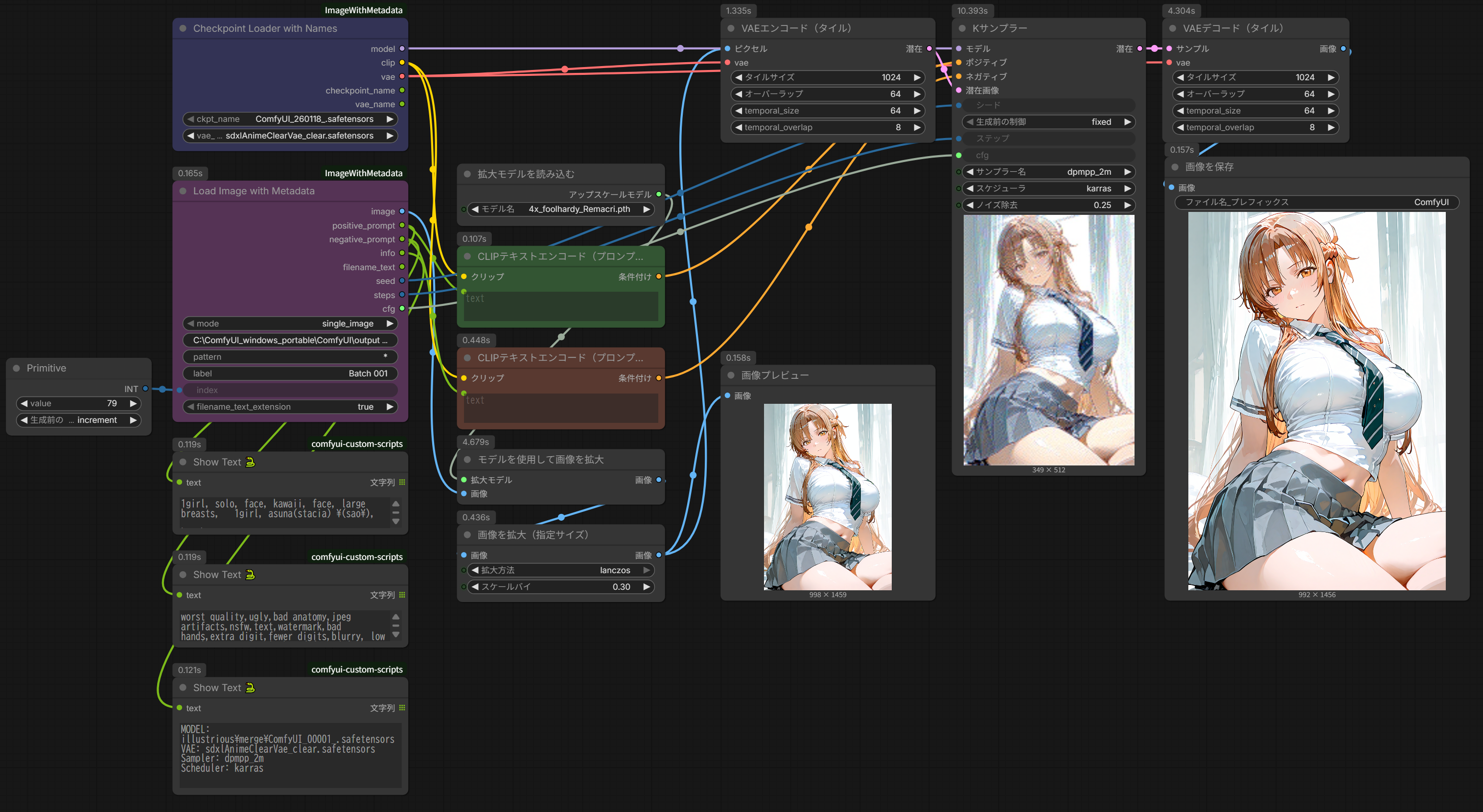
- Batch processing: Load images sequentially from a folder
- Metadata extraction: Extract prompts, seed, steps, CFG from saved images
- Two modes:
single_image: Load specific image by indexincremental_image: Auto-advance through folder
- Multiple format support: PNG, JPG, WebP, BMP, GIF
- Based on WAS Node Suite: Uses proven, stable code pattern
- Loop support: Automatically wraps to first image when reaching end
Save Image with Metadata
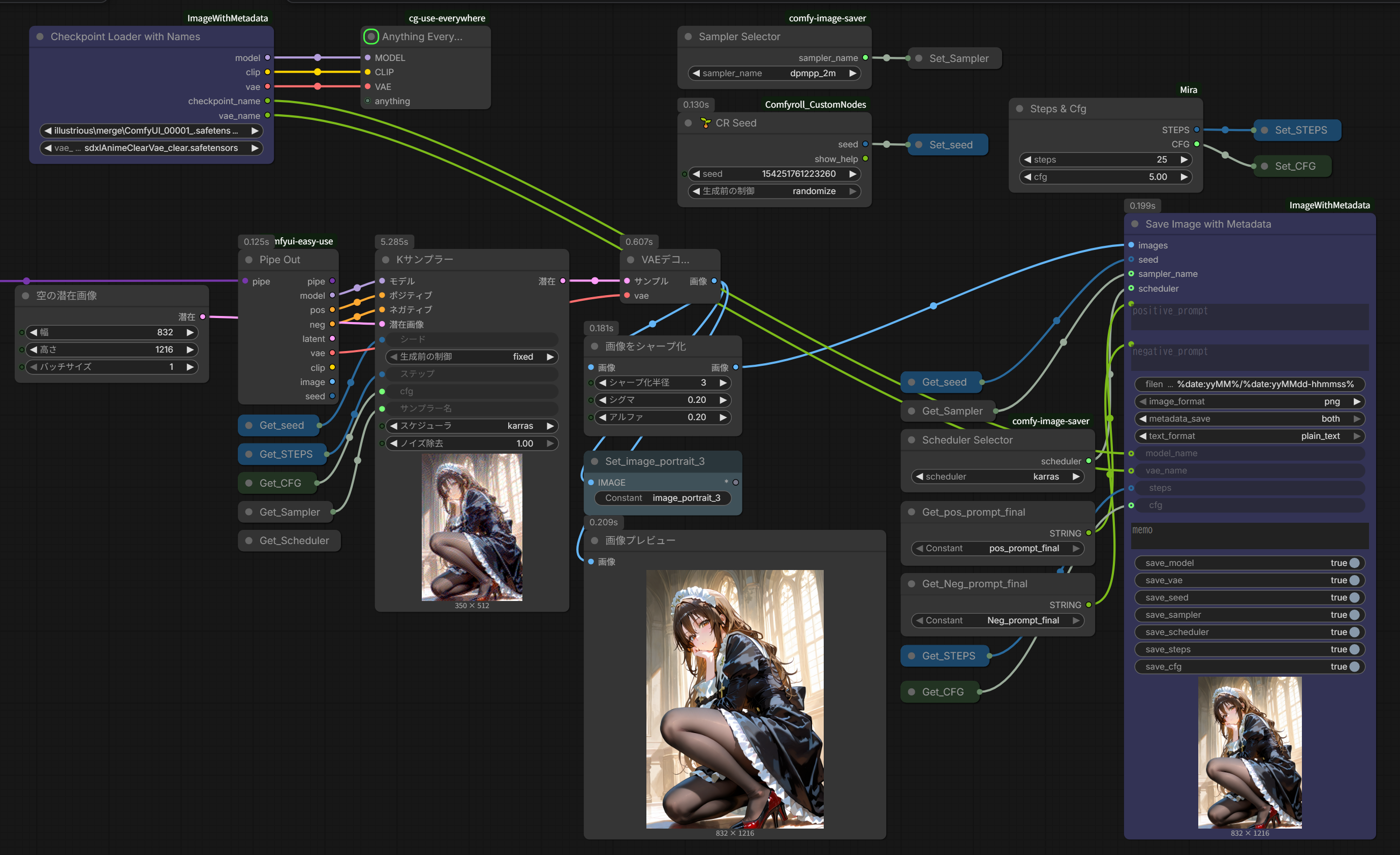
- Comprehensive metadata: Save all generation parameters
- Multiple formats: PNG, WebP, JPG
- Dual output: PNG metadata + optional text file
- Flexible text format: JSON or plain text
- Date-based naming: Automatic folder organization by date
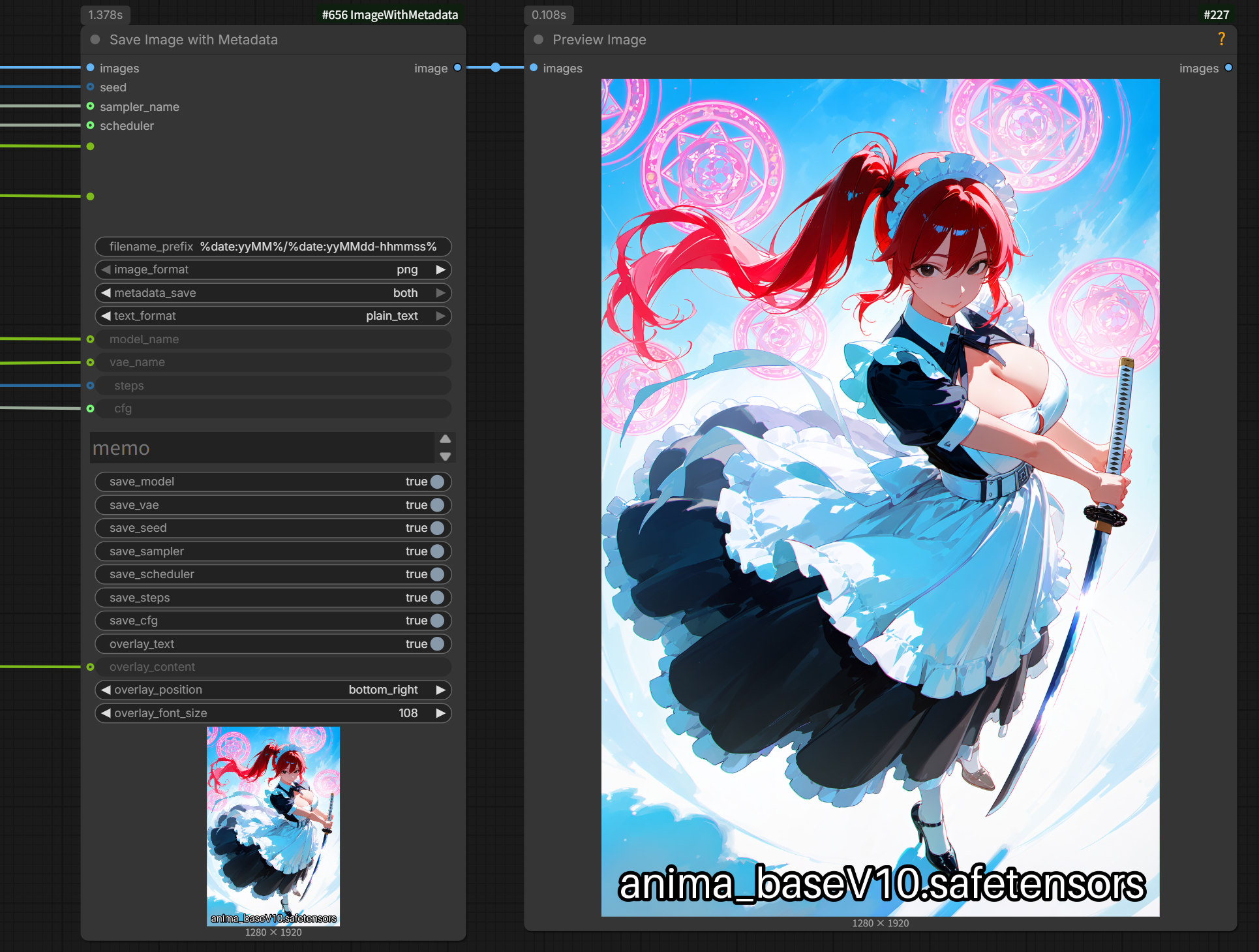
- Text overlay (burn-in): Optionally burn the model name (or custom text) directly into the saved image pixels for quick visual identification - font size auto-shrinks to fit the image width
- Preview output: Outputs the (optionally overlaid) image as an IMAGE socket, so it can be chained into a Preview Image node or other downstream nodes
Checkpoint Loader with Names
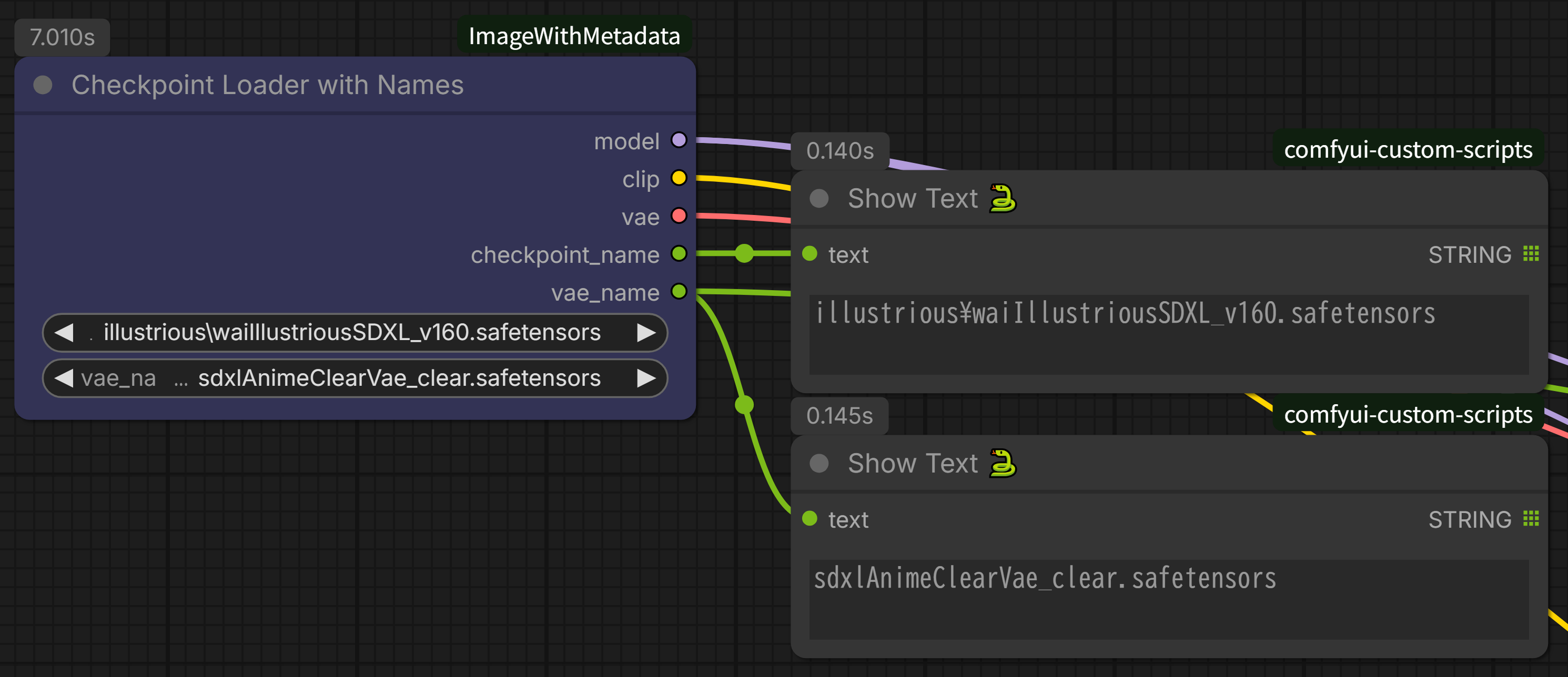
- Model name output: Returns checkpoint name as STRING
- VAE name output: Returns VAE name as STRING
- Baked VAE support: Option to use checkpoint's baked VAE
- Connect to Save node: Pass model/VAE names to SaveImageWithMetadata
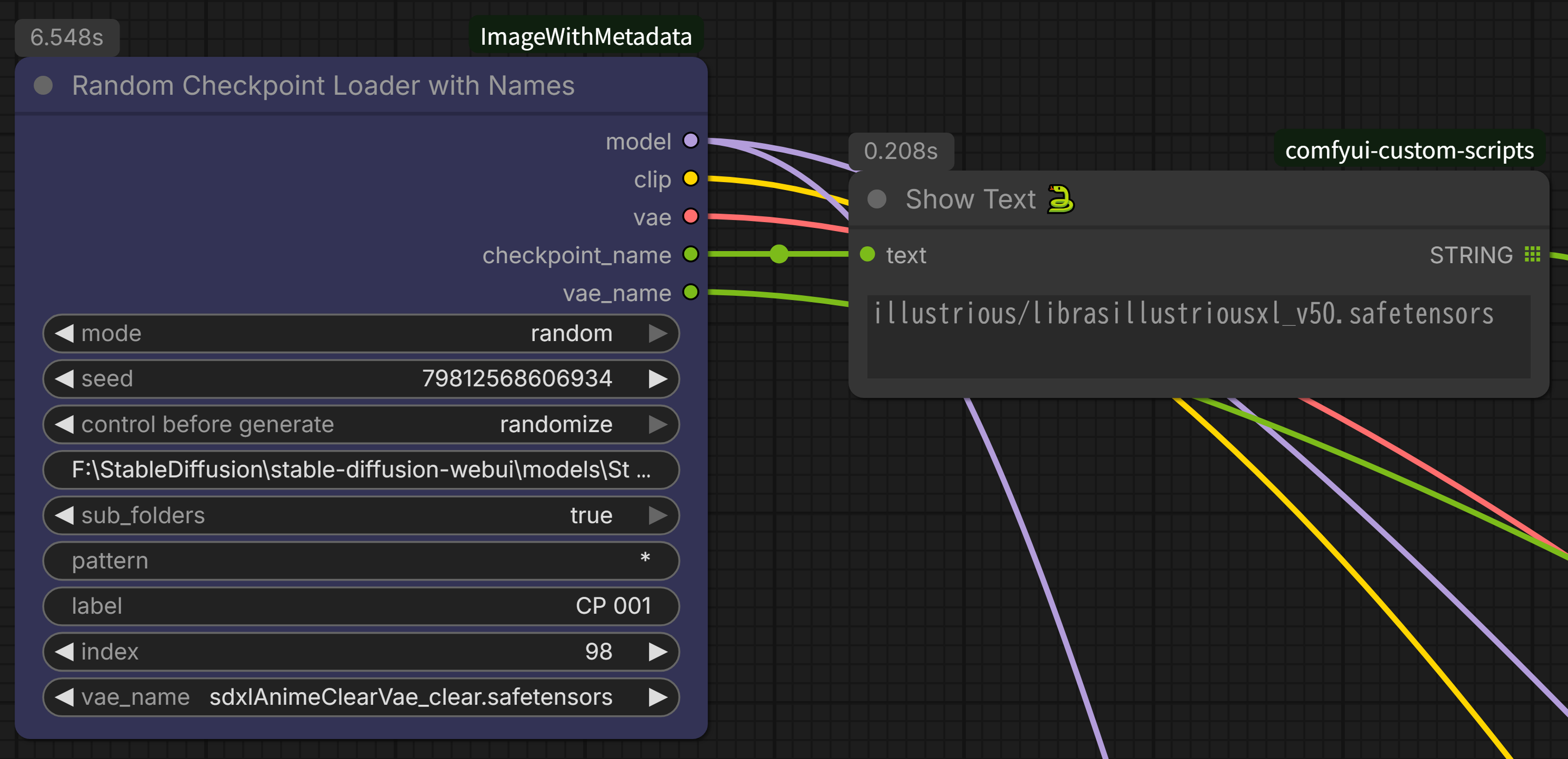
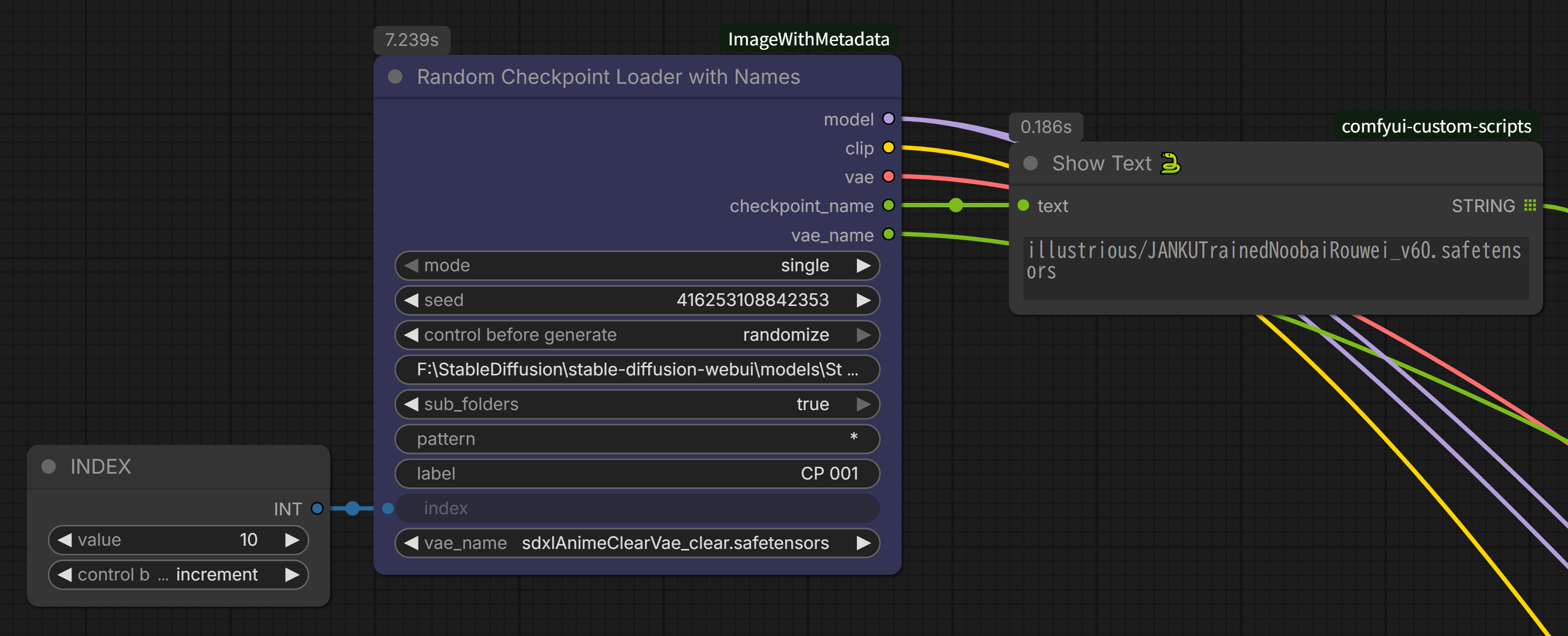
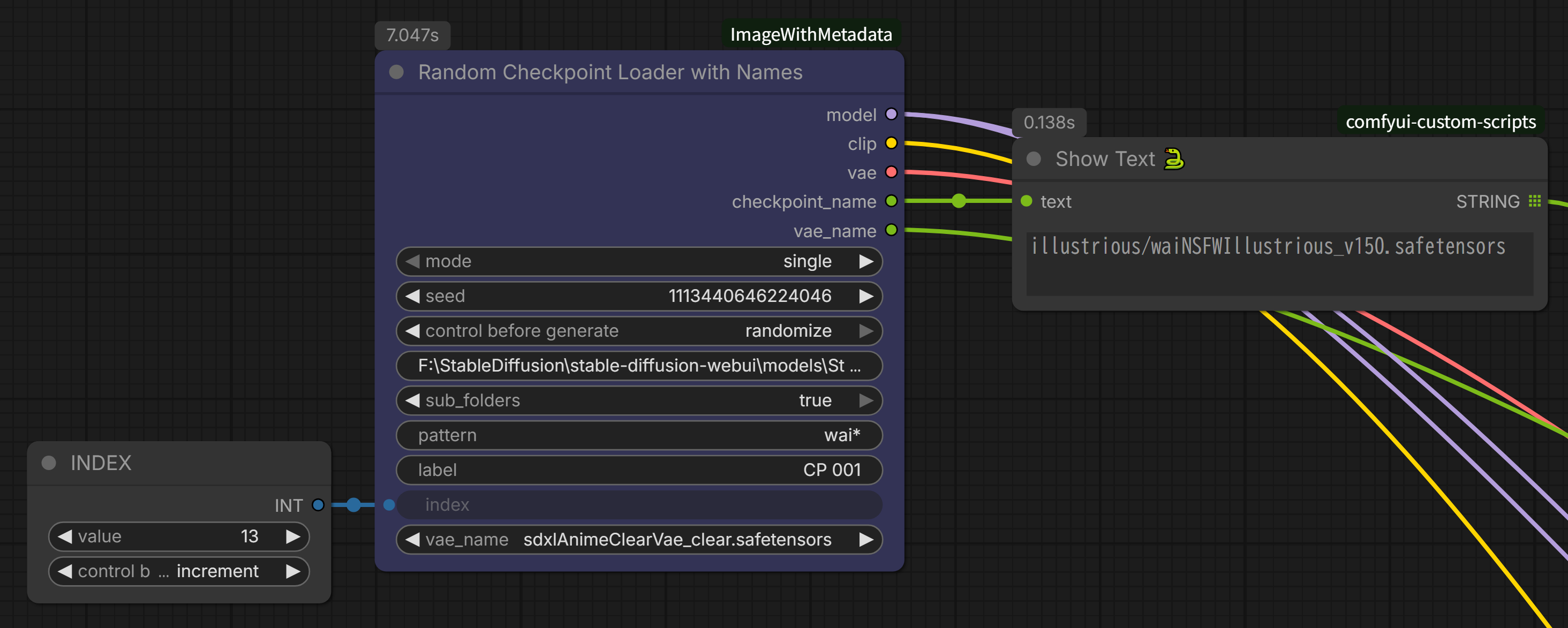
Random Checkpoint Loader with Names
- Two modes:
single: Sequential switching with external index (batch processing)random: Seed-based random selection
- Folder specification: Select checkpoints only from specific folder
- Subfolder support: Search models in subfolders
- Pattern filter: Filter by filename (e.g.,
anime_*) - BaseModel management: Separate SDXL/SD1.5/Illustrious usage
- Name output: Model and VAE names as STRING
Random Diffusion Model Loader with Names
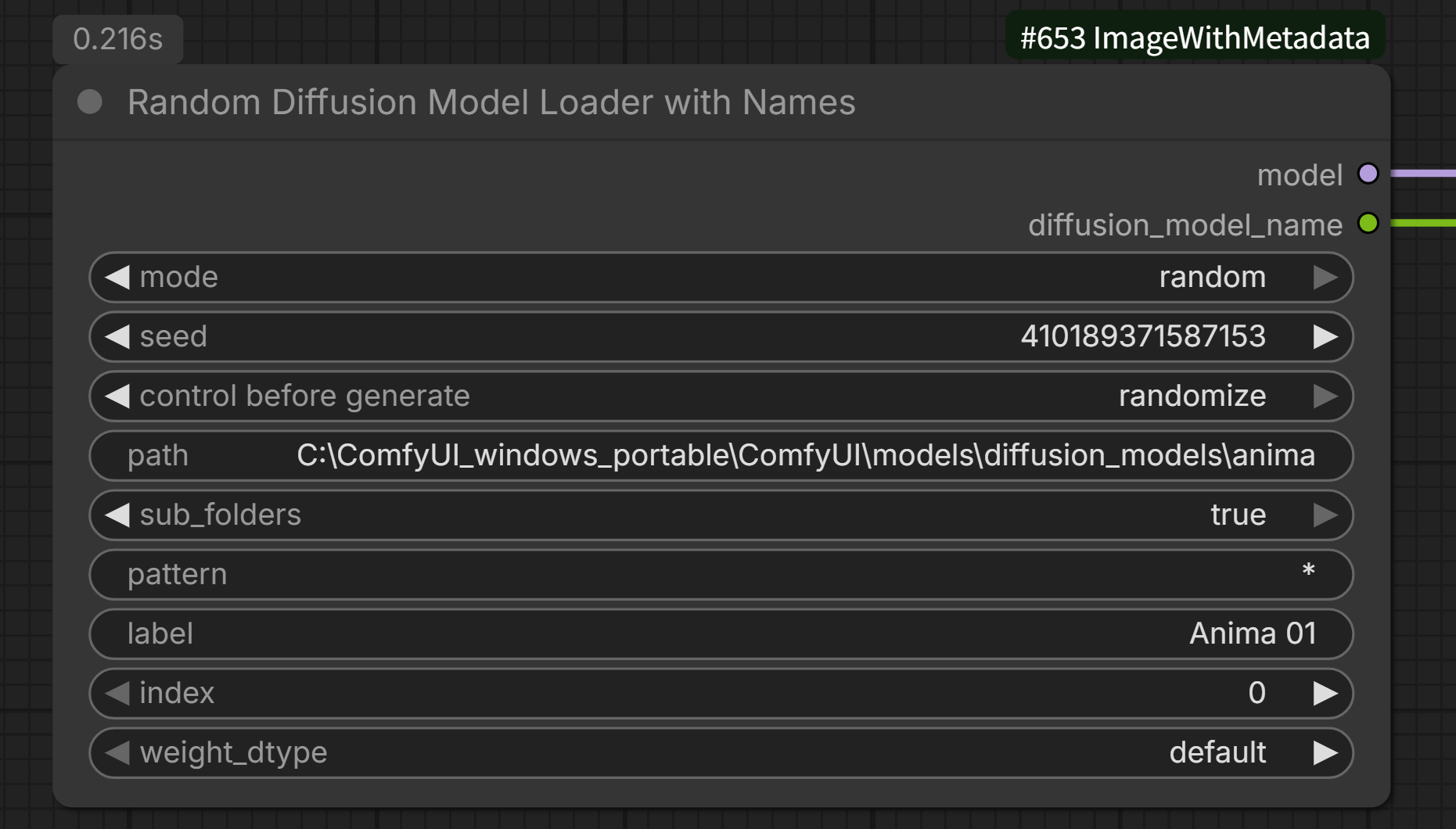
- For standalone UNET architectures: Works with Flux, SD3, Anima, and other models that ship the diffusion model (UNET) as a separate file instead of a single checkpoint
- Two modes:
single: Sequential switching with external index (batch processing)random: Seed-based random selection
- Folder specification: Select diffusion models only from a specific folder
- Subfolder support: Search models in subfolders
- Pattern filter: Filter by filename (e.g.,
*29B*for partial match) - weight_dtype option: Same dtype choices as the built-in Load Diffusion Model node (default/fp8_e4m3fn/fp8_e4m3fn_fast/fp8_e5m2)
- Name output: Returns just the model's filename (no subfolder path) as STRING
Installation
- Clone or download this repository into your ComfyUI custom_nodes folder:
cd ComfyUI/custom_nodes/
git clone https://github.com/shin131002/ComfyUI-ImageWithMetadata.git ImageWithMetadata
- Restart ComfyUI
No additional dependencies required - uses ComfyUI's built-in libraries.
Usage
For detailed usage instructions, see USAGE.md (English) or USAGE_ja.md (日本語).
Quick Start: Batch Upscaling
Recommended Pattern: Group Node with Integer Counter
- Add Integer node
- Set
control_before_generate: increment
- Set
- Add Load Image with Metadata
- Set
mode: single_image - Set
path: your image folder - Connect Integer output to
indexinput
- Set
- Select both nodes → Right-click → Convert to Group
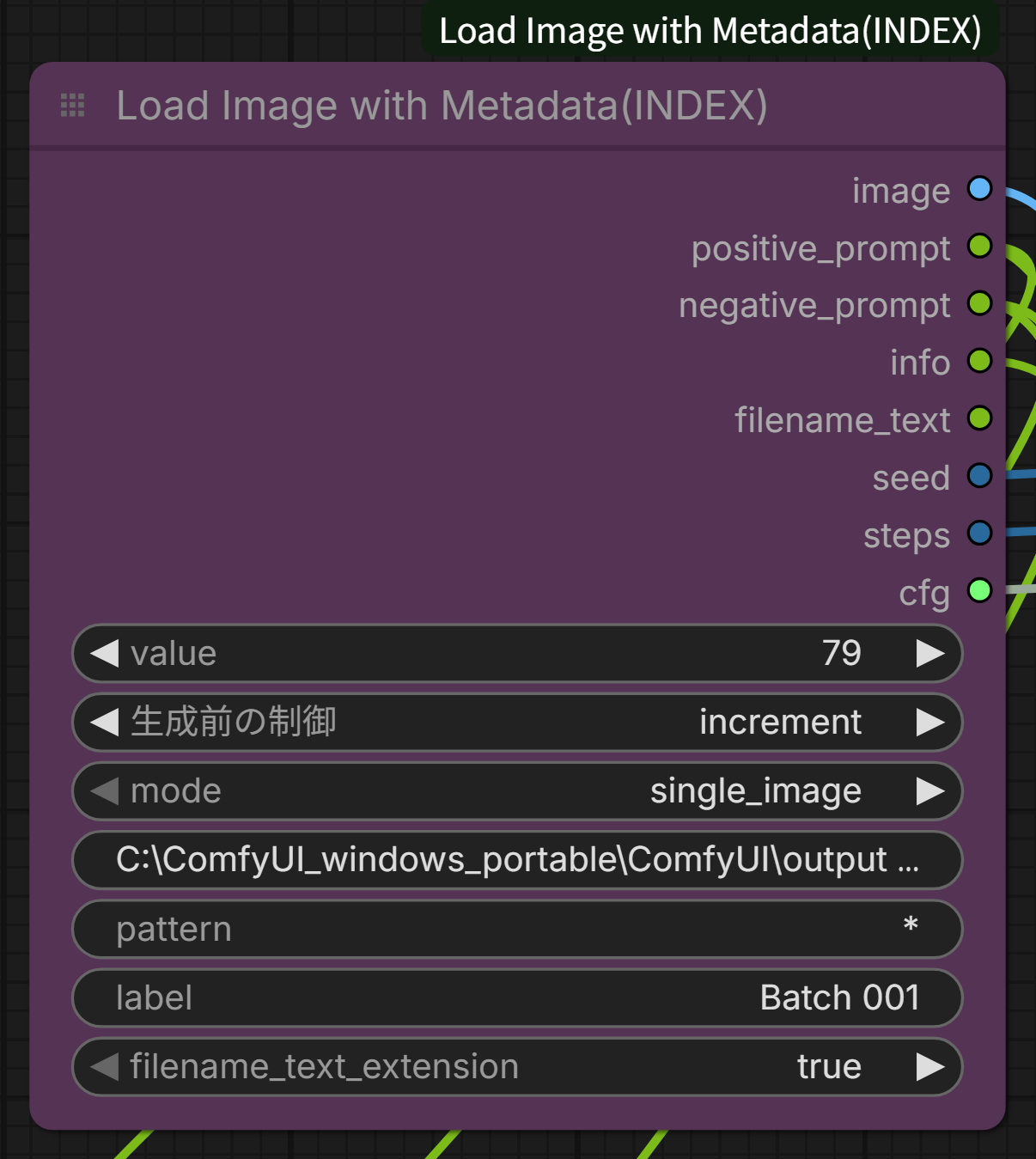
This creates a unified batch processing node!
Load Image with Metadata
Key Parameters:
mode: single_image (with external counter) or incremental_imagepath: Image folder pathpattern: File filter (* = all files)label: Batch identifierindex: Starting position (0-based)
Outputs:
- image, positive_prompt, negative_prompt, info, filename_text, seed, steps, cfg
Save Image with Metadata
Key Parameters:
filename_prefix: Supports date format like%date:yyMMdd-hhmmss%(also supportsyyyyfor a 4-digit year)metadata_save: png_metadata_only / text_file_only / bothtext_format: json / plain_textoverlay_text: Burn text onto the saved image (default: False)overlay_content: Custom text to overlay; leave empty to usemodel_nameautomaticallyoverlay_position: Corner to place the text (top_left/top_right/bottom_left/bottom_right)overlay_font_size: Starting font size; automatically shrinks to fit the image width
Connect generation parameters from other nodes for complete metadata capture.
Mode Comparison
incremental_image Mode
- Always starts from last position
- Cannot start from middle (e.g., image #50)
- Best for: Complete folder processing from start
single_image Mode + External Counter (Recommended)
- Start from any position
- See current index value
- Manually adjust if needed
- Best for: Flexible batch processing
Examples
Example 1: Auto Batch Generation with Multiple Models
Integer (increment, value=0)
  ↓
Random Checkpoint Loader with Names (single mode)
  ├→ path: F:\models\SDXL
  ├→ index: ← Integer connection
  ├→ checkpoint_name → Save Image with Metadata
  └→ MODEL, CLIP, VAE → KSampler
Example 2: Auto Upscaling Workflow
Integer (increment, value=0)
  ↓
Load Image with Metadata (single_image)
  ↓
Upscale Model
  ↓
Save Image with Metadata
Example 3: img2img Batch Processing
Integer (increment, value=50)  ← Start from 51st image
  ↓
Load Image with Metadata (single_image)
  ├→ image → VAE Encode → KSampler
  ├→ positive_prompt → CLIP Text Encode
  └→ negative_prompt → CLIP Text Encode
Example 4: Testing Multiple Diffusion Models (Flux/SD3/Anima)
Integer (increment, value=0)
  ↓
Random Diffusion Model Loader with Names (single mode)
  ├→ path: F:\models\diffusion_models\anima
  ├→ index: ← Integer connection
  ├→ diffusion_model_name → Save Image with Metadata (overlay_text: True)
  └→ MODEL → KSampler
Metadata Format
Text File (JSON)
{
  "positive_prompt": "1girl, solo, ...",
  "negative_prompt": "worst quality, ...",
  "model": "model_name.safetensors",
  "vae": "vae_name.pt",
  "seed": 123456789,
  "sampler_name": "dpmpp_2m",
  "scheduler": "karras",
  "steps": 20,
  "cfg": 7.0
}
Text File (Plain Text)
Model: model_name.safetensors
VAE: vae_name.pt
Seed: 123456789
Sampler: dpmpp_2m
Scheduler: karras
Steps: 20
CFG: 7.0
Positive: =======================================
1girl, solo, ...
Negative: =======================================
worst quality, ...
Troubleshooting
Images not loading
- Check if path exists
- Verify pattern matches files (use
*for all) - Check console for error messages
Slow performance
- This is expected for large batches
- Use single_image + Integer for better control
Metadata not extracted
- Ensure images were saved with metadata
- Check if text file exists (filename.txt)
- Supported formats: This node's format, A1111 format
Credits and License
This project is based on WAS Node Suite by WASasquatch.
- Repository: https://github.com/WASasquatch/was-node-suite-comfyui
- License: MIT License
The LoadImageWithMetadata node uses the BatchImageLoader pattern from WAS Node Suite with added metadata extraction functionality.
License
MIT License - See LICENSE file for details.
When using or distributing this software, please maintain attribution to both:
- This project
- WAS Node Suite (original BatchImageLoader implementation)
Support Policy
This is a personal project provided free of charge with limited support:
Not provided:
- Individual technical support
- Guaranteed bug fixes or feature additions
- Guaranteed compatibility with future ComfyUI updates
Provided:
- ✅ Open source code (free to modify and fork)
- ✅ Basic documentation
- ✅ GitHub discussions (responses not guaranteed)
If you encounter issues:
- Check this README and USAGE.md/USAGE_ja.md
- Search existing issues
- Open a new issue (responses not guaranteed)
- Fork and fix yourself (MIT License)
Disclaimer: This software is provided "as is" without warranty of any kind. The author is not responsible for any damages arising from the use of this software.
Contributing
Issues and Pull Requests are welcome, but please note that response time may vary due to time constraints.
Changelog
v1.2.0 (2026-08-26)
- Added Random Diffusion Model Loader with Names node
- single/random mode for diffusion model (UNET) switching - for Flux/SD3/Anima and other standalone-UNET architectures
- Folder specification, subfolder support, and pattern filter (same as Random Checkpoint Loader with Names)
- weight_dtype option matching the built-in Load Diffusion Model node
- Outputs the model's filename only (no subfolder path)
- Added text overlay (burn-in) support to Save Image with Metadata
- Optionally burns the model name or custom text onto the saved image for quick visual identification
- Auto-shrinks font size to fit the image width
- Added IMAGE output to Save Image with Metadata for chaining into Preview Image or other downstream nodes
- Fixed:
%date:yyyy%infilename_prefixproduced a duplicated 2-digit year (e.g. "2626") instead of the 4-digit year - Fixed: multi-line negative prompts in A1111-format metadata were truncated to their first line on load
v1.1.0 (2026-01-26)
- Added Random Checkpoint Loader with Names node
- single/random mode for checkpoint switching
- Folder specification and subfolder support
- Pattern filter functionality
- BaseModel-specific management support
v1.0.0 (2026-01-25)
- Initial release
- Load Image with Metadata node
- Save Image with Metadata node
- Checkpoint Loader with Names node
- Based on WAS Node Suite's BatchImageLoader pattern