
Anima-2.9B Remap
Auto block-index remapping for applying old-Anima LoRAs and merging models with Anima-2.9B (28-to-40-block layer expansion)
Nodes (6)
Keyword-filter your way through a big Anima LoRA folder
The Anima LoRA loader for when you're not satisfied with the default remap
Put old Anima LoRAs on Anima-2.9B without the scribble-fest
Merge 28-block Anima into 2.9B without the static
The Anima merge node for hand-tuning the new blocks
Roll the dice on your Anima LoRA folder, with the 28/40 remap handled
ComfyUI-Anima29B-Remap
[!CAUTION] This repository is no longer updated, and it contains known bugs that are already fixed in ComfyUI-Anima-Remap.
Development has moved to ComfyUI-Anima-Remap, which covers the same Anima/Anima-2.9B functionality below plus Anima-3.8B (52 blocks) support, with the same node IDs so existing workflows keep loading (just change which manifest file is selected). All future fixes and features go into the new repository, so please migrate there. This one remains available as-is but will not receive further fixes.
[!WARNING] Bugs present in this repository, fixed only in the new one:
- LoRA tags with an extension or a subfolder path fail to resolve.
<lora:mylora:0.8>works, but<lora:mylora.safetensors:0.8>for a LoRA inside a subfolder, or a name copied from ComfyUI's own LoRA dropdown (which uses\on Windows), silently fails with a "LoRA not found" warning even though the file is there.- The random LoRA loaders skip symlinked subfolders. LoRAs that only exist behind a symbolic link never appear as candidates, even though ComfyUI's native LoRA dropdown shows them fine.
save_remappedcaches ignore later setting changes. Once a cache file is written, changingmanifest/extend_to_new_layers/extend_strengthhas no effect for that LoRA — the stale cache keeps being loaded, with no warning. In the new repository the cache filename includes a hash of these settings, so changing them produces a fresh remap.None of these will be fixed here. If any of them affects you, migrate to ComfyUI-Anima-Remap.
[!NOTE] If you only use the original Anima / Anima-2.9B and none of the bugs above affect you, there's no urgency to migrate — everything below still works as documented. Before moving, we recommend checking the new repo's README ("Text encoder compatibility caveat") first.
[!IMPORTANT] Do not install both this repository and the new
ComfyUI-Anima-Remapat the same time. They register the same node IDs, so having both installed will cause a node-registration conflict. There's also no need to have both installed.
A ComfyUI custom node package for applying LoRAs and merging models made for the original Anima (base, 28 blocks) onto Anima-2.9B (a 28-to-40-block LLaMA Pro-style layer-expansion model), while automatically accounting for the difference in block/layer structure. Also includes Anima-specific random LoRA loaders (folder-based, with the same auto-remap logic built in).
What this is for
Anima-2.9B was expanded by inserting 12 new blocks in between the blocks of the original Anima (28 blocks), for a total of 40 blocks. Because of this, applying a LoRA or merging a model that was made for the original Anima directly onto Anima-2.9B causes the block indices to line up incorrectly, so weights get applied to the wrong blocks entirely — resulting in broken, "scribble-level" images, or noisy output from model merges.
This package uses the officially distributed expand_manifest.json (which records how the block indices map during the expansion) to automatically detect and correct this mismatch before applying a LoRA or merging models.
Folder structure
ComfyUI-Anima29B-Remap/
├── LICENSE                                  # Code license (MIT)
├── README.md                                # This file (English)
├── README_ja.md                             # Japanese README
├── __init__.py                              # Node registration
├── mapping/
│   └── expand_manifest_preview_v1.json      # Official layer-expansion manifest (for preview-v1, see provenance note below)
└── nodes/
    ├── __init__.py                          # (empty, makes this a proper package)
    ├── anima_common.py                      # Shared logic (block detection, mapping computation)
    ├── lora_remap_anima.py                  # LoRA tag loader (auto remap)
    ├── lora_remap_extended_anima.py         # LoRA tag loader, extended (experimental, front/back blend)
    ├── model_merge_anima.py                 # Model merge (auto remap)
    ├── model_merge_extended_anima.py        # Model merge, extended (experimental, front/back blend)
    ├── anima_random_lora_loader.py          # Random LoRA loader, 3 folders (auto remap)
    └── anima_filtered_random_lora_loader.py # Random LoRA loader, 1 folder + keyword filter (auto remap)
Installation
Place this entire folder under ComfyUI/custom_nodes/ and restart ComfyUI.
ComfyUI/custom_nodes/ComfyUI-Anima29B-Remap/
Or clone it directly:
cd ComfyUI/custom_nodes/
git clone https://github.com/shin131002/ComfyUI-Anima29B-Remap.git
After restarting, search for "Anima" in the node search (double-click the canvas) and you'll find these nodes:
- Anima LoRA Tag Loader (Auto Remap)
- Anima Model Merge (Auto Remap)
- Anima LoRA Tag Loader Extended (Experimental) — experimental, see below
- Anima Model Merge Extended (Experimental) — experimental, see below
- Anima Random LoRA Loader (28/40 Auto) — folder-based random selection, 3 groups, see below
- Anima Filtered Random LoRA Loader (28/40 Auto) — folder-based random selection, 1 folder + keyword filter, see below
Node 1: Anima LoRA Tag Loader (Auto Remap)
A LoRA loader with the same <lora:name:weight> tag syntax used by LoRA Tag Power Loader-style nodes, parsed out of a prompt string. When the connected model has 40 blocks (an Anima-2.9B-family model) and the LoRA being applied is determined to have been made for the original Anima (28 blocks), it automatically remaps the LoRA's keys before applying it.
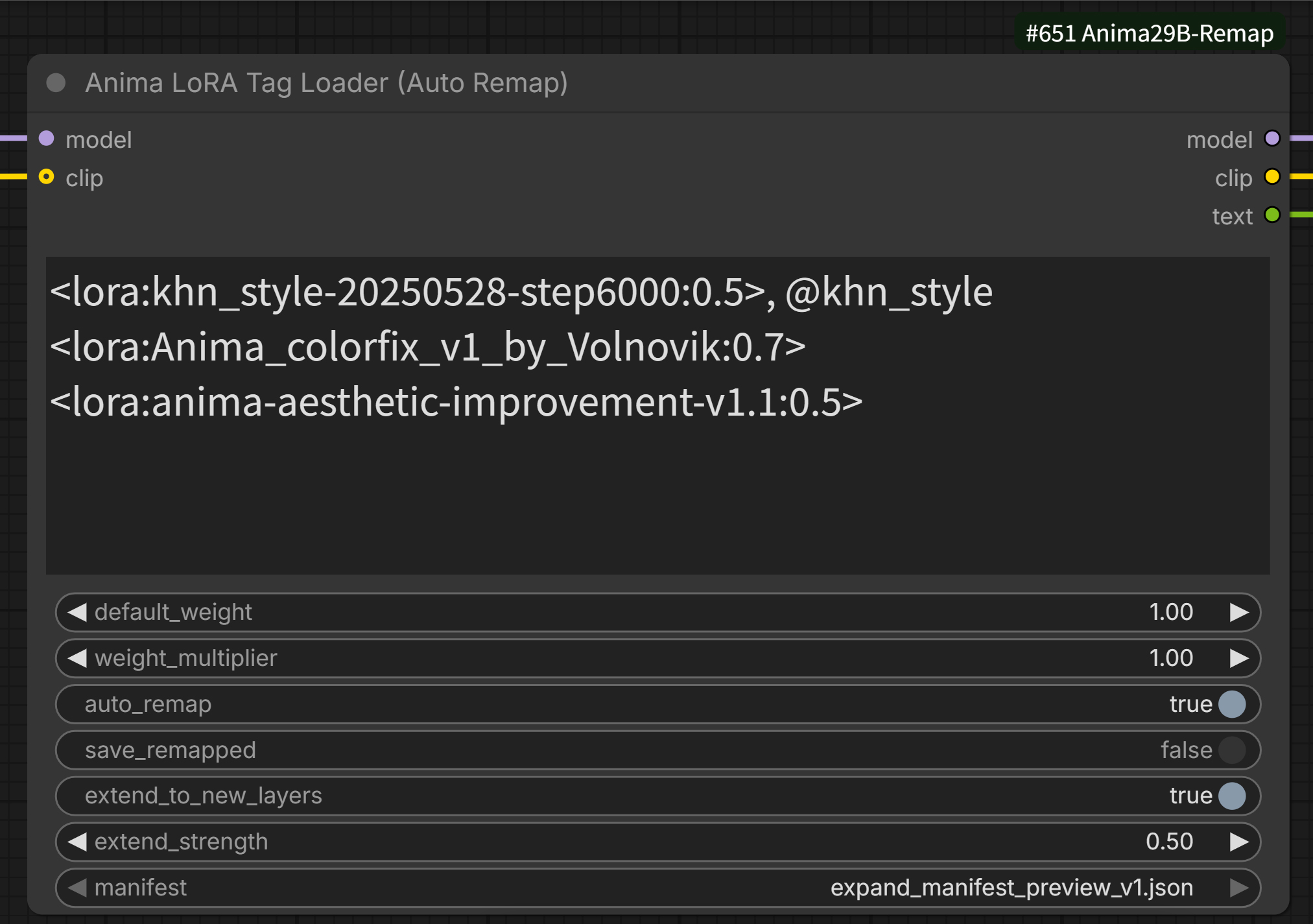
Inputs
| Name | Type | Description |
|---|---|---|
| model | MODEL | The model to apply the LoRA(s) to |
| clip | CLIP (optional) | The CLIP to apply the LoRA(s) to |
| text | STRING | Prompt string containing <lora:name:weight> tags |
| default_weight | FLOAT | Default weight used when a tag omits it |
| weight_multiplier | FLOAT | A multiplier applied uniformly to every LoRA's weight |
| auto_remap | BOOLEAN | When ON, enables the auto-remap mechanism (default: ON) |
| save_remapped | BOOLEAN | When ON, saves the remapped LoRA to disk as a file whenever a fresh remap is performed (default: OFF — see details and a caution below) |
| extend_to_new_layers | BOOLEAN | Experimental. When ON, also applies an approximation of the LoRA's effect onto the 12 newly-inserted layers (default: OFF) |
| extend_strength | FLOAT | Strength used for extend_to_new_layers (multiplies together with the tag's own weight) |
| manifest | dropdown | Selects which version of expand_manifest.json to use |
Outputs
| Name | Type | Description |
|---|---|---|
| model | MODEL | Model with the LoRA(s) applied |
| clip | CLIP | CLIP with the LoRA(s) applied |
| text | STRING | The prompt string with LoRA tags stripped out (feed this to your downstream CLIP Text Encoder) |
Tag syntax
1girl, masterpiece <lora:my_old_anima_style:0.8> outdoors
You can also specify the CLIP weight separately with <lora:name:model_weight:clip_weight> (if omitted, it defaults to the model weight).
Auto-detection logic (overview)
- Detect the total block count of the connected
model(max index + 1 found amongnet.blocks.Nkeys;llm_adapter.blockskeys are excluded from this detection) - Detect how many blocks the LoRA file itself has keys for, the same way
- Only proceed to remapping if the model has more blocks than the LoRA was made for
- If the model has 28 blocks (original Anima), the entire remap mechanism (including the cache check described below) is skipped completely, and the original LoRA is always applied as-is
⚠️ New: if the LoRA turns out to reference more blocks than the connected model has (e.g. a LoRA made for Anima-2.9B applied to a 28-block model), remapping it down isn't possible — there's nowhere for its high-index tensors to go. Rather than silently letting ComfyUI skip those unmatched tensors and produce a partial/broken application, the node raises an error and stops the run. This is checked regardless of which code path above produced the final LoRA (cache hit, freshly remapped, or as-is).
About the remap cache (save_remapped)
save_remapped is a toggle that controls whether the remapped LoRA gets saved to disk as a file. Saving it lets subsequent runs skip the remapping step entirely and just load the saved file directly.
⚠️ Caution: while you're still tuning
manifest,extend_strength, orextend_to_new_layers, we strongly recommend keepingsave_remappedOFF.Once a cache file (
_29Bremap) has been saved even once, any later changes tomanifest,extend_to_new_layers, orextend_strengthwill have no effect at all. As long as the cache file exists, its contents — baked in at whatever settings were active the moment it was saved — will keep being loaded and take priority over your current node settings.The recommended workflow is:
- Keep
save_remappedOFF while you experiment withmanifest/extend_to_new_layers/extend_strengthto find settings you like (during this phase, the LoRA is remapped fresh on every run and nothing is written to disk)- Once you've settled on values, turn
save_remappedON for a single run to write out the final cache file- If you want to try different settings again later, delete the generated
_29Bremapfile first, then go back to step 1
This is the full sequence of events (which only occurs when the connected model has 40 blocks — i.e. is Anima-2.9B-family — and the LoRA is determined to need remapping):
- First, check whether a file named
<original LoRA name>_29Bremap.<extension>already exists, using the same lookup method as for the original LoRA (including subfolders) - If it exists: load that file directly and apply it. No remapping is performed at all — an existing cache file always takes priority, regardless of the
save_remappedsetting - If it doesn't exist: load the original LoRA, remap its keys on the fly, and apply it. If
save_remappedis ON at this point, the remapped result is saved as<original LoRA name>_29Bremap.<extension>in the same folder as the original LoRA (if a file with that name already exists for some other reason, it is not overwritten — the save is skipped). Ifsave_remappedis OFF, the LoRA is still applied, but nothing is written to disk (so this "remap on the fly" step will happen again on every subsequent run)
In short, leaving save_remapped ON means the _29Bremap file generated on the first run keeps getting reused as a cache afterward, so every run after the first applies the LoRA with no remapping overhead.
Notes
llm_adapter.blocks(6 blocks, not part of the expansion) is treated as a completely separate structure from the mainnet.blocks(the 28-to-40 expansion target) and is always excluded from remapping- LoRA key naming is supported in two forms: dot-separated (
net.blocks.N.) and kohya-style underscore-separated (..._blocks_N_...). Any other naming convention won't be detected, and the LoRA will be applied unmodified without remapping - Nodes 5 & 6 (the random loaders) scan for
.safetensors,.pt, and.ckptfiles
Node 2: Anima Model Merge (Auto Remap)
Merges two Anima models (MODEL), automatically reconciling any difference in block/layer structure between them.
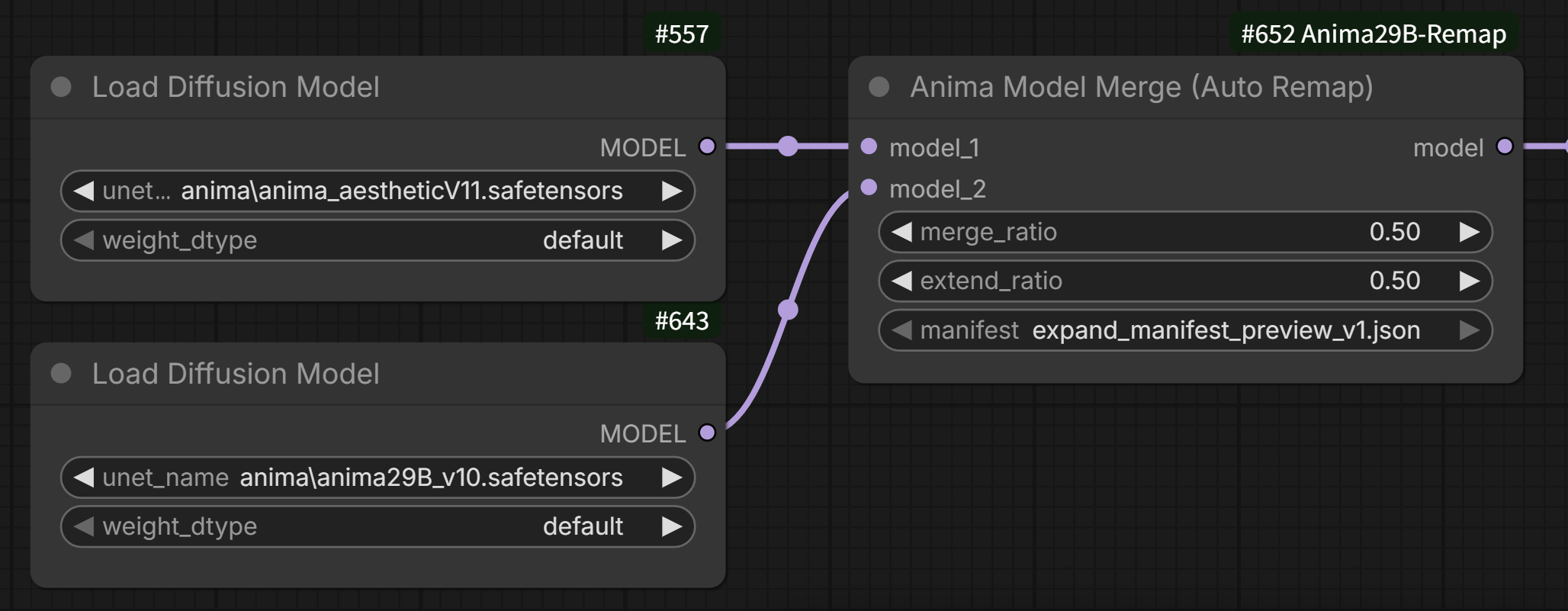
Inputs
| Name | Type | Description |
|---|---|---|
| model_1 | MODEL | First model to merge (top slot) |
| model_2 | MODEL | Second model to merge (bottom slot) |
| merge_ratio | FLOAT (0.0–1.0) | Blend weight for model_1 |
| extend_ratio | FLOAT (0.0–1.0) | Experimental. How much of the corresponding old-model layer to blend into the 12 newly-inserted blocks (default: 0.0 — new layers stay 100% the 2.9B side's own values, as before) |
| manifest | dropdown | Selects which version of expand_manifest.json to use |
Outputs
| Name | Type |
|---|---|
| model | MODEL |
What merge_ratio means
1.0→ output is 100%model_1(top)0.0→ output is 100%model_2(bottom)0.5→ a 50/50 blend
Automatic architecture handling
| Situation | Output |
|---|---|
| Both models have 28 blocks (both original-Anima derivatives) | Direct merge at 28 blocks (no remap needed) |
| Both models have 40 blocks (both Anima-2.9B derivatives) | Direct merge at 40 blocks (no remap needed) |
| One has 40 blocks, the other has 28 | Output is always 40 blocks. The 28-block model's weights are remapped and blended in at the old (shared) block positions according to merge_ratio. By default, the 12 newly-inserted blocks always keep the 40-block model's own values — regardless of whether that model is plugged into model_1 or model_2 — and are unaffected by merge_ratio (this can be changed with extend_ratio, see below) |
About extend_ratio (extending to the new 12 layers, experimental)
By default (extend_ratio = 0.0), the 12 newly-inserted blocks always keep the 40-block model's (Anima-2.9B-family) own values, unaffected by merge_ratio or the 28-block model at all.
Setting extend_ratio above 0 uses expand_manifest.json's inserted_to_source (which records which base block each new block was originally copied from at initialization) to blend in the 28-block model's corresponding (remapped) source layer:
final new-layer value = (1 - extend_ratio) * 2.9B model's own value + extend_ratio * the 28-block model's corresponding source layer
At extend_ratio = 1.0, the new layers are fully replaced by the 28-block model's (approximated) values as well. This follows the same idea as the LoRA node's extend_to_new_layers / extend_strength, but is an independent feature — and, just like there, it's a best-effort approximation with no "correct" answer.
Since this node has no built-in save function (see below), it doesn't have the same "settings silently stop applying once cached" caveat that the LoRA node's save_remapped does — saving a merge result always requires explicitly running the ModelSave node, so there's no risk of unknowingly reusing a file baked with outdated settings.
Bypass behavior
When the node is set to "Bypass" mode, ComfyUI's standard behavior takes over: the first matching input (model_1, the top slot) is passed straight through to the output. This is standard ComfyUI behavior for a node with two MODEL inputs and one MODEL output — no special handling is implemented in this node for it.
Saving the result
This node has no built-in save functionality. To save the merge result, connect the model output to ComfyUI's built-in ModelSave node (found under the advanced/model_merging category).
[Anima Model Merge] --MODEL--> [ModelSave]
ModelSave only saves the UNet (diffusion model) portion — CLIP and VAE are not included. By default it saves under ComfyUI/output, so move the file to somewhere like models/diffusion_models if you want to use it for generation.
Nodes 3 & 4: the Extended (Experimental) variants
Anima LoRA Tag Loader Extended (Experimental) and Anima Model Merge Extended (Experimental) are separate files and separate nodes, added without changing the regular nodes (1 & 2) at all. The regular nodes keep working exactly as before.
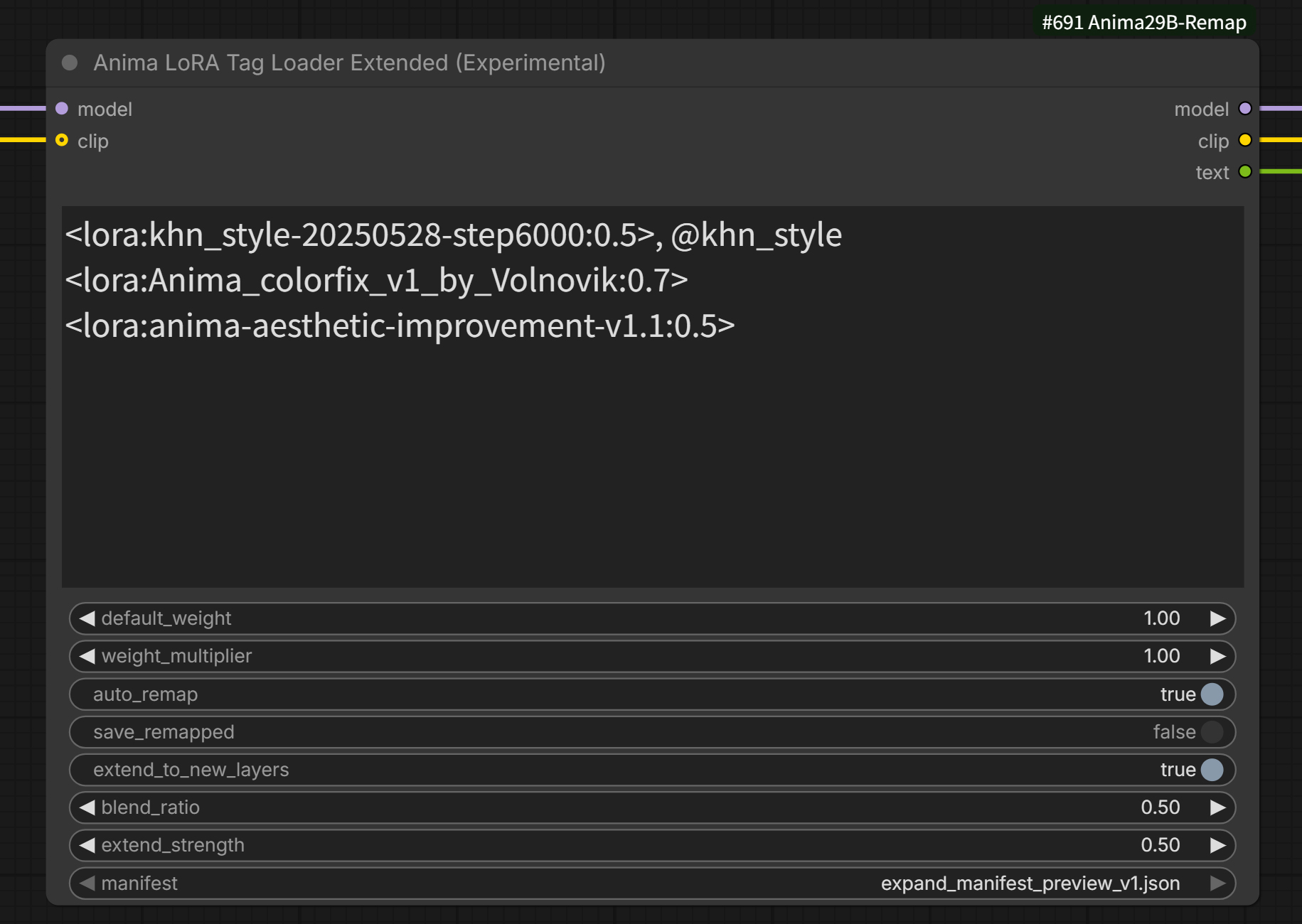
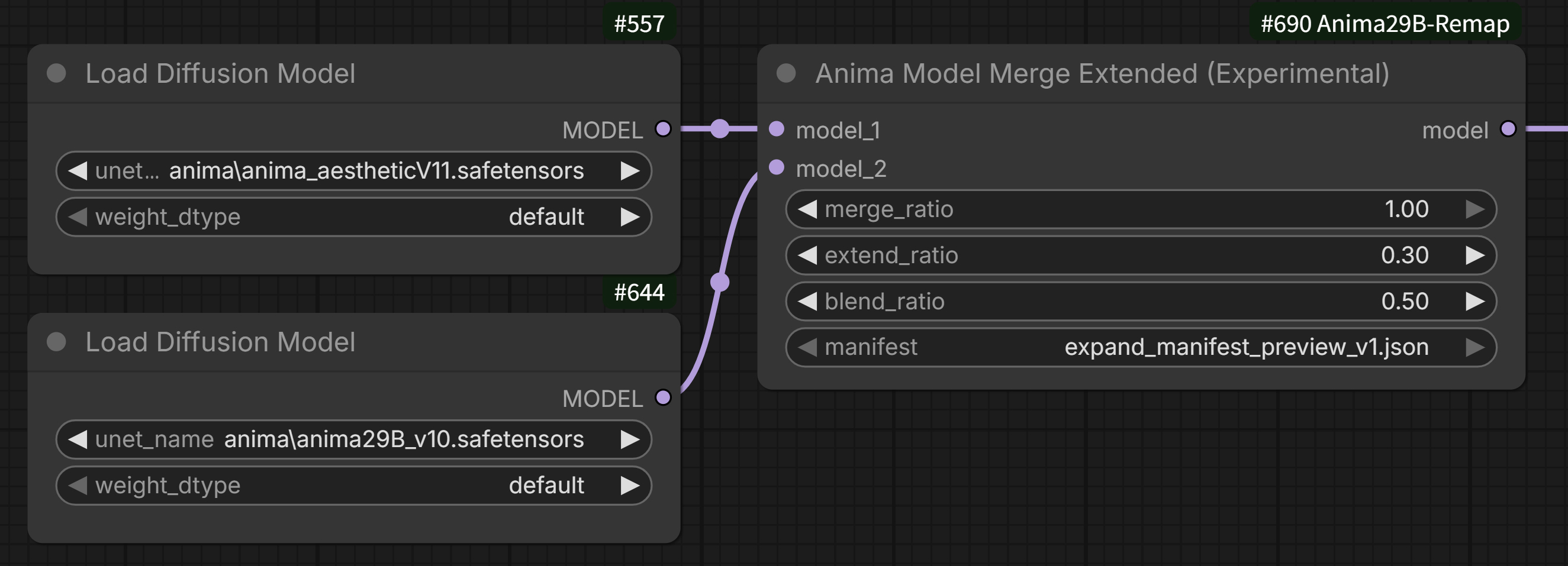
What's extended
The regular nodes' extend_to_new_layers / extend_strength (LoRA) and extend_ratio (model merge) only used the single "preceding old layer" recorded in expand_manifest.json's inserted_to_source when projecting onto the 12 newly-inserted layers.
The Extended variants generalize this into blending both the preceding ("front") and following ("back") old layers, at a ratio you choose:
- LoRA Extended: adds
blend_ratio(0.0–1.0). The front layer's weight isblend_ratio, the back layer's weight is1 - blend_ratio. - Model Merge Extended: adds the same
blend_ratio, used together with the existingextend_ratio(extend_ratiostill controls the mix between "the 2.9B model's own value" and "the blended old-model value";blend_rationow controls how that blended old-model value itself is built from the front vs. back layer).
value applied to the new layer = front (preceding) layer's value * blend_ratio + back (following) layer's value * (1 - blend_ratio)
At blend_ratio = 1.0, the back layer's contribution is zero, so the result is numerically identical to the regular nodes (1 & 2) (verified). Lowering blend_ratio progressively mixes in the following layer's influence.
Edge case: insertion positions near either end of the block sequence may only have ONE of the two neighbors (there's no "front" for the very first inserted block, no "back" for the very last). For those layers,
blend_ratiodoesn't apply — the sole available neighbor is always used at full strength, rather than being scaled down byblend_ratio(which could otherwise zero out that layer's extension entirely ifblend_ratiofavored the missing side).
About the cache file
The LoRA Extended node's cache file uses a different suffix (_29Bremap_ext) from the regular node's, so they never collide or overwrite each other. As with the regular node, we recommend keeping save_remapped OFF while you're still experimenting with manifest / extend_to_new_layers / blend_ratio / extend_strength (the same caveat applies here — a cached file reflects only what was selected the moment it was saved).
Both Extended and regular LoRA nodes also share the same stop-on-mismatch behavior described above: a LoRA that references more blocks than the connected model has cannot be remapped down, so the node raises an error and stops rather than silently applying it partially.
When to use these
These are purely for experimentation. Reach for them if you want finer control over how the effect is projected onto the new layers — if the regular nodes already give you what you want, there's no need to switch.
Nodes 5 & 6: Anima Random LoRA Loader / Anima Filtered Random LoRA Loader (28/40 Auto)
Anima-only ports of shin131002/RandomLoRALoader's "Random LoRA Loader" (3-folder simultaneous selection) and "Filtered Random LoRA Loader" (1 folder + keyword filter), with the same auto-remap logic as Nodes 1–4 built directly in. Every randomly-selected LoRA is checked and, if needed, remapped before being applied — no manual tagging required.
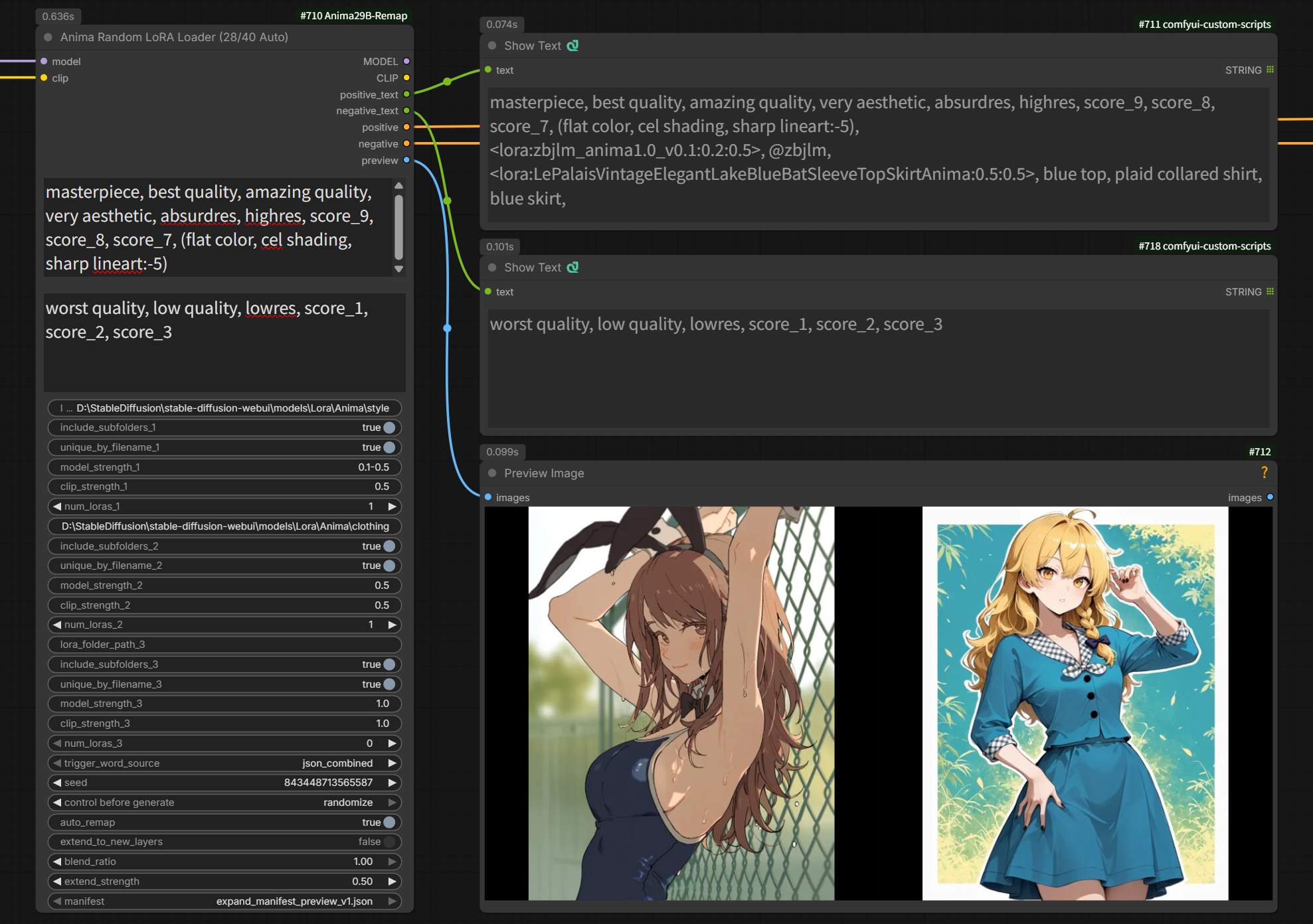
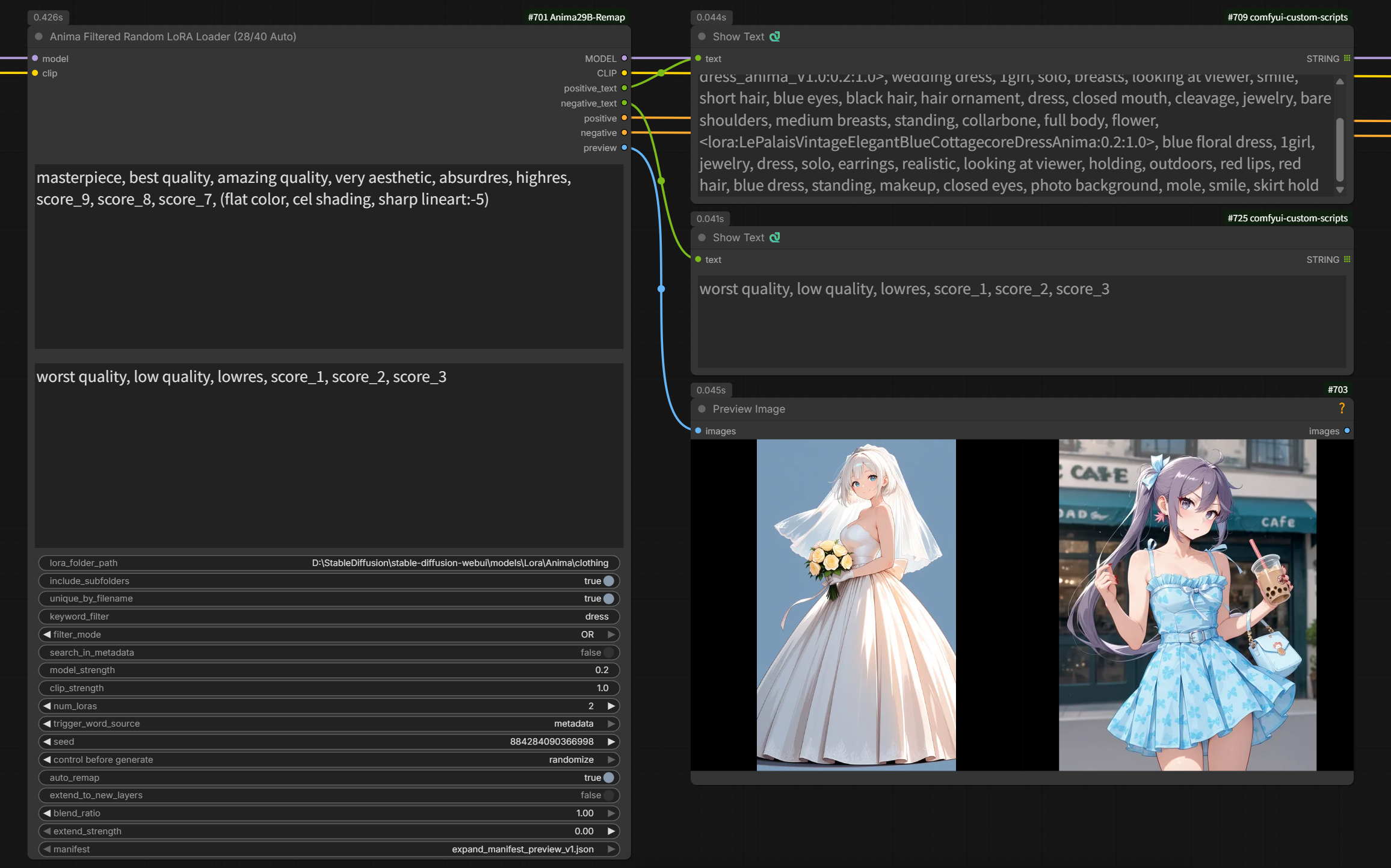
Anima Random LoRA Loader selects LoRAs from up to 3 folders at once (e.g. style / character / concept), each with its own strength range and count. Anima Filtered Random LoRA Loader selects from a single folder with keyword filtering (AND/OR, phrase matching, optional metadata search) — better suited to a large, mixed LoRA collection.
Both share the same trigger-word extraction, preview-image output, and strength-range parsing ("0.4-0.8" etc.) as the original RandomLoRALoader package. See that project's README for details on those shared features.
What's different from the original RandomLoRALoader
- Anima only. These are not general SD1.5/SDXL/Flux loaders — see RandomLoRALoader for those.
- No LoRA Block Weight (LBW) support. Anima's flat transformer-block layout doesn't map onto the SD1.5/SDXL IN/MID/OUT preset convention that LBW relies on, so this is out of scope for now.
- No
save_remapped/ on-disk remap caching. These nodes are built around picking a different LoRA per run — a cached_29Bremapfile would go stale silently the momentmanifest/extend_to_new_layers/blend_ratio/extend_strengthchanged, and would also get re-discovered by the folder scan as a second, metadata-less "duplicate" LoRA candidate. Every run remaps in-memory instead; LoRA files are small, so the extra cost is negligible next to generation time. - Folder scans exclude
_29Bremap/_29Bremap_extfiles. If you've used Nodes 1–4 withsave_remappedON in the same LoRA folders, those cached copies are automatically skipped rather than being treated as extra candidates. - Remap settings are ONE shared set, not per-folder/per-group —
auto_remap,manifest,extend_to_new_layers,blend_ratio,extend_strengthapply uniformly to every LoRA these nodes pick, regardless of which folder/group it came from. - Same stop-on-mismatch behavior as Nodes 1–4: if a randomly-selected LoRA references more blocks than the connected model has, the node raises an error and stops rather than silently applying a partial LoRA.
Inputs (Random LoRA Loader — Filtered is the same idea with 1 folder + keyword filter instead of 3 folders)
| Name | Type | Description |
|---|---|---|
| model / clip | MODEL / CLIP | Base model/CLIP |
| additional_prompt_positive / _negative | STRING | Extra prompt text, combined with each selected LoRA's trigger words |
| lora_folder_path_1..3 | STRING | Folder path per group |
| include_subfolders_1..3 | BOOLEAN | Recurse into subfolders |
| unique_by_filename_1..3 | BOOLEAN | Exclude duplicate filenames across subfolders |
| model_strength_1..3 / clip_strength_1..3 | STRING | Fixed ("1.0") or random range ("0.4-0.8") |
| num_loras_1..3 | INT | How many LoRAs to pick per group |
| trigger_word_source | dropdown | json_combined / json_random / json_sample_prompt / metadata |
| seed | INT | Random selection seed |
| auto_remap | BOOLEAN | Shared across all groups (default: ON) |
| extend_to_new_layers | BOOLEAN | Experimental, shared across all groups (default: OFF) |
| blend_ratio | FLOAT | Shared across all groups (default: 1.0) |
| extend_strength | FLOAT | Shared across all groups (default: 0.5) |
| manifest | dropdown | Shared across all groups |
Outputs
Same shape as the original RandomLoRALoader nodes: MODEL, CLIP, positive_text, negative_text, positive (CONDITIONING), negative (CONDITIONING), preview (IMAGE). positive_text includes each selected LoRA as <lora:name:model_strength:clip_strength>, trigger words (LoRA syntax is stripped before it reaches the CONDITIONING outputs).
About expand_manifest.json
This file is bundled as-is from the official Anima-2.9B distribution on Hugging Face (Gazingstars123/Anima-2.9B). It records exactly where the new blocks were inserted during the 28-to-40 expansion (insertion_positions), and this package uses that information to compute which position in the new 40-block layout each of the original 28 block indices corresponds to. It contains only small pieces of metadata like insertion positions — no model weights are included.
If Anima-2.9B is updated to a new version (e.g. v1.1) in the future with a different block layout, add that version's expand_manifest.json to the mapping/ folder and select it from each node's manifest dropdown.
Known limitations
- Only tested against the Anima-2.9B preview-v1 layout so far (28→40 blocks, 12 insertion points)
- If a LoRA's key naming doesn't match an expected pattern, auto-detection fails and it won't be remapped
- 28-vs-40 detection is based on the highest block index a LoRA's own keys actually reference, not a label baked into the file. A LoRA trained for Anima-2.9B that happens to only touch early/mid blocks (e.g. a structure-only LoRA) could be misidentified as an old-Anima (28-block) LoRA and get remapped when it shouldn't be. This is a known edge case with no override option yet; if it turns out to matter in practice, a manual "force 28 / force 40 / auto" override could be added later
- Model merging uses
comfy.model_patcher.ModelPatcher'sget_key_patches/add_patches— the same mechanism ComfyUI's own built-in merge nodes use
About licensing
Both the original Anima and Anima-2.9B are distributed under the CircleStone Labs Non-Commercial License. Any remapped LoRA files or merged model files produced using this package (the LoRA Remap / Model Merge nodes) are "Derivatives" under that license, and therefore inherit the same non-commercial restriction.
- The model itself and its derivatives (including remapped LoRAs and merged models produced here) may only be used for non-commercial purposes
- However, images generated (Outputs) using these models can be used commercially — the license explicitly excludes generated Outputs from the definition of "Derivative"
- Anima is also a derivative model of
Cosmos-Predict2-2B-Text2Image, so the NVIDIA Open Model License Agreement applies as well, to the extent it covers derivative models - The license does make an exception allowing an individual to sell "the model weights themselves" (e.g. a LoRA or merged model file) (Section 2.c), but this does not extend to a product, service, or tool built around the model — that would require a separate commercial license
This tool is intended for personal, non-commercial use. If you're considering commercial use or distribution, always check the primary source — LICENSE.md in the Anima repository on Hugging Face — or consult a professional. Nothing in this README constitutes legal advice.
Note that this license restriction applies to the Anima model weights themselves (and to any remapped LoRAs or merged models produced with them) — the code in this repository (the Python node implementations) is released under the MIT License (see the bundled LICENSE file).
Disclaimer and Support Policy
Disclaimer
- This node is provided without technical support
- No guarantee of functionality
- Compatibility with future ComfyUI updates is not guaranteed
- Bug reports and feature requests may not be addressed
- Use at your own risk
Support Status
- ❌ No individual support via issues or email
- ❌ No guarantee of bug fixes or new features
- ✅ Code is open source - fork and modify freely
- ✅ Community discussion welcome (no guarantee of a response)
Reporting Issues
Support isn't guaranteed, but you can:
- Check existing issues in the repository
- Check this README and its troubleshooting section
- Open an issue (it may not be addressed)
- Fork it and fix it yourself
License
MIT License - free to use, modify, and distribute.
That said, as noted above, the Anima model itself (its weights, and any LoRAs or merged models produced from them) remains subject to the separate CircleStone Labs Non-Commercial License.