
Time image
A single dependency-free ComfyUI node that aligns an image and mask to divisible dimensions.
Time image
A single, dependency-free ComfyUI node: Time・Res Fixer (Img/Mask) aligns an image and its optional mask to dimensions divisible by a chosen multiple, then outputs the resulting width and height as integers for downstream nodes.
No model weights, no downloads, no network access, no extra Python packages — only numpy, torch and Pillow, which ComfyUI already provides. The entire package is MIT-licensed.
Node
- Time・Res Fixer (Img/Mask) — fit an image and optional mask to a divisible canvas, keeping both pixel-aligned.
Installation
- In ComfyUI Manager, search for
Time image(Comfy Registry), or use Install via Git URL withhttps://github.com/shiguanggougouo/Time-image. - From the command line:
comfy node registry-install time-image. - Or copy the
Time-imagefolder intoComfyUI/custom_nodes/and restart ComfyUI.
No model files need to be downloaded.
What changed in 2.0.0
The pose extraction nodes (OpenPose / DWPose) and the depth extraction nodes (Depth Anything V2) were removed, together with all bundled third-party code and automatic model downloads. Workflows that used Time Pose Extractor, Time Depth Model Loader or Time Depth Extractor need to replace those nodes. The package is now one lightweight node under a plain MIT license, with no non-commercial restrictions.
Time・Res Fixer (Img/Mask) in detail
This node is an input alignment step rather than a general resizer. It brings an image and its mask to dimensions divisible by a chosen multiple, using one shared geometry for both. It loads no model weights, needs no network access, and is fully deterministic.
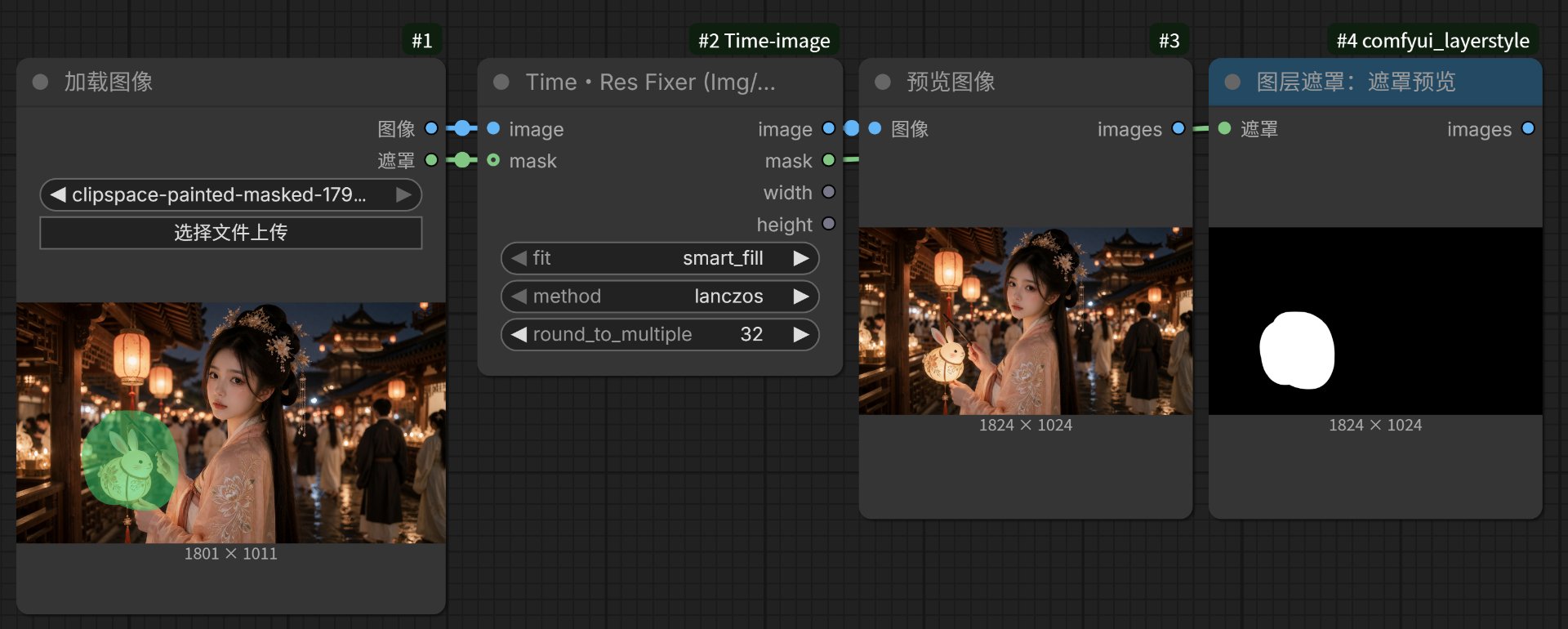
Workflow example: an 1801×1011 image and its mask are aligned to 1824×1024 with round_to_multiple = 32; the image and mask outputs stay pixel-aligned.
Dimensions
target = ceil(original / round_to_multiple) * round_to_multiple — sizes only grow, never shrink, by at most multiple - 1 pixels. Available multiples: 2, 4, 8, 14, 16, 28, 32, 64, 128, 256, 512.
8 / 32 / 64match VAE and latent downsampling (SD 1.5 / SDXL).14 / 28match the patch-14 grid used by Depth Anything / DINO-family models, so no pixels get cropped away downstream.2is enough when only even dimensions are required.
Fit modes
| fit | Scaling | Handling the remainder | Result |
| --- | --- | --- | --- |
| smart_fill (default) | Proportional, min scale | Mirror padding, equivalent to OpenCV BORDER_REFLECT_101 (edge pixel not repeated) | No black bars, no distortion |
| letterbox | Proportional, min scale | Center padding with 0 | Full composition, black bars |
| crop | Proportional, max scale | Center crop | Full bleed, edge content lost |
| fill | Direct stretch to target | None | Slight aspect distortion |
Example: a 1000×600 image aligned to 64 becomes 1024×640; proportional scaling gives 1024×614, and the missing 26 pixels of height are filled with mirrored content.
Image and mask stay aligned
- The image uses one of six PIL filters (
lanczosby default, plusbicubic,hamming,bilinear,box,nearest); the mask always usesnearest, so binary edges and soft mask values are preserved instead of being blurred into intermediate grey. - Scaling, cropping and padding share exactly the same coordinates on both paths. In
smart_fillthe mask is mirrored too, inletterboxit is padded with0, and incropit is cropped at the same center. - A single mask is broadcast across the whole image batch; a mismatched batch count raises a clear error. If the mask resolution differs from the image, it is first resampled to the image size with
nearest. - With no mask connected, the node returns an all-zero mask (
0means unselected in ComfyUI), so all four outputs are always available and the chain never breaks.
Outputs and behaviour
image, mask, width (INT), height (INT). The integer width and height can be wired straight into Empty Latent Image, KSampler or upscale nodes, so downstream resolution follows the input automatically.
The node validates IMAGE as [B,H,W,C] with 1, 3 or 4 channels and MASK as [B,H,W], and whitelists fit / method. Grayscale is handled as PIL L and restored to a channel dimension; RGBA works too. Output dtype and device follow the inputs (fp16 / bf16 / GPU tensors pass through), and ascontiguousarray plus detach() keep the tensors clean.
Limitations
- It only pads upward; it cannot scale an image down to a fixed resolution such as 512.
- Frames pass through
uint8quantization (round(x*255)), so results are not bit-exact. - Resampling runs per frame on the CPU via PIL: 4K inputs, large batches or video are slower, with a GPU↔CPU round trip.
smart_fillmirrors mask edges into the padded area. If a mask touches the canvas edge and must stay exact, useletterboxinstead.letterboxis always centered black padding; there is no custom pad colour, pad position or arbitrary target resolution.
Quick picks: SD/SDXL latent → 8 or 64; Depth Anything / DINO-family models → 14 or 28; even dimensions only → 2. For general use, lanczos + smart_fill is a good default.
License
MIT — see LICENSE. This package contains only original code: no third-party code and no model weights are bundled, so it may be used commercially.
Time image(中文说明)
Time image 是一个独立的 ComfyUI 节点包,只提供 Time・Res Fixer (Img/Mask):把图像与可选遮罩按同一套几何对齐到指定倍数的尺寸,并以整数输出最终宽高给下游节点。
不加载模型权重、不下载文件、不联网、不需要额外 Python 包 —— 只依赖 ComfyUI 自带的 numpy、torch 和 Pillow。整个包采用 MIT 许可。
节点
- Time・Res Fixer (Img/Mask):将图像和可选遮罩调整到指定倍数的画布尺寸,两路输出保持像素级对齐。
安装
- 在 ComfyUI Manager 中搜索
Time image(Comfy Registry),或用 Install via Git URL 填https://github.com/shiguanggougouo/Time-image。 - 命令行:
comfy node registry-install time-image。 - 或将
Time-image文件夹复制到ComfyUI/custom_nodes/,然后重启 ComfyUI。
无需下载任何模型文件。
2.0.0 的变化
姿态提取节点(OpenPose / DWPose)与深度提取节点(Depth Anything V2)已移除,随包附带的第三方代码和模型自动下载逻辑也一并删除。曾使用 Time Pose Extractor、Time Depth Model Loader 或 Time Depth Extractor 的工作流需要改用其它节点替代。现在整个包是一个轻量单节点、纯 MIT 许可,不再有非商业限制。
节点详解:Time・Res Fixer (Img/Mask)
这个节点的定位是输入对齐,而不是通用缩放:它把图像与遮罩用同一套几何一起补齐到指定倍数,再交给下游模型。全程不加载权重、不联网、结果完全确定,也是本包中唯一、也是最轻量稳定的一环。
工作流示例:1801×1011 的图像与遮罩经 round_to_multiple = 32 对齐为 1824×1024,输出的图像与遮罩保持像素级对齐。
尺寸规则
目标尺寸 = ceil(原尺寸 / round_to_multiple) × round_to_multiple,只增不减,最多比原图多出 倍数 - 1 像素。可选倍数:2, 4, 8, 14, 16, 28, 32, 64, 128, 256, 512。
8 / 32 / 64对应 VAE 与 latent 下采样(SD 1.5 / SDXL)。14 / 28对应 Depth Anything / DINO 系模型按 patch 14 裁切的网格,提前对齐可以避免下游悄悄裁掉像素。- 只需要偶数尺寸时,
2就够。
四种 fit 模式
| fit | 缩放方式 | 剩余空间处理 | 效果 |
| --- | --- | --- | --- |
| smart_fill(默认) | 等比,min 比例 | 镜像反射填充,等同 OpenCV BORDER_REFLECT_101(边缘像素不重复) | 无黑边、不变形 |
| letterbox | 等比,min 比例 | 居中补 0 | 保留完整构图,有黑边 |
| crop | 等比,max 比例 | 中心裁切 | 铺满画面,丢失边缘内容 |
| fill | 直接拉伸到目标尺寸 | 无 | 轻微形变 |
例:1000×600 按 64 对齐得到 1024×640;等比缩放后为 1024×614,缺少的 26 像素高度由镜像内容补齐。
图像与遮罩严格同步
- 图像提供 6 种 PIL 重采样(默认
lanczos,另有bicubic、hamming、bilinear、box、nearest);遮罩固定使用nearest,保留二值边界与软边数值,不会被插值糊出中间灰度。 - 缩放、裁切、补边在两路上共用完全相同的坐标:
smart_fill时遮罩同样镜像,letterbox时补0,crop时按同一中心裁切。 - 单张遮罩自动广播到整个图像 batch;数量不一致会明确报错。若遮罩分辨率与图像不同,会先用
nearest校正到图像尺寸,再走同一套几何。 - 未连接遮罩时返回全
0的遮罩(ComfyUI 中0表示未选中),四个输出始终齐全,链路不会中断。
输出与行为
输出为 image、mask、width(INT)、height(INT)。整数宽高可以直接接到 Empty Latent Image、KSampler 或放大节点,上游更换分辨率时下游自动跟随,无需手算。
节点会校验 IMAGE 为 [B,H,W,C] 且通道数为 1/3/4、MASK 为 [B,H,W],并对 fit / method 做白名单检查。灰度图按 PIL L 处理并补回通道维,RGBA 同样可用。输出的 dtype 与 device 跟随输入(fp16 / bf16 / GPU 张量可直接透传),ascontiguousarray 与 detach() 保证张量内存连续、不带计算图。
使用边界
- 只向上补齐,不能把图像缩小到 512 之类的固定分辨率。
- 每帧经过
round(x*255)的 uint8 量化,结果不是逐位精确。 - 重采样在 CPU 上用 PIL 逐帧进行:4K 输入、大 batch 或视频会较慢,并有一次 GPU↔CPU 往返。
smart_fill会把遮罩边缘镜像到补边区域;若遮罩贴着画布边缘且要求精确,改用letterbox。letterbox固定为居中黑边,暂不支持自定义填充颜色、填充位置或任意目标分辨率。
参数速选:SD/SDXL latent 用 8 或 64;Depth Anything / DINO 系模型用 14 或 28;只需偶数用 2。常规出图推荐 lanczos + smart_fill。
许可
MIT 许可,完整条款见 LICENSE。本包只含原创代码,不含第三方代码,也不附带模型权重,可用于商业用途。