
LoRA Preview
LoRA loader nodes with preview images: a single LoRA loader and a Power-LoRA-Loader style multi-LoRA stack, with hover previews in the LoRA picker.
Nodes (2)
ComfyUI LoRA Preview
LoRA loader nodes for ComfyUI that show a preview image for every LoRA.
فارسی: README.fa.md
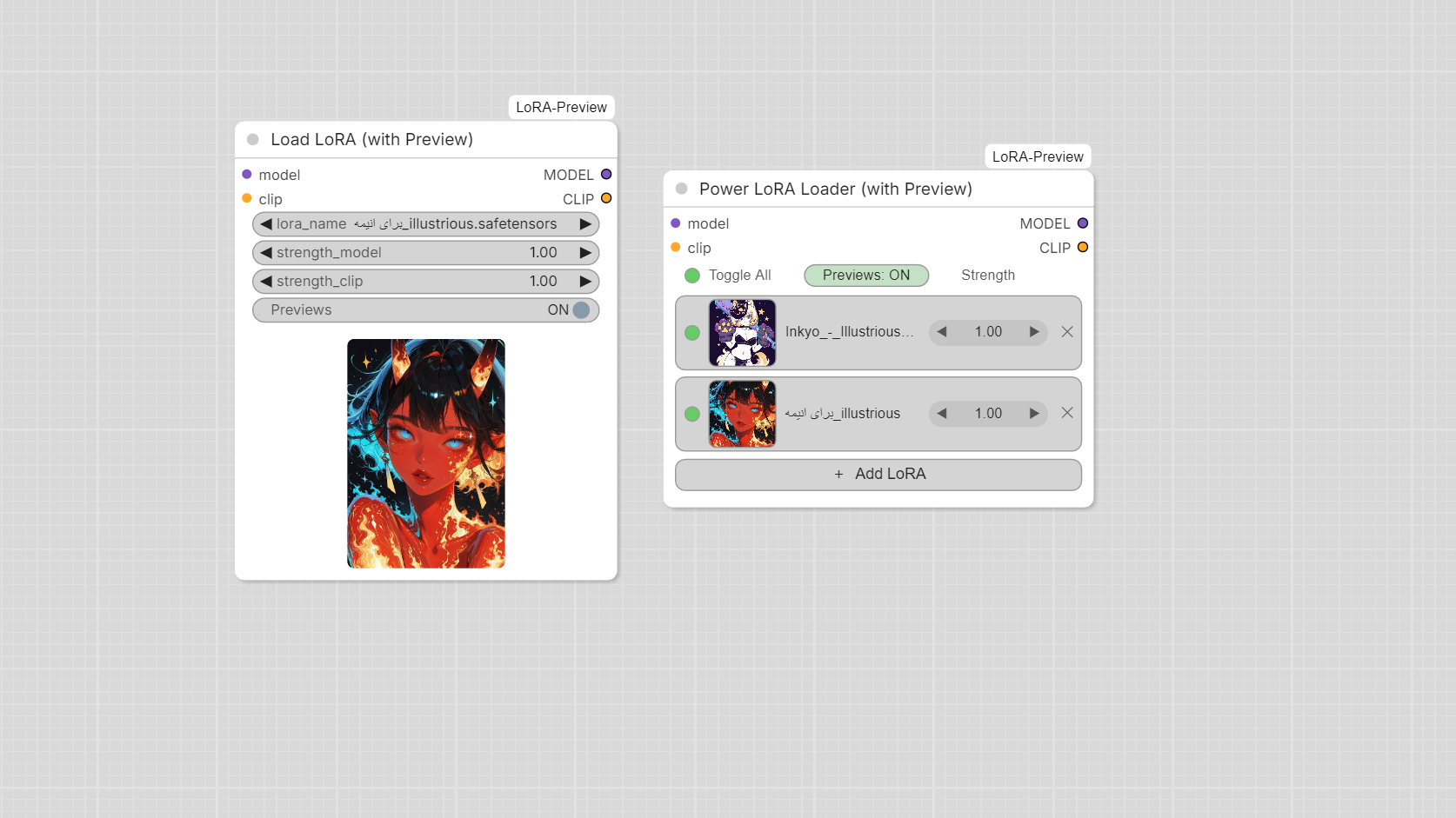
Nodes
Load LoRA (with Preview)
A normal LoRA loader (model, clip, lora_name, strength_model, strength_clip) with the
selected LoRA's preview image shown under the widgets. A Previews ON/OFF toggle hides the image.
Power LoRA Loader (with Preview)
A Power-LoRA-Loader style node for stacking any number of LoRAs:
- One row per LoRA: on/off dot, thumbnail, name, strength (
◀ 1.00 ▶), remove (✕) - + Add LoRA opens the LoRA list
- Hover a row to see a large preview next to the node
- Toggle All and Previews: ON/OFF in the header
- Click the number to type a strength, click the arrows to change it by 0.05
- One strength per row, applied to both model and clip
Hover preview in the LoRA list
Whenever a dropdown menu contains LoRA names (including the stock LoraLoader), hovering an entry shows its preview image in a fixed box next to the menu.
Example workflow
example_workflows/LoRA-Preview-Example.json contains both nodes. In ComfyUI open it from the Templates browser (under this node pack) or drag the file onto the canvas. The LoRA names inside it are examples; pick your own LoRAs after loading.
Preview images
Put the image next to the LoRA file, using the same file name. These are searched in order
(for my_lora.safetensors):
my_lora.preview.png, my_lora.preview.jpg, my_lora.preview.jpeg, my_lora.preview.webp,
my_lora.png, my_lora.jpg, my_lora.jpeg, my_lora.webp
LoRAs in sub-folders work too. To support more extensions edit PREVIEW_SUFFIXES in __init__.py.
Installation
ComfyUI-Manager (once published to the Registry): search for LoRA Preview and install.
Manual:
cd ComfyUI/custom_nodes
git clone https://github.com/shhostweb-beep/ComfyUI-LoRA-Preview
Restart ComfyUI and hard-refresh the browser (Ctrl+F5). There are no extra Python dependencies.
Notes
- Strength
0rows and switched-off rows are skipped. - Changing a row in the Power LoRA Loader is stored in the workflow as a JSON string (
loras_json). - Tested with the ComfyUI frontend only in limited setups; please open an issue if something looks off.
License
MIT