
lyw MA Loader
Powerful LoRA loader for ComfyUI: presets, folders, multi-select, Civitai metadata and previews, optional Lora Manager integration.
ComfyUI-lyw-MA-Loader
A standalone, visual LoRA loader node for ComfyUI — organize LoRAs into groups, manage presets and favorites, fetch Civitai previews and trigger words, and optionally stay in sync with Lora Manager.
中文说明:README.zh.md
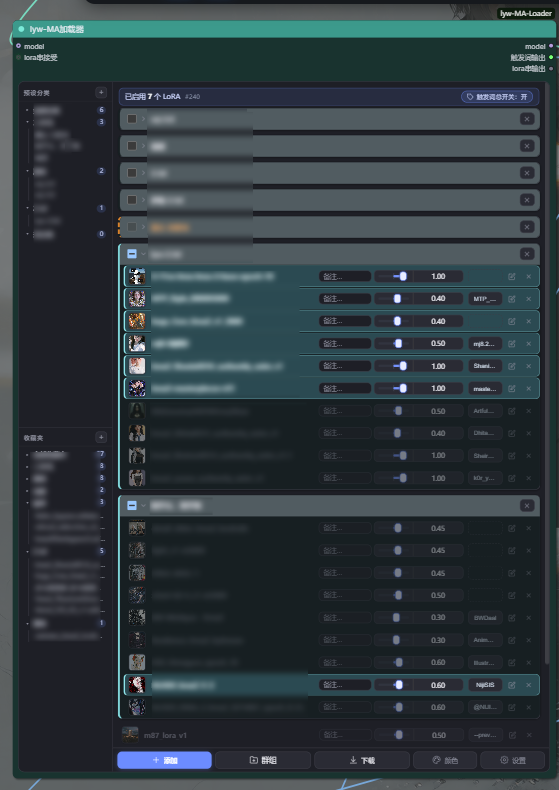
Main node UI
Add / Replace LoRA dialog

The screenshots show the Chinese UI. The node follows the system language: Chinese systems show Chinese, every other system shows English.
Credits
This plugin is based on and modified from ComfyUI-Magic-Assistant by shigjfg. Special thanks to the original author for the work this plugin is built on.
Features
Visual LoRA list
Every LoRA is a row with a thumbnail, weight slider, note field, trigger-word button and an enable toggle. Click a row to include/exclude it from loading; the row is dimmed when disabled. Weights, notes and trigger words are stored in the workflow, so each canvas keeps its own setup.
Folders (groups)
- Group any selection of LoRAs into a folder
- Drag a row or a folder title's blank area to reorder freely — the position under the mouse pointer is the exact drop position, with a blue insertion line
- Drop a row onto a folder to move it inside; drop it on empty list space to move it back out
- Ignore a group: its LoRAs stop participating in loading while each row keeps its own enable state. Un-ignore and everything comes back exactly as before. Ignored groups also do not take part in Group / Extra group operations
Presets and favorites
The left sidebar holds presets (multi-LoRA snapshots) and favorite collections. Drag a preset or favorite into the right-hand list and it is inserted exactly where you drop it — no more "always appended to the bottom". Single click still appends to the end.
Multi-select and batch operations
Right-click any row to:
| Action | Behavior | |---|---| | Replace LoRA | Swap the model file, keep position and settings | | Duplicate LoRA | Copy the selected rows to the end of the root list | | Group selection | Move the selected rows into a new folder (original positions cleared) | | Extra group | Copy the selected rows into a new folder, originals untouched | | Fetch info | Batch-fetch Civitai metadata for the selection | | Colors | Per-row color settings | | Delete | Remove the row |
Civitai metadata and previews
Trigger words and preview images are resolved by SHA256 against Civitai and saved next to the model file (<model>.txt, <model>.png/.jpg/.webp), together with a <model>.metadata.json sidecar. A built-in info manager can:
- batch fill missing info for the whole scope, a folder, or the current selection
- re-check sources, or update existing info
- keep not found items in their own category instead of polluting the fill results
- pause automatically when Civitai rate-limits the requests
Lora Manager integration (optional)
When Lora Manager is installed, the loader reuses the same sidecar format and its download endpoint, so both UIs show the same previews, titles and trigger words. Without Lora Manager the loader falls back to its own crawl and still works standalone.
Colors
Per-LoRA and per-folder colors, each with two modes:
- Follow global — the item uses the global default and changes with it
- Fixed — the item keeps its own colors regardless of global changes
The chosen mode is stored with the workflow.
Chain output
lora串输出 can be connected to another loader. Only the terminal loader applies LoRAs, so one model is patched once for the whole chain. Use 触发词输出 to emit the merged trigger words of the LoRAs that actually loaded.
Language
Node title, ports and dialogs follow the system language: zh-* systems show Chinese, everything else shows English. You can force a language for testing with localStorage.setItem("MPL_LANG", "en") (or "zh") in the browser console.
Performance notes
Only enabled LoRAs outside ignored groups are serialized into the node's stack. Disabled and ignored rows never reach the backend. LoRA tensors are cached by (path, weight) and unused entries are released after each run, so switching weights does not leak memory.
Installation
cd ComfyUI/custom_nodes
git clone https://github.com/shengdaklp99/ComfyUI-lyw-MA-Loader.git
Restart ComfyUI. The node appears under ✨ Magic Assistant → lyw-MA Loader.
Requirements: ComfyUI with its bundled torch, numpy and Pillow. opencv-python is optional and only used to extract the first frame from video previews.
Quick start
- Add lyw-MA Loader and connect
model. - Click Add to append LoRAs, or drag presets/favorites from the sidebar.
- Click a row to toggle loading; adjust weight and note inline.
- Right-click a row for batch operations.
- Optionally connect the trigger-word output to a text encoder.
Node reference
| Port | Direction | Description |
|---|---|---|
| model | input | Model to patch |
| lora串接受 | input (optional) | LoRA chain from an upstream loader |
| model | output | Patched model |
| 触发词输出 | output | Merged trigger words of loaded LoRAs |
| lora串输出 | output | LoRA chain for the next loader |
Troubleshooting
- Node title stays Chinese on an English system — ComfyUI caches
/i18nat startup; restart ComfyUI, then hard-refresh the browser (Ctrl+Shift+R). - "Missing LoRA file(s)" on queue — the workflow references a model that no longer exists; the node validates the stack before running.
- Preview not showing — run the info manager once, or check that the preview file sits next to the model.
Contributing
Issues and pull requests are welcome.
If this plugin helps you, please consider giving it a ⭐ Star — it helps other ComfyUI users find it.