
ComfyUI Extension
ComfyUI_Promptfix
A real-time bidirectional bridge between Adobe Photoshop and ComfyUI for seamless image generation and editing directly in your layer stack.
shaaraa/ComfyUI_Promptfix
Nodes2
On cloudLocal install
CategoryPromptFix
Stars0
Updated7 months ago
Nodes (2)
Readme
🎨 ComfyUI PromptFix (Photoshop Bridge)
ComfyUI PromptFix is a high-performance extension for ComfyUI that creates a seamless, real-time bidirectional bridge between Adobe Photoshop and ComfyUI.
[!IMPORTANT] This extension is designed to work exclusively with the NanoBanana Seedream AI Plugin for Photoshop. To use this tool, you must have the Photoshop plugin installed and active.
🚀 Key Features
- 🎨 Bi-Directional Workflow: Send your Photoshop canvas and selections directly to ComfyUI and receive generated results back as new layers.
- ⚡ Ultra-Low Latency: Optimized for speed, allowing for near-instant rendering and feedback.
- 🔄 Auto-Queueing: Trigger ComfyUI's "Queue Prompt" directly from the Photoshop interface for a fluid creative process.
- 🛠️ Smart Masking: Automatically converts Photoshop selections into high-precision ComfyUI masks.
- 🎨 Custom Nodes: Includes specialized
PromptFix InputandPromptFix Outputnodes for easy integration into any workflow.
📦 Installation
1. ComfyUI Extension
- Navigate to your ComfyUI
custom_nodesdirectory:cd ComfyUI/custom_nodes/ - Clone this repository:
git clone https://github.com/shaaraa/ComfyUI_Promptfix.git - Restart ComfyUI.
2. Photoshop Plugin (Required)
This extension requires the NanoBanana Seedream AI Plugin. 👉 Get the Photoshop Plugin here on Gumroad
🛠️ How it Works
- In Photoshop: Activate the plugin, make a selection or prepare your canvas.
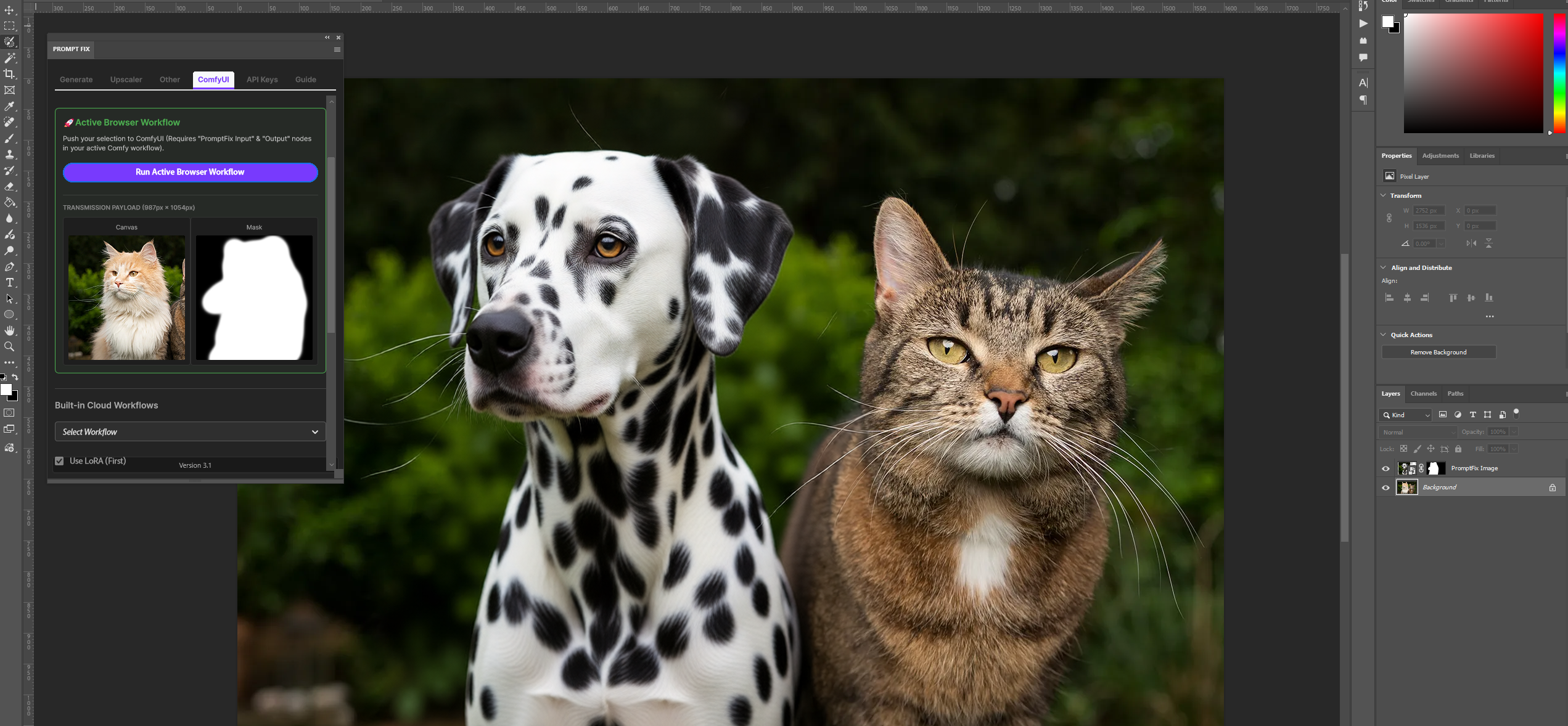
- The Bridge: The plugin exports image data to the
data/ps_inputsdirectory within this extension. - In ComfyUI:
- The
🎨 PromptFix Inputnode automatically detects and loads the new data. - Your workflow processes the image (Any workflow that can edit images, like Flux Klein, Qwen Image edit 2509/2511, etc.).
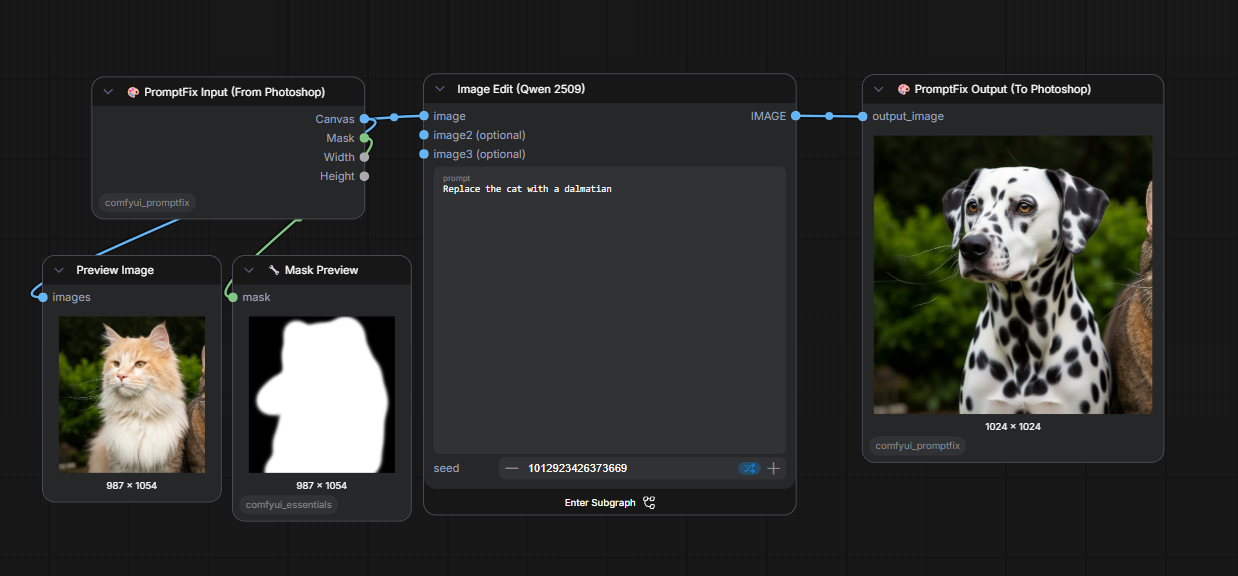
- The
🎨 PromptFix Outputnode saves the result and notifies Photoshop.
- The
- Result: The generated artwork appears instantly back in your Photoshop layer stack.
📑 Node Reference
🎨 PromptFix Input (From Photoshop)
- Outputs:
Canvas: The active canvas/layer from Photoshop.Mask: The selection/alpha mask.Width/Height: Original dimensions for perfect alignment.
🎨 PromptFix Output (To Photoshop)
- Inputs:
output_image: The final rendered image.
- Action: Notifies the Photoshop plugin to download and import the result.
🤝 Credits & License
- Author: shaaraa
- License: MIT
For support or feature requests, visit the Issues page.