
SeeSee Civitai Metadata
Save Image (Civitai Metadata): a drop-in Save Image replacement that writes the A1111 'parameters' Civitai reads - prompt, seed, sampler, model and LoRA hashes - traced automatically from any workflow, including UNET loaders, SamplerCustomAdvanced graphs and prompt enhancers.
SeeSee Civitai Metadata
One node: Save Image (Civitai Metadata). It saves images exactly like ComfyUI's
Save Image and adds the generation data Civitai reads when you upload a PNG — prompt,
negative prompt, seed, steps, sampler, scheduler, CFG, size, model and LoRAs (matched by
hash, so Civitai links them to their model pages) and the hi-res pass.
No rewiring, no extra nodes for seed or sampler, no special loaders. Swap it in for Save Image and keep your workflow as it is.
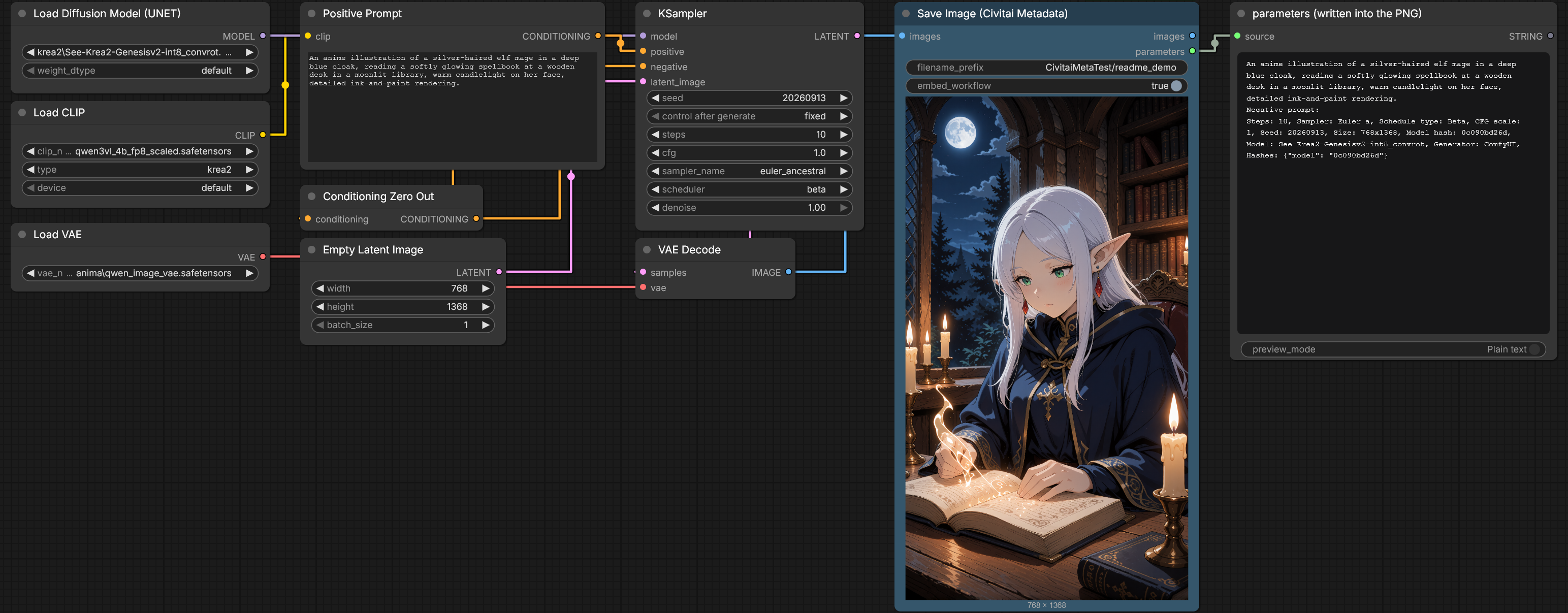
A Krea 2 graph with a UNET loader: the node saves the image, and the parameters output
(shown here in a Preview Any node) is exactly what ends up in the PNG.
Why
Civitai reads two kinds of PNG metadata: the A1111 parameters text, and ComfyUI's own
prompt graph. Its ComfyUI reader only understands simple graphs (KSampler fed by
CLIPTextEncode with literal text). Real workflows break it quickly:
- a UNET / diffusion model loader instead of Load Checkpoint
SamplerCustomAdvancedwithCFGGuider,BasicScheduler,RandomNoise- the prompt coming through a primitive node, a prompt enhancer or an LLM
- seed or steps coming from a seed node or a settings node
- subgraphs
In those cases Civitai shows nothing at all. The existing save nodes that fix this want you to rebuild the workflow around their own inputs and usually only work with a checkpoint loader.
This node instead walks the graph backwards from the image it saves and reads the values that actually flowed through the links while the workflow ran. The encoded prompt is the one the text encoder received, even if an LLM wrote it a second earlier.
Install
- ComfyUI Manager: search for SeeSee Civitai Metadata → Install → restart ComfyUI
- Manager → Install via Git URL:
https://github.com/seesee75-commits/ComfyUI-SeeSee-Civitai-Metadata - Manually:
cd ComfyUI/custom_nodes
git clone https://github.com/seesee75-commits/ComfyUI-SeeSee-Civitai-Metadata
No extra Python packages.
Use
Three ways to get the node into a workflow:
-
Right-click a Save Image node → Convert to Save Image (Civitai Metadata). Position, title, colors,
<img src="docs/convert-menu.png" alt="Right-click menu of a Save Image node with the entry Convert to Save Image (Civitai Metadata)" width="520">filename_prefixand all links are kept. -
Right-click the empty canvas → Convert all Save Image nodes to Civitai Metadata.
-
Add it by hand: image → Save Image (Civitai Metadata), or search for "civitai".
Right-click → Convert back to Save Image undoes it.
| Input / output | |
|---|---|
| images | the images to save, as with Save Image |
| filename_prefix | as with Save Image, including %date:yyyy-MM-dd% and subfolders |
| embed_workflow | also embed ComfyUI's prompt and workflow (default on), so the PNG can still be dragged back into ComfyUI |
| output images | the input images, unchanged — same slot as Save Image, so existing links keep working |
| output parameters | the exact text written into the PNG, e.g. for a Preview Any node |
Every save prints one line to the console, for example:
[Civitai Metadata] node 243: model See-Krea2-Genesisv2-int8_convrot, seed 424242, 10 steps, Euler a/Beta, cfg 1, hires 8 steps @ 0.2, 2 LoRA
If something could not be found (no sampler upstream, no prompt text, no model file), the line says so and the image is still saved.
What gets written
A waist-up anime illustration of seesee_elf, a pale slim adult elf …
Negative prompt:
Steps: 10, Sampler: Euler a, Schedule type: Beta, CFG scale: 1, Seed: 424242, Size: 936x1672,
Model hash: 0c090bd26d, Model: See-Krea2-Genesisv2-int8_convrot, Generator: ComfyUI,
Hires steps: 8, Denoising strength: 0.2, Hires upscaler: 2x-AnimeSharpV4_RCAN.safetensors,
Hires resize: 936x1672, Lora hashes: "Flat_anime_Krea__: bb9537c7e7, real_3d_krea2_loraholic: 796e646d07",
Hashes: {"model": "0c090bd26d", "lora:Flat_anime_Krea__": "bb9537c7e7", "lora:real_3d_krea2_loraholic": "796e646d07"},
Civitai resources: [{"type":"lora","weight":0.6,"modelVersionId":3072075},{"type":"lora","weight":0.5,"modelVersionId":3066073}]
(One line in the file; wrapped here.) This output was checked with Civitai's own metadata
reader, @civitai/generation-metadata, which
reads every field above, including both LoRAs and the model hash.
Details that matter for Civitai:
- The text goes into a UTF-8
iTXtchunk namedparameters, which Civitai checks before ComfyUI'sprompt/workflowchunks. Both can live in the same file. - Hashes are AutoV2 (the first 10 hex characters of the file's SHA256). Civitai stores that form for every uploaded file.
- Only the checkpoint, LoRAs and embeddings are hashed. VAE and text-encoder hashes are left out on purpose: those files are re-uploaded by many people, and Civitai credits whoever uploaded them first.
- When a LoRA or checkpoint was downloaded through LoRA Manager or Civitai Helper,
their sidecar files already know the Civitai version id; it is written as
Civitai resources, which Civitai links without any hash lookup and which also carries the LoRA weight. - Multi-pass workflows (hires fix, refiner pass, tiled upscale) are written the A1111 way:
seed, steps and sampler of the first pass, the last pass as
Hires steps,Denoising strengthandHires upscaler. A single img2img pass writesDenoising strength.
Supported graphs
The node does not depend on a list of known node types; it recognises roles: a sampler is a node with a model or guider, a seed/step/sigmas input and a latent or image to start from; a prompt is the text input of whatever sits at the end of the conditioning chain; a model is any file on the model chain that lives in a ComfyUI model folder.
Run end-to-end in ComfyUI (and read back with Civitai's parser):
UNETLoader→SamplerCustomAdvancedwithCFGGuider,BasicScheduler,RandomNoise,KSamplerSelect, values from rgthree KSampler Config andSeedNode, inside subgraphs- a Qwen3-VL prompt enhancer writing the prompt, including when its nodes came from cache
- image-space refine pass:
ImageUpscaleWithModel→ImageScaleToTotalPixels→VAEEncode→ second sampler UltimateSDUpscaleas the final passLoraLoaderModelOnlyand LoRA Manager Lora LoaderCheckpointLoaderSimple→KSampler, prompt and seed from primitive nodes, negative prompt,LatentUpscaleByhires pass
Covered by the offline tests: LoraLoader, rgthree Power Lora Loader, BasicGuider +
FluxGuidance (written as Distilled CFG Scale), KarrasScheduler, SamplerEulerAncestral,
embedding:name in the prompt, img2img denoise.
Handled by the same rules, not tested yet: KSamplerAdvanced, SamplerCustom,
DualCFGGuider, SplitSigmas, GGUF loaders, LoRA stacks (LORA_STACK), Civitai Helper
sidecars. Reports welcome.
Runtime values come from ComfyUI's output cache. If the cache does not hold a value, the node evaluates simple nodes (primitives, string concatenation/replace, reroutes) statically and the console line says what it could not recover.
Model hashes
The first time a model is saved with, its SHA256 is needed. The node looks in this order:
- its own cache:
ComfyUI/user/seesee-civitai-metadata/hash_cache.json - LoRA Manager's
<model>.metadata.json - Civitai Helper's
<model>.civitai.info <model>.sha256- otherwise it hashes the file once — for a large checkpoint that first save takes noticeably longer, the console says so — and caches the result by path, size and modification time.
Nothing is sent anywhere. The node makes no network requests.
FAQ
Why a replacement and not a node next to Save Image? Save Image JSON-encodes everything it is given for the PNG, so A1111 text cannot be passed to it, and it has written its file before any node after it runs.
Does --disable-metadata still apply?
It still suppresses the prompt and workflow chunks. The parameters text is written
anyway — writing it is the only reason to use this node.
Only PNG? Yes, for now.
The model is not linked on Civitai.
Civitai links by hash, so the exact file you generated with must be uploaded to Civitai
(any version, any model). A merged, converted or quantised copy has a different hash unless
it was uploaded as well. The console line and the parameters output show the hash that
was written.
Tests
python tests/test_offline.py
Runs without ComfyUI or a GPU: the tracer against the real prompt graphs of two images (one of them byte-identical to a file Civitai already accepted), classic, Flux-style, LoRA-stack and hires graphs, the formatter against a port of Civitai's reader, and the hash cache.
License
MIT