
ReStartupFlags
Toggle launch flags (like Sage on/off, fast accumulations, etc.) and restart ComfyUI from the UI. This can be especially usefull on RunPod or other cloud services but works locally too.
ComfyUI-ReStartupFlags
A ComfyUI extension that lets you toggle launch flags and restart the server from the UI instead of "endless" exiting and launching new batch files.
Why?
I like Sage Attenuation but it doesn't always like models. It breaks Z-Image completely, messes with Krea 2 Image Edit, ect. Plus I was always messing with different memory settings. And no matter what, every time: cntl-c → exit → find the new batch file → launch → refresh. Wash, rinse, repeat.
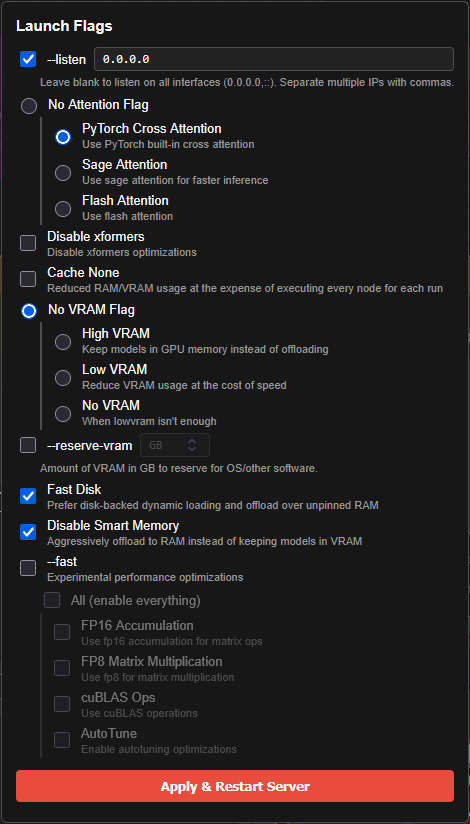
This little utility creates a very ugly but practical dialog box that lets you select the options you want and relaunch ComfyUI. Any launch flags that aren't part of the dialog are left unchanged. As a side feature, opening the dialog will tell you the current state of all of the flags handled by the program, so if you don't remember if --lowvram is set, you can check it there.
Right now, the only flags supported are the ones I've used. I'm not against adding more options if people ask, and there is a section at the bottom that explains how to do it yourself. I'm not a programmer but it's fairly hackable if you have a good text editor.
The restart uses the same mechanism as ComfyUI Manager, so it behaves identically.
Supported Flags
There are a lot of startup flags but the ones currently supported are listed below.
Attention Method (mutually exclusive)
--use-pytorch-cross-attention--use-sage-attention--use-flash-attention
VRAM Mode (mutually exclusive)
--highvram--lowvram--novram
Other Flags
--listen— with a text field for IP address(es)--disable-xformers--cache-none--reserve-vram— with a numeric input for GB--fast-disk--disable-smart-memory
--fast Options
- Enable all, or pick individually:
fp16_accumulation,fp8_matrix_mult,cublas_ops,autotune
The popup reads the current flags from sys.argv on each open, so it always reflects how the server was actually launched.
Installation
Install ReStartupFlags from ComfyUI Manager.
----or---
If you want to install it the manual way, clone or download this repo into your ComfyUI custom_nodes directory:
cd ComfyUI/custom_nodes
git clone https://github.com/seeker-ktf/ComfyUI-ReStartupFlags.git
Restart ComfyUI. A rocket icon should appear in the top bar next to where the ComfyUI Manager goes.
No additional dependencies are required.
Adding New Flags
Feedback is welcome. This is really just a hack for my personal use that other people were interested in so I loaded it here. If you'd like me to look at adding other flags, drop me a line. However, if you want to make the changes yourself:
Edit __init__.py and add entries to the appropriate list:
ATTENTION_FLAGS— mutually exclusive attention methodsVRAM_FLAGS— mutually exclusive VRAM modesSTANDALONE_FLAGS— independent on/off checkboxesFAST_OPTIONS— sub-options for--fast
Flags with a text or numeric value (like --listen or --reserve-vram) require corresponding changes in both the Python routes and the JS popup.
License
Apache 2.0