
ComfyUI Extension
comfyui-sg-resolution-picker
A powerful resolution picker node for ComfyUI with auto-snapping, aspect ratio locking, and megapixels scaling.
sebagallo/comfyui-sg-resolution-picker
Nodes1
On cloudLocal install
CategorySGNodes/Utilities
Stars0
Updated9 months ago
Readme
ComfyUI SG Resolution Picker
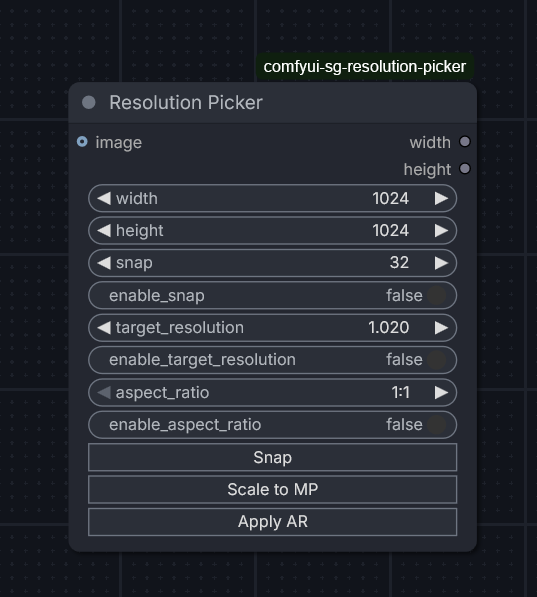
A specialized resolution picker node for ComfyUI that provides a visual interface for selecting dimensions, with support for grid snapping, aspect ratio locking, and megapixel-based scaling.
Features
- Visual Dimension Picker: Interact directly with the node UI to select resolutions.
- Grid Snapping: Automatically snaps width and height to a configurable grid (e.g., 8, 64).
- Visual Dimension Picker: Interact directly with the node UI to select resolutions.
- Grid Snapping: Automatically snaps width and height to a configurable grid (e.g., 8, 64).
- Aspect Ratio Locking: Choose from standard aspect ratios (1:1, 16:9, etc.) or provide a custom list.
- Pick Closest AR: Automatically select the aspect ratio from the list that best matches your current width/height.
- Megapixel Scaling: Scale your resolution to reach a target megapixel count while maintaining the current aspect ratio.
- Image Input: Optionally connect an image to automatically detect and use its dimensions as the starting point.
Nodes
SG Resolution Picker
This is the primary node. It outputs the calculated width and height.
Inputs
- width: The initial or target width.
- height: The initial or target height.
- snap: The grid size to snap to (e.g., 64).
- enable_snap: Toggle grid snapping on/off.
- target_resolution: The target megapixel count (e.g., 1.0 for 1MP).
- enable_target_resolution: Toggle megapixel scaling on/off.
- aspect_ratio: Dropdown selection for standard aspect ratios.
- enable_aspect_ratio: Toggle aspect ratio locking.
- pick_closest_ar: When enabled, the node ignores the manual AR selection and picks the closest one from the list based on current dims.
- custom_aspect_ratios (Optional): A comma-separated list of ARs (e.g.,
1:1, 16:9, 21:9) to override the default list. - image (Optional): An input image to extract dimensions from.
Outputs
- width: The final calculated width.
- height: The final calculated height.
Installation
- Clone or place this folder in your ComfyUI
custom_nodesdirectory:cd ComfyUI/custom_nodes git clone https://github.com/sebagallo/comfyui-sg-resolution-picker - Restart ComfyUI.