
ComfyUI Extension
comfyui-sg-process-manager
A ComfyUI custom node package for managing subprocesses within ComfyUI workflows.
sebagallo/comfyui-sg-process-manager
Nodes6
On cloudLocal install
CategoryProcess Management
Stars1
Updated10 months ago
Nodes (6)
Kill All Processes
The nuclear option, scoped to this pack
Process Management
Kill Process
The shutdown switch for anything StartProcess launched
Process Management
Kill Process by Name
Convenient, blunt, and not limited to this pack's processes
Process Management
Kill Process by PID
The pack's one kill node that isn't limited to its own processes
Process Management
List Processes
The little 'what's actually running' node
Process Management
Start Process
StartProcess is your workflow's escape hatch
Process Management
Readme
comfyui-sg-process-manager
A ComfyUI custom node package for managing subprocesses within ComfyUI workflows.
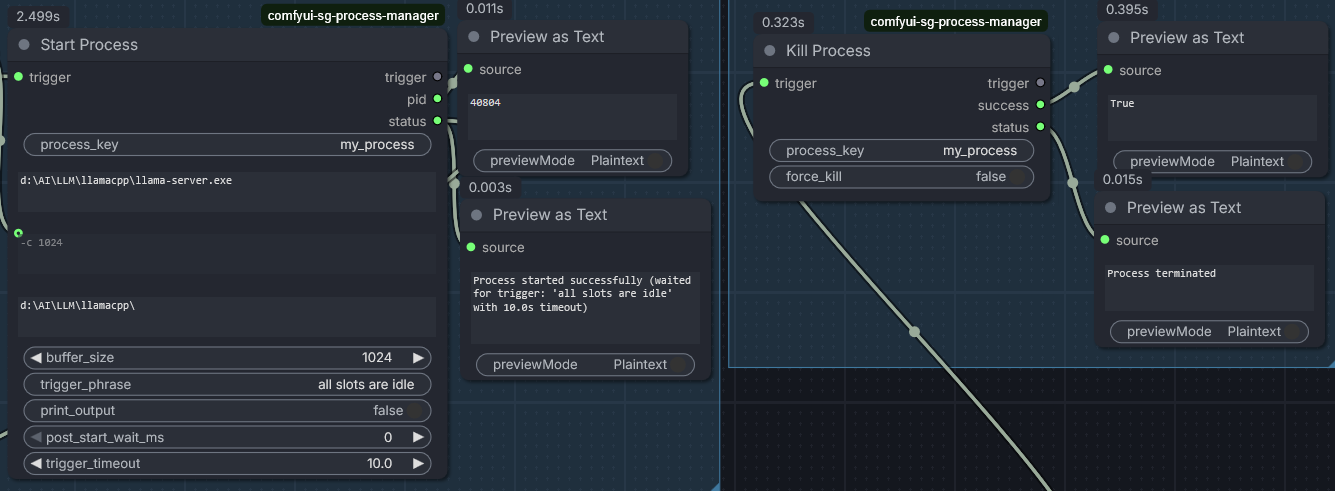
Features
- Start Process Node: Launch subprocesses with custom commands, arguments, and working directories
- Kill Process Node: Terminate or force-kill running processes
- Global Process Management: Processes are managed globally by key, allowing coordination across the workflow
- Cross-Platform: Works on Windows, macOS, and Linux
- Automatic Cleanup: Running processes are automatically terminated when ComfyUI exits
Installation
cd ComfyUI/custom_nodes
git clone https://github.com/sebagallo/comfyui-sg-process-manager.git
Nodes
Start Process
Inputs:
trigger(*): Passthrough trigger - node executes when this input is providedprocess_key(STRING): Unique identifier for the process (default: "my_process")command(STRING, multiline): The command to executeargs(STRING, multiline, optional): Arguments for the command (space-separated)cwd(STRING, multiline, optional): Working directory for the processbuffer_size(INT, optional): Size of output buffer in bytes (default: 1024, min: 1, max: 1048576)trigger_phrase(STRING, optional): Phrase to wait for in process output before continuing (default: "")print_output(BOOLEAN, optional): Whether to print process output to console (default: False)post_start_wait_ms(INT, optional): Milliseconds to wait after process starts (default: 500, min: 0, max: 30000)trigger_timeout(FLOAT, optional): Seconds to wait for trigger phrase (default: 10.0, min: 0.1, max: 300.0)
Outputs:
trigger(*): Passthrough of the input triggerpid(INT): Process ID of the started process (0 if failed)status(STRING): Status message ("Process started successfully" or error message)
Kill Process
Inputs:
trigger(*): Passthrough trigger - node executes when this input is providedprocess_key(STRING): Key of the process to terminate (default: "my_process")force_kill(BOOLEAN, optional): Whether to force kill (default: False)
Outputs:
trigger(*): Passthrough of the input triggersuccess(BOOLEAN): Whether the termination was successfulstatus(STRING): Status message describing the result
List Processes
Inputs:
trigger(*): Passthrough trigger - node executes when this input is provided
Outputs:
trigger(*): Passthrough of the input triggerprocess_keys([STRING]): List of all currently managed process keys
Kill All Processes
Inputs:
trigger(*): Passthrough trigger - node executes when this input is provided
Outputs:
trigger(*): Passthrough of the input triggersuccess(BOOLEAN): Whether the operation was successfulstatus(STRING): Status message describing the result
Kill Process by PID
Inputs:
trigger(*): Passthrough trigger - node executes when this input is providedpid(INT): Process ID to terminate (default: 0)force_kill(BOOLEAN, optional): Whether to force kill (default: False)
Outputs:
trigger(*): Passthrough of the input triggersuccess(BOOLEAN): Whether the termination was successfulstatus(STRING): Status message describing the result
Kill Process by Name
Inputs:
trigger(*): Passthrough trigger - node executes when this input is providedname(STRING): Process name to terminate (e.g., "notepad.exe")force_kill(BOOLEAN, optional): Whether to force kill (default: False)
Outputs:
trigger(*): Passthrough of the input triggersuccess(BOOLEAN): Whether the termination was successfulstatus(STRING): Status message describing the result
Usage
- Use Start Process to launch a subprocess with your desired command and arguments
- The process is stored globally using the
process_key - Use Kill Process with the same
process_keyto terminate the process - Both nodes are passthrough - they execute when triggered and pass the trigger value through
Example
[Some Trigger] -> Start Process -> [pid, status] -> Some Other Node
                                    |
                                    v
                               Kill Process <- [Another Trigger]
Notes
- Processes are managed globally across the entire ComfyUI session
- Only one process can run per
process_keyat a time - Processes are automatically cleaned up when ComfyUI exits