
ComfyUI-LATO2
Low-poly remeshing with LATO.2 in ComfyUI: dense generated meshes (TRELLIS.2, Hunyuan3D, scans) to clean, artist-like low-poly meshes. Windows and Linux, nothing to compile.
ComfyUI-LATO2
Low-poly remeshing in ComfyUI with LATO.2: turn a dense generated mesh (TRELLIS.2, Hunyuan3D, a scan) into a clean, artist-like low-poly mesh of 200 to 5000 vertices. Windows and Linux, nothing to compile.
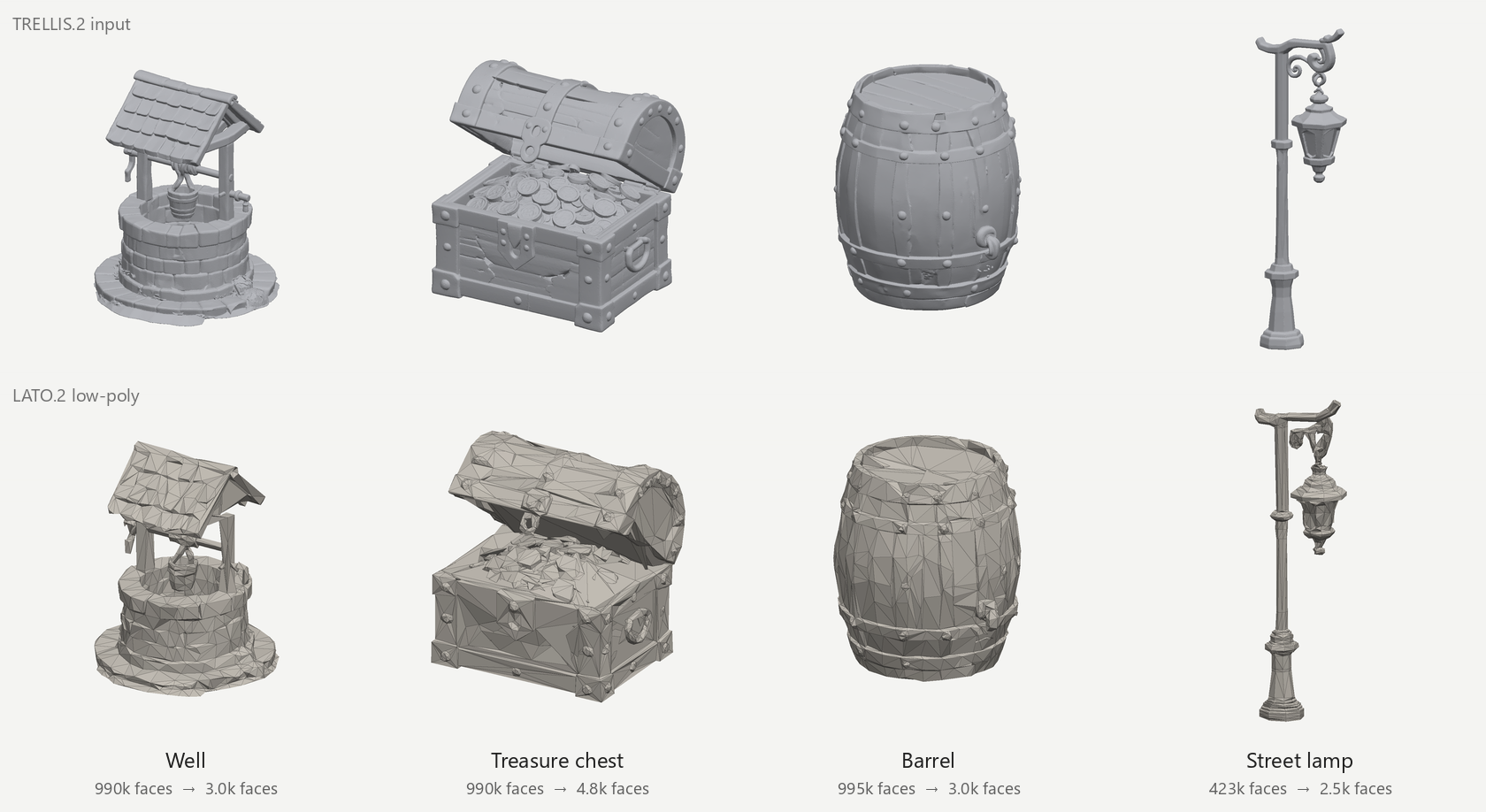
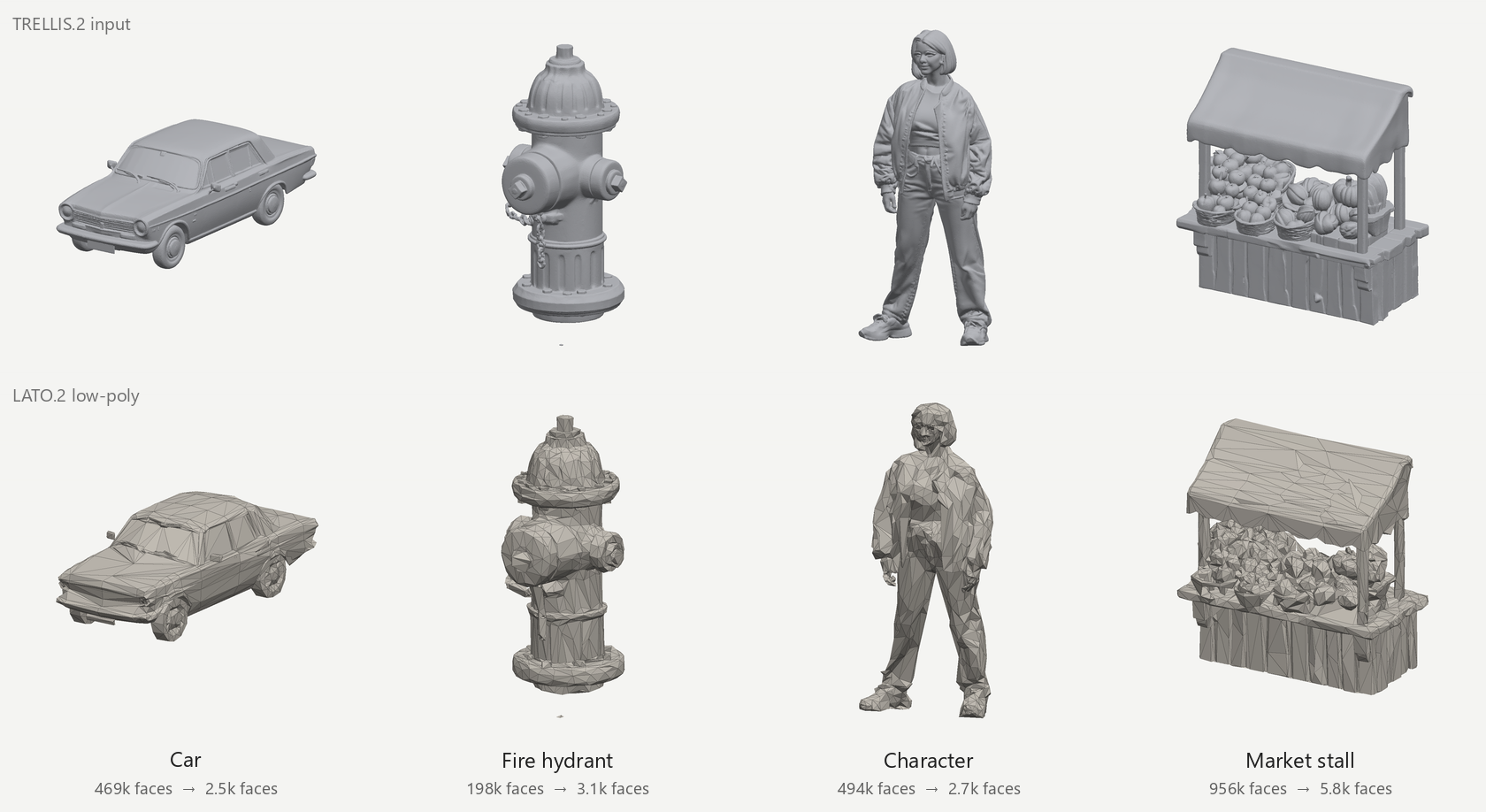
Dense TRELLIS.2 meshes (top rows) and this node's results (bottom rows), at 1,200 vertices (the chest and the market stall at 2,500).
What it does
LATO.2 (paper) generates a new mesh for a given shape: a vertex flow places the number of vertices you ask for on the shape, and a topology flow connects them the way a 3D artist would. It is not a decimator: the edges follow the form instead of the original triangles.
This node runs it inside ComfyUI and adds what a usable result needs:
-
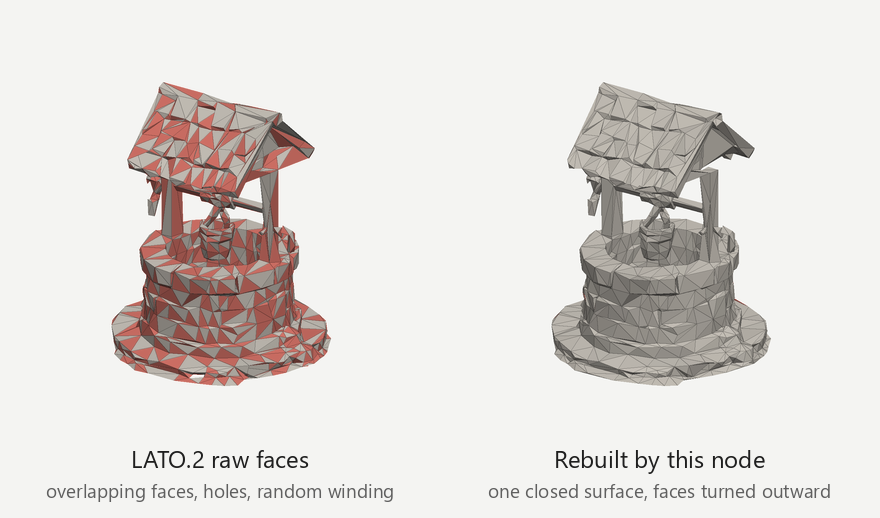
One closed surface. LATO.2 turns every triangle of its predicted edge graph into a face, which stacks overlapping faces, leaves holes and winds faces at random. The node rebuilds the faces from LATO.2's edge predictions: no holes, no edge shared by more than two faces, every face turned outward (below, red marks the back of a face).
-
Inner walls removed first. TRELLIS.2 meshes carry a second, inner copy of their surface and sealed interiors; LATO.2 would mesh both walls. A voxel flood fill from outside drops the faces nothing outside can reach.
-
Same place and size. The result is moved back to the input's position and scale, so it can replace the source.
-
Native ComfyUI 3D types. Connect a
MESH(native TRELLIS.2, Hunyuan3D) or a 3D file (Load 3D), and get aMESH(forSave 3D Modeland the other mesh nodes) and a 3D file (forPreview 3D). -
Windows and Linux without compiling. LATO.2 depends on CUDA extensions with no Windows builds; the node ships portable stand-ins for them (see How it works).
Install
You need an NVIDIA GPU with CUDA and 8 GB of VRAM, git, Python 3.10 or newer to run the installer, about
13 GB of disk and an internet connection for the first setup.
-
Get the node. In ComfyUI Manager, search for LATO2 and install ComfyUI-LATO2; or with comfy-cli,
comfy node install comfyui-lato2; or clone it intocustom_nodes:cd ComfyUI/custom_nodes git clone https://github.com/sakalond/ComfyUI-LATO2 -
Set up LATO.2. Run the installer once (any Python 3.10+; it does not touch ComfyUI's own Python):
cd ComfyUI/custom_nodes/ComfyUI-LATO2
python install_lato2.py
It clones LATO.2's code into
vendor/LATO.2(pinned to the tested commit), builds a Python 3.12 environment with PyTorch 2.8 (CUDA 12.8) inenvs/lato2with uv (installed with pip if missing), and downloads the weights (3.4 GB) and DINOv2 (1.1 GB) intoComfyUI/models/lato2. It takes a few minutes.--models-dirputs the weights elsewhere;--only repo,env,models,configruns single steps. -
Restart ComfyUI and run LATO.2 Setup Check (category
3d/LATO.2): it says ready, or what is missing.
LATO.2 runs in its own environment because it needs pinned packages (PyTorch 2.8, spconv) that should not be mixed
into ComfyUI's. The paths can be changed in lato2_config.json (see lato2_config.example.json) or with the
environment variables LATO2_PYTHON, LATO2_REPO, LATO2_CKPT, LATO2_DINO_HUB_DIR and LATO2_TIMEOUT.
To uninstall, delete custom_nodes/ComfyUI-LATO2 (with its envs/ and vendor/) and models/lato2.
Use
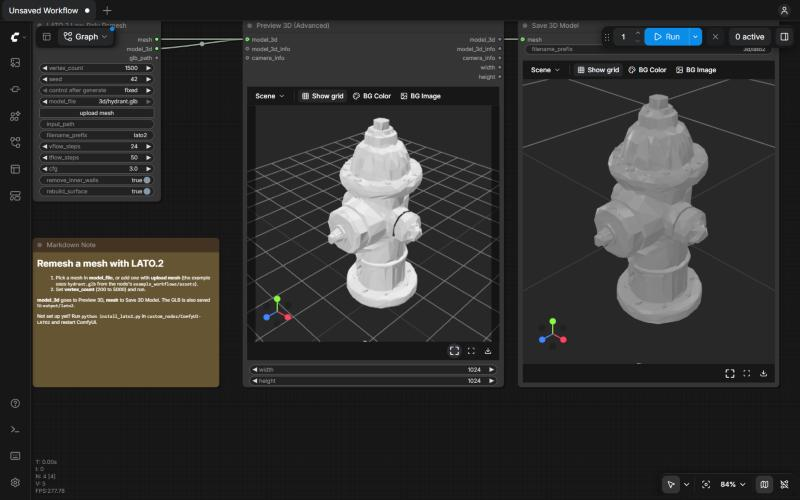
LATO.2 Low-Poly Remesh
| Input | |
|---|---|
| vertex_count | Vertices LATO.2 places, 200 to 5000; the result has about this many. |
| seed | LATO.2 samples its vertices and edges: another seed gives another, equally valid, layout. |
| mesh | A connected MESH or 3D file. Overrides the two inputs below. |
| model_file | A mesh in ComfyUI's input folder (.glb .gltf .obj .ply .stl, also in input/3d). upload mesh adds one. |
| input_path | A mesh path, absolute or relative to ComfyUI's input or output folder. Overrides model_file. |
| filename_prefix | Name of the GLB written to output/lato2. |
| vflow_steps, tflow_steps, cfg | Advanced: steps of the vertex and topology flows, and how strongly the vertex flow follows the input's rendered view. |
| remove_inner_walls | Advanced, on: drop the faces outside space cannot reach before remeshing. |
| rebuild_surface | Advanced, on: rebuild the faces into one closed surface. Off gives LATO.2's raw faces. |
| Output | |
|---|---|
| mesh | The low-poly mesh as a MESH (geometry only), for Save 3D Model, Get Mesh Info and the other mesh nodes. |
| model_3d | The GLB as a 3D file, for Preview 3D and Save 3D. |
| glb_path | The GLB's path relative to the output folder. |
The GLB is also saved to output/lato2/.
Example workflows
In ComfyUI open Browse Templates and pick Extensions > ComfyUI-LATO2, or drag a file from
example_workflows/ onto the canvas. The examples use
example_workflows/assets/hydrant.glb: add it with upload mesh.
| Workflow | |
|---|---|
| lato2_remesh_a_mesh.json | A mesh file to low-poly: Preview 3D and Save 3D Model. |
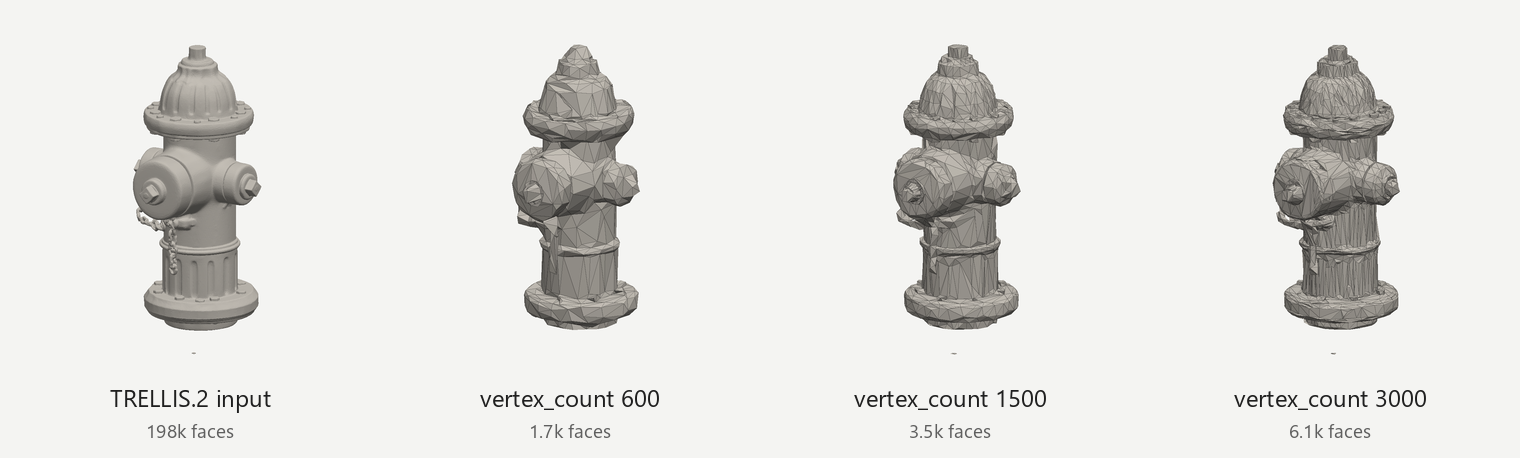
| lato2_vertex_counts.json | The same mesh at 600, 1500 and 3000 vertices, side by side. |
| lato2_from_load_3d.json | Load 3D into the node (its 3D file output). |
| lato2_after_trellis2.json | Image to 3D with ComfyUI's native TRELLIS.2, then LATO.2 (needs the TRELLIS.2 models). |
Tips
- Vertex count: 1000 to 1500 gives the clean low-poly look of the images above for props, vehicles and characters; 2500 and more keeps small detail (coins, bolts, chains).
- Not the layout you want? Change the seed: LATO.2 samples, so every seed gives a different layout. Trying two or three seeds and keeping the cleanest is worth it for hero assets.
- Textures are not carried over: the result is new geometry. Texture it afterwards (for example with StableGen in Blender), or bake the original's texture onto it.
- Thin parts (slats, blades, cloth edges) are the hardest case: where LATO.2 places vertices on both sides of a thin part, its surfaces can cross and fold, which shows as creases.
How it works
- Inner walls. The input is voxelized and empty space is flood-filled from the border of the grid; faces that
the outside cannot reach are dropped. Hairline gaps are closed first so the flood does not leak in, and an exact
visibility pass keeps every face that can be seen (
runners/exterior_fill.py, from StableGen's Make Solid). - LATO.2. The shape is normalized; LATO.2 renders a grey view of it for DINOv2, places the vertices (vertex flow) and predicts how likely each pair of vertices is to be joined (topology flow).
- Surface rebuild (
runners/lato2_surface.py). From LATO.2's edge likelihoods: the most likely triangles are taken first while every edge keeps at most two faces, faces do not fold onto or overlap their neighbours and can be wound consistently; the remaining holes are filled with minimum-area triangulations that avoid folds; a flood fill of the closed result's outside, weighed against keeping flat neighbours consistent (a minimum cut), turns every face outward. - Back to the input's frame, written as GLB.
No compiling (runners/portable.py, runners/white_model_render.py). LATO.2 imports o_voxel, torch_scatter,
flash-attn or xformers, and renders with Open3D; none of these has Windows builds for PyTorch 2.8, and Open3D's
offscreen renderer returns black images on servers without a display. The node uses the installed package when it
imports and a stand-in otherwise:
| Package | Stand-in | Checked against the original |
|---|---|---|
| o_voxel | The same scan-line voxel pass in NumPy, in the same float32/float64 arithmetic | Identical voxels on 5 meshes at grid 64 and 1024 (up to 19 million voxels) |
| torch_scatter | scatter_mean in PyTorch | Unit test |
| flash-attn / xformers | Block-diagonal attention on PyTorch's scaled_dot_product_attention | Mean difference 7e-5 (bf16) |
| Open3D / nvdiffrast renderer | A NumPy rasterizer with the same camera, light and shadow test | 0.03 to 0.05 grey levels mean difference |
The installer still installs xformers where a wheel exists, as it is faster.
Limitations
- LATO.2 samples. The same input and seed on another machine or GPU can give a slightly different layout.
- Folds on thin parts. About 10% of edges join faces that point opposite ways where LATO.2's surface folds or crosses itself (mostly thin parts). Each face still points outward, so renders and game engines show the surface correctly; tools that need a consistently wound or self-intersection-free mesh (3D printing, booleans) may not.
- Narrow slots (the gap between two boards) can be bridged when LATO.2 places no vertices inside them.
- Geometry only: no textures, UVs or materials.
- One mesh at a time: a
MESHbatch uses its first mesh.
Troubleshooting
- "LATO.2 is not set up": run
python install_lato2.pyin the node's folder and restart ComfyUI; LATO.2 Setup Check lists what is missing. - CUDA out of memory: LATO.2 peaks at about 7 GB of VRAM; unload other models first (ComfyUI's Free model and node cache button).
- Speed: a run takes 30 to 60 s on an RTX 3090 or 4080, much of it loading the weights (LATO.2 runs in a fresh process each time, so it holds no VRAM between runs). Removing the inner walls of a very dense input (a million faces) adds one to three minutes of CPU time.
- Logs: the runner's output appears in ComfyUI's console, prefixed
[LATO.2].
Development
python -m pytest tests                                          # unit tests, no GPU needed
python tests/smoke_comfyui.py --server 127.0.0.1:8188 --mesh example_workflows/assets/hydrant.glb   # needs a running ComfyUI
Credits and license
-
LATO.2 by Hang Long, Tianhao Zhao, Junkai Lin, Youjia Zhang, Huipeng Guo, Rendong Liang, Jiale Xu, Jozef Hladký, Matthias Nießner, Yuanming Hu and Wei Yang (MIT). Its code and weights are downloaded by the installer, not included here. Please cite their paper:
@misc{long2026lato2factorized3dmesh, title={LATO.2: Factorized 3D Mesh Generation with Vertex and Topology Flow}, author={Hang Long and Tianhao Zhao and Junkai Lin and Youjia Zhang and Huipeng Guo and Rendong Liang and Jiale Xu and Jozef Hladký and Matthias Nießner and Yuanming Hu and Wei Yang}, year={2026}, eprint={2607.10623}, archivePrefix={arXiv}, primaryClass={cs.GR}, url={https://arxiv.org/abs/2607.10623}, } -
DINOv2 (Apache-2.0), downloaded by the installer.
-
The
o_voxelstand-in follows TRELLIS.2'so-voxel(MIT); see THIRD_PARTY_NOTICES.md. -
From StableGen, where this node was first built. The meshes in the images and
example_workflows/assets/hydrant.glbwere generated with TRELLIS.2 in StableGen.
This node's code is licensed under the GPL-3.0 (LICENSE). The models keep their own licenses.