
Flux Kontext Diff Merge
ComfyUI custom node for diff-based image merging
Flux Kontext Diff Merge
A ComfyUI custom node that preserves image quality by selectively merging only the changed regions from AI-generated edits back into the original image. Perfect for use with Flux Kontext Dev to prevent quality degradation in unchanged areas.
Features
- Adaptive Detection: Robust to global AI processing changes using LAB color space
- Optional Translation Alignment: Compensates for small global position shifts when unchanged regions agree
- Area Filtering: Removes small noise areas that aren't real changes
- Multiple Detection Methods: Adaptive, color difference, SSIM, and combined approaches
- Multiple Blending Methods: Poisson, alpha, multi-band, and Gaussian blending
- Intelligent Masking: Automatic mask refinement with morphological operations
- Preview Capability: Shows detected changes with visual overlay
- Batch Processing: Processes full batches; broadcasts a single original over a multi-image edited batch
- Robust Poisson: Stable center selection and safe padding when masks touch image edges
Installation
Method 1: Git Clone (Recommended)
cd ComfyUI/custom_nodes/git clone https://github.com/safzanpirani/flux-kontext-diff-merge.git- Launch ComfyUI.
Method 2: Manual Installation
- Create folder:
ComfyUI/custom_nodes/flux-kontext-diff-merge - Copy all files into this folder
- Restart ComfyUI
Usage
Basic Workflow
- Load your original image (before AI editing)
- Process with Flux Kontext Dev to get your edited image
- Add the Flux Kontext Diff Merge node
- Connect inputs:
original_image: Your original unedited imageedited_image: The AI-edited output from Flux Kontext Dev
- Use recommended settings (see below)
Node Inputs
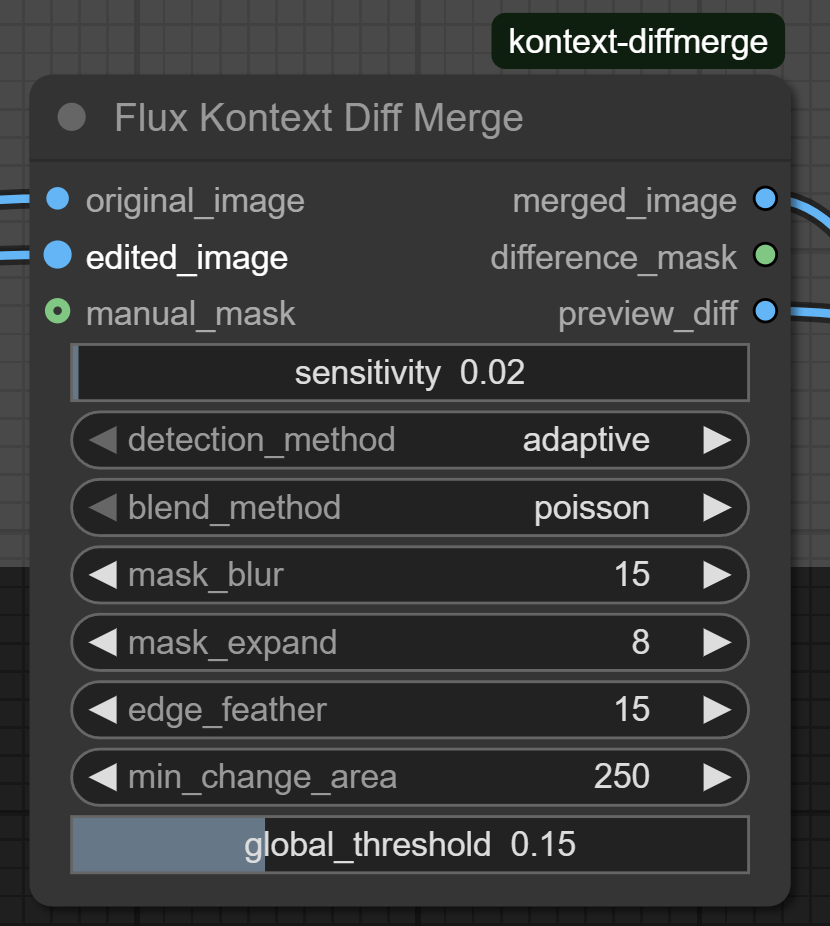
Required Inputs
original_image(IMAGE): Connect from your FluxKontextImageScale nodeedited_image(IMAGE): Connect from your VAEDecode node
Parameters
threshold(0.01-1.0, default: 0.02): Controls change detection threshold (increasing this reduces the size of the detected mask)detection_method: Choose detection approachadaptive: Best for AI-processed images (recommended)color_diff: Simple color differencesssim: Structural similaritycombined: Multiple detection methods
global_threshold(0.01-0.5, default: 0.15): Accounts for overall colour/lighting changes, not geometric shiftsmin_change_area(0-5000, default: 250): Minimum area size for valid changesblend_method: Choose blending techniquepoisson: Best for seamless integration (recommended)alpha: Simple linear blendingmultiband: Multi-scale blending for complex changesgaussian: Smooth falloff blending
mask_blur(1-100, default: 15): Blur amount for mask edgesmask_expand(0-50, default: 8): Pixels to expand the change maskedge_feather(0-50, default: 15): Additional edge softening
Optional
manual_mask: Override automatic detection with your own mask, in original-image coordinatesalignment(none/translation, default:none): Opt into conservative translation registration before detection and blendingmax_alignment_shift(1-64, default: 16): Largest accepted translation in pixels along either axis
Node Outputs
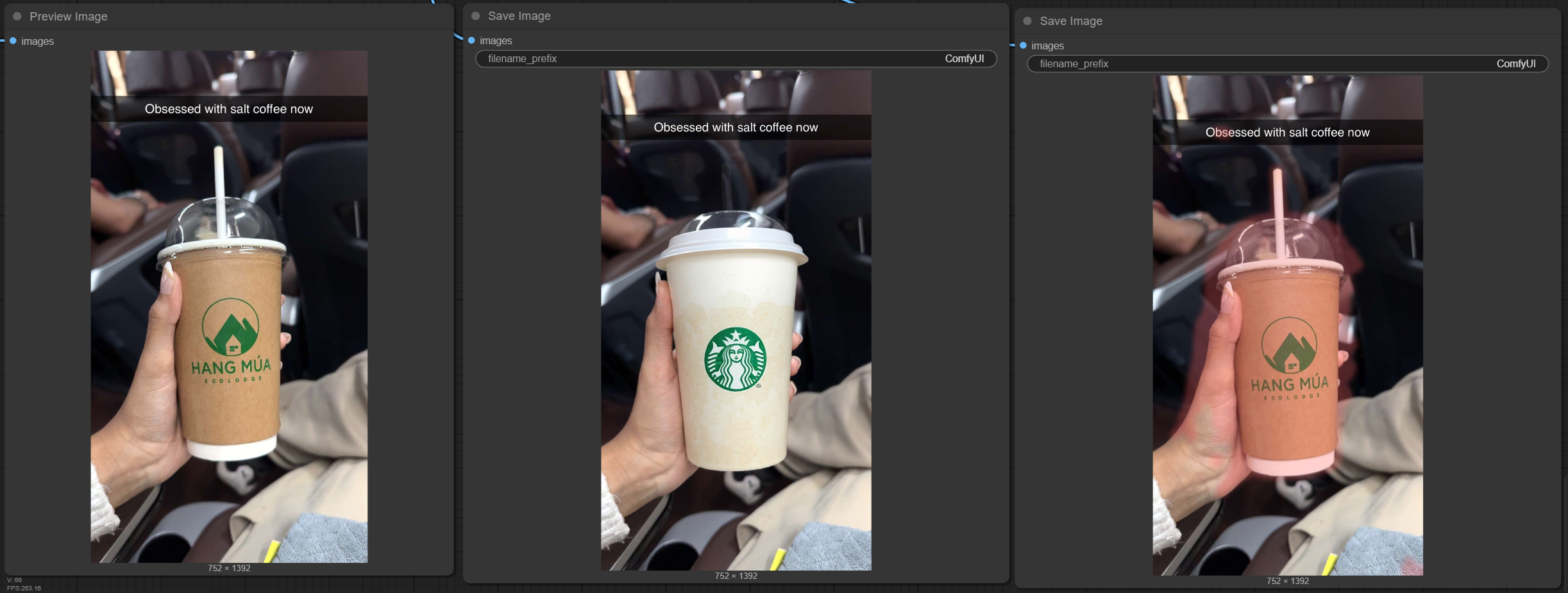
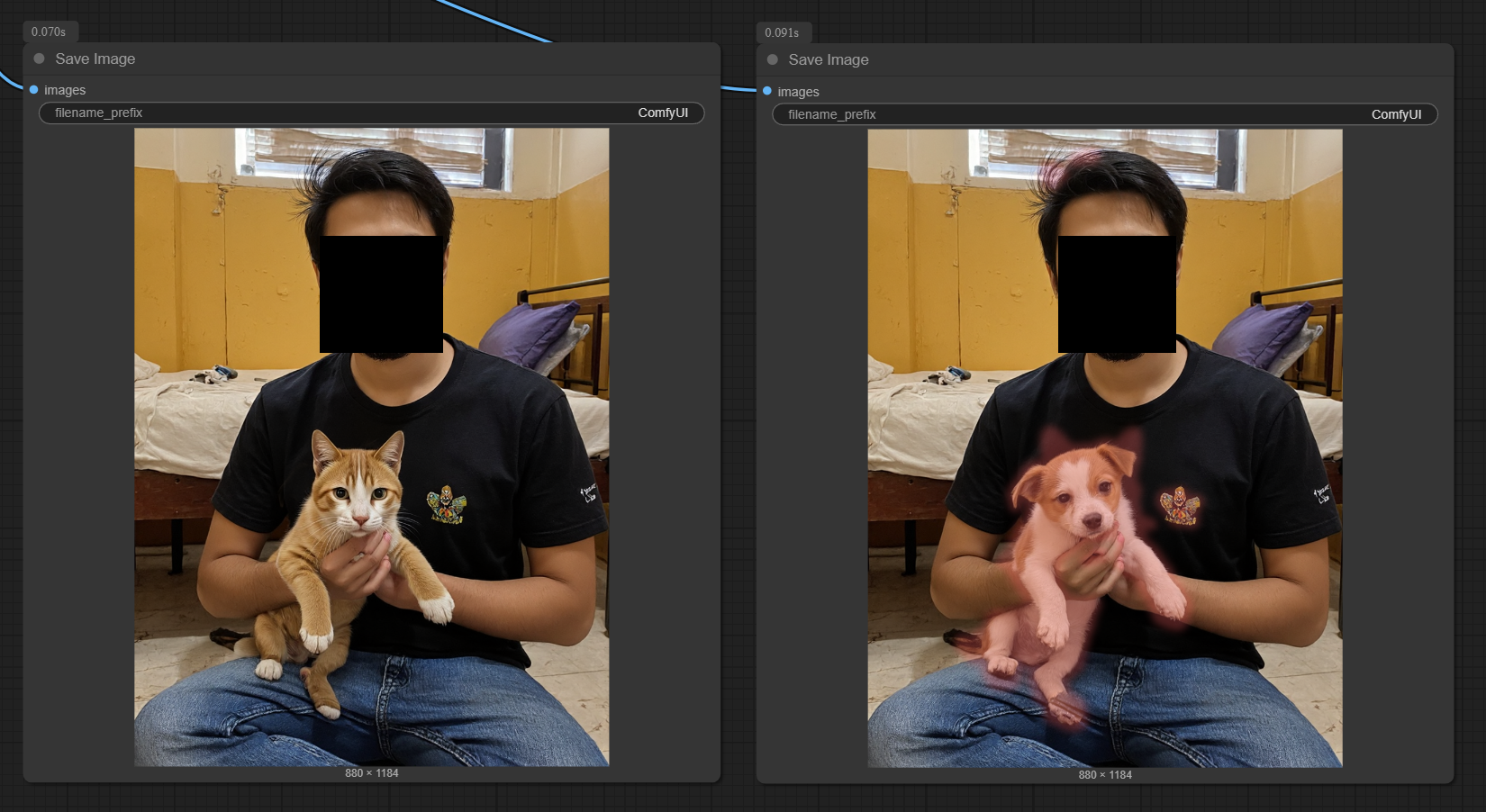
merged_image: The final quality-preserved imagedifference_mask: The detected change maskpreview_diff: Preview showing detected changes highlighted in red
Batch Support
This node fully supports batch workflows:
- If
original_imageandedited_imagehave the same batch size, items are processed pairwise - If
original_imagehas batch size 1 andedited_image> 1, the original is automatically broadcast to match the edited batch manual_maskmay be a single mask (broadcast) or a batch of masks; masks are resized per item to match image dimensions- All outputs (
merged_image,difference_mask,preview_diff) are returned as batches
Global position shifts (including Nano Banana edits)
By default, the node compares the images at the same pixel coordinates. Adaptive
LAB detection compensates for colour changes; it does not align geometry.
For edits shifted a few pixels, choose alignment: "translation". Each batch
item is registered separately, after any existing resize to the original size.
The output remains in the original image's coordinate system.
Alignment uses phase correlation on a 3×3 grid of grayscale tiles. A translation
is accepted only when at least four textured tiles (grayscale standard deviation
≥2, correlation response ≥0.3) agree within one pixel per axis, span at least two
rows and two columns, and stay within max_alignment_shift. The median of the
largest agreeing group is validated: at least four supporting tiles spanning two
rows and columns must each reduce mean absolute grayscale error by at least 20%
on their covered pixels. This distributed agreement avoids aligning to a single
repainted or moved object. It assumes substantial unchanged, textured background.
Only translation is supported, not rotation, zoom, perspective, or nonrigid deformation. Images smaller than 96 pixels on either axis, low-texture images, large edits, repetitive patterns, or weak/ambiguous matches may remain unaligned. When the criteria fail, the node uses the edited image as supplied; inspect the preview rather than assuming registration succeeded. Leave alignment disabled when the intended edit is itself a global translation.
Near-integer estimates (within 0.15 pixels) are snapped to avoid unnecessary resampling; other translations use bilinear interpolation. Missing border pixels are retained from the original and excluded from the output mask, including manual masks and feathering. A manual mask must describe the desired edit in original-image coordinates, not the shifted edited-image coordinates.
Optimal Settings
Object Replacement
threshold: 0.02
detection_method: "adaptive"
global_threshold: 0.15
min_change_area: 250
blend_method: "poisson"
mask_blur: 15
mask_expand: 8
edge_feather: 15
Poisson Blending Notes
- Poisson now selects the blend center using a distance transform (most interior point) for stability across thresholds
- If the mask touches the image border, the node performs reflect-padding under the hood and crops back, avoiding ROI errors and position jumps
- Poisson internally treats masks as binary; for very soft edges, consider
multibandorgaussian
Results
Example 1: Object Replacement
Example 2: Dog to Cat Replacement
Why Use This Node?
When Flux Kontext Dev processes an image, it introduces subtle changes throughout the entire image. This node:
- ✅ Preserves original image quality in unchanged areas
- ✅ Only applies AI changes where they're actually needed
- ✅ Handles global colour artifacts adaptively; small position shifts require optional translation alignment
- ✅ Provides seamless blending between original and edited regions
Requirements
- ComfyUI
- Python 3.8+
- OpenCV (opencv-python)
- scikit-image
- NumPy
- SciPy
- Pillow
License
MIT License - feel free to use and modify for your projects.
Troubleshooting
Entire image shows red overlay
If the edited image is globally displaced, enable alignment: "translation"
first; threshold changes cannot register image positions. See the alignment
criteria and limitations above.
- Increase
global_thresholdto 0.20+ - Increase
thresholdto 0.03 - Use
detection_method: "adaptive" - Increase
min_change_areato 500+
No changes detected
- Decrease
global_thresholdto 0.08 - Decrease
thresholdto 0.01 - Decrease
min_change_areato 100 - Check the
preview_diffoutput for debugging
Batch shape mismatches
- If you pass a single original and a batched edited input, the node will broadcast the original automatically
- If you pass mismatched batch sizes otherwise, you will get an error; align batch sizes or use broadcasting as above
What's New
- Optional conservative translation alignment with distributed tile agreement, error validation, and original-preserving borders
- Batch processing with original-image broadcasting when edited batch > 1
- Poisson blending is robust to edge-touching masks (reflect padding) and uses distance-transform center selection
- Per-parameter tooltips and improved in-node documentation for easier tuning