
TrainyThing
Send a ComfyUI batch to a phone for review with TrainyThing; the keepers, the notes and the seeds come back into the graph.
Nodes (5)
The one node in this pack that works offline
Read yesterday's phone verdicts back into a fresh graph
Swipe your batch on your phone, then let the graph carry on
Fire the batch at your phone, then let ComfyUI get on with it
The other half of Review, for when the split lives elsewhere
TrainyThing for ComfyUI
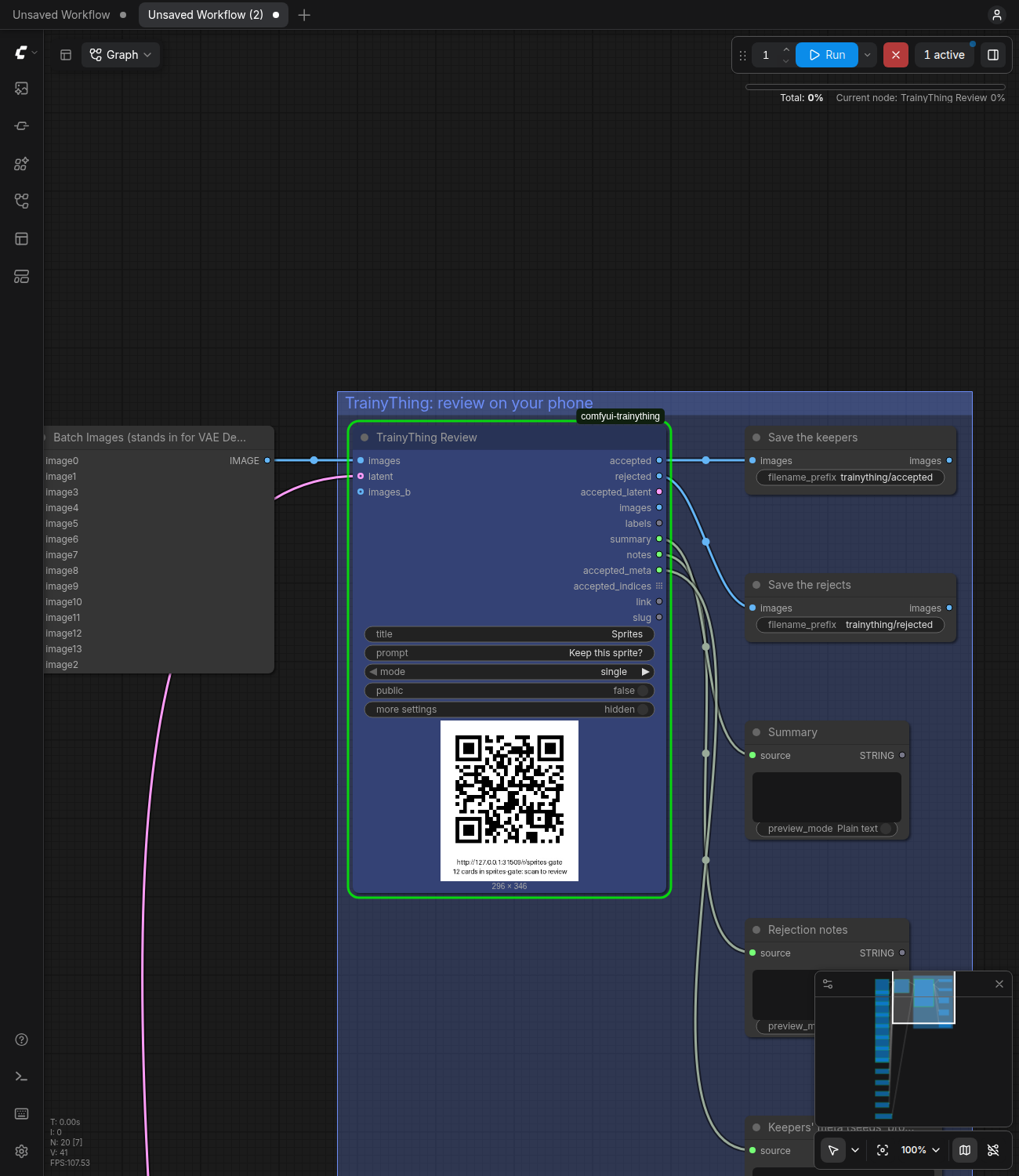
Wire TrainyThing Review after VAE Decode and press Queue: the batch becomes a TrainyThing review queue, the node shows its link and a QR, and the run waits. Scan it, swipe each image keep or reject on your phone (with a note on why), and the run goes on with the keepers, the rejects, the notes and each keeper's seed and prompt on separate sockets. Use it when the choice should be made on a phone, away from the desk, with a reason attached, or by more than one person. If you only want to click the keepers on the canvas yourself, keep using an on-canvas chooser such as cg-image-picker's Image Chooser; it is simpler for that.
Install
Clone the pack into ComfyUI's custom_nodes/, install its one dependency
with ComfyUI's own python, and restart ComfyUI. It needs the TrainyThing
daemon, which needs Node ≥ 22.5: start it once with
npx -y trainything dashboard (it keeps running in the background).
cd ComfyUI/custom_nodes
git clone https://github.com/ryanrinkel/comfyui-trainything
cd comfyui-trainything
python -m pip install -r requirements.txt     # the python ComfyUI runs with (its venv, or python_embeded\python.exe)
# restart ComfyUI; the five nodes are under "TrainyThing" in the node library
npx -y trainything dashboard                  # once: starts the daemon and opens its dashboard
Or from the Comfy Registry, where the pack is trainything: search for
TrainyThing in ComfyUI Manager, or comfy node install trainything.
ComfyUI Manager's "Install via Git URL" with the repository URL does the
same clone and install.
Try it without a model: copy tests/fixtures/sprites/*.png into ComfyUI's
input/, drag examples/gate.json onto the canvas, press Run, scan the QR.
Where it finds the daemon
The same order as the TrainyThing CLI, so the CLI, the MCP server and ComfyUI on one machine agree:
TRAINYTHING_URLandTRAINYTHING_TOKENin ComfyUI's environment;base_url(orport) andowner_tokenin$TRAINYTHING_HOME/config.json(default~/.trainything/config.json; the daemon writes it on first start);http://127.0.0.1:4747.
The token is never a widget. ComfyUI writes every widget value into each
PNG's metadata and into saved and shared workflow files, so a token typed into
a node would leak with the first image posted. The link and slug on the node
are not secrets the daemon relies on. With no daemon at the URL the node fails
with one line: no TrainyThing at http://127.0.0.1:4747; run npx -y trainything dashboard once. ComfyUI on another machine (a rented GPU)
needs TRAINYTHING_URL pointing at a daemon it can reach.
When a local daemon does not answer, the node tries once to start it (15 s
budget), with a console line naming how: a trainything binary on the PATH
first, else npx -y trainything list (the daemon is on npm as trainything,
0.1.0 and up). TRAINYTHING_TOKEN is passed to that
command only when TRAINYTHING_URL is set too; otherwise the CLI reads the
token from config.json itself.
During a wait a daemon that stops answering (or answers 5xx) is retried every 2, 4, 8 … at most 30 seconds until the timeout, with one console line; a 401, 403, 404 or 409 fails at once.
The three workflows
All three are in examples/, built on Load Image and twelve sprites so they
run with no model (see examples/README.md); in a real graph VAE Decode's
output goes where Batch Images is.
1. The gate: review inside the run (examples/gate.json). Press Queue,
scan the QR, swipe, and the run finishes with the keepers saved and the
rejection notes on screen. The run waits at Review (45 minutes by default,
then it goes on with what was judged).
Load Checkpoint ──▶ CLIP Text Encode (+) ──┐
                    CLIP Text Encode (−) ──┤
Empty Latent (batch 12) ───────────────────┴─▶ KSampler ──▶ VAE Decode ──▶ images ─┐
                                                   └──────────────── latent ───────┤
                                                                                   ▼
                                                                     [ TrainyThing Review ]
                                                                     link + QR on the node; the run waits
                                                                        │ accepted ──▶ Upscale ──▶ Save Image
                                                                        │ accepted_latent ──▶ KSampler (denoise 0.35) ──▶ …
                                                                        │ notes ──▶ Show Text
                                                                        └ rejected ──▶ Save Image (prefix "rejected/")
2. Two runs: refine from what was said (examples/two-runs-send.json,
then examples/two-runs-load.json). Run 1 sends and ends; queue it several
times with the same slug and the queue on the phone grows. Run 2 reads the
queue back whenever the reviewing is done, images included, even if
ComfyUI's output folder no longer has them. This is the path that never holds
ComfyUI's queue.
run 1   … ──▶ VAE Decode ──▶ [ TrainyThing Send  slug: sprites-08 ]        (the run ends; review when convenient)

run 2   [ TrainyThing Load  slug: sprites-08 ] ──▶ images ──▶ [ TrainyThing Filter  accepted ] ──▶ VAE Encode ──▶ KSampler ──▶ …
                                               ├──▶ summary ──▶ Show Text         (rewrite the prompt from the notes)
                                               └──▶ accepted_meta                 (the keepers' seeds and prompts)
3. A and B: which prompt, checkpoint or LoRA (examples/ab-pair.json).
The same seeds through two settings; one card per index with both images on
it; accepted is the winner of each pair and the run's folder gains
preferences.jsonl (the DPO shape).
prompt A ──▶ KSampler (seed 1000) ──▶ VAE Decode ──▶ images   ─┐
prompt B ──▶ KSampler (seed 1000) ──▶ VAE Decode ──▶ images_b ─┴─▶ [ TrainyThing Review  mode: pair ] ──▶ accepted (the winners)
                                                                        output/trainything/<slug>/preferences.jsonl
The nodes
All five are under TrainyThing in the node library.
TrainyThing Review
Send, then Wait, in one node; the batch and its latent stay in memory across the wait. An output node: it runs with nothing wired downstream.
A fresh node shows the essentials: images, title, prompt, mode,
public. The rest sits behind a more settings switch on the node
(web/trainything.js; the frontend's own Show advanced inputs in its
Vue node renderer), and unfolds by itself when a loaded workflow changed
one of them. The five nodes come coloured so the review part of a graph
reads as one box; a colour you pick on the node wins.
| Input | Default | What it does |
|---|---|---|
| images | | IMAGE, any batch size: one card per image |
| latent (optional) | | LATENT of the same batch: accepted_latent is sliced from it |
| title | ComfyUI batch | the queue's title on the phone and the dashboard |
| prompt | Keep this one? | the question on every card |
| mode | single | single, pair, choose, select (see Modes) |
| public | off | start the tunnel now (before any upload), so the link works off this machine; if the tunnel fails, the console says so and the link is the local one |
| slug (more settings, from here down) | empty | the link name. Empty: from the title. An open queue's name: the cards are appended (see below). A closed queue's name: an error. random: an unguessable one |
| intro | empty | shown before the first card. Empty: "Generated from: the positive prompt." and what to do in this mode |
| options | empty | choose / select only, required there: id:Label, id:Label, … |
| feedback | on_reject | when the reviewer is asked why: on_reject, optional, off, required |
| identity | name_email | reviewers give a name and email, or anonymous |
| order | coverage | coverage (cards with fewest reviews first) or fixed (batch order) |
| min_reviews | 1 | reviews per card before the queue is done (1 to 50) |
| project | comfyui | the project tag on the dashboard |
| timeout_minutes | 45 | stop waiting after this long (≥ 0.1); the queue stays open |
| on_timeout | partial | partial: go on with what was judged, the rest unjudged. block: nothing downstream runs |
| images_b (optional) | | pair mode: the B side, same batch size |
| labels (optional) | empty | one line per image, shown above its card |
| meta (optional) | empty | one JSON object for all images, or one per image (JSON lines or an array); merged over what the graph walk found, and it wins |
Hidden: the node's id, the prompt graph and the workflow, which go into each
PNG's prompt / workflow chunks and feed the graph walk. Under ComfyUI's
--disable-metadata the PNGs carry neither chunk, as Save Image's; the walk
still fills meta.
Appending to a queue the node did not make. A queue made by the CLI, the
dashboard or the MCP server keeps its own settings, checked before anything
is uploaded: a mode other than the queue's is an error naming both; other
options give way to the queue's (a console line says so); a queue with no
min_reviews gets the node's (without one the wait could only end on a close
or the timeout), and a queue with its own keeps it (a console line when it
differs from the widget).
The checks the split needs run before anything is uploaded or waited on:
pair needs images_b of the same batch size, and a wired latent needs at
least as many samples as images.
| Output | Type | What it holds |
|---|---|---|
| accepted | IMAGE | the keepers, in batch order |
| rejected | IMAGE | the rejects |
| accepted_latent | LATENT | the keepers' latents, when latent was wired |
| images | IMAGE | the whole batch |
| labels | STRING | labels.jsonl for this run: one line per image with ref, label, verdict, the tallies, contested, notes |
| summary | STRING | the daemon's summary.md: counts, then notes grouped by verdict |
| notes | STRING | the notes, one per line, prefixed by the card's label |
| accepted_meta | STRING | a JSON array of the keepers' meta: index, position, run, seed, steps, cfg, sampler, scheduler, denoise, prompt_text, negative_text, checkpoint, loras, batch_size, width, height, walk, plus your meta |
| accepted_indices | INT list | the keepers' batch indices; a node downstream runs once per keeper |
| link | STRING | the review link (the tunnel's when public is on) |
| slug | STRING | the queue's name |
An empty accepted or rejected stops only its own branch: Save Image after
rejected simply does not run when nothing was rejected.
TrainyThing Send
Review's first half: makes (or appends to) the queue, shows the link and QR, and the run goes on. An output node.
Inputs: Review's, without latent, timeout_minutes and on_timeout.
| Output | Type | What it holds |
|---|---|---|
| queue | TRAINYTHING_QUEUE | a handle (URL, slug, queue id, link, this run's card refs); only TrainyThing Wait takes it |
| link | STRING | the review link |
| slug | STRING | the queue's name |
TrainyThing Wait
Review's second half, for when Send and the split sit in different parts of the graph.
| Input | Default | What it does |
|---|---|---|
| queue | | from TrainyThing Send |
| images | | the batch Send was given, to slice |
| latent (optional) | | its latent, for accepted_latent |
| images_b (optional) | | pair mode: the B batch, so winners can come from either side |
| timeout_minutes | 45 | as Review |
| on_timeout | partial | as Review |
pair mode without images_b (or with another batch size), or a latent with
fewer samples than images, is an error at once, before the wait.
Outputs: Review's first nine (accepted … accepted_indices), not link or
slug. Only this run's cards are split, even in an appended queue.
TrainyThing Load
A later run reads a queue back by name, images from the daemon's blob store.
| Input | Default | What it does |
|---|---|---|
| slug | empty | the queue's link name (as on the dashboard), or its id |
| wait | off | off: read what is judged now. On: wait until the queue is done or the timeout, as Wait does |
| timeout_minutes | 45 | with wait on: stop waiting and load what is judged |
| Output | Type | What it holds |
|---|---|---|
| accepted, rejected, images | IMAGE | as Review; images is every image card in card order (an appended queue's runs one after another) |
| labels, summary, notes | STRING | as Review, for the whole queue |
| accepted_meta | STRING | as Review. position is the keeper's position in Load's batch (the same numbers as accepted_indices); index is its index in the batch its own Send was given (the sampler's), for Latent From Batch. With several runs in the queue they differ. A card that Send did not make has no index |
| accepted_indices | INT list | positions in Load's batch |
No accepted_latent: a latent is not stored. Cards that are not images
(text, audio, video added by the CLI) are skipped with a console line. ComfyUI
re-runs Load only when the queue moved (cards, judgments, status, closed time,
last activity).
TrainyThing Filter
Any batch, the labels, a rule: the subset. It does not talk to the daemon.
| Input | Default | What it does |
|---|---|---|
| images | | the batch the labels describe, one line per image |
| latent (optional) | | its latent, sliced the same way |
| images_b (optional) | | pair labels: the B batch, so accepted / rejected take the winning / losing image of each pair (not wired: the A side) |
| labels | | from Review, Wait or Load (a socket, not a text box) |
| rule | accepted | accepted, rejected, contested, unjudged, option |
| option_id | empty | with option: choose, the consensus is this id; select, it includes it |
| Output | Type | What it holds |
|---|---|---|
| images | IMAGE | the subset, in batch order |
| latent | LATENT | its latent (blocked when the picks come from both pair sides) |
| indices | INT list | the subset's indices |
| count | INT | how many (0 when empty; the other three are then blocked) |
A labels line count that differs from the batch size is an error.
Modes
| Mode | The card | accepted / rejected |
|---|---|---|
| single | one image; keep or reject | the keepers / the rejects |
| pair | images (A) and images_b (B) side by side; pick one | the chosen image of each pair, from either side / the other one. accepted_latent is blocked (the wired latent is A's) |
| choose | one image; pick one of the options | both blocked; labels and summary carry the counts; Filter option gives the images |
| select | one image; pick any of the options | as choose |
options is id:Label, id:Label, …, for example hair:Hair colour, scarf:Scarf, hands:Hands, ok:Fine. An id is lowercase letters, digits, -
and _; 2 to 12 options; a malformed list is an error that names the entry.
It is ignored (with a console line) in single and pair. In choose and
select, accepted_meta and accepted_indices are blocked too.
A card is contested when reviewers tie (with min_reviews above 1) and
unjudged when nobody judged it, or it was skipped; such cards are in
neither set and Filter reaches them by rule. notes: single, the rejection
notes; pair, every note with the side chosen (sprite 03 (chose B): cleaner outline); choose / select, grouped by option (sprite 04 [hair, hands]: …).
Recipes
| To refine… | Wire |
|---|---|
| Keep only the keepers | accepted → Save Image |
| The keepers, bigger | accepted → Upscale → KSampler img2img, or accepted_latent → KSampler at low denoise |
| One keeper, exactly again | drag its PNG from output/trainything/<slug>/blobs/ onto the canvas: the workflow is inside it. Or seed + batch_size + index from accepted_meta with core's Latent From Batch |
| The prompt | summary (or notes) → a text preview; read the notes beside the prompt and change it |
| The reasons, counted | mode: choose with reason tags as options → the counts in summary; Filter option hair → those images |
| Defects, tagged | mode: select with the same tags; Filter option takes every card that includes one |
| Two of anything | images_b, mode: pair, same seeds → preferences.jsonl |
| A dataset of keepers with captions | python examples/dataset.py ComfyUI/output/trainything/<slug> → <ref>.png + <ref>.txt pairs (caption: meta.prompt_text), the LoRA-trainer convention. --rule rejected or --rule option:<id>; --out DIR. Standard library only |
| Several opinions | min_reviews: 2 and public on; contested cards stay out of both sets and are yours to decide |
What the run leaves on disk
Each finished wait (Review, Wait) and each Load writes
ComfyUI/output/trainything/<slug>/ (the files are overwritten each time):
| File | What |
|---|---|
| results.json | the whole queue: every card, its items, meta, judgments and summary |
| blobs/ | every image as the PNG that was uploaded, with the prompt and workflow chunks Save Image writes (none under --disable-metadata) |
| labels.jsonl | one line per card: ref, label, verdict, tallies, contested, notes |
| summary.md | counts and notes grouped by verdict, written to be read |
| preferences.jsonl | pair mode only: one line per pair with a winner |
The queue itself lives in the daemon (~/.trainything), so Load can read it
back after this folder is gone.
Known limits
- A waiting node holds ComfyUI's whole queue, like every on-canvas chooser. Nothing else runs until the reviewing is done, the timeout passes or you press Cancel (the queue stays open; Load reads it later). Send, then Load, never holds it.
- ComfyUI caches an unchanged Send or Review: queueing the same graph with the same inputs skips it, since those images are already on the phone. Change a seed or a widget to send again.
accepted_latentis always blocked inpairmode: the wired latent is A's and a pair B won has none. VAE Encodeacceptedfor the winners' latent.- Load re-reads on a reviewer's visit. Load's cache key carries the queue's last activity, so an undo followed by another verdict re-runs it; that time also moves when a reviewer merely opens a card, which costs one re-read and nothing else.
- The run's folder is best effort after a wait. A full or read-only
output folder, or a failed bundle, is one console line; the split is
returned anyway and Load reads the queue later. A daemon that answers
results?out=from another filesystem (Docker on 127.0.0.1) is noticed (no freshresults.jsonhere) and the bundle is read instead. publicneeds cloudflared. The daemon fetches it on first use; where that fails, installcloudflaredon the PATH. Withoutpublicthe link only works on this machine (or your LAN, if the daemon is bound to it).- The graph walk is best effort. It follows
imagesback through VAE Decode, KSampler, the text encoders and LoRA loaders to the checkpoint, and writes where it stopped inmeta.walk. Custom samplers, loop packs and seed-per-image setups stop it; themetainput overrides anything it got wrong, and the PNG carries the whole workflow regardless. - Mixed sizes are resized. A ComfyUI batch has one size, so Load resizes any image whose size differs from the first card's (bilinear), and a B batch of another size is resized to A's; the console says how many.
ui.PreviewTextdoes not render on custom nodes in ComfyUI 0.39.0, so the link is printed under the QR in the image (and on the console).- Built and tested against ComfyUI 0.39.0 (
requires-comfyui = ">=0.39.0"); an older ComfyUI prints one warning line at startup and may not load the nodes. Images only for now; audio and video are later.
Development
tests/harness/setup_comfy.sh   # once: CPU ComfyUI 0.39.0 + two venvs in ~/.cache/comfyui-trainything
tests/run.sh                   # the whole suite in the harness venv, then in a bare venv (Pillow + numpy)
tests/harness/make_examples.py --check --shoot   # rebuild examples/*.json through the frontend, check them, re-take the screenshots
The tests start throwaway daemons (from ../trainything, TRAINYTHING_REPO;
it needs pnpm build) and throwaway CPU ComfyUIs on random ports, judge
through the reviewer API, and never touch ~/.trainything or port 4747.
tests/test_k4_install.py is the stranger install: a fresh ComfyUI checkout,
this repo git cloned into its custom_nodes/, the five nodes in
/object_info. TRAINYTHING_FORCE_REMOTE=1 is for tests only (a local
daemon treated as remote).
| Path | What |
|---|---|
| __init__.py | the entrypoint (comfy_entrypoint, V3 API) and the ComfyUI version check |
| nodes/ | the five nodes; inputs.py the shared schema; common.py the shared logic, importable without ComfyUI |
| trainything_client.py | the owner API client, standard library only |
| png.py, walk.py, split.py, cards.py | PNG chunks; the graph walk; labels → indices; a batch → cards |
| examples/ | the canvas workflows and dataset.py |
License
MIT; see LICENSE.