
OpenH3-IR
Four nodes for MiniMax H3: type a plain prompt, name your pictures, clips and sounds with @, lock exact dialogue, and get the structured brief H3 wants in its own published format, checked before it runs. Nothing to start beside ComfyUI. Needs any OpenAI-compatible model you run or have access to.
Nodes (4)
OpenH3-IR Nodes for ComfyUI
Write the shot. Drop the references. Render.
The ComfyUI-native way to use OpenH3-IR, the open local Context-IR implementation for MiniMax H3.

Write naturally, reference media by name with @, and lock exact dialogue with @speaks().
No <Picture 1> bookkeeping, no prompt copy-pasting, and no second service to start.
@the-man crosses @desert while @dragon follows beside him.
He looks back and @speaks("You really came all this way?")
Hover @the-man and you see the file it points to. Replace that file and the prompt keeps pointing to the same role.
OpenH3-IR, inside ComfyUI
OpenH3-IR is an open implementation of the Context-IR layer MiniMax H3 uses between a normal request and the structured document H3 actually consumes.
It can be used from the command line, over HTTP, or here in ComfyUI.
This repository is the ComfyUI side of the project: four nodes and a ready-to-run workflow built around the same OpenH3-IR engine.
Installing the pack also installs open-h3-ir into ComfyUI's own Python, so the normal path is completely in-process:
ComfyUI → OpenH3-IR → MiniMax H3 → render
There is nothing else to launch, no port to pick, and no environment to keep alive beside ComfyUI.
If you do want OpenH3-IR on another machine, the same graph can talk to its HTTP service instead.
What you get
Four nodes cover the part of an H3 workflow that usually turns into plumbing:
| Node | What it does | | ---------------------- | -------------------------------------------------------------------------------------- | | OpenH3-IR Main | Your prompt, duration, frame shape, shots and writing controls | | OpenH3-IR Media | One drag-and-drop tray for pictures, video and audio | | OpenH3-IR Setup | Your language model, MiniMax H3 files and where OpenH3-IR runs | | OpenH3-IR Director | Optional reusable direction for camera, lighting, pacing, performance, sound and music |
Together they:
- turn plain prose into the structured Context-IR brief H3 expects
- bind names like
@hero,@cityand@musicdirectly to their files - keep pictures, clips and sounds in one media tray
- understand what each reference is for, not just that it exists
- lock exact dialogue with
@speaks("...") - keep requested duration, H3's legal frame count and the latent in sync
- select the H3 job from the references actually in the graph
- load the H3 files you explicitly picked
- hand the model, conditioning, latent and VAEs back to ComfyUI
- optionally apply reusable Director profiles
- report what was written, loaded, resolved and used
Your sampler, LoRAs, steps, sigma shift, decode and save remain yours.
OpenH3-IR handles the H3 job. ComfyUI still handles the render.
Install
ComfyUI Manager
Search for OpenH3-IR, install it, and restart ComfyUI.
That's the recommended install.
Manual
git clone https://github.com/ruashots/ComfyUI-OpenH3-IR.git /path/to/ComfyUI/custom_nodes/ComfyUI-OpenH3-IR
/path/to/ComfyUI/python -m pip install -r /path/to/ComfyUI/custom_nodes/ComfyUI-OpenH3-IR/requirements.txt
The second command installs open-h3-ir into the same Python ComfyUI runs.
The node pack and OpenH3-IR remain separate releases, so either side can be updated without bundling a copy of the other into this repository.
The nodes also do not import OpenH3-IR while ComfyUI is loading them. If the package is missing, half-installed or broken, the nodes still appear normally and the failure is reported when a graph actually tries to compile.
Start here
Open:
example/openh3ir_base_workflow.json
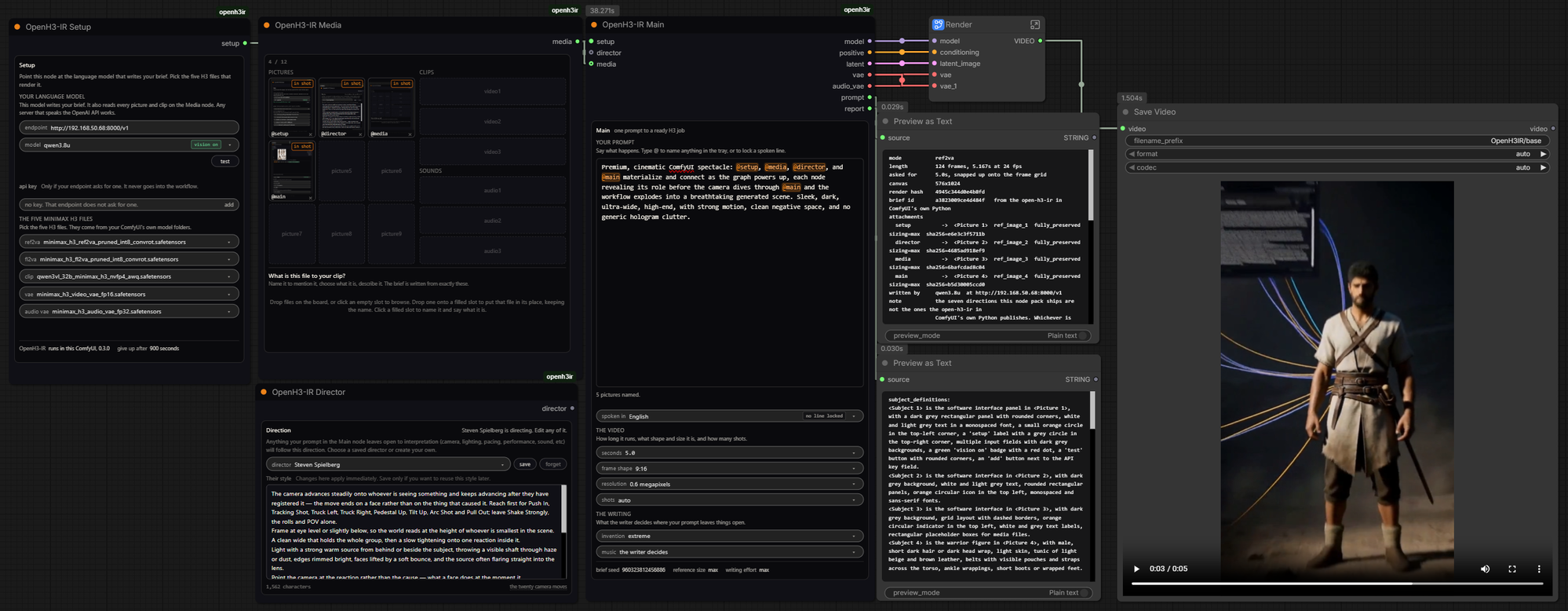
Then:
- Put your OpenAI-compatible endpoint on OpenH3-IR Setup
- Press test
- Pick your five MiniMax H3 files
- Write a prompt
- Queue
That's enough for a text-only render.
Add OpenH3-IR Media when you want pictures, clips or sound.
The workflow ships already wired and starts with an empty Media node, so you can get a first render before learning the rest of the pack.
Your language model can be local or hosted. Anything speaking the OpenAI API works, including:
- vLLM
- llama.cpp server
- LM Studio
- Ollama
- hosted OpenAI-compatible endpoints
If the job contains visual references, the language model needs vision.
The Setup node sends it a picture and checks instead of trying to infer that from the model name.
The four nodes
Search h3 in ComfyUI and all four appear.
tray finds Media, director finds Director, and minimax finds Main.
A text-only graph needs Main + Setup.
The moment you add a picture, clip or sound, add Media and connect its media output to Main.
Director is always optional.
Main
<img src="docs/media/comfyui-main-node.png" width="220" alt="OpenH3-IR Main node">Main is the prompt and the decisions that belong to the video itself.
The prompt is the work. Most things below it are decisions OpenH3-IR can make for you unless you choose them first.
Your prompt
Write plain prose.
Use @ when you want to point at something in the Media tray:
@hero walks onto @gantry and stops when she sees @city below.
Use @speaks("...") when dialogue must survive unchanged:
@hero turns back and @speaks("Close the gate behind me.")
The line below the prompt reports what you referenced, what dialogue is locked, and anything that cannot currently be resolved.
Video
| Control | What it decides |
| --------------- | --------------------------------------------------------------------------------------------------------------- |
| seconds | The only place length is set. It is snapped onto H3's frame grid once and used by both the brief and the render |
| frame shape | 16:9, 21:9, 4:3, 1:1, 3:4 or 9:16 |
| resolution | H3's native 768-short-edge size, or a stated pixel-area target |
| shots | auto leaves the edit to OpenH3-IR, or pin a count from 1 to 10 |
A shot count that physically cannot fit the requested duration is refused with the arithmetic rather than silently changed.
Writing
| Control | What it decides |
| ------------- | -------------------------------------------------------------------------------------------- |
| invention | How much the writer adds where your request is silent: restrained, balanced, bold or extreme |
| music | Let the writer decide, or request none |
| spoken in | The language used by locked @speaks() lines |
Turning music off only turns music off. Ambient and physical sound can still be written because H3 generates sound in the same pass as the picture.
Advanced
brief seed changes the writing, not the sampler seed.
Change it when you want another interpretation of the same prompt.
reference size controls how large each picture reaches H3. match relates it to the current render size. max preserves more of the original image size, which can hold identity harder but costs more because reference tokens ride through sampling.
writing effort controls how much work the language model is asked to spend producing the brief.
Media
<img src="docs/media/comfyui-media-node.png" width="220" alt="OpenH3-IR Media node">Media is one tray for everything the video looks at or listens to.
Drop files directly onto the panel or click an empty slot to browse.
Pictures, clips and sounds sort themselves into their sections. Hold a file over the node and the slot it will land in lights up before you release it.
Named media instead of <Picture 1>
Files start with names like:
picture1
video1
audio1
Rename them to something useful:
hero
dragon
desert
reference-camera
music
Then use those names directly:
@hero races across @desert while @dragon follows beside him.
Type @ and the prompt editor opens a picker with the available references and thumbnails.
No remembering whether the girl was <Picture 1> or <Picture 3>. No keeping numbered labels synchronized with the prose. No explaining that mapping to the writing model and hoping it follows it.
The binding is mechanical.
@hero points to that Media slot, and OpenH3-IR carries the relationship through to the actual H3 reference label.
A mention for a slot that does not exist turns red and is refused before a model call.
Files you never mention can still be used. The report tells you which ones went unmentioned.
Hover to see what a mention means
Once a reference is in the prompt, hover it.
A picture shows the picture.
A clip shows a frame.
A sound shows its filename and the note you wrote about it.
Rename a slot and mentions of its old name turn red immediately.
Swap the file, keep the prompt
Drop a new file onto an occupied slot.
Its:
- name
- role
- description
stay in place.
So a workflow using @hero keeps using @hero. Only the source file changes.
A couple of file-specific claims are reset when necessary. If a replacement clip has no soundtrack, the old soundtrack choice is turned off. Replacing an audio recording clears words that belonged to the previous recording.
The node tells you when it does either.
Tell H3 what each reference is for
Every Media slot has a role.
Pictures
- something in the shot
- the setting
- a style to copy
- add it to an existing clip
- replace the one in an existing clip
- first frame
- last frame
- storyboard
Clips
- copy what is in it
- copy how it is shot
- edit it
- carry on from it
Sounds
- play it
- match its style
- cut to its beat
- sound effect
- voice to match
These are not hints added to your prompt.
They change how OpenH3-IR builds the job.
A clip set to edit it produces an editing brief.
A clip set to copy how it is shot can lend its structure without being cited for the things visible inside it.
A track set to match its style is treated as style rather than something to reproduce.
A picture set to first frame or last frame switches the job to H3's FL2VA path.
Invalid combinations are refused before the language model or renderer is used, with the slots and reason named.
Character and object replacement
Put a clip in the tray and set it to:
edit it
Then set a picture to:
replace the one in an existing clip
That picture is now a replacement reference, not another subject to add.
Whatever it shows takes the place of something already in the clip, following its position, movement and timing.
If more than one possible target exists, describe the original in the extra field:
the man in the plaid shirt
or:
the red car on the left
Two replacement pictures can target two different subjects in the same edit.
A person, car, dog or coffee cup all work the same way.
This is still MiniMax H3 generating a new video. It is not an in-place repaint of your original frames. OpenH3-IR asks H3 to preserve the original camera, framing, timing, action and light as closely as possible, but H3 still performs a new render.
Exact dialogue with @speaks
Normal quoted text stays normal prompt text. The writer can interpret or polish it.
Dialogue that must survive unchanged uses:
@speaks("The gate stays shut tonight.")
That span is locked.
The returned brief is validated to make sure the line survived word for word and mark for mark. If it did not, the brief is refused and rewritten.
Choose the language for locked lines with spoken in on Main.
An unfinished @speaks( turns red in the editor and will not compile.
There is no other prompt syntax: plain prose, @references, and locked dialogue.
Setup
<img src="docs/media/comfyui-setup-node.png" width="220" alt="OpenH3-IR Setup node">Setup contains the things that belong to your machine rather than the scene.
Your language model
Enter the endpoint in full, ending in /v1:
http://192.168.1.20:8000/v1
Press test.
The node:
- reaches the endpoint
- reads the models it serves
- fills the model automatically if there is only one
- sends the selected model a picture
- reports whether vision actually works
If several models are available, you choose one. The node does not silently take the first.
The endpoint must be reachable from the machine ComfyUI runs on, not merely from your browser.
A newly added Setup node makes no network calls on its own. The test only happens when you press test.
API keys
The API key is not saved inside the workflow.
It lives in ComfyUI's own user folder instead, because workflows travel and can be embedded in rendered files.
Environment variables
If you already export:
H3IR_LLM_URL
H3IR_LLM_MODEL
before starting ComfyUI, empty fields on the node can inherit them.
The report says when a value came from the environment rather than the node.
Your five MiniMax H3 files
The five selectors show the files your ComfyUI installation actually has.
There is no hidden "auto" choice.
There is no background selection based on whichever filename happens to look closest.
The file you can read on the node is the file that loads.
The report names every selected file and the loader that handled it.
If a filename clearly identifies the wrong H3 checkpoint family for the current job, OpenH3-IR warns you rather than quietly replacing your choice.
A filename that provides no evidence gets no warning.
Director
<img src="docs/media/comfyui-director-node.png" width="220" alt="OpenH3-IR Director node">Director is optional.
Leave it disconnected and OpenH3-IR behaves normally.
Connect one and it gives the writer reusable direction for the decisions your own prompt left open:
- framing
- camera movement
- camera height
- lighting
- color
- pacing
- performance
- sound
- music
The direction itself is ordinary prose and fully visible on the node.
Describe habits, not scenes
The useful part of a director is not their name. It is what they repeatedly do.
Instead of sending a writing model:
Make it like Director X
Director stores the actual characteristics you care about: how scenes are framed, how the camera moves, how performances are shaped, what the light does, how sound is handled, and what kind of personality those choices bring to the work.
The name is for your library and report.
Only the direction itself is sent to the writer.
Seven editable examples ship with the pack. You can change them, rename them, delete them, or save your own.
Nothing is selected behind the scenes. What you can read in the box is what gets used.
Your prompt still wins
Director steers whatever you left open.
It does not overwrite something you explicitly requested.
Ask for a locked-off wide and the shot stays locked off. Director can still influence its light, performance, sound and the other decisions you did not take yourself.
If you pin a shot count on Main, Director does not get to change it.
H3's named camera moves
MiniMax H3 recognizes twenty camera moves by name.
Director exposes that closed vocabulary so a direction can use the exact term H3 knows instead of an approximation that gets weaker adherence.
The shipped directions use those names where appropriate and can also say which moves to avoid.
Saved directions
You do not need to save a direction for it to work.
The graph already carries the text you wrote.
Saving only makes that direction available for reuse in another workflow on the same ComfyUI.
Saved directions live as plain files under:
user/default/openh3ir/directors/
A workflow carries the direction itself, not a fragile pointer to a library entry, so sending the graph to somebody else does not require them to have your Director library.
One duration, all the way through
MiniMax H3 renders on a fixed 17k+5 frame grid.
OpenH3-IR gives you one seconds control, resolves it once, and uses that result everywhere:
- Context-IR
- shot timing
- frame count
- latent
- render
Ask for 10 seconds and the legal result is 10.125 seconds.
The report shows both.
There is deliberately no second duration control elsewhere in these nodes that can drift out of sync and leave you rendering eight seconds of a ten-second brief.
The selectable range is wider than H3's trained duration band. If you go outside that band, the render is allowed but the report tells you that it is untested.
What Main gives the rest of the graph
Main outputs the pieces that feed the normal H3 rendering chain:
| Output | Into |
| ----------- | ---------------------------------------- |
| model | your model patches, guider and scheduler |
| positive | guider conditioning |
| latent | sampler |
| vae | VAE Decode |
| audio_vae | VAE Decode Audio |
It also gives you:
prompt
The compiled Context-IR brief.
report
What actually happened: job type, resolved duration, selected files, loaders, reference bindings, mentions, unmentioned media, warnings and OpenH3-IR information.
Wire report into ComfyUI's own Preview as Text node if you want it on the canvas.
The supplied workflow already does.
Your render stays a ComfyUI render
These nodes do not sample and do not save.
They prepare the H3 job.
Everything you normally tune on the rendering side stays available:
- LoRAs
- model patches
- sampler
- steps
- sigma shift
- scheduler
- decode
- save
The supplied workflow gathers that side into a box called Render so the part you actually type into stays readable.
It intentionally starts close to ordinary H3 settings rather than pretending to be the fastest possible recipe.
One deliberate choice is the beta scheduler instead of simple, following Comfy-Org's reference-to-video guidance that beta or normal performs better on reference-heavy H3 prompts.
GGUF
If ComfyUI-GGUF is installed, .safetensors and .gguf builds can appear in the same selectors.
Pick a .safetensors file and the native loader is used.
Pick a .gguf file and ComfyUI-GGUF's loader is used.
There is no separate GGUF toggle because the selected file already answers that question.
Checkpoint and encoder are chosen independently, so supported GGUF and safetensors files can also be mixed.
Current validation note: GGUF routing, file lists and loader selection are unit tested, but H3 GGUF has not yet been run end to end on the machine this pack was developed on. If you test it through this pack, reports are welcome.
Media limits
The Media node follows MiniMax H3's per-kind ceilings:
- 9 pictures
- 3 clips
- 3 standalone sounds
The tray has a 12-file total ceiling, so not every individual slot can be full at once.
A file that does not fit is rejected where you drop it, with the reason. It is never silently discarded or uploaded.
What the workflow remembers
The Media node's state is saved with the graph, including:
- slots
- names
- roles
- descriptions
- clip audio choices
- replacement targets
Rendered videos that carry the ComfyUI workflow carry that state too.
The media files themselves remain in ComfyUI's input folder. Open the workflow on another machine and it knows what belongs in each slot, but the actual source files still have to be present or dropped back in.
Media from another node
An IMAGE coming directly out of another node cannot currently feed the Media tray.
Save it first, then add the file.
That tradeoff is deliberate: OpenH3-IR examines the same file H3 receives, so the thing that was described and the thing that was rendered cannot quietly become different inputs.
Run OpenH3-IR somewhere else
Most people do not need this.
By default Setup reports:
OpenH3-IR runs in this ComfyUI
Open that row and you get one field: runs at.
Leave it empty and OpenH3-IR stays in-process.
Put an OpenH3-IR service address there and the same graph uses that instance instead:
h3ir serve
ComfyUI still renders locally.
This is useful when:
- several ComfyUI machines share one OpenH3-IR instance
- the ComfyUI machine should not talk directly to the language model
- your LLM infrastructure already lives somewhere else
The remote OpenH3-IR instance carries its own language-model configuration, so the endpoint fields on the ComfyUI node are not used in that mode.
The report says so.
Media transfer needs no mount-map setup
The nodes try the cheapest route first.
If the OpenH3-IR service can open ComfyUI's file directly, it gets the path. Nothing is copied.
If the same disk is exposed under another spelling, for example:
C:\ComfyUI\temp\ref.png
versus:
/mnt/c/ComfyUI/temp/ref.png
the node tries plausible forms and the service confirms one by actually opening the file.
If no path works, the file is uploaded automatically.
Uploads are content-addressed, so the service can tell the node it already has an unchanged file. Queue the same graph again and that media does not have to cross the network again.
The remote instance publishes its own upload ceiling and retention through /v1/capabilities, and the node checks those limits before sending the bytes.
No path-mapping field is required.
The two sides can update independently
The ComfyUI pack and OpenH3-IR are separate releases.
Before a graph queues, Main asks whichever OpenH3-IR instance will do the work what it currently accepts.
If the graph uses a feature that version has never heard of, the queue stops before media travels.
The message names what is incompatible and which side needs updating.
Other differences that do not prevent the job from running are reported as notes instead of turning into unnecessary hard failures.
Re-queueing does not mean rewriting
OpenH3-IR is seeded and the node caches compilation from its inputs.
Queue an unchanged graph again and it can reuse the same brief.
Change brief seed when you actually want another written interpretation of the same request.
That seed belongs to OpenH3-IR's writing stage. It is not the sampler seed.
If the writer fails validation twice and a fallback brief is used, the report says so instead of passing it off as a normal written result.
When something goes wrong
Read the toast or the report.
The pack tries to tell apart failures that would otherwise look identical:
| Problem | What it points at | | --------------------------------------- | ----------------------------------------------------------- | | no language-model address | the Setup field to fill in, with an example | | OpenH3-IR missing from ComfyUI's Python | the install command or remote-service alternative | | installed but unable to import | the broken installation rather than pretending it is absent | | endpoint serves several models | the available IDs and the field where you pick one | | language model is down | the endpoint, not your graph | | requested remote instance is down | its address and the command that starts it | | no Setup node | the missing node, files and socket | | attachment cannot be found | the paths that were tried | | attachment is invalid | the media analyzer's actual error | | ffmpeg is missing | the machine where OpenH3-IR is running | | too many references | H3's actual ceilings | | incompatible media roles | the slots involved and why they cannot coexist |
A broken OpenH3-IR installation costs you the compile, not the node pack.
The nodes stay on the menu.
What it does not do
OpenH3-IR cannot hear audio content.
For sounds, it knows the file details plus whatever description you type. A sound used as voice to match or play it can also carry the words already spoken in that recording.
OpenH3-IR also cannot turn H3 into an in-place video editor.
When you edit or replace something in a source clip, the original file is never modified. H3 watches it and generates a new video that follows it as closely as it can.
And the Media tray currently accepts files from disk, not IMAGE, VIDEO or AUDIO values arriving directly from other nodes.
Those are real limits, so they are stated rather than hidden behind the UI.
The other ways into OpenH3-IR
This repository is the ComfyUI package, but it is not a separate prompting system.
It is one way into OpenH3-IR.
The main project lives at:
ruashots/open-h3-ir
There you can use the same Context-IR implementation:
- from the command line
- over its HTTP API
- as the package this node pack runs directly inside ComfyUI
That repository also goes deeper into what Context-IR is, why it matters to H3, side-by-side output comparisons, the invention dial, API and CLI use, validation, and the implementation behind the briefs these nodes produce.
If all you want is OpenH3-IR in ComfyUI, you do not need to install or operate both repositories yourself.
Install this pack and it brings OpenH3-IR with it.
Credits
Parts of the frontend implementation build on techniques from two MIT-licensed ComfyUI projects:
- ComfyUI-Fantastic-MiniMaxH3-PromptBuilder, by Adudeguyman
- ComfyUI-MiniMaxH3-Easy, by nkxx188
Full attribution and links are in NOTICE.
License
Apache 2.0. See LICENSE.
That license covers this node pack.
MiniMax H3 has its own license and terms, which apply separately to the model itself. See the OpenH3-IR README for the project-level notes, and MiniMax's agreement for the actual terms.