
Geiru Context Suite
Anti-degradation nodes for MiniMax H3 in ComfyUI. Keep long videos and continuation chains sharp, with steady colour and no burn-in: Keystone and capstone hold clip 1's detail, Context Noise stops held frames from baking in, and Geiru Context / Anchoring handle clean joins. Includes Geiru Hybrid Windows for seamless long fast-motion renders and Geiru Window Director to build them window by window (approve, re-roll, rewind, blend). Example workflows included.
Geiru Context Suite
ComfyUI nodes for chaining MiniMax H3 clips without the quality slowly falling apart.
Formerly the Clown Context Suite (renamed to avoid mix-ups with ClownsharkBatwing's RES4LYF nodes). Old workflows still load.
Credits
The Geiru Context Suite stands on other people's work. I'm building off it, so all credit to them:
- seitanism: ComfyUI-H3-Motion-Context-MultiRef. Holding the previous shot's real latents at the start of the next one, masked, is his method; Geiru Context is built on it.
- NikoDemon80: ComfyUI-H3-Motion-Context, the Chain node (copied in unchanged apart from its name as Geiru Chain, GPL-3.0 like this pack), and months of drift measurements that shaped how this was tested.
- ethanfel (Lumifel): the context noise idea behind Geiru Context Noise (see ComfyUI-MiniMaxH3-Context-Loop), and ComfyUI-H3-Prompt-IDE.
- drozbay (GitHub): native H3 latent-mask support and the masked-extension method everything here relies on, from MaskVidExperiments.
- kijai (GitHub): ComfyUI's MiniMax H3 support and the H3 context windows (PR #17425) that Geiru Hybrid Windows is built on, plus ComfyUI-KJNodes.
- JalenBrunson: ComfyUI-HybridWindows, which Geiru Hybrid Windows works like. I just added the keystone and capstone to it.
- TrentHunter82: TrentNodes. Its degrade node made the bad frame 0 tests possible, which showed how much a clean frame 0 matters (the idea behind Geiru Keystone).
- Imagineer13: the H3 Anti-Burn LoRA (training code on GitHub), used in the experimental Geiru Protection LoRA. Not part of this pack.
- Everyone on the Banodoco Discord and r/StableDiffusion who tested, argued and shared results.
The problem
When you chain H3 clips, each new clip starts from the tail of the last one. You tell the model where to start, but never where to end. Detail is lost a little in every clip, and because each clip starts from the one before, the loss stacks up over the chain.
The fix: pull every shot back to clip 1
Clip 1's first frame is the only frame from before any drift. Geiru Keystone and Geiru Late Lock pull every shot back toward it (details in Geiru Keystone and Geiru Late Lock), so the loss can't stack up, and nothing from clip 1 ends up in the saved clips.
It's the simplest way to run a long chain: no language model and no extra renders. Start with the Mad Clown Inventor example.
Degradation protection (one switch)
Three nodes keep a long chain from drifting. Each keeps its own node and settings:
| Node | What it does | |---|---| | Geiru Keystone | Locks the source clip's clean first frame (keystone) into the start of every shot and/or tacks its capstone onto the back. | | Geiru Late Lock | Brings Keystone's latents in only from a chosen step, so the shot picks its own pose first. | | Geiru Context Noise | ethanfel's context noise: the held frames get some of the sampler's current noise, fading to none at the join, so H3 doesn't copy them so exactly. |
Geiru Context's degradation_protection switch turns them all on or off together:
- On (default): each runs with its own settings. If you've turned one off on its own node, it stays off.
- Off: they all pass through, as if they weren't there.
Set them up once, then flip one switch: on for long stretches of one continuous scene, off around cuts and scene changes. In testing, a hard cut or a new environment already resets the drift on its own, so protection is only needed while the scene stays the same. When the scene changes, point Keystone's source_clip at the first clip that fully shows the new scene (not the transition clip).
Wiring: Geiru Context → Geiru Context Noise → (Geiru Anchoring) → Geiru Keystone → Geiru Late Lock → sampler, with the model plugged through Context Noise, Keystone and Late Lock.
With Geiru Anchoring: Anchoring holds frames at the end of the shot, which is where the capstone would go. So when Anchoring is holding something, Keystone and Late Lock skip the capstone automatically (the keystone at the front is still used). Nothing to set.
Your speed (turbo) LoRA matters
Certain LoRAs affect degradation protection differently, because a LoRA changes how the model reacts to noise. The noise itself is the same (it comes from the scheduler), but each turbo was trained on its own noise levels, so it can handle the partly-noised held frames very differently.
All of my testing used minimax_h3_ref2v_turbo_8step_v1.0_768p_comfyui_resized_avg_rank_64_bf16. Etupa (thanks for testing!) still got degradation with minimax_h3_ref2v_turbo_silver_dareties_comfy_pruned_v2, even with context noise at 1, and none with the 8-step turbo above (704 × 1280, 3 clips of 8 s). If you see degradation with a different turbo, try that one. I'll be testing other speed LoRAs and higher resolutions next.
Results
On a 50-clip chain (about 5 minutes 20 seconds) through four scenes, rendered twice with the same seed: by clip 20 the plain chain had fallen apart, while with protection it stayed clean, though somewhat darker than clip 1. Scene changes reset the drift on their own, which is why protection is a switch. On a fully locked-off static shot the texture holds, but the colour can still slowly darken.
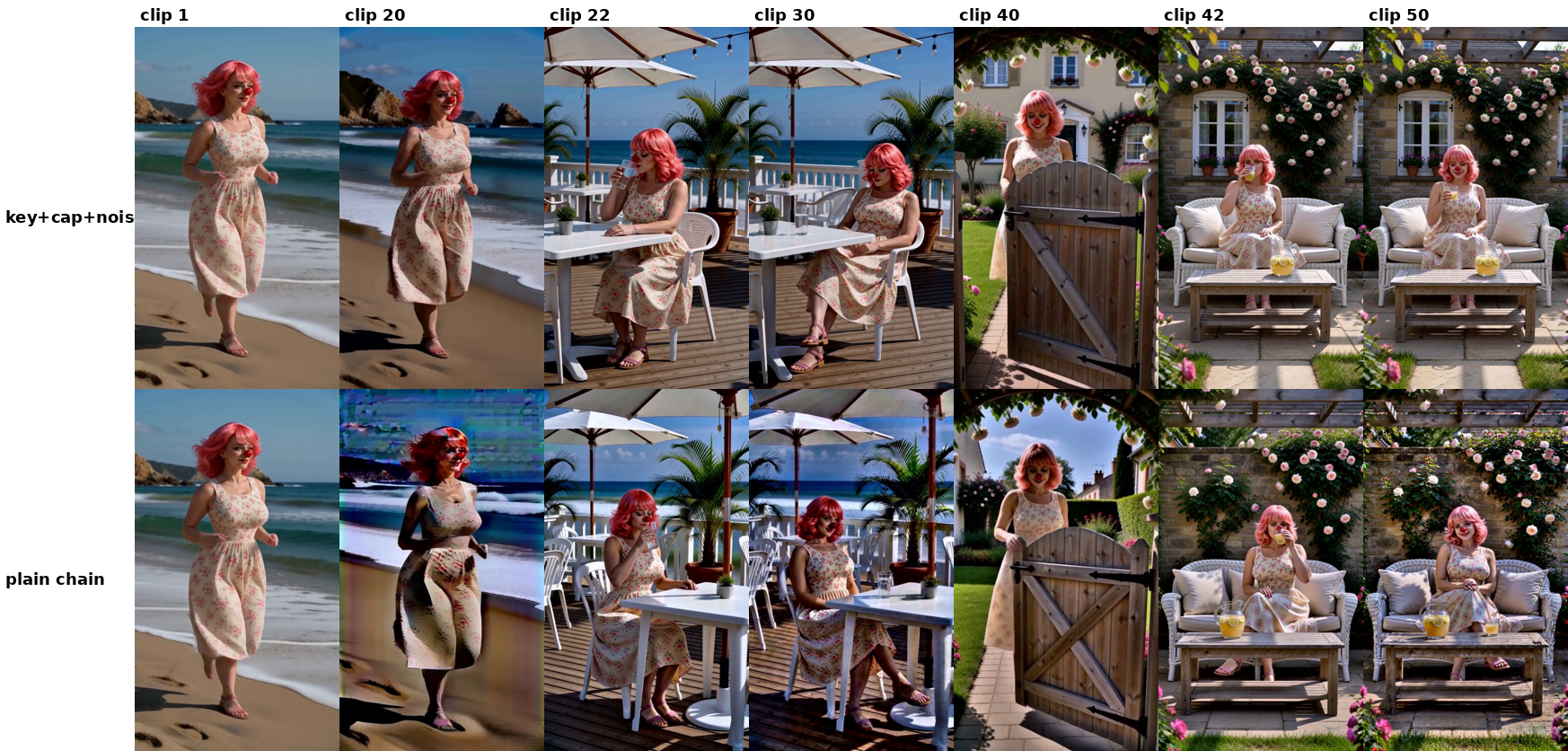
Full numbers and how they were measured: NerdNotes.
Moved to experimental repos
- Geiru Protection LoRA (a LoRA loader that only runs while protection is on, made for Imagineer13's H3 Anti-Burn LoRA): Geiru-Protection-LoRa-Experimental. Testing so far shows no colour gain on top of degradation protection (NerdNotes, test 16).
- Geiru Prophecy, Clown Carryover and the Prophecy and Anchoring example workflows: Geiru-Prophecy-Experimental-. Too inconsistent to be a finished node.
Nodes
Everything shows up under the Geiru Context Suite category.
| Node | What it does |
|---|---|
| Geiru Context | Holds the previous shot's last frames (and audio) at the start of this shot. Has the degradation_protection switch. |
| Geiru Anchoring | Holds a source's frames (and audio) at the end of this shot. Plug any source into next_shot, e.g. an ending from Geiru Prophecy. |
| Geiru Shot Counter | The shot number, plus previous_shot and continuation (true from shot 2 on). Can also follow the H3 Motion Context Chain node's count. |
| Geiru Chain | nikodemon's Motion Context Chain node, renamed: Approve, Run/Re-roll, Chain, Reset and Clear buttons that drive the Load / Save Latent shot numbers. |
| Geiru Keystone | Puts clip 1's first frame (keystone) into every shot and/or tacks its capstone onto the back. With Geiru Context in front of it, puts the real frame back afterwards. |
| Geiru Late Lock | Picks the step Keystone's latents come in, so the shot picks its own pose first. |
| Geiru Context Noise | ethanfel's context noise on the held frames. The real held latents are put back after sampling. |
| Geiru Hybrid Windows | One long render (a minute or more) in overlapping windows instead of a chain of clips, with clip 1's keystone and capstone in every window. |
| Geiru Window Director | Optional, goes after Geiru Hybrid Windows: build the render one window at a time, with Approve, Re-roll, Rewind and Blend all buttons. |
Geiru Shot Counter
| Setting | Meaning |
|---|---|
| use_classic_counter on | The shot_number box is the shot. increment / decrement change it each time you hit run, increment after accept only after an accepted run of Geiru Prophecy (one shot at a time only), fixed never. follow motion context copies the clip_index from Motion Context's Save Latent node each run (see Using it with a Chain node). |
| use_classic_counter off | The shot is worked out when the run starts: highest saved latent in latent_prefix + 1. Each new chain needs its own empty folder. |
| latent_prefix | The Save Latent filename_prefix (count mode). |
The box at the bottom of the node shows the shot the last run used, and in count mode how many latents are saved and which shot is next.
Geiru Chain
A renamed copy of the Chain node from nikodemon's ComfyUI-H3-Motion-Context. It's here because Motion Context and seitanism's MultiRef use the same node names, so you can only have one installed, and MultiRef has no Chain node. With Geiru Chain you can use either pack.
It works exactly like the original. Keep Load Latent, Save Latent and Geiru Chain in the same canvas group. Either pack's Load / Save Latent nodes work. If you have Motion Context installed you can use its own Chain node instead; everything works the same.
| Button | What it does |
|---|---|
| Approve | Moves Load and Save up one and runs the next shot. |
| Run/Re-roll | Runs the current shot again. Use this instead of ComfyUI's Run button. |
| Chain | Approve on a loop. segments = how many shots before it stops (0 = until you press Stop). |
| Reset | Sets Load 0 / Save 1. Doesn't delete anything. |
| Clear latents | Deletes the numbered saved shots in the Load folder. Custom file names are kept. |
Using it with a Chain node
Set the counter's shot_counter to follow motion context. The counter then copies the clip_index from the Motion Context Save Latent node every run, so the shot number lines up with the Chain node's count. The counter only reads that number and never changes it; the Chain node stays in charge. Leave Load and Save Latent's clip_index as widgets (not wired) so the Chain buttons can move them.
Geiru Context and Geiru Anchoring
Both copy real latents into the shot at matching block positions and mask them so the sampler keeps them. Frame counts go 5, 22, 39, 56, 73… (17n + 5); the drop settings go in steps of 17.
head_frames(Context) is the overlap with the previous shot. If you use pre-split audio, set it to the audio overlap (e.g. 39).drop_last/drop_firsttrim the held frames from either end.hold_audioholds the previous shot's audio for the whole overlap (allhead_frames), even wheredrop_last/drop_firstfree the picture: the model makes those frames fit the held sound.audio_drop_lasttrims held audio off the end so the new shot's own sound comes in sooner (0 = hold it all).audio_feather_ticksfades the held audio out at the join instead of a hard cut. Geiru Anchoring works the same way at the end of the shot, withaudio_drop_firsttrimming held audio off the front.shot_number(optional, from the Geiru Shot Counter): on the first shot they don't load their source at all and pass the latent through. Handy when Anchoring'snext_shotcomes from a Load Latent of a clip that isn't made yet. Leave it unplugged and they work as before.
Recommended settings (the Anchoring frames must outnumber the Context frames):
| Node | Frames | Drop |
|---|---|---|
| Geiru Context | head_frames 39 | drop_last 17 |
| Geiru Anchoring | tail_frames 56 | drop_first 17 |
More Anchoring workflows are in Geiru-Prophecy-Experimental-. Two are in this repo's example_workflows (moved over from my old packs and switched to Geiru Context and Geiru Anchoring, same settings):
- everyone_wants_a_piece_of_the_clown.json: a Motion Context chain with Geiru Context (39, drop_first 17) and Geiru Anchoring (39, drop_last 17).
- withers_has_big_nattys.json: the static vlog (odd shots fresh, even shots continue). On even shots, Geiru Context (39, drop_first 17) holds the end of the shot before at the start, and Geiru Anchoring (39, drop_last 17) holds the start of the shot after at the end. Motion Context's Load / Save Latent nodes are still used for the clips.
Clip length
For continuations, use clip lengths that are multiples of 3: 141 (5.9 s), 192 (8 s), 243 (10.1 s), 294 (12.25 s) or 345 (14.4 s). H3's audio runs at 40 steps a second against 24 video frames, so only every third frame lands exactly on an audio step. With other lengths (like 124 or 175) the held audio is cut a third of a step off from where it belongs, and in testing the sound built up and got louder down the chain.
Joining the clips
Each clip is saved whole (all of its frames, overlap included), so trim them when you join them. drop_last doesn't remove the overlap, it only changes what's in it. With Geiru Context at 39, drop_last 17:
- The new shot's frames 0-21 are exact copies of the previous shot's frames 153-174 (the held part).
- The new shot's frames 22-38 are freshly made, but they cover the same moment as the previous shot's frames 175-191 (the dropped part).
So the two clips still share 39 frames of time: 22 identical, and 17 that are two different takes of the same moment. Butted together untrimmed, that moment plays twice. Cut so the join lands inside the identical part, then it's seamless:
- Cut the last 39 frames off every clip except the last one (the default). The previous clip ends on frame 152 and the next one starts on its frame 0, which is an exact copy of frame 153.
- Cut the last 17 frames off each clip and the first 22 off the next. The previous clip ends on frame 174 and the next one carries on from its frame 22. Use this if the start of each clip has something you don't want to keep.
Don't cut the first 39 frames off the next clip instead: that joins two different takes of the same moment and can show a small jump. The last clip is always kept whole. For other settings, the overlap is head_frames and the identical part is head_frames minus the drops.
Seamless Video Combiner (in my workflows repo) does the join for you, sound included (with a short audio crossfade at each seam). example_workflows/sane_clown_combiner.json is set up for Geiru chains: 10 clips, 8 seconds (192 frames) each, overlap 39, cutting the end of each clip (End pair: End Overlap 39, End Join 0). For way 2, turn on Use Beginning pair (Beginning Overlap 39, Beginning Join 22). Copy the clips from output/h3_ref2va/ into ComfyUI's input folder (or pick them in the ten Load Video nodes), set the number of videos and the duration if yours differ, and run.
Geiru Keystone and Geiru Late Lock
- keystone = clip 1's first frame (frame 0).
- capstone = a frame from the end of clip 1 (frame 187 of a 192-frame clip).
Why clip 1: in a chain, each later clip's frame 0 comes from the previous clip's tail. That frame was made in the middle of the previous clip, so it already carries everything that drifted on the way there, and it gets copied forward again and again. Clip 1's frame 0 is the only one from before any drift, and the first frame is what MiniMax leans on most.
source_clip: you can switch to a different source clip at any point. If the scene changes, set source_clip to a newer clip, and that clip's keystone and capstone are used from then on. Shots up to and including the source clip pass through untouched.
- Front: the keystone (or capstone) is locked into the shot's latent 0. With Geiru Context before Keystone, latent 0 is a real frame held from the previous shot, and it's put back after sampling, so the saved latent and the video keep the real frame. Without Geiru Context (for example plain Motion Context), there's no real latent 0 to put back, so each clip's first frame stays clip 1's frame: it still works as a detail anchor, just trim that one frame when you join.
- Back: nothing in the shot is replaced. The latent is tacked on after the shot's last latent for each model call (locked) and cut off again, so it's never in the output.
Putting the frame back and the back placement both need the model, so plug the model through Keystone (model in, model out to the guider) or use Geiru Late Lock.
| Setting | Meaning |
|---|---|
| enabled | On / off. |
| placement | keystone front (default), keystone front + back, capstone front + back, keystone front + capstone back. front = written into the shot's first latent, back = tacked on after the shot's end. |
| source_clip | The clip the keystone and capstone come from (1 by default). With latent_folder set, this is the only number you change. With shot_number plugged in, shots up to and including this clip pass through. |
| latent_folder | The folder your chain saves its latents in (your Save Latent's folder, e.g. h3_ref2va). When set, Keystone loads source_clip from it itself and the source clip input isn't needed. Leave it empty to use the source clip input instead (then set that Load Latent to the same clip as source_clip, since it's what actually picks the latent). Needs H3 Motion Context or Motion Context MultiRef installed. |
| Input | Meaning |
|---|---|
| source clip (keystone / capstone) | A Load Latent fixed on the source clip. Keep it outside the Chain group so the Chain buttons don't change its number. |
| model | Optional. Plug it through here (model out to the guider) if you don't use Late Lock: then the back is tacked on from step 1 and latent 0 is restored. |
| shot_number | From Geiru Shot Counter. On the source clip's shot and earlier nothing is grafted (the source clip doesn't exist yet). |
Geiru Late Lock goes between Keystone and the sampler: latent from Keystone in, latent out to the sampler; model in, model out to the guider. A capstone locked from the start pulls the pose back toward clip 1; Late Lock avoids that. swap_step is when Keystone's latents come in:
- Capstone (back): nothing is there for the first
swap_stepsteps, then it's tacked onto the back for the rest, so nothing pulls on her motion and pose while the shot decides them. - Keystone (front): the slot is held empty (left as noise the model doesn't change) for the first
swap_stepsteps, then locked in.
slots picks which: capstone slot (back) (default), keystone slot (front), or both. It only touches what Keystone set up, so on shot 1 it does nothing. Late Lock also puts the real frame back, so you don't need the model through Keystone as well.
Setting swap_step: the default is 4 (what the example workflows use). It's recommended to set it to the last 25% of your steps (for example 6 on an 8-step run). The best point depends on your scheduler and sampler, since it's really the noise level that decides when Late Lock works best. Raise it if it starts to affect motion; lower it if colour or detail starts to go.
Comparison, clip 10 of the same 10-clip chain: no Keystone (base), keystone front, and keystone front + Late Lock capstone.
https://github.com/user-attachments/assets/3002019d-7d6d-4afc-9592-09a3c201fb78
In a 10-clip test (measured about 20 frames from the end of clip 10), colour drift from clip 1 went from 6.4 with no Keystone, to 3.9 with keystone front, to 2.9 with keystone front + Late Lock capstone. Over-sharpening dropped as well.
Joining: see Joining the clips. With Geiru Context in front and the model plugged through Keystone or Late Lock, join the normal way; otherwise use the 17 + 22 cut.
Geiru Hybrid Windows
Built on kijai's MiniMax H3 context windows (PR #17425) and works the way JalenBrunson's ComfyUI-HybridWindows does (based on the Rolling Diffusion paper). This node is not my idea; all credit to them. I just added the keystone and capstone, to help everyone make longer videos without degradation.
Instead of chaining clips, it renders the whole video in one go, in overlapping windows, so memory stays at one window:
- Window 1 renders the first
switch_stepsteps, and a snapshot is saved. - Window 1 carries on to the last step, only to get its finished first frame (the keystone) and its last single-frame latent (the capstone). That finish is thrown away and window 1 goes back to the snapshot.
- Windows 2, 3 and on render the first
switch_stepsteps one after another. Each one's overlap with the window before is locked to that window's result. The keystone is locked into each window's first slot, and the capstone is tacked onto its back fromcapstone_stepon (and cut off again). - The last steps run as blended context windows over the whole video, which smooths the joins.
With keystone and capstone off, it works like plain hybrid windows.
Experiment: 2 minutes in one render (16 windows)
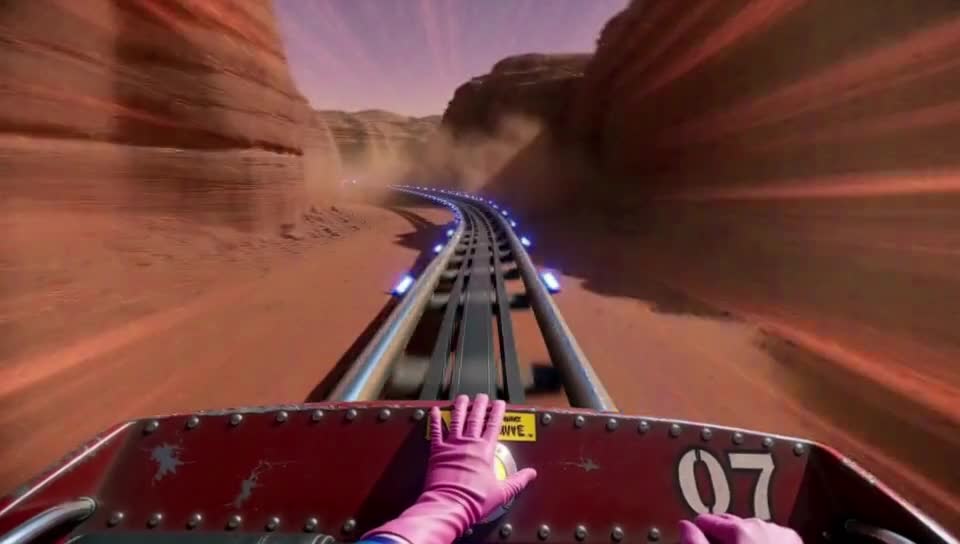
Watch the 2-minute video (MP4)
An experiment using the anti-degradation features inside context windows, plus crash protection: a 2 min 6 s first-person roller coaster ride (3031 frames, 960 × 544) in one render, in 16 windows of 226 frames with a 39-frame overlap, one prompt per window.
- Every window runs all 8 steps on its own (
switch_step8), so there's no blended pass at the end. The anti-degradation features alone keep it from drifting. - Keystone and capstone in every window (
capstone_step6, so the capstone comes in for steps 7 and 8), and context noise (linear, 1) on each locked overlap. - Crash protection saves the progress after every window, so a crash or out-of-memory partway through a run this long doesn't lose the windows that are done.
By eye there's no visible degradation from start to end. It's one render with no cuts and no stitching (the video is compressed for GitHub).
Experiment: a talking clown at full steps (16 windows)
https://github.com/user-attachments/assets/bd21d8b0-5c07-4d87-be8b-6c8ca5eeb197
A 2 min 6 s talking video in one render. Settings used for this video:
- 3031 frames (2:06) at 24 fps, 544 × 960 (portrait)
- 16 windows:
context_length226,context_overlap39,split_conds_to_windowson (one prompt per window) switch_step8 (every window renders all 8 steps on its own, no blended pass),finished_handoffoffkeystone_swapon,back_capstoneon,capstone_step6context_noiseon, strength 1, fade linearfuse_methodpyramid,freenoiseoff,sound_firstoff, crash protection on- er_sde, beta scheduler, 8 steps, BasicGuider, sigma shift 12 (video) / 3 (audio)
- Turbo 8-step LoRA and Motion Booster V2 LoRA at 1
- Audio: roycho's recorded voice, encoded into the latent with a noise mask of 0.5
By eye there's no visible degradation. Measured, the background darkens slowly: about 4% over the seated windows and 12–18% over the standing windows by window 15, with no burn. Full results in NerdNotes, test 15.
Hybrid Windows is not as good as the continuation nodes at preventing degradation, but that is not its purpose. It's meant for scenes with fast motion that need to be seamless. It's recommended to use it as a hybrid window, with at least two blend steps using finished_handoff (for example switch_step 6 of 8 with finished_handoff on), to get more consistency than standard hybrid windows allow. These two experiments were tests of extremes, not something meant to imply the purpose of the node.
Plug the model through it (model in, model out to the guider). It needs a ComfyUI with MiniMax H3 context windows: update ComfyUI if the node is missing.
The main settings are always on the node. The keystone, capstone, context noise, sound_first and finished_handoff settings are advanced: click Show advanced inputs at the bottom of the node to see them (or turn on showing advanced inputs in ComfyUI's settings). A setting that does nothing grays out: keystone_step while keystone_swap is off, capstone_step while back_capstone is off, and the context noise strength and fade while context_noise is off. With the defaults (keystone, capstone and context noise off) it works like plain hybrid windows.
| Setting | Meaning |
|---|---|
| context_length / context_overlap | Window size and overlap in frames (17n + 5). 124 / 39 is about 5 seconds per window. |
| switch_step | Steps each window renders on its own before the blended finish. 6 of 8 = steps 1-6 window by window, 7-8 blended. |
| fuse_method | How the blended steps average the windows (pyramid). |
| freenoise | Reuses window 1's noise for every window: more consistent, but motion can repeat. Off gives more variety. On by default. |
| split_conds_to_windows | Give each window its own prompt (see below). |
| crash_protection | On by default. Saves progress after every window (output/geiru_hybrid_progress/) and clears unused GPU memory between windows. After a crash or out-of-memory, press Run again with the same settings and it picks up from the last saved window. Change the seed if you changed a LoRA, turbo or sampler. To keep the finished latent, use Motion Context's (or MultiRef's) Save Latent (ComfyUI's own can't save H3's video + audio latent). |
| detail_latent | Optional input: use this latent's first frame as the keystone instead of window 1's. |
| Advanced | |
| keystone_swap | Off by default. Window 1's finished first frame is locked into the first slot of every later window. |
| keystone_step | Steps before the keystone is locked in (a late lock, like capstone_step). 0 (default) = locked from the first step. 2 with switch_step 6 = locked for steps 3-6. |
| back_capstone | Off by default. Window 1's finished last single-frame latent is tacked onto the back of every later window. |
| capstone_step | Steps before the capstone comes in. Keep it below switch_step (4 with 6 = on for steps 5-6), or it never comes in. |
| context_noise | Off by default. ethanfel's context noise, only while an overlap is locked in: during each window's own steps (1 to switch_step), its locked overlap gets part of the current noise, most at the start of the overlap and fading to none at the join. The keystone slot stays clean, the blended steps aren't touched, and the overlap the window before made is kept as it was. |
| context_noise_strength | How much noise the first overlap latent gets (1 default = as much as the new latents). |
| context_noise_fade | How the context noise fades to clean at the join: linear (default, an even fade, best in the fade sweep), ease (drops off faster), or ethanfel (his drift_control recipe: full on the overlap, a 4-latent taper to the join, scaled by next/current noise level at every step). |
| sound_first | Off by default. On: renders the sound first on its own (picture at 64x64), then locks it in and renders the picture. |
| finished_handoff | Off by default. On: every window renders all the way to the last step, and the next window's overlap is locked to those finished frames. Every window goes back to its switch_step snapshot before the blended finish. Costs the last steps once more per window. |
Workflows saved with the older layout still load with every value on the right setting.
One prompt per window: make one prompt node per window, join them in order with ComfyUI's Conditioning Combine (chain them for more than two), plug the result into the guider, and turn split_conds_to_windows on. Each window takes the prompt for the part of the video under its middle, so with as many prompts as windows, window 1 gets prompt 1, window 2 prompt 2, and so on. One prompt for a whole minute makes every window try to do the whole thing, so the motion repeats.
Geiru Window Director
An optional node for Geiru Hybrid Windows that lets you build the render one window at a time. A normal Hybrid Windows render makes every window in one go, so if window 4 comes out wrong you have to redo the whole video. With Window Director you check each window as it's made:
- Make window 1 and look at it.
- Approve it (the next window is made), or Re-roll it until it's right.
- Keep going. If you change your mind about an earlier window, click it in the strip and press Rewind to selected to redo it from there.
- When every window is made, Blend all runs the blended last steps over the whole video, which smooths the joins.
Without Window Director plugged in, Geiru Hybrid Windows runs exactly as before.
model → Geiru Hybrid Windows → Geiru Window Director → guider / sampler → VAE decode → video
Each window's render returns only part of the video, so the decode doesn't spend time on the rest. The preview setting picks which part. After Blend all, it's the whole finished video.
| Button | What it does |
|---|---|
| Approve | Keeps the window you're looking at and makes the next one. Its square turns green straight away. |
| Run/Re-roll | Makes the current window again (fresh noise when new_seed_on_reroll is on). ComfyUI's own Run button does the same. |
| Rewind to selected | Goes back to the window you clicked in the strip and makes it again. The windows after it are dropped. |
| Direct | Approves on a loop until every window is made, or until you press Stop. Like Geiru Chain's Chain button. |
| Blend all | Greyed out until every window is made. Runs the blended last steps over the whole video. With bypass_blend on it's Join all: the windows joined as approved, no blend. |
| Reset | Clears this run's saved windows. Doesn't queue anything. |
The strip at the bottom has one square per window: green = approved, yellow = ready to look at, pulsing blue = rendering, dark = not made yet. It fills in on the first run, once Hybrid Windows has worked out how many windows the video needs.
| Setting | |
|---|---|
| run_name | Each name keeps its own windows in output/geiru_window_director/<run_name>/, so you can start a new take without losing the old one, and pick a run back up after restarting ComfyUI. |
| new_seed_on_reroll | Off: a re-roll or rewind uses the same noise, so the window only changes if you change its prompt or the seed. On: fresh noise every time. |
| keep_late_steps | Off by default. On (with finished_handoff on): every window also saves its steps after switch_step, so once every window is made you can raise switch_step on Geiru Hybrid Windows and Blend all starts from that later step (a lighter blend), without making the windows again. Uses more disk space. |
| bypass_blend | Off by default. On: the last button becomes Join all, which joins the windows as you approved them and skips the blended steps. Use it with finished_handoff on. |
| preview | this window: only the new window, with its overlap with the window before so you can see the join. Quickest. all windows so far: windows 1 to the current one, which takes longer to decode as it grows. |
- Keep
finished_handoffon in Geiru Hybrid Windows: each window then builds on the finished window you approved, and the preview shows those finished frames. With it off, each window builds on the softer half-finished guess atswitch_step. - With
split_conds_to_windowson, use one prompt per window. You can change a window's prompt and re-roll it. - Nothing is ever cleared on its own. If you change a setting a take depends on (length, size, steps, window length or overlap, keystone, capstone, finished handoff), the run stops with a message. Set it back, or press Reset. The one change that's allowed: raising
switch_steponce every window is made, withkeep_late_stepson. - With
finished_handoffon, each window is finished on its own, which costs the last few steps once more per window. Crash protection isn't used while Window Director is plugged in: every window is already saved.
Window Director's button layout follows Geiru Chain, whose buttons come from NikoDemon80's ComfyUI-H3-Motion-Context.
Example workflows
I'm a clown and I'm ridiculous. My workflow names are equally so. The names can be a bit confusing, so I made a different folder of exact copies of them with more intuitive names, called Workflows with Boring Names, which you can use if you want to... I guess...
| Workflow | Boring name |
|---|---|
| Mad Clown Inventor | long_chain_keystone_and_late_lock |
| Noisy Clown | long_chain_plus_context_noise |
| Clown Coaster | hybrid_windows_60_second_simple |
| Clowns for Picard | hybrid_windows_60_second_widescreen |
| everyone_wants_a_piece_of_the_clown | motion_context_chain_cntxt_and_anchors |
| withers_has_big_nattys | static_vlog_odd_even_shots_cntxt_and_anchors |
| sane_clown_combiner | join_clips_into_one_video |
| Clown Control Freak | hybrid_windows_window_director_3_windows |
| Clown Biker Babe | hybrid_windows_window_director_8_windows |
Mad Clown Inventor example
example_workflows/mad_clown_inventor_example.json is a Geiru Chain workflow with Geiru Keystone + Geiru Late Lock: Geiru Context (39, drop_last 17, holding the sound too), Keystone on keystone front + capstone back with latent_folder set to the chain's folder, and Late Lock on the capstone at step 4.
- Load your reference pictures and write the prompt in the H3 Prompt IDE node.
- Press Chain (or Run/Re-roll for one shot). Don't use ComfyUI's Run button.
- Keep Load Latent, Save Latent and Geiru Chain inside their group.
- Keystone loads its source clip itself from
latent_folder(h3_ref2va, the folder the chain saves to). When the scene changes, just changesource_clip. If your Save Latent uses a different folder, put that folder inlatent_folder.
Late Lock puts the real frame back, so join the clips the normal way (see Joining the clips).
Noisy Clown example
example_workflows/noisy_clown_example.json is the Mad Clown Inventor workflow with Geiru Context Noise added, so you can try the full degradation protection set: Geiru Context → Geiru Context Noise → Geiru Keystone → Geiru Late Lock → sampler, with the model plugged through Context Noise and Late Lock. Context Noise is at 1, which tested best in the fade and strength sweep. If the scene cuts, first try prompting more deliberately; turning the noise down to 0.8 is optional, but it may make degradation progress faster. Use it the same way as Mad Clown Inventor, and flip degradation_protection off around cuts and scene changes.
Clown Coaster example
example_workflows/clown_coaster_example.json is a 60-second Geiru Hybrid Windows render in one go: a first-person space roller coaster where only the rider's gloved hands are seen. A rocket launch throws her onto the track, then a loop-de-loop, ghost space stingrays, down to Mars, she hits a HYPERDRIVE button, a ride over the Sun, and around a black hole.
- 1433 frames (60 s) in 8 windows of 226 frames, overlap 39.
- 8 prompt nodes, one per window, joined in order with Conditioning Combine, with
split_conds_to_windowson. - Keystone, capstone (
capstone_step4) andfinished_handoffon (in the node's advanced settings; they're off on a fresh node),freenoiseoff. - SAVE LATENT (hybrid windows) (Motion Context's Save Latent, since ComfyUI's own can't save H3's video + audio latent) saves the finished latent to
output/latents/geiru_hybrid/as a new numbered file each run. If the decode runs out of memory, load it with Motion Context's Load Latent and decode it again (tiled) without sampling.
Load your subject picture into Picture 1 and press ComfyUI's Run. The length and size are on PROMPT 1; if you change the length, the prompts won't line up one per window any more.
Clowns for Picard example
Top: normal hybrid windows (keystone, capstone and finished_handoff off). Bottom: Geiru Hybrid Windows (all three on). Same seed, prompts and settings otherwise.
https://github.com/user-attachments/assets/840d5913-4df5-488a-ae09-3f3056f7e9b7
example_workflows/clowns_for_picard.json is the Clown Coaster example as I actually rendered it: widescreen 1328 × 736 (0.98 MP), with more detailed, faster-moving prompts, and sound_first on as well. The 8 prompts are in big WINDOW 1-8 PROMPT text boxes in the green group at the bottom, in ride order, so you don't have to type into the small prompt nodes. Otherwise it's set up and used like Clown Coaster (same length, windows, settings and SAVE LATENT node). It's a big render (a full minute at almost 1 MP); lower the size if you run out of memory.
Clown Control Freak example
example_workflows/clown_control_freak.json is a Geiru Window Director workflow: a 600-frame clip in 3 windows with one prompt per window, written in three H3 Prompt IDE nodes. The clown walks through a park, pets a duck at the pond, then falls back on the grass and the view cuts overhead. Load your subject picture into Picture 1, then use the Director's buttons (start with Run/Re-roll). The READ ME note in the workflow walks through it.
Clown Biker Babe example
example_workflows/clown_biker_babe.json is a bigger Geiru Window Director workflow: a 60-second clip (1440 frames) in 8 windows with one prompt per window, written in eight H3 Prompt IDE nodes. The clown says her line and pulls on her helmet, then races at a ramp, flies off it, pops a wheelie, jumps a row of parked cars, rides a loop, goes off a cliff, and finally stops and pulls her helmet off. The sound is made by H3 from the prompts (no audio is loaded). Load your subject picture into Picture 1, then use the Director's buttons (start with Run/Re-roll). The READ ME note in the workflow walks through it.
Other packs the examples use
- ComfyUI-H3-Motion-Context or ComfyUI-H3-Motion-Context-MultiRef (save / load latent). Install one, not both: they use the same node names.
- ComfyUI-H3-Prompt-IDE
- ComfyUI-KJNodes
- ComfyUI-VideoHelperSuite
- rgthree-comfy
- ComfyUI-Custom-Scripts
- ComfyUI-Easy-Use
- ComfyMath
Install
Clone into ComfyUI/custom_nodes/ and restart ComfyUI:
cd ComfyUI/custom_nodes
git clone https://github.com/roycho87/geiru_context_suite
No extra Python packages needed.