
ComfyUI-FrameIO
High-performance frame IO nodes (WEBP)
Nodes (5)
The FrameIO loader you actually want when frames repeat
Load 600 numbered frames without touching a filename — Batch Load Image Sequence
Make ComfyUI wait before loading frames — the trigger variant
PNG frame dumps are eating your disk — save WebP instead
A boring node that saves you from typing video paths by hand
ComfyUI-FrameIO
High-performance frame input/output nodes for AI video pipelines in ComfyUI.
ComfyUI-FrameIO focuses on efficient frame storage, loading, and reuse for long video generation workflows, solving common problems like massive PNG sizes, duplicate frames, and fragile filename-based loading.
✨ Features
🧩 Frame Saving
- Save batch
IMAGEtensors as WebP - Lossy or Lossless WebP
- Skip identical frames using hash-based deduplication
- Massive disk space reduction vs PNG
- Returns STRING_LIST (ComfyUI list-native)
📥 Frame Loading
- Pattern-based frame loading
- STRING_LIST → IMAGE loader (no filename guessing)
- Frame range selector (
start,end,step) - Auto-detect frame count (set
frame_count=0) - Execution Trigger node for flow control
- List Video Files node to scan input directory
- Safe with duplicate paths (from deduplication)
⚡ Optimized for AI Video
- Multi-threaded IO for high-speed saving & loading
- Direct PyTorch normalization (avoids slow CPU/NumPy conversions)
- Designed for long sequences
- Works with WebP / PNG / JPG
- Preserves exact frame ordering
- Security restricted (saves only to ComfyUI output directory)
📦 Included Nodes
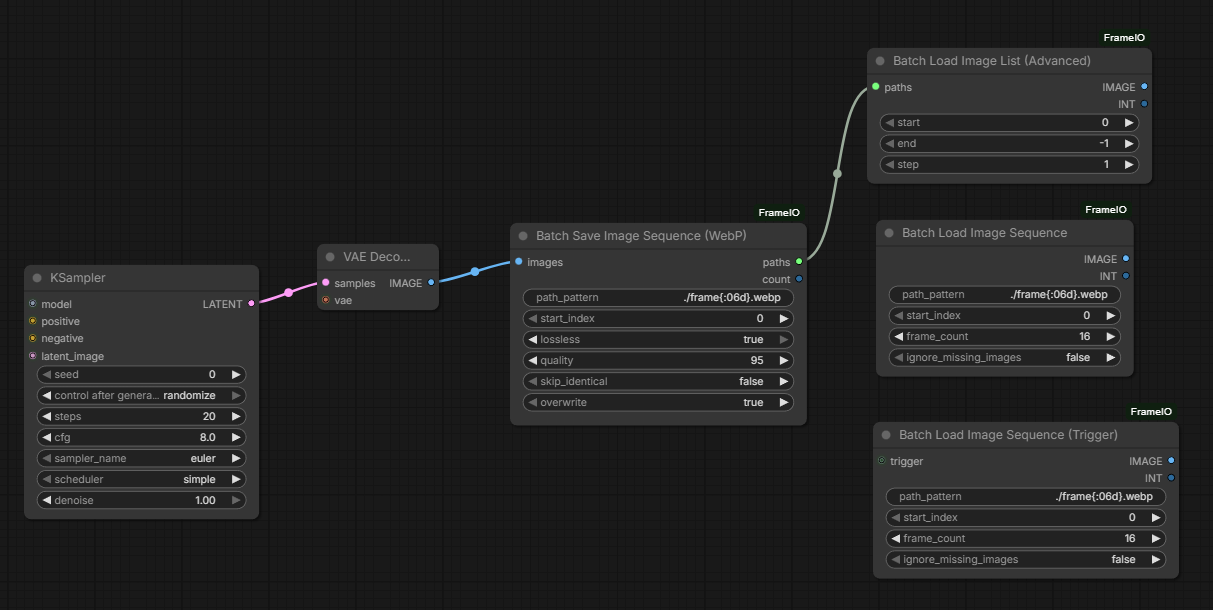
🔹 Batch Save Image Sequence (WebP)
Save an image batch efficiently to disk.
Inputs
images(IMAGE)path_pattern(STRING)start_index(INT)lossless(true / false)quality(INT)skip_identical(true / false)overwrite(true / false)
Outputs
paths(STRING_LIST)count(INT)
🔹 Batch Load Image Sequence
Load images from disk using a filename pattern.
Inputs
path_pattern(STRING) - e.g.,./frame{:06d}.webpstart_index(INT)frame_count(INT) - Set to 0 to auto-detect all available framesignore_missing_images(true / false)
Outputs
images(IMAGE)count(INT)
🔹 Batch Load Image Sequence (Trigger)
Same as the standard sequence loader, but includes an optional trigger input. Useful for forcing ComfyUI to wait for a previous node (like a video render) to finish before loading.
🔹 Batch Load Image List (Advanced)
Load images directly from a STRING_LIST.
Inputs
paths(STRING_LIST)start(INT, optional)end(INT, optional)step(INT, optional)
Outputs
images(IMAGE)count(INT)
This is the recommended loader when using frame deduplication.
🔹 List Video Files (Input Dir)
Scans your ComfyUI input folder for video files.
Inputs
subfolder(STRING) - Subfolder within the input directory.filter(STRING) - Wildcard filter (default*).load_cap(INT) - Maximum number of files to return (default100, 0 for no limit).deep_search(true / false) - Search subdirectories recursively (defaultfalse).
Outputs
paths(STRING_LIST) - List of absolute paths.count(INT) - Number of files found.
🧠 Why ComfyUI-FrameIO?
| Problem | Solution | |------|------| | PNG sequences too large | WebP (5–10× smaller) | | Duplicate frames | Hash-based skip | | Filename guessing | STRING_LIST loader | | Partial re-render | Frame range selector | | Long videos | Optimized IO |
🎬 Recommended Workflows
🔥 Best Practice (Long Videos)
KSampler
↓
Batch Save Image Sequence (WebP)
↓ STRING_LIST
Batch Load Image List (Advanced)
↓ IMAGE
Video Combine / FFmpeg
🎯 Partial Reload
start = 300end = 900step = 2
Perfect for re-encoding or post-processing sections.
⚙️ Recommended Settings
| Use Case | Settings | |-------|---------| | Final video | Quality 95, Skip Identical = true | | Iteration | Quality 90 | | Dataset / archival | Lossless = true | | Static shots | Skip Identical = true |
📥 Installation
cd ComfyUI/custom_nodes
git clone https://github.com/room3dev/ComfyUI-FrameIO.git
Restart ComfyUI.
Nodes will appear under:
FrameIO
📄 License
MIT