
ComfyUI-Model-Manager-Neo
Manage models: browsing, download and delete. Fork of ComfyUI-Model-Manager with improved HF/Civitai auth, huggingface_hub integration, and bug fixes.
<div align="center">[!CAUTION] This project is still under active development, and general use is not recommended at this time. Unexpected bugs may occur, and because features are being added incrementally, some parts may still be half-finished. The interfaces may also continue to evolve. That said, feedback and issue reports are very welcome.
<img src="https://api.iconify.design/lucide/boxes.svg?color=%236366f1" width="41" height="41" align="middle" alt=""> ComfyUI‑Model‑Manager‑Neo
Browse · Download · Upload · Drag‑and‑drop — all your models in one place.
A glassmorphism rebuild of the ComfyUI model manager on Vue 3 + Tailwind CSS v4 + reka‑ui. Every hot path — the ZipNN compression engine included — runs in a prebuilt pure‑Rust core.





























Contents
- Why Neo? · Screenshots · Installation · Features
- Model search & discovery · ZipNN lossless compression · What changed from the original · Removed features
- Documentation · Development · Credits & Attribution · Security · License
<a id="why-neo"></a>
<img src="https://api.iconify.design/lucide/sparkles.svg?color=%23f59e0b" width="34" height="34" align="middle" alt=""> Why Neo?
ComfyUI‑Model‑Manager‑Neo rebuilds the original manager from the ground up:
1. New in Neo
- <img src="https://api.iconify.design/lucide/cpu.svg?color=%23f59e0b" width="19" height="19" align="middle" alt=""> Rust native core — library scanning, hashing, safetensors header
parsing, the tensor tree, the folder watcher, the preview WebP codec and the
entire ZipNN engine run in a prebuilt Rust extension shipped inside the
repository: four platforms × two Stable-ABI flavours (abi3 for GIL builds,
CPython 3.12 and newer; abi3t for free-threaded builds, CPython 3.15+ per
PEP 803), one binary each. The core loads with a plain
import— no compiler, no pip package and no download (the extension's four Python hub dependencies are installed automatically on first launch). Measured against the pure‑Python original: a 5,000‑model library scan about 7.5× faster cold (under 100 ms warm), five hash notations computed in one pass, a 65,000‑tensor MoE tensor tree built about 100× faster, and ZipNN compression that stays under 1 GB of peak RAM regardless of model size (evidence:docs/BENCH.md). - <img src="https://api.iconify.design/lucide/shield-check.svg?color=%2322c55e" width="19" height="19" align="middle" alt=""> Verified, memory‑safe compression — the Rust engine forbids
unsafecode by lint: the format core contains none at all, and the single boundary that needs it (a read‑only memory map) is safety‑reviewed and documented. Seven continuous fuzzing targets harden the codec, and every restore is checked against the SHA‑256 recorded at compression time. Format compatibility with the officialzipnn0.5.4 package is a CI gate on every push, in both directions. - <img src="https://api.iconify.design/lucide/package-plus.svg?color=%23f59e0b" width="19" height="19" align="middle" alt=""> ZipNN lossless compression — compress and decompress safetensors models
in place (
.znn.safetensors), batch whole folders into sealed<name>_DeltaZNNbundles, and shrink fine‑tunes to tiny delta files against their base model. - <img src="https://api.iconify.design/lucide/upload-cloud.svg?color=%23f59e0b" width="19" height="19" align="middle" alt=""> Upload to Hugging Face / ModelScope — publish any local model straight to a Hugging Face or ModelScope repository (created for you if needed, with a private option, related assets and live progress). ModelScope support — download, upload, search and auth — is an entirely new integration in Neo.
- <img src="https://api.iconify.design/lucide/radar.svg?color=%23f59e0b" width="19" height="19" align="middle" alt=""> Multi‑hub search & hash identify — search Hugging Face, ModelScope and Civitai in parallel from a single input, and resolve any local file against the Civitai catalog by hash.
- <img src="https://api.iconify.design/lucide/list-checks.svg?color=%23f59e0b" width="19" height="19" align="middle" alt=""> Multi‑select — tick model and folder cards to add them to the workflow or delete them in one go.
- <img src="https://api.iconify.design/lucide/star.svg?color=%23eab308" width="19" height="19" align="middle" alt=""> Stars — a star toggle on every card; starred entries always sort first.
- <img src="https://api.iconify.design/lucide/folder-plus.svg?color=%2322c55e" width="19" height="19" align="middle" alt=""> Create folders — an “Add Folder” button in the folder view.
- <img src="https://api.iconify.design/lucide/link.svg?color=%23f59e0b" width="19" height="19" align="middle" alt=""> Direct‑link downloads — paste a raw
.safetensors/.ckpt/.ggufURL, pick the target folder, optionally choose a custom sub‑folder. - <img src="https://api.iconify.design/lucide/zap.svg?color=%23f59e0b" width="19" height="19" align="middle" alt="">
hf_xetacceleration — Hugging Face transfers use the chunked, deduplicated Xet protocol when available. - <img src="https://api.iconify.design/lucide/languages.svg?color=%23f59e0b" width="19" height="19" align="middle" alt=""> Japanese & Traditional Chinese locales — complete Japanese and
Traditional Chinese (zh-TW) bundles join English and Simplified
Chinese. The UI follows ComfyUI's own language setting; region
subtags (
ja-JP, …) fold onto their base language, while Hant script tags (zh-Hant,zh-Hant-TW, …) select the Traditional bundle.
2. Refreshed & enhanced
- <img src="https://api.iconify.design/lucide/layers.svg?color=%23f59e0b" width="19" height="19" align="middle" alt=""> Glassmorphism UI — a translucent, blurred, elevation‑aware interface that follows ComfyUI's own light/dark palette automatically.
- <img src="https://api.iconify.design/lucide/puzzle.svg?color=%23f59e0b" width="19" height="19" align="middle" alt=""> Headless Reka‑UI components — the PrimeVue dependency was replaced with lightweight, headless reka-ui primitives, Tailwind CSS v4 and Lucide icons: shadcn‑vue‑style components you can read and tweak.
- <img src="https://api.iconify.design/lucide/workflow.svg?color=%23f59e0b" width="19" height="19" align="middle" alt=""> First‑class node‑graph integration — drag a model onto the canvas to spawn or fill a node, drag embeddings into text areas, load workflows embedded in preview images.
- <img src="https://api.iconify.design/lucide/monitor-smartphone.svg?color=%23f59e0b" width="19" height="19" align="middle" alt=""> Responsive — designed for desktop, mobile and multi‑screen setups.
- <img src="https://api.iconify.design/lucide/wrench.svg?color=%23f59e0b" width="19" height="19" align="middle" alt=""> Modern toolchain — Vite 8 (Rolldown), TypeScript 6, ESLint 10 flat config, Prettier, Stylelint, Ruff, clippy, husky + lint‑staged. Deterministic, lint‑clean builds.
[!NOTE] Neo is a fork of
hayden-cn/ComfyUI-Model-Managerand is distributed under the same GPL‑3.0 license. All credit for the original architecture belongs to its author — see Credits.
<a id="screenshots"></a>
<img src="https://api.iconify.design/lucide/camera.svg?color=%238b5cf6" width="34" height="34" align="middle" alt=""> Screenshots
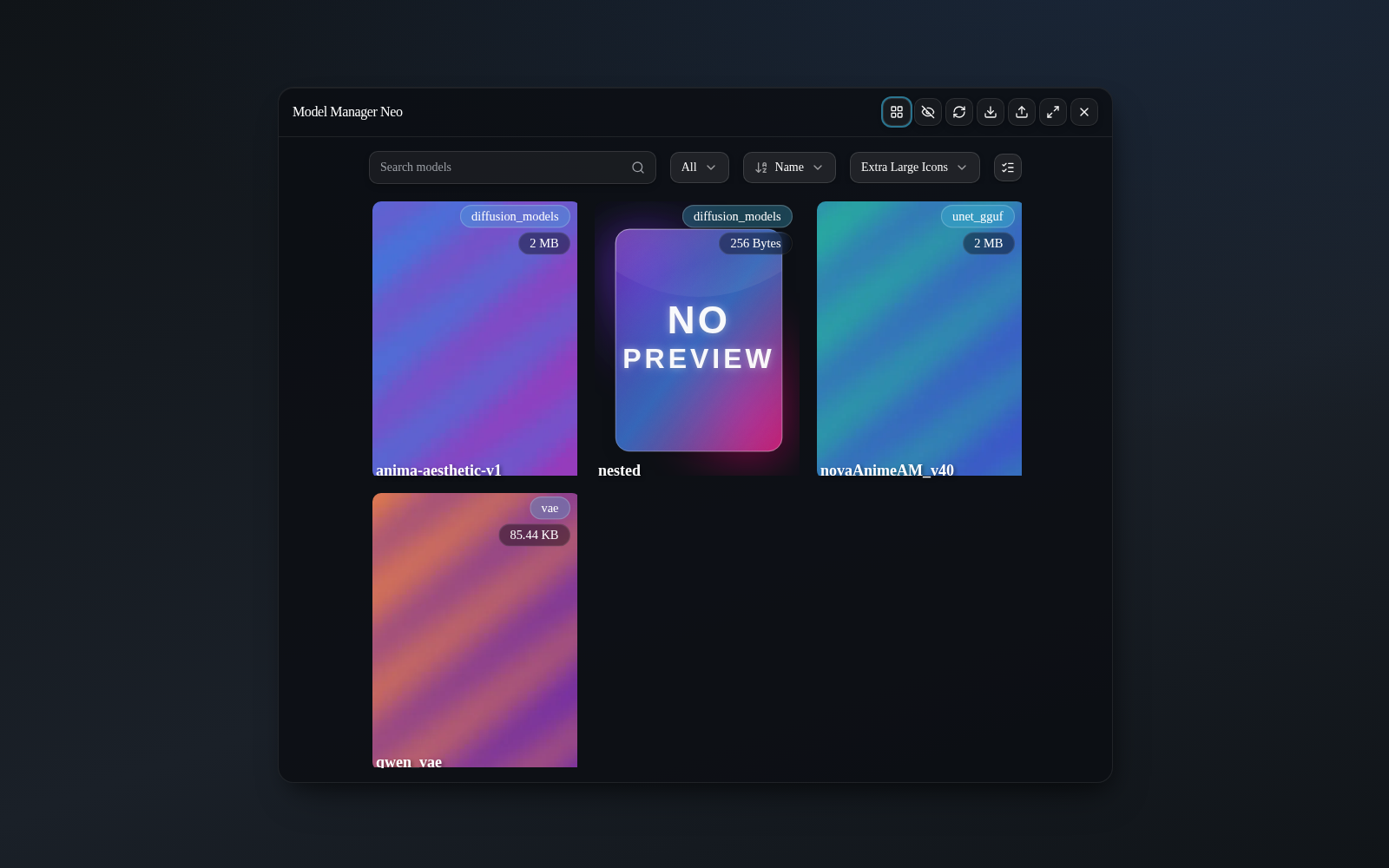
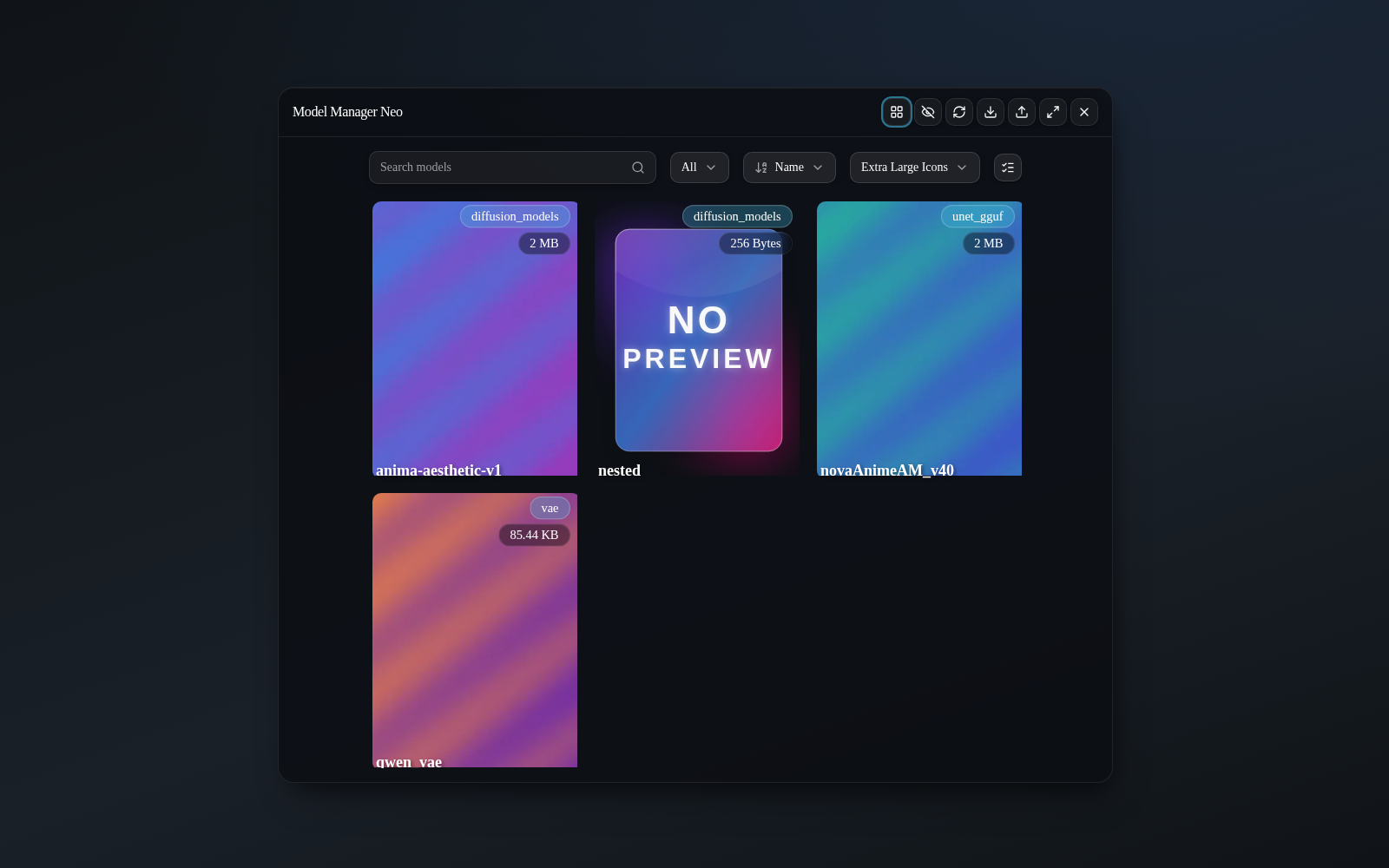
1. Flat “Models” view — search, sort and resize the grid
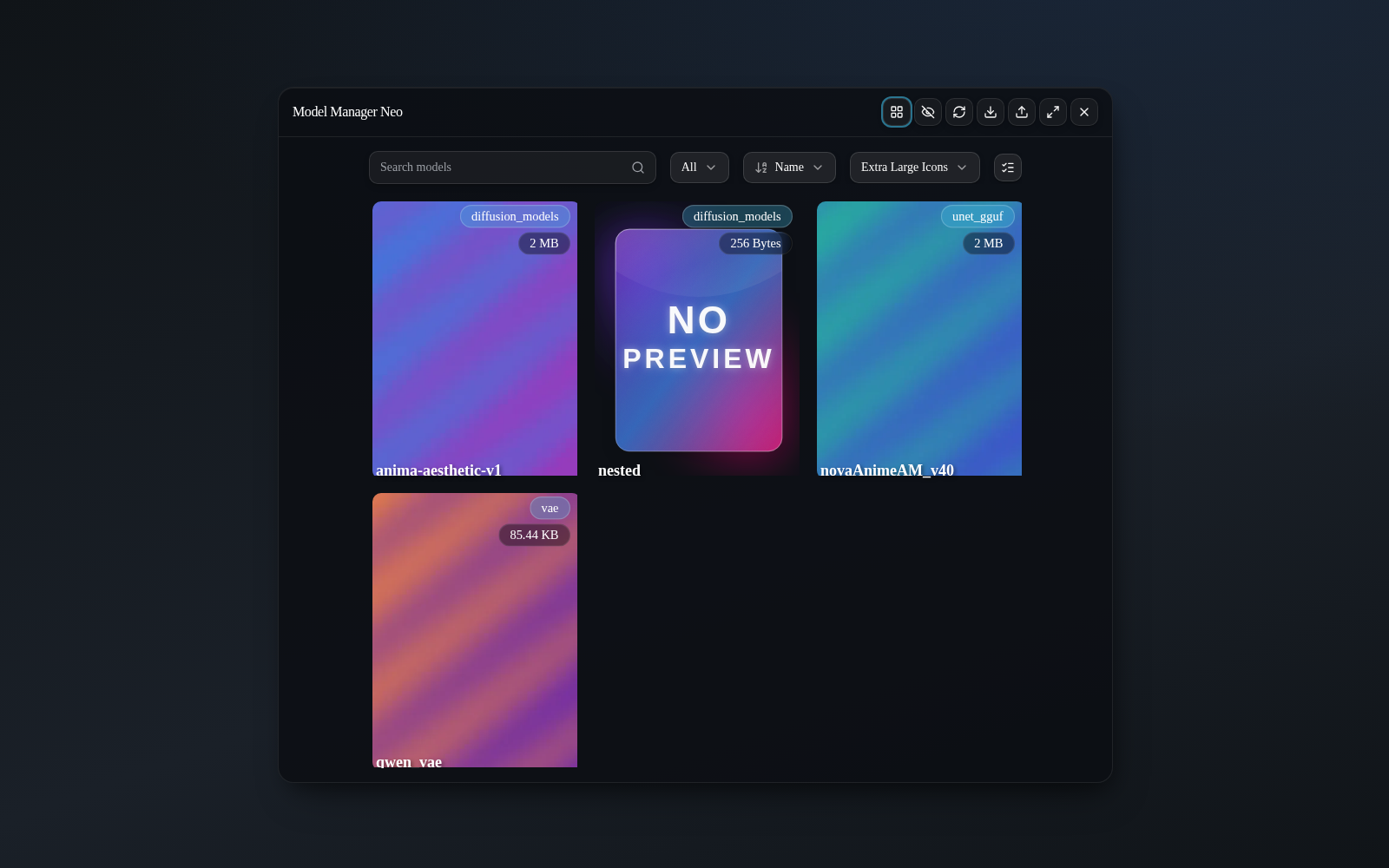
The manager window in Flat layout: a grid of glass model cards with preview, type and size chips, the search bar, and the type / sort / card‑size selectors.
2. Folder (explorer) view — navigate your directory tree
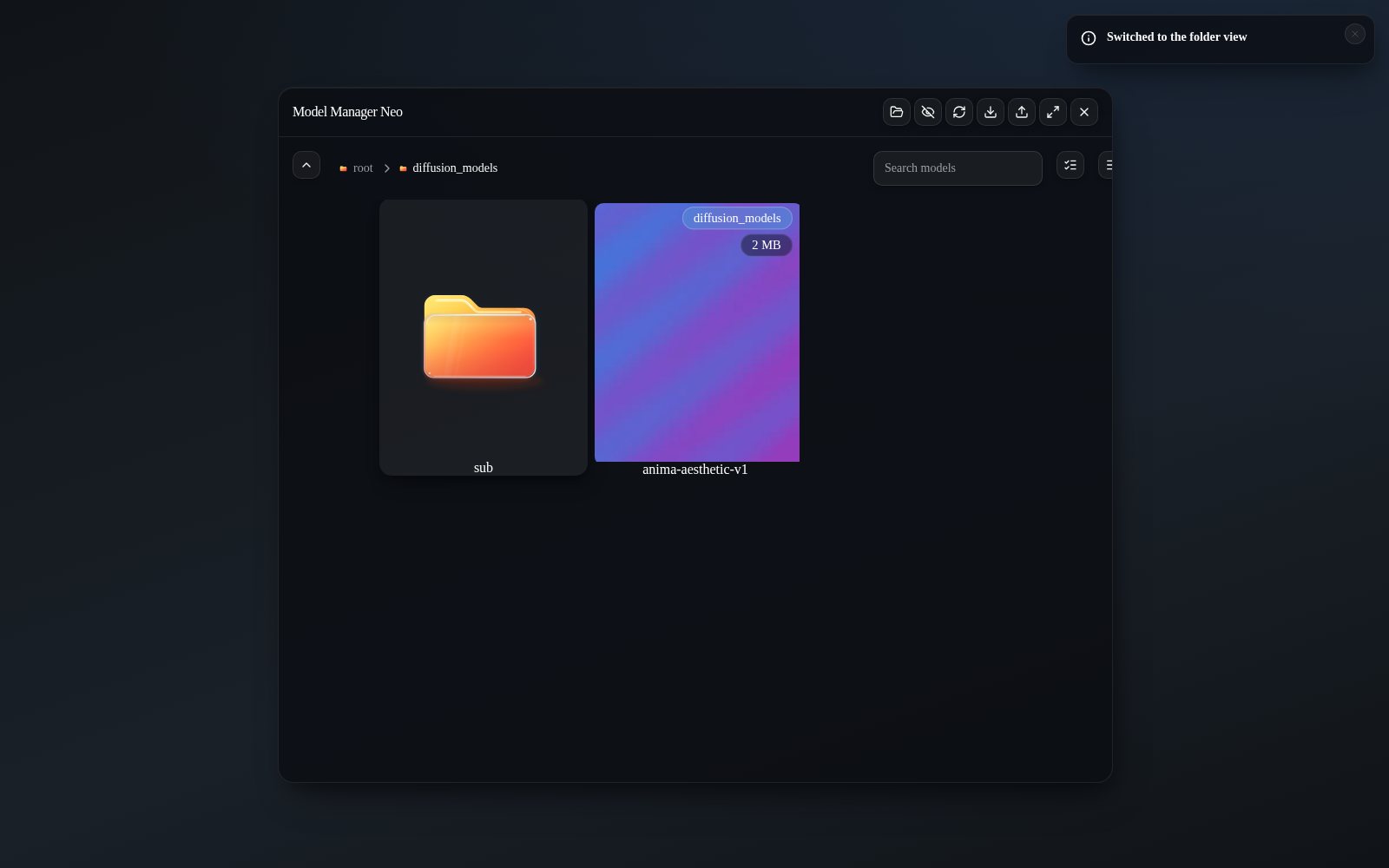
The Folder layout one level deep, with the breadcrumb trail and the pale‑turquoise glass folder cards: hovering a card makes its folder float.
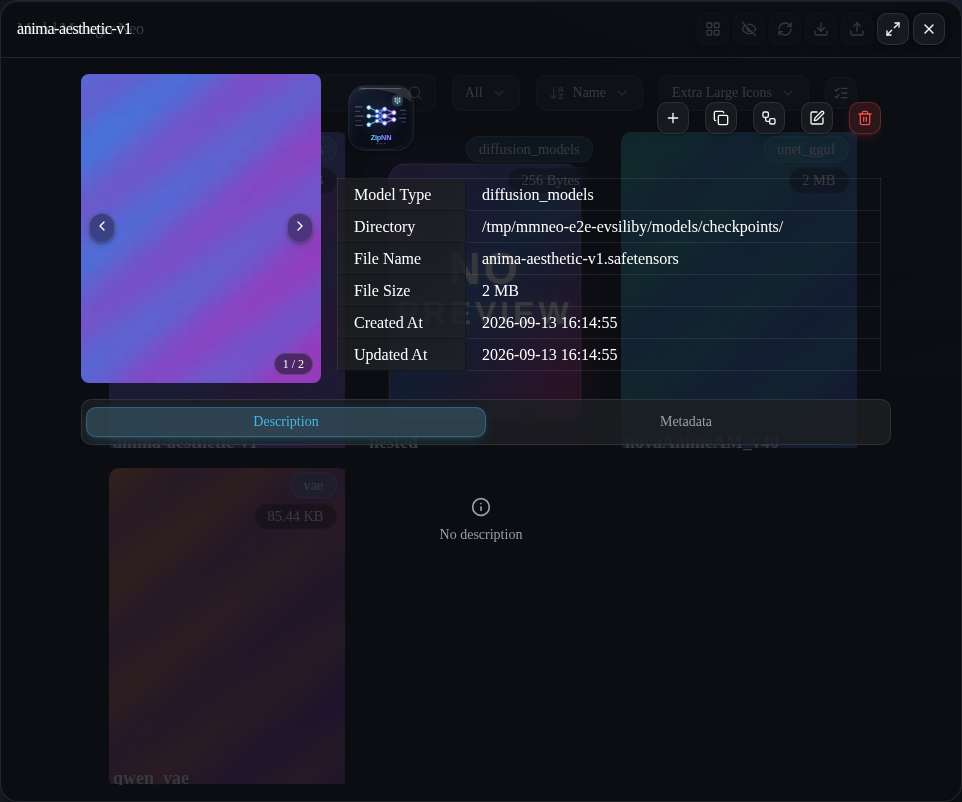
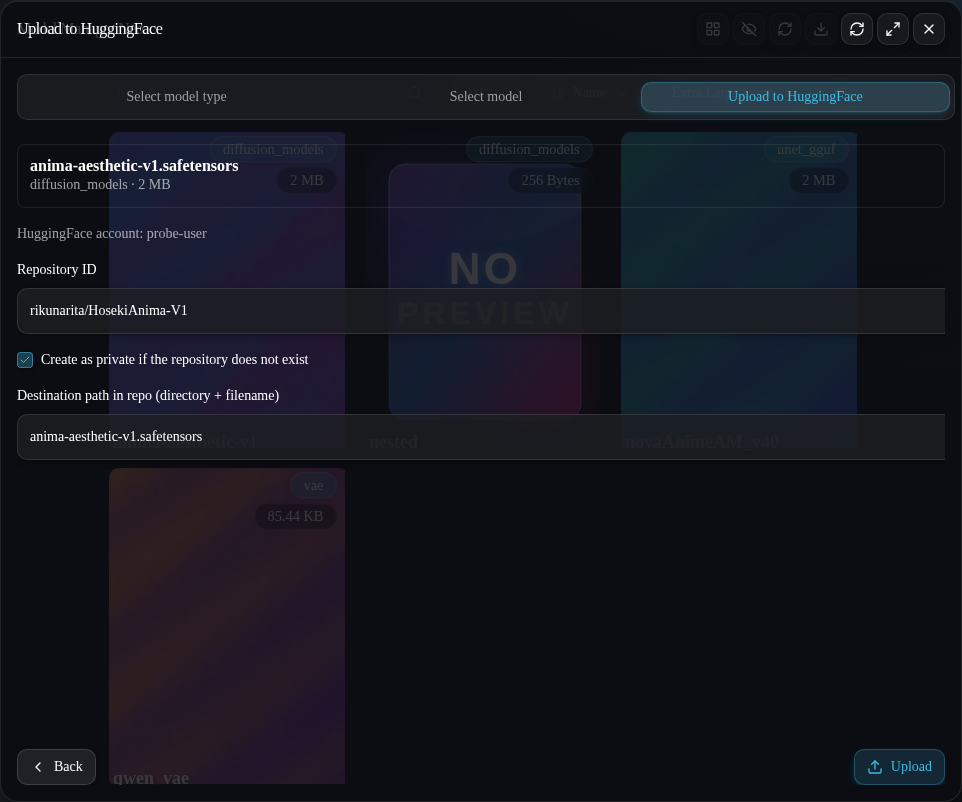
3. Model detail, editing, and the Hugging Face upload
| | |
| ------------------------------------------------------------------------- | ------------------------------------------------------------------------------------------------ |
|  |
| 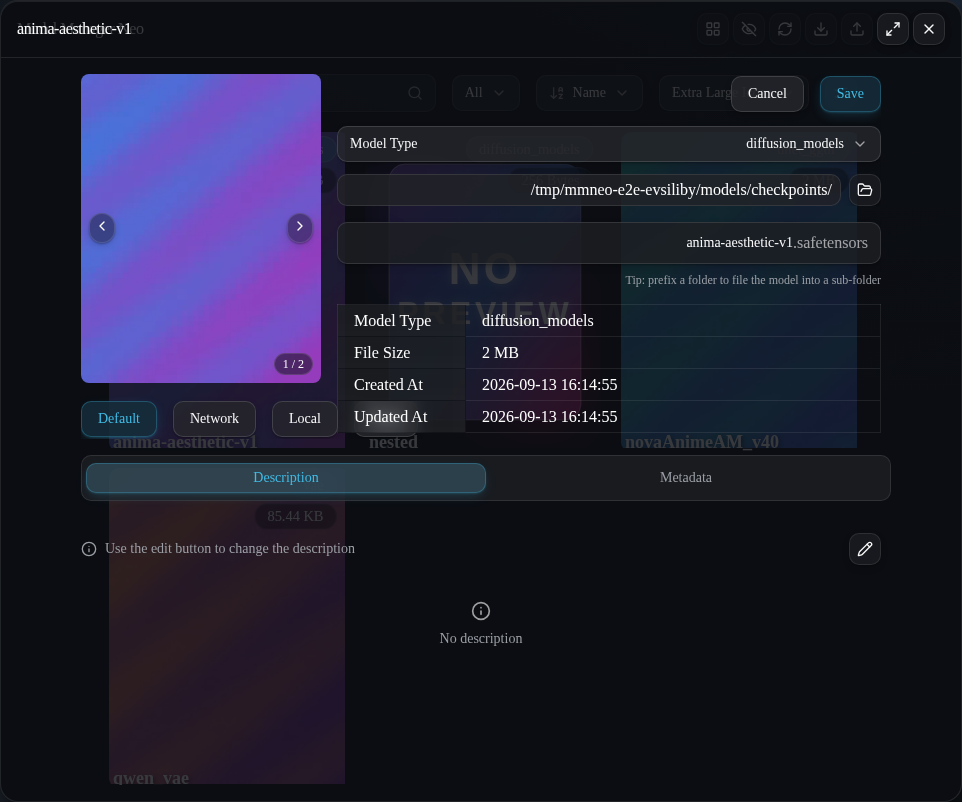 |
| Model info: preview, base‑info table, Description and Information tabs. | Edit mode: type dropdown, folder picker button, file name that accepts a
|
| Model info: preview, base‑info table, Description and Information tabs. | Edit mode: type dropdown, folder picker button, file name that accepts a folder/name prefix. |
| | |
| ------------------------------------------------------------------------------- | ------------------------------------------------------------------------------------------------------------- |
|  |
| 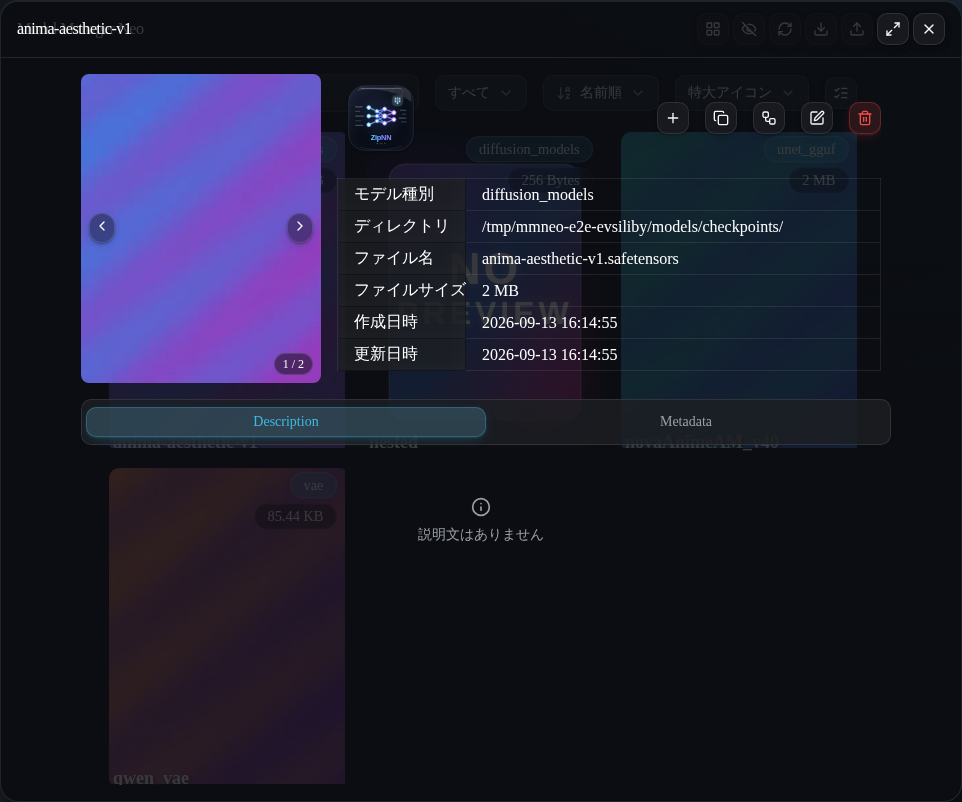 |
| Upload to Hugging Face, step 3: repo id, private‑on‑create, destination path. | The same window in 日本語 — the UI ships with complete English, 中文 (both scripts) and 日本語 bundles. |
|
| Upload to Hugging Face, step 3: repo id, private‑on‑create, destination path. | The same window in 日本語 — the UI ships with complete English, 中文 (both scripts) and 日本語 bundles. |
4. Model-name search and the safetensors tensor tree
| | |
| ------------------------------------------------------------------------------------------------------------------ | -------------------------------------------------------------------------------------------------------------- |
|  |
|  |
| One query, three hubs: Hugging Face / ModelScope / Civitai columns with avatars, download counts and deep links. | The Information tab renders the safetensors header as a collapsible folder tree (Hugging Face‑viewer style). |
|
| One query, three hubs: Hugging Face / ModelScope / Civitai columns with avatars, download counts and deep links. | The Information tab renders the safetensors header as a collapsible folder tree (Hugging Face‑viewer style). |
For a 10‑second tour, see demo-assets/hero.webm.
<a id="installation"></a>
<img src="https://api.iconify.design/lucide/rocket.svg?color=%2322c55e" width="34" height="34" align="middle" alt=""> Installation
Neo runs as a ComfyUI custom node. Pick one method:
1 · Git clone (recommended for updates)
cd ComfyUI/custom_nodes
git clone https://github.com/rikunarita/ComfyUI-Model-Manager-Neo.git
2 · Manual download
Download the
repository archive,
extract it into ComfyUI/custom_nodes/, and make sure the folder is named
ComfyUI-Model-Manager-Neo.
3 · ComfyUI Registry (ComfyUI Manager / CLI)
Neo is published on the ComfyUI registry as
comfyui-model-manager-neo:
search for “ComfyUI‑Model‑Manager‑Neo” in ComfyUI-Manager, or
install it from the command line with the official CLI:
comfy node install comfyui-model-manager-neo
Then restart ComfyUI. The Python dependencies (huggingface_hub, hf_xet,
modelscope_hub, markdownify) are installed automatically on first launch.
The web bundle ships prebuilt in web/ and the Rust core ships prebuilt
in native/native-bin/, so neither Node.js nor a compiler
is required to run the extension — a plain import loads the core (platform
coverage: see the engine table).
Open the manager from the top‑bar “Model Manager Neo” button, the Model Manager Neo entry in the main menu, the legacy menu button, or the command palette.
<a id="features"></a>
<img src="https://api.iconify.design/lucide/list-checks.svg?color=%233b82f6" width="34" height="34" align="middle" alt=""> Features
<details open> <summary><b>Browse & organise</b></summary>- Two layouts: Flat grid (the default view) and Folder explorer, switchable at any time.
- Real‑time search (
*wildcards and multi‑token “AND” matching). - Sort by name, size, date created, date modified or recently used (opening a model or adding it to the graph records the use).
- Adjustable card size (presets plus fully custom dimensions).
- Toggle visibility of hidden (
.‑prefixed) files without restarting. - Image and video previews (any preview opens in a fullscreen lightbox), pale‑turquoise glass folder artwork that floats on hover, and a glass no‑preview fallback.
- Type‑root folder cards show the total size of their type, and models whose recorded SHA256 matches another file in the library raise a red duplicate warning in the detail window.
- Models filed below the type root show their sub‑directory above the name (in both layouts).
- Smart collections — save the flat view's current search and type filter as a named, per‑user collection and re‑apply it in one click. The collections pill button is split: the floppy‑disk segment opens the save dialog, and the rest of the button opens the apply/switch menu.
- Hygiene scan — a local‑only sweep (no network, no hashing) for orphaned previews and notes, models without previews and empty folders, with bulk cleanup behind the usual confirmation.
- Optional folder watching — an off‑by‑default native watcher refreshes the affected list within about a second and a half when another program adds or removes a model.
- Drag a model thumbnail onto the canvas to add a loader node.
- Drag onto an existing node to fill a matching input (when several inputs match, drop right on the one you want).
- Drag an embedding into a text area to append
(embedding:name:1.0). - Drag a preview image onto the graph to load an embedded workflow.
- Add button to place a node on the canvas.
- Paste a Civitai, Hugging Face, ModelScope (
www.modelscope.ai) or direct file URL — or type a model name and search all three hubs in parallel. - Page URLs on Civitai's mirror host
civitai.redare treated exactly like Civitai (the stored model page keeps the pasted host). - Resolve multiple files and versions per page and pick the one you want.
- Direct links require an explicit target type, with an optional custom sub‑folder.
- Optional preview images — the whole gallery a model page offers is kept, and the image selected at download time becomes the card's primary preview; every download also gets an editable Markdown description.
- Free‑space guard: the dialog shows the target volume's free space and the backend refuses tasks whose announced size does not fit in it.
- Pause / resume / delete tasks; progress, speed and size update live.
- Hugging Face downloads use
huggingface_hub(+hf_xetwhen available). - Civitai downloads are SHA256‑verified on completion, routed by file type, and screened for base‑model mismatches and executable payload formats.
- From a local file into any model folder (registered as a live task with progress in the Download List).
- To Hugging Face or ModelScope: pick the platform in the wizard's first
step; authenticate with the matching token; the repository is created if it
does not exist (public or private); choose the destination path and watch
live progress. ModelScope always talks to the international
www.modelscope.aidomain. - The optional related assets switch also uploads every
<model name>.*sidecar (preview images, Markdown notes) next to the model — notes can be committed as the repository'sREADME.md. - Selected folders upload as a batch (every model inside, sub‑folders preserved) from the folder view's selection bar.
- Inspect file info and everything recorded about a model in the read‑only
Information table: the notes' YAML front‑matter parsed into author, base
model, every hash (
AutoV1…SHA256_12), format and precision, the model platform, a model‑page link and all preview URLs (unknown keys verbatim at the end), or the safetensors__metadata__block for models without notes. - Safetensors models additionally show their full tensor layout as a collapsible folder tree — dotted names grouped per segment with counts per level, and name / dtype / shape per tensor, in the style of the Hugging Face viewer. The tree is pre‑grouped by the Rust core, so even a 65,000‑tensor MoE header opens instantly.
- Rename, move between folders or types, or permanently delete a model together with its previews and notes; cancelling an edit with unsaved changes asks for confirmation first.
- Read, edit and save Markdown notes stored beside the model; the Information table itself is editable behind an explicit warning (saving rewrites the notes' front‑matter).
- Manage the preview gallery: reorder, remove, add local images, and choose the primary (the tile with the blue ring in edit mode).
- Open model page shows the logo of the model's source hub (Civitai, Hugging Face or ModelScope); Download to local streams the stored file to the browser as an attachment.
- Identify by hash resolves a local file against the Civitai catalog (recorded hashes first, then a single‑pass hash of the file).
- Everything is loaded on demand when a model is opened — there is no library‑wide scan step.
- API keys for Civitai, Hugging Face and ModelScope, stored locally
in
private.key(withCIVITAI_API_KEY/HF_TOKEN/MODELSCOPE_API_TOKENenvironment fallbacks). Keys migrate out of ComfyUI user settings on first run. - Exclude model types from the model list; include or exclude hidden files.
- Watch model folders for external changes (off by default; network mounts are skipped automatically).
- ZipNN automation: auto‑compress models unused for N days, auto‑compress after a download completes, and pause downloads while a prompt executes.
- UI language follows ComfyUI's locale — English, 中文
(Simplified & Traditional) and 日本語 bundled in full; region
subtags (
ja-JP, …) fold onto their base language and Hant script tags select the Traditional bundle.
<a id="search"></a>
<img src="https://api.iconify.design/lucide/search.svg?color=%2314b8a6" width="34" height="34" align="middle" alt=""> Model search & multi‑platform discovery
The Create Download Task window accepts more than page URLs: anything that
does not start with https:// is treated as a model‑name query and searched
in parallel across three platforms — Hugging Face (left column),
ModelScope (middle) and Civitai (right). The field flips between search
mode and URL mode in real time as you type; results refresh with a short
debounce and each column reports its own errors instead of failing the whole
search.
- Every result row shows the publishing user's or organisation's avatar (an initials badge when the hub publishes none) plus the all‑time download count.
- The model id splits into two deep links: the owner name opens the user or organisation page, the repository name opens the model page; clicking anywhere else on the row resolves that model straight into the download editor.
- Plain
username/repo-nameinput is supported, and pressing Enter always resolves something: an exact match among the results first, then the bare repository id as a Hugging Face repository, then the top row of the first non‑empty column; with no results yet, Enter runs the name search immediately. - Every column pages: scrolling to the bottom reveals a “∨ Show more” button whenever a next page exists.
- Platforms can be hidden and each platform's sort order set per user in Settings → Model Manager Neo → Search (the defaults are Hugging Face trending, ModelScope likes and Civitai highest rated).
Civitai downloads also get the safety checks the official CLI popularised, adapted to the manager's task system:
- Download plan (dry run) — before starting, the editor shows the resolved destination path, the announced size, the published SHA256 and whether the platform API key is configured.
- SHA256 verification — completed Civitai downloads are hashed and compared against the published SHA256; a mismatch deletes the file and fails the task.
- Layout routing — a version file whose own type maps to another model folder (a bundled VAE, …) is filed into that folder instead of the selected one.
- Base‑model warning — shown when the version's base model is not among the base models recorded in the destination folder's library.
- Executable‑format warning — pickle and archive payloads can execute code when loaded; the editor warns you before the download starts.
- Hub accounts (whoami) — for every platform with a configured key the download dialog shows the connected account, and 401 failures explain where to create a key and how to resume.
Enlarging a preview of a Civitai‑origin model opens the lightbox with the image on the left and its parsed generation metadata on the right (prompt, negative prompt, sampler, steps, CFG scale, seed, clip skip, size, base model and the resource recipe).
The model detail window's identify by hash asks the Civitai catalog which
model version a local file is: the hashes already recorded in the Markdown
sidecar are tried first, and only when none of them hits is the file hashed in
a single pass (SHA256 / AutoV2 / AutoV1 / CRC32, plus BLAKE3). A hit
opens the resolved model and version with its base model, trigger words, file
list and the same civitai download command the official CLI prints; a miss
reports that no matching model version was found.
<a id="zipnn"></a>
<img src="https://api.iconify.design/lucide/package-plus.svg?color=%230ea5e9" width="34" height="34" align="middle" alt=""> ZipNN lossless compression
Large .safetensors checkpoints eat disk space fast. Neo compresses and
decompresses them in place, losslessly, in the
ZipNN format — the same tensor‑aware scheme
the official ZipNN project uses. The engine is Neo's pure‑Rust core,
cross‑validated against the official zipnn 0.5.4 package in CI on every
push, so results stay interchangeable with the wider ZipNN ecosystem.
1. How it works
Model weights are mostly floating‑point numbers, and floating‑point numbers are mostly redundant: the exponent bytes of a well‑behaved weight tensor repeat over and over. ZipNN exploits exactly this redundancy. For every tensor it:
- splits the value into its byte planes and re‑orders the sign / exponent / mantissa bits so like bytes land together, then
- Huffman‑codes each plane with the FiniteStateEntropy (FSE) codec.
Tensors that are not floating point (integer indices, masks, …) are passed
through untouched by the official recipe, but Neo's Rust core compresses
them too — every safetensors dtype, in two interoperability bands (see the
dtype coverage matrix below).
Any tensor whose compressed form would not actually be smaller is left
as‑is. Each compressed tensor is stored as a uint8 vector, and the file
records the original dtype and shape of every one of them in a single
znn_compressed_vectors metadata entry. No data is approximated or dropped:
decompression reproduces the original file bit for bit.
The compressed model is written next to the original as
<name>.znn.safetensors — the same suffix the official ZipNN tooling (and
loaders patched with zipnn_safetensors()) expects, so a patched ComfyUI
loader reads a Neo‑compressed model transparently. Realistic checkpoints
typically land around 60–80 % of their original size (random‑looking data
compresses far less; low‑entropy weights compress much more).
<a id="dtype-coverage--the-interoperability-matrix"></a>
2. dtype coverage & the interoperability matrix
The Rust core compresses every dtype safetensors 0.8 defines — 22 of
them — in two interoperability bands. The band of a compressed file is recorded
in its metadata (znn_neo_extended="1" for the extension band) and shown in
the UI: a Neo Extended badge on the Information tab, the dtype breakdown
row (bfloat16×412, uint8×3, …), and an explicit note in the compress
confirmation dialog.
| Tensor dtype | ZipNN dtype code | Official ZipNN 0.5.4 tools |
| ------------------------------------------------------------------------------------------------------------------------------- | ------------------ | -------------------------------------------------------------------------------------------------------- |
| F32 F16 BF16 F8_E4M3 F8_E5M2 | 1–30 (upstream) | decode Neo's files unchanged |
| F64 C64 I8 U8 BOOL I16 U16 I32 U32 I64 U64 F8_E4M3FNUZ F8_E5M2FNUZ F8_E8M0 F4 F6_E2M3 F6_E3M2 | 128–146 (Neo band) | refuse with an explicit error — never silent corruption (demonstrated against the pip release in CI) |
Details worth knowing:
- the official decoder rejects every dtype code it does not implement with
ValueError: Unsupported Dtype N— a Neo‑extended file simply cannot be mis‑decoded by upstream tooling; inside Neo it restores byte‑exactly with SHA‑256 verification like any other file; complex64uses the Neo band (code 130): the official 0.5.4 decoder does not implement the reserved code 9 and rejects it exactly like the Neo codes (proven by a test in CI), so there is nothing to stay compatible with;- integer tensors with zero high bytes (
int32indices< 65536, masks, scale tables, …) additionally use the truncation modes: all‑zero byte planes are dropped from the payload entirely — lossless by construction, since the compressor only drops planes it verified to be zero across the whole tensor; complex128andbcomplex32exist at the codec level (codes 129/131) but have no safetensors representation — no.safetensorsfile can carry them.
3. Using it
Open any .safetensors model and press the ZipNN button between the
preview and the info table. After you confirm:
- the button turns into a live progress bar while the model compresses — ComfyUI stays responsive, and the task can be cancelled at any time;
- on success, the original is replaced by
<name>.znn.safetensors— previews and Markdown notes follow the rename, and the grid refreshes.
Compression is reversible and plays it safe: the original is never deleted until the compressed file has been fully written and verified, and every restore is checked against the SHA‑256 recorded at compression time.
Opening a compressed model flips the same button to decompress (shown
inverted), restoring the plain .safetensors. Its info table then lists
Original File Size, Compressed File Size and % of Original Size
instead of the single File Size row — files compressed by the official ZipNN
CLI, which does not record the original size, keep the plain row.
The button also sits on the top‑right corner of every model and folder card (next to the star), so you can compress or decompress without opening the detail window. Running tasks show a circular progress ring (with a percentage for batches).
4. Batch compression (whole folders)
Select folders (“Select files”) and press the ZipNN button in the bottom
bar — or use the corner button on a folder card — and every
.safetensors model inside the folder tree is compressed (previews and notes
follow their models) and moved into the bundle folder <name>_DeltaZNN;
the original folder disappears once it empties. Models that are already
compressed in place (single-model button, auto-compress settings, or older
versions) join the bundle as they are — moved, not re-compressed — so no
compressed file is left behind outside the bundle. A *_DeltaZNN bundle is
sealed:
- only ZipNN content (
*.znn.*models,*.znndelta files) can be placed inside one (uploads, downloads and moves of plain models into it are refused); - a bundle folder and an ordinary folder can never be selected at the same time — mixing the two warns with a toast and leaves the bundle side unselected;
- the bundle's ZipNN button is inverted; pressing it batch‑decompresses the bundle and moves everything back to the folder it was named after (the emptied bundle folder is removed);
- delta folders (
<base>_DeltaZNN, see below) are bundles too: their inverted button restores every fine‑tune inside them in one go; - model‑type root folders (
checkpoints, …) get their bundle inside themselves (<root>_DeltaZNN) — a sibling of a type root would fall outside ComfyUI's folder mapping and vanish from both the loader and the manager; the direction is auto‑detected: compress while plain models exist, decompress when only bundles remain; - bundles created by older versions (
<name>_ZNN) are still recognised and decompress back to their original name.
Several folders run as a queue: one confirmation, sequential tasks, one progress state at a time.
5. Delta compression (fine‑tunes against a base)
A fine‑tuned model shares most of its bytes with its base, and ZipNN can store
only the difference: select exactly two plain .safetensors models and
press ZipNN delta compress in the bottom bar. A small dialog lets you pick
which selection is the base and which the fine‑tune (base and fine‑tune
may carry different metadata). The result — typically a few percent of the
fine‑tune's size — is written to <base>_DeltaZNN/<ft>_delta_<base>.znn
and the redundant fine‑tune file is removed. Decompressing a delta (its card
button, inverted) restores the fine‑tuned model byte‑exactly beside the
base and removes the emptied delta folder. Restoration needs the base model,
and the delta records the fine‑tune's own SHA‑256 so the restore is verified
end to end.
Delta files are written in the official ZipNN streaming container format:
the official zipnn package restores them byte‑exactly (in its byte‑delta
mode), and Neo in turn restores deltas produced by the official tooling (both
its single‑container and streaming forms) — both directions are part of the CI
cross‑validation. .znn is also registered in ComfyUI's list of supported
model extensions (alongside the original's experimental .gguf), so delta
files appear in the grid as managed models and can be restored straight from
the UI.
<a id="the-engine"></a>
6. The engine: a prebuilt pure‑Rust core
Rather than wrapping the official Python package, Neo runs the format on its
own pure‑Rust engine: the upstream C extension ships no Linux wheels on
PyPI (pip install zipnn compiles from source), so Neo moves that compilation
off your machine entirely. The format is ported to Rust
(native/crates/znn-codec: no unsafe code in the
format core, seven continuous fuzzing targets, and output byte‑identical to
the original C implementation in differential tests) and ships as prebuilt
abi3 / abi3t binaries inside the repository — one per platform and Stable-ABI
flavour, loaded by import alone:
| Platform | Artifact | Requirements |
| ------------------------------ | ----------------------------------------------- | ------------------------------------------------ |
| Linux x86_64 | native-bin/linux-x86_64/mm_core.abi3.so | glibc ≥ 2.28 (Debian 10 / Ubuntu 20.04+) |
| Linux aarch64 | native-bin/linux-aarch64/mm_core.abi3.so | glibc ≥ 2.28 |
| macOS (Intel & Apple Silicon) | native-bin/macos-universal2/mm_core.abi3.so | one fat binary — Intel 10.12+, Apple Silicon 11+ |
| Windows x86_64 | native-bin/windows-x86_64/mm_core.pyd | MSVC‑built |
| Linux x86_64 (free-threaded) | native-bin/linux-x86_64t/mm_core.abi3t.so | glibc ≥ 2.28 · free-threaded CPython 3.15+ |
| Linux aarch64 (free-threaded) | native-bin/linux-aarch64t/mm_core.abi3t.so | glibc ≥ 2.28 · free-threaded CPython 3.15+ |
| macOS (free-threaded) | native-bin/macos-universal2t/mm_core.abi3t.so | one fat binary · free-threaded CPython 3.15+ |
| Windows x86_64 (free-threaded) | native-bin/windows-x86_64t/mm_core.pyd | MSVC-built · free-threaded CPython 3.15+ |
One binary serves CPython 3.12 and newer on each platform (the Stable ABI,
abi3-py312 — proven against 3.12 and 3.14 in CI); free-threaded builds use
the abi3t counterparts (abi3t-py315, PEP 803 — proven against both 3.15
builds in CI), which the loader picks automatically. A free-threaded
interpreter cannot load the plain abi3 binaries, and the GIL build of 3.15+
keeps using those. Every artifact is gated at ≤ 5 MB by the CI size budget,
with the eight-binary total checked against a 40 MB guideline. The
linux-x86_64 and Windows GIL binaries are PGO-optimized: the profile is
regenerated from a deterministic workload in every CI build, and A/B
measurements in CI show up to ~10 % faster first-run throughput against the
non-optimized build (BENCH §13); the abi3t binaries ship
non-PGO for now.
The port also fixed reliability problems at their source: during the rewrite,
a class of memory-safety defects was demonstrated in the C core's delta path
(deterministic crashes at specific input lengths, out-of-bounds writes on
fractional chunks). The Rust engine removes this defect class structurally —
every plane split and chunk arithmetic is bounds-checked, and the single
unsafe boundary (a read-only mmap) is safety-reviewed — and the inputs that
once crashed are pinned as regression tests. Interoperability is enforced in
CI: the integration workflow cross‑validates every push against the
official pip zipnn 0.5.4 in both directions. Licences: the
format port attributes ZipNN (MIT) and FiniteStateEntropy (BSD‑2‑Clause); the
preview WebP codec uses zenwebp (AGPL‑3.0) — full texts in
native/NOTICE.
On a platform without a binary (other architectures, 32‑bit, exotic libc), the extension still installs: browsing, downloading and hashing degrade to their pure‑Python paths, while ZipNN operations and preview re‑encoding report the loader's exact reason instead of failing silently.
[!NOTE] Compression streams through the file with mmap — peak RAM is roughly the largest single tensor, not the model (a 12 GB checkpoint compresses under 1 GB). It is lossless and verified: the core records the source's SHA‑256 at compress time and re‑checks it inline on restore (a mismatch keeps the compressed file and moves the output aside as
.corruptfor inspection); the plain.safetensorsis only removed after the.znn.safetensorsfile has been written and verified through an atomic rename, and a failed run cleans up its partial output. An opt‑in paranoid mode additionally re‑decompresses and compares before the original is deleted.
<a id="what-changed"></a>
<img src="https://api.iconify.design/lucide/git-compare.svg?color=%23a855f7" width="34" height="34" align="middle" alt=""> What changed from the original
This section makes the fork's differences explicit, as the GPL‑3.0 license
requires. The comparison baseline is
hayden-cn/ComfyUI-Model-Manager
v2.8.5. Functionality is preserved and extended; three things were removed:
the PrimeVue dependency itself, the batch‑scan feature and the copy‑node button
— see Removed features.
<img src="https://api.iconify.design/lucide/palette.svg?color=%23d946ef" width="26" height="26" align="middle" alt=""> Interface
| Area | Original | Neo |
| ----------------- | ------------------------------------------------------- | ------------------------------------------------------------------------------------------------------------------------------------------------------------------------------------------------------------------------------------------------------------------------------------------- |
| Component library | PrimeVue 4 | reka‑ui (headless) + shadcn‑vue‑style wrappers |
| Styling | Tailwind CSS v3 + PrimeVue theme | Tailwind CSS v4 with scoped --mm-* design tokens |
| Icons | PrimeIcons | Lucide (@lucide/vue) via an icon map |
| Look & feel | Standard PrimeVue surfaces | Glassmorphism (blur, elevation, micro‑interactions), auto dark mode |
| Dialogs | PrimeVue Dialog/ContextMenu | reka‑ui dialogs, per‑dialog size/position, drag‑to‑move, anchored context menus |
| Model detail tabs | Description + Metadata (raw safetensors __metadata__) | Description + Information: a read‑only table parsing the notes' YAML front‑matter (author, base model, hashes, format & precision, model platform, model‑page link, every preview URL, unknown keys verbatim), raw __metadata__ as the fallback, plus the safetensors tensor tree |
| Locales | English, 中文 | English, 中文 (Simplified + Traditional), 日本語 (complete bundles) |
<img src="https://api.iconify.design/lucide/cpu.svg?color=%230ea5e9" width="26" height="26" align="middle" alt=""> Backend & engine
The deepest changes are below the UI. The original is pure Python (7 backend
modules, 19 HTTP routes); Neo grows to 16 Python modules and 42 routes,
and moves every hot path into a prebuilt Rust extension (native/, PyO3 over
the Stable ABI — see the engine table).
A pure‑Python fallback survives only where a degraded answer beats an error:
| Area | Original | Neo |
| --------------------- | ---------------------------------------------------------------------------------------------------------------------------------- | ------------------------------------------------------------------------------------------------------------------------------------------------------------------------------------------------------------------------------------------------------------------------------------------------------------------------------------------------------------ |
| Model listing | recursive Python os.scandir per request | Rust parallel walk + a persistent front‑matter index that survives restarts (5,000‑model scan ~7.5× faster cold, ~100 ms warm; entry‑for‑entry golden‑tested) |
| Model detail route | header parsing ran on the event loop — a huge MoE header froze the whole server | executor‑backed, Rust‑parsed; the server stays responsive |
| Hashing | one hashlib SHA‑256 loop | five notations (SHA256/AutoV1/AutoV2/CRC32/BLAKE3) in one streaming pass |
| Download verification | full re‑read after completion | inline digest fed by the write loop — zero extra I/O — keeping the Civitai SHA‑256 gate |
| safetensors headers | comfy.utils + json.loads | Rust jiter parse behind one route (metadata + tensors + a pre‑grouped display tree; a 65k‑tensor MoE tree builds ~100× faster, wire‑format cross‑checked against the JS) |
| ZipNN compression | — | the whole engine: compress / decompress / folder batches / fine‑tune deltas, mmap‑streamed (< 1 GB RAM on any model), SHA‑256‑verified restore, cooperative cancellation |
| Preview images | PIL re‑encode; animations frozen to frame 1 | zenwebp (pure Rust) encode/decode; animated GIF/WebP previews stay animated (frames, durations, loop count and ICC profile preserved) |
| Hub integrations | Civitai + Hugging Face only: page resolvers over blocking requests, files fetched through plain HTTP URLs — no ModelScope at all | Civitai + Hugging Face + ModelScope — ModelScope is an entirely new integration (download source, upload target, search hub and auth). SDK‑backed transfers (huggingface_hub + hf_xet, modelscope_hub), three‑hub parallel name search, per‑hub API keys in private.key (env fallbacks + migration from ComfyUI settings), hash reverse‑identify |
| Hub HTTP | blocking requests inside thread‑pool workers | one shared aiohttp session on the event loop (a stalled CDN can no longer pin a worker for the 120 s read timeout) |
| Folder watching | — | optional native notify watcher (default off): per‑type refresh in ~1.5 s, network mounts skipped, watch‑budget exhaustion degrades to the 30 s TTL refresh |
| Library hygiene | — | orphaned sidecar / empty‑folder sweep with bulk cleanup |
| Upload preflight | — | duplicate‑detection hashing for HF/ModelScope uploads runs in the native core (GIL released) |
| Distribution | the prebuilt web bundle is fetched from GitHub Releases on first launch | the web bundle ships prebuilt in web/ and the Rust core in native/native-bin/ — first launch fetches nothing beyond the four Python dependencies |
Feature‑level additions on top of the original — the entire ModelScope
integration (download source, upload target, search hub and auth), upload to
Hugging Face, SDK‑backed Hugging Face downloads (huggingface_hub + hf_xet;
the original fetched plain resolve URLs), multi‑hub search, hash identify, smart
collections, stars, recently‑used tracking and sort, multi‑select, folder
creation, direct‑link downloads, the in‑browser “Download to local”, the
free‑space guard, the Civitai download safety net, gallery previews,
duplicate‑SHA256 warnings, sub‑directory labels and per‑type size totals, the
fullscreen preview lightbox, and the Japanese and Traditional Chinese locales —
are described in Features; every one of them was added in Neo.
<img src="https://api.iconify.design/lucide/package.svg?color=%23f97316" width="26" height="26" align="middle" alt=""> Packages
- Removed:
primevue,@primevue/themes,lodash,dayjs,js-yaml(the last was already unused in the original — its YAML work was done byyaml). - Added / replaced:
reka-ui,@lucide/vue,es-toolkit(← lodash),date-fns(← dayjs),vue-sonner(toasts),class-variance-authority,clsx,tailwind-merge. - Upgraded: Vite 5 → 8 (Rolldown), TypeScript 5 → 6, Vue i18n 9 →
11, markdown‑it 14 → 15,
@vueuse/core11 → 15,yaml2.6 → 2.9. - Python: added
huggingface_hub+hf_xet+modelscope_hub(the original required onlymarkdownify); an asyncio task pool replacing the old thread pool; a shared aiohttp client replacing every direct blockingrequestscall. - Rust: added the
native/workspace (znn-codecformat core +mm-corePyO3 bindings) shipping as prebuilt abi3 / abi3t binaries — the extension installs no compiled Python package at all. ZipNN compression is entirely Neo-side work (the original never shipped it); earlier development builds of this fork vendored the ZipNN C sources with per‑CPython‑version.sofiles, and those were removed once the Rust core replaced them.
<img src="https://api.iconify.design/lucide/sliders-horizontal.svg?color=%2306b6d4" width="26" height="26" align="middle" alt=""> Toolbar / button roles
The manager header was redesigned into explicit, icon‑driven actions: flat ⇄ folder layout toggle, hygiene scan, show/hide hidden files, refresh, download list, and upload to Hugging Face / ModelScope.
<img src="https://api.iconify.design/lucide/folder-open.svg?color=%23f59e0b" width="26" height="26" align="middle" alt=""> Glass asset pack (folder icons & no‑preview art)
The interface draws on a hand‑made glassmorphism asset pack in assets/:
- Folder cards show a static pale‑turquoise glass folder at rest. Hovering a card starts a gentle CSS floating bob; moving the pointer away settles it back at once. The SVGs are plain vector files (no SMIL) served over HTTP with an ETag and a day‑long max‑age, so every card shares a single cached copy.
- Breadcrumb trails prefix every segment with the small folder glyph.
- Models without a preview use the glass
NO-PREVIEWartwork, served as vector (image/svg+xml) so it is never rasterised. - Model‑hub logos (Civitai, Hugging Face, ModelScope) appear on the Open model page button, so a model's origin is recognisable at a glance.
Why pale turquoise of all colours? Because this is Neo.
<img src="https://api.iconify.design/lucide/hammer.svg?color=%2365a30d" width="26" height="26" align="middle" alt=""> Toolchain
The lint and format pipeline is a conventional, fully configured
ESLint 10 flat config + Prettier + Stylelint 17 setup for the
frontend, Ruff + mypy for the Python backend, and clippy
-D warnings + rustfmt for the Rust workspace, complemented by
dependency‑cruiser (import‑graph gate) and Fallow
(dead code and duplication). Quality is enforced by a five‑level test pyramid:
Rust unit tests, golden contract tests, cargo‑fuzz targets (7 surfaces,
weekly 3 h/target budget), the full pytest suite against the built artifact on
three OSes, and the official‑zipnn cross‑validation (see
Development).
<a id="removed-features"></a>
<img src="https://api.iconify.design/lucide/trash-2.svg?color=%23ef4444" width="34" height="34" align="middle" alt=""> Removed features
<a id="removed-feature"></a>
<img src="https://api.iconify.design/lucide/scan-search.svg?color=%23ef4444" width="26" height="26" align="middle" alt=""> Batch scan
The “Batch scan model information” feature has been removed. It was
redundant: the model detail window reads that model's __metadata__ straight
from the safetensors header together with the Markdown notes stored beside the
file, and a model without a preview shows the bundled glass no‑preview artwork
in the grid. A library‑wide walk that hashed every model and
queried Civitai by hash was a second, far slower route to the same information
— plus a modal dialog, a global store, websocket events, a task file on disk
and its own settings, all of which had to be maintained.
The two settings that outlived the scan drive the model list today (which
types are loaded into the grid, and whether .‑prefixed files are shown),
under the settings category Model List. They keep their historical
ModelManager.Scan.* ID strings because that ID is the key ComfyUI persists
each user's value under — renaming it would orphan every existing
installation's saved setting.
[!NOTE] What this gives up: the only way to bulk backfill previews and descriptions from Civitai by file hash. A model whose information was never fetched keeps its placeholder preview until previews or notes are set by hand (the editor's gallery strip) or it is re‑downloaded through Create Download Task. Reading a model's information is unaffected — it always comes from disk, on demand — and individual models can still be identified against the Civitai catalog with the detail window's hash reverse‑lookup.
<a id="removed-feature-copy-node"></a>
<img src="https://api.iconify.design/lucide/clipboard-x.svg?color=%23ef4444" width="26" height="26" align="middle" alt=""> Copy node to clipboard
The "Copy node to clipboard" button — in both the model detail action row and the card hover column — is gone. Copying a half‑configured loader node into ComfyUI's internal clipboard kept colliding with the graph's own copy/paste flow, and what users actually want — a loader node on the canvas — is easier to get by dragging the card, or pressing Add node, straight onto the graph.
<a id="documentation"></a>
<img src="https://api.iconify.design/lucide/book-open.svg?color=%237c3aed" width="34" height="34" align="middle" alt=""> Documentation
Step‑by‑step usage guides, each complete and self‑contained:
docs/USAGE.md— Englishdocs/USAGE.ja.md— 日本語docs/USAGE.zh-CN.md— 中文(简体)docs/USAGE.zh-TW.md— 中文(繁體)
They cover installation, both layouts, card interactions and drag‑to‑graph, the model editor (folder picker, folder‑prefixed names, previews, descriptions), downloads and the task list, the hub upload (Hugging Face / ModelScope) phases and completion messages, ZipNN compression, settings and locales, plus a troubleshooting table.
Further reading:
docs/BENCH.md— the measurement record behind every performance claim in this README.native/README.md— the Rust workspace: layout, test pyramid, fuzzing setup and how the prebuilt binaries are produced.SECURITY.md— how to report a vulnerability privately, what counts as in scope, and the security gates CI runs on every push.
<a id="development"></a>
<img src="https://api.iconify.design/lucide/terminal.svg?color=%230ea5e9" width="34" height="34" align="middle" alt=""> Development
You only need Node.js to build the web bundle; running the extension inside ComfyUI needs nothing but Python (the Rust core ships prebuilt).
corepack enable          # uses the pinned pnpm version (Node 26)
pnpm install
uv sync --frozen         # Python dev/test environment (.venv)
The Python dev/test environment (pytest, ruff, mypy, the hub SDKs, torch‑CPU)
is managed by uv — uv sync --frozen rebuilds it from pyproject.toml's
[dependency-groups] and the committed uv.lock in one shot. That is a
development convenience only: the runtime contract is unchanged — ComfyUI
still installs requirements.txt itself on first launch (a test keeps the two
lists equal).
To work on the Rust core, a stable toolchain is enough — a debug build is a
valid mm_core (the API handshake and the whole pytest suite behave identically
to release):
cd native && cargo build -p mm-core
cp target/debug/libmm_core.so native-bin/linux-x86_64/mm_core.abi3.so   # this platform's tag
scripts/build-native.sh --target <tag> --size-gate reproduces the shipped
release artifacts (cargo‑zigbuild for the glibc ≥ 2.28 floor, maturin + lipo
for macOS universal2, maturin/MSVC for Windows); native/README.md
documents the workspace, the test pyramid and the fuzzing setup.
| Script | Purpose |
| ------------------------------------- | ----------------------------------------------------------------------- |
| pnpm dev | Vite dev server (writes web/manager-dev.js for hot reload in ComfyUI) |
| pnpm build | Production build into web/ |
| pnpm build:clean | Remove web/ then rebuild |
| pnpm rebuild | Remove node_modules/ and web/, reinstall, then rebuild |
| pnpm typecheck | vue-tsc --noEmit type checking |
| pnpm lint / pnpm lint:fix | ESLint (flat config) |
| pnpm lint:css / pnpm lint:css:fix | Stylelint 17 (CSS + Vue SFC style blocks, Tailwind v4 aware) |
| pnpm deps | dependency-cruiser: import-graph gate (needs Node ≥ 22) |
| pnpm deps:graph | write dependency_graph.svg of the module graph |
| pnpm format / pnpm format:check | Prettier (with the Tailwind plugin) |
| pnpm py:lint (:fix) | Ruff lint for the backend (py/, __init__.py, tests/, scripts/) |
| pnpm py:format (:check) | Ruff format for the backend |
| pnpm py:test | pytest suite (skips native-path tests when no mm_core is built) |
| python -m mypy | Backend static types ([tool.mypy] in pyproject) |
| pnpm rs:fmt (:check) / rs:lint | rustfmt / clippy -D warnings for native/ |
| pnpm rs:test | Rust unit + integration tests (mm-core without the extension-module) |
| pnpm rs:build | release build of mm-core |
| pnpm fallow | Fallow full pipeline: dead code + duplication + health |
| pnpm fallow:dead (:type-aware) | unused files/exports/types/deps, cycles — optional TS semantic pass |
| pnpm fallow:dupes | AST clone detection (mild mode, see .fallowrc.json) |
| pnpm fallow:health | complexity hotspots, refactor targets, 0–100 health score |
| pnpm fallow:fix:dry / fallow:fix | preview / apply automatic cleanup (always dry-run first) |
| pnpm fallow:audit | PR-style gate: only findings introduced by the current change |
A husky pre-commit hook runs lint-staged on staged files (ESLint +
Stylelint + Prettier for the frontend, Ruff for the backend) plus a full
pnpm typecheck.
1. Quality gates
Fallow (written in Rust, with no AI in the analyzer) reads the repository as one dependency graph and reports unused files/exports/types/dependencies, circular imports, clone groups and complexity hotspots; the tree is kept at zero unused exports, zero duplication, and CI fails on any ERROR‑level finding.
ESLint 10 flat config wires together typescript-eslint,
eslint-plugin-vue, eslint-plugin-import-x, eslint-plugin-tailwindcss and
eslint-config-prettier; Prettier formats and sorts Tailwind classes;
Stylelint 17 lints src/style.css and every SFC style block;
dependency‑cruiser 18 gates the import graph of src/ (no cycles, no
orphans, no devDependency or Node core imports from shipped code).
Ruff (pyproject.toml [tool.ruff]) lints and formats the backend (target
py312, line length 120, a curated rule set), with mypy checking static
types on top.
CI runs all of the above on every push, plus the frontend measurement gate
(scripts/bench/front/k15.mjs). The native workflow builds the eight
platform artifacts (four abi3 + four abi3t) and enforces the size budget; it
smoke‑fuzzes all seven targets, imports the abi3 artifact under CPython 3.12
and 3.14 and the abi3t artifact under both 3.15 builds (GIL and
free‑threaded), runs the full pytest suite — including a free‑threaded 3.15t
cell — and cross‑validates against the official zipnn on Linux, Windows and
macOS.
Security gates run alongside all of the above in the Security workflow:
CodeQL (default setup, extended query suite — TypeScript/Vue, Python,
Rust and the Actions configuration itself), OSV-Scanner (all four
dependency surfaces; pull requests are gated on newly introduced
vulnerabilities), Gitleaks (full-history secret sweeps beside GitHub's
own push protection) and zizmor (workflow hardening), with every
accepted finding recorded with its reason — see
SECURITY.md.
2. Project structure
├─ __init__.py            # ComfyUI entry: installs deps, registers routes
├─ py/                    # Python backend (aiohttp routes, tasks, hub clients)
│  ├─ manager.py          #   model CRUD + native-accelerated listing/hygiene
│  ├─ download.py         #   download tasks (http + huggingface_hub + modelscope_hub)
│  ├─ upload.py           #   local file upload (path-validated)
│  ├─ upload_hf.py        #   upload to Hugging Face (shared hub pipeline)
│  ├─ upload_modelscope.py#   upload to ModelScope
│  ├─ compress.py         #   ZipNN routes driving the native job API
│  ├─ information.py      #   Civitai/HF/ModelScope page resolution, preview serving
│  ├─ search.py           #   multi-platform model-name search + avatar proxy
│  ├─ identify.py         #   Civitai hash reverse-lookup
│  ├─ native.py           #   prebuilt-core loader (platform tag, API handshake)
│  ├─ http_client.py      #   shared aiohttp session for every hub round trip
│  ├─ watcher.py          #   optional library watcher (native notify, default off)
│  ├─ auth.py · config.py · thread.py · utils.py
├─ native/                # Rust workspace (GPL-3.0; attributions in native/NOTICE)
│  ├─ crates/znn-codec/   #   ZipNN format core + scan/hash/header/webp (+ fuzz/)
│  ├─ crates/mm-core/     #   PyO3 abi3 bindings (the mm_core module)
│  └─ native-bin/         #   prebuilt binaries per platform tag (committed on main)
├─ src/                   # Vue 3 frontend
│  ├─ components/         #   app components + ui/ (reka-ui wrappers)
│  ├─ hooks/              #   store, models, download, zipnn, upload, config, …
│  ├─ utils/ · types/ · locales/
│  ├─ style.css           #   Tailwind v4 entry + design tokens
│  └─ main.ts             #   registers the ComfyUI extension
├─ scripts/               # native build + official-zipnn cross-validation + frontend perf gate
├─ tests/                 # pytest suite: golden contracts, parity, junctions
└─ web/                   # prebuilt bundle served to ComfyUI (committed)
<a id="credits"></a>
<img src="https://api.iconify.design/lucide/heart-handshake.svg?color=%23ec4899" width="34" height="34" align="middle" alt=""> Credits & Attribution
ComfyUI‑Model‑Manager‑Neo exists only because
ComfyUI-Model-Manager
by hayden‑cn existed first. Every structural
idea in this fork — the model‑folder abstraction, the resumable download task
system with its websocket progress protocol, the Civitai and Hugging Face page
parsers, the drag‑a‑card‑onto‑the‑graph integration, the model editor's form
plumbing, even the little affordances like the card‑size presets — is
hayden‑cn's design. Neo changes the UI layer, the dependencies and a great
many bugs, but it did not have to invent the underlying design. Reading the
original remains the fastest way to understand why this codebase is shaped
the way it is; the attribution for the architecture is simple — it is
hayden‑cn's.
The compression engine implements the format of the
ZipNN project (MIT) — Hershcovitch et
al., “ZipNN: Lossless Compression for AI Models”
(arXiv:2411.05239) — with entropy coding
following the zstd huff0/FSE specification (RFC 8878) and FiniteStateEntropy
(BSD‑2‑Clause). Full third‑party attribution for the native core lives in
native/NOTICE.
This fork is a derivative work used and modified in accordance with the
GNU General Public License v3.0. Modifications in Neo (the UI rebuild,
PrimeVue removal, the Rust native core, ZipNN compression, the Hugging Face /
ModelScope hub integrations, multi‑hub search and hash identify, package
modernisation, toolchain,
the reliability and security hardening, the batch‑scan removal and the Japanese
localisation — itemised in
What changed from the original) are provided under the same
GPL‑3.0 license. Per the license, the original copyright notice and the full
license text are preserved in LICENSE.
<img src="https://api.iconify.design/logos/qwen-icon.svg" width="26" height="26" align="middle" alt=""> Built with Qwen Studio
A large part of this fork was built in close collaboration with Qwen Studio: the glassmorphism UI rebuild, the Rust native core, the ZipNN compression engine, the hub upload flows, the reliability and security passes, and much of the debugging.
Built with these excellent projects: reka-ui, Tailwind CSS, Lucide, VueUse, es-toolkit, vue-sonner, huggingface_hub, hf_xet, modelscope_hub, ZipNN, and zenwebp.
<a id="security"></a>
<img src="https://api.iconify.design/lucide/shield-check.svg?color=%2322c55e" width="34" height="34" align="middle" alt=""> Security
Security scans run on every push and pull request: dependency audits against
the OSV database (all four lockfiles), CodeQL static analysis of the
TypeScript/Vue, Python and Rust sources and of the CI configuration itself,
secret scanning over the full git history, and hardening checks for the GitHub
workflows. The Rust core is additionally fuzzed on seven targets every week.
Accepted risks are recorded with written reasons — nothing is dismissed
quietly. Found something? Please report it privately:
SECURITY.md.
<a id="license"></a>
<img src="https://api.iconify.design/lucide/scale.svg?color=%2394a3b8" width="34" height="34" align="middle" alt=""> License
GPL‑3.0‑only — see LICENSE for the full text.
The Rust native core (native/) additionally links zenwebp —
a pure‑Rust WebP codec, AGPL‑3.0‑only OR Imazen‑commercial — for the
preview WebP pipeline. Neo is GPL‑3.0‑only and uses zenwebp under the
AGPL‑3.0 terms; AGPLv3 §13 explicitly permits combining an AGPL work with a
GPLv3 work (the AGPL part stays AGPL). ComfyUI is a local application, not
a network service, so the AGPL network clause is effectively inoperative here,
and the distribution source‑availability obligation is met by this public
repository. Full third‑party attribution for the native core:
native/NOTICE.
If Neo saves you time, consider starring the repo <img src="https://api.iconify.design/lucide/star.svg?color=%23eab308" width="19" height="19" align="middle" alt=""> and thanking the original author.
</div> <!-- Link references -->